LED RENAULT TALISMAN 2016 1.G Owner's Manual
[x] Cancel search | Manufacturer: RENAULT, Model Year: 2016, Model line: TALISMAN, Model: RENAULT TALISMAN 2016 1.GPages: 328, PDF Size: 3.39 MB
Page 137 of 328
2.29
DRIVER CORRECTION DEVICES AND AIDS (2/12)
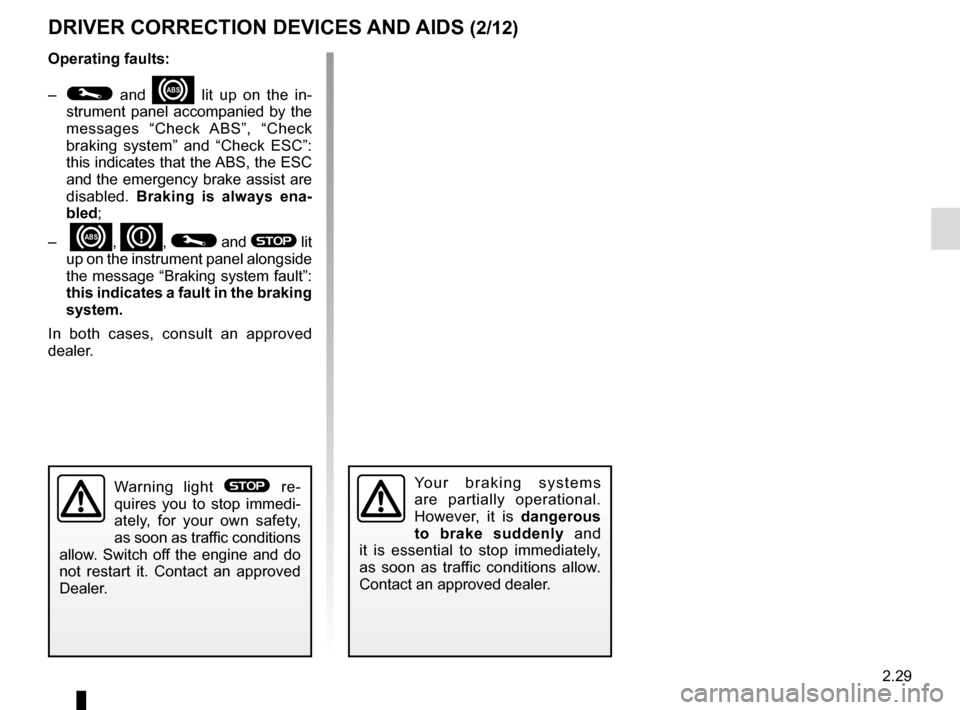
Operating faults:
–
© and x lit up on the in-
strument panel accompanied by the
messages “Check ABS”, “Check
braking system” and “Check ESC”:
this indicates that the ABS, the ESC
and the emergency brake assist are
disabled. Braking is always ena-
bled;
–
x, D, © and ® lit
up on the instrument panel alongside
the message “Braking system fault”:
this indicates a fault in the braking
system.
In both cases, consult an approved
dealer.
Your braking systems
are partially operational.
However, it is dangerous
to brake suddenly and
it is essential to stop immediately,
as soon as traffic conditions allow.
Contact an approved dealer.Warning light ® re-
quires you to stop immedi-
ately, for your own safety,
as soon as traffic conditions
allow. Switch off the engine and do
not restart it. Contact an approved
Dealer.
Page 139 of 328
2.31
DRIVER CORRECTION DEVICES AND AIDS (4/12)
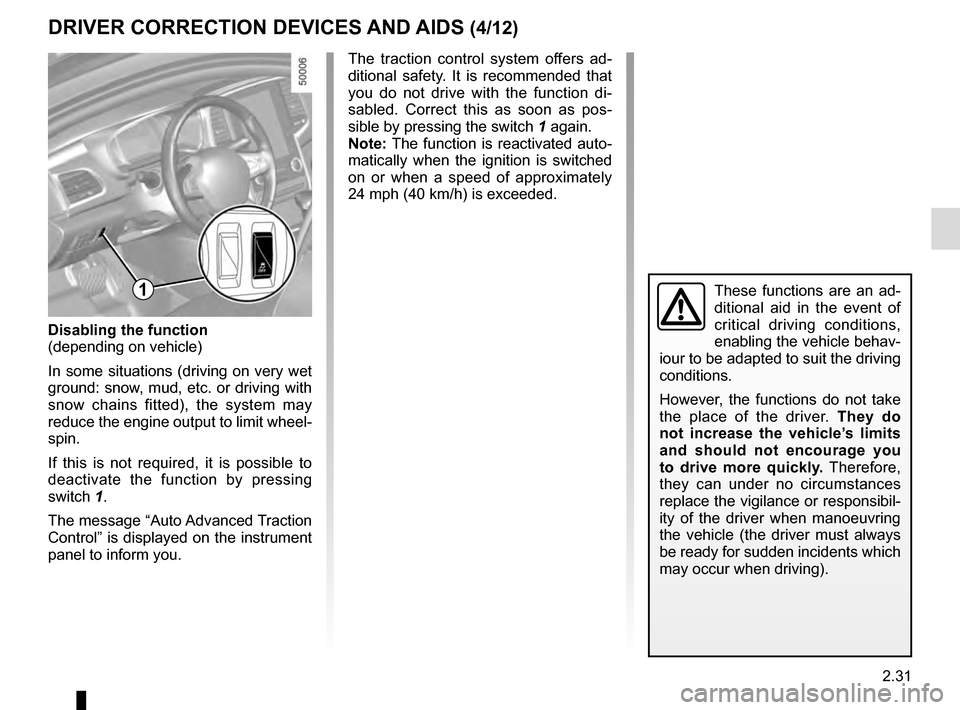
Disabling the function
(depending on vehicle)
In some situations (driving on very wet
ground: snow, mud, etc. or driving with
snow chains fitted), the system may
reduce the engine output to limit wheel-
spin.
If this is not required, it is possible to
deactivate the function by pressing
switch 1.
The message “Auto Advanced Traction
Control” is displayed on the instrument
panel to inform you.
1
The traction control system offers ad-
ditional safety. It is recommended that
you do not drive with the function di-
sabled. Correct this as soon as pos-
sible by pressing the switch 1 again.
Note: The function is reactivated auto-
matically when the ignition is switched
on or when a speed of approximately
24 mph (40 km/h) is exceeded.
These functions are an ad-
ditional aid in the event of
critical driving conditions,
enabling the vehicle behav-
iour to be adapted to suit the driving
conditions.
However, the functions do not take
the place of the driver. They do
not increase the vehicle’s limits
and should not encourage you
to drive more quickly. Therefore,
they can under no circumstances
replace the vigilance or responsibil-
ity of the driver when manoeuvring
the vehicle (the driver must always
be ready for sudden incidents which
may occur when driving).
Page 151 of 328
2.43
BLIND SPOT WARNING (1/4)
1
A
A
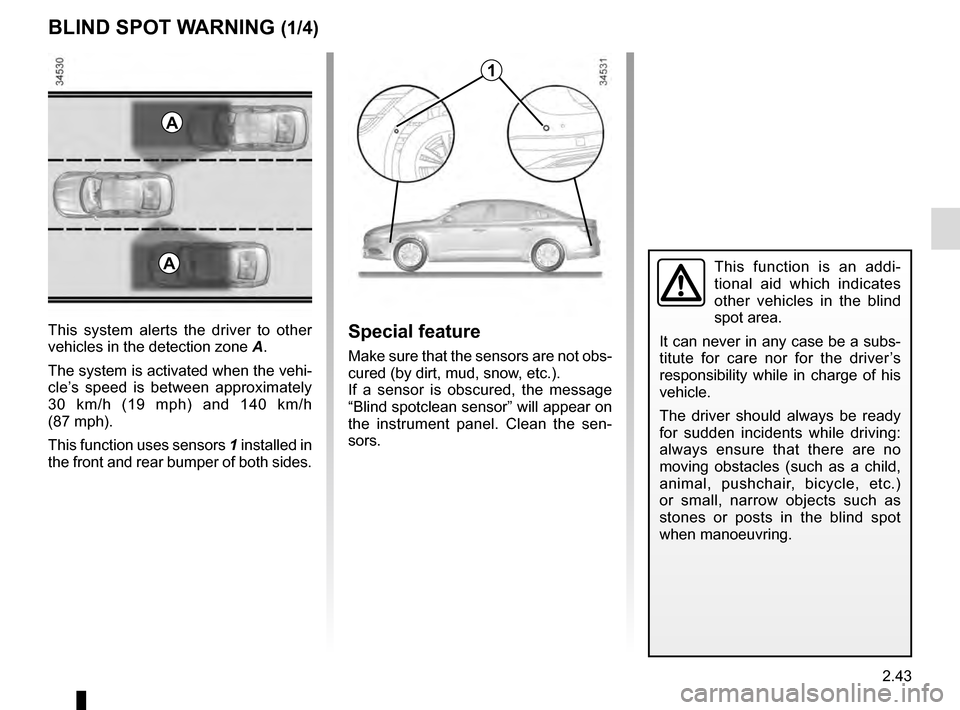
This system alerts the driver to other
vehicles in the detection zone A.
The system is activated when the vehi-
cle’s speed is between approximately
30 km/h (19 mph) and 140 km/h
(87 mph).
This function uses sensors 1 installed in
the front and rear bumper of both sides.Special feature
Make sure that the sensors are not obs-
cured (by dirt, mud, snow, etc.).
If a sensor is obscured, the message
“Blind spotclean sensor” will appear on
the instrument panel. Clean the sen-
sors.
This function is an addi-
tional aid which indicates
other vehicles in the blind
spot area.
It can never in any case be a subs-
titute for care nor for the driver’s
responsibility while in charge of his
vehicle.
The driver should always be ready
for sudden incidents while driving:
always ensure that there are no
moving obstacles (such as a child,
animal, pushchair, bicycle, etc.)
or small, narrow objects such as
stones or posts in the blind spot
when manoeuvring.
Page 154 of 328
2.46
Operating faults
If the system detects a fault, the mes-
sage “Check blind spot alert” is dis-
played on the instrument panel. Call an
approved Dealer.
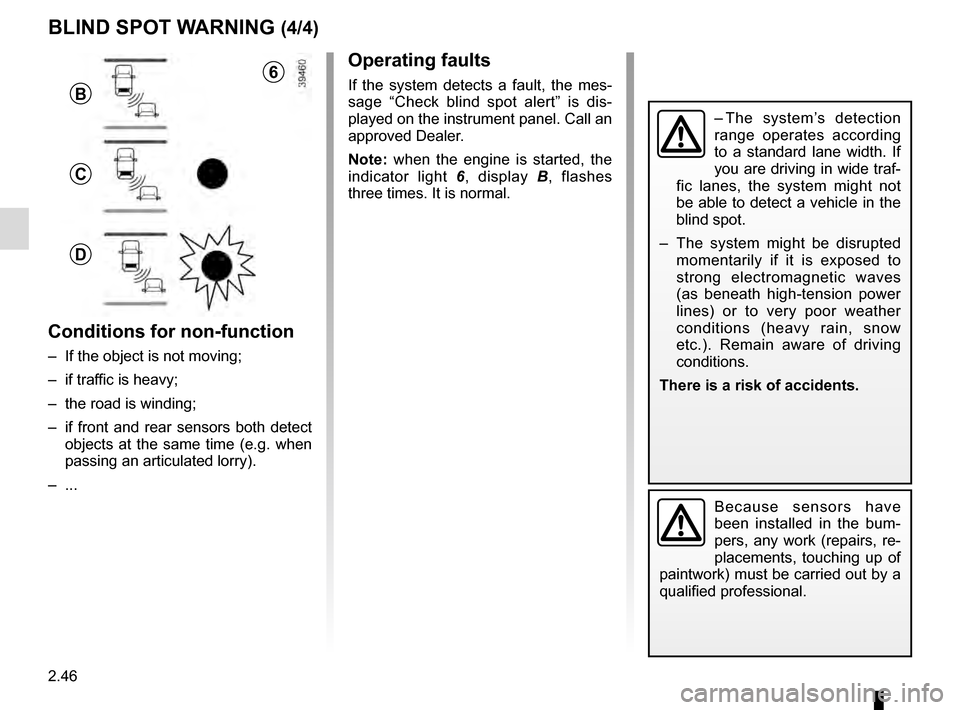
Note: when the engine is started, the
indicator light 6, display B , flashes
three times. It is normal.
– The system’s detection
range operates according
to a standard lane width. If
you are driving in wide traf-
fic lanes, the system might not
be able to detect a vehicle in the
blind spot.
– The system might be disrupted momentarily if it is exposed to
strong electromagnetic waves
(as beneath high-tension power
lines) or to very poor weather
conditions (heavy rain, snow
etc.). Remain aware of driving
conditions.
There is a risk of accidents.
Because sensors have
been installed in the bum-
pers, any work (repairs, re-
placements, touching up of
paintwork) must be carried out by a
qualified professional.
6
B
C
D
Conditions for non-function
– If the object is not moving;
– if traffic is heavy;
– the road is winding;
– if front and rear sensors both detect objects at the same time (e.g. when
passing an articulated lorry).
– ...
BLIND SPOT WARNING (4/4)
Page 159 of 328
2.51
CRUISE CONTROL/SPEED LIMITER: speed limiter function (3/3)
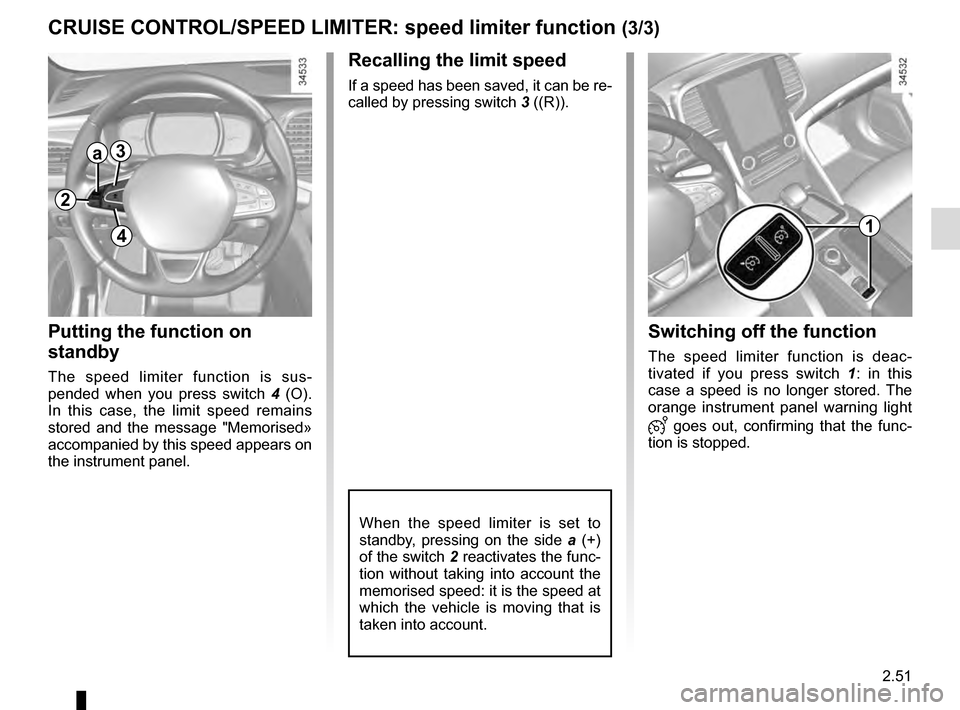
Recalling the limit speed
If a speed has been saved, it can be re-
called by pressing switch 3 ((R)).
Putting the function on
standby
The speed limiter function is sus-
pended when you press switch 4 (O).
In this case, the limit speed remains
stored and the message "Memorised»
accompanied by this speed appears on
the instrument panel.
Switching off the function
The speed limiter function is deac-
tivated if you press switch 1 : in this
case a speed is no longer stored. The
orange instrument panel warning light
goes out, confirming that the func-
tion is stopped.
1
2
a3
4
When the speed limiter is set to
standby, pressing on the side a (+)
of the switch 2 reactivates the func-
tion without taking into account the
memorised speed: it is the speed at
which the vehicle is moving that is
taken into account.
Page 163 of 328
2.55
CRUISE CONTROL/SPEED LIMITER: cruise control function (1/4)
The cruise control function
is in no way linked to the
braking system.
This function is an addi-
tional driving aid. However,
the function does not take
the place of the driver.
Therefore, it can under no circum-
stances replace the driver’s respon-
sibility to respect speed limits and to
be vigilant (the driver must always
be ready to brake). Cruise control
must not be used in heavy traffic, on
undulating or slippery roads (black
ice, aquaplaning, gravel) and during
bad weather (fog, rain, side winds
etc.).
There is a risk of accidents.
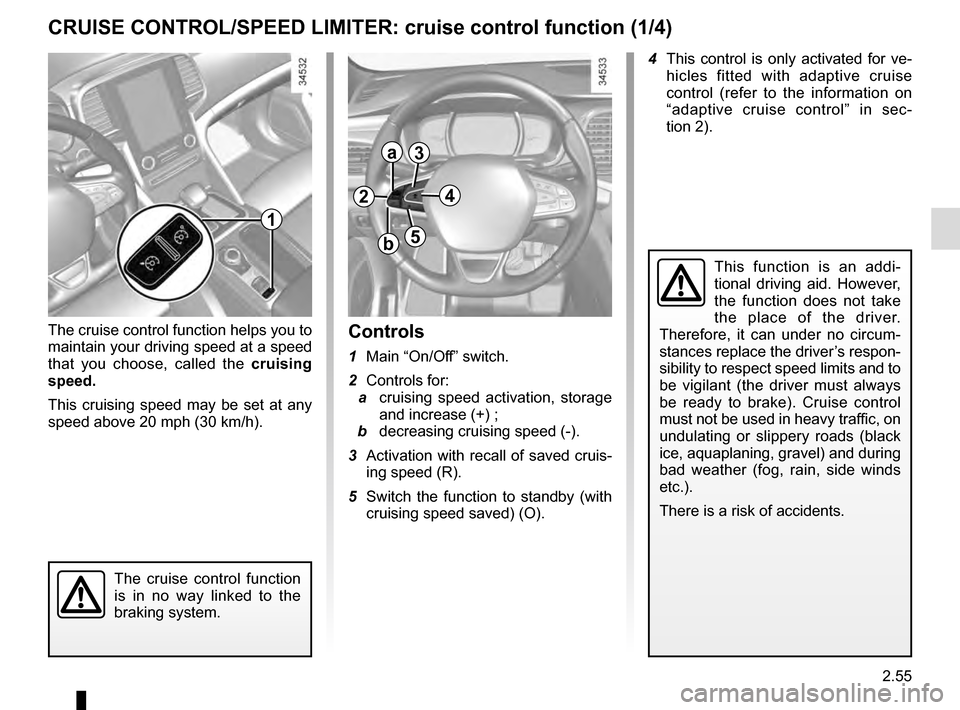
Controls
1 Main “On/Off” switch.
2 Controls for:
a cruising speed activation, storage
and increase (+) ;
b decreasing cruising speed (-).
3 Activation with recall of saved cruis- ing speed (R).
5 Switch the function to standby (with cruising speed saved) (O).
1
2
a
b
3
5
The cruise control function helps you to
maintain your driving speed at a speed
that you choose, called the cruising
speed.
This cruising speed may be set at any
speed above 20 mph (30 km/h). 4 This control is only activated for ve-
hicles fitted with adaptive cruise
control (refer to the information on
“adaptive cruise control” in sec-
tion 2).
4
Page 166 of 328
2.58
CRUISE CONTROL/SPEED LIMITER: cruise control function (4/4)
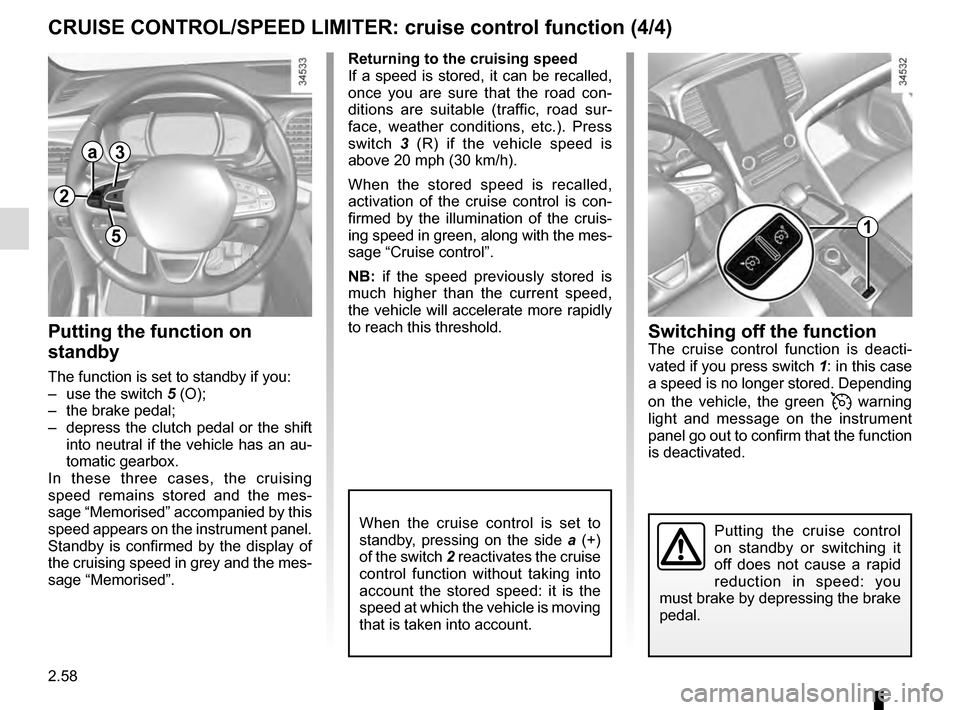
Putting the function on
standby
The function is set to standby if you:
– use the switch 5 (O);
– the brake pedal;
– depress the clutch pedal or the shift into neutral if the vehicle has an au-
tomatic gearbox.
In these three cases, the cruising
speed remains stored and the mes-
sage “Memorised” accompanied by this
speed appears on the instrument panel.
Standby is confirmed by the display of
the cruising speed in grey and the mes-
sage “Memorised”.
Putting the cruise control
on standby or switching it
off does not cause a rapid
reduction in speed: you
must brake by depressing the brake
pedal.
1
2
a3
5
Returning to the cruising speed
If a speed is stored, it can be recalled,
once you are sure that the road con-
ditions are suitable (traffic, road sur-
face, weather conditions, etc.). Press
switch 3 (R) if the vehicle speed is
above 20 mph (30 km/h).
When the stored speed is recalled,
activation of the cruise control is con-
firmed by the illumination of the cruis-
ing speed in green, along with the mes-
sage “Cruise control”.
NB: if the speed previously stored is
much higher than the current speed,
the vehicle will accelerate more rapidly
to reach this threshold.
When the cruise control is set to
standby, pressing on the side a (+)
of the switch 2 reactivates the cruise
control function without taking into
account the stored speed: it is the
speed at which the vehicle is moving
that is taken into account.
Switching off the functionThe cruise control function is deacti-
vated if you press switch 1: in this case
a speed is no longer stored. Depending
on the vehicle, the green
warning
light and message on the instrument
panel go out to confirm that the function
is deactivated.
Page 170 of 328
2.62
ADAPTIVE CRUISE CONTROL (4/7)
Exceeding the cruising speed
The cruising speed may be exceeded
at any time by depressing the accelera-
tor pedal.
When exceeding this speed, the cruis-
ing speed and the following bars show
red and the cruising speed flashes on
the instrument panel: the distance con-
trol function is no longer activated.
Then, release the accelerator: cruise
and distance control will automatically
reactivate unless the function has been
set to standby.
2
a3
4
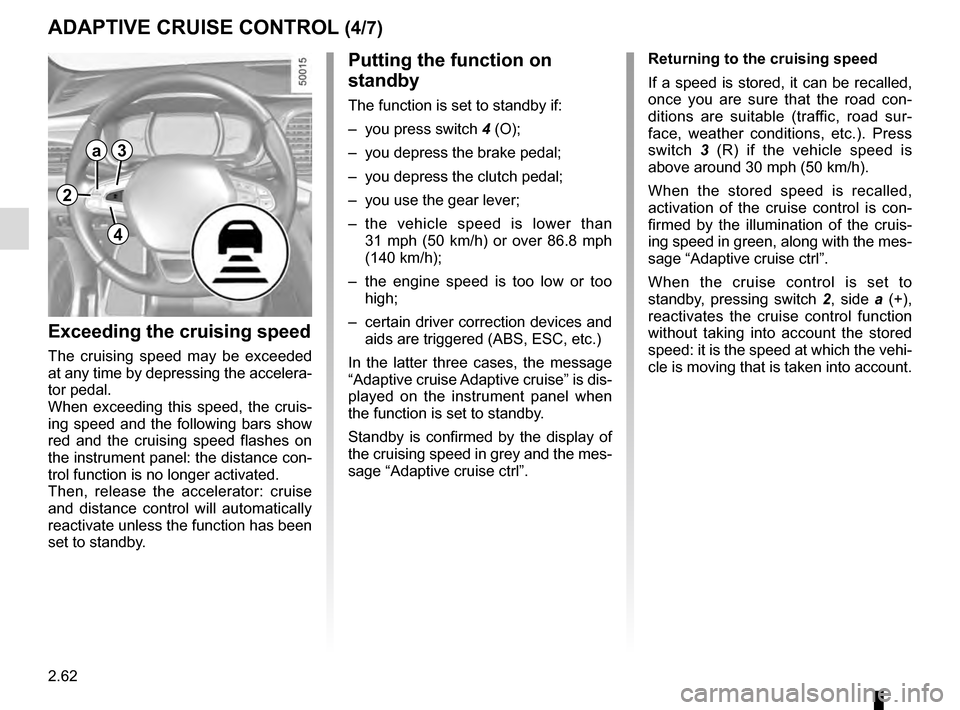
Putting the function on
standby
The function is set to standby if:
– you press switch 4 (O);
– you depress the brake pedal;
– you depress the clutch pedal;
– you use the gear lever;
– the vehicle speed is lower than 31 mph (50 km/h) or over 86.8 mph
(140 km/h);
– the engine speed is too low or too high;
– certain driver correction devices and aids are triggered (ABS, ESC, etc.)
In the latter three cases, the message
“Adaptive cruise Adaptive cruise” is dis-
played on the instrument panel when
the function is set to standby.
Standby is confirmed by the display of
the cruising speed in grey and the mes-
sage “Adaptive cruise ctrl”. Returning to the cruising speed
If a speed is stored, it can be recalled,
once you are sure that the road con-
ditions are suitable (traffic, road sur-
face, weather conditions, etc.). Press
switch
3 (R) if the vehicle speed is
above around 30 mph (50 km/h).
When the stored speed is recalled,
activation of the cruise control is con-
firmed by the illumination of the cruis-
ing speed in green, along with the mes-
sage “Adaptive cruise ctrl”.
When the cruise control is set to
standby, pressing switch 2, side a (+),
reactivates the cruise control function
without taking into account the stored
speed: it is the speed at which the vehi-
cle is moving that is taken into account.
Page 176 of 328
2.68
An impact to the under-
side of the vehicle while
manoeuvring (e.g.: strik-
ing a post, raised kerb or
other street furniture) may result in
damage to the vehicle (e.g.: defor-
mation of an axle).
To avoid any risk of accident, have
your vehicle checked by an ap-
proved Dealer.
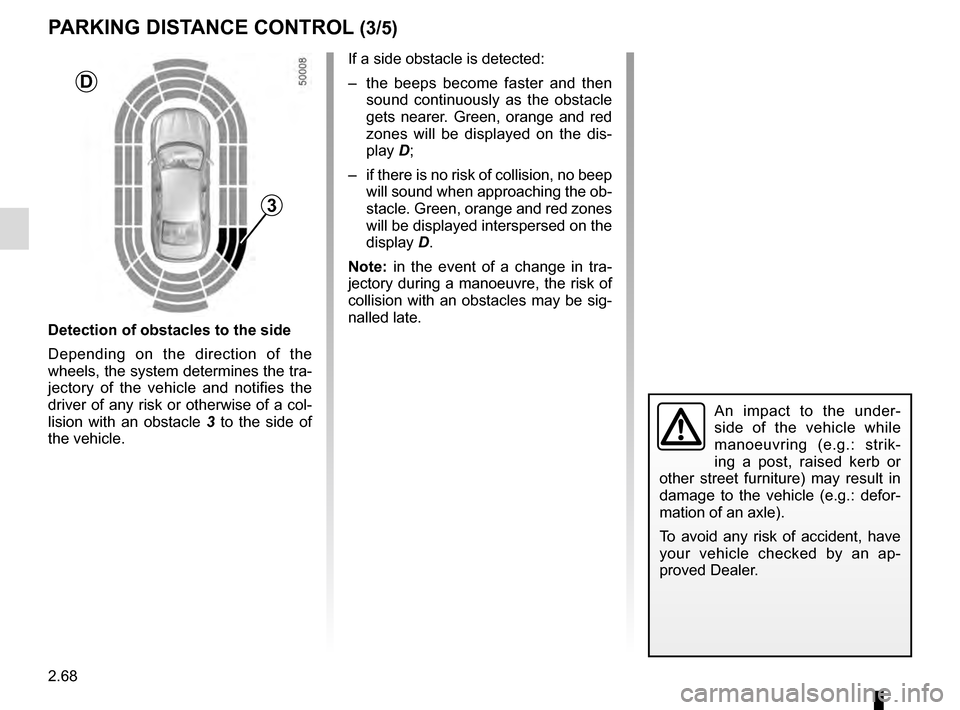
Detection of obstacles to the side
Depending on the direction of the
wheels, the system determines the tra-
jectory of the vehicle and notifies the
driver of any risk or otherwise of a col-
lision with an obstacle 3 to the side of
the vehicle.
PARKING DISTANCE CONTROL (3/5)
If a side obstacle is detected:
– the beeps become faster and then sound continuously as the obstacle
gets nearer. Green, orange and red
zones will be displayed on the dis-
play D;
– if there is no risk of collision, no beep will sound when approaching the ob-
stacle. Green, orange and red zones
will be displayed interspersed on the
display D.
Note: in the event of a change in tra-
jectory during a manoeuvre, the risk of
collision with an obstacles may be sig-
nalled late.
3
D
Page 196 of 328
3.6
10
AUTOMATIC CLIMATE CONTROL: Controls A (1/5)
15
6543
9
1216
17
18
19
11
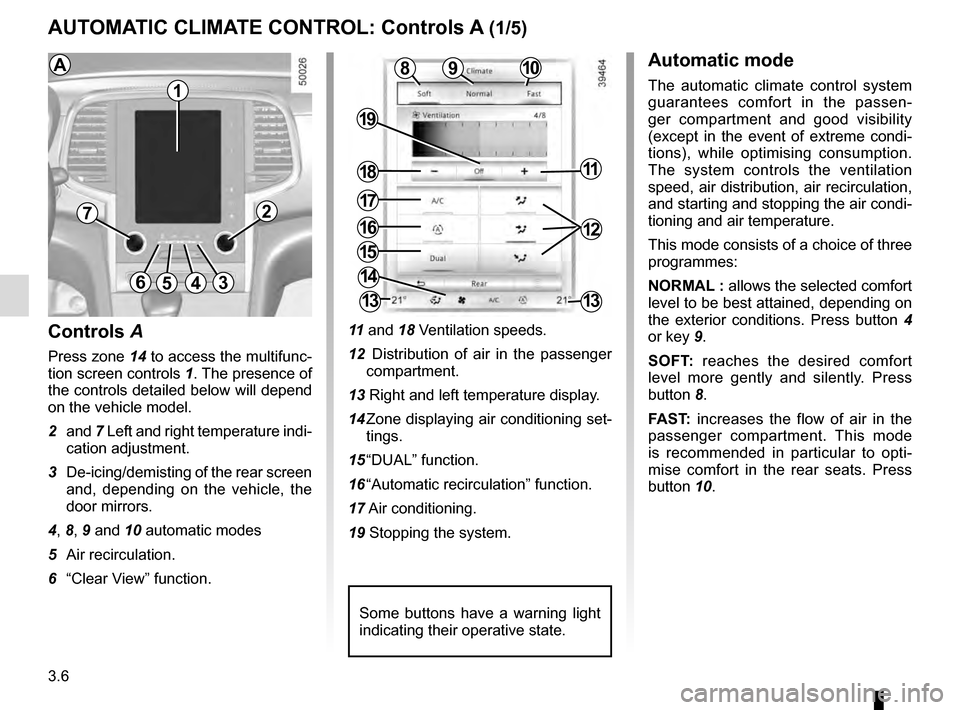
Controls A
Press zone 14 to access the multifunc-
tion screen controls 1. The presence of
the controls detailed below will depend
on the vehicle model.
2 and 7 Left and right temperature indi-
cation adjustment.
3 De-icing/demisting of the rear screen and, depending on the vehicle, the
door mirrors.
4, 8, 9 and 10 automatic modes
5 Air recirculation.
6 “Clear View” function. 11
and 18 Ventilation speeds.
12 Distribution of air in the passenger compartment.
13 Right and left temperature display.
14 Zone displaying air conditioning set- tings.
15 “DUAL” function.
16 “Automatic recirculation” function.
17 Air conditioning.
19 Stopping the system.
8
14
13
72
13
1
Some buttons have a warning light
indicating their operative state.
AAutomatic mode
The automatic climate control system
guarantees comfort in the passen-
ger compartment and good visibility
(except in the event of extreme condi-
tions), while optimising consumption.
The system controls the ventilation
speed, air distribution, air recirculation,
and starting and stopping the air condi-
tioning and air temperature.
This mode consists of a choice of three
programmes:
NORMAL : allows the selected comfort
level to be best attained, depending on
the exterior conditions. Press button 4
or key 9.
SOFT: reaches the desired comfort
level more gently and silently. Press
button 8.
FAST: increases the flow of air in the
passenger compartment. This mode
is recommended in particular to opti-
mise comfort in the rear seats. Press
button 10.