LED RENAULT TALISMAN 2016 1.G Owner's Guide
[x] Cancel search | Manufacturer: RENAULT, Model Year: 2016, Model line: TALISMAN, Model: RENAULT TALISMAN 2016 1.GPages: 328, PDF Size: 3.39 MB
Page 197 of 328
3.7
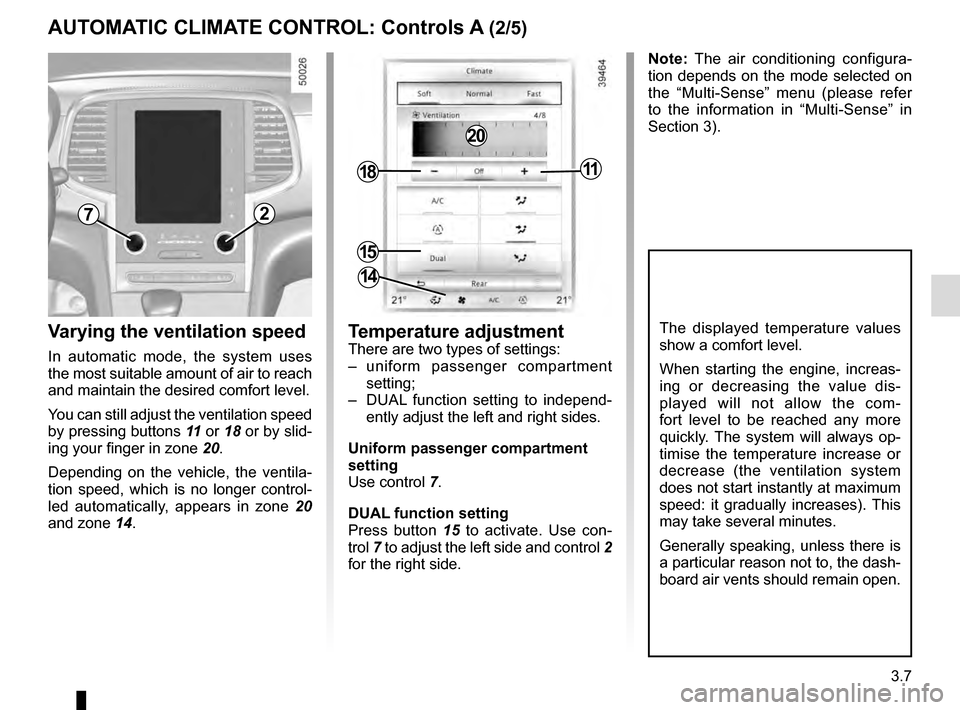
Varying the ventilation speed
In automatic mode, the system uses
the most suitable amount of air to reach
and maintain the desired comfort level.
You can still adjust the ventilation speed
by pressing buttons 11 or 18 or by slid-
ing your finger in zone 20.
Depending on the vehicle, the ventila-
tion speed, which is no longer control-
led automatically, appears in zone 20
and zone 14.
AUTOMATIC CLIMATE CONTROL: Controls A (2/5)
Temperature adjustment
There are two types of settings:
– uniform passenger compartment setting;
– DUAL function setting to independ- ently adjust the left and right sides.
Uniform passenger compartment
setting
Use control 7.
DUAL function setting
Press button 15 to activate. Use con-
trol 7 to adjust the left side and control 2
for the right side.
The displayed temperature values
show a comfort level.
When starting the engine, increas-
ing or decreasing the value dis-
played will not allow the com-
fort level to be reached any more
quickly. The system will always op-
timise the temperature increase or
decrease (the ventilation system
does not start instantly at maximum
speed: it gradually increases). This
may take several minutes.
Generally speaking, unless there is
a particular reason not to, the dash-
board air vents should remain open.
72
15
1811
14
Note: The air conditioning configura-
tion depends on the mode selected on
the “Multi-Sense” menu (please refer
to the information in “Multi-Sense” in
Section 3).
20
Page 199 of 328
3.9
AUTOMATIC CLIMATE CONTROL: Controls A (4/5)
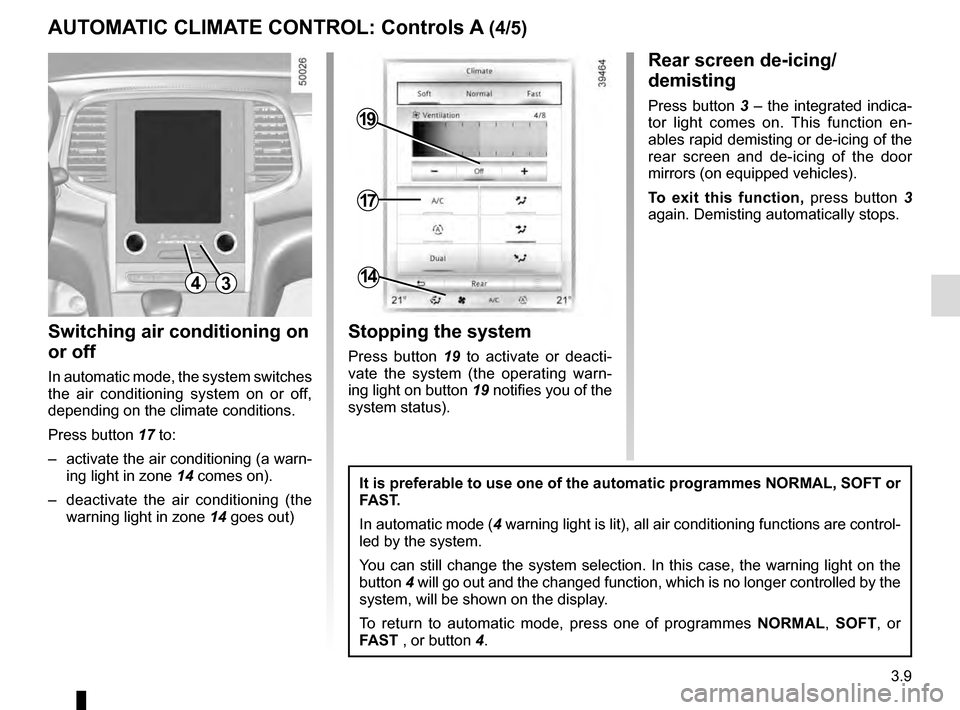
Switching air conditioning on
or off
In automatic mode, the system switches
the air conditioning system on or off,
depending on the climate conditions.
Press button 17 to:
– activate the air conditioning (a warn- ing light in zone 14 comes on).
– deactivate the air conditioning (the warning light in zone 14 goes out)
4
17
19
14
Stopping the system
Press button 19 to activate or deacti-
vate the system (the operating warn-
ing light on button 19 notifies you of the
system status).
It is preferable to use one of the automatic programmes NORMAL, SOFT or
FAST.
In automatic mode (4 warning light is lit), all air conditioning functions are control-
led by the system.
You can still change the system selection. In this case, the warning ligh\
t on the
button 4 will go out and the changed function, which is no longer controlled by \
the
system, will be shown on the display.
To return to automatic mode, press one of programmes NORMAL, SOFT, or
FAST , or button 4.
Rear screen de-icing/
demisting
Press button 3 – the integrated indica-
tor light comes on. This function en-
ables rapid demisting or de-icing of the
rear screen and de-icing of the door
mirrors (on equipped vehicles).
To exit this function, press button 3
again. Demisting automatically stops.
3
Page 200 of 328
3.10
AUTOMATIC CLIMATE CONTROL: Controls A (5/5)
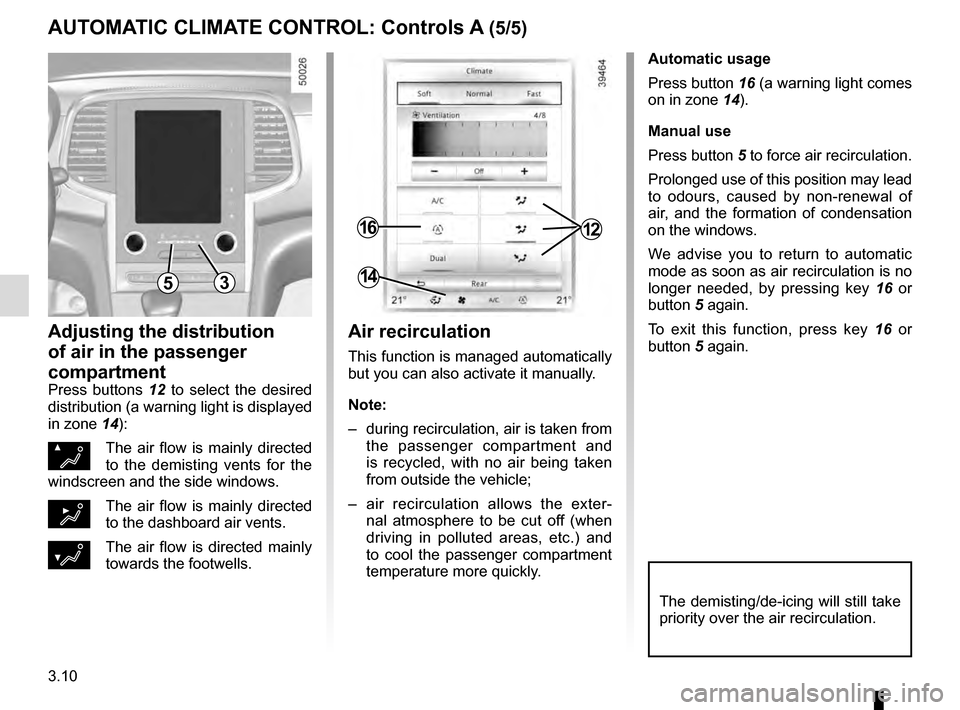
Automatic usage
Press button 16 (a warning light comes
on in zone 14).
Manual use
Press button 5 to force air recirculation.
Prolonged use of this position may lead
to odours, caused by non-renewal of
air, and the formation of condensation
on the windows.
We advise you to return to automatic
mode as soon as air recirculation is no
longer needed, by pressing key 16 or
button 5 again.
To exit this function, press key 16 or
button 5 again.
Adjusting the distribution
of air in the passenger
compartment
Press buttons 12 to select the desired
distribution (a warning light is displayed
in zone 14):
ØThe air flow is mainly directed
to the demisting vents for the
windscreen and the side windows.
½The air flow is mainly directed
to the dashboard air vents.
¿The air flow is directed mainly
towards the footwells.
The demisting/de-icing will still take
priority over the air recirculation.
53
1216
14
Air recirculation
This function is managed automatically
but you can also activate it manually.
Note:
– during recirculation, air is taken from the passenger compartment and
is recycled, with no air being taken
from outside the vehicle;
– air recirculation allows the exter- nal atmosphere to be cut off (when
driving in polluted areas, etc.) and
to cool the passenger compartment
temperature more quickly.
Page 204 of 328
3.14
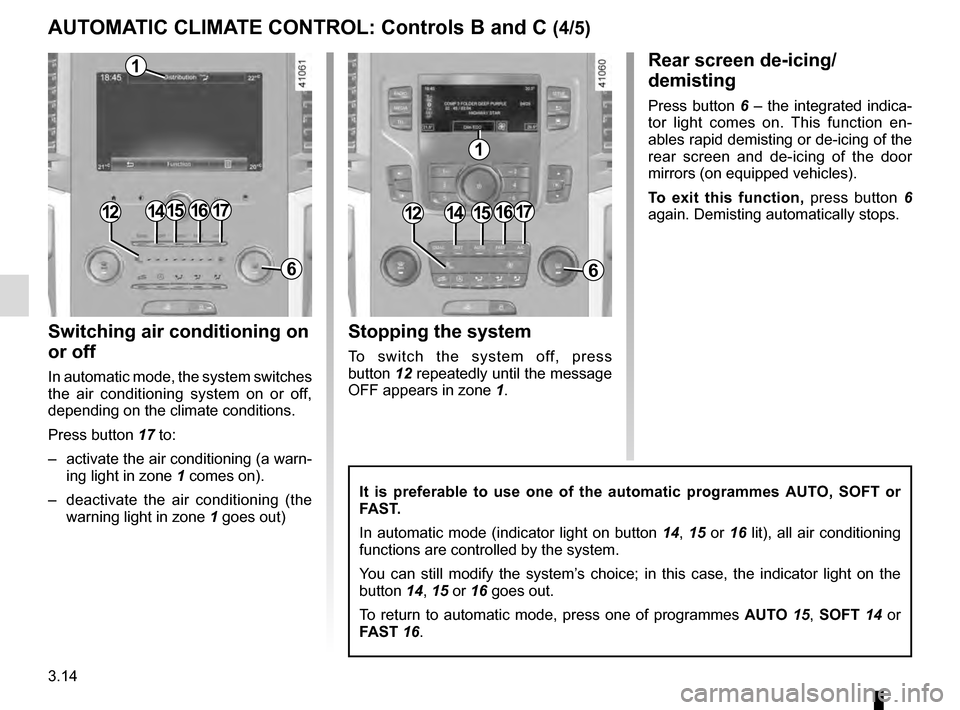
Switching air conditioning on
or off
In automatic mode, the system switches
the air conditioning system on or off,
depending on the climate conditions.
Press button 17 to:
– activate the air conditioning (a warn-ing light in zone 1 comes on).
– deactivate the air conditioning (the warning light in zone 1 goes out)
Rear screen de-icing/
demisting
Press button 6 – the integrated indica-
tor light comes on. This function en-
ables rapid demisting or de-icing of the
rear screen and de-icing of the door
mirrors (on equipped vehicles).
To exit this function, press button 6
again. Demisting automatically stops.
It is preferable to use one of the automatic programmes AUTO, SOFT or
FAST.
In automatic mode (indicator light on button 14, 15 or 16 lit), all air conditioning
functions are controlled by the system.
You can still modify the system’s choice; in this case, the indicator light on the
button 14, 15 or 16 goes out.
To return to automatic mode, press one of programmes AUTO 15, SOFT 14 or
FAST 16.
15
6
1715
6
1714161416
1
1
Stopping the system
To switch the system off, press
button 12 repeatedly until the message
OFF appears in zone 1.
1212
AUTOMATIC CLIMATE CONTROL: Controls B and C (4/5)
Page 205 of 328
3.15
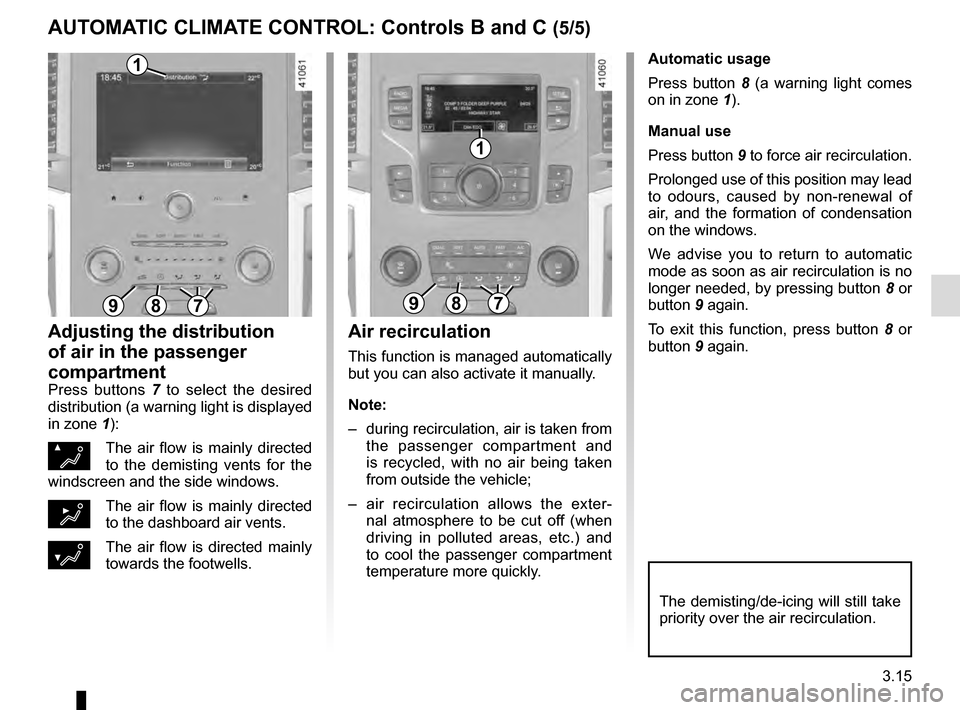
Automatic usage
Press button 8 (a warning light comes
on in zone 1).
Manual use
Press button 9 to force air recirculation.
Prolonged use of this position may lead
to odours, caused by non-renewal of
air, and the formation of condensation
on the windows.
We advise you to return to automatic
mode as soon as air recirculation is no
longer needed, by pressing button 8 or
button 9 again.
To exit this function, press button 8 or
button 9 again.
Adjusting the distribution
of air in the passenger
compartment
Press buttons 7 to select the desired
distribution (a warning light is displayed
in zone 1):
ØThe air flow is mainly directed
to the demisting vents for the
windscreen and the side windows.
½The air flow is mainly directed
to the dashboard air vents.
¿The air flow is directed mainly
towards the footwells.
The demisting/de-icing will still take
priority over the air recirculation.
Air recirculation
This function is managed automatically
but you can also activate it manually.
Note:
– during recirculation, air is taken from the passenger compartment and
is recycled, with no air being taken
from outside the vehicle;
– air recirculation allows the exter- nal atmosphere to be cut off (when
driving in polluted areas, etc.) and
to cool the passenger compartment
temperature more quickly.
897897
1
1
AUTOMATIC CLIMATE CONTROL: Controls B and C (5/5)
Page 216 of 328
3.26
PASSENGER COMPARTMENT STORAGE, FITTINGS (2/3)
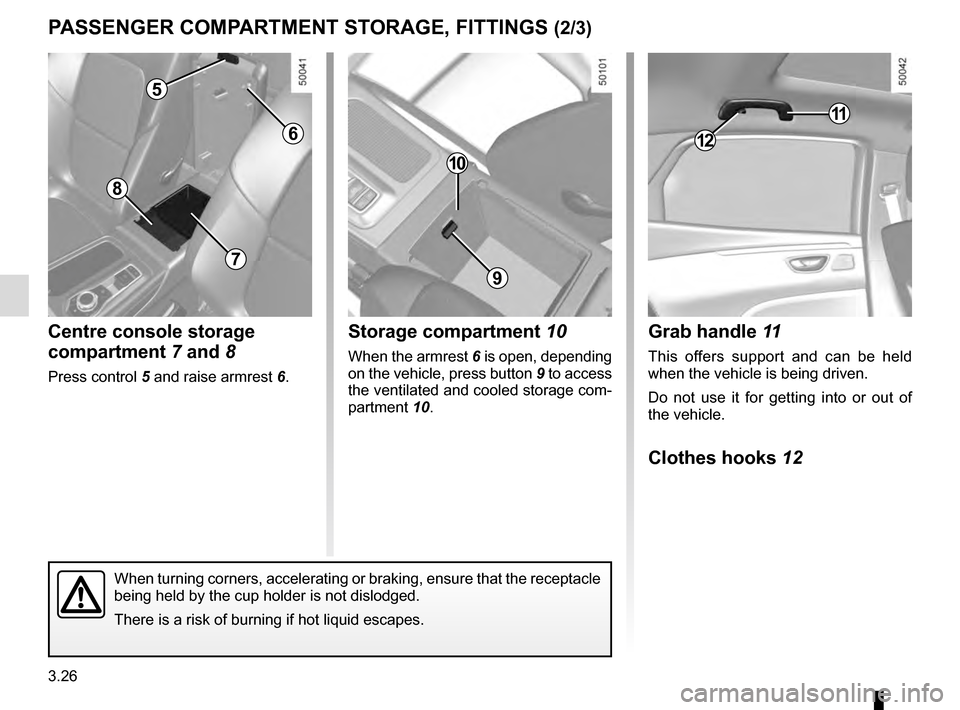
Grab handle 11
This offers support and can be held
when the vehicle is being driven.
Do not use it for getting into or out of
the vehicle.
Clothes hooks 12
Centre console storage
compartment 7 and 8
Press control 5 and raise armrest 6.
8
11
12
5
7
6
9
10
Storage compartment 10
When the armrest 6 is open, depending
on the vehicle, press button
9 to access
the ventilated and cooled storage com-
partment 10.
When turning corners, accelerating or braking, ensure that the receptacl\
e
being held by the cup holder is not dislodged.
There is a risk of burning if hot liquid escapes.
Page 220 of 328
3.30
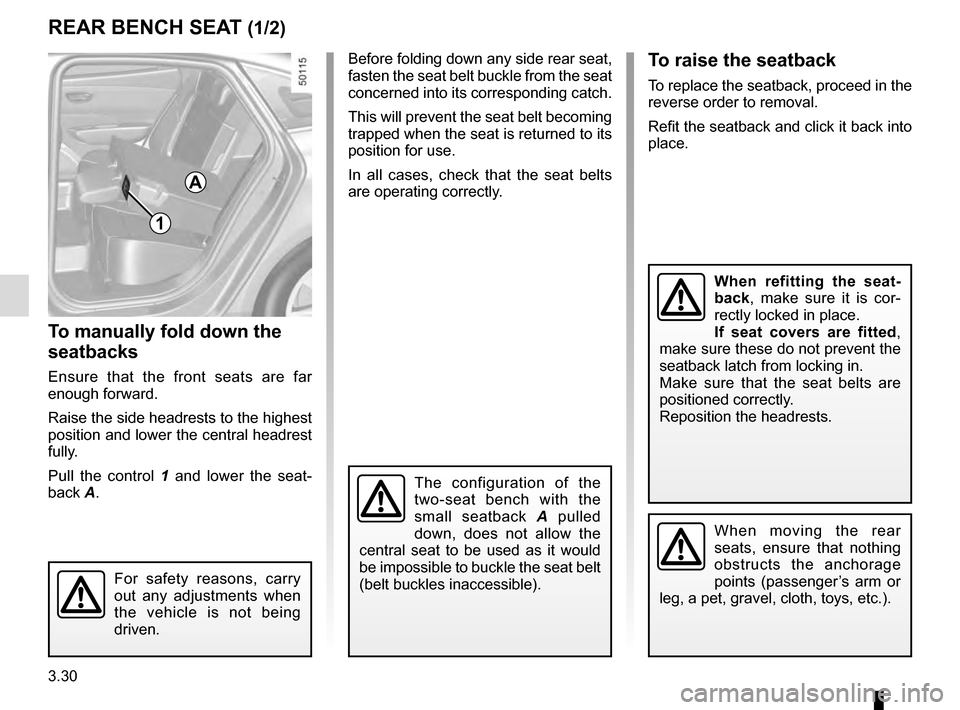
To manually fold down the
seatbacks
Ensure that the front seats are far
enough forward.
Raise the side headrests to the highest
position and lower the central headrest
fully.
Pull the control 1 and lower the seat-
back A.
REAR BENCH SEAT (1/2)
1
To raise the seatback
To replace the seatback, proceed in the
reverse order to removal.
Refit the seatback and click it back into
place.
A
For safety reasons, carry
out any adjustments when
the vehicle is not being
driven.
The configuration of the
two-seat bench with the
small seatback A pulled
down, does not allow the
central seat to be used as it would
be impossible to buckle the seat belt
(belt buckles inaccessible).
When refitting the seat-
back, make sure it is cor-
rectly locked in place.
If seat covers are fitted ,
make sure these do not prevent the
seatback latch from locking in.
Make sure that the seat belts are
positioned correctly.
Reposition the headrests.
When moving the rear
seats, ensure that nothing
obstructs the anchorage
points (passenger’s arm or
leg, a pet, gravel, cloth, toys, etc.).
Before folding down any side rear seat,
fasten the seat belt buckle from the seat
concerned into its corresponding catch.
This will prevent the seat belt becoming
trapped when the seat is returned to its
position for use.
In all cases, check that the seat belts
are operating correctly.
Page 221 of 328
3.31
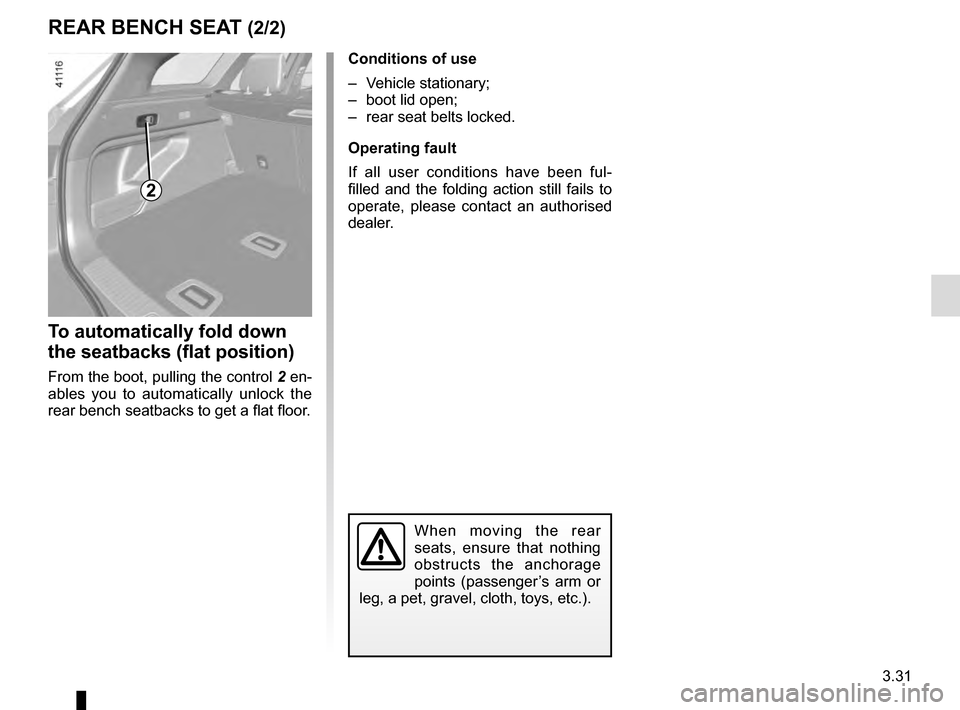
To automatically fold down
the seatbacks (flat position)
From the boot, pulling the control 2 en-
ables you to automatically unlock the
rear bench seatbacks to get a flat floor.
REAR BENCH SEAT (2/2)
2
When moving the rear
seats, ensure that nothing
obstructs the anchorage
points (passenger’s arm or
leg, a pet, gravel, cloth, toys, etc.).
Conditions of use
– Vehicle stationary;
– boot lid open;
– rear seat belts locked.
Operating fault
If all user conditions have been ful-
filled and the folding action still fails to
operate, please contact an authorised
dealer.
Page 250 of 328
4.8
LEVELS (2/3)
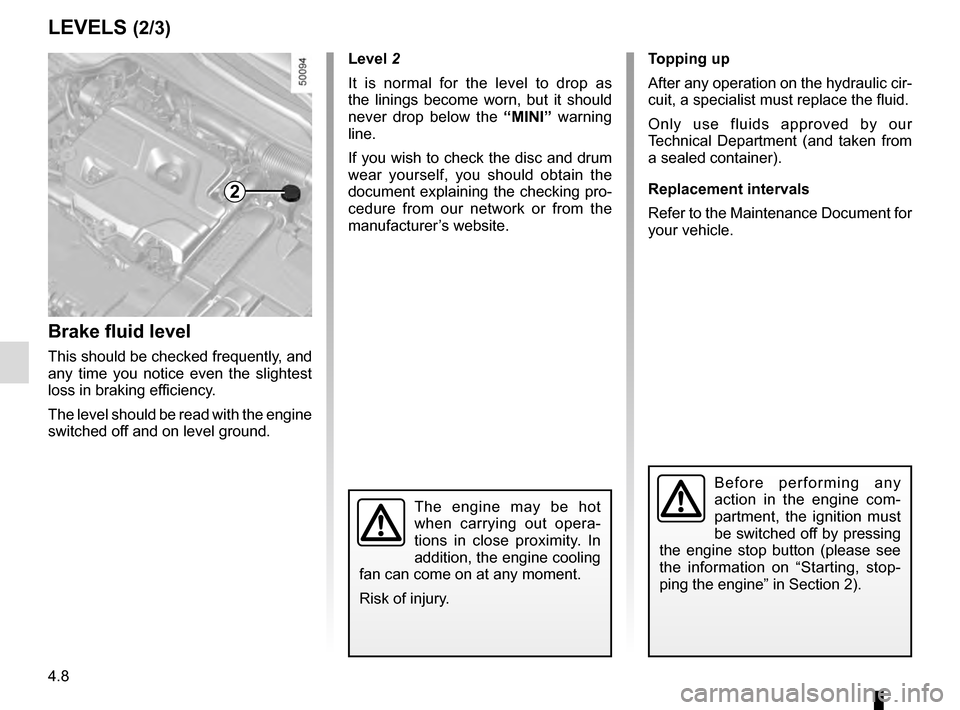
Brake fluid level
This should be checked frequently, and
any time you notice even the slightest
loss in braking efficiency.
The level should be read with the engine
switched off and on level ground.Level 2
It is normal for the level to drop as
the linings become worn, but it should
never drop below the “MINI” warning
line.
If you wish to check the disc and drum
wear yourself, you should obtain the
document explaining the checking pro-
cedure from our network or from the
manufacturer’s website. Topping up
After any operation on the hydraulic cir-
cuit, a specialist must replace the fluid.
Only use fluids approved by our
Technical Department (and taken from
a sealed container).
Replacement intervals
Refer to the Maintenance Document for
your vehicle.
The engine may be hot
when carrying out opera-
tions in close proximity. In
addition, the engine cooling
fan can come on at any moment.
Risk of injury.
2
Before performing any
action in the engine com-
partment, the ignition must
be switched off by pressing
the engine stop button (please see
the information on “Starting, stop-
ping the engine” in Section 2).
Page 251 of 328
4.9
LEVELS (3/3)/FILTERS
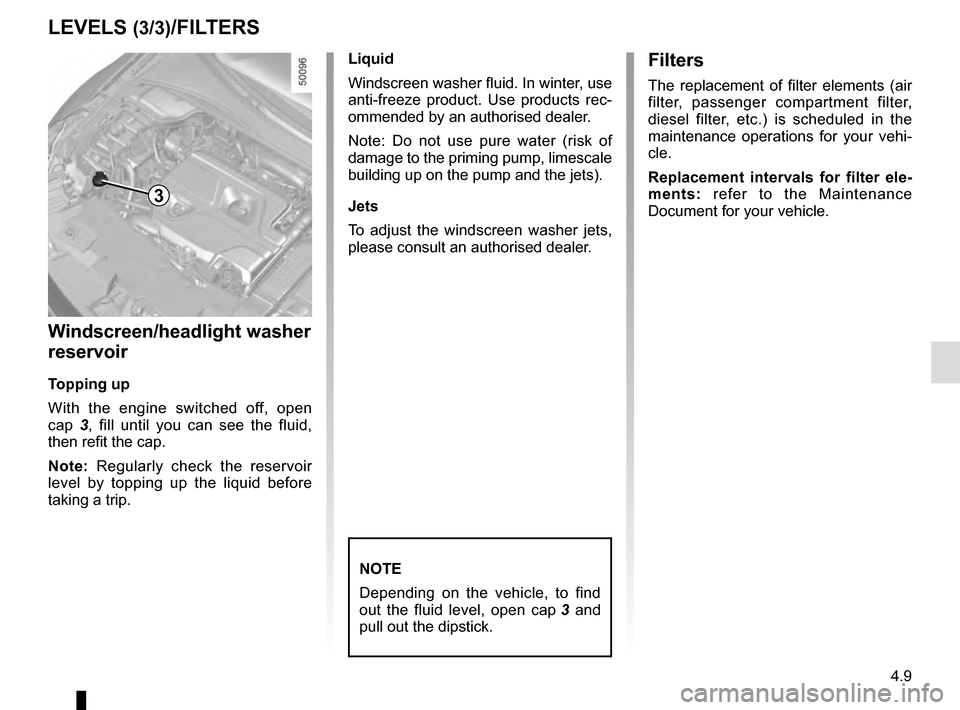
Windscreen/headlight washer
reservoir
Topping up
With the engine switched off, open
cap 3, fill until you can see the fluid,
then refit the cap.
Note: Regularly check the reservoir
level by topping up the liquid before
taking a trip. Liquid
Windscreen washer fluid. In winter, use
anti-freeze product. Use products rec-
ommended by an authorised dealer.
Note: Do not use pure water (risk of
damage to the priming pump, limescale
building up on the pump and the jets).
Jets
To adjust the windscreen washer jets,
please consult an authorised dealer.
NOTE
Depending on the vehicle, to find
out the fluid level, open cap
3 and
pull out the dipstick.
Filters
The replacement of filter elements (air
filter, passenger compartment filter,
diesel filter, etc.) is scheduled in the
maintenance operations for your vehi-
cle.
Replacement intervals for filter ele-
ments: refer to the Maintenance
Document for your vehicle.
3