LED RENAULT TALISMAN 2016 1.G User Guide
[x] Cancel search | Manufacturer: RENAULT, Model Year: 2016, Model line: TALISMAN, Model: RENAULT TALISMAN 2016 1.GPages: 328, PDF Size: 3.39 MB
Page 88 of 328
1.82
Position memory
– Adjust the door mirrors (see previous paragraphs);
– from the multifunction screen, select menu “Vehicle”, “Seats”, “Settings”
then “Position” and select “Save”.
The positions of the door mirrors in a
forward gear, reverse and of the front
seats are simultaneously saved.
Rear view mirrors which tilt
in reverse gear
For vehicles equipped with the driver’s
seat with position memory, you can
enter a specific setting for the door mir-
rors when reversing and store the po-
sition.
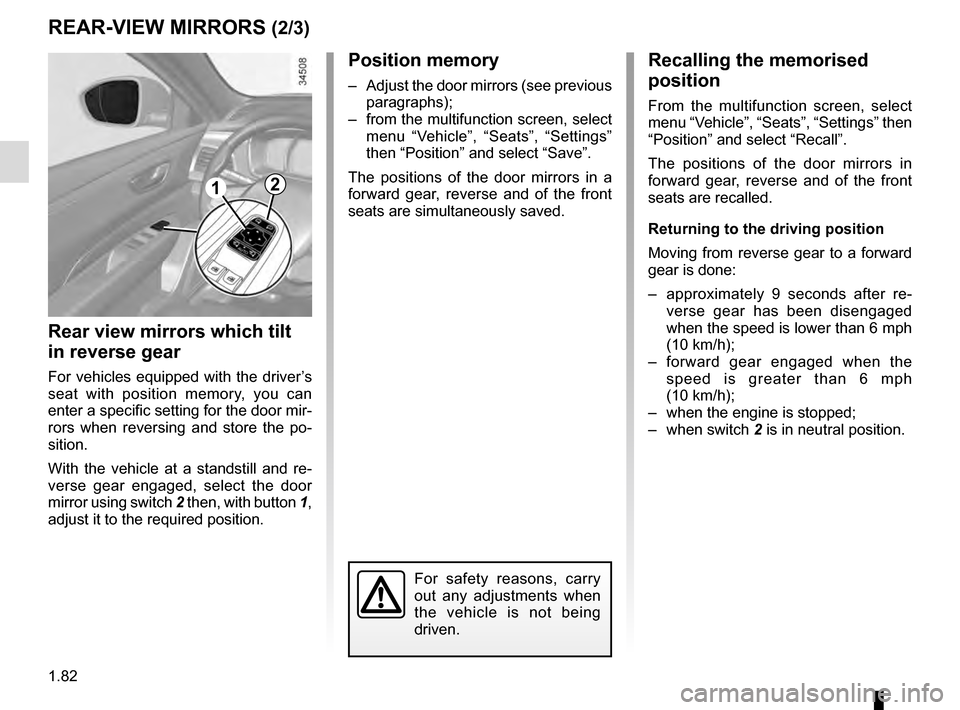
With the vehicle at a standstill and re-
verse gear engaged, select the door
mirror using switch 2 then, with button 1,
adjust it to the required position.
REAR-VIEW MIRRORS (2/3)
1
Recalling the memorised
position
From the multifunction screen, select
menu “Vehicle”, “Seats”, “Settings” then
“Position” and select “Recall”.
The positions of the door mirrors in
forward gear, reverse and of the front
seats are recalled.
Returning to the driving position
Moving from reverse gear to a forward
gear is done:
– approximately 9 seconds after re- verse gear has been disengaged
when the speed is lower than 6 mph
(10 km/h);
– forward gear engaged when the speed is greater than 6 mph
(10 km/h);
– when the engine is stopped;
– when switch 2 is in neutral position.
For safety reasons, carry
out any adjustments when
the vehicle is not being
driven.
2
Page 89 of 328
1.83
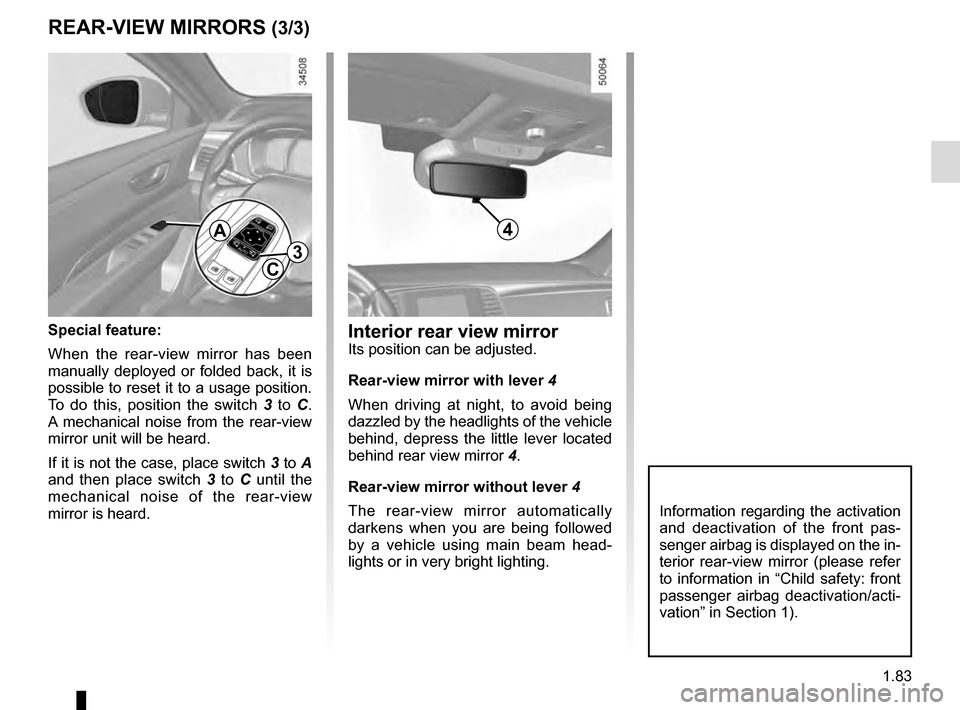
Interior rear view mirrorIts position can be adjusted.
Rear-view mirror with lever 4
When driving at night, to avoid being
dazzled by the headlights of the vehicle
behind, depress the little lever located
behind rear view mirror 4.
Rear-view mirror without lever 4
The rear-view mirror automatically
darkens when you are being followed
by a vehicle using main beam head-
lights or in very bright lighting.
REAR-VIEW MIRRORS (3/3)
Special feature:
When the rear-view mirror has been
manually deployed or folded back, it is
possible to reset it to a usage position.
To do this, position the switch 3 to C.
A mechanical noise from the rear-view
mirror unit will be heard.
If it is not the case, place switch 3 to A
and then place switch 3 to C until the
mechanical noise of the rear-view
mirror is heard.
A
C3
Information regarding the activation
and deactivation of the front pas-
senger airbag is displayed on the in-
terior rear-view mirror (please refer
to information in “Child safety: front
passenger airbag deactivation/acti-
vation” in Section 1).
4
Page 92 of 328
1.86
Automatic main beam
headlights
Depending on the vehicle, this system
switches the main beam headlights on
and off automatically. The function uses
a camera located behind the interior
rear-view mirror to detect vehicles that
are following and coming in the oppo-
site direction.
The main beam headlights come on au-
tomatically if:
– exterior light is weak;
– no other vehicles or lighting are de-tected;
– the vehicle speed is above approxi- mately 30 mph (45 km/h).
If any of the above conditions are not
fulfilled, the system switches to dipped
beam headlights.
The “automatic main beam
headlights” system should
under no circumstances be
used to replace driver atten-
tion and responsibility with regard
to vehicle lighting and adapting to
light, visibility and traffic conditions.Using the portable naviga-
tion system at night in the
windscreen area below the
camera may disturb the
operation of the “automatic main
beam headlights” system (risk of re-
flection on the windscreen).
EXTERIOR LIGHTING AND SIGNALS (2/5)
4
3
The system may encounter difficul-
ties under certain conditions, inclu-
ding :
– extreme weather conditions (rain, snow, fog, etc.);
– obstruction in front of the winds- creen or camera;
– when a following or oncoming vehicle has weak or hidden li-
ghting;
– incorrect settings for the front headlights;
– reflective systems;
– ...
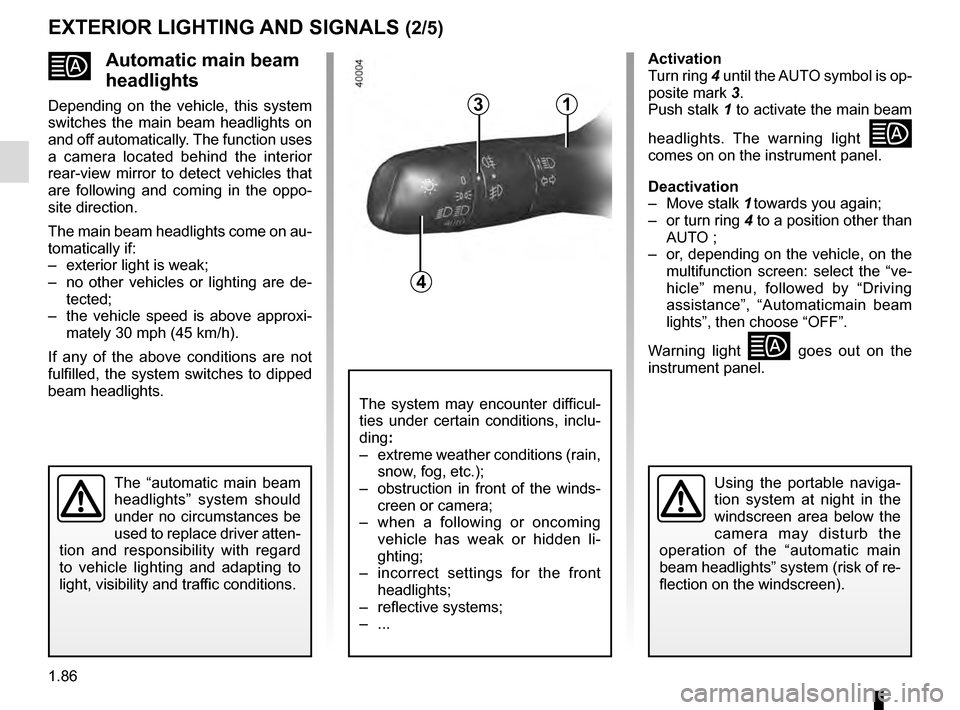
Activation
Turn ring 4 until the AUTO symbol is op-
posite mark 3.
Push stalk 1 to activate the main beam
headlights. The warning light
comes on on the instrument panel.
Deactivation
– Move stalk 1 towards you again;
– or turn ring 4 to a position other than AUTO ;
– or, depending on the vehicle, on the multifunction screen: select the “ve-
hicle” menu, followed by “Driving
assistance”, “Automaticmain beam
lights”, then choose “OFF”.
Warning light
goes out on the
instrument panel.
1
Page 102 of 328
1.96
Note:
To ensure the headlight washers ope-
rate correctly in winter, remove snow
from the jet trims and de-ice the jet
trims using an aerosol de-icer.
You are recommended to regularly
remove dirt encrusted on the headlight
glass.
When the minimum windscreen washer
fluid level is reached, the headlight
washer system may be deprimed.
Fill the windscreen washer fluid and
then activate the windscreen washer,
with the engine running, to reprime
the system.
FRONT WINDSCREEN WASH/WIPE (6/6)
Headlight washers
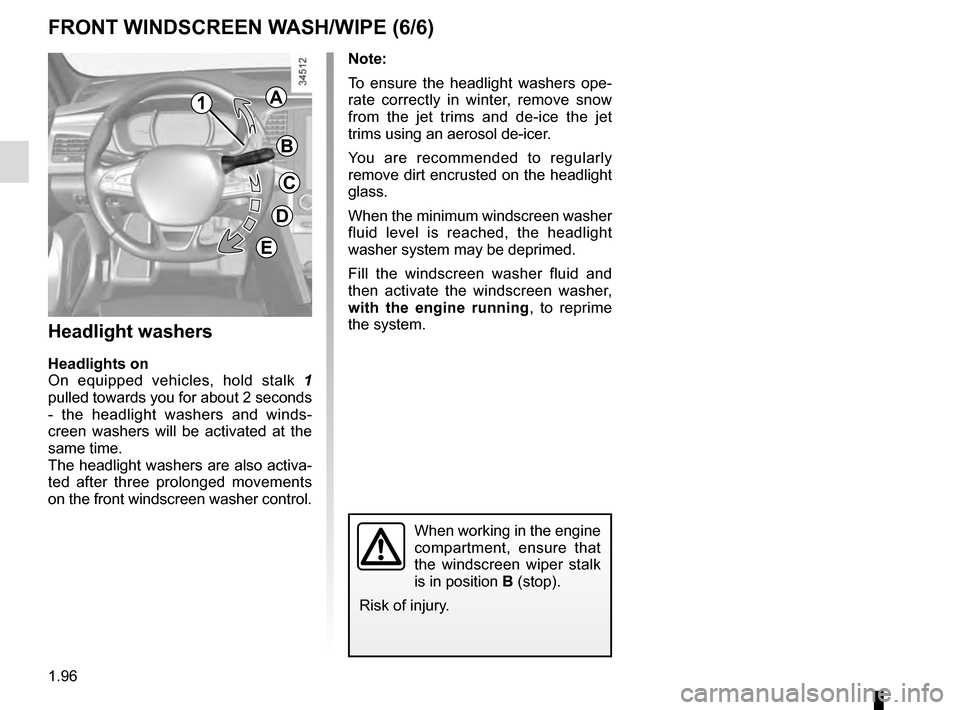
Headlights on
On equipped vehicles, hold stalk 1
pulled towards you for about 2 seconds
- the headlight washers and winds-
creen washers will be activated at the
same time.
The headlight washers are also activa-
ted after three prolonged movements
on the front windscreen washer control.
When working in the engine
compartment, ensure that
the windscreen wiper stalk
is in position B (stop).
Risk of injury.
1A
B
C
D
E
Page 106 of 328
1.100
FUEL TANK (2/3)
Filling with fuel
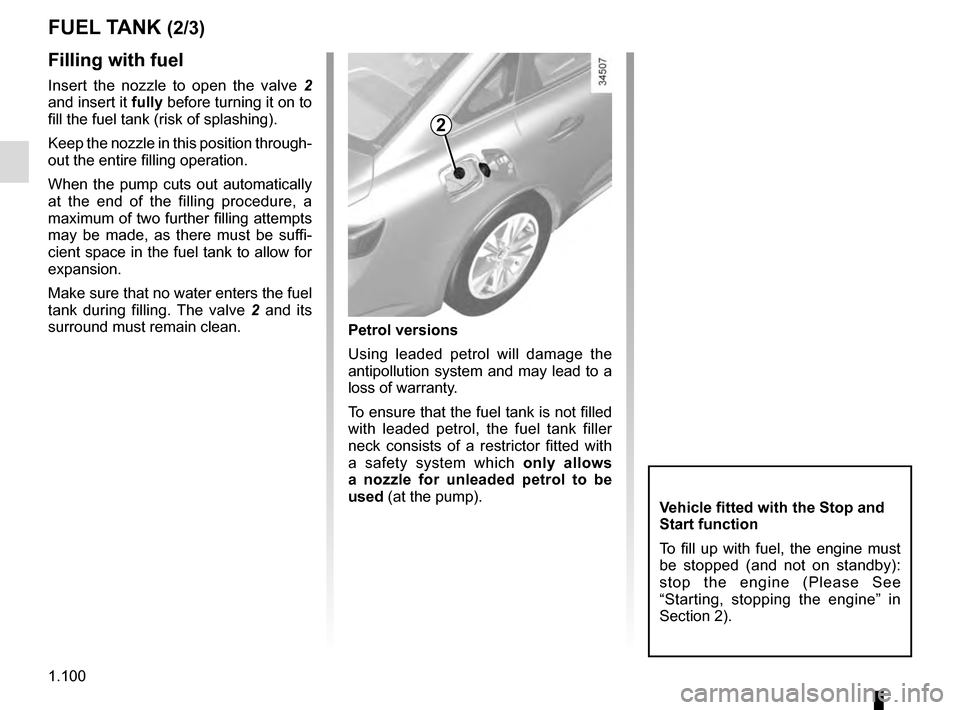
Insert the nozzle to open the valve 2
and insert it fully before turning it on to
fill the fuel tank (risk of splashing).
Keep the nozzle in this position through-
out the entire filling operation.
When the pump cuts out automatically
at the end of the filling procedure, a
maximum of two further filling attempts
may be made, as there must be suffi-
cient space in the fuel tank to allow for
expansion.
Make sure that no water enters the fuel
tank during filling. The valve 2 and its
surround must remain clean.
2
Petrol versions
Using leaded petrol will damage the
antipollution system and may lead to a
loss of warranty.
To ensure that the fuel tank is not filled
with leaded petrol, the fuel tank filler
neck consists of a restrictor fitted with
a safety system which only allows
a nozzle for unleaded petrol to be
used (at the pump).
Vehicle fitted with the Stop and
Start function
To fill up with fuel, the engine must
be stopped (and not on standby):
stop the engine (Please See
“Starting, stopping the engine” in
Section 2).
Page 121 of 328
2.13
SPECIAL FEATURES OF DIESEL VERSIONS
Diesel engine speed
Diesel engines are fitted with an injec-
tion pump which prevents the engine
speed being exceeded irrespective of
the gear selected.
If the message “Check antipollution
system” is displayed along with warn-
ing lights
Ä and ©, consult an
authorised dealer immediately.
When driving, depending on the fuel
grade used, it is possible that white
smoke may be emitted.
This is due to the exhaust particle filter
being cleaned automatically, and does
not affect the way the vehicle runs.
Running out of fuel
If the tank has been completely
drained, the system must be reprimed
after the tank is refilled: see information
on the “fuel tank” in section 1 before re-
starting the engine.
Do not park the vehicle or
run the engine in locations
where combustible sub-
stances or materials such
as grass or leaves can come into
contact with the hot exhaust system.
Precautions to be taken in
winter
To avoid any faults in icy weather:
– ensure that the battery is always fully charged,
– always keep the diesel tank rela- tively full to avoid water vapour con-
densing in it and accumulating at the
bottom of the tank.
Page 127 of 328
2.19
DRIVING ADVICE, ECO-DRIVING (2/5)
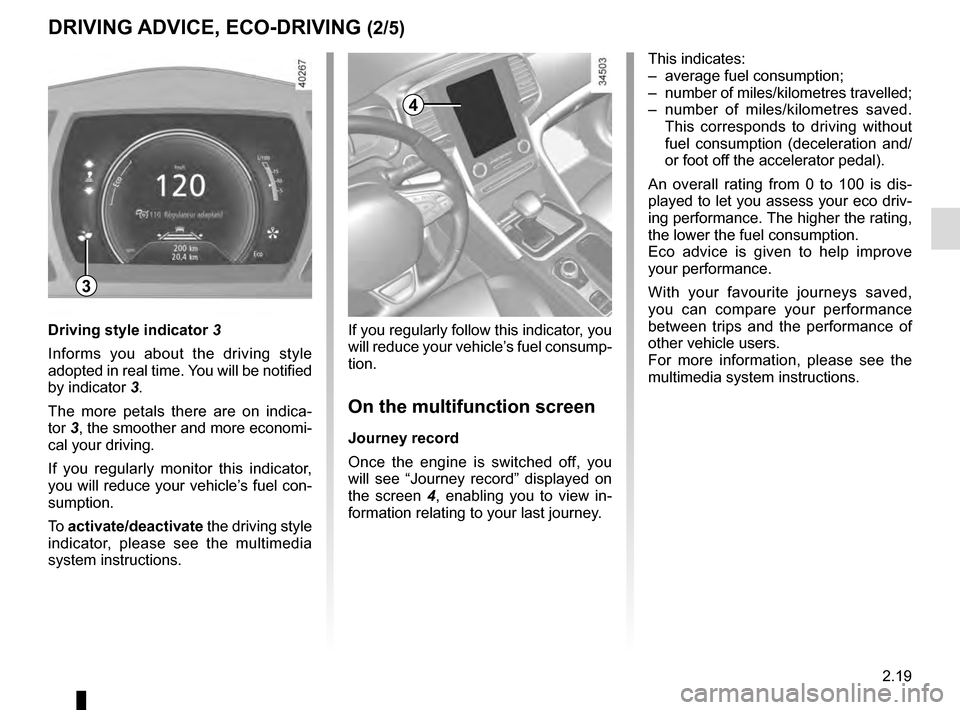
4
3
If you regularly follow this indicator, you
will reduce your vehicle’s fuel consump-
tion.
On the multifunction screen
Journey record
Once the engine is switched off, you
will see “Journey record” displayed on
the screen 4, enabling you to view in-
formation relating to your last journey.
Driving style indicator
3
Informs you about the driving style
adopted in real time. You will be notified
by indicator 3.
The more petals there are on indica-
tor 3, the smoother and more economi-
cal your driving.
If you regularly monitor this indicator,
you will reduce your vehicle’s fuel con-
sumption.
To activate/deactivate the driving style
indicator, please see the multimedia
system instructions. This indicates:
– average fuel consumption;
– number of miles/kilometres travelled;
– number of miles/kilometres saved.
This corresponds to driving without
fuel consumption (deceleration and/
or foot off the accelerator pedal).
An overall rating from 0 to 100 is dis-
played to let you assess your eco driv-
ing performance. The higher the rating,
the lower the fuel consumption.
Eco advice is given to help improve
your performance.
With your favourite journeys saved,
you can compare your performance
between trips and the performance of
other vehicle users.
For more information, please see the
multimedia system instructions.
Page 132 of 328
2.24
ENVIRONMENT
Emissions
Your vehicle has been designed to
emit fewer greenhouse gases (CO2)
while in use, and therefore to consume
less fuel (e.g. 140 g/km, equivalent to
1494.6 mpg (5.3 l/100 km) for a diesel
vehicle).
Our vehicles are also equipped with a
particle filter system including a cata-
lytic converter, an oxygen sensor and
an active carbon filter (the latter pre-
vents vapour from the fuel tank being
released into the open air).
For certain diesel vehicles, this system
also has a particle filter to reduce the
volume of soot particles emitted.
Please make your own
contribution towards
protecting the environment
too
– Worn parts replaced in the course of routine vehicle maintenance (vehi-
cle battery, oil filter, air filter, batter-
ies, etc.) and oil containers (empty or
filled with used oil) must be disposed
of through specialist organisations. – At the end of the vehicle’s service
life, it should be sent to approved
centres to ensure that it is recycled.
– In all cases, comply with local legis- lation.
Recycling
Your vehicle is 85% recyclable and
95% recoverable.
To achieve these objectives, many of
the vehicle components have been de-
signed to enable them to be recycled.
The materials and structures have
been carefully designed to allow these
components to be easily removed and
reprocessed by specialist companies.
In order to preserve raw material re-
sources, this vehicle incorporates nu-
merous parts made from recycled plas-
tics or renewable materials (vegetable
or animal-derived materials such as
cotton or wool).
Your vehicle has been designed with
respect for the environment in mind for
its entire service life: during production,
use and at the end of its life.
This commitment is illustrated by the
Renault eco² signature.Manufacture
Your vehicle has been manufactured at
a factory which complies with a policy
to reduce the environmental impact
on the surrounding areas (reduction of
water and energy consumption, visual
and noise pollution, atmospheric emis-
sions and waste water; sorting and re-
using waste).
Page 133 of 328
2.25
TYRE PRESSURE MONITORING SYSTEM (1/3)
If the vehicle is equipped with the func-
tion, this system monitors the tyre pres-
sure.
Operating principle
Each wheel (except for the emergency
spare wheel) has a sensor in the infla-
tion valve which periodically measures
the tyre pressure.
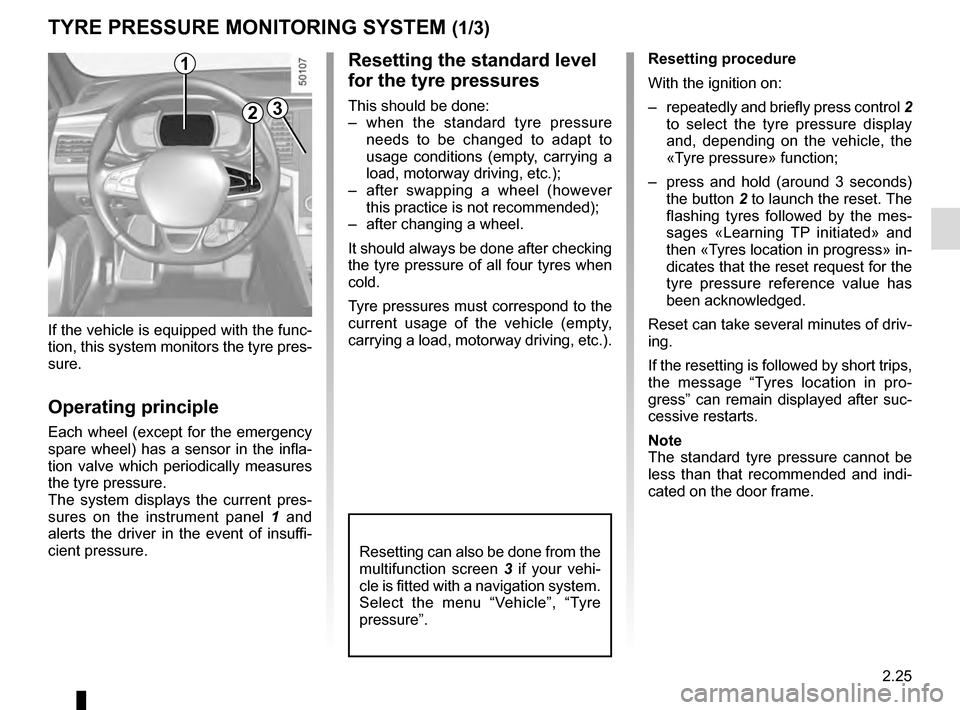
The system displays the current pres-
sures on the instrument panel 1 and
alerts the driver in the event of insuffi-
cient pressure.
2
1Resetting procedure
With the ignition on:
– repeatedly and briefly press control 2
to select the tyre pressure display
and, depending on the vehicle, the
«Tyre pressure» function;
– press and hold (around 3 seconds) the button 2 to launch the reset. The
flashing tyres followed by the mes-
sages «Learning TP initiated» and
then «Tyres location in progress» in-
dicates that the reset request for the
tyre pressure reference value has
been acknowledged.
Reset can take several minutes of driv-
ing.
If the resetting is followed by short trips,
the message “Tyres location in pro-
gress” can remain displayed after suc-
cessive restarts.
Note
The standard tyre pressure cannot be
less than that recommended and indi-
cated on the door frame.
3
Resetting the standard level
for the tyre pressures
This should be done:
– when the standard tyre pressure needs to be changed to adapt to
usage conditions (empty, carrying a
load, motorway driving, etc.);
– after swapping a wheel (however this practice is not recommended);
– after changing a wheel.
It should always be done after checking
the tyre pressure of all four tyres when
cold.
Tyre pressures must correspond to the
current usage of the vehicle (empty,
carrying a load, motorway driving, etc.).
Resetting can also be done from the
multifunction screen 3 if your vehi-
cle is fitted with a navigation system.
Select the menu “Vehicle”, “Tyre
pressure”.
Page 136 of 328
2.28
DRIVER CORRECTION DEVICES AND AIDS (1/12)ABS (anti-lock braking
system)
Under heavy braking, the ABS prevents
the wheels from locking, allowing the
stopping distance to be managed and
keeping control of the vehicle.
Under these circumstances, the vehi-
cle can be steered to avoid an obstacle
whilst braking. In addition, this system
can increase stopping distances, par-
ticularly on roads with low surface grip
(wet ground etc.).
You will feel a pulsation through the
brake pedal each time the system is
activated. The ABS does not in any way
improve the vehicle's physical perform-
ance relating to the road surface and
roadholding. It is still essential to follow
the rules of good driving practice (such
as driving at a safe distance from the
vehicle in front etc.).
– ABS (anti-lock braking system) ;
– ESC
(electronic stability control)
with understeer control and trac-
tion control;
– emergency brake assist;
– active emergency braking;
– driver assistance with a trailer;
– hill start assistance;
– rear wheel steering.
Other driving assistance systems are
detailed on the following pages.
In an emergency, apply firm and
continuous pressure to the brake
pedal. There is no need to pump
it repeatedly. The ABS will modu-
late the force applied in the braking
system.
These functions are an ad-
ditional aid in the event of
critical driving conditions,
enabling the vehicle behav-
iour to be adapted to suit the driving
conditions.
However, the functions do not take
the place of the driver. They do
not increase the vehicle’s limits
and should not encourage you
to drive more quickly. Therefore,
they can under no circumstances
replace the vigilance or responsibil-
ity of the driver when manoeuvring
the vehicle (the driver must always
be ready for sudden incidents which
may occur when driving).