instrument panel RENAULT TWINGO 2016 3.G Owner's Manual
[x] Cancel search | Manufacturer: RENAULT, Model Year: 2016, Model line: TWINGO, Model: RENAULT TWINGO 2016 3.GPages: 216, PDF Size: 7.15 MB
Page 100 of 216
2.26
Exceeding the limit speed
It is possible to exceed the limit speed
at any time. To do this: press the accel-
erator pedal firmly and fully (beyond
the resistance point).
While the speed is being exceeded, the
limit speed displayed on the instrument
panel flashes.
Then, release the accelerator: the
speed limiter function will return as
soon as you reach a speed lower than
the stored speed.
Limited speed cannot be maintained
If driving up or down a steep gradient,
the system is unable to maintain the
limited speed: the memorised speed
flashes on the instrument panel and
a beep sounds at regular intervals to
inform you.
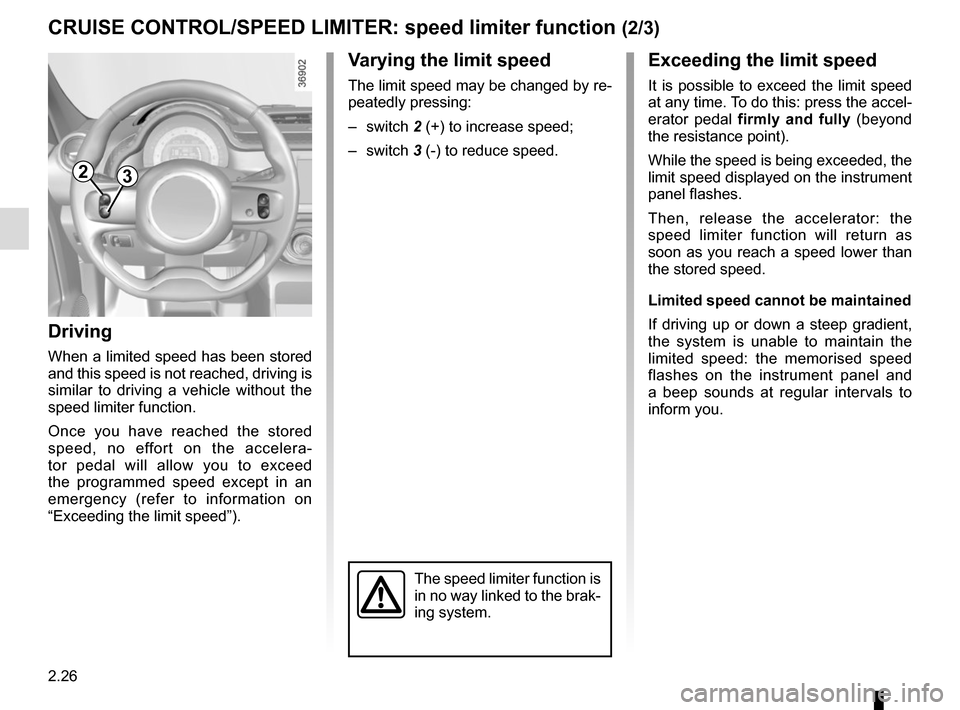
Varying the limit speed
The limit speed may be changed by re-
peatedly pressing:
– switch 2 (+) to increase speed;
– switch 3 (-) to reduce speed.
Driving
When a limited speed has been stored
and this speed is not reached, driving is
similar to driving a vehicle without the
speed limiter function.
Once you have reached the stored
speed, no effort on the accelera-
tor pedal will allow you to exceed
the programmed speed except in an
emergency (refer to information on
“Exceeding the limit speed”).
CRUISE CONTROL/SPEED LIMITER: speed limiter function (2/3)
The speed limiter function is
in no way linked to the brak-
ing system.
23
Page 101 of 216
2.27
CRUISE CONTROL/SPEED LIMITER: speed limiter function (3/3)
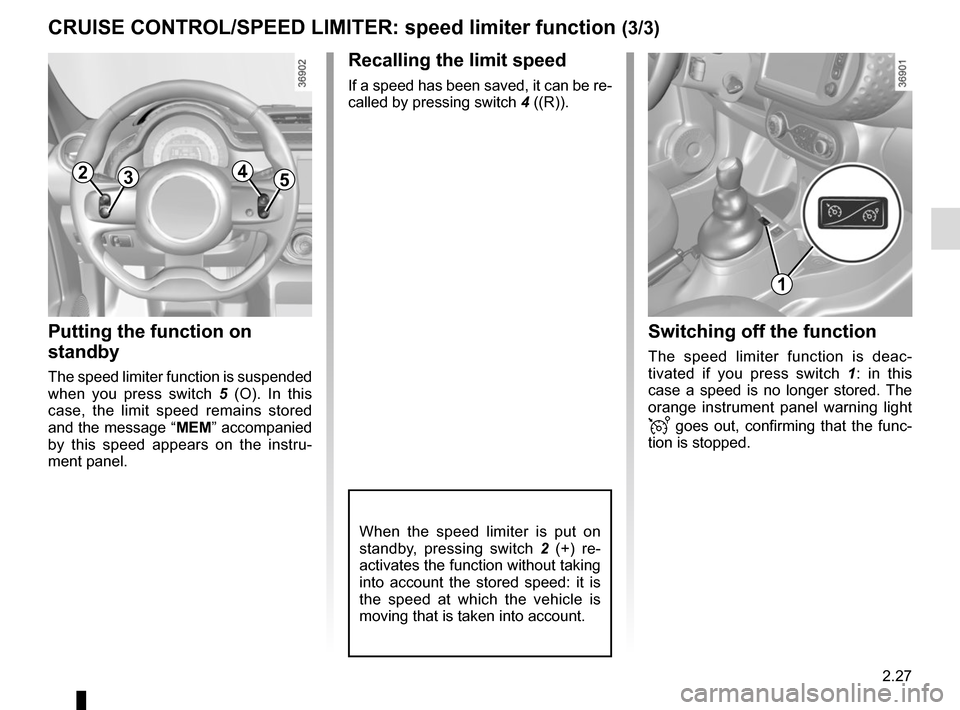
Recalling the limit speed
If a speed has been saved, it can be re-
called by pressing switch 4 ((R)).
Putting the function on
standby
The speed limiter function is suspended
when you press switch 5 (O). In this
case, the limit speed remains stored
and the message “ MEM” accompanied
by this speed appears on the instru-
ment panel.
Switching off the function
The speed limiter function is deac-
tivated if you press switch 1 : in this
case a speed is no longer stored. The
orange instrument panel warning light
goes out, confirming that the func-
tion is stopped.
When the speed limiter is put on
standby, pressing switch 2 (+) re-
activates the function without taking
into account the stored speed: it is
the speed at which the vehicle is
moving that is taken into account.
2354
1
Page 103 of 216
2.29
Driving
Once a cruising speed is memorised
and the cruise control function is active,
you may lift your foot off the accelera-
tor pedal.
Important: you are never-
theless advised to keep
your feet close to the pedals
in order to react if neces-
sary.
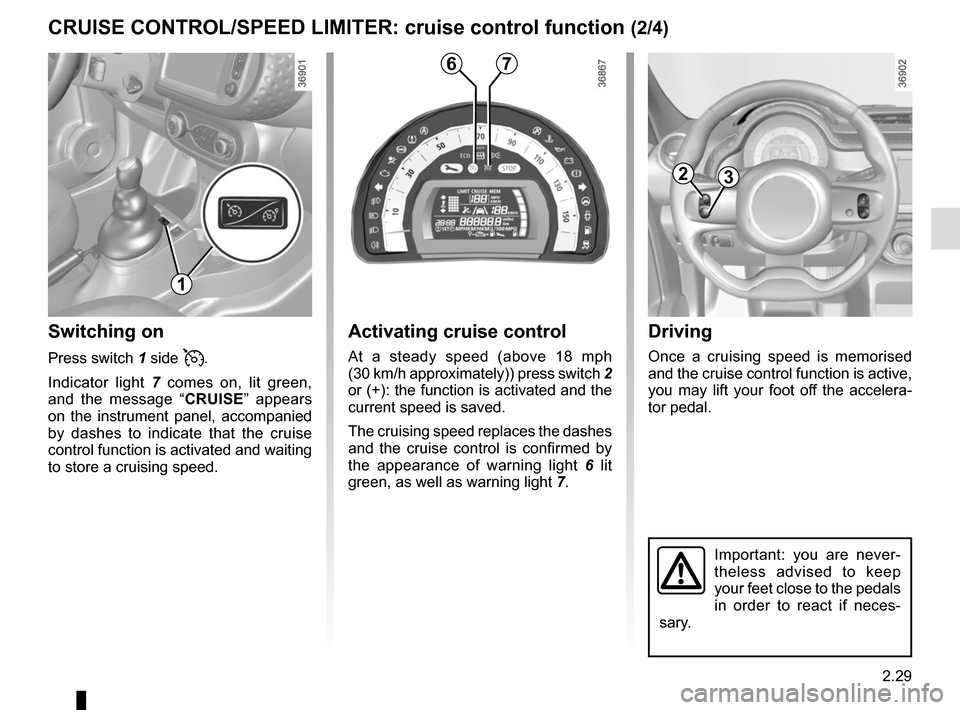
Activating cruise control
At a steady speed (above 18 mph
(30 km/h approximately)) press switch 2
or (+): the function is activated and the
current speed is saved.
The cruising speed replaces the dashes
and the cruise control is confirmed by
the appearance of warning light 6 lit
green, as well as warning light 7.
Switching on
Press switch 1 side .
Indicator light 7 comes on, lit green,
and the message “ CRUISE” appears
on the instrument panel, accompanied
by dashes to indicate that the cruise
control function is activated and waiting
to store a cruising speed.
CRUISE CONTROL/SPEED LIMITER: cruise control function (2/4)
23
67
1
Page 104 of 216
2.30
CRUISE CONTROL/SPEED LIMITER: cruise control function (3/4)
Exceeding the cruising speed
The cruising speed may be exceeded
at any time by depressing the accelera-
tor pedal. While it is being exceeded,
the cruising speed flashes on the in-
strument panel.
Then, release the accelerator: after a
few seconds, the vehicle will automati-
cally return to its set cruising speed.
Cruising speed cannot be
maintained
When driving down a steep gradient,
the system is unable to maintain the
cruising speed: the stored speed will
flash on the instrument panel informa-
tion display to inform you of this situ-
ation.
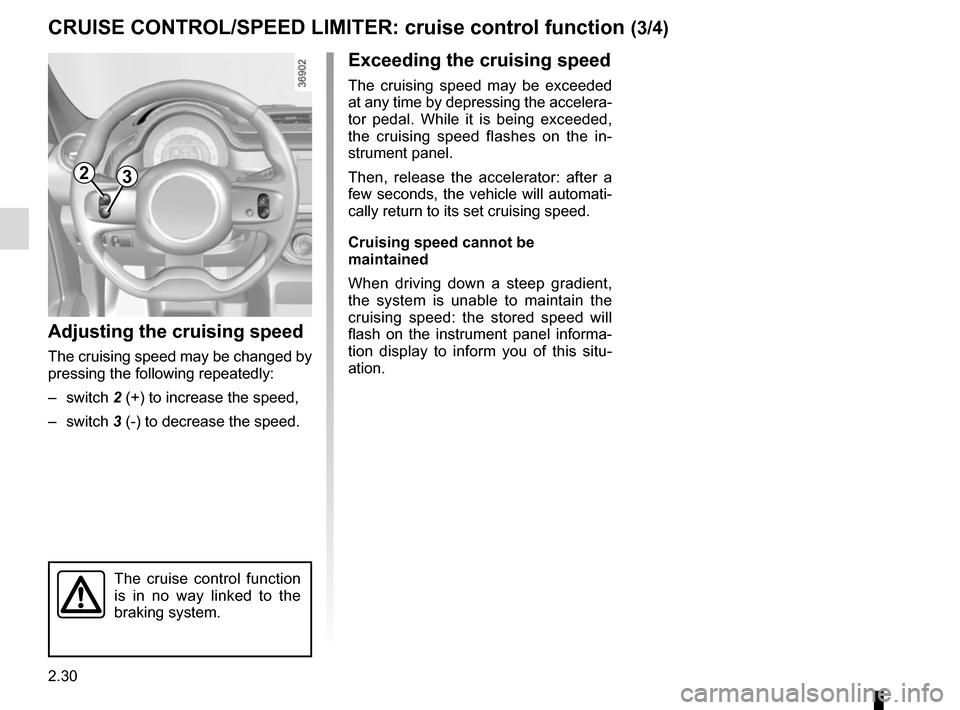
Adjusting the cruising speed
The cruising speed may be changed by
pressing the following repeatedly:
– switch 2 (+) to increase the speed,
– switch 3 (-) to decrease the speed.
The cruise control function
is in no way linked to the
braking system.
23
Page 105 of 216
2.31
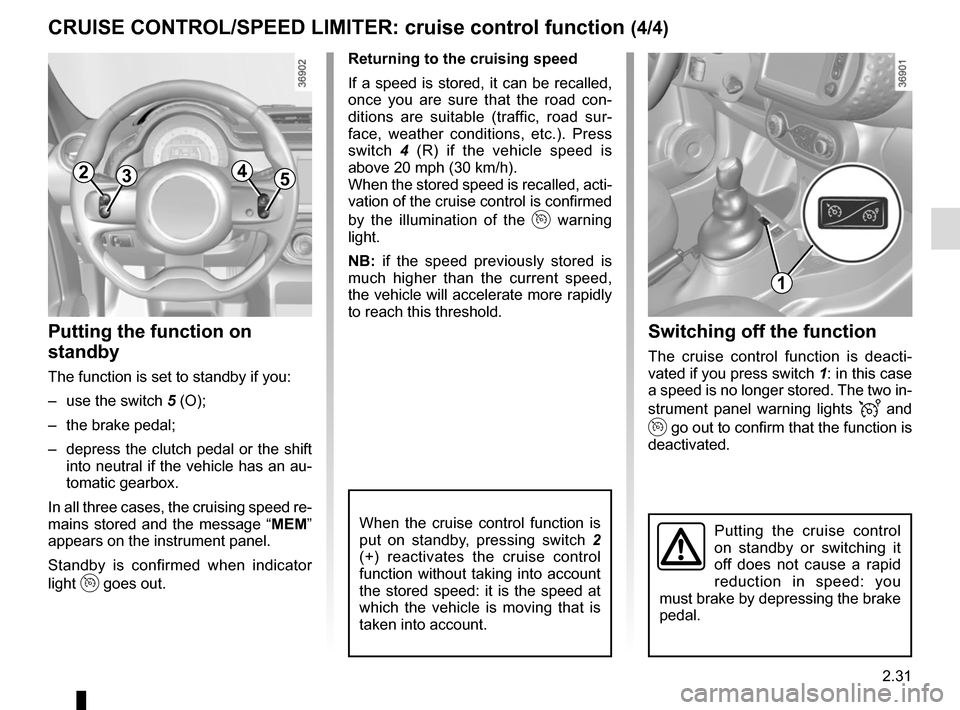
Switching off the function
The cruise control function is deacti-
vated if you press switch 1: in this case
a speed is no longer stored. The two in-
strument panel warning lights
and
go out to confirm that the function is
deactivated.
Returning to the cruising speed
If a speed is stored, it can be recalled,
once you are sure that the road con-
ditions are suitable (traffic, road sur-
face, weather conditions, etc.). Press
switch
4 (R) if the vehicle speed is
above 20 mph (30 km/h).
When the stored speed is recalled, acti-
vation of the cruise control is confirmed
by the illumination of the
warning
light.
NB: if the speed previously stored is
much higher than the current speed,
the vehicle will accelerate more rapidly
to reach this threshold.
When the cruise control function is
put on standby, pressing switch 2
(+) reactivates the cruise control
function without taking into account
the stored speed: it is the speed at
which the vehicle is moving that is
taken into account.
Putting the function on
standby
The function is set to standby if you:
– use the switch 5 (O);
– the brake pedal;
– depress the clutch pedal or the shift into neutral if the vehicle has an au-
tomatic gearbox.
In all three cases, the cruising speed re-
mains stored and the message “ MEM”
appears on the instrument panel.
Standby is confirmed when indicator
light
goes out.
CRUISE CONTROL/SPEED LIMITER: cruise control function (4/4)
Putting the cruise control
on standby or switching it
off does not cause a rapid
reduction in speed: you
must brake by depressing the brake
pedal.
2354
1
Page 109 of 216
2.35
REVERSING CAMERA (2/2)
This function is an additio-
nal aid. It cannot, therefore,
under any circumstances
replace the vigilance or the
responsibility of the driver.
The driver should always pay at-
tention to sudden incidents during
driving: always ensure that there
are no moving obstacles (such as
a child, animal, pram, bicycle, etc.)
or small, narrow objects such as
stones or posts in your path when
manoeuvring.
C
B
A
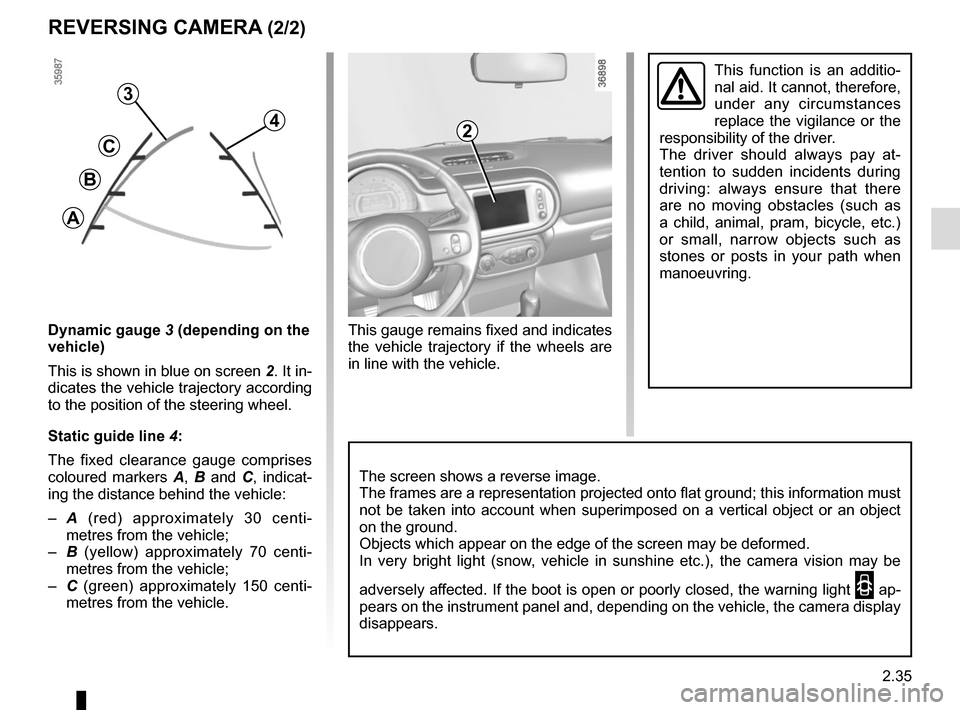
Dynamic gauge 3 (depending on the
vehicle)
This is shown in blue on screen 2. It in-
dicates the vehicle trajectory according
to the position of the steering wheel.
Static guide line 4:
The fixed clearance gauge comprises
coloured markers A, B and C , indicat-
ing the distance behind the vehicle:
– A (red) approximately 30 centi-
metres from the vehicle;
– B (yellow) approximately 70 centi-
metres from the vehicle;
– C (green) approximately 150 centi-
metres from the vehicle.
4
3
The screen shows a reverse image.
The frames are a representation projected onto flat ground; this informa\
tion must
not be taken into account when superimposed on a vertical object or an o\
bject
on the ground.
Objects which appear on the edge of the screen may be deformed.
In very bright light (snow, vehicle in sunshine etc.), the camera vision may be
adversely affected. If the boot is open or poorly closed, the warning light
2 ap-
pears on the instrument panel and, depending on the vehicle, the camera \
display
disappears.
2
This gauge remains fixed and indicates
the vehicle trajectory if the wheels are
in line with the vehicle.
Page 111 of 216
2.37
AUTOMATIC TRANSMISSION (2/3)
Special circumstances
– If the road contours and bends
do not allow you to stay in auto-
matic mode (e.g.: in the mountains),
we recommend that you change to
manual mode.
This will prevent the automatic gear-
box from changing gears repeatedly
when climbing, and permit engine
braking on long descents.
– In cold weather, to prevent the
engine from stalling, wait a few mo-
ments before shifting the selector
lever from position P or N and en-
gaging D or R.
Driving in manual mode
With the selector lever in position D,
move the lever to the left. Shifting the
lever repeatedly allows you to change
gears manually:
– To move down through the gears, push the lever backwards;
– To move up through the gears, push the lever forwards.
The gear selected is displayed on the
instrument panel.
Special cases
Under certain driving conditions (e.g.
engine protection, electronic stability
program (ESP) operational etc.: ESC))
the automatic system may change the
gear automatically.
Likewise, to prevent incorrect manoeu-
vres, a gear change may be refused by
the automatic system: in this case the
gear display flashes for a few seconds
as a warning.
In very cold weather, the system
may prevent the gears from being
shifted in manual mode until the
gearbox reaches the right tempera-
ture.
Parking the vehicle
When the vehicle is stopped, move the
lever to position P while keeping your
foot on the brake pedal: the gearbox is
in neutral and the drive wheels are me-
chanically locked by the driveshaft.
Apply the handbrake.
An impact to the under-
side of the vehicle while
manoeuvring (e.g.: strik-
ing a post, raised kerb or
other street furniture) may result in
damage to the vehicle (e.g.: defor-
mation of an axle).
To avoid any risk of accident, have
your vehicle checked by an ap-
proved Dealer.
Page 152 of 216
4.12
TYRE PRESSURE (1/2)
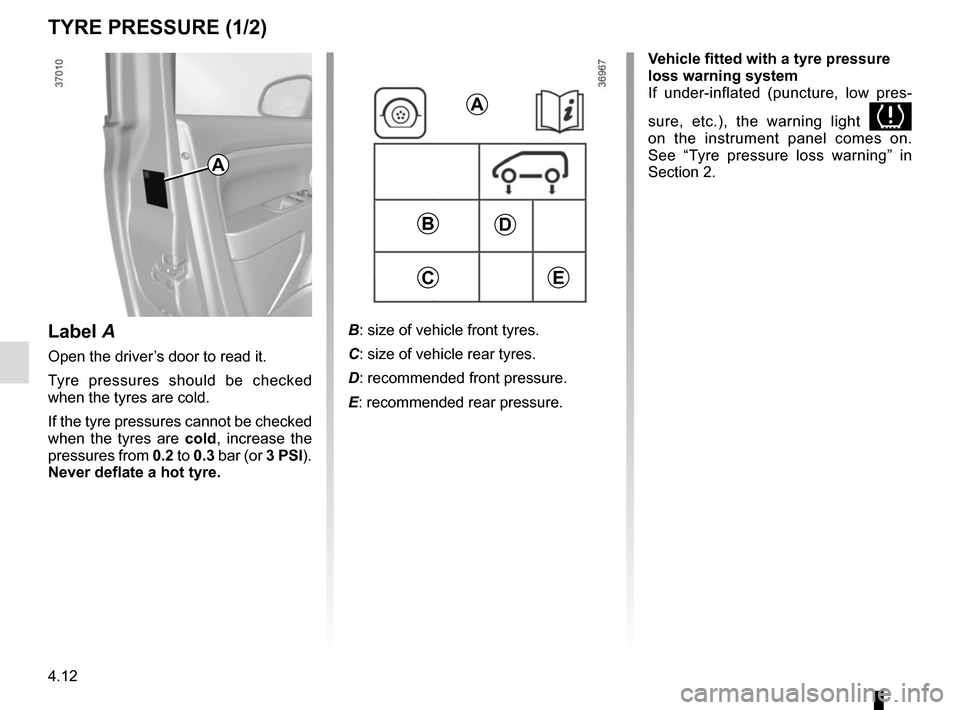
B: size of vehicle front tyres.
C: size of vehicle rear tyres.
D: recommended front pressure.
E: recommended rear pressure.
A
D
E
B
C
Label A
Open the driver’s door to read it.
Tyre pressures should be checked
when the tyres are cold.
If the tyre pressures cannot be checked
when the tyres are cold, increase the
pressures from 0.2 to 0.3 bar (or 3 PSI).
Never deflate a hot tyre.
A
Vehicle fitted with a tyre pressure
loss warning system
If under-inflated (puncture, low pres-
sure, etc.), the warning light
on the instrument panel comes on.
See “Tyre pressure loss warning” in
Section 2.
Page 156 of 216
4.16
Glass instrument panel(e.g.: instrument panel, clock, exterior
temperature display, radio display, mul-
timedia or multifunction display etc.)
Use a soft cloth (or cotton wool).
If this does not clean them properly,
use a soft cloth (or cotton wool) slightly
moistened with soapy water and then
wipe clean with another soft damp cloth
or cotton wool.
Finally, carefully dry off with a soft dry
cloth.
Do not use products containing alco-
hol and/or spray fluids on the area.
Seat belts
These must be kept clean.
Use products selected by our Technical
Department (Approved outlets) or
warm, soapy water and a sponge and
wipe with a dry cloth.
Detergents or dyes must not be used
under any circumstances.
INTERIOR TRIM MAINTENANCE (1/2)
Textiles (seats, door trim, etc)
Vacuum-clean the textiles regularly.
Liquid stain
Use soapy water.
Dab lightly (never rub) with a soft cloth,
rinse and remove the excess.
Solid or pasty stain
Carefully remove the excess solid or
pasty material immediately with a
spatula (working from the edges to the
centre to avoid spreading the stain).
Clean as for a liquid stain.
Special instructions for sweets or
chewing gum
Put an ice cube on the stain to solidify
it, then proceed as for a solid stain.
A well-maintained vehicle will last
longer. It is therefore recommended to
maintain the interior of the vehicle regu-
larly.
A stain should always be dealt with
swiftly.
Whatever type of stain is on the trim,
use
cold (or warm) soapy water with
natural soap.
Detergents (washing-up liquid, pow-
dered products, alcohol-based prod-
ucts) should not be used.
Use a soft cloth.
Rinse and soak up the excess.
For further recommendations for
maintaining the interior, and/or for
any unsatisfactory results, please
see an authorised dealer.
Page 165 of 216
5.7
Tyre pressuresAdhere to the tyre pressures. The tyre
pressures should be checked at least
once a month and additionally before
any long journey (refer to the label af-
fixed to the edge of the driver’s door).
The pressures should be checked cold:
ignore higher pressures which may be
reached in hot weather or following a
high speed journey.Vehicle fitted with a tyre pressure
loss warning system
If under-inflated (puncture, low pres-
sure, etc.), the warning light
on the instrument panel comes on.
See “Tyre pressure loss warning” in
Section 2.
Fitting new tyres
For safety reasons, this op-
eration must be carried out
by a specialist. Fitting differ-
ent tyres may change your
vehicle as follows:
– it may mean that your vehicle no longer conforms to current regu-
lations;
– it may change the way it handles when cornering;
– it may cause the steering to be heavy;
– it may affect the use of snow chains.
If the pressures cannot be checked
when the tyres are cold, increase the
pressures from 0.2 to 0.3 bar (or 3 PSI).
Never deflate a hot tyre.
Changing wheels around
TYRES (2/3)
Please be aware that a
poorly tightened or missing
valve cap can make the
tyres less airtight and lead
to pressure loss.
Always use valve caps identical to
those fitted originally and tighten
them fully.
Incorrect tyre pressures
lead to abnormal tyre wear
and unusually hot running.
These are factors which
may seriously affect safety and lead
to:
– poor road holding,
– risk of bursting or tread separa- tion.
The pressure depends on the load
and the speed of use. Adjust the
pressure according to the condi-
tions of use (refer to the label affixed
to the edge of the driver’s door).
The front and rear wheels
have different dimensions.
For safety reasons, it is not
permitted to switch the front
wheels (tyres and/or rims) with the
rear wheels.