Connect RENAULT ZOE 2018 User Guide
[x] Cancel search | Manufacturer: RENAULT, Model Year: 2018, Model line: ZOE, Model: RENAULT ZOE 2018Pages: 226, PDF Size: 5.51 MB
Page 78 of 226
1.72
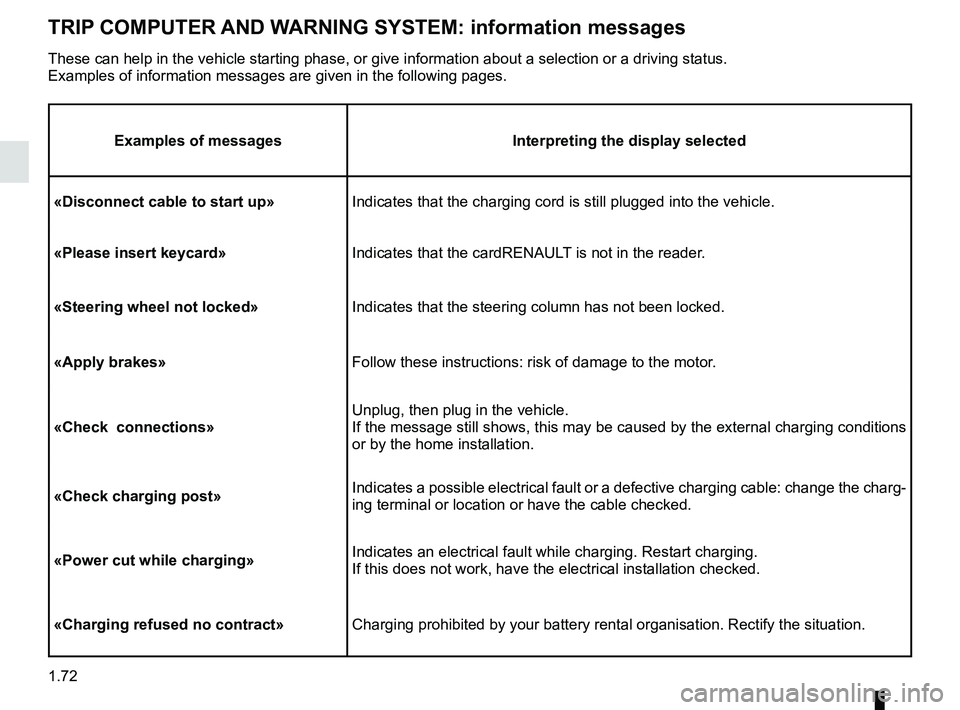
TRIP COMPUTER AND WARNING SYSTEM: information messages
Examples of messagesInterpreting the display selected
«Disconnect cable to start up» Indicates that the charging cord is still plugged into the vehicle.
«Please insert keycard» Indicates that the cardRENAULT is not in the reader.
«Steering wheel not locked» Indicates that the steering column has not been locked.
«Apply brakes» Follow these instructions: risk of damage to the motor.
«Check connections» Unplug, then plug in the vehicle.
If the message still shows, this may be caused by the external charging \
conditions
or by the home installation.
«Check charging post» Indicates a possible electrical fault or a defective charging cable: cha\
nge the charg-
ing terminal or location or have the cable checked.
«Power cut while charging» Indicates an electrical fault while charging. Restart charging.
If this does not work, have the electrical installation checked.
«Charging refused no contract» Charging prohibited by your battery rental organisation. Rectify the sit\
uation.
These can help in the vehicle starting phase, or give information about \
a selection or a driving status.
Examples of information messages are given in the following pages.
Page 81 of 226
1.75
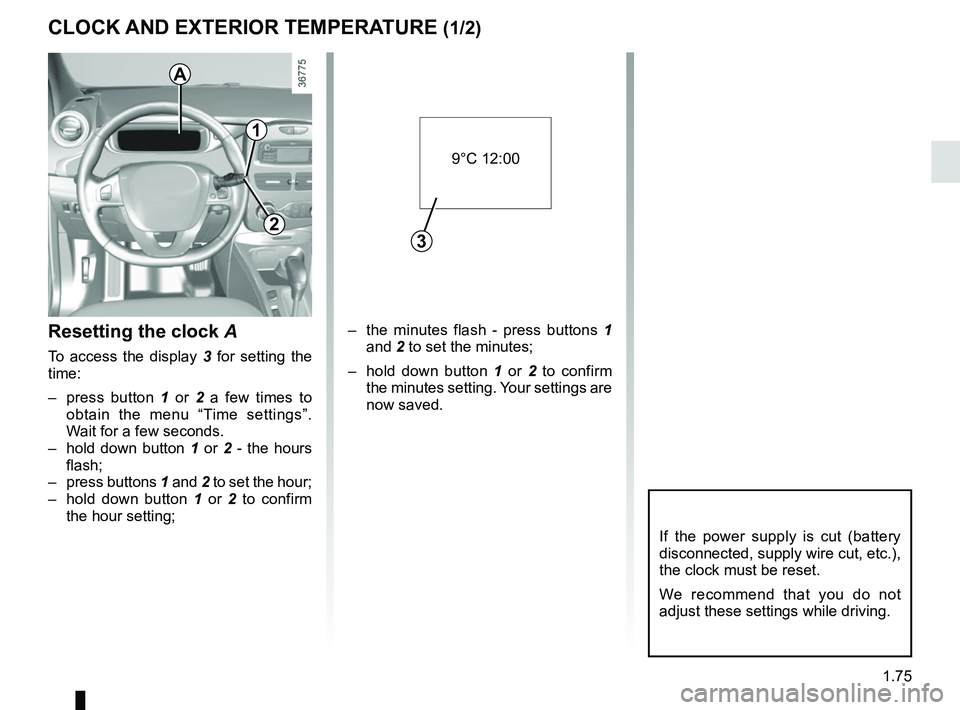
CLOCK AND EXTERIOR TEMPERATURE (1/2)
– the minutes flash - press buttons 1 and 2 to set the minutes;
– hold down button 1 or 2 to confirm
the minutes setting. Your settings are
now saved.Resetting the clock A
To access the display 3 for setting the
time:
– press button 1 or 2 a few times to
obtain the menu “Time settings”.
Wait for a few seconds.
– hold down button 1 or 2 - the hours
flash;
– press buttons 1 and 2 to set the hour;
– hold down button 1 or 2 to confirm
the hour setting;
If the power supply is cut (battery
disconnected, supply wire cut, etc.),
the clock must be reset.
We recommend that you do not
adjust these settings while driving.
9°C 12:00
3
A
1
2
Page 137 of 226
3.11
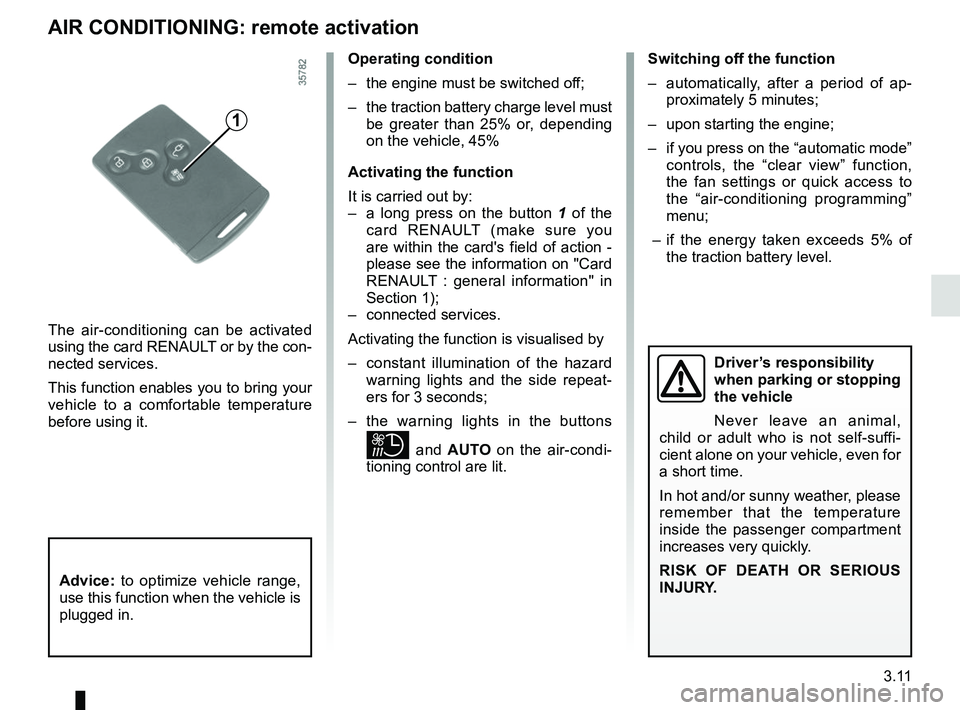
AIR CONDITIONING: remote activation
The air-conditioning can be activated
using the card RENAULT or by the con-
nected services.
This function enables you to bring your
vehicle to a comfortable temperature
before using it.
1
Operating condition
– the engine must be switched off;
– the traction battery charge level must be greater than 25% or, depending
on the vehicle, 45%
Activating the function
It is carried out by:
– a long press on the button 1 of the
card RENAULT (make sure you
are within the card's field of action -
please see the information on "Card
RENAULT : general information" in
Section 1);
– connected services.
Activating the function is visualised by
– constant illumination of the hazard warning lights and the side repeat-
ers for 3 seconds;
– the warning lights in the buttons
and AUTO on the air-condi-
tioning control are lit. Switching off the function
– automatically, after a period of ap-
proximately 5 minutes;
– upon starting the engine;
– if you press on the “automatic mode” controls, the “clear view” function,
the fan settings or quick access to
the “air-conditioning programming”
menu;
– if the energy taken exceeds 5% of the traction battery level.
Driver’s responsibility
when parking or stopping
the vehicle
Never leave an animal,
child or adult who is not self-suffi-
cient alone on your vehicle, even for
a short time.
In hot and/or sunny weather, please
remember that the temperature
inside the passenger compartment
increases very quickly.
RISK OF DEATH OR SERIOUS
INJURY.
Advice: to optimize vehicle range,
use this function when the vehicle is
plugged in.
Page 138 of 226
3.12
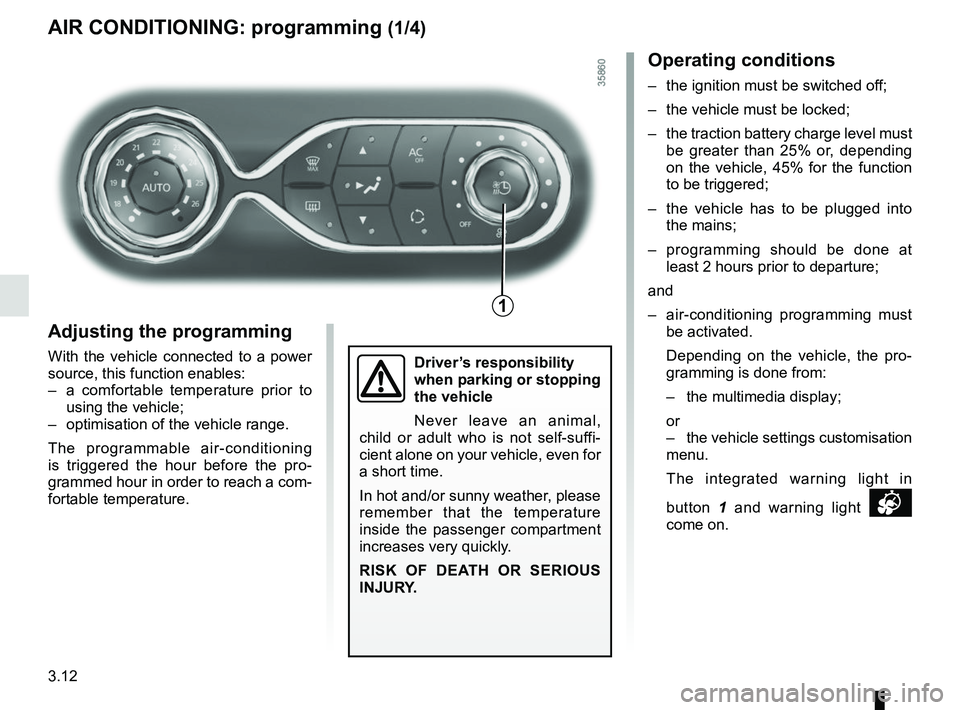
AIR CONDITIONING: programming (1/4)
Adjusting the programming
With the vehicle connected to a power
source, this function enables:
– a comfortable temperature prior to using the vehicle;
– optimisation of the vehicle range.
The programmable air-conditioning
is triggered the hour before the pro-
grammed hour in order to reach a com-
fortable temperature.
1
Driver’s responsibility
when parking or stopping
the vehicle
Never leave an animal,
child or adult who is not self-suffi-
cient alone on your vehicle, even for
a short time.
In hot and/or sunny weather, please
remember that the temperature
inside the passenger compartment
increases very quickly.
RISK OF DEATH OR SERIOUS
INJURY.
Operating conditions
– the ignition must be switched off;
– the vehicle must be locked;
– the traction battery charge level must be greater than 25% or, depending
on the vehicle, 45% for the function
to be triggered;
– the vehicle has to be plugged into the mains;
– programming should be done at least 2 hours prior to departure;
and
– air-conditioning programming must be activated.
Depending on the vehicle, the pro- gramming is done from:
– the multimedia display;
or
– the vehicle settings customisation menu.
The integrated warning light in
button 1 and warning light
come on.
Page 141 of 226
3.15
Stopping the programmed air
conditioning
The air conditioning stops automati-
cally around ten minutes after the set
end time.
However, the function can be deacti-
vated if:
– the charging socket is disconnected;
– the “Remote Activation” function is activated – please see the informa-
tion on “Air conditioning: remote acti-
vation” in Section 2;
– the traction battery charging level is lower than 15% or, depending on the
vehicle, 30%Driver’s responsibility
when parking or stopping
the vehicle
Never leave an animal,
child or adult who is not self-suffi-
cient alone on your vehicle, even for
a short time.
In hot and/or sunny weather, please
remember that the temperature
inside the passenger compartment
increases very quickly.
RISK OF DEATH OR SERIOUS
INJURY.
AIR CONDITIONING: programming (4/4)
Connected services
The air conditioning can also be acti-
vated using the connected services.
For more information regarding the op-
erating conditions, please contact an
authorised dealer.
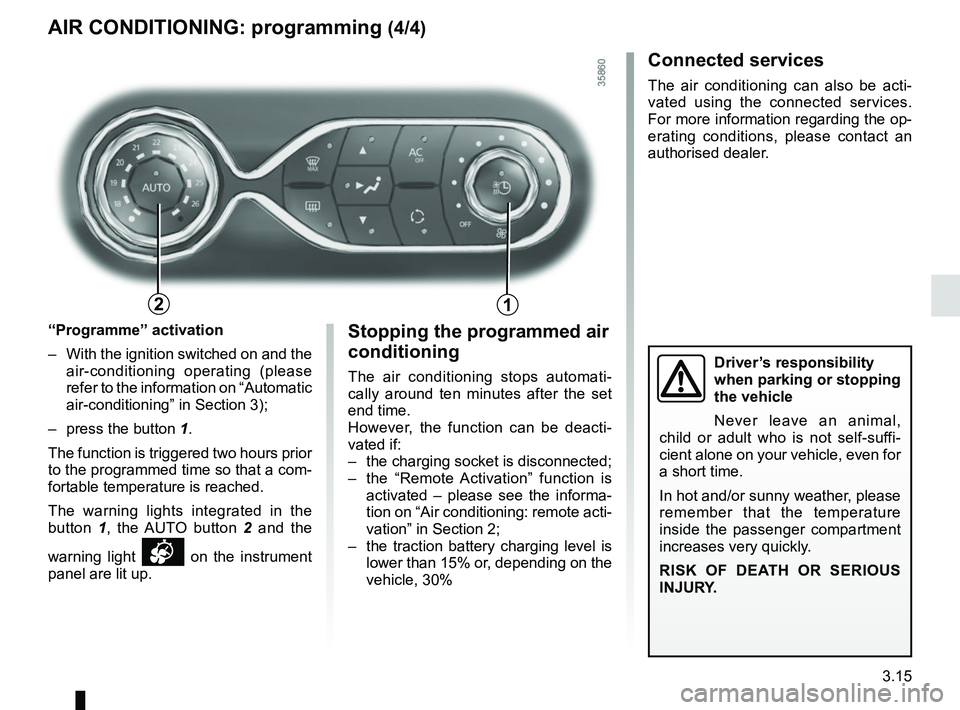
“Programme” activation
– With the ignition switched on and the air-conditioning operating (please
refer to the information on “Automatic
air-conditioning” in Section 3);
– press the button 1.
The function is triggered two hours prior
to the programmed time so that a com-
fortable temperature is reached.
The warning lights integrated in the
button 1, the AUTO button 2 and the
warning light
on the instrument
panel are lit up.
12
Page 152 of 226
3.26
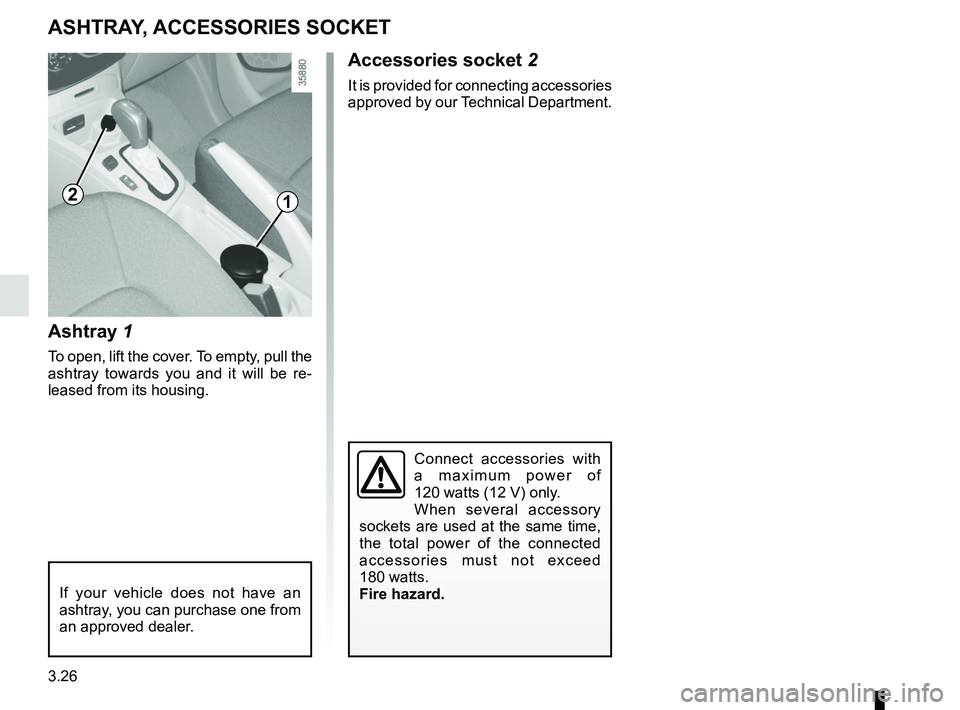
Ashtray 1
To open, lift the cover. To empty, pull the
ashtray towards you and it will be re-
leased from its housing.
ASHTRAY, ACCESSORIES SOCKET
Accessories socket 2
It is provided for connecting accessories
approved by our Technical Department.
If your vehicle does not have an
ashtray, you can purchase one from
an approved dealer.
12
Connect accessories with
a maximum power of
120 watts (12 V) only.
When several accessory
sockets are used at the same time,
the total power of the connected
accessories must not exceed
180 watts.
Fire hazard.
Page 166 of 226
4.6
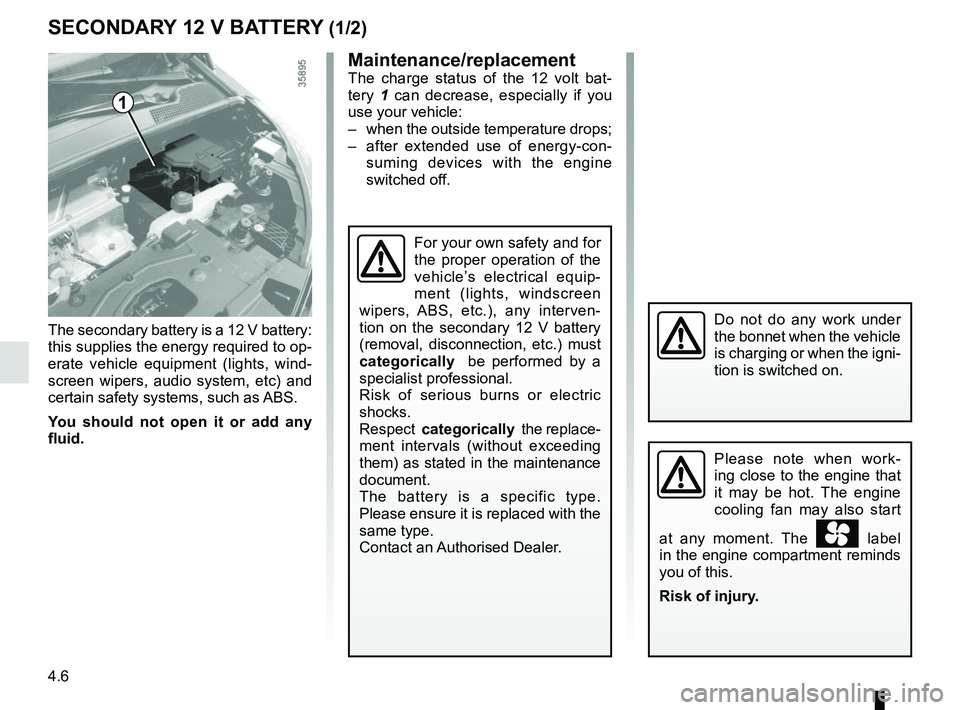
The secondary battery is a 12 V battery:
this supplies the energy required to op-
erate vehicle equipment (lights, wind-
screen wipers, audio system, etc) and
certain safety systems, such as ABS.
You should not open it or add any
fluid.
SECONDARY 12 V BATTERY (1/2)
1
Do not do any work under
the bonnet when the vehicle
is charging or when the igni-
tion is switched on.
For your own safety and for
the proper operation of the
vehicle’s electrical equip-
ment (lights, windscreen
wipers, ABS, etc.), any interven-
tion on the secondary 12 V battery
(removal, disconnection, etc.) must
categorically be performed by a
specialist professional.
Risk of serious burns or electric
shocks.
Respect categorically the replace-
ment intervals (without exceeding
them) as stated in the maintenance
document.
The battery is a specific type.
Please ensure it is replaced with the
same type.
Contact an Authorised Dealer.
Maintenance/replacementThe charge status of the 12 volt bat-
tery 1 can decrease, especially if you
use your vehicle:
– when the outside temperature drops;
– after extended use of energy-con- suming devices with the engine
switched off.
Please note when work-
ing close to the engine that
it may be hot. The engine
cooling fan may also start
at any moment. The
label
in the engine compartment reminds
you of this.
Risk of injury.
Page 167 of 226
4.7
SECONDARY 12 V BATTERY (2/2)Breakdown recovery
To avoid damaging your vehicle, do
not recharge the secondary 12 V
battery using:
– an external battery charger;
– a battery from another vehicle.
Please contact an Authorised
Dealer.
Do not disconnect the sec-
ondary 12 V battery.
Risk of serious burns or
electric shocks.
Do not use your electric vehicle to
restart the 12 volt battery in another
vehicle. The 12 volt electric power of
an electric vehicle is not enough to
perform such an operation.
Risk of damage to vehicle
A234
567
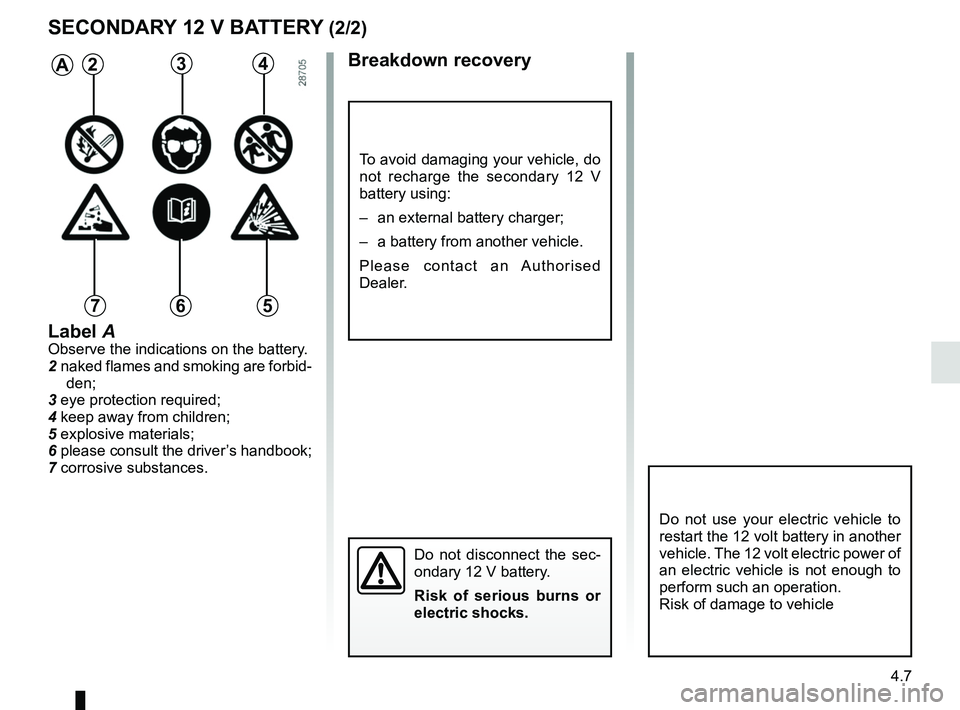
Label AObserve the indications on the battery.
2 naked flames and smoking are forbid-
den;
3 eye protection required;
4 keep away from children;
5 explosive materials;
6 please consult the driver’s handbook;
7 corrosive substances.
Page 171 of 226
4.11
Using a roller type car wash
Return the windscreen wiper stalk to
the Park position (refer to the informa-
tion on the “Windscreen washer, wiper”
in Section 1). Check the mounting of
external accessories, additional lights
and mirrors, and ensure that the wiper
blades are secured with adhesive tape.
Remove the radio aerial mast if your
vehicle is fitted with this equipment.
Remember to remove the tape and refit
the antenna after washing.
BODYWORK MAINTENANCE (3/3)Cleaning the headlights
As the headlights are made of plastic
“glass”, use a soft cloth or cotton wool
to clean them. If this does not clean
them properly, moisten the cloth with
soapy water, then wipe clean with a soft
damp cloth or cotton wool.
Finally, carefully dry off with a soft dry
cloth.
Do not use cleaning products con-
taining alcohol or utensils (e.g.: a
scraper).
Washing the vehicle
Never wash the engine
compartment, the charging
connection or the traction
battery with a high-pressure jet.
This risks damaging the electric cir-
cuit.
Never wash the vehicle while it is
charging.
Risk of electric shock and a risk to
life.
Vehicles with a matte paint
finish
This type of paint requires certain pre-
cautions.
Do not do the following
Use wax-based products (polishing).
Rub too hard.
Wash the vehicle in a roller-type car
wash.
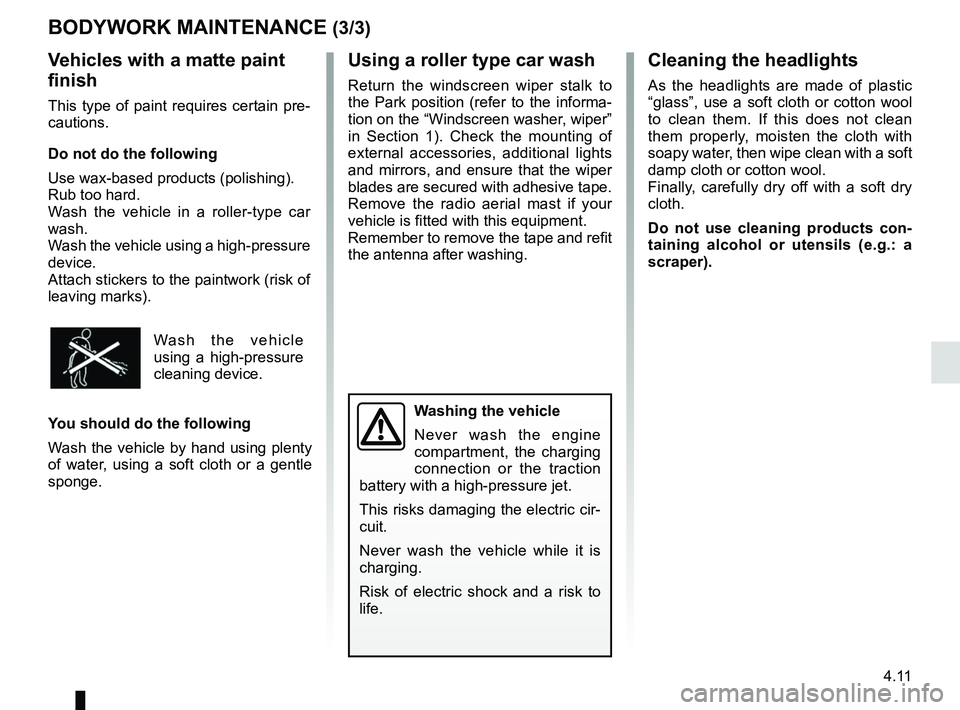
Wash the vehicle using a high-pressure
device.
Attach stickers to the paintwork (risk of
leaving marks).
Wash the vehicle
using a high-pressure
cleaning device.
You should do the following
Wash the vehicle by hand using plenty
of water, using a soft cloth or a gentle
sponge.
Page 178 of 226
5.4
TYRE PRESSURE KIT (2/3)
Depending on the vehicle, in the event
of a puncture, use the kit located in the
boot or underneath the luggage com-
partment carpet.
Vehicle fitted with a tyre pressure
loss warning system
If under-inflated (puncture, low pres-
sure, etc.), the warning light
lights up on the instrument panel. See
“Tyre pressure loss warning” in
Section 2.
With the engine running and the
parking brake applied,
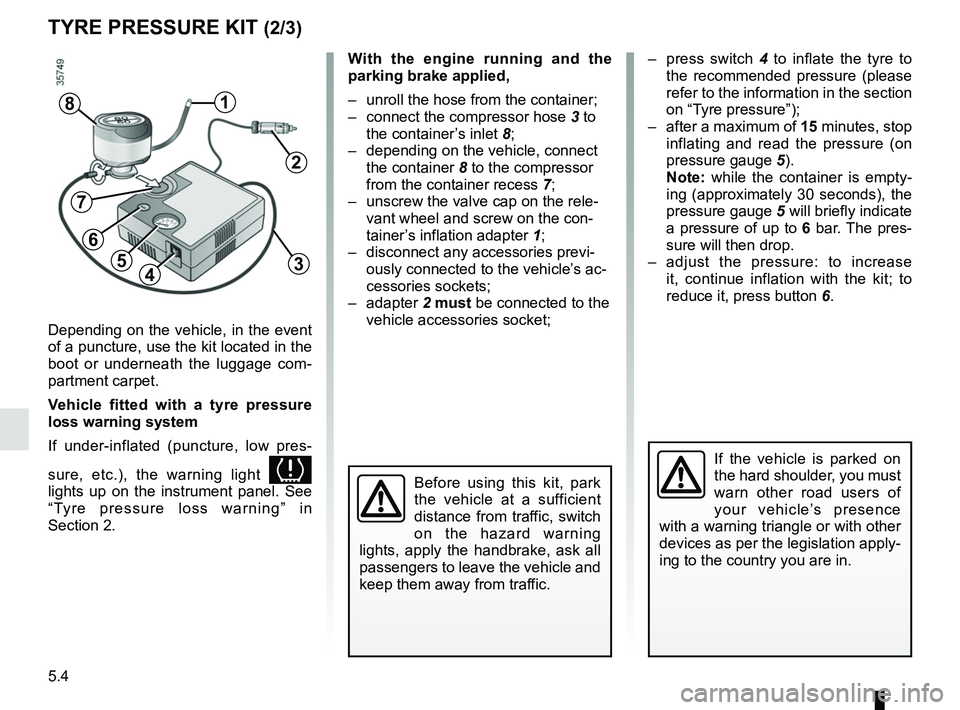
– unroll the hose from the container;
– connect the compressor hose 3 to
the container’s inlet 8;
– depending on the vehicle, connect the container 8 to the compressor
from the container recess 7;
– unscrew the valve cap on the rele- vant wheel and screw on the con-
tainer’s inflation adapter 1;
– disconnect any accessories previ- ously connected to the vehicle’s ac-
cessories sockets;
– adapter 2 must be connected to the
vehicle accessories socket;
45
1
Before using this kit, park
the vehicle at a sufficient
distance from traffic, switch
on the hazard warning
lights, apply the handbrake, ask all
passengers to leave the vehicle and
keep them away from traffic.
8
If the vehicle is parked on
the hard shoulder, you must
warn other road users of
your vehicle’s presence
with a warning triangle or with other
devices as per the legislation apply-
ing to the country you are in.
– press switch 4 to inflate the tyre to
the recommended pressure (please
refer to the information in the section
on “Tyre pressure”);
– after a maximum of 15 minutes, stop inflating and read the pressure (on
pressure gauge 5).
Note: while the container is empty-
ing (approximately 30 seconds), the
pressure gauge 5 will briefly indicate
a pressure of up to 6 bar. The pres-
sure will then drop.
– adjust the pressure: to increase it, continue inflation with the kit; to
reduce it, press button 6.
2
3
7
6