display SAAB 9-3 2000 User Guide
[x] Cancel search | Manufacturer: SAAB, Model Year: 2000, Model line: 9-3, Model: SAAB 9-3 2000Pages: 236, PDF Size: 10.85 MB
Page 64 of 236
64 Instruments and controls If the speed of the car exceeds 84 mph
(135 km/h), the entire speedometer will
be illuminated.
In cars with automatic transmission, if the
selector lever is moved from D to position
3, 2 or 1, the selector indication on the
main instrument panel will be illuminated.
To restore the displays and lighting to the
normal mode, press the Night-Panel button. Setting the date1 Use or to select TEMP/DATE.
2 Press the CLEAR button and for at
least one second (year starts to flash
and a chime sounds).
3 Set the year using or .
4 Touch CLEAR.
5 Set the month in the same way.
6 Touch CLEAR.
7 Set the day in the same way.
8 Press CLEAR to save the date setting.
Units and language versions The SID has four sets of units:
CHECK messages can be displayed in six
language options: English, Swedish,
German, French, Italian and Spanish. Selecting units and language 1 Depress the CLEAR button and at
the same time for 4 seconds until an
audible signal sounds.
2 Select the required units with or .
3 Briefly depress the CLEAR button.
4 Press or to select the required
language.
5 Briefly depress the CLEAR button.
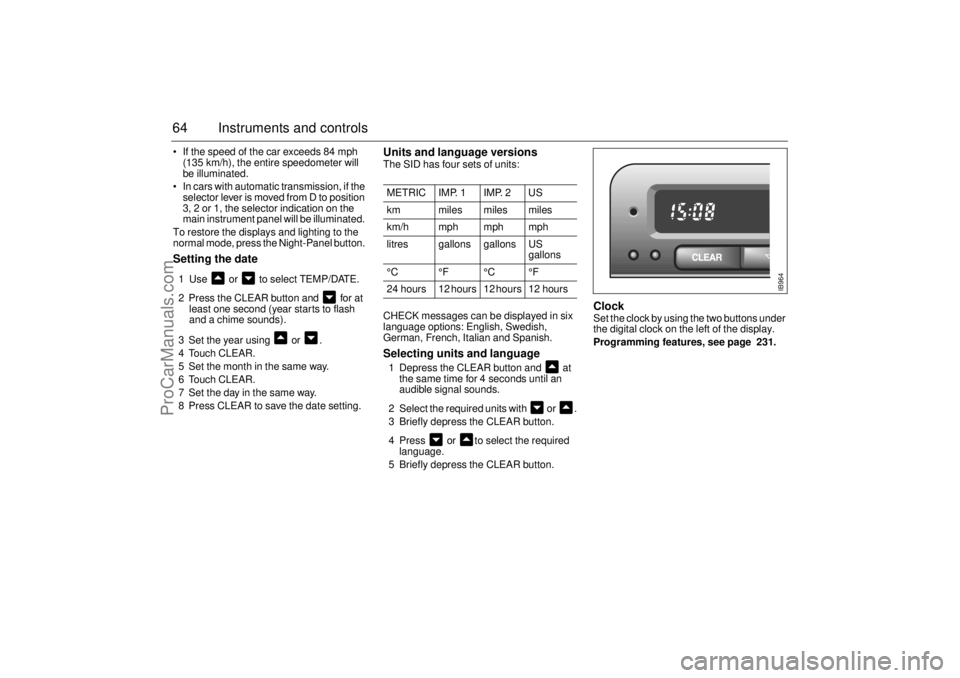
Clock Set the clock by using the two buttons under
the digital clock on the left of the display.
Programming features, see page 231.
METRIC IMP. 1 IMP. 2 US
km miles miles miles
km/h mph mph mph
litres gallons gallons US
gallons
°C °F °C °F
24 hours 12 hours 12 hours 12 hours
IB964
ProCarManuals.com
Page 66 of 236
66 Instruments and controlsSetting the date1 Use to select TEMP/DATE.
2 Press the SET button for at least one
second (year starts to flash and a chime
sounds).
3 Set the year using or .
4 Touch SET.
5 Set the month in the same way.
6 Touch SET.
7 Set the day in the same way.
8 Press SET to save the date setting.
Turning the Alarm and Speed
warning on or off 1 Select the Alarm or Speed-warning
function.
2 Press SET to turn on the function.
Press CLR to turn off the function.
When either function is on, an asterisk
* will
be visible on the far right of the display. The
function will be visible even if another func-
tion has been selected.
The Alarm and Speed-warning settings will
not be cancelled when the engine is
switched off.
When the Alarm has been set to come on at
a specified time, it will only be activated
once – it will not come on at the same time
every day. Press SET to turn it on again.
The Alarm will continue to beep for one
minute if not switched off.
Calculation of arrival time and
average speed The settings must be made before the jour-
ney is started.
Calculation of arrival time:
1 Select DIST using the button.
2 Hold SET until display starts flashing.
3 Set the destination distance using or
.
4 Press SET to store settings.
When ARRIV is selected during the journey,
the arrival time based on the average speed
over the past 20 minutes will be displayed.
Press DIST and the distance remaining to
the destination will be displayed in the same
way.
After the distance to destination has
decreased to zero, the DIST will function as
a trip meter (see ”Using DIST as a trip
meter”). The starting value for the trip meter
will be the last distance set in the DIST
function.
Example: The DIST setting was 100 miles.
Once 100 miles (160 km) has been cov-
ered, the DIST will start to function as a trip
meter, the initial reading of which will be
100 miles (160 km).
ProCarManuals.com
Page 67 of 236

67 Instruments and controls
Using DIST as a trip meter If no value has been set for the DIST func-
tion, DIST will now function as a trip meter
(indicated by an arrow on the far right of the
display).
Press CLR to reset the trip meter.
Under 1000 miles the distance will be
shown in increments of 0.1 miles,
there-after, the reading will change in incre-
ments of 1.0 miles.
Metric units: for just under a kilometer, the
distance will be shown in increments of
10 meters, there-after, the reading will
change in increments of 100 meters.
When DIST is functioning as a trip meter,
the ARRIV function will display the current
time. To calculate the arrival time if a specified
average speed is maintained
1 Select DIST using the button.
2 Hold the SET button for two seconds.
3 Set the distance to be covered using
or .
4 Press SET to store settings.
5 Press to select SPD Ø.
6 Hold the SET button for two seconds.
7 Set the average speed you intend to
drive at using or .
8 Press SET to display the estimated
arrival time.
At the beginning of a journey, the SPD Ø
and ARRIV functions will display current
values. If values are set during the journey,
the new values will be displayed after a
delay of about 10 seconds. Calculating the requisite average speed:
1 Press to select DIST.
2 Hold the SET button for two seconds.
3 Set the distance to be covered using
or .
4 Press SET to store settings.
5 Press to select ARRIV.
6 Hold the SET button for two seconds.
7 Set the desired arrival time using or
.
8 Press SET to display the average speed
you need to maintain to arrive at the
desired time.
At the beginning of a journey, the SPD Ø
and ARRIV functions will display current
values. If values are set during the journey,
the new values will be displayed after a
delay of about 10 seconds.
ProCarManuals.com
Page 68 of 236

68 Instruments and controlsResetting values
To reset the values, press CLR for at least
four seconds.
The following functions will be reset
simultaneously:
Estimated range on remaining fuel
(function based on a fuel consumption of
28 mpg)
Average fuel consumption
Average speed
Arrival time (function based on current
speed)
Programmed values for DIST, ALARM and
SPD W will not be reset (see the respective
function).
CHECK messages When the engine is started, CHECKING will
appear on the display for about four sec-
onds, while the SID checks are being per-
formed.
When a CHECK message is generated
while the car is being driven, a chime will
sound, INFO DISPL will illuminate on the
main instrument panel, and the message
will appear on the SID. The number of mes-
sages that can be displayed by the SID
varies with the specification of the car.
If more than one CHECK message has
been generated, the
+ symbol will appear to
the left of the text on the display. The mes-
sages appear in order of priority.
If a new fault occurs while another message
is being displayed, the message relating to
the new one will appear for 10 seconds,
after which the display will return to the ear-
lier one.
Press CLR once to acknowledge a mes-
sage, whereupon it will be cleared from the
display. It will not be displayed again before
the ignition has been switched off and then
on again. The following CHECK messages may be
displayed:
1 This message cannot be removed by pressing
CLR. Press the brake pedal to clear.
2 This message will be displayed approximately
600 miles (1,000 km) before the next sched-
uled service is due, or when 365 days have
elapsed since the last service. The message
should be cleared at the time of that service
(see the Saab Warranties & Service Record
Booklet).
If you have carried out the service yourself, you
can clear the message by pressing CLR once.
Reset by pressing CLR for at least eight sec-
onds, until ”SERVICE” appears on the display
and a chime sounds. Display shows: See
page
TEST BRAKE LIGHTS
1)
183
BRAKE LIGHT FAILURE 183
FRONT LIGHT FAILURE 181
REAR LIGHT FAILURE 183
FOG LIGHT FAILURE 184
WASHER FLUID LEVEL LOW 180
TIGHTEN FUEL FILLER CAP 138
FILL COOLANT FLUID 174
KEY NOT ACCEPTED 39
REPLACE KEY BATTERY 39
SERVICE THEFT ALARM 39
TRANSMISSION OVERHEAT-
ING 144
TIME FOR SERVICE
2)
212
ProCarManuals.com
Page 69 of 236

69 Instruments and controls
Night panelTo improve night-driving conditions inside
the car, the Night Panel mode can be
selected. In this mode, the amount of infor-
mation displayed is reduced, and only the
most important instruments and displays
will be illuminated.
When the Night Panel button is pressed,
only the speedometer will be illuminated (up
to the 87-mph or 140-km/h graduation), all
the other instruments illumination will be
extinguished and their needles moved to
zero. Both the SID and the ACC displays will
be extinguished and the backlighting for
switches and other controls will be dimmed.
Note: All indicator and warning lights,
together with the display of CHECK mes-
sages, will operate as normal. The following conditions will wake up the
respective displays in the Night-Panel
mode:
Setting of the Audio System, SID or ACC
(display comes on for ten seconds).
CHECK message generated in the SID.
High engine revs cause the rev counter to
be illuminated until the engine speed has
fallen again.
If the quantity of fuel remaining falls below
4 gallons (15 liters), the fuel gauge will be
illuminated.
If the engine temperature rises above nor-
mal, the temperature gauge will be illumi-
nated.
If the speed of the car exceeds 84 mph
(135 km/h), the entire speedometer will
be illuminated.
In cars with automatic transmission, if the
selector lever is moved from D to position
3, 2 or 1, the selector indication on the
main instrument panel will be illuminated.
To restore the displays and lighting to the
normal mode, press the Night-Panel button.
Units and language versions The SID has four sets of units:
CHECK messages can be displayed in six
language options: English, Swedish,
German, French, Italian and Spanish. METRIC IMP. 1 IMP. 2 US
km miles miles miles
km/h mph mph mph
litres gallons gallons US
gallons
°C °F °C °F
24 hours 12 hours 12 hours 12 hours
ProCarManuals.com
Page 70 of 236
70 Instruments and controlsSelecting units and language 1 Press the CLR and SET buttons at the
same time for 4 seconds until an audible
signal sounds.
2 Press or to select the required
units.
3 Touch SET.
4 Press or to select the required
language.
5 Touch SET.
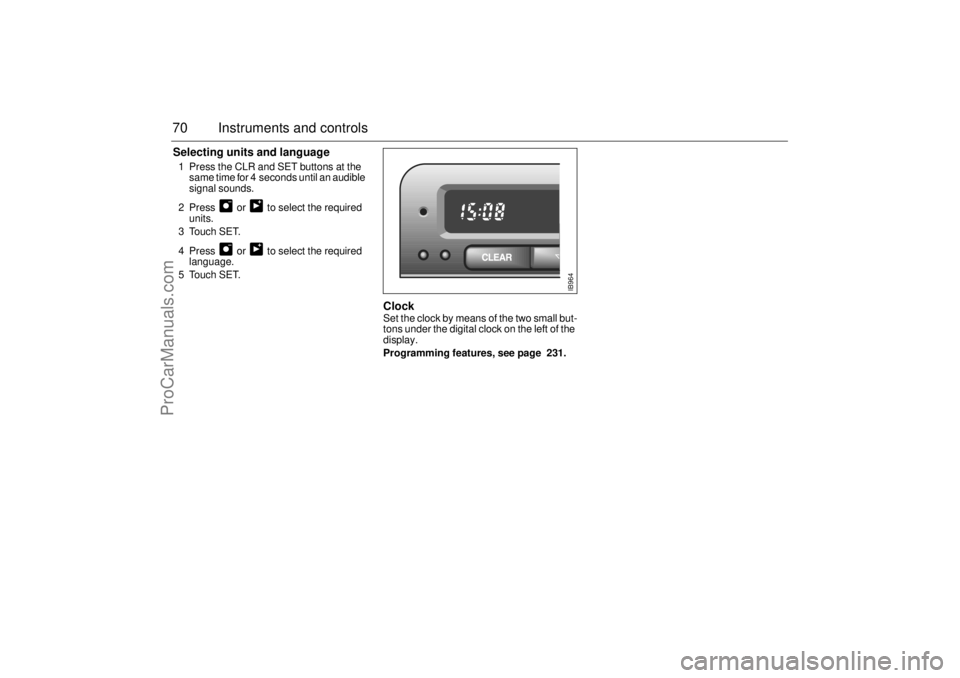
Clock Set the clock by means of the two small but-
tons under the digital clock on the left of the
display.
Programming features, see page 231.
IB964
ProCarManuals.com
Page 80 of 236
80 Instruments and controlsAutomatic climate
control (ACC)The air is drawn in through an intake at the
bottom edge of the windshield. It passes
through an efficient filter before being
routed through the climate-control system
and into the cabin. The cabin discharge vent
is located on the right behind the rear
bumper. The air discharge vents should be
kept free of snow and ice in the winter.
ACC (Automatic Climate Control) automati-
cally maintains the desired cabin tempera-
ture, regardless of the weather outside.
The system will achieve the desired temper-
ature in the quickest possible way.
Note that heating or cooling is not
speeded up by setting the temperature
higher or lower than you really want.
For the ACC system to be most effective, all
windows, and the sunroof if there is one,
must be closed, and the panel vents must
be open.
The incoming air is treated in three stages:
first it passes through a filter; it is then dehu-
midified and cooled and, finally, if required,
heated. The temperature interval within which you
can make adjustments is 58-82°F
(15-27°C). Outside it, there is the HI position
(max. heat and high fan speed) and the LO
position (max. cooling and max. fan speed).
The displayed temperature is not the actual
temperature but corresponds to the comfort
level normally experienced at that tempera-
ture after allowance has been made for the
air flow, relative humidity, solar radiation,
etc., currently prevailing inside the car.
The most usual temperature setting is
66-74°F (19-23°C), depending on per-
sonal preference and what clothing is
worn. It is recommended that changes in the
temperature setting be made in steps of
2°F (1°C).
Conversion between °C and °F is done in
the SID unit; see ”Units and language ver-
sions”, page 69.
During the cooling phase in warm
weather the panel vents must be open.
Do not manually select recirculation in
cold/wintery weather. The reduced air
flow can cause misting and ice on the
inside of the windows.
IB794
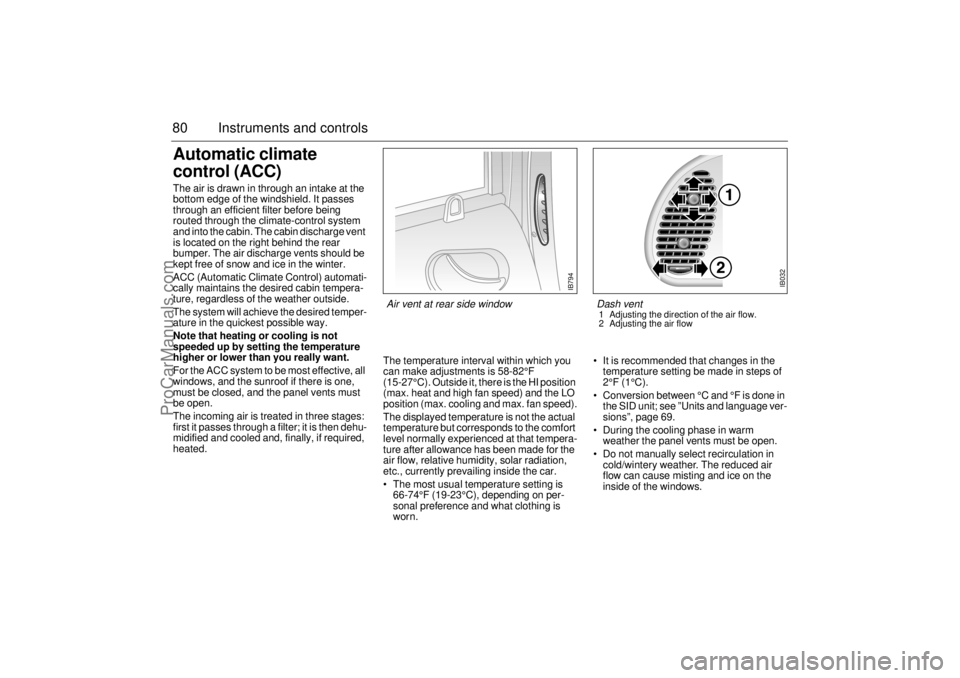
Air vent at rear side window
IB032
Dash vent 1 Adjusting the direction of the air flow.
2 Adjusting the air flow
ProCarManuals.com
Page 82 of 236
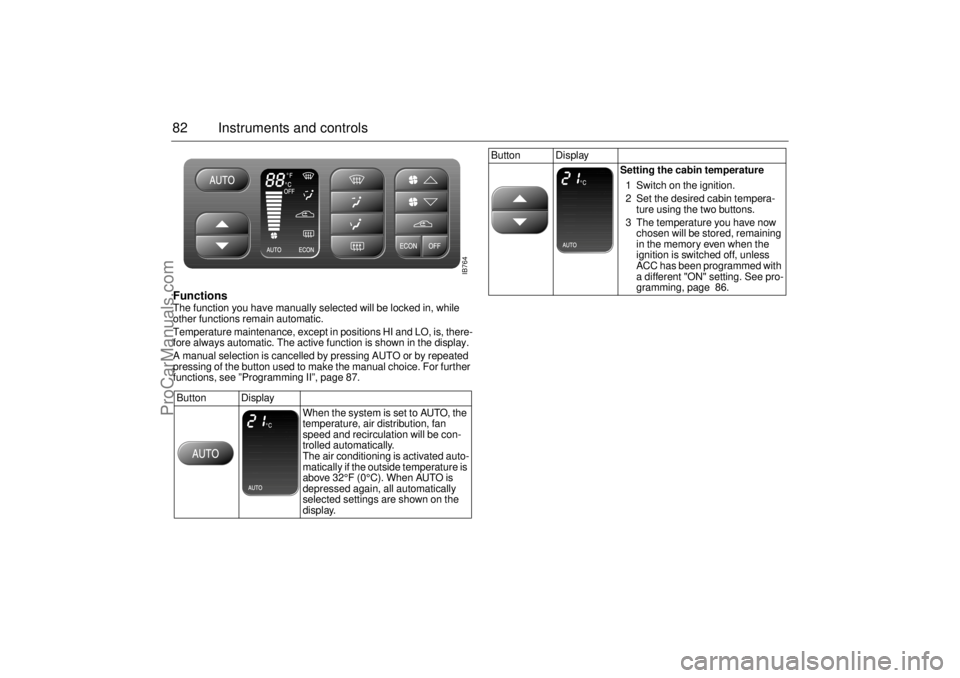
82 Instruments and controlsFunctions The function you have manually selected will be locked in, while
other functions remain automatic.
Temperature maintenance, except in positions HI and LO, is, there-
fore always automatic. The active function is shown in the display.
A manual selection is cancelled by pressing AUTO or by repeated
pressing of the button used to make the manual choice. For further
functions, see ”Programming II”, page 87.
Button Display
When the system is set to AUTO, the
temperature, air distribution, fan
speed and recirculation will be con-
trolled automatically.
The air conditioning is activated auto-
matically if the outside temperature is
above 32°F (0°C). When AUTO is
depressed again, all automatically
selected settings are shown on the
display.
Button Display
Setting the cabin temperature
1 Switch on the ignition.
2 Set the desired cabin tempera-
ture using the two buttons.
3 The temperature you have now
chosen will be stored, remaining
in the memory even when the
ignition is switched off, unless
ACC has been programmed with
a different "ON" setting. See pro-
gramming, page 86.
IB764
ProCarManuals.com
Page 83 of 236
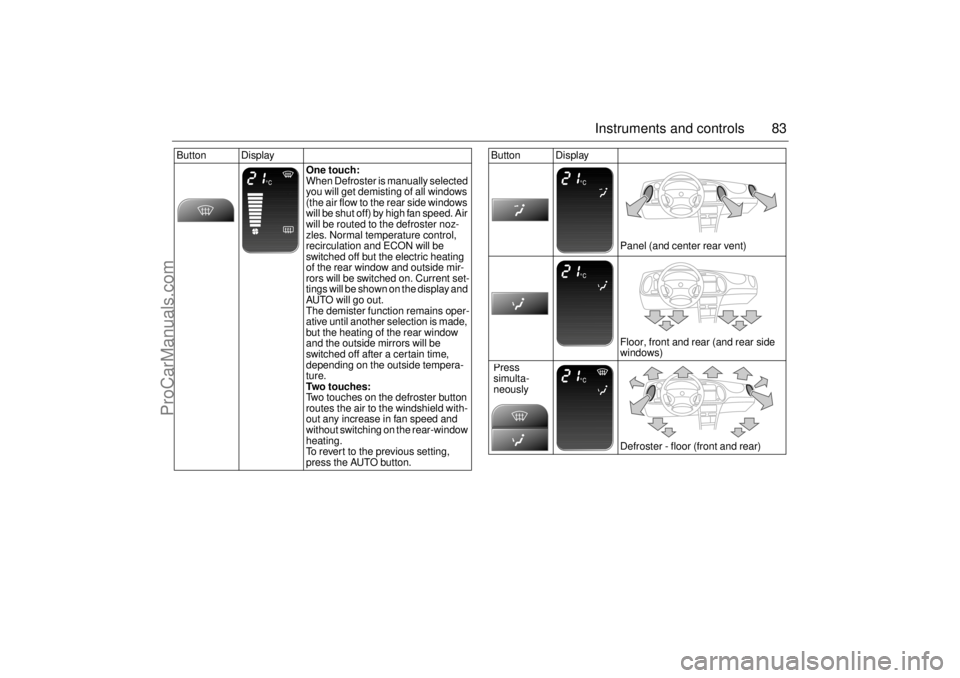
83 Instruments and controls
Button Display
One touch:
When Defroster is manually selected
you will get demisting of all windows
(the air flow to the rear side windows
will be shut off) by high fan speed. Air
will be routed to the defroster noz-
zles. Normal temperature control,
recirculation and ECON will be
switched off but the electric heating
of the rear window and outside mir-
rors will be switched on. Current set-
tings will be shown on the display and
AUTO will go out.
The demister function remains oper-
ative until another selection is made,
but the heating of the rear window
and the outside mirrors will be
switched off after a certain time,
depending on the outside tempera-
ture.
Two touches:
Two touches on the defroster button
routes the air to the windshield with-
out any increase in fan speed and
without switching on the rear-window
heating.
To revert to the previous setting,
press the AUTO button.
Button Display
Panel (and center rear vent)
Floor, front and rear (and rear side
windows)
Defroster - floor (front and rear) Press
simulta-
neously
ProCarManuals.com
Page 84 of 236
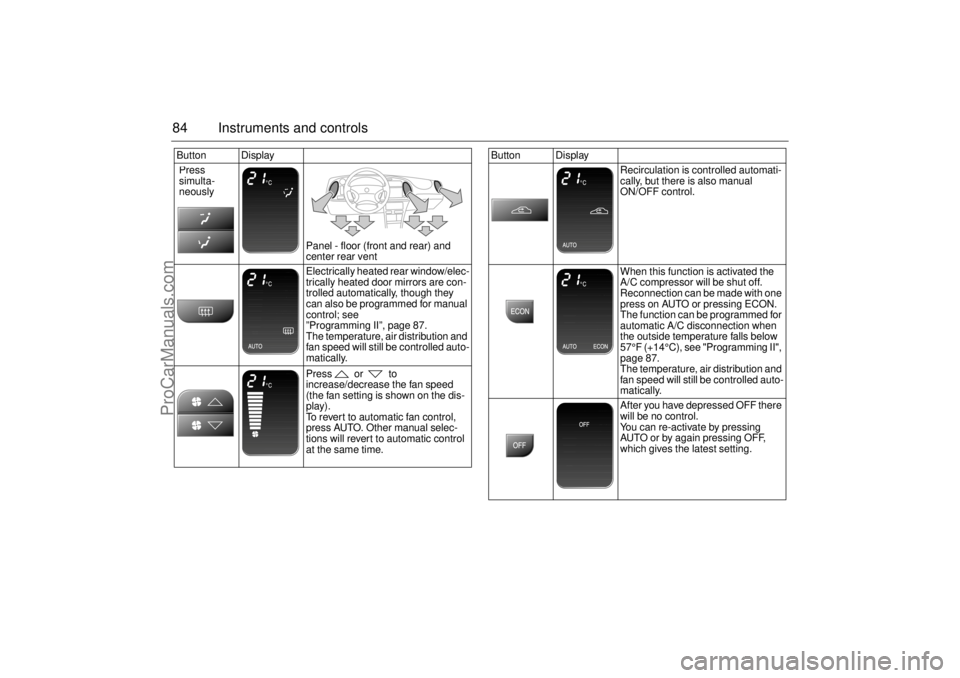
84 Instruments and controlsButton Display
Panel - floor (front and rear) and
center rear vent
Electrically heated rear window/elec-
trically heated door mirrors are con-
trolled automatically, though they
can also be programmed for manual
control; see
”Programming II”, page 87.
The temperature, air distribution and
fan speed will still be controlled auto-
matically.
Press or to
increase/decrease the fan speed
(the fan setting is shown on the dis-
play).
To revert to automatic fan control,
press AUTO. Other manual selec-
tions will revert to automatic control
at the same time. Press
simulta-
neously
Button Display
Recirculation is controlled automati-
cally, but there is also manual
ON/OFF control.
When this function is activated the
A/C compressor will be shut off.
Reconnection can be made with one
press on AUTO or pressing ECON.
The function can be programmed for
automatic A/C disconnection when
the outside temperature falls below
57°F (+14°C), see "Programming II",
page 87.
The temperature, air distribution and
fan speed will still be controlled auto-
matically.
After you have depressed OFF there
will be no control.
You can re-activate by pressing
AUTO or by again pressing OFF,
which gives the latest setting.
ProCarManuals.com