heating SAAB 9-3 2002 User Guide
[x] Cancel search | Manufacturer: SAAB, Model Year: 2002, Model line: 9-3, Model: SAAB 9-3 2002Pages: 256, PDF Size: 11.55 MB
Page 91 of 256
91 Instruments and controls
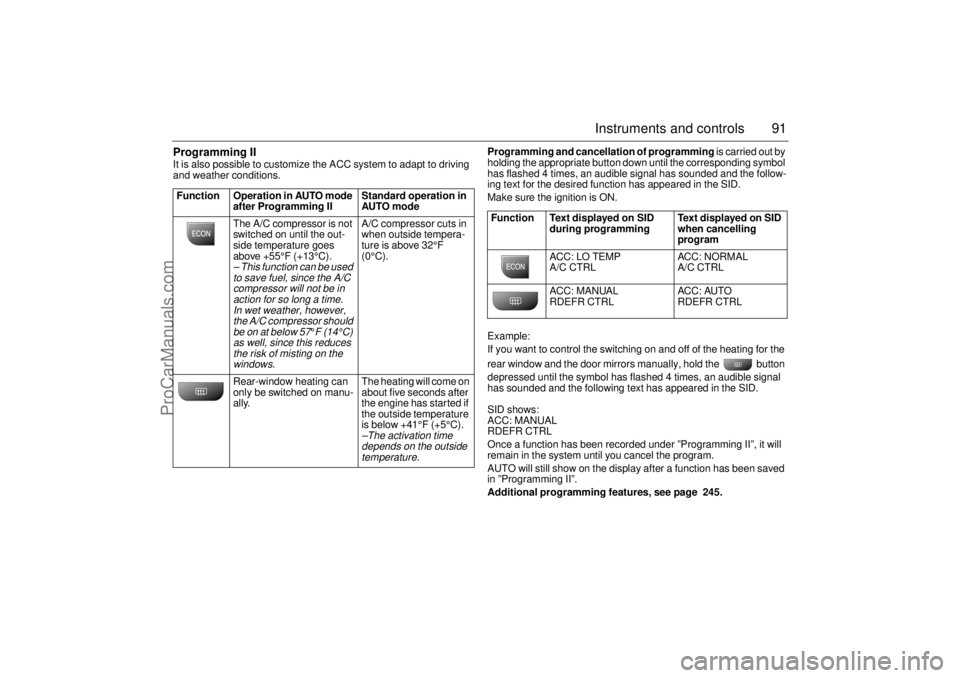
Programming II It is also possible to customize the ACC system to adapt to driving
and weather conditions. Programming and cancellation of programming is carried out by
holding the appropriate button down until the corresponding symbol
has flashed 4 times, an audible signal has sounded and the follow-
ing text for the desired function has appeared in the SID.
Make sure the ignition is ON.
Example:
If you want to control the switching on and off of the heating for the
rear window and the door mirrors manually, hold the button
depressed until the symbol has flashed 4 times, an audible signal
has sounded and the following text has appeared in the SID.
SID shows:
ACC: MANUAL
RDEFR CTRL
Once a function has been recorded under ”Programming II”, it will
remain in the system until you cancel the program.
AUTO will still show on the display after a function has been saved
in ”Programming II”.
Additional programming features, see page 245. Function Operation in AUTO mode
after Programming II Standard operation in
AUTO mode
The A/C compressor is not
switched on until the out-
side temperature goes
above +55°F (+13°C).
– This function can be used
to save fuel, since the A/C
compressor will not be in
action for so long a time.
In wet weather, however,
the A/C compressor should
be on at below 57
°F (14°C)
as well, since this reduces
the risk of misting on the
windows.
A/C compressor cuts in
when outside tempera-
ture is above 32°F
(0°C).
Rear-window heating can
only be switched on manu-
ally. The heating will come on
about five seconds after
the engine has started if
the outside temperature
is below +41°F (+5°C).–The activation time
depends on the outside
temperature.
Function Text displayed on SID
during programming Text displayed on SID
when cancelling
program
ACC: LO TEMP
A/C CTRL ACC: NORMAL
A/C CTRL
ACC: MANUAL
RDEFR CTRL ACC: AUTO
RDEFR CTRL
ProCarManuals.com
Page 92 of 256
92 Instruments and controlsUseful tips: If the ACC system is not functioning
satisfactorily the following should be tried
before you take the car to an authorized
Saab dealer.
If the indication AUTO does not light up
after starting (the ignition must have been
switched off for at least 10 minutes): See
“Cancelling program I”, page 90.
If you think that the ACC system is not
functioning satisfactorily you should:
1 Check that the cigarette lighter plug is in
its socket (since if the socket is empty
heated air can flow out and affect the
cabin sensor).
2 Recalibrate: See the section headed
Calibration, page 90.
If the battery has been disconnected or
has died, the ACC system should be reca-
librated: See Calibration, pag 90.
Programmed settings are not deleted if the
battery has been disconnected. Extinguishing the lighting in ACC See section Night panel, page 73.
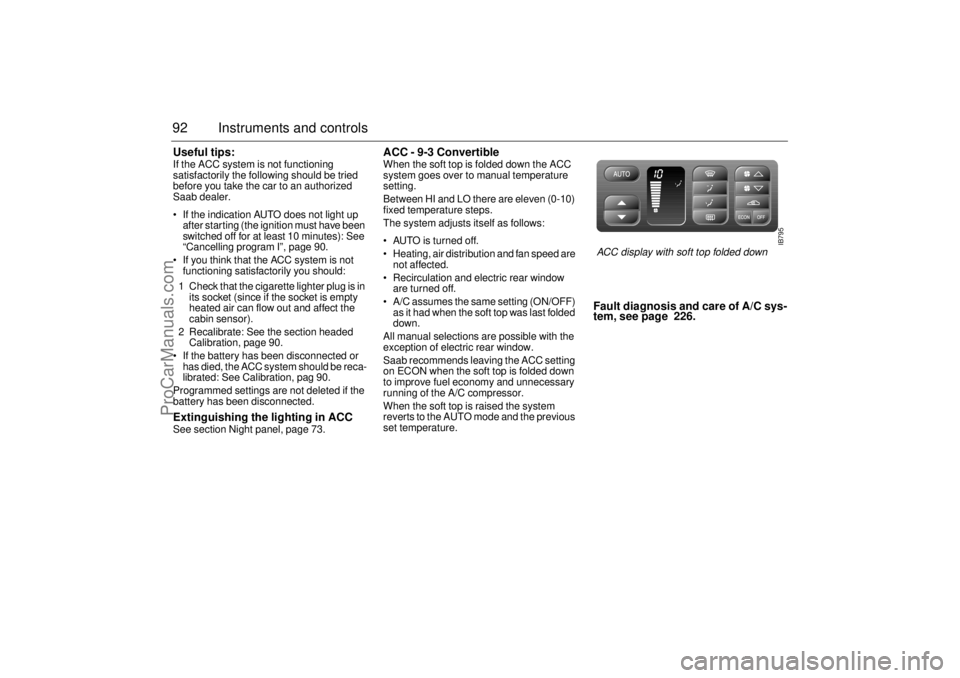
ACC - 9-3 Convertible When the soft top is folded down the ACC
system goes over to manual temperature
setting.
Between HI and LO there are eleven (0-10)
fixed temperature steps.
The system adjusts itself as follows:
AUTO is turned off.
Heating, air distribution and fan speed are
not affected.
Recirculation and electric rear window
are turned off.
A/C assumes the same setting (ON/OFF)
as it had when the soft top was last folded
down.
All manual selections are possible with the
exception of electric rear window.
Saab recommends leaving the ACC setting
on ECON when the soft top is folded down
to improve fuel economy and unnecessary
running of the A/C compressor.
When the soft top is raised the system
reverts to the AUTO mode and the previous
set temperature.
Fault diagnosis and care of A/C sys-
tem, see page 226.
IB795
ACC display with soft top folded down
ProCarManuals.com
Page 100 of 256

100 Saab 9-3 Audio SystemCD playerTo select the CD mode, load a CD into the
deck or, if one is already loaded, press the
CD/RDM button.
Insert the CD, label-side up, and allow the
mechanism to load it automatically. Play-
back of the first track will start and the follow-
ing message will appear on the display:
A tiny, amber-colored LED indicator to the
left of the disc tray is illuminated when a disc
is loaded.
When all the tracks have been played, the
CD player will restart playback from track 1.
To cancel playback, press the eject or
RADIO button.
Track search (1) Touch or repeatedly to move
to preceding or following tracks. Touching
once will restart playback from the
beginning of the current track. To change to
the preceding track, touch twice.
Rapid play (passage search) When or is pressed and
held, rapid play will be initiated, with the time
and track showing on the display, e.g.:
If the button is depressed for more than
5 seconds, the rapid play will be even faster.
Rapid play stops when the button is
released.
NOTEDo not use writable CDs in your audio
system, as in certain cases these types of
CD are only suitable for home use and
can therefore cause operational prob-
lems (overheating).
IB1837
ProCarManuals.com
Page 102 of 256
102 Saab 9-3 Audio SystemCD changer (accessory)Important! Always keep the sliding cover
closed to keep dust out of the CD changer,
so that it will continue to provide satisfactory
service for a long time.
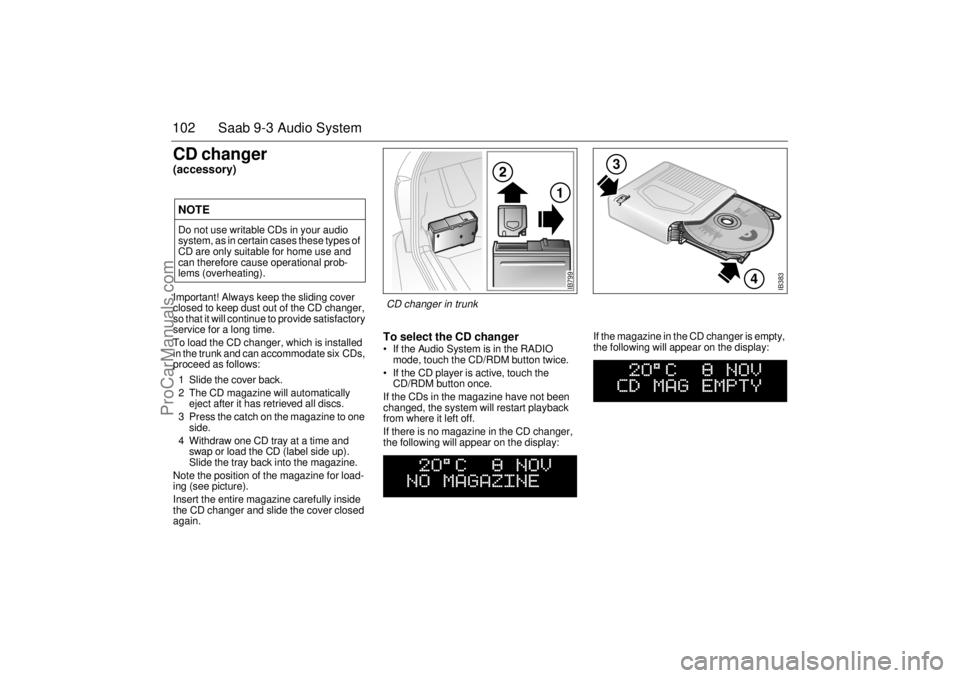
To load the CD changer, which is installed
in the trunk and can accommodate six CDs,
proceed as follows:
1 Slide the cover back.
2 The CD magazine will automatically
eject after it has retrieved all discs.
3 Press the catch on the magazine to one
side.
4 Withdraw one CD tray at a time and
swap or load the CD (label side up).
Slide the tray back into the magazine.
Note the position of the magazine for load-
ing (see picture).
Insert the entire magazine carefully inside
the CD changer and slide the cover closed
again.
To select the CD changer If the Audio System is in the RADIO
mode, touch the CD/RDM button twice.
If the CD player is active, touch the
CD/RDM button once.
If the CDs in the magazine have not been
changed, the system will restart playback
from where it left off.
If there is no magazine in the CD changer,
the following will appear on the display: If the magazine in the CD changer is empty,
the following will appear on the display:
NOTEDo not use writable CDs in your audio
system, as in certain cases these types of
CD are only suitable for home use and
can therefore cause operational prob-
lems (overheating).
IB383
4
3
IB799
CD changer in trunk
ProCarManuals.com
Page 129 of 256
129 Interior equipment, trunk
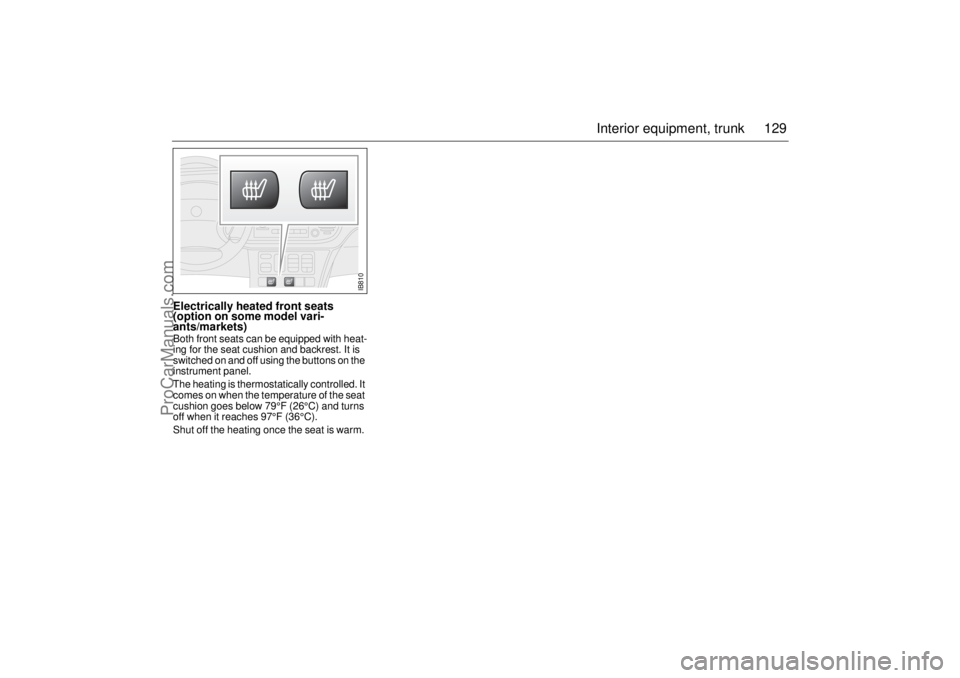
Electrically heated front seats
(option on some model vari-
ants/markets)Both front seats can be equipped with heat-
ing for the seat cushion and backrest. It is
switched on and off using the buttons on the
instrument panel.
The heating is thermostatically controlled. It
comes on when the temperature of the seat
cushion goes below 79°F (26°C) and turns
off when it reaches 97°F (36°C).
Shut off the heating once the seat is warm.
IB810
ProCarManuals.com
Page 137 of 256
137 Interior equipment, trunk
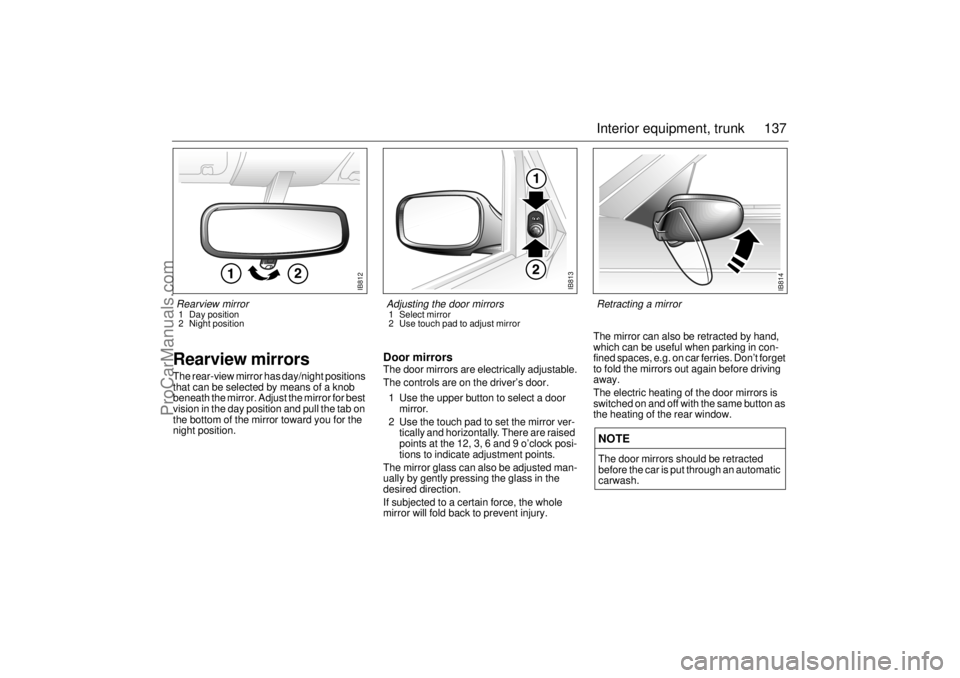
Rearview mirrorsThe rear-view mirror has day/night positions
that can be selected by means of a knob
beneath the mirror. Adjust the mirror for best
vision in the day position and pull the tab on
the bottom of the mirror toward you for the
night position.
Door mirrorsThe door mirrors are electrically adjustable.
The controls are on the driver’s door.
1 Use the upper button to select a door
mirror.
2 Use the touch pad to set the mirror ver-
tically and horizontally. There are raised
points at the 12, 3, 6 and 9 o’clock posi-
tions to indicate adjustment points.
The mirror glass can also be adjusted man-
ually by gently pressing the glass in the
desired direction.
If subjected to a certain force, the whole
mirror will fold back to prevent injury. The mirror can also be retracted by hand,
which can be useful when parking in con-
fined spaces, e.g. on car ferries. Don’t forget
to fold the mirrors out again before driving
away.
The electric heating of the door mirrors is
switched on and off with the same button as
the heating of the rear window.
NOTEThe door mirrors should be retracted
before the car is put through an automatic
carwash.
IB813
Adjusting the door mirrors 1 Select mirror
2 Use touch pad to adjust mirror
IB814
Retracting a mirror
IB812
Rearview mirror1 Day position
2 Night position
ProCarManuals.com
Page 159 of 256
159 Starting and driving
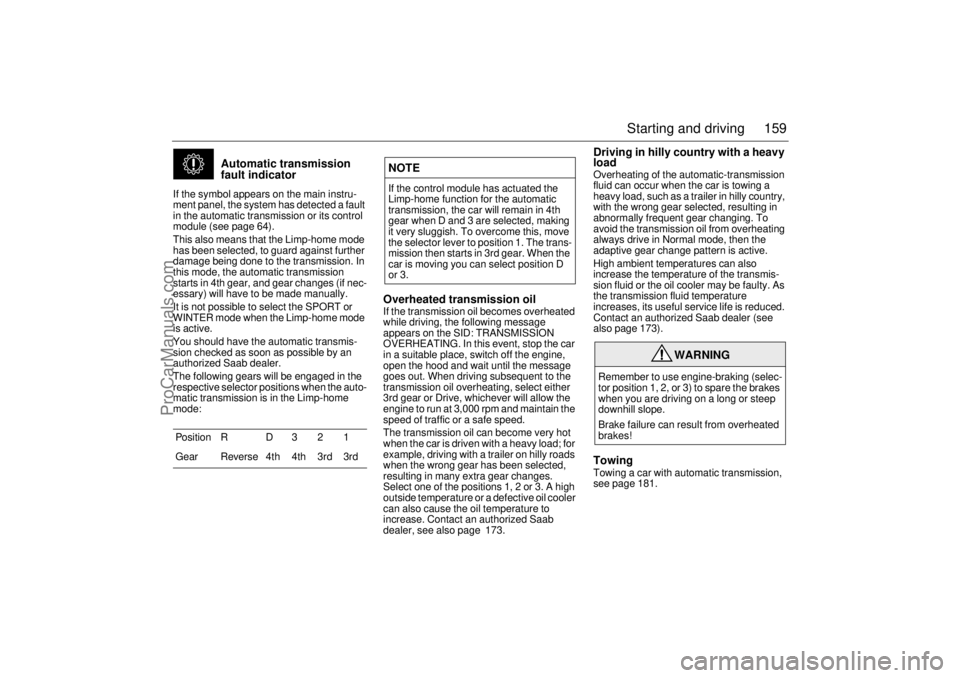
Automatic transmission
fault indicator
If the symbol appears on the main instru-
ment panel, the system has detected a fault
in the automatic transmission or its control
module (see page 64).
This also means that the Limp-home mode
has been selected, to guard against further
damage being done to the transmission. In
this mode, the automatic transmission
starts in 4th gear, and gear changes (if nec-
essary) will have to be made manually.
It is not possible to select the SPORT or
WINTER mode when the Limp-home mode
is active.
You should have the automatic transmis-
sion checked as soon as possible by an
authorized Saab dealer.
The following gears will be engaged in the
respective selector positions when the auto-
matic transmission is in the Limp-home
mode:
Overheated transmission oilIf the transmission oil becomes overheated
while driving, the following message
appears on the SID: TRANSMISSION
OVERHEATING. In this event, stop the car
in a suitable place, switch off the engine,
open the hood and wait until the message
goes out. When driving subsequent to the
transmission oil overheating, select either
3rd gear or Drive, whichever will allow the
engine to run at 3,000 rpm and maintain the
speed of traffic or a safe speed.
The transmission oil can become very hot
when the car is driven with a heavy load; for
example, driving with a trailer on hilly roads
when the wrong gear has been selected,
resulting in many extra gear changes.
Select one of the positions 1, 2 or 3. A high
outside temperature or a defective oil cooler
can also cause the oil temperature to
increase. Contact an authorized Saab
dealer, see also page 173.
Driving in hilly country with a heavy
loadOverheating of the automatic-transmission
fluid can occur when the car is towing a
heavy load, such as a trailer in hilly country,
with the wrong gear selected, resulting in
abnormally frequent gear changing. To
avoid the transmission oil from overheating
always drive in Normal mode, then the
adaptive gear change pattern is active.
High ambient temperatures can also
increase the temperature of the transmis-
sion fluid or the oil cooler may be faulty. As
the transmission fluid temperature
increases, its useful service life is reduced.
Contact an authorized Saab dealer (see
also page 173).TowingTowing a car with automatic transmission,
see page 181. Position R D 3 2 1
Gear Reverse 4th 4th 3rd 3rd
NOTEIf the control module has actuated the
Limp-home function for the automatic
transmission, the car will remain in 4th
gear when D and 3 are selected, making
it very sluggish. To overcome this, move
the selector lever to position 1. The trans-
mission then starts in 3rd gear. When the
car is moving you can select position D
or 3.
WARNING
Remember to use engine-braking (selec-
tor position 1, 2, or 3) to spare the brakes
when you are driving on a long or steep
downhill slope.
Brake failure can result from overheated
brakes!
ProCarManuals.com
Page 161 of 256

161 Starting and driving
If the gear selector lever is moved from position D to 1, a
change-down to 3rd gear will occur at about 110 mph (180 km/h).
A change-down to 2nd gear will occur at about 75 mph (120 km/h)
and to 1st gear at about 40 mph (65 km/h).
When position 1 is selected, all the other gears will be locked out.
Manual gear-changing is not recommended on slippery roads.
If one of the drive wheels spins excessively, the engine torque will
be reduced to avoid damaging the transmission.
Adaptive gear-change patternsAdaptive gear-change patterns are selected automatically depend-
ing on the engine load. This function applies in the Normal and Sport
modes.
The change occurs at a higher rotation speed and the gear remains
engaged for a longer period, if the control module senses that the
load does not drop. These change patterns avoid unnecessary gear
changes when, for example, driving on long inclines with a trailer,
and to prevent overheating of the transmission oil. This function cuts
in automatically if the oil becomes too hot, to protect the transmis-
sion from damage, and lowers the oil temperature.
The adaptive change pattern function is not activated at speeds over
93 mph (150 km/h). If a pattern is in operation when this speed is
exceeded, it will be maintained until the control module senses that
a more suitable one can be activated.
The adaptive gear-change pattern function is deselected when:
Winter mode is selected.
The engine is switched off.
The load is reduced by so much that this function is no longer
required.
“Automatic transmission fault indicator” appears on the
main instrument panel, see page 159.
NOTE Do not move the selector to position 3 at speeds in excess of
90 mph (150 km/h).
Do not move the selector to position 2 at speeds in excess of
70 mph (110 km/h).
ProCarManuals.com
Page 164 of 256

164 Starting and drivingDisengaging the system The system will be disengaged:
When the brake or clutch pedal is
depressed.
When the switch is moved to CANCEL.
When the switch is moved to OFF.
When the engine is switched off.
When the selector lever is moved to posi-
tion N (cars with automatic transmission).
BrakingTo avoid overheating the brakes, (e.g. when
negotiating long descents with a drop of
several hundred feet), select a low gear to
use the braking effect of the engine. If the
car has automatic transmission, move the
selector lever to position 1 or 2.
When driving fast, you can help to prolong
the life of the brakes by thinking ahead and
braking harder for short periods, rather than
braking more moderately over long
stretches. Brake pad wear indicatorsThe outboard brake pads on the front
wheels incorporate pad-wear indicators.
When the lining is down to 3 mm, the pad
will produce a screeching, squealing or
scraping noise when the brakes are applied.
New pads should be installed without delay.
Brake pads should only be replaced by
an authorized Saab dealer.
To ensure optimum brake performance,
it is recommended that you use only
Saab original brake pads.
WARNING
It is prudent to try your brakes from
time to time, especially when driving in
heavy rain, through water collected on
the road, in snow, on a wet road sur-
face or in salty slush. In such condi-
tions, the brakes may take longer than
normal to take effect. To rectify this,
touch the brake pedal periodically to
dry the brakes out.
The same applies after the car has
been washed or when the weather is
very humid.
Avoid parking the car with wet brakes.
Before parking, and if the traffic condi-
tions allow, brake quite heavily so that
the brake discs and pads warm up and
dry.
The brakes are power assisted and it
should be kept in mind that the servo
unit only provides the power assis-
tance when the engine is running.
The brake pressure required when the
engine is off,( e.g. when the car is
being towed) is roughly four times the
normal pedal force required. The
pedal also feels hard and unrespon-
sive.
ProCarManuals.com
Page 175 of 256
175 Starting and driving
Recommendations for driving in
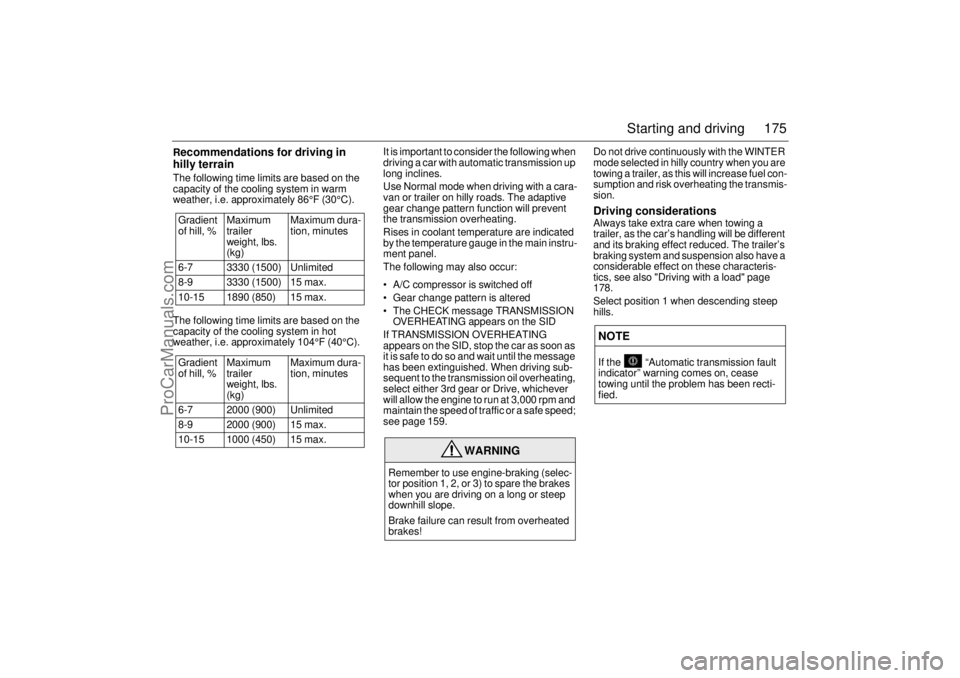
hilly terrainThe following time limits are based on the
capacity of the cooling system in warm
weather, i.e. approximately 86°F (30°C).
The following time limits are based on the
capacity of the cooling system in hot
weather, i.e. approximately 104°F (40°C).It is important to consider the following when
driving a car with automatic transmission up
long inclines.
Use Normal mode when driving with a cara-
van or trailer on hilly roads. The adaptive
gear change pattern function will prevent
the transmission overheating.
Rises in coolant temperature are indicated
by the temperature gauge in the main instru-
ment panel.
The following may also occur:
A/C compressor is switched off
Gear change pattern is altered
The CHECK message TRANSMISSION
OVERHEATING appears on the SID
If TRANSMISSION OVERHEATING
appears on the SID, stop the car as soon as
it is safe to do so and wait until the message
has been extinguished. When driving sub-
sequent to the transmission oil overheating,
select either 3rd gear or Drive, whichever
will allow the engine to run at 3,000 rpm and
maintain the speed of traffic or a safe speed;
see page 159.Do not drive continuously with the WINTER
mode selected in hilly country when you are
towing a trailer, as this will increase fuel con-
sumption and risk overheating the transmis-
sion.
Driving considerationsAlways take extra care when towing a
trailer, as the car’s handling will be different
and its braking effect reduced. The trailer’s
braking system and suspension also have a
considerable effect on these characteris-
tics, see also "Driving with a load" page
178.
Select position 1 when descending steep
hills. Gradient
of hill, % Maximum
trailer
weight, lbs.
(kg)Maximum dura-
tion, minutes
6-7 3330 (1500) Unlimited
8-9 3330 (1500) 15 max.
10-15 1890 (850) 15 max.
Gradient
of hill, % Maximum
trailer
weight, lbs.
(kg)Maximum dura-
tion, minutes
6-7 2000 (900) Unlimited
8-9 2000 (900) 15 max.
10-15 1000 (450) 15 max.
WARNING
Remember to use engine-braking (selec-
tor position 1, 2, or 3) to spare the brakes
when you are driving on a long or steep
downhill slope.
Brake failure can result from overheated
brakes!
NOTEIf the “Automatic transmission fault
indicator” warning comes on, cease
towing until the problem has been recti-
fied.
ProCarManuals.com