warning SAAB 9-3 2003 Service Manual
[x] Cancel search | Manufacturer: SAAB, Model Year: 2003, Model line: 9-3, Model: SAAB 9-3 2003Pages: 256, PDF Size: 21.66 MB
Page 62 of 256
62 Instruments and controlsInformation display,
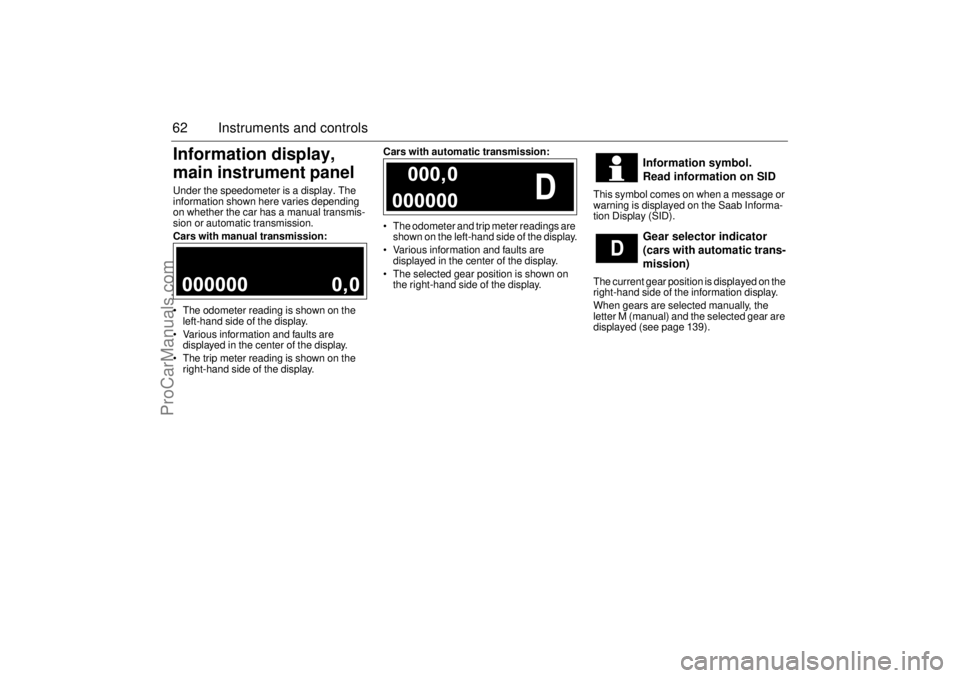
main instrument panelUnder the speedometer is a display. The
information shown here varies depending
on whether the car has a manual transmis-
sion or automatic transmission.
Cars with manual transmission:
The odometer reading is shown on the
left-hand side of the display.
Various information and faults are
displayed in the center of the display.
The trip meter reading is shown on the
right-hand side of the display.Cars with automatic transmission:
The odometer and trip meter readings are
shown on the left-hand side of the display.
Various information and faults are
displayed in the center of the display.
The selected gear position is shown on
the right-hand side of the display.This symbol comes on when a message or
warning is displayed on the Saab Informa-
tion Display (SID).
The current gear position is displayed on the
right-hand side of the information display.
When gears are selected manually, the
letter M (manual) and the selected gear are
displayed (see page 139).
Information symbol.
Read information on SID
Gear selector indicator
(cars with automatic trans-
mission)
ProCarManuals.com
Page 63 of 256
63 Instruments and controls
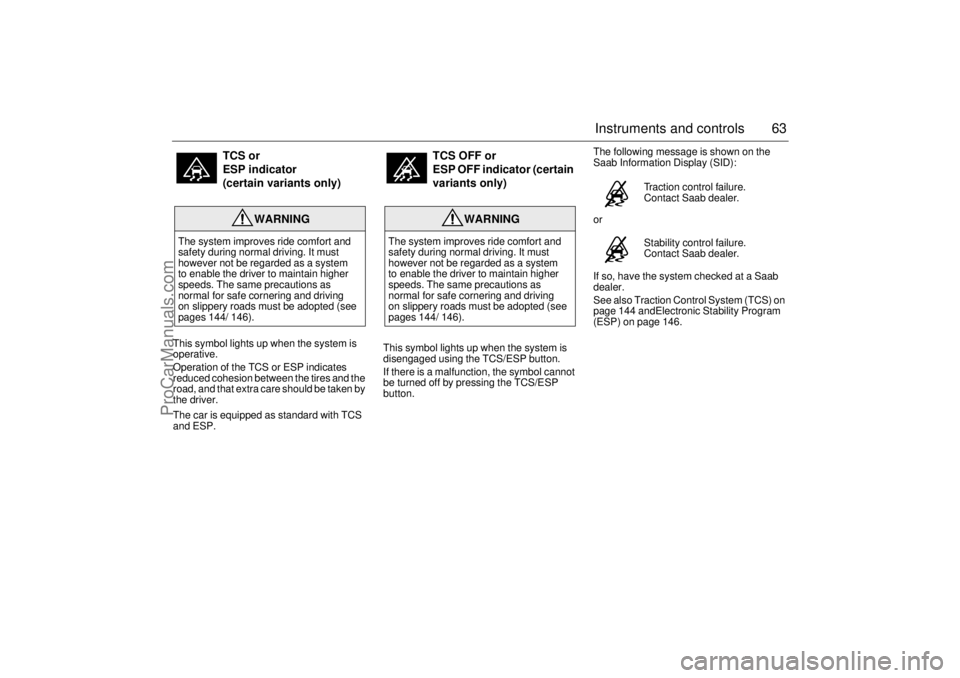
This symbol lights up when the system is
operative.
Operation of the TCS or ESP indicates
reduced cohesion between the tires and the
road, and that extra care should be taken by
the driver.
The car is equipped as standard with TCS
and ESP.This symbol lights up when the system is
disengaged using the TCS/ESP button.
If there is a malfunction, the symbol cannot
be turned off by pressing the TCS/ESP
button.The following message is shown on the
Saab Information Display (SID):
or
If so, have the system checked at a Saab
dealer.
See also Traction Control System (TCS) on
page 144 andElectronic Stability Program
(ESP) on page 146.
TCS or
ESP indicator
(certain variants only)
WARNING
The system improves ride comfort and
safety during normal driving. It must
however not be regarded as a system
to enable the driver to maintain higher
speeds. The same precautions as
normal for safe cornering and driving
on slippery roads must be adopted (see
pages 144/ 146).
TCS OFF or
ESP OFF indicator (certain
variants only)
WARNING
The system improves ride comfort and
safety during normal driving. It must
however not be regarded as a system
to enable the driver to maintain higher
speeds. The same precautions as
normal for safe cornering and driving
on slippery roads must be adopted (see
pages 144/ 146).
Traction control failure.
Contact Saab dealer.
Stability control failure.
Contact Saab dealer.
ProCarManuals.com
Page 64 of 256

64 Instruments and controlsSaab Information
Display (SID)Various types of information are shown on
the SID: warnings, indications, trip com-
puter information and information from the
car’s Infotainment System.
The warnings and indications that can be
shown on the SID are listed on page 249.
When the engine is switched off, the current
warnings and indications are displayed.
If there is more than one message on the
SID, a plus sign will be displayed to the left
of the first message. Each message will be
displayed for 10 seconds.
Press the CLEAR button to acknowledge
a SID message. If you acknowledge a mes-
sage but do nothing about it, the message
will be displayed again the next time you
start the car.
You can adjust the settings of several of the
car’s systems, such as the clock, alarm and
climate control system. These are known as
Profiler.
ProfilerAdjustments can be made with the control
unit situated between the main instrument
panel and the audio system. This is called
Profiler.
1 Activate Profiler by pressing the
CUSTOMIZE button.
2 Turn the INFO dial until the appropriate
system is selected.
3 Confirm selection by pressing the
INFO dial.
Select Exit once you have made the desired
settings.The number of systems that are displayed
on the SID depends on the car’s equipment
level. The list shown below includes the
systems that can be found in your car.
Theft Alarm, page 46.
Full theft alarmDoor alarm only
Park Assistance, page 152.
SPA onSPA off
Clock / Alarm, page 69.
Set ClockSet Alarm
Rain Sensor, page 77.
HighMediumLow
SID, control unit and display
ProCarManuals.com
Page 65 of 256
65 Instruments and controls
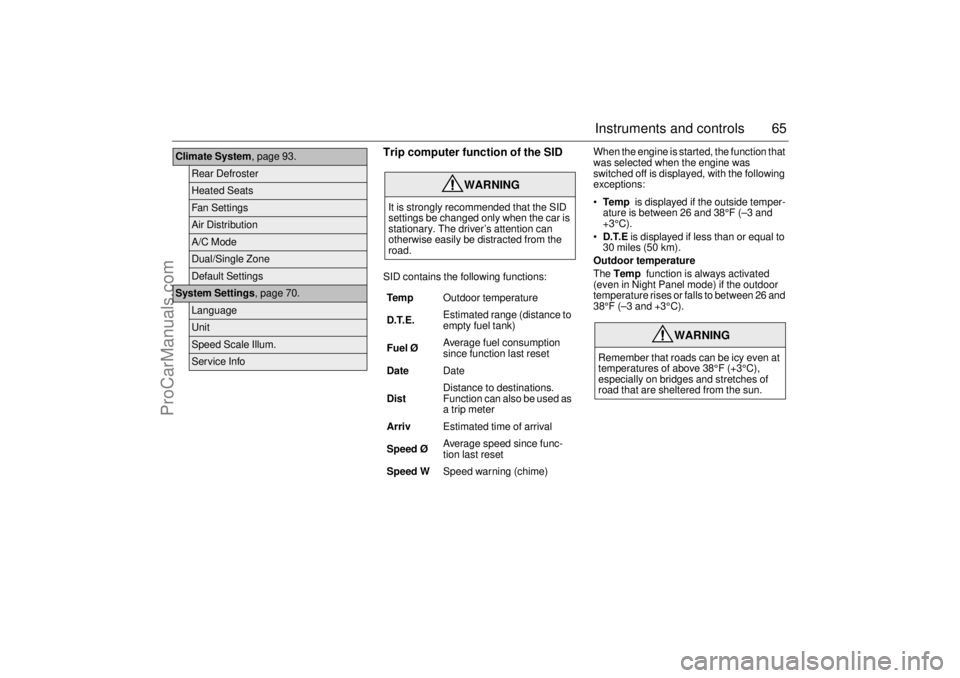
Trip computer function of the SIDSID contains the following functions:When the engine is started, the function that
was selected when the engine was
switched off is displayed, with the following
exceptions:
Te m p is displayed if the outside temper-
ature is between 26 and 38°F (–3 and
+3°C).
D.T.E is displayed if less than or equal to
30 miles (50 km).
Outdoor temperature
The Temp function is always activated
(even in Night Panel mode) if the outdoor
temperature rises or falls to between 26 and
38°F (–3 and +3°C).
Climate System, page 93.
Rear DefrosterHeated SeatsFan SettingsAir DistributionA/C ModeDual/Single ZoneDefault Settings
System Settings, page 70.
LanguageUnitSpeed Scale Illum.Service Info
WARNING
It is strongly recommended that the SID
settings be changed only when the car is
stationary. The driver’s attention can
otherwise easily be distracted from the
road.
Tem pOutdoor temperature
D.T.E. Estimated range (distance to
empty fuel tank)
Fuel ØAverage fuel consumption
since function last reset
DateDate
DistDistance to destinations.
Function can also be used as
a trip meter
ArrivEstimated time of arrival
Speed Ø Average speed since func-
tion last reset
Speed WSpeed warning (chime)
WARNING
Remember that roads can be icy even at
temperatures of above 38°F (+3°C),
especially on bridges and stretches of
road that are sheltered from the sun.
ProCarManuals.com
Page 66 of 256

66 Instruments and controlsSetting values
1 Select one of the functions using the
INFO dial.
Speed W (preset to 55 mph (90 km/h)
Dist (preset to 100 miles (100 km) if not
previously set)
Speed Ø
Arriv
Date
2 Press and hold the INFO dial until given
audible confirmation.
3 Turn the INFO dial to change the value.
(Press CLEAR to reset the value.)
4 Press the INFO dial to finish setup.
Using DIST as a trip meter
1 Select Dist using the INFO dial.
2 Press and hold the CLEAR button for
approx. 1 second.
An arrow will now appear on the right-hand
side of the display, indicating that the trip
meter is running.Resetting a single function
1 Select the function you wish to reset with
the INFO dial.
Fuel Ø
Speed Ø
Tr i p (Dist used as trip meter)
2 Press and hold the CLEAR button for
approx. 1 second.
The selected function will now be reset.
Resetting the trip computer
1 Select one of the functions using the
INFO dial.
Fuel Ø
Speed Ø
D.T.E.
Arriv
Tr i p (Dist used as trip meter)
2 Press and hold the CLEAR button
(approx. 3 seconds) until audible confir-
mation is given.Speed warning
This value is preset to 55 mph (90 km/h).
The value can be set to between 0 and
150 mph (0 and 250 km/h).
1 Select Speed W using the INFO dial.
2 Press and hold the INFO dial until given
audible confirmation.
3 Adjust the speed using the INFO dial.
4 Confirm the setting by pressing the
INFO dial.
A star on the right-hand side of the display
indicates when the speed warning function
is active.
An audible alarm will sound if the set speed
is exceeded.
Disengage the function with the CLEAR
button. Re-engage the function using
the INFO dial.
ProCarManuals.com
Page 68 of 256

68 Instruments and controlsCalculating the requisite average speed
(What average speed do I need to maintain
to get to my destination in time?)
This function should be used before starting
out a journey.
To calculate the requisite average speed,
the distance must first be given.
First, set the distance under Dist.
1 Then use the INFO dial to select the
Arriv function.
2 Press and hold the INFO dial until given
audible confirmation.
3 Turn the INFO dial to set the estimated
time of arrival.
4 Press the INFO dial to finish setup.
The average speed (Speed Ø) will be
shown for 10 seconds.
This average speed will be updated during
the journey.Setting the date
1 Select the Date function using the
INFO dial.
2 Press and hold the INFO dial until given
audible confirmation.
3 Turn the INFO dial to set the year.
4 Press the INFO dial.
5 Turn the INFO dial to set the month.
6 Press the INFO dial.
7 Turn the INFO dial to set the day.
8 Confirm the setting by pressing the
INFO dial.
Night PanelTo improve night-driving conditions inside
the car, the Night Panel mode can be
selected. In this mode, the amount of infor-
mation displayed is reduced, and only the
most important instruments and displays
will be illuminated.
When the NIGHT PANEL button is pressed,
only the speedometer will be illuminated.
All other instrument lighting will be switched
off and the needles drop to zero.
Note: All indicator and warning lights and
messages will operate normally if required.
Temp (when the outside temperature falls
or rises to between 26 and 38°F (–3 and
+3°C)) and D.T.E. (when the remaining fuel
is only sufficient for approx. 80 miles
(50 km) of driving) are even shown in Night
Panel model.
ProCarManuals.com
Page 74 of 256
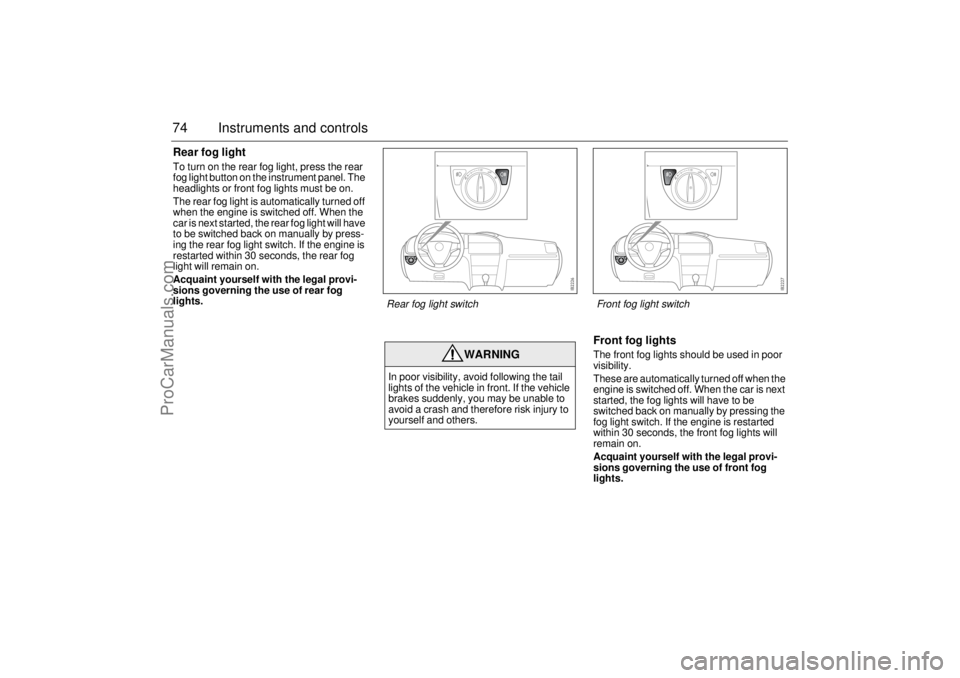
74 Instruments and controlsRear fog lightTo turn on the rear fog light, press the rear
fog light button on the instrument panel. The
headlights or front fog lights must be on.
The rear fog light is automatically turned off
when the engine is switched off. When the
car is next started, the rear fog light will have
to be switched back on manually by press-
ing the rear fog light switch. If the engine is
restarted within 30 seconds, the rear fog
light will remain on.
Acquaint yourself with the legal provi-
sions governing the use of rear fog
lights.
Front fog lightsThe front fog lights should be used in poor
visibility.
These are automatically turned off when the
engine is switched off. When the car is next
started, the fog lights will have to be
switched back on manually by pressing the
fog light switch. If the engine is restarted
within 30 seconds, the front fog lights will
remain on.
Acquaint yourself with the legal provi-
sions governing the use of front fog
lights.
WARNING
In poor visibility, avoid following the tail
lights of the vehicle in front. If the vehicle
brakes suddenly, you may be unable to
avoid a crash and therefore risk injury to
yourself and others.Rear fog light switch
Front fog light switch
ProCarManuals.com
Page 75 of 256
75 Instruments and controls
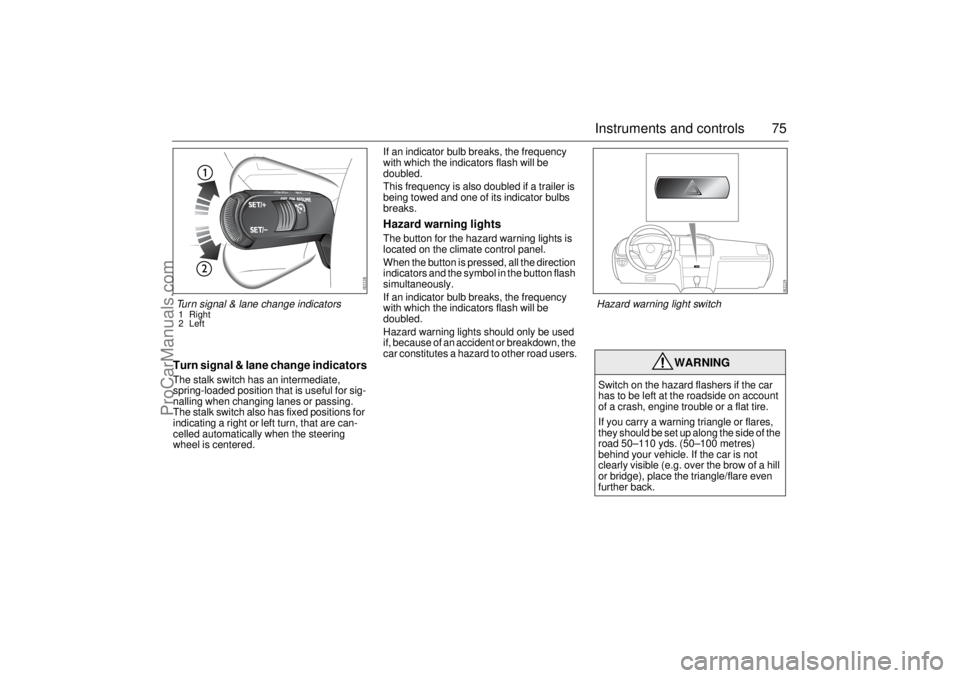
Turn signal & lane change indicatorsThe stalk switch has an intermediate,
spring-loaded position that is useful for sig-
nalling when changing lanes or passing.
The stalk switch also has fixed positions for
indicating a right or left turn, that are can-
celled automatically when the steering
wheel is centered.If an indicator bulb breaks, the frequency
with which the indicators flash will be
doubled.
This frequency is also doubled if a trailer is
being towed and one of its indicator bulbs
breaks.
Hazard warning lightsThe button for the hazard warning lights is
located on the climate control panel.
When the button is pressed, all the direction
indicators and the symbol in the button flash
simultaneously.
If an indicator bulb breaks, the frequency
with which the indicators flash will be
doubled.
Hazard warning lights should only be used
if, because of an accident or breakdown, the
car constitutes a hazard to other road users.
WARNING
Switch on the hazard flashers if the car
has to be left at the roadside on account
of a crash, engine trouble or a flat tire.
If you carry a warning triangle or flares,
they should be set up along the side of the
road 50–110 yds. (50–100 metres)
behind your vehicle. If the car is not
clearly visible (e.g. over the brow of a hill
or bridge), place the triangle/flare even
further back.
Turn signal & lane change indicators1 Right
2 Left
Hazard warning light switch
ProCarManuals.com
Page 77 of 256
77 Instruments and controls
When the washer fluid level drops below
1 quart (1 litre), the headlight washers are
deactivated. This is in order to prioritize the
windshield. The following message is
displayed on the SID:
Headlight washers (certain variants
only)The headlights are washed at the same time
as the windshield if the h eadlights are on.
The headlights are washed every fifth time
the windshield washers are used or if two
(2) minutes have elapsed since the wind-
shield was last washed.
The headlight washers are not activated at
speeds in excess of 125 mph (200 km/h).
Rain sensor (option)The rain sensor automatically controls the
windshield wipers. The sensor is located on
the windshield beside the rearview mirror.
The system varies the frequency of wiping
between single sweeps and continuous
wiping, depending on the amount of pre-
cipitation.
Washer fluid level low.
Refill.
WARNING
Turn the rain sensor off if the ignition is
ON to avoid personal injury when clearing
snow and ice from the windshield.NOTICETurn the rain sensor off before washing
the car in an automatic carwash, to avoid
damaging the windshield wipers.
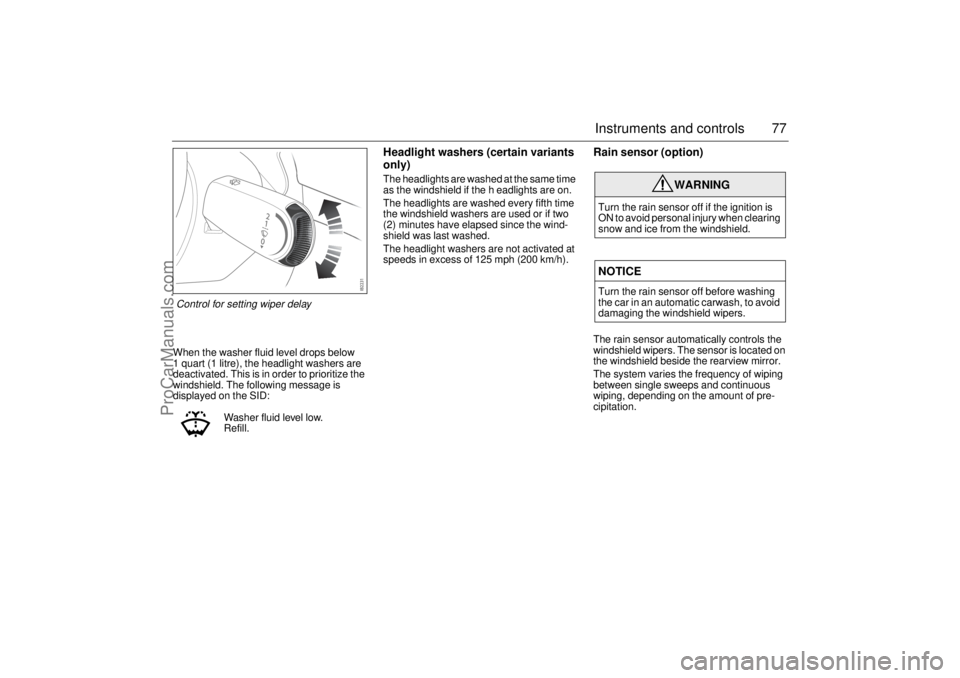
Control for setting wiper delay
ProCarManuals.com
Page 79 of 256
79 Instruments and controls
Manual climate-control
systemFresh air for the cabin is drawn in through an
inlet grille at the bottom edge of the wind-
shield. It passes through a filter before
reaching the climate control system and
delivery into the cabin. The air is evacuated
via openings in the parcel shelf. It is then led
through outlets on either side of the car
behind the rear bumper.
The incoming air is treated in three stages:
first it passes through a filter; it is then dehu-
midified and cooled; and finally, if required,
it is heated.
To optimize the performance of the A/C sys-
tem, all windows and the sunroof should be
shut.
To reduce potential misting on the insides of
the windows, the glass should be cleaned
with a quality glass cleaner. How often this
will need to be done depends on how clean
the air is - if there are smokers in the car, the
windows will need to be cleaned more fre-
quently.
The output of air is controlled by the fan
speed.
Temperature controlThe temperature of the incoming air can
be infinitely varied using the temperature
control.
Fan
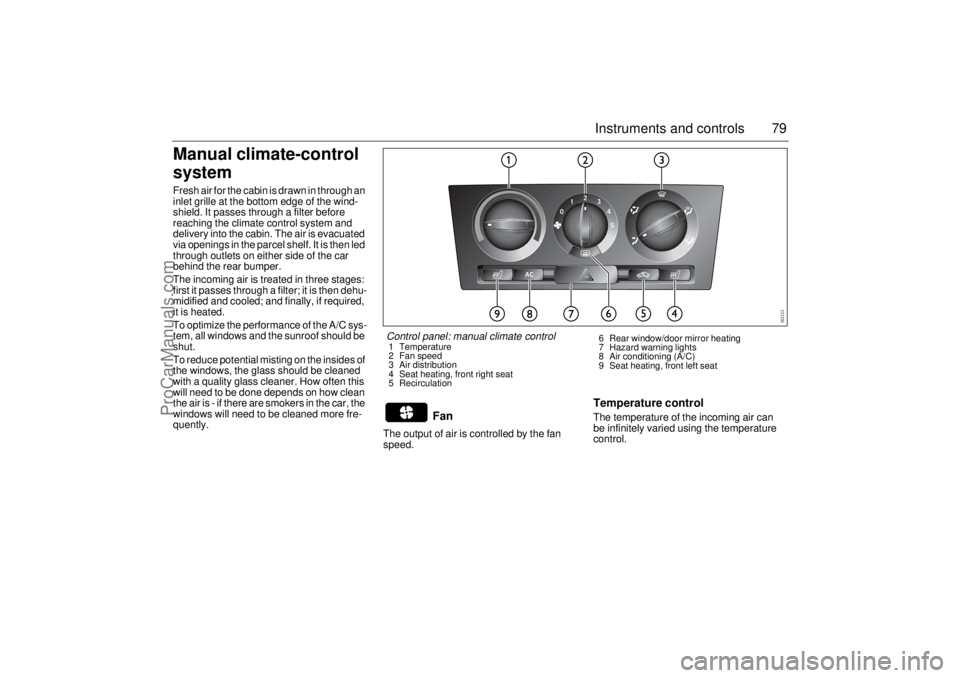
Control panel: manual climate control1 Temperature
2 Fan speed
3 Air distribution
4 Seat heating, front right seat
5 Recirculation6 Rear window/door mirror heating
7 Hazard warning lights
8 Air conditioning (A/C)
9 Seat heating, front left seat
ProCarManuals.com