warning SAAB 9-3 2009 Owners Manual
[x] Cancel search | Manufacturer: SAAB, Model Year: 2009, Model line: 9-3, Model: SAAB 9-3 2009Pages: 304, PDF Size: 44.31 MB
Page 157 of 304
157 Starting and driving
Refueling1 Switch off the engine.
2 Open the fuel cap, located in the
right-hand rear fender.
3 Insert the fuel pump nozzle beyond the
flange on the filler pipe and let the first
mark (a ring, a pimple or the first
spring-coil) rest on the flange. Do not
withdraw the nozzle while filling is in
progress.
4 Cease refueling the first time the pump
stops, and wait a few seconds after
you’ve finished pumping before you
remove the nozzle.Fuel cap
To remove the fuel cap, turn it slowly to the
left (counterclockwise). The fuel cap has a
spring in it; if you let go of the cap too soon,
it will spring back to the right.
When you put the fuel cap back on, turn it to
the right (clockwise) until you hear 3 clicks.
Make sure the cap is fully installed.
The diagnostic system can determine if the
fuel cap has been left off or is improperly
installed. See “Service Engine Light also
known as CHECK ENGINE” on page 83.If the fuel cap has been left off or is improp-
erly installed the following message is
shown on the Saab Information Display
(SID):
WARNING
If a fire starts while you are refueling, do
not remove the nozzle. Shut off the flow of
fuel by shutting off the pump or by notify-
ing the station attendant. Leave the area
immediately.
NOTICEDo not overfill. Fuel should not come right
up the filler pipe as expansion room is
needed when the temperature rises.
Fill to maximum filling capacity.
Stop filling after the first time that the
nozzle trips to shut off the flow of fuel.
Filling capacity can differ between dif-
ferent fuel stations and outside tem-
perature. Fuel tank volume when
nozzle trips to shut off, may vary by
0.5 gal. (2 liters).
Do not fill fuel all the way up the filler
pipe. The gasoline must be allowed
room for expansion especially during
hot weather.
Tighten fuel filler cap.
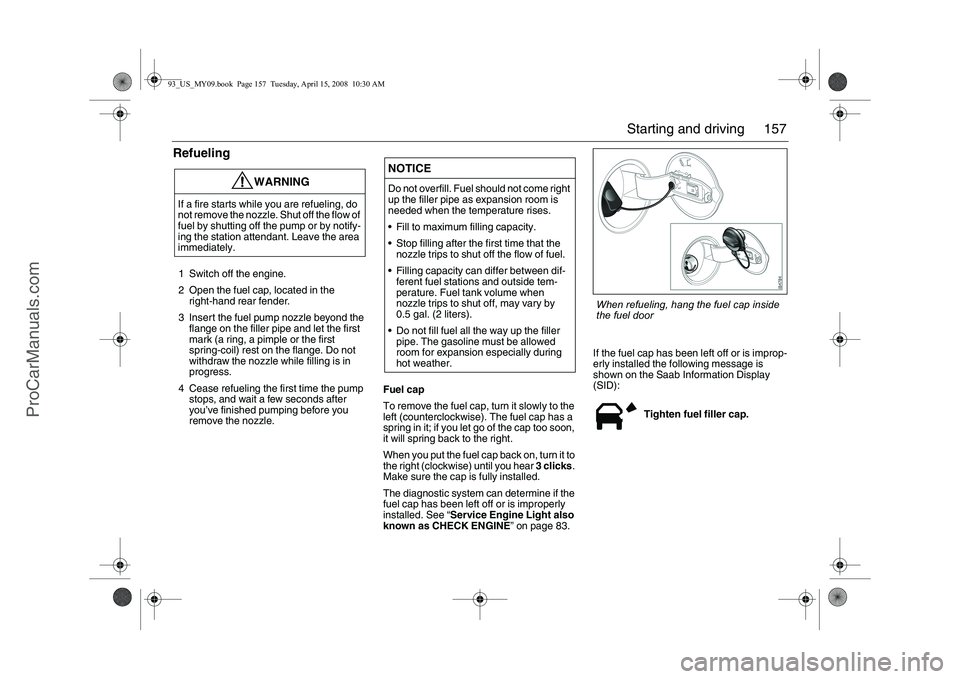
When refueling, hang the fuel cap inside
the fuel door
93_US_MY09.book Page 157 Tuesday, April 15, 2008 10:30 AM
ProCarManuals.com
Page 158 of 304

158 Starting and drivingThe most effective way to prevent conden-
sation forming in the tank (and thus avoid
possible running problems) is to keep the
tank full.
Refer to page 185 for information regarding
gasoline anti-freeze.
The fuel door has a built in filler cap holder
slot located on the fuel door. Slide the white
ring on the cap into the slot.
Notice: If you need a new fuel cap, be sure
to get the right type. Your dealer can get one
for you. If you get the wrong type, it may not
fit properly.
Filling a portable fuel container Fuel (Gasoline Engine)
Fuel
Use of the recommended fuel is an impor-
tant part of the proper maintenance of your
vehicle.
Gasoline Octane
Use regular unleaded gasoline with a
posted octane of 87 or higher.
If the octane is less than 87, you may get a
heavy knocking noise when you drive. If this
occurs, use a gasoline rated at 87 octane or
higher as soon as possible. Otherwise, you
might damage your engine. A little pinging
noise when you accelerate or drive uphill is
considered normal. This does not indicate a
problem exists or that a higher-octane fuel
is necessary. If you are using 87 octane or
higher-octane fuel and hear heavy knock-
ing, your engine needs service. Although
not required, use higher octane fuel for opti-
mum performance- 90 octane for the 2.0T
engine and 93 octane for the 2.8 V6.
WARNING
Never fill a portable fuel container while it
is in your vehicle. Static electricity dis-
charge from the container can ignite the
gasoline vapor. You can be badly burned
and your vehicle damaged if this occurs.
To help avoid injury to you and others:
Dispense gasoline only into approved
containers.
Do not fill a container while it is inside
a vehicle, in a vehicle’s trunk, pickup
bed or on any surface other than the
ground.
Bring the fill nozzle in contact with the
inside of the fill opening before operat-
ing the nozzle. Contact should be
maintained until the filling is complete.
Do not smoke while pumping gaso-
line.
93_US_MY09.book Page 158 Tuesday, April 15, 2008 10:30 AM
ProCarManuals.com
Page 162 of 304
162 Starting and drivingAutomatic
transmission3
The automatic transmission has an elec-
tronic control module. The control module
receives information including accelerator
position and road speed. Using this and
other information, it controls the hydraulic
pressure of the transmission to ensure that
gear changing is as smooth as possible.
The remote control can only be removed
when the selector lever is in the P position.The engine can only be started when the
selector lever is in the P or N position.
When the car is stationary, the engine must
be idling when you move the selector lever
from one position to another. If not, the
transmission could be damaged.
WARNING
Depress the brake pedal when shifting
the selector lever from P or N.
The car must be at a standstill before
P, R or N is selected. You have to have
your foot on the brake pedal to move
the lever out of P. If the car is still
moving when a drive position is subse-
quently selected, this could cause a
crash or damage the automatic trans-
mission.
Never park the car with the selector
lever in a drive position, even if the
parking brake is on.
If you want to leave the car with the
engine running, move the selector
lever to P or N and apply the parking
brake.
NOTICEAfter selecting a drive position, pause
briefly to allow the gear to engage (the car
starts to pull a little) before you acceler-
ate.
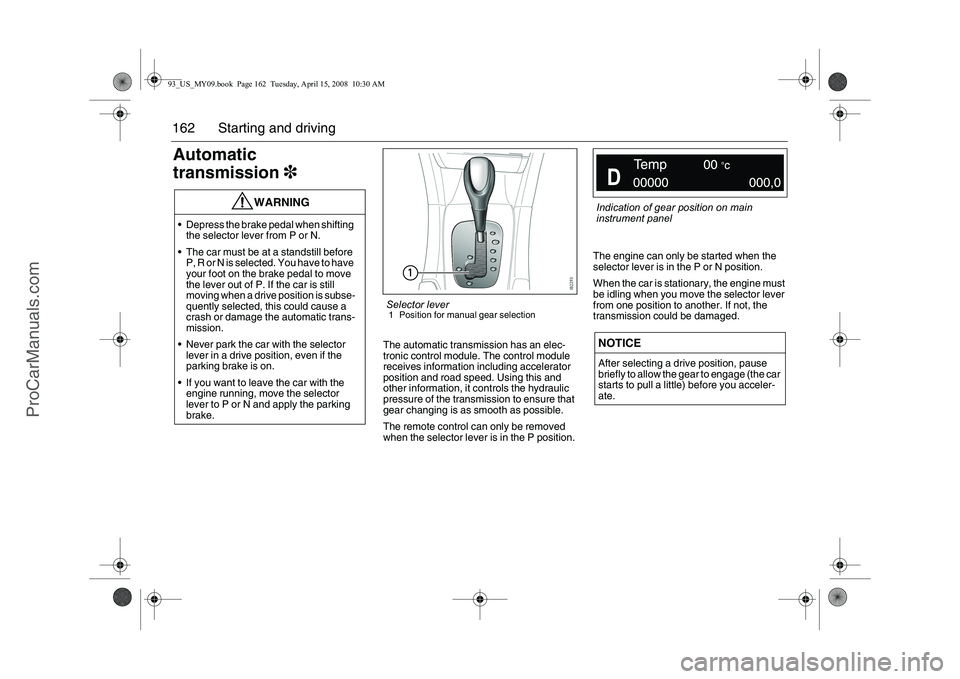
Selector lever1 Position for manual gear selection
Indication of gear position on main
instrument panel
93_US_MY09.book Page 162 Tuesday, April 15, 2008 10:30 AM
ProCarManuals.com
Page 164 of 304
164 Starting and drivingThermal transmission protectionThe transmission has built-in protection
against overheating. If the temperature of
the transmission fluid exceeds 302 °F
(150 °C), engine torque will be limited to
147 ft.lbs. (200 Nm).
The following message is shown on the SID:
If this message appears, stop the car as
soon as it is safe to do so and allow the
engine to idle until the message has gone
out. The selector lever should be in
position P.
Lock-upThe transmission’s torque converter has a
lock-up function. This can lock the torque
converter, thus reducing the engine speed
and fuel consumption.Kick-downWhen the accelerator is pressed down fully,
a down change is made to optimize acceler-
ation, e.g. for overtaking.
Following this, the next higher gear will be
selected at the optimum engine speed,
unless you ease off the accelerator before
reaching this.
Driving in hilly country with a
heavy loadThe transmission fluid can overheat when
the gearbox is strained, for example, when
driving with a trailer on hilly roads. To avoid
the transmission fluid overheating, always
drive with the selector lever in the D posi-
tion. The adaptive gear change patterns are
then active.
High air temperatures or a faulty oil cooler
can also cause the transmission fluid to
overheat. Overheating reduces the service
life of the fluid. Gearbox too hot. Make a
safe stop. Open hood.
WARNING
Remember to use the braking effect of the
engine (1st, 2nd or 3rd gear) when you
are descending long or steep hills to
spare the brakes.
Overheating can cause the brakes to
fade!
93_US_MY09.book Page 164 Tuesday, April 15, 2008 10:30 AM
ProCarManuals.com
Page 169 of 304
169 Starting and driving
Cruise Control(Cruise control system)
For safety reasons (brake system func-
tion), the brakes must be applied once
when the engine has started, before the
cruise control system can be activated.
The following message is shown on the SID:
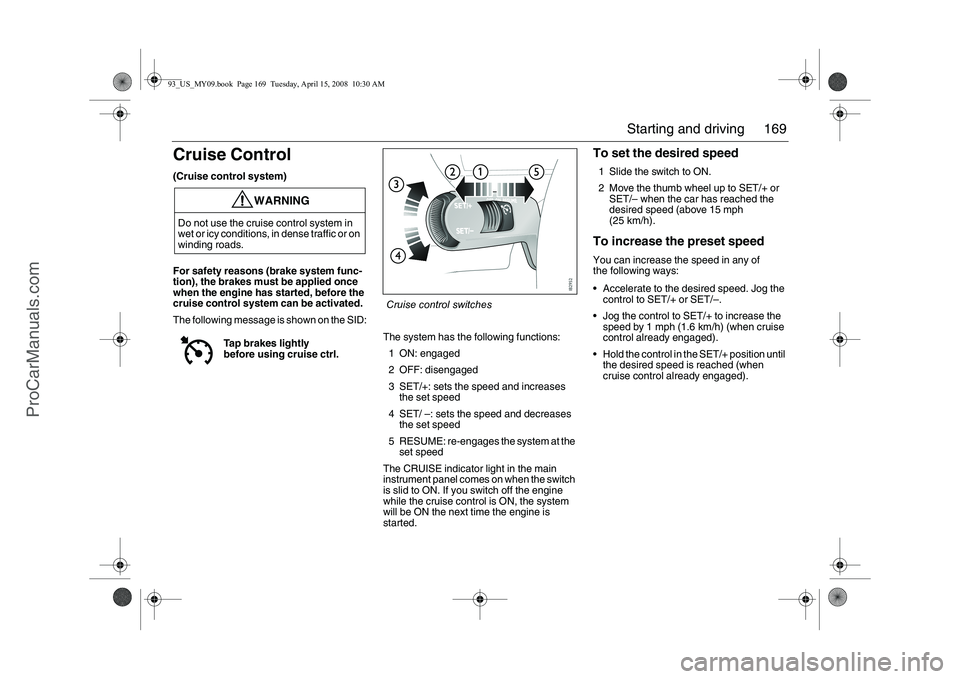
The system has the following functions:
1 ON: engaged
2 OFF: disengaged
3 SET/+: sets the speed and increases
the set speed
4 SET/ –: sets the speed and decreases
the set speed
5 RESUME: re-engages the system at the
set speed
The CRUISE indicator light in the main
instrument panel comes on when the switch
is slid to ON. If you switch off the engine
while the cruise control is ON, the system
will be ON the next time the engine is
started.
To set the desired speed1 Slide the switch to ON.
2 Move the thumb wheel up to SET/+ or
SET/– when the car has reached the
desired speed (above 15 mph
(25 km/h).To increase the preset speedYou can increase the speed in any of
the following ways:
Accelerate to the desired speed. Jog the
control to SET/+ or SET/–.
Jog the control to SET/+ to increase the
speed by 1 mph (1.6 km/h) (when cruise
control already engaged).
Hold the control in the SET/+ position until
the desired speed is reached (when
cruise control already engaged).
WARNING
Do not use the cruise control system in
wet or icy conditions, in dense traffic or on
winding roads.
Tap brakes lightly
before using cruise ctrl.
Cruise control switches
93_US_MY09.book Page 169 Tuesday, April 15, 2008 10:30 AM
ProCarManuals.com
Page 171 of 304
171 Starting and driving
ABS brakesThe Antilock Braking System (ABS) modu-
lates the brake pressure to each wheel. The
pressure is automatically reduced just
before the wheel locks up and then
increases again to the point at which the
wheel is just about to lock. The wheel sen-
sors send information to the brake system’s
electronic control module for every 4 or so
inches (decimeter) that the car rolls. This
information is processed continuously to
ensure that the adjustment of the brake
pressure will be as exact as possible.
Adjustment takes place up to 12 times per
second.The brake system provides Electronic
Brakeforce Distribution (EBD). This distri-
butes the brake pressure between the front
and rear wheels, in such a way as to achieve
optimum braking performance irrespective
of the car’s speed or load.
The ABS has a built-in diagnostics function
which will switch on the ABS warning light
if a fault is detected in the system (see
page 82).
Note. The following message will appear
on the SID (and corresponding symbol
on main instrument unit) if a fault is
detected:
WARNING
It is prudent to try your brakes from
time to time, especially when driving in
heavy rain, through water collected on
the road, in snow, on a wet road sur-
face or in salty slush. In such condi-
tions, the brakes may take longer than
normal to take effect. To rectify this,
touch the brake pedal periodically to
dry the brakes out.
The same applies after the car has
been washed or when the weather is
very humid.
Avoid parking the car with wet brakes.
Before parking, and if the traffic condi-
tions allow, brake quite heavily so that
the brake discs and pads warm up and
dry.
The brakes are power assisted and it
should be kept in mind that the servo
unit only provides the power assis-
tance when the engine is running.
The brake pressure required when the
engine is off, (e.g. when the car is
being towed) is roughly four times the
normal pedal force required. The
pedal also feels hard and unrespon-
sive.
Overheating can cause the brakes to
fade!
WARNING
The additional safety afforded by the
ABS system is not designed to allow
drivers to drive faster but to make
normal driving safer.
To stop as quickly as possible, without
loss of directional stability, whether
the road surface is dry, wet or slippery,
press the brake pedal down hard
without letting up (do not pump the
pedal), declutching simulta-
neously, and steer the car to safety.
Antilock brake malfunc.
Contact service.
93_US_MY09.book Page 171 Tuesday, April 15, 2008 10:30 AM
ProCarManuals.com
Page 173 of 304
173 Starting and driving
All-wheel drive (XWD)3Essentially, the system consists of a PTU
(Power Take off Unit), propeller shaft, RDM
(Rear Drive Module which contains an elec-
tronically controlled plate clutch, final drive
gear and differential) and driveshafts. This
system enhances driving characteristics
and stability. The system is always active
and cannot be deactivated. It works
together with the ESP system and the
engine and transmission control modules.
When driving at a constant speed, approx.
95% of the torque is distributed to the front
wheels and approx. 5% to the rear wheels.
The torque is distributed steplessly and
instantaneously between the front and rear
wheels, depending on the driving condi-
tions. If the car is fitted with eLSD (electron-
ically controlled plate clutch between the
rear wheels), the torque can also be distrib-
uted individually to the relevant rear wheel.For optimum system function, the car’s tires
should not have varying degrees of wear.
When the XWD system requires service,
the following message is shown on the SID:
When the service message is displayed,
the XWD system may have limited func-
tionality (or be completely disabled in
some cases, i.e. the car switches to
front-wheel drive). Contact a workshop
for information. We recommend that you
contact an authorised Saab dealer.
Traction Control
System (TCS)Anti-spin systemHow the system worksThe Traction Control System (TCS) is
designed to prevent wheelspin. This
enables the car to achieve the best possible
grip and, hence, maximum tractive effort,
together with greater stability.
The TCS system uses information from the
ABS system’s wheel speed sensors to
determine whether any wheel is spinning. If
any wheel is spinning, this is reduced on
all-wheel drive cars initially by changing the
torque distribution, secondly by reducing
the engine torque, and thirdly with the aid of
the wheel brakes. On front-wheel drive cars,
wheelspin is reduced initially by reducing
the engine torque, and secondly with the aid
of the wheel brakes. Service XWD.
WARNING
When driving normally, the TCS system
helps to improve the car’s stability, and
driveability under slippery road and
extreme driving conditions. The TCS
must not be regarded as a system to
enable the driver to maintain higher
speeds. The same precautions must be
adopted as normal for safe cornering and
driving on slippery roads.
93_US_MY09.book Page 173 Tuesday, April 15, 2008 10:30 AM
ProCarManuals.com
Page 175 of 304
175 Starting and driving
Electronic Stability
Program ESP
®
Anti-skid system
The ESP
® system employs both the
antilock braking system (ABS) and the trac-
tion control system (TCS). It is a system that
helps the driver to stabilize the car in
unusual circumstances that can otherwise
be more difficult to handle.
How the ESP
® system works
The ESP
® system can help to prevent the
car from skidding by braking one or several
wheels independently of the driver. The
engine output is then also reduced to pre-
vent the driving wheels from spinning. The
car has sensors that measure wheel speed,
yaw rate, lateral acceleration, steering
wheel position and braking pressure. The
values provided by these sensors are used
to calculate the actual direction of the car,
the intentions of the driver and whether the
ESP
® system should be engaged.
If this direction does not agree with that
intended by the driver, calculated from the
steering wheel position, the ESP
® system is
engaged.
The ESP
® system improves the driver’s
chances of retaining control over the car in
a critical situation.
WARNING
When driving normally, the ESP
® system
helps to improve the car’s stability and
maneuverability under slippery road and
extreme driving conditions. The ESP
®
system must not be regarded as a system
to enable the driver to maintain higher
speeds. The same precautions must be
adopted as normal for safe cornering and
driving on slippery roads must be
adopted.
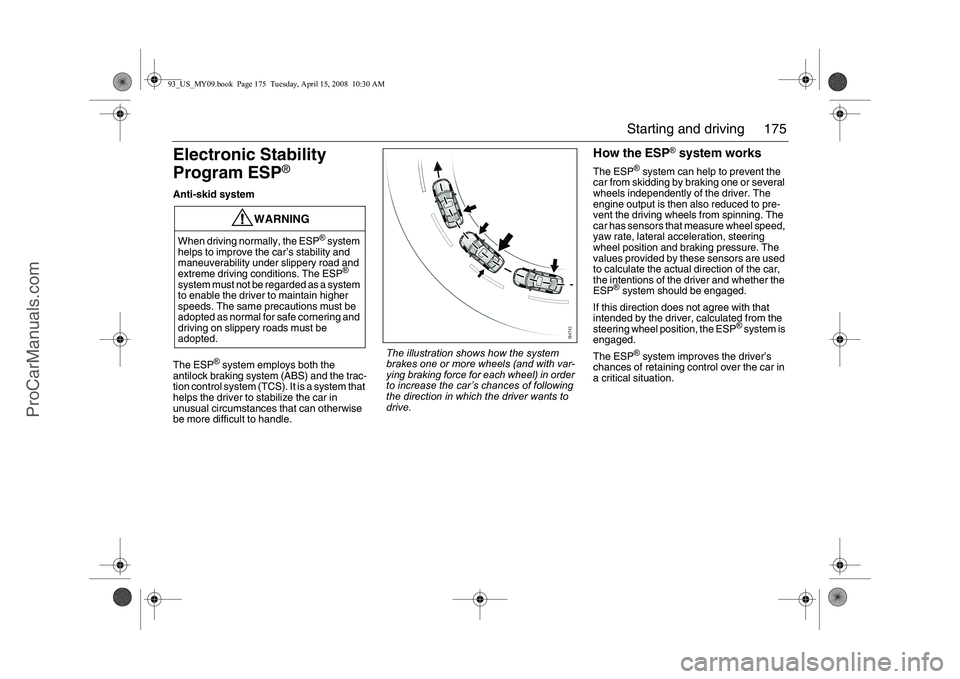
The illustration shows how the system
brakes one or more wheels (and with var-
ying braking force for each wheel) in order
to increase the car’s chances of following
the direction in which the driver wants to
drive.
93_US_MY09.book Page 175 Tuesday, April 15, 2008 10:30 AM
ProCarManuals.com
Page 177 of 304
177 Starting and driving
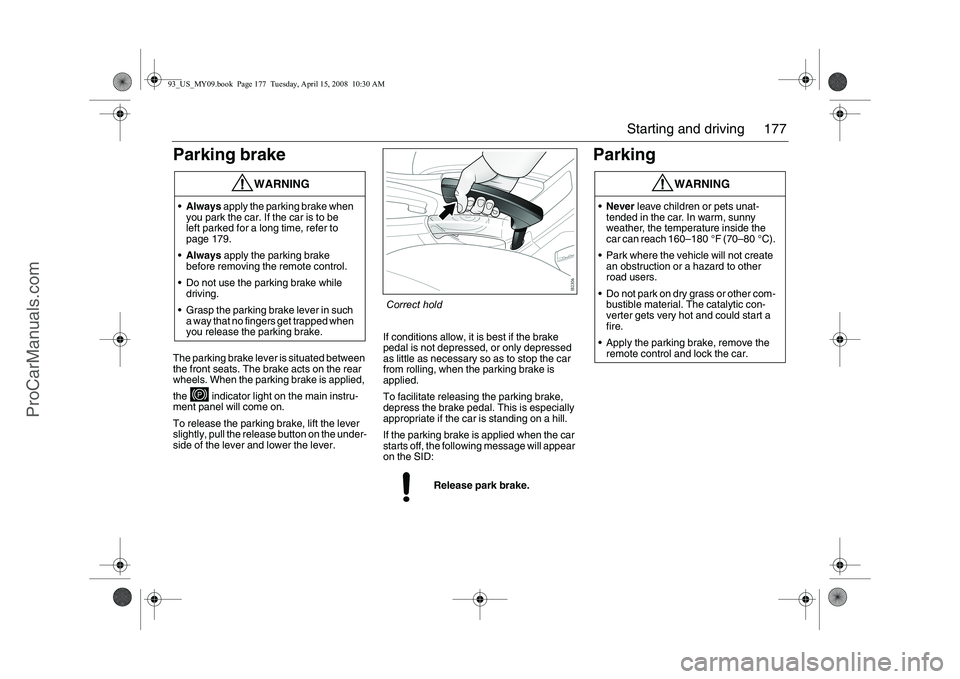
Parking brakeThe parking brake lever is situated between
the front seats. The brake acts on the rear
wheels. When the parking brake is applied,
the indicator light on the main instru-
ment panel will come on.
To release the parking brake, lift the lever
slightly, pull the release button on the under-
side of the lever and lower the lever.If conditions allow, it is best if the brake
pedal is not depressed, or only depressed
as little as necessary so as to stop the car
from rolling, when the parking brake is
applied.
To facilitate releasing the parking brake,
depress the brake pedal. This is especially
appropriate if the car is standing on a hill.
If the parking brake is applied when the car
starts off, the following message will appear
on the SID:
Parking
WARNING
Always apply the parking brake when
you park the car. If the car is to be
left parked for a long time, refer to
page 179.
Always apply the parking brake
before removing the remote control.
Do not use the parking brake while
driving.
Grasp the parking brake lever in such
a way that no fingers get trapped when
you release the parking brake.
Release park brake.
WARNING
Never leave children or pets unat-
tended in the car. In warm, sunny
weather, the temperature inside the
car can reach 160–180 °F (70–80 °C).
Park where the vehicle will not create
an obstruction or a hazard to other
road users.
Do not park on dry grass or other com-
bustible material. The catalytic con-
verter gets very hot and could start a
fire.
Apply the parking brake, remove the
remote control and lock the car.
Correct hold
93_US_MY09.book Page 177 Tuesday, April 15, 2008 10:30 AM
ProCarManuals.com
Page 180 of 304
180 Starting and drivingSaab Parking
Assistance3Saab Parking Assistance
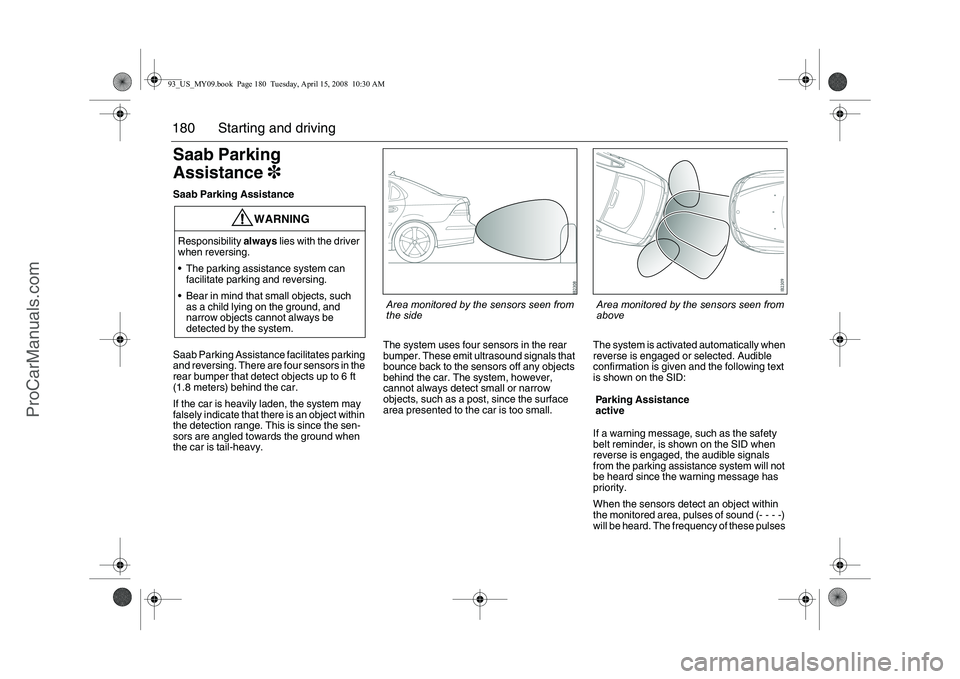
Saab Parking Assistance facilitates parking
and reversing. There are four sensors in the
rear bumper that detect objects up to 6 ft
(1.8 meters) behind the car.
If the car is heavily laden, the system may
falsely indicate that there is an object within
the detection range. This is since the sen-
sors are angled towards the ground when
the car is tail-heavy.The system uses four sensors in the rear
bumper. These emit ultrasound signals that
bounce back to the sensors off any objects
behind the car. The system, however,
cannot always detect small or narrow
objects, such as a post, since the surface
area presented to the car is too small.The system is activated automatically when
reverse is engaged or selected. Audible
confirmation is given and the following text
is shown on the SID:
If a warning message, such as the safety
belt reminder, is shown on the SID when
reverse is engaged, the audible signals
from the parking assistance system will not
be heard since the warning message has
priority.
When the sensors detect an object within
the monitored area, pulses of sound (- - - -)
will be heard. The frequency of these pulses
WARNING
Responsibility always lies with the driver
when reversing.
The parking assistance system can
facilitate parking and reversing.
Bear in mind that small objects, such
as a child lying on the ground, and
narrow objects cannot always be
detected by the system.
Parking Assistance
active
Area monitored by the sensors seen from
the side
Area monitored by the sensors seen from
above
93_US_MY09.book Page 180 Tuesday, April 15, 2008 10:30 AM
ProCarManuals.com