instrument panel SAAB 9-3 2009 Owner's Guide
[x] Cancel search | Manufacturer: SAAB, Model Year: 2009, Model line: 9-3, Model: SAAB 9-3 2009Pages: 304, PDF Size: 44.31 MB
Page 162 of 304
162 Starting and drivingAutomatic
transmission3
The automatic transmission has an elec-
tronic control module. The control module
receives information including accelerator
position and road speed. Using this and
other information, it controls the hydraulic
pressure of the transmission to ensure that
gear changing is as smooth as possible.
The remote control can only be removed
when the selector lever is in the P position.The engine can only be started when the
selector lever is in the P or N position.
When the car is stationary, the engine must
be idling when you move the selector lever
from one position to another. If not, the
transmission could be damaged.
WARNING
Depress the brake pedal when shifting
the selector lever from P or N.
The car must be at a standstill before
P, R or N is selected. You have to have
your foot on the brake pedal to move
the lever out of P. If the car is still
moving when a drive position is subse-
quently selected, this could cause a
crash or damage the automatic trans-
mission.
Never park the car with the selector
lever in a drive position, even if the
parking brake is on.
If you want to leave the car with the
engine running, move the selector
lever to P or N and apply the parking
brake.
NOTICEAfter selecting a drive position, pause
briefly to allow the gear to engage (the car
starts to pull a little) before you acceler-
ate.
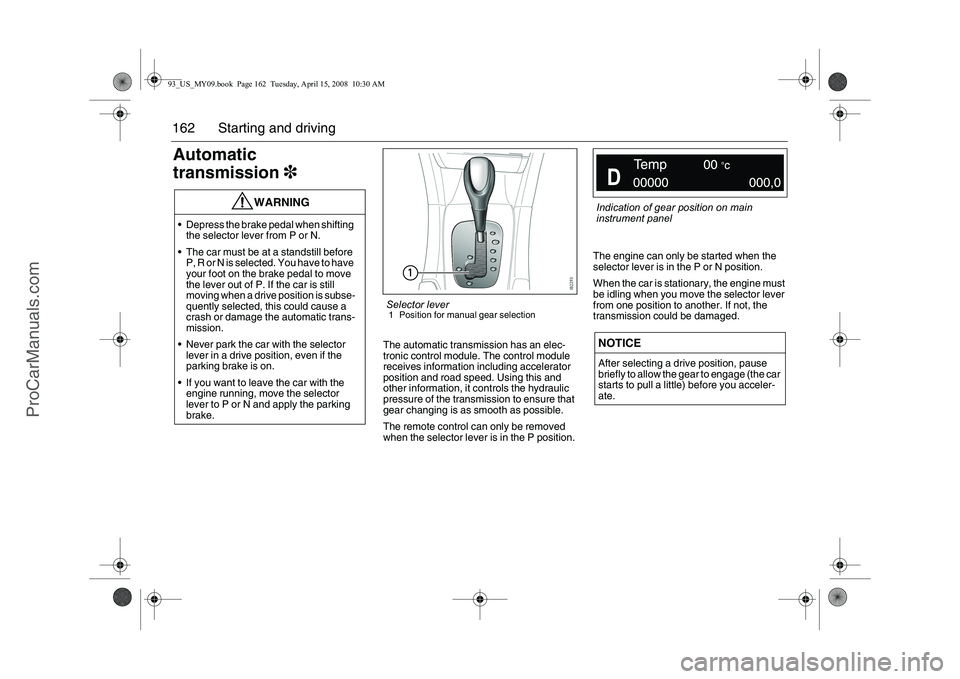
Selector lever1 Position for manual gear selection
Indication of gear position on main
instrument panel
93_US_MY09.book Page 162 Tuesday, April 15, 2008 10:30 AM
ProCarManuals.com
Page 168 of 304
168 Starting and driving
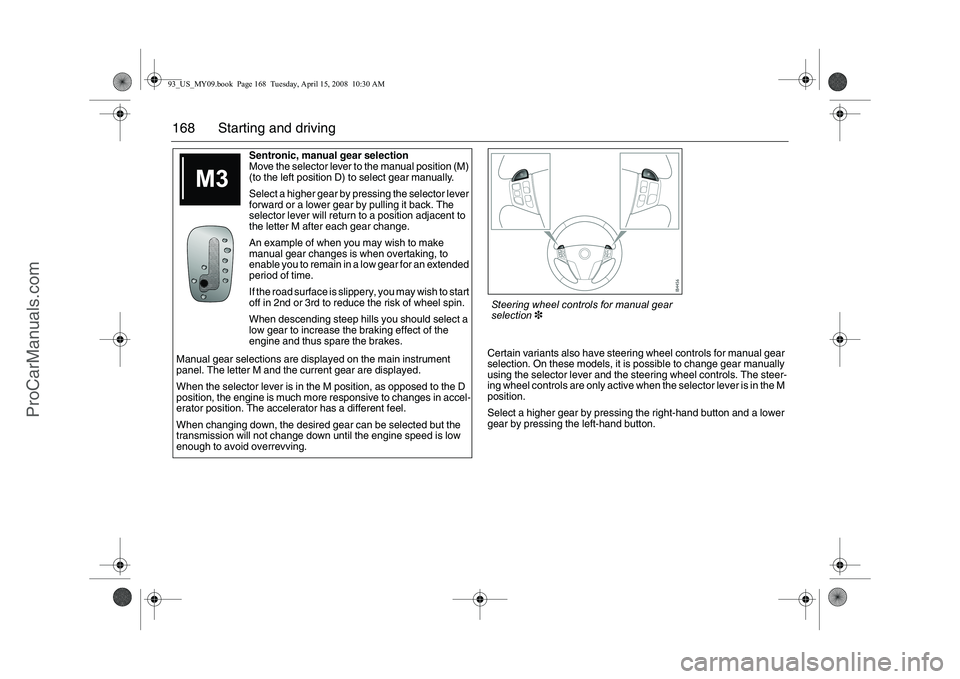
Certain variants also have steering wheel controls for manual gear
selection. On these models, it is possible to change gear manually
using the selector lever and the steering wheel controls. The steer-
ing wheel controls are only active when the selector lever is in the M
position.
Select a higher gear by pressing the right-hand button and a lower
gear by pressing the left-hand button. Sentronic, manual gear selection
Move the selector lever to the manual position (M)
(to the left position D) to select gear manually.
Select a higher gear by pressing the selector lever
forward or a lower gear by pulling it back. The
selector lever will return to a position adjacent to
the letter M after each gear change.
An example of when you may wish to make
manual gear changes is when overtaking, to
enable you to remain in a low gear for an extended
period of time.
If the road surface is slippery, you may wish to start
off in 2nd or 3rd to reduce the risk of wheel spin.
When descending steep hills you should select a
low gear to increase the braking effect of the
engine and thus spare the brakes.
Manual gear selections are displayed on the main instrument
panel. The letter M and the current gear are displayed.
When the selector lever is in the M position, as opposed to the D
position, the engine is much more responsive to changes in accel-
erator position. The accelerator has a different feel.
When changing down, the desired gear can be selected but the
transmission will not change down until the engine speed is low
enough to avoid overrevving.Steering wheel controls for manual gear
selection3
93_US_MY09.book Page 168 Tuesday, April 15, 2008 10:30 AM
ProCarManuals.com
Page 169 of 304
169 Starting and driving
Cruise Control(Cruise control system)
For safety reasons (brake system func-
tion), the brakes must be applied once
when the engine has started, before the
cruise control system can be activated.
The following message is shown on the SID:
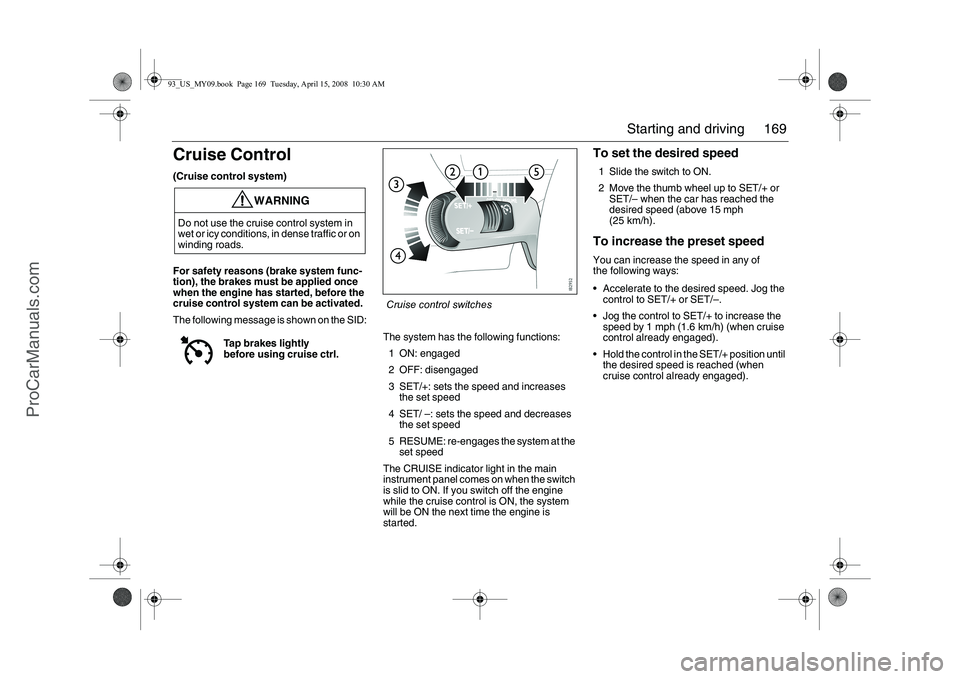
The system has the following functions:
1 ON: engaged
2 OFF: disengaged
3 SET/+: sets the speed and increases
the set speed
4 SET/ –: sets the speed and decreases
the set speed
5 RESUME: re-engages the system at the
set speed
The CRUISE indicator light in the main
instrument panel comes on when the switch
is slid to ON. If you switch off the engine
while the cruise control is ON, the system
will be ON the next time the engine is
started.
To set the desired speed1 Slide the switch to ON.
2 Move the thumb wheel up to SET/+ or
SET/– when the car has reached the
desired speed (above 15 mph
(25 km/h).To increase the preset speedYou can increase the speed in any of
the following ways:
Accelerate to the desired speed. Jog the
control to SET/+ or SET/–.
Jog the control to SET/+ to increase the
speed by 1 mph (1.6 km/h) (when cruise
control already engaged).
Hold the control in the SET/+ position until
the desired speed is reached (when
cruise control already engaged).
WARNING
Do not use the cruise control system in
wet or icy conditions, in dense traffic or on
winding roads.
Tap brakes lightly
before using cruise ctrl.
Cruise control switches
93_US_MY09.book Page 169 Tuesday, April 15, 2008 10:30 AM
ProCarManuals.com
Page 202 of 304
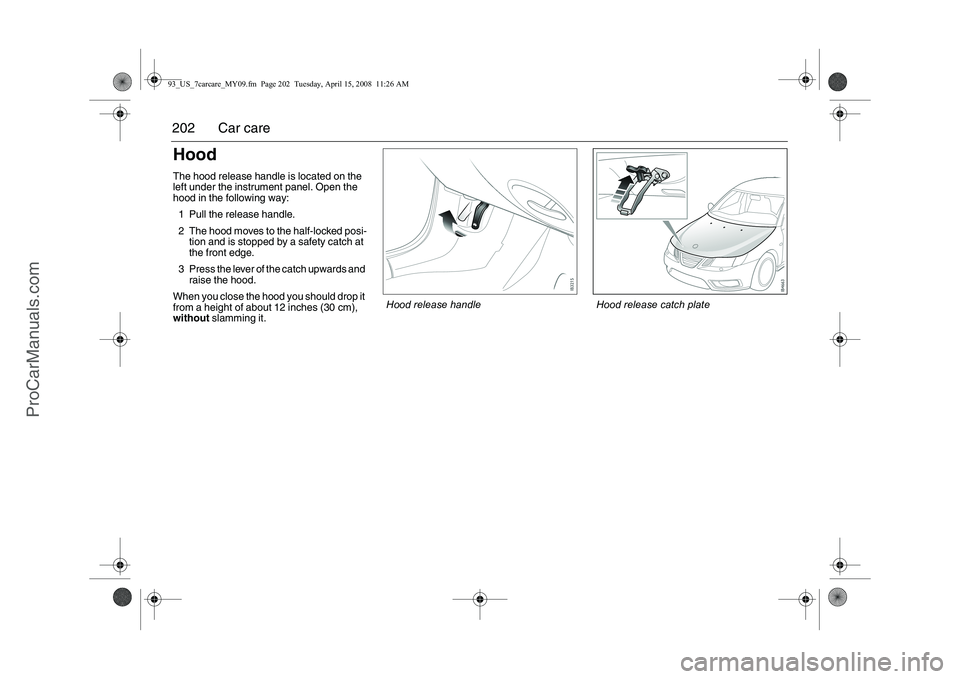
202 Car careHoodThe hood release handle is located on the
left under the instrument panel. Open the
hood in the following way:
1 Pull the release handle.
2 The hood moves to the half-locked posi- tion and is stopped by a safety catch at
the front edge.
3 Press the lever of the catch upwards and raise the hood.
When you close the hood you should drop it
from a height of about 12 inches (30 cm),
without slamming it.
Hood release catch plate
Hood release handle
93_US_7carcare_MY09.fm Page 202 Tuesday, April 15, 2008 11:26 AM
ProCarManuals.com
Page 235 of 304
235
Car care
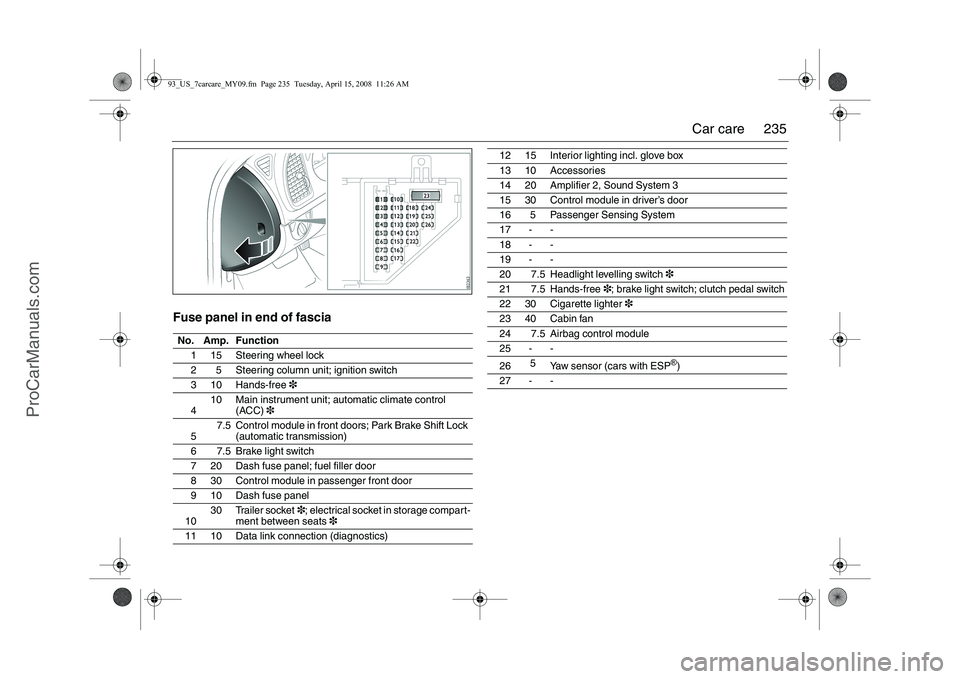
Fuse panel in end of fasciaNo. Amp. Function
1 15 Steering wheel lock
2 5 Steering column unit; ignition switch
3 10 Hands-free 3
4 10 Main instrument unit;
automatic climate control
(ACC) 3
5 7.5 Control module in front doors; Park Brake Shift Lock
(automatic transmission)
6 7.5 Brake light switch
7 20 Dash fuse panel; fuel filler door
8 30 Control module in passenger front door
9 10 Dash fuse panel
10 30 Trailer socket
3; electrical socket in storage compart-
ment between seats 3
11 10 Data link connection (diagnostics)
12 15 Interior lighting incl. glove box
13 10 Accessories
14 20 Amplifier 2, Sound System 3
15 30 Control module in driver’s door
16 5 Passenger Sensing System
17 - -
18 - -
19 - -
20 7.5 Headlight levelling switch 3
21 7.5 Hands-free 3; brake light switch; clutch pedal switch
22 30 Cigarette lighter 3
23 40 Cabin fan
24 7.5 Airbag control module
25 - -
26 5
Yaw sensor (cars with ESP
®)
27 - -
93_US_7carcare_MY09.fm Page 235 Tuesday, April 15, 2008 11:26 AM
ProCarManuals.com
Page 299 of 304
299 Index
Headlight flasher
_________________ 99
Headlight levelling ________________ 98
Headlights
______________________ 98
Hood
_________________________ 202
Horn _________________________ 118
Horn button
____________________ 118
IIf a tire goes flat
________________ 247
Ignition switch
__________________ 150
Immobilizer
_____________________ 55
Important considerations for driving
_153
Important information, petrol-engined
cars with catalytic converters
_____ 154
Indicator lights
___________________ 82
Inflation, tires __________________ 240
Information about fuel
____________ 158
Instrument illumination, adjusting
___ 100
Interior lighting, Convertible
________ 79
Interior lighting, SportSedan and
SportCombi
___________________ 131
Interior rearview mirror
___________ 123
Intermittent malfunctioning, central
locking
_______________________ 50
JJump starting
__________________ 197
KKey
___________________________ 48
Kick-down
_____________________ 164
LLabeling, tire sidewall
____________ 248
Labels and plates, location
________ 292
Lashing eyes, SportCombi ________ 144
Lashing eyes, SportSedan ________ 139
Laying the car up
_______________ 179
LATCH (child safety) ______________ 25
Leather upholstery, cleaning
_______ 266
Lighting in luggage compartment,
Convertible
____________________ 79
Limp-home
____________________ 154
Limp-home, automatic transmission
_165
Load carriers, roof
_______________ 192
Load indices, tires _______________ 249
Loading your vehicle _____________ 250
Load-through hatch, SportCombi
___ 143
Load-through hatch, SportSedan ___ 138
Locking a car with flat battery
_______ 51
Locks
__________________________ 48
Long-term parking
_______________ 179
Luggage compartment
___________ 136
Luggage compartment lighting,
Convertible
____________________ 79
Luggage compartment lighting,
SportSedan _______________ 132
, 140Luggage compartment lighting,
changing
_____________________ 230
MMain instrument panel
_____________ 82
Main/dipped beam
________________ 99
Maintenance schedule
___________ 278
Malfunction Indicator Lamp
_________ 83
Manual gear selection
____________ 168
Manual gearbox
_________________ 161
Manual tripping of car alarm
________ 58
Materials used in the car, reclamation
272
MAXI fuses
____________________ 234
Memory, driver’s seat
_____________ 21
Messages on SID, Convertible
______ 71
Milometer
_______________________ 90
Moonroof ______________________ 128
Mug holder ____________________ 133
NNew tires, buying
________________ 243
Number plate lighting, changing
____ 229
OORVR
________________________ 205
Opening handles
_________________ 48
Opening the soft top, Convertible
____ 64
Outside mirrors
_________________ 122
Owner assistance _______________ 280
93_US_MY09.book Page 299 Tuesday, April 15, 2008 10:30 AM
ProCarManuals.com