light SAAB 9-3 2009 Service Manual
[x] Cancel search | Manufacturer: SAAB, Model Year: 2009, Model line: 9-3, Model: SAAB 9-3 2009Pages: 304, PDF Size: 44.31 MB
Page 102 of 304
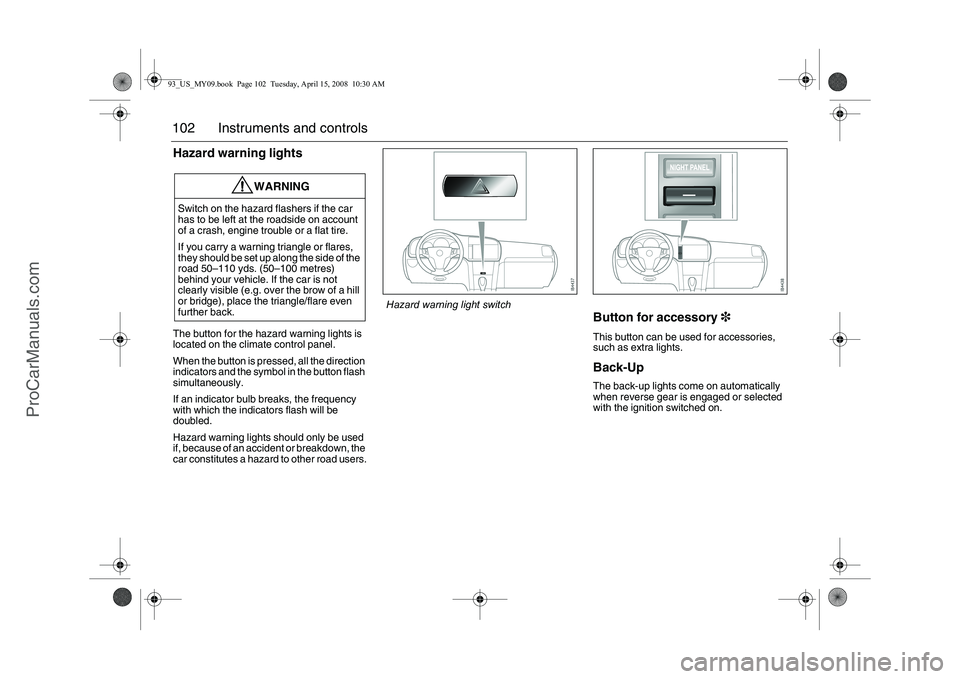
102 Instruments and controlsHazard warning lightsThe button for the hazard warning lights is
located on the climate control panel.
When the button is pressed, all the direction
indicators and the symbol in the button flash
simultaneously.
If an indicator bulb breaks, the frequency
with which the indicators flash will be
doubled.
Hazard warning lights should only be used
if, because of an accident or breakdown, the
car constitutes a hazard to other road users.
Button for accessory3This button can be used for accessories,
such as extra lights.Back-Up The back-up lights come on automatically
when reverse gear is engaged or selected
with the ignition switched on.
WARNING
Switch on the hazard flashers if the car
has to be left at the roadside on account
of a crash, engine trouble or a flat tire.
If you carry a warning triangle or flares,
they should be set up along the side of the
road 50–110 yds. (50–100 metres)
behind your vehicle. If the car is not
clearly visible (e.g. over the brow of a hill
or bridge), place the triangle/flare even
further back.
Hazard warning light switch
93_US_MY09.book Page 102 Tuesday, April 15, 2008 10:30 AM
ProCarManuals.com
Page 104 of 304
104 Instruments and controls
Activate the rain sensor by lifting the stalk
switch to the AUTO position. The wipers
make one sweep for reference to see how
much water is on the windshield. Thereafter
the sensor compares the amount of water
on the windshield with this reference value.
If the stalk switch is left in the AUTO position
when the engine is switched off, when the
engine is next started it must first be moved
to the 0 or 3 position and then back to AUTO
to reactivate the sensor.
If the system malfunctions, the wipers will
operate at low speed when the stalk switch
is set to the AUTO position and SID will
show:
WashersActivate the washers by pulling the stalk
switch towards the steering wheel.
When the washers are operated, the wipers
will make 3, 4 or 5 sweeps, depending on
how long the washers were kept on. If
the speed of the car is less than 12 mph
(20 km/h), the wipers will make an addi-
tional sweep after roughly 8 seconds.
When the washer fluid level drops below
1 quart (1 liter), the headlight washers (if
equipped) are deactivated. This is in order
to prioritize the windshield. The following
message is displayed on the SID:
Rain sensor malfunc.
Contact service.
Washer fluid level low.
Refill.
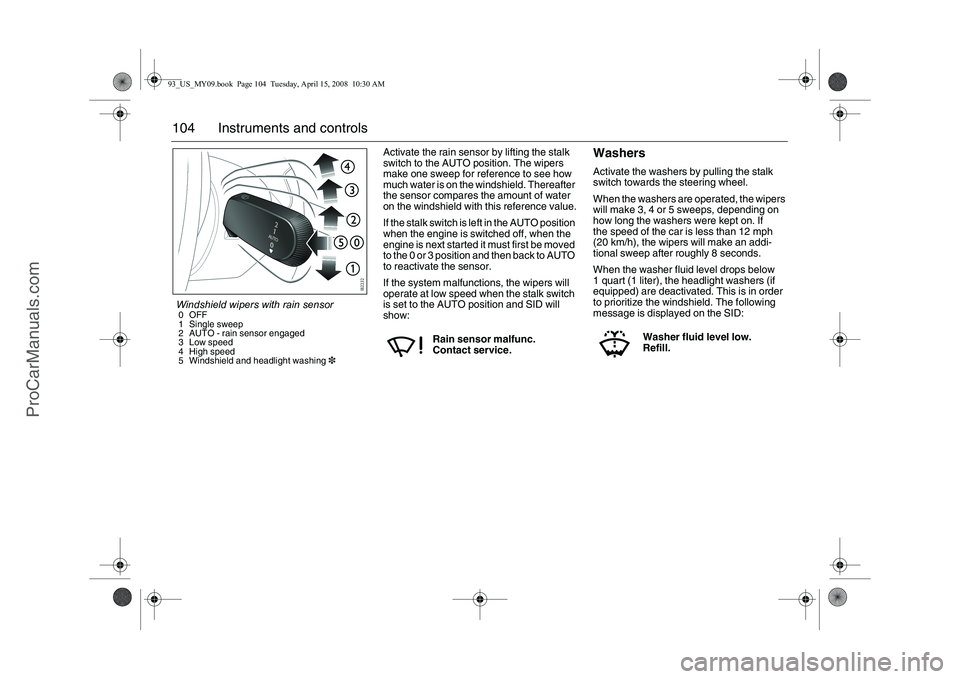
Windshield wipers with rain sensor0OFF
1 Single sweep
2 AUTO - rain sensor engaged
3 Low speed
4 High speed
5 Windshield and headlight washing393_US_MY09.book Page 104 Tuesday, April 15, 2008 10:30 AM
ProCarManuals.com
Page 105 of 304
105 Instruments and controls
Headlight washers3The headlights are washed at the same time
as the windshield if the headlights are on.
The headlights are washed every fifth time
the windshield washers are used or if two
(2) minutes have elapsed since the wind-
shield was last washed.
The headlight washers are not activated at
speeds in excess of 125 mph (200 km/h).Adjusting sensitivity
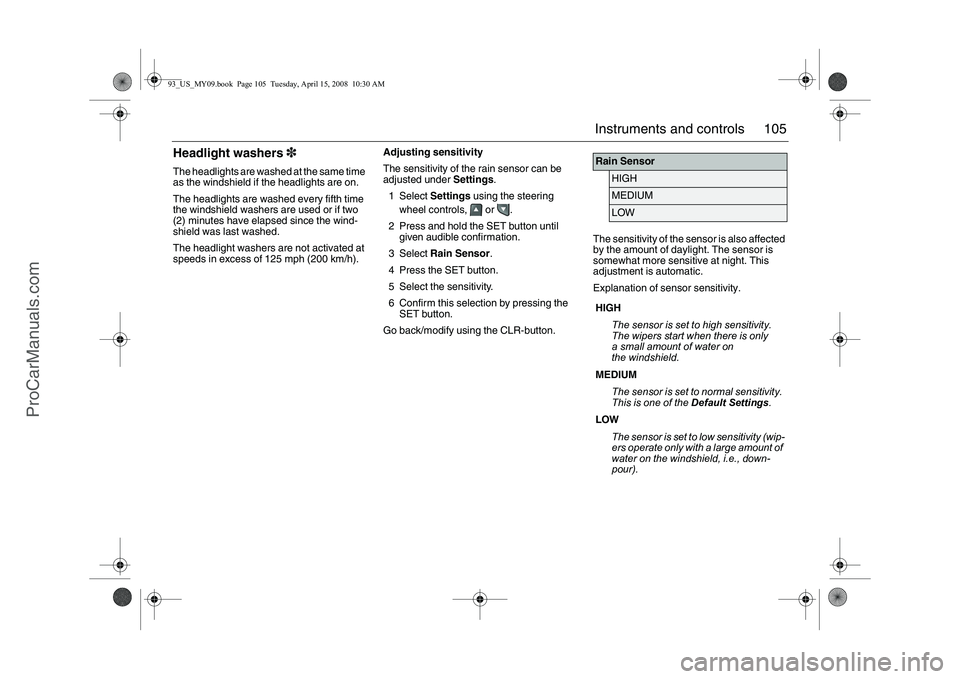
The sensitivity of the rain sensor can be
adjusted under Settings.
1Select Settings using the steering
wheel controls, or .
2 Press and hold the SET button until
given audible confirmation.
3Select Rain Sensor.
4 Press the SET button.
5 Select the sensitivity.
6 Confirm this selection by pressing the
SET button.
Go back/modify using the CLR-button.The sensitivity of the sensor is also affected
by the amount of daylight. The sensor is
somewhat more sensitive at night. This
adjustment is automatic.
Explanation of sensor sensitivity.
Rain Sensor
HIGHMEDIUMLOW
HIGH
The sensor is set to high sensitivity.
The wipers start when there is only
a small amount of water on
the windshield.
MEDIUM
The sensor is set to normal sensitivity.
This is one of the Default Settings.
LOW
The sensor is set to low sensitivity (wip-
ers operate only with a large amount of
water on the windshield, i.e., down-
pour).
93_US_MY09.book Page 105 Tuesday, April 15, 2008 10:30 AM
ProCarManuals.com
Page 111 of 304
111 Instruments and controls
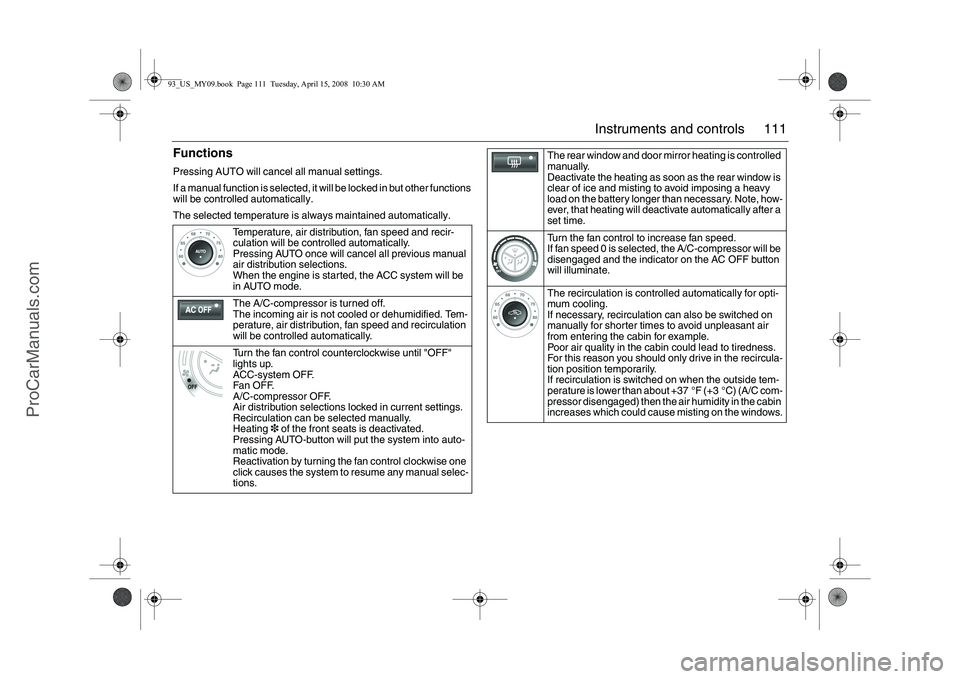
FunctionsPressing AUTO will cancel all manual settings.
If a manual function is selected, it will be locked in but other functions
will be controlled automatically.
The selected temperature is always maintained automatically.
Temperature, air distribution, fan speed and recir-
culation will be controlled automatically.
Pressing AUTO once will cancel all previous manual
air distribution selections.
When the engine is started, the ACC system will be
in AUTO mode.
The A/C-compressor is turned off.
The incoming air is not cooled or dehumidified. Tem-
perature, air distribution, fan speed and recirculation
will be controlled automatically.
Turn the fan control counterclockwise until "OFF"
lights up.
ACC-system OFF.
Fan OFF.
A/C-compressor OFF.
Air distribution selections locked in current settings.
Recirculation can be selected manually.
Heating3 of the front seats is deactivated.
Pressing AUTO-button will put the system into auto-
matic mode.
Reactivation by turning the fan control clockwise one
click causes the system to resume any manual selec-
tions.
The rear window and door mirror heating is controlled
manually.
Deactivate the heating as soon as the rear window is
clear of ice and misting to avoid imposing a heavy
load on the battery longer than necessary. Note, how-
ever, that heating will deactivate automatically after a
set time.
Turn the fan control to increase fan speed.
If fan speed 0 is selected, the A/C-compressor will be
disengaged and the indicator on the AC OFF button
will illuminate.
The recirculation is controlled automatically for opti-
mum cooling.
If necessary, recirculation can also be switched on
manually for shorter times to avoid unpleasant air
from entering the cabin for example.
Poor air quality in the cabin could lead to tiredness.
For this reason you should only drive in the recircula-
tion position temporarily.
If recirculation is switched on when the outside tem-
perature is lower than about +37 °F (+3 °C) (A/C com-
pressor disengaged) then the air humidity in the cabin
increases which could cause misting on the windows.
93_US_MY09.book Page 111 Tuesday, April 15, 2008 10:30 AM
ProCarManuals.com
Page 115 of 304
115 Instruments and controls
SettingsSome of the functions of the ACC system
can be customized.
1Select Settings using the steering
wheel controls, or .
2 Press and hold the SET button until
given audible confirmation.
3Select Climate System.
4 Press the SET button.
5 Select the Rear Defroster, Heated
Seats, Fan Settings, A/C Mode or
Default Settings.
6 Press the SET button.
7 Make your selection.
8 Confirm your selection by pressing the
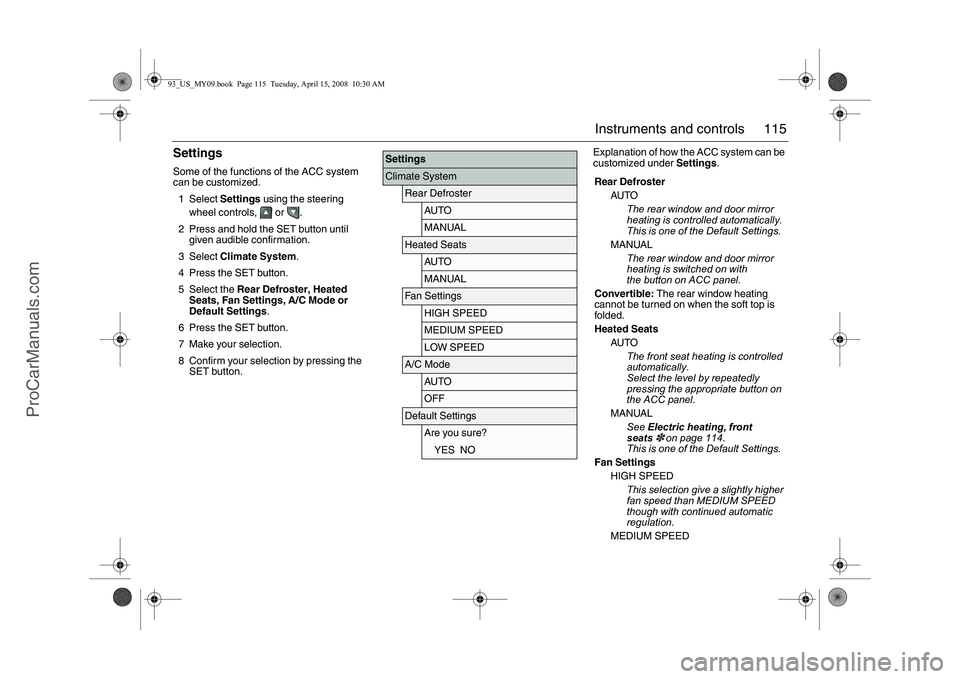
SET button.Explanation of how the ACC system can be
customized under Settings.
SettingsClimate System
Rear Defroster
AUTOMANUAL
Heated Seats
AUTOMANUAL
Fan Settings
HIGH SPEEDMEDIUM SPEEDLOW SPEED
A/C Mode
AUTOOFF
Default Settings
Are you sure?YES NO
Rear Defroster
AUTO
The rear window and door mirror
heating is controlled automatically.
This is one of the Default Settings.
MANUAL
The rear window and door mirror
heating is switched on with
the button on ACC panel.
Convertible: The rear window heating
cannot be turned on when the soft top is
folded.
Heated Seats
AUTO
The front seat heating is controlled
automatically.
Select the level by repeatedly
pressing the appropriate button on
the ACC panel.
MANUAL
See Electric heating, front
seats
3 on page 114.
This is one of the Default Settings.
Fan Settings
HIGH SPEED
This selection give a slightly higher
fan speed than MEDIUM SPEED
though with continued automatic
regulation.
MEDIUM SPEED
93_US_MY09.book Page 115 Tuesday, April 15, 2008 10:30 AM
ProCarManuals.com
Page 116 of 304
116 Instruments and controls
Normal automatic fan speed. This is
one of the Default Settings.
LOW SPEED
This selection give a slightly lower
fan speed than MEDIUM SPEED
though with continued automatic
regulation.
Convertible: Fan speed is not regulated
automatically when the soft top is open.
A/C Mode
Auto
Automatic engagement and disen-
gagement of the A/C. This is one of
the Default Settings.
A/C offA/C compressor OFF (see also
page 111). The A/C compressor
can be activated temporarily by
pressing the AC or AUTO button
while on the road and if the outside
temperature is above 41°F (+5°C).
The A/C will be off the next time the
engine is started, if the engine has
been switched off for more than
2 hours.
Convertible: The A/C compressor is
switched off when the soft top is folded
down.
Further customizations to this function can
be made at a workshop. We recommend
that you contact a Saab dealer.
The A/C compressor can be on even
when the soft top is folded down.
The A/C compressor can be set to
operate as when the soft top was last
folded down.
93_US_MY09.book Page 116 Tuesday, April 15, 2008 10:30 AM
ProCarManuals.com
Page 117 of 304
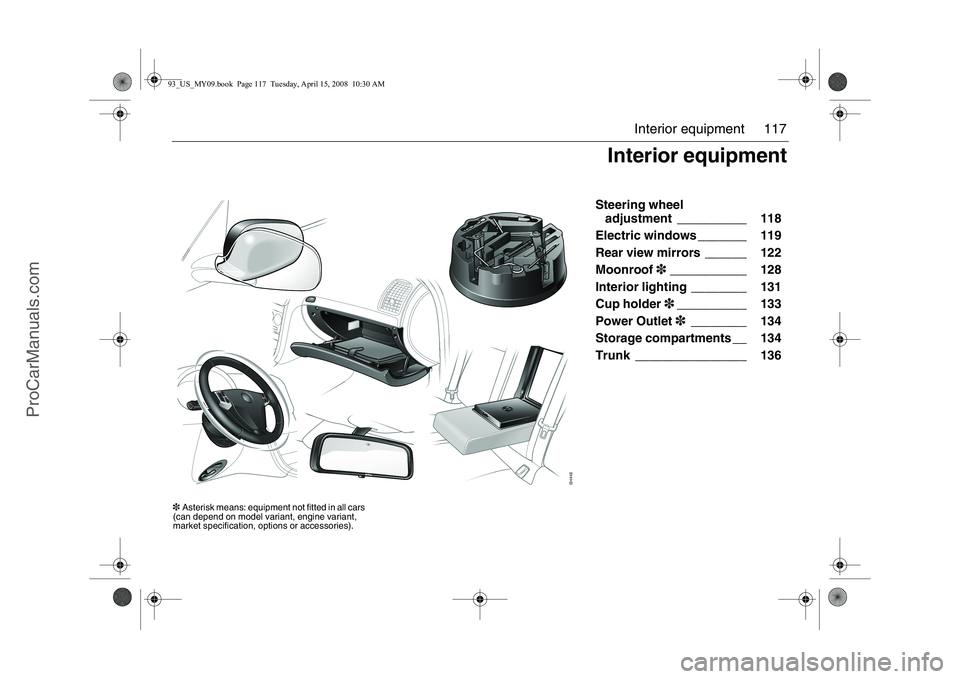
117 Interior equipment
Steering wheel
adjustment __________ 118
Electric windows _______ 119
Rear view mirrors ______ 122
Moonroof3___________ 128
Interior lighting ________ 131
Cup holder3__________ 133
Power Outlet3________ 134
Storage compartments __ 134
Trunk ________________ 136
Interior equipment
3Asterisk means: equipment not fitted in all cars
(can depend on model variant, engine variant,
market specification, options or accessories).93_US_MY09.book Page 117 Tuesday, April 15, 2008 10:30 AM
ProCarManuals.com
Page 118 of 304
118 Interior equipmentSteering wheel
adjustmentThe height and reach of the steering wheel
can be adjusted.
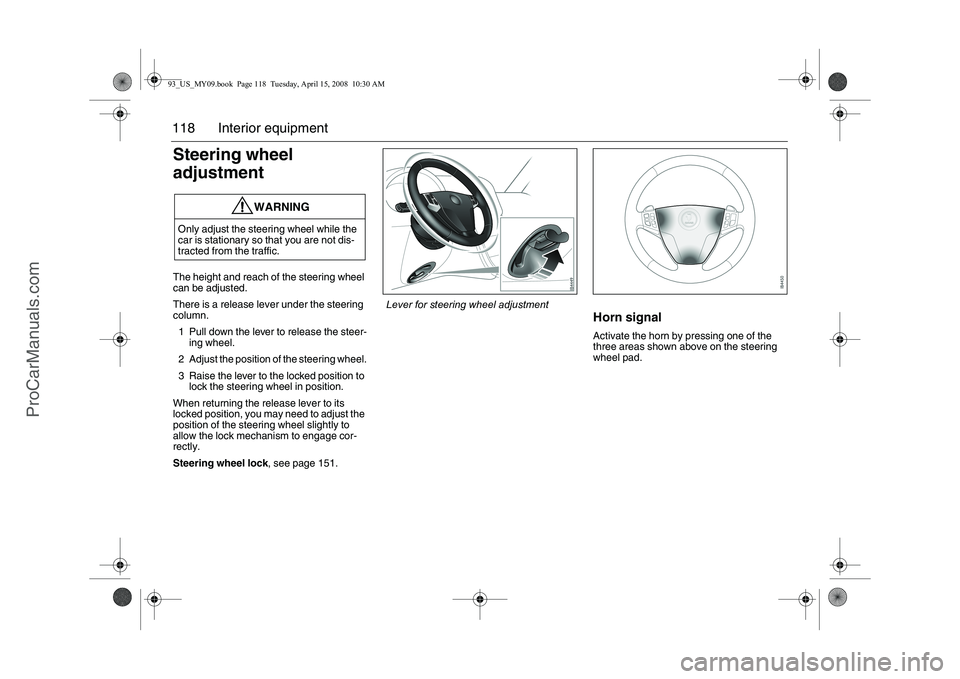
There is a release lever under the steering
column.
1 Pull down the lever to release the steer-
ing wheel.
2 Adjust the position of the steering wheel.
3 Raise the lever to the locked position to
lock the steering wheel in position.
When returning the release lever to its
locked position, you may need to adjust the
position of the steering wheel slightly to
allow the lock mechanism to engage cor-
rectly.
Steering wheel lock, see page 151.
Horn signalActivate the horn by pressing one of the
three areas shown above on the steering
wheel pad.
WARNING
Only adjust the steering wheel while the
car is stationary so that you are not dis-
tracted from the traffic.
Lever for steering wheel adjustment
93_US_MY09.book Page 118 Tuesday, April 15, 2008 10:30 AM
ProCarManuals.com
Page 120 of 304
120 Interior equipmentTo closeRaise the front edge of the button one step.
The window will stop when it is fully closed
or when the button is released.
Automatic closing3: Raise the button all
the way and release it. If the window does
not close automatically, refer to Calibration
on page 121.
Pinch protection3On certain model variants, the front electric
windows are equipped with pinch protec-
tion. This is activated if something gets
trapped between the window pane and door
frame when the window is closed. The
window will stop and lower slightly.
Temporary overriding the pinch protec-
tion
If dirt, ice or similar create so much resis-
tance that the pinch protection cuts in (the
window cannot be closed), the pinch protec-
tion can be temporarily disengaged and the
window closed.
1 Make sure the ignition is ON.
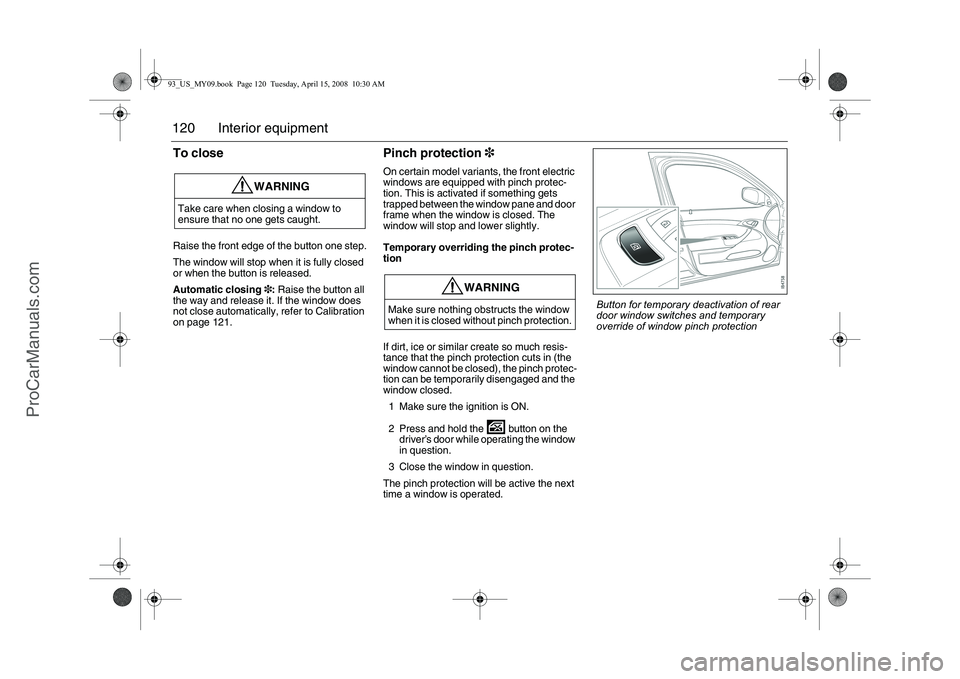
2 Press and hold the button on the
driver’s door while operating the window
in question.
3 Close the window in question.
The pinch protection will be active the next
time a window is operated.
WARNING
Take care when closing a window to
ensure that no one gets caught.
WARNING
Make sure nothing obstructs the window
when it is closed without pinch protection.
Button for temporary deactivation of rear
door window switches and temporary
override of window pinch protection
93_US_MY09.book Page 120 Tuesday, April 15, 2008 10:30 AM
ProCarManuals.com
Page 124 of 304
124 Interior equipmentPreparations for first-time programming
Before programming the garage opener for
the first time, you must delete any factory
codes.
Press and hold the two outer buttons until
the indicator light begins to flash-after
20 seconds. Release both buttons. Do not
hold for longer that 30 seconds. The garage
opener is now in the train (or learning) mode
and can be programmed at any time begin-
ning with "Programming" - step 2.Programming
The garage opener can record and store the
frequencies of three different remote con-
trols.
The battery in the remote control should be
fairly new for programming to work well.
Do not repeat "Programming" - step two
to train additional devices to a second or
third button. Begin with "Programming" -
step three.
1 Turn the ignition ON.
2 Press and hold the two outer buttons
(buttons one and three) - releasing only
when the indicator light begins to flash
(after 20 seconds). Do not hold the
buttons for longer than 30 seconds and
do not repeat step two to program a
second and/or third hand-held transmit-
ter to the remaining two buttons.
3 Position the end of your hand-held trans-
mitter 1-3 inches (5-14 cm) away from
the button you wish to program while
keeping the indicator light in view. The
transmitter should face the mirror from
below or left side of the mirror.
4 Simultaneously press and hold both the
chosen and hand-held transmitter
buttons. Do not release the buttons
until step 5 has been completed.Note: Some gate operators and garage
door openers may require you to replace
this Programming Step 4 with procedures
noted in the "Gate Operator / Canadian
Programming" section.
5 After the indicator light changes from a
slow to a rapidly blinking light, release
both the mirror and hand-held transmit-
ter buttons.
6 Press and hold the just-trained button
and observe the indicator light.
If the indicator light stays on
constantly, programming is complete
and your device should activate when
the button is pressed and released.
Note: To program the remaining two but-
tons, begin with "Programming" - step
three. Do not repeat step two.93_US_MY09.book Page 124 Tuesday, April 15, 2008 10:30 AM
ProCarManuals.com