light SAAB 9-3 2009 Workshop Manual
[x] Cancel search | Manufacturer: SAAB, Model Year: 2009, Model line: 9-3, Model: SAAB 9-3 2009Pages: 304, PDF Size: 44.31 MB
Page 125 of 304
125 Interior equipment
If the indicator light blinks rapidly for two
seconds and then turns to a constant
light continue with "Programming"
steps 7-9 to complete the programming of
a rolling code equipped device (most
commonly a garage door opener).
7 At the garage door opener receiver
(motor-head unit) in the garage, locate
the "learn" or "smart" button. This can
usually be found where the hanging
antenna wire is attached to the
motor-head unit.
8 Firmly press and release the "learn" or
"smart" button. (The name and color of
the button may vary by manufacturer.)
Note: There are 30 seconds in which to ini-
tiate step nine.
9 Return to the vehicle and firmly press,
hold for two seconds and release the
programmed button. Repeat the
"press/hold/release" sequence a
second time, and, depending on the
brand of the garage door opener (or
other rolling code equipped device),
repeat this sequence a third time to
complete the programming process.
The garage opener should now activate
your rolling code equipped device.
Note: To program the remaining two but-
tons, begin with "Programming" - step
three. Do not repeat step two. Gate Operator / Canadian Programming
Canadian radio-frequency laws require
transmitter signals to "time-out" (or quit)
after several seconds of transmission -
which may not be long enough for the
garage opener to pick up the signal during
programming. Similar to this Canadian law,
some U.S. gate operators are designed to
"time-out" in the same manner.
If you live in Canada or you are having diffi-
culties programming a gate operator by
using the "Programming" procedures
(regardless of where you live), replace
"Programming " step 4 with the following:
Note: If programming a garage door opener
or gate operator, it is advised to unplug the
device during the "cycling" process to pre-
vent possible overheating.
Continue to press and hold the button while
you press and release - every two sec-
onds ("cycle") your hand-held transmitter
until the frequency signal has successfully
been accepted by the garage opener. (The
indicator light will flash slowly and then rap-
idly.)
Proceed with "Programming" step five to
complete.Reprogramming a single button
To program a device to the garage opener
using a button previously trained, follow
these steps:
1 Press and hold the desired button. DO
NOT release the button.
2 The indicator light will begin to flash after
20 seconds. Without releasing the
button, proceed with "Programming" -
step 3.
NOTICESwitch off the power supply to the garage
door or gate (or park the car beyond the
range of the remote control) while pro-
gramming using the "cycling" method to
prevent damaging the electrical motor.
93_US_MY09.book Page 125 Tuesday, April 15, 2008 10:30 AM
ProCarManuals.com
Page 126 of 304
126 Interior equipmentErasing the three buttons
To erase programming from the three but-
tons (individual buttons cannot be erased
but can be "reprogrammed" as outlined
below), follow the step noted:
Press and hold the two outer buttons until
the indicator light begins to flash-after
20 seconds. Release both buttons. Do not
hold for longer that 30 seconds. The garage
opener is now in the train (or learning) mode
and can be programmed at any time begin-
ning with "Programming" - step 3.Opening a garage door
To operate, simply press and release the
programmed button. Activation will now
occur for the trained device (i.e. garage door
opener, gate operator, security system,
entry door lock, home/office lighting, etc.).
For convenience, the hand-held transmitter
of the device may also be used at any time.
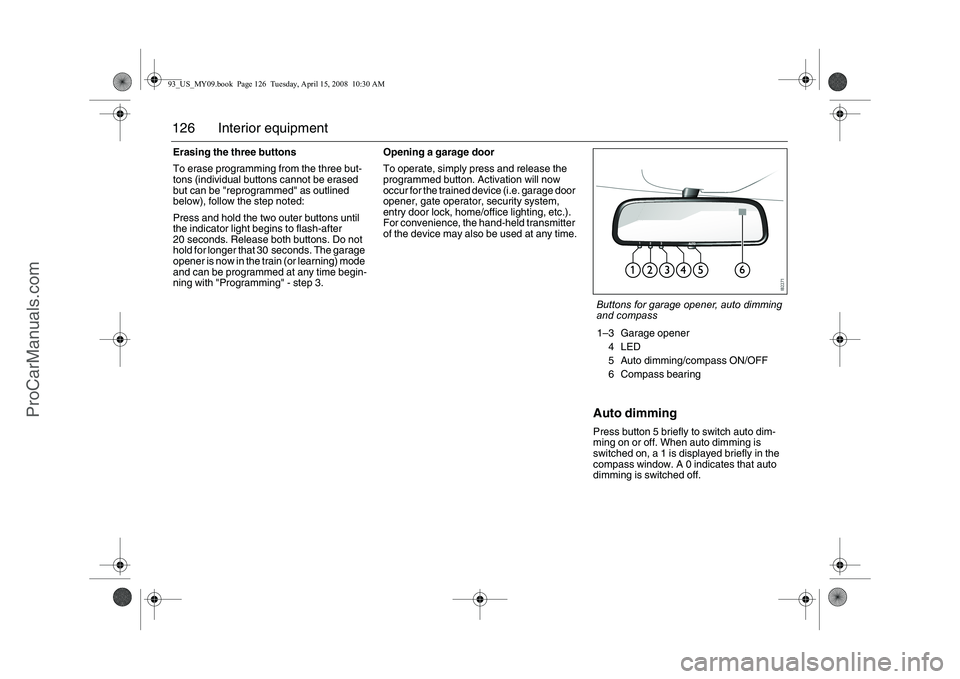
Auto dimmingPress button 5 briefly to switch auto dim-
ming on or off. When auto dimming is
switched on, a 1 is displayed briefly in the
compass window. A 0 indicates that auto
dimming is switched off.Buttons for garage opener, auto dimming
and compass
1–3 Garage opener
4LED
5 Auto dimming/compass ON/OFF
6 Compass bearing
93_US_MY09.book Page 126 Tuesday, April 15, 2008 10:30 AM
ProCarManuals.com
Page 129 of 304
129 Interior equipment
To closeManually controlled closing
Slide the control forward to its first position.
The moonroof will halt when you release the
control.
Automatic closing3
Slide the control forward to its second posi-
tion and release it. The moonroof will close
fully.
The moonroof pinch protection halts closing
and opens the moonroof slightly if some-
thing obstructs closing.
Moonroof without automatic closing3
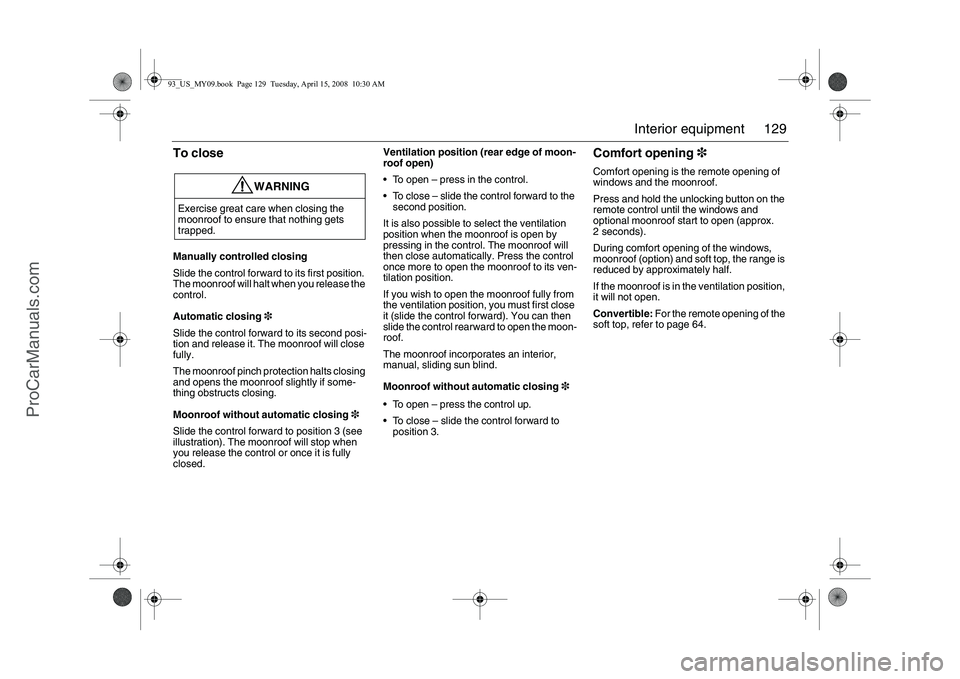
Slide the control forward to position 3 (see
illustration). The moonroof will stop when
you release the control or once it is fully
closed.Ventilation position (rear edge of moon-
roof open)
To open – press in the control.
To close – slide the control forward to the
second position.
It is also possible to select the ventilation
position when the moonroof is open by
pressing in the control. The moonroof will
then close automatically. Press the control
once more to open the moonroof to its ven-
tilation position.
If you wish to open the moonroof fully from
the ventilation position, you must first close
it (slide the control forward). You can then
slide the control rearward to open the moon-
roof.
The moonroof incorporates an interior,
manual, sliding sun blind.
Moonroof without automatic closing3
To open – press the control up.
To close – slide the control forward to
position 3.
Comfort opening3Comfort opening is the remote opening of
windows and the moonroof.
Press and hold the unlocking button on the
remote control until the windows and
optional moonroof start to open (approx.
2 seconds).
During comfort opening of the windows,
moonroof (option) and soft top, the range is
reduced by approximately half.
If the moonroof is in the ventilation position,
it will not open.
Convertible: For the remote opening of the
soft top, refer to page 64.
WARNING
Exercise great care when closing the
moonroof to ensure that nothing gets
trapped.93_US_MY09.book Page 129 Tuesday, April 15, 2008 10:30 AM
ProCarManuals.com
Page 130 of 304
130 Interior equipmentPinch protection3The moonroof is equipped with pinch pro-
tection. This is activated if something gets
trapped when the moonroof is being closed.
The moonroof will stop and open slightly.
Temporary overriding the pinch protec-
tion
If dirt, ice or similar create so much resis-
tance that the pinch protection cuts in
(moonroof cannot be closed), the pinch pro-
tection can be temporarily disengaged.
1 Make sure the ignition is ON.
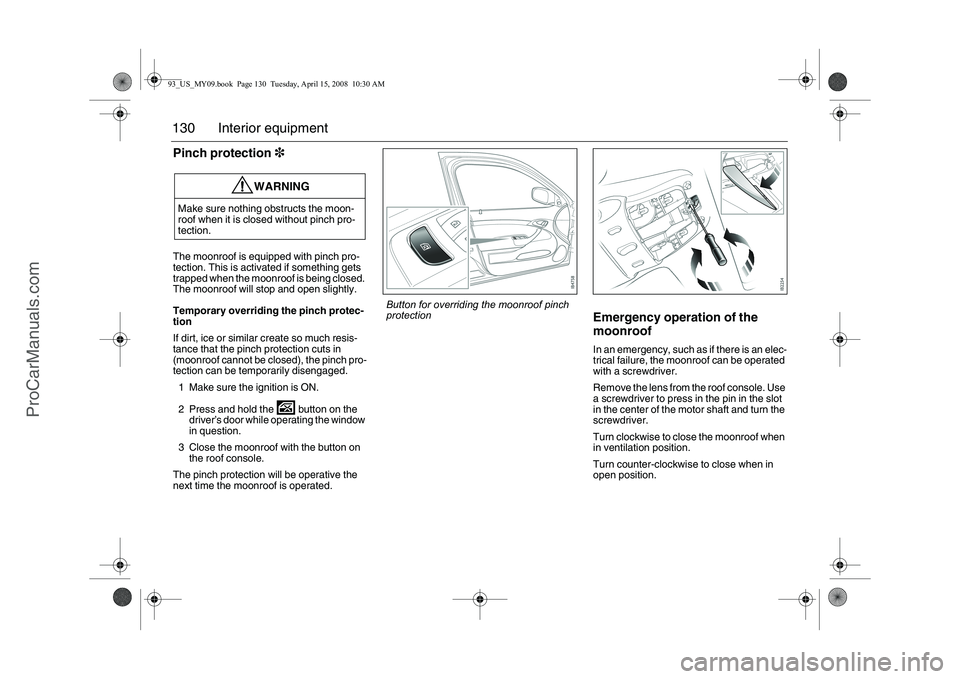
2 Press and hold the button on the
driver’s door while operating the window
in question.
3 Close the moonroof with the button on
the roof console.
The pinch protection will be operative the
next time the moonroof is operated.
Emergency operation of the
moonroofIn an emergency, such as if there is an elec-
trical failure, the moonroof can be operated
with a screwdriver.
Remove the lens from the roof console. Use
a screwdriver to press in the pin in the slot
in the center of the motor shaft and turn the
screwdriver.
Turn clockwise to close the moonroof when
in ventilation position.
Turn counter-clockwise to close when in
open position.
WARNING
Make sure nothing obstructs the moon-
roof when it is closed without pinch pro-
tection.
Button for overriding the moonroof pinch
protection
93_US_MY09.book Page 130 Tuesday, April 15, 2008 10:30 AM
ProCarManuals.com
Page 131 of 304

131 Interior equipment
Interior lightingThe interior lighting consists of one front and
one rear roof light, floor lighting, and cour-
tesy lights in the doors (certain variants
only). The light switch for the interior lighting
is located on the roof console by the rear
view mirror.When the switch is in the mid-position
(door-activated), the interior lighting will
come on:
When the car is unlocked
When a door is opened and the ignition is
OFF
When the remote control is removed from
the ignition switch.
The lighting goes out:
When the car is locked
When the ignition is turned on
Approx. 20 seconds after closing all
doors.
The lights are dimmed out gradually.If a door is left open and the light switch is in
position 2 or 3 and the ignition is OFF, the
interior lighting will be switched off automat-
ically after 20 minutes to save the battery.
The glove box lighting is switched on and off
automatically when the glove box is opened
and closed.1 Interior lighting always off
2 Interior lighting controlled by the doors
3 Interior lighting on continuously
Rear lighting1 Reading lights
2 Roof light
93_US_MY09.book Page 131 Tuesday, April 15, 2008 10:30 AM
ProCarManuals.com
Page 132 of 304

132 Interior equipmentSun visorIlluminated vanity mirrors are provided on
the sun visors. The lighting comes on when
the cover is raised.
Trunk lightingThe trunk lighting is switched on and off
when the trunk lid is opened and closed.
If the trunk lid is left open, the lighting will be
switched off automatically after 20 minutes
to prevent the battery from running flat.
Floor matsPress the loose mat down over the two floor
brackets. Then check that the mat is firmly
secured.
WARNING
Secure the loose floor mats into the floor,
otherwise they could slide forward. This is
particularly important on the driver’s side
as the mat could otherwise slide under
the pedals and interfere with driving.
Sun visor with vanity mirror
Fastening the floor mat
93_US_MY09.book Page 132 Tuesday, April 15, 2008 10:30 AM
ProCarManuals.com
Page 134 of 304

134 Interior equipmentPower Outlet3You can use the electrical socket in the stor-
age compartment under the armrest
between the front seats to charge a mobile
phone, for example. There is a recess on
each side of the compartment which will
accept a lead so that you can close the lid
without damaging the charger lead.
Storage compartmentsThere are additional storage compartments
below the front ashtray and in the doors
(cars with Bose
® Centerpoint
® Surround
Sound System do not have storage com-
partments in the rear doors).
WARNING
The maximum output of the cigarette
lighter socket is 240 W (20 A). The rating
of the socket in the compartment between
the seats is the same. Overloading can
result in melting or even fire.
WARNING
The glove box must be closed while trav-
elling. An open glove box door could
cause personal injury in the event of a
crash.
Open the glove box with the button on the
left of the moulding.
Convertible has lockable glove box. Use
the traditionally key, see page 54.
93_US_MY09.book Page 134 Tuesday, April 15, 2008 10:30 AM
ProCarManuals.com
Page 139 of 304

139 Interior equipment
Trunk Release HandleThere is a glow-in-the-dark trunk release
handle located inside the trunk on the latch.
This handle will glow following exposure to
light. Pull the release handle down to open
the trunk from inside.
Tie down eyes, SportSedanThere are tie down eyes in the trunk that
should be used to secure loads. In general,
loads should be placed as far forward and
as low down as possible in the trunk.
NOTICEThe trunk release handle was not
designed to be used to tie down the trunk
lid or as an anchor point when securing
items in the trunk. Improper use of the
trunk release could damage it.
WARNING
Lay heavy bags on the floor. Place
smaller and lighter bags on top.
Secure heavy and bulky items using
the lashing eyes provided in the trunk.
This will avert the danger of luggage
flying around if the car should brake
suddenly or be involved in a crash.
Secure small items if the backrest is
folded down. Small items can also be
thrown around inside the car and
cause personal injury.
The elastic cargo net3 is only
designed for light objects that are to be
kept in place while driving
Elastic cargo net3: WARNING. Avoid
eye injury. DO NOT overstretch.
ALWAYS keep face and body out of
recoil path. DO NOT use when strap
has visible signs of wear or damage.
The rear seat must be in the upright
position to protect against load dis-
placement in the event of a crash.
Tie down eyes in the trunk
Trunk Release Handle93_US_MY09.book Page 139 Tuesday, April 15, 2008 10:30 AM
ProCarManuals.com
Page 140 of 304

140 Interior equipment
Trunk lightingOn the underside of the parcel shelf is a light
that is switched on and off when the trunk is
opened and closed.
If the trunk lid is left open, the lighting will be
switched off automatically after 20 minutes
to prevent the battery from running flat.
Emergency opening of the
narrow backrest, SportSedanThe narrow section of the backrest can be
opened in an emergency if the car is without
electricity (not possible to open trunk lid)
and you need to access the trunk for a warn-
ing triangle, for example.
Remove the cover and depress the yellow
lever forward.
Tools and spare wheel, see page 256. Do not exceed the load capacity of the
car, as this will alter its handling char-
acteristics (see page 284).
Match your speed and driving style to
how the car is loaded. The handling
characteristics of the car can be
affected since a load in the trunk will
alter the car’s center of gravity.Cover over emergency opening lever, on
parcel shelf
93_US_MY09.book Page 140 Tuesday, April 15, 2008 10:30 AM
ProCarManuals.com
Page 142 of 304

142 Interior equipment
WARNING
Lay heavy bags on the floor. Place smaller and lighter bags on
top.
Elastic cargo net3: WARNING. Avoid eye injury. DO NOT
overstretch. ALWAYS keep face and body out of recoil path.
DO NOT use when strap has visible signs of wear or damage.
Secure heavy and bulky items using the lashing eyes provided
in the trunk. This will avert the danger of luggage flying around
if the car should brake suddenly or be involved in a crash.
Secure small items if the backrest is folded down. Small items
can also be thrown around inside the car and cause personal
injury.
Do not exceed the load capacity of the car, as this will alter its
handling characteristics (see page 284).93_US_MY09.book Page 142 Tuesday, April 15, 2008 10:30 AM
ProCarManuals.com