fuel SAAB 9-5 2000 Owners Manual
[x] Cancel search | Manufacturer: SAAB, Model Year: 2000, Model line: 9-5, Model: SAAB 9-5 2000Pages: 256, PDF Size: 14.24 MB
Page 3 of 256
3
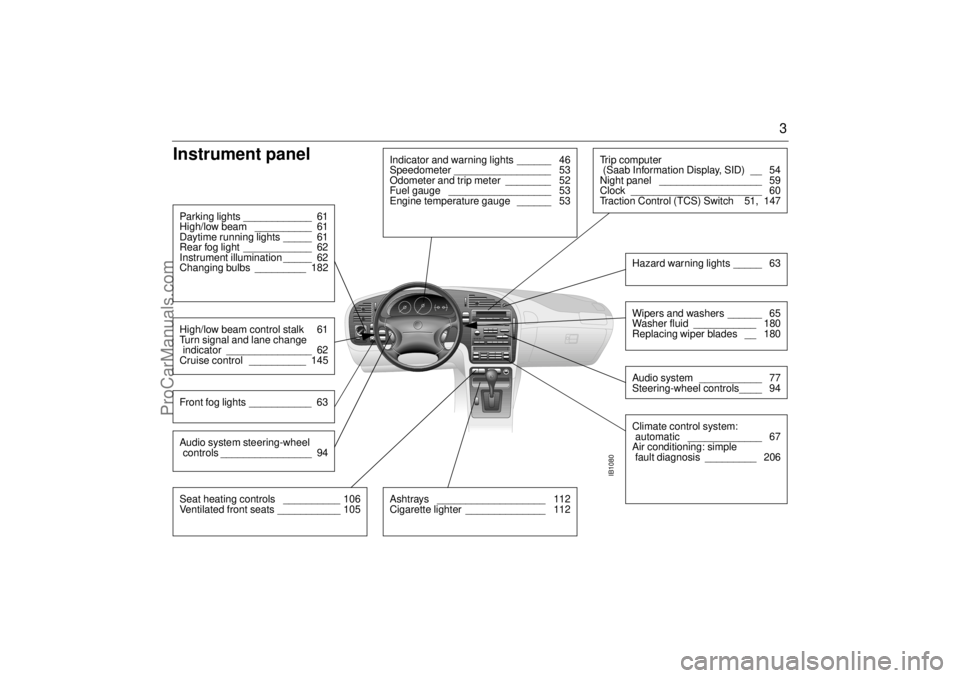
Instrument panel
IB1080
Indicator and warning lights ______ 46
Speedometer _________________ 53
Odometer and trip meter ________ 52
Fuel gauge __________________ 53
Engine temperature gauge ______ 53
Parking lights ____________ 61
High/low beam __________ 61
Daytime running lights _____ 61
Rear fog light ____________ 62
Instrument illumination _____ 62
Changing bulbs _________ 182High/low beam control stalk 61
Turn signal and lane change
indicator _______________ 62
Cruise control __________ 145Front fog lights ___________ 63
Ashtrays ___________________ 112
Cigarette lighter ______________ 112
Tr i p c o m p u t e r
(Saab Information Display, SID) __ 54
Night panel __________________ 59
Clock _______________________ 60
Traction Control (TCS) Switch 51, 147
Wipers and washers ______ 65
Washer fluid ___________ 180
Replacing wiper blades __ 180Audio system ___________ 77
Steering-wheel controls____ 94Hazard warning lights _____ 63Climate control system:
automatic _____________ 67
Air conditioning: simple
fault diagnosis _________ 206
Seat heating controls __________ 106
Ventilated front seats ___________ 105Audio system steering-wheel
controls ________________ 94
ProCarManuals.com
Page 4 of 256
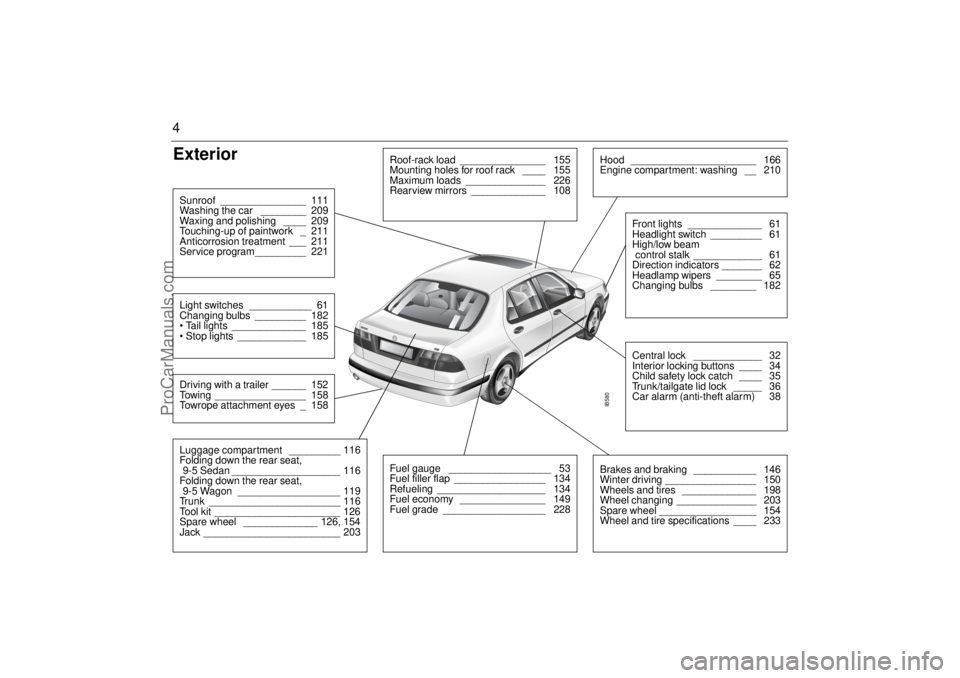
4Exterior
IB580
Roof-rack load _______________ 155
Mounting holes for roof rack ____ 155
Maximum loads ______________ 226
Rearview mirrors _____________ 108
Hood ______________________ 166
Engine compartment: washing __ 210
Central lock ____________ 32
Interior locking buttons ____ 34
Child safety lock catch ____ 35
Trunk/tailgate lid lock _____ 36
Car alarm (anti-theft alarm) 38Front lights _____________ 61
Headlight switch _________ 61
High/low beam
control stalk ____________ 61
Direction indicators _______ 62
Headlamp wipers ________ 65
Changing bulbs ________ 182
Fuel gauge __________________ 53
Fuel filler flap ________________ 134
Refueling ___________________ 134
Fuel economy _______________ 149
Fuel grade __________________ 228
Brakes and braking ___________ 146
Winter driving ________________ 150
Wheels and tires _____________ 198
Wheel changing ______________ 203
Spare wheel _________________ 154
Wheel and tire specifications ____ 233
Luggage compartment _________ 116
Folding down the rear seat,
9-5 Sedan ___________________ 116
Folding down the rear seat,
9-5 Wagon __________________ 119
Trunk _______________________ 116
Tool kit ______________________ 126
Spare wheel _____________ 126, 154
Jack ________________________ 203Driving with a trailer ______ 152
Towing ________________ 158
Towrope attachment eyes _ 158Light switches ___________ 61
Changing bulbs _________ 182
Tail lights _____________ 185
Stop lights ____________ 185Sunroof _______________ 111
Washing the car ________ 209
Waxing and polishing ____ 209
Touching-up of paintwork _ 211
Anticorrosion treatment ___ 211
Service program_________ 221
ProCarManuals.com
Page 46 of 256

46 Instruments and controls
Indicator and warning
lights A number of indicator and warning lights will
come on when the ignition is switched on
prior to starting. Under normal conditions,
these should go out a few seconds after the
engine has started (see page 52).
Warning, oil pressure
(engine oil)
This light will come on together with if
the engine oil pressure is dangerously low.
If the light flashes or comes on while you are
driving, stop the car, switch off the engine
and check the engine oil level (see page
171). NOTEUnder no circumstances must the car be
driven when the warning light is on. Low
oil pressure can result in serious engine
damage.
Main instrument panel 1 Tachometer
2 Indicator and warning lights
3 Speedometer
4 Indicator and warning lights
5 Fuel gauge 6 Engine temperature gauge
7 Trip meter reset button
8 Odometer and trip meter
IB1339
2030405060 70
80
90
100
11 0
120
130
140
150
240220200180 160 140 120 100
80
60
40
20
10
8
4
3
2
6
7
5
1
ProCarManuals.com
Page 49 of 256
49 Instruments and controls
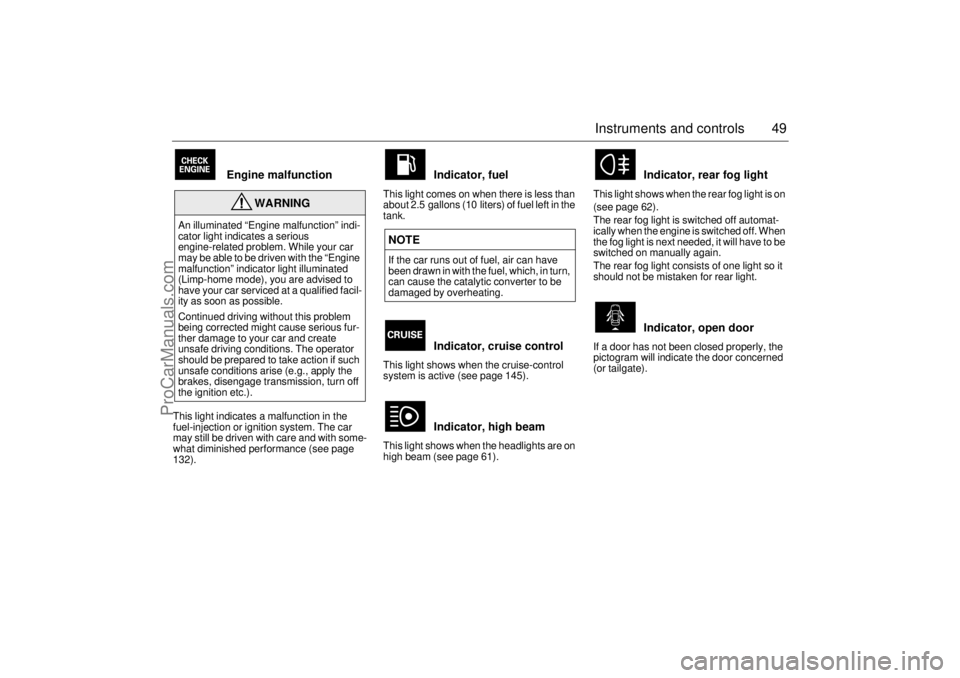
Engine malfunction
This light indicates a malfunction in the
fuel-injection or ignition system. The car
may still be driven with care and with some-
what diminished performance (see page
132).
Indicator, fuel
This light comes on when there is less than
about 2.5 gallons (10 liters) of fuel left in the
tank.
Indicator, cruise control
This light shows when the cruise-control
system is active (see page 145).
Indicator, high beam
This light shows when the headlights are on
high beam (see page 61).
Indicator, rear fog light
This light shows when the rear fog light is on
(see page 62).
The rear fog light is switched off automat-
ically when the engine is switched off. When
the fog light is next needed, it will have to be
switched on manually again.
The rear fog light consists of one light so it
should not be mistaken for rear light.
Indicator, open door
If a door has not been closed properly, the
pictogram will indicate the door concerned
(or tailgate).
WARNING
An illuminated “Engine malfunction” indi-
cator light indicates a serious
engine-related problem. While your car
may be able to be driven with the “Engine
malfunction” indicator light illuminated
(Limp-home mode), you are advised to
have your car serviced at a qualified facil-
ity as soon as possible.
Continued driving without this problem
being corrected might cause serious fur-
ther damage to your car and create
unsafe driving conditions. The operator
should be prepared to take action if such
unsafe conditions arise (e.g., apply the
brakes, disengage transmission, turn off
the ignition etc.).
NOTEIf the car runs out of fuel, air can have
been drawn in with the fuel, which, in turn,
can cause the catalytic converter to be
damaged by overheating.
ProCarManuals.com
Page 52 of 256
52 Instruments and controlsAutochecking of lights,
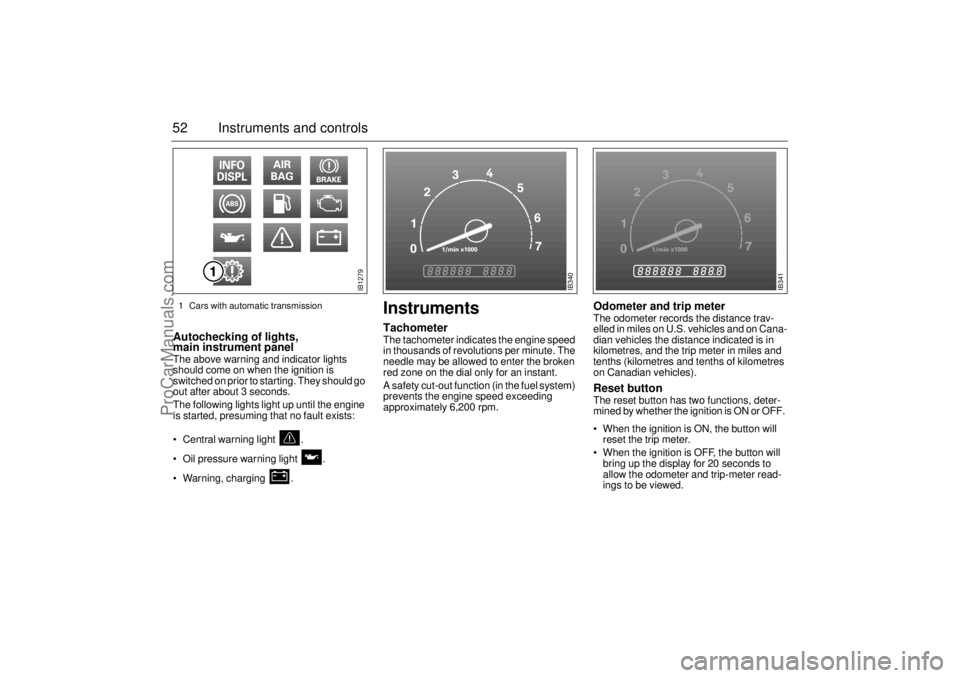
main instrument panel The above warning and indicator lights
should come on when the ignition is
switched on prior to starting. They should go
out after about 3 seconds.
The following lights light up until the engine
is started, presuming that no fault exists:
Central warning light .
Oil pressure warning light .
Warning, charging .
InstrumentsTachometerThe tachometer indicates the engine speed
in thousands of revolutions per minute. The
needle may be allowed to enter the broken
red zone on the dial only for an instant.
A safety cut-out function (in the fuel system)
prevents the engine speed exceeding
approximately 6,200 rpm.
Odometer and trip meter The odometer records the distance trav-
elled in miles on U.S. vehicles and on Cana-
dian vehicles the distance indicated is in
kilometres, and the trip meter in miles and
tenths (kilometres and tenths of kilometres
on Canadian vehicles). Reset button The reset button has two functions, deter-
mined by whether the ignition is ON or OFF.
When the ignition is ON, the button will
reset the trip meter.
When the ignition is OFF, the button will
bring up the display for 20 seconds to
allow the odometer and trip-meter read-
ings to be viewed.
IB1279
IB340
IB341
1 Cars with automatic transmission
ProCarManuals.com
Page 53 of 256
53 Instruments and controls
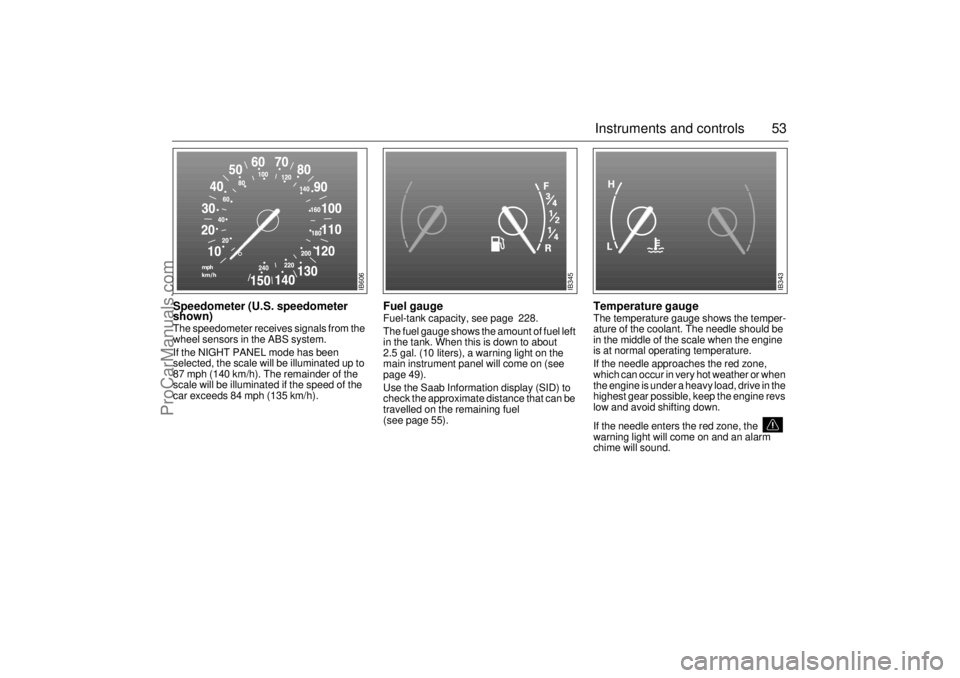
Speedometer (U.S. speedometer
shown)The speedometer receives signals from the
wheel sensors in the ABS system.
If the NIGHT PANEL mode has been
selected, the scale will be illuminated up to
87 mph (140 km/h). The remainder of the
scale will be illuminated if the speed of the
car exceeds 84 mph (135 km/h).
Fuel gauge Fuel-tank capacity, see page 228.
The fuel gauge shows the amount of fuel left
in the tank. When this is down to about
2.5 gal. (10 liters), a warning light on the
main instrument panel will come on (see
page 49).
Use the Saab Information display (SID) to
check the approximate distance that can be
travelled on the remaining fuel
(see page 55).
Temperature gauge The temperature gauge shows the temper-
ature of the coolant. The needle should be
in the middle of the scale when the engine
is at normal operating temperature.
If the needle approaches the red zone,
which can occur in very hot weather or when
the engine is under a heavy load, drive in the
highest gear possible, keep the engine revs
low and avoid shifting down.
If the needle enters the red zone, the
warning light will come on and an alarm
chime will sound.
IB606
IB345
IB343
ProCarManuals.com
Page 55 of 256
55 Instruments and controls
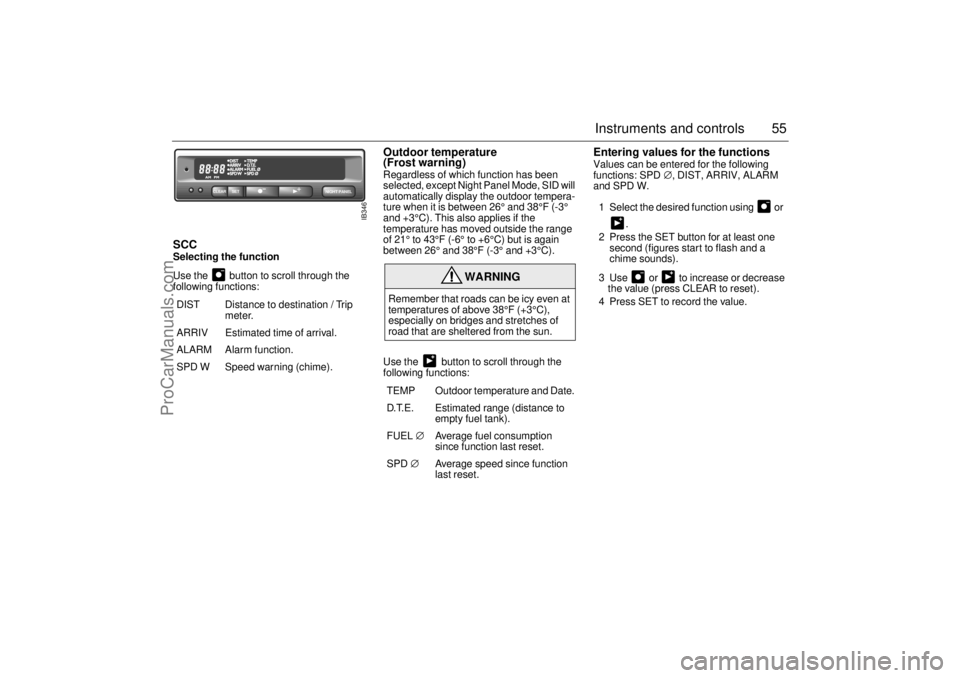
SCCSelecting the function
Use the button to scroll through the
following functions:
Outdoor temperature
(Frost warning)Regardless of which function has been
selected, except Night Panel Mode, SID will
automatically display the outdoor tempera-
ture when it is between 26° and 38°F (-3°
and +3°C). This also applies if the
temperature has moved outside the range
of 21° to 43°F (-6° to +6°C) but is again
between 26° and 38°F (-3° and +3°C).
Use the button to scroll through the
following functions:
Entering values for the functions Values can be entered for the following
functions: SPD∅, DIST, ARRIV, ALARM
and SPD W.
1 Select the desired function using or
.
2 Press the SET button for at least one
second (figures start to flash and a
chime sounds).
3 Use or to increase or decrease
the value (press CLEAR to reset).
4 Press SET to record the value.
DIST Distance to destination / Trip
meter.
ARRIV Estimated time of arrival.
ALARM Alarm function.
SPD W Speed warning (chime).
WARNING
Remember that roads can be icy even at
temperatures of above 38°F (+3°C),
especially on bridges and stretches of
road that are sheltered from the sun.
TEMP Outdoor temperature and Date.
D.T.E. Estimated range (distance to
empty fuel tank).
FUEL∅ Average fuel consumption
since function last reset.
SPD∅ Average speed since function
last reset.
NIGHT PANEL
CLEAR
SET
IB346
ProCarManuals.com
Page 58 of 256

58 Instruments and controlsResetting values
To reset the values, press CLEAR for at
least four seconds.
The following functions will be reset
simultaneously:
Estimated range on remaining fuel
(function based on a fuel consumption of
28 mpg).
Average fuel consumption.
Average speed.
Arrival time (function based on current
speed).
Programmed values for DIST, ALARM and
SPD W will not be reset (see the respective
function).
CHECK messages When the engine is started, CHECKING will
appear on the display for about four sec-
onds, while the SID checks are being per-
formed.
When a CHECK message is generated
while the car is being driven, a chime will
sound, INFO DISPL will come on on the
main instrument panel, and the message
will appear on the SID. The number of mes-
sages that can be displayed by the SID
varies with the specification of the car.
If more than one CHECK message has
been generated, the
+ symbol will appear to
the left of the text on the display. The mes-
sages appear in order of priority.
If a new fault occurs while another message
is being displayed, the message relating to
the new one will appear for 10 seconds,
after which the display will return to the ear-
lier one.
Press CLEAR once to acknowledge a mes-
sage, whereupon it will be cleared from the
display. It will not be displayed again before
the ignition has been switched off and then
on again. The following messages may be displayed:
Message See
page
FRONT LIGHT FAILURE 182
REAR LIGHT FAILURE 185
FOG LIGHT FAILURE 186
BRAKE LIGHT FAILURE 185
TEST BRAKE LIGHTS
1)
185
WASHER FLUID LEVEL LOW 181
FILL COOLANT FLUID 174
REPLACE KEY BATTERY 35
KEY NOT ACCEPTED 42
SERVICE THEFT ALARM 42
TRANSMISSION OVERHEAT-
ING 141
TIGHTEN FUEL FILLER CAP 134
TIME FOR SERVICE
2)
218
ProCarManuals.com
Page 59 of 256

59 Instruments and controls
1 This message cannot be removed by pressing
CLEAR. Depress the brake pedal.
2 This message will be displayed approxi-
mately 600 miles (1,000 km) before the next
scheduled service is due, or when 365 days
have elapsed since the last service. The
message should be cleared at the time of that
service (see the Saab Warranties & Service
Record Booklet).
If you have carried out the service yourself,
you can clear the message by pressing
CLEAR once. Reset by pressing CLEAR for
at least eight seconds, until ”SERVICE”
appears on the display and a chime sounds.
Night panelTo improve night-driving conditions inside
the car, the Night Panel mode can be
selected. In this mode, the amount of infor-
mation displayed is reduced, and only the
most important instruments and displays
will be illuminated.
When the Night Panel button is pressed,
only the speedometer will be illuminated (up
to the 87-mph or 140-km/h graduation), all
the other instruments illumination being
extinguished and their needles moved to
zero. Both the SID and the ACC displays will
be extinguished and the backlighting for
switches and other controls will be dimmed.
Note: All indicator and warning lights,
together with the display of CHECK mes-
sages, will operate as normal, except "Frost
warning", see page 55. The following conditions will wake up the
respective displays in the Night-Panel
mode:
Setting of the Audio system, SID or ACC
(display comes on for ten seconds).
CHECK message generated in the SID.
High engine revs cause the rev counter to
be illuminated until the engine speed has
fallen again.
If the quantity of fuel remaining falls below
4 gallons (15 liters), the fuel gauge will be
illuminated.
If the engine temperature rises above nor-
mal, the temperature gauge will be illumi-
nated.
If the speed of the car exceeds 84 mph
(135 km/h), the entire speedometer will
be illuminated.
In cars with automatic transmission, if the
selector lever is moved from D to position
3, 2 or 1, the selector indication on the
main instrument panel will be illuminated.
To restore the displays and lighting to the
normal mode, press the Night-Panel button.
ProCarManuals.com
Page 74 of 256
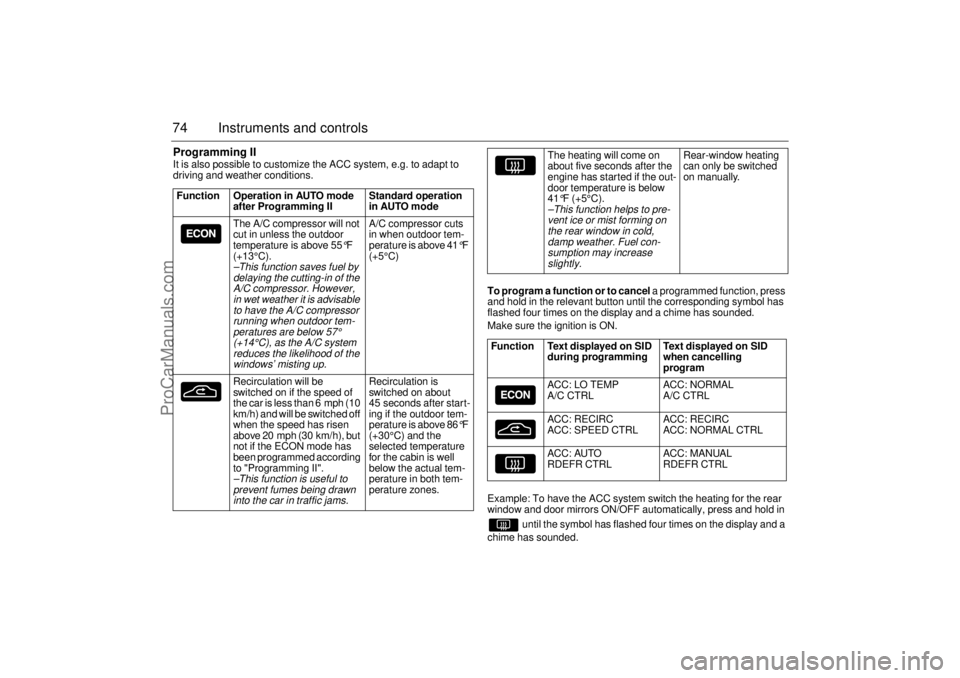
74 Instruments and controlsProgramming IIIt is also possible to customize the ACC system, e.g. to adapt to
driving and weather conditions.
To program a function or to cancel a programmed function, press
and hold in the relevant button until the corresponding symbol has
flashed four times on the display and a chime has sounded.
Make sure the ignition is ON.
Example: To have the ACC system switch the heating for the rear
window and door mirrors ON/OFF automatically, press and hold in
until the symbol has flashed four times on the display and a
chime has sounded. Function Operation in AUTO mode
after Programming II Standard operation
in AUTO mode
The A/C compressor will not
cut in unless the outdoor
temperature is above 55
°F
(+13°C).
–This function saves fuel by
delaying the cutting-in of the
A/C compressor. However,
in wet weather it is advisable
to have the A/C compressor
running when outdoor tem-
peratures are below
57°
(+14°C), as the A/C system
reduces the likelihood of the
windows’ misting up.
A/C compressor cuts
in when outdoor tem-
perature is above 41
°F
(+5°C)
Recirculation will be
switched on if the speed of
the car is less than 6 mph (10
km/h) and will be switched off
when the speed has risen
above 20 mph (30 km/h), but
not if the ECON mode has
been programmed according
to "Programming II".
–This function is useful to
prevent fumes being drawn
into the car in traffic jams.
Recirculation is
switched on about
45 seconds after start-
ing if the outdoor tem-
perature is above 86
°F
(+30°C) and the
selected temperature
for the cabin is well
below the actual tem-
perature in both tem-
perature zones.
The heating will come on
about five seconds after the
engine has started if the out-
door temperature is below
41°F (+5°C).
–This function helps to pre-
vent ice or mist forming on
the rear window in cold,
damp weather. Fuel con-
sumption may increase
slightly.
Rear-window heating
can only be switched
on manually.
Function Text displayed on SID
during programming Text displayed on SID
when cancelling
program
ACC: LO TEMP
A/C CTRL ACC: NORMAL
A/C CTRL
ACC: RECIRC
ACC: SPEED CTRL ACC: RECIRC
ACC: NORMAL CTRL
ACC: AUTO
RDEFR CTRL ACC: MANUAL
RDEFR CTRL
ProCarManuals.com