buttons SAAB 9-5 2001 User Guide
[x] Cancel search | Manufacturer: SAAB, Model Year: 2001, Model line: 9-5, Model: SAAB 9-5 2001Pages: 272, PDF Size: 14.83 MB
Page 98 of 272
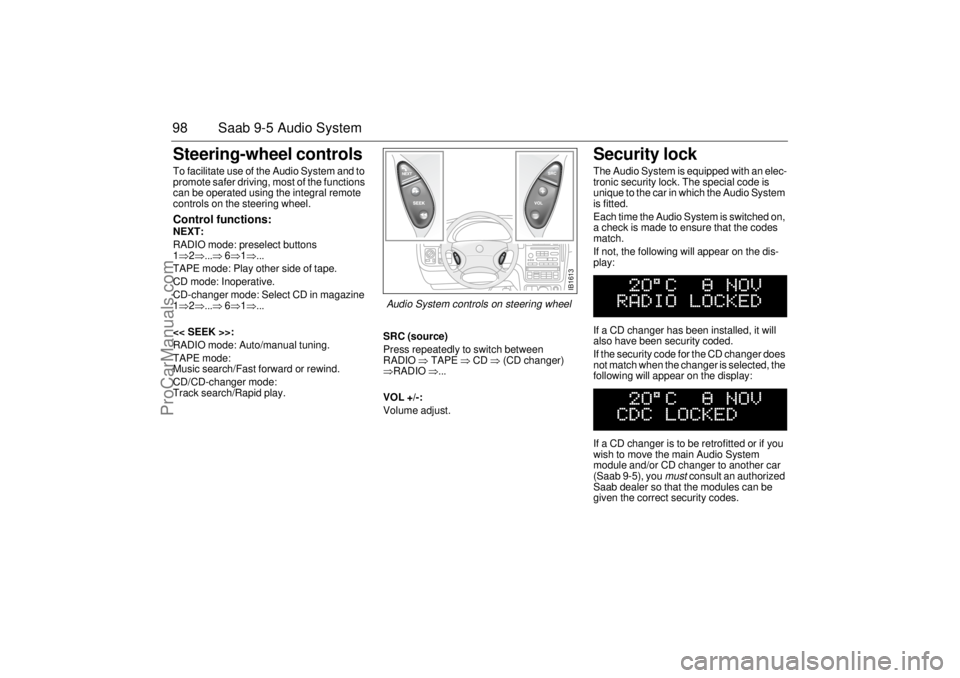
98 Saab 9-5 Audio SystemSteering-wheel controls To facilitate use of the Audio System and to
promote safer driving, most of the functions
can be operated using the integral remote
controls on the steering wheel. Control functions: NEXT:
RADIO mode: preselect buttons
1⇒2⇒...⇒ 6⇒1⇒...
TAPE mode: Play other side of tape.
CD mode: Inoperative.
CD-changer mode: Select CD in magazine
1⇒2⇒...⇒ 6⇒1⇒...
<< SEEK >>:
RADIO mode: Auto/manual tuning.
TAPE mode:
Music search/Fast forward or rewind.
CD/CD-changer mode:
Track search/Rapid play.SRC (source)
Press repeatedly to switch between
RADIO ⇒ TAPE ⇒ CD ⇒ (CD changer)
⇒RADIO ⇒...
VOL +/-:
Volume adjust.
Security lock The Audio System is equipped with an elec-
tronic security lock. The special code is
unique to the car in which the Audio System
is fitted.
Each time the Audio System is switched on,
a check is made to ensure that the codes
match.
If not, the following will appear on the dis-
play:
If a CD changer has been installed, it will
also have been security coded.
If the security code for the CD changer does
not match when the changer is selected, the
following will appear on the display:
If a CD changer is to be retrofitted or if you
wish to move the main Audio System
module and/or CD changer to another car
(Saab 9-5), you
must
consult an authorized
Saab dealer so that the modules can be
given the correct security codes.
IB1613
Audio System controls on steering wheel
ProCarManuals.com
Page 108 of 272

108 OnStar - TelematicsYour new vehicle comes equipped with
advanced telematics hardware and a full
year of Onstar premium service. Saab
Telematics is a sophisticated in-vehicle
system allowing convergence of wireless
communications, GPS (Global Positioning
System) satellites and advanced vehicle
electronics.
You must activate immediately to ensure
you receive your full year of service, as your
prepaid subscription begins at the time of
delivery.
Here’s how to activate your OnStar ser-
vice:
1 Push the blue OnStar button located in
your Saab. You will be greeted by a live
OnStar Advisor. The Advisor will acti-
vate your OnStar service.
2 Provide the information requested by
the Advisor to activate your account and
set up your personal profile. This will
take approximately 10-15 minutes.
Using OnStarWelcome to OnStar. This section gives you
all the information you need to get started
using OnStar, including descriptions of all
OnStar services. It also introduces the
added services of Personal Calling, Virtual
Advisor, and the Onstar Subscriber Web-
site. For a complete explanation of these
additional services, please see pages 112,
116 and 117.OnStar is EasyIt’s easy to start using your OnStar system.
In fact, pressing the OnStar button is usually
all you need to do. Once you are connected,
an OnStar Advisor will help you with the ser-
vices in your plan.Your onboard OnStar System consists of
three buttons:
OnStar Services Button
Press this button, and you are
connected to an OnStar Advi-
sor. You will hear a chime, fol-
lowed by the words
”Connecting to OnStar.” Allow
20-30 seconds for initial con-
nection to the OnStar Call Cen-
ter. The Advisor will then help
you with any of the services
included in your OnStar plan.
If cellular service is unavail-
able, OnStar will generate a
fast busy tone. The OnStar sys-
tem will retry calls a number of
times before returning to the
ready mode. To cancel the
automatic dialing, press the
Call Answer/End button.
ProCarManuals.com
Page 109 of 272

109 OnStar - Telematics
System status lightSolid Green — Indicates the OnStar
system in the vehicle is powered ON and
ready to make calls or receive calls from the
OnStar Center.
Blinking Green — The light blinks green to
indicate a call is being connected or in
progress. If you notice this light blinking
while you are not on a call, press the Call
Answer/End button.
Red — This signals that your OnStar
system may not be functioning properly.
Press the OnStar button to attempt to con-
tact an OnStar Advisor. If the connection is
made, the Advisor will assist you in making
sure your OnStar system is operating prop-
erly. If you cannot contact the OnStar Cen-
ter, please take your car to the nearest Saab
dealer for diagnosis and service.The OnStar Center is the heart of your ser-
vice — staffed 24 hours a day, 7 days a
week with knowledgeable OnStar Advisors.
Even on weekends and holidays, there is
always someone ready to help.
OnStar uses sophisticated Global Position-
ing System (GPS) satellites to locate your
Saab, and wireless technology to provide
the communications link and seamless inte-
gration into your Saab. This system allows
our OnStar Advisors to pinpoint your Saab´s
location precisely. This way, Advisors can
provide you with a range of helpful services
to protect you and your Saab. Plus, with our
Premium Plan* included for 12 months with
your Saab, Advisors can also access an
extensive database to assist you with direc-
tions, making reservations and other conve-
nience services.
*) New retail deliveries only.
Emergency button
In an emergency, press this
button to connect with an
OnStar Advisor. Your call will
be given the highest priority,
and you will hear a tone fol-
lowed by the words ”Connect-
ing to OnStar Emergency.” The
Advisor will locate your Saab,
find out what kind of assistance
you require, and contact the
nearest emergency services
provider who can dispatch
ambulance, fire, police or other
emergency services. Please
use this button only for true
emergencies.
Call answer/end button
Press this button at the end of a
call. You’ll hear the words
”OnStar Request Ended.” Also,
press this button to answer a
call from the OnStar Center, or
cancel a call if one of the other
buttons is accidentally
pressed. This button is also
used to access OnStar Per-
sonal Calling services which
are described on page 112.
ProCarManuals.com
Page 122 of 272
122 Interior equipment and trunk
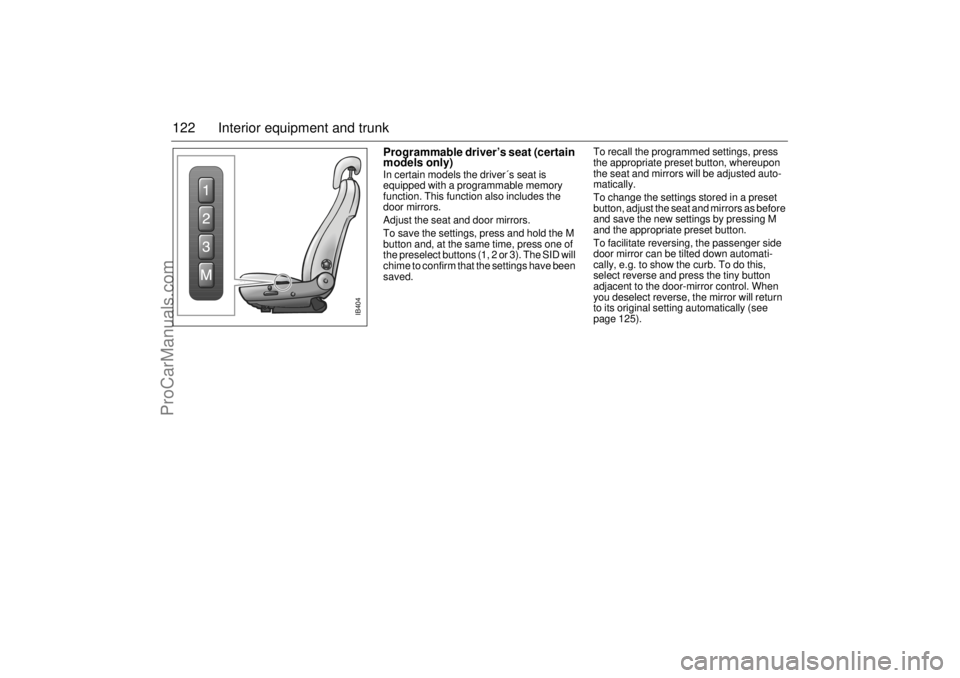
Programmable driver’s seat (certain
models only) In certain models the driver´s seat is
equipped with a programmable memory
function. This function also includes the
door mirrors.
Adjust the seat and door mirrors.
To save the settings, press and hold the M
button and, at the same time, press one of
the preselect buttons (1, 2 or 3). The SID will
chime to confirm that the settings have been
saved.To recall the programmed settings, press
the appropriate preset button, whereupon
the seat and mirrors will be adjusted auto-
matically.
To change the settings stored in a preset
button, adjust the seat and mirrors as before
and save the new settings by pressing M
and the appropriate preset button.
To facilitate reversing, the passenger side
door mirror can be tilted down automati-
cally, e.g. to show the curb. To do this,
select reverse and press the tiny button
adjacent to the door-mirror control. When
you deselect reverse, the mirror will return
to its original setting automatically (see
page 125).
IB404
ProCarManuals.com
Page 125 of 272
125 Interior equipment and trunk
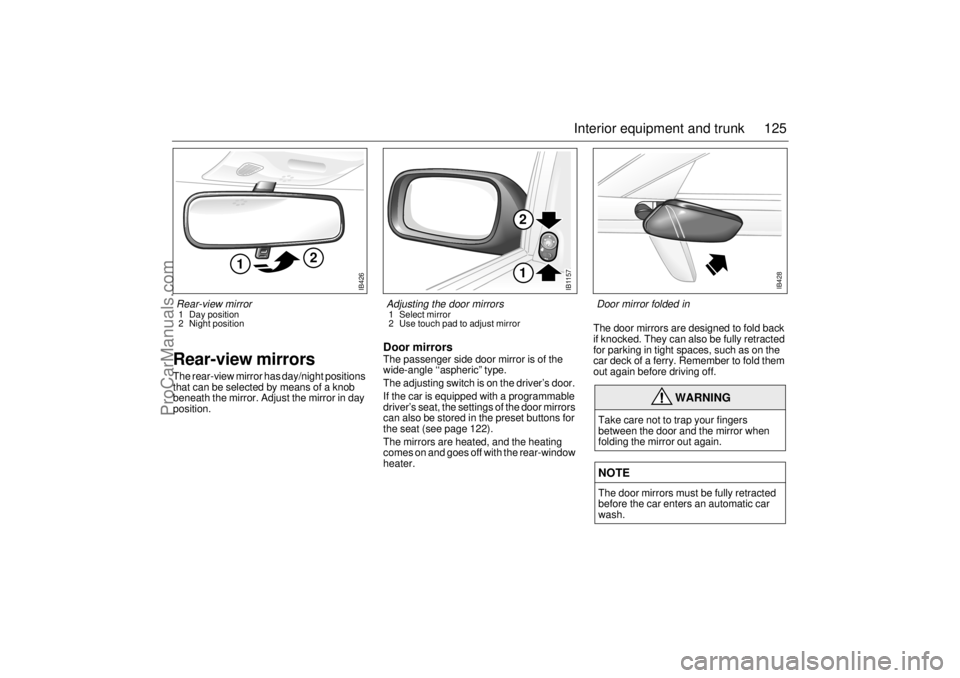
Rear-view mirrorsThe rear-view mirror has day/night positions
that can be selected by means of a knob
beneath the mirror. Adjust the mirror in day
position.
Door mirrorsThe passenger side door mirror is of the
wide-angle ‘‘aspheric” type.
The adjusting switch is on the driver’s door.
If the car is equipped with a programmable
driver’s seat, the settings of the door mirrors
can also be stored in the preset buttons for
the seat (see page 122).
The mirrors are heated, and the heating
comes on and goes off with the rear-window
heater. The door mirrors are designed to fold back
if knocked. They can also be fully retracted
for parking in tight spaces, such as on the
car deck of a ferry. Remember to fold them
out again before driving off.
WARNING
Take care not to trap your fingers
between the door and the mirror when
folding the mirror out again. NOTEThe door mirrors must be fully retracted
before the car enters an automatic car
wash.
IB426
2
1
Rear-view mirror 1 Day position
2 Night position
IB1157
12
Adjusting the door mirrors 1 Select mirror
2 Use touch pad to adjust mirror
IB428
Door mirror folded in
ProCarManuals.com
Page 149 of 272
149 Starting and driving
If the car does not startIf the text ”KEY NOT ACCEPTED” is shown
on the SID, after a failed start attempt, the
cause could be a fault in the transmitter in
the key, or in the receiver in the ignition lock.
The following should be done:
Turn the key back to the LOCK position.
Turn the key to ON.
Press one of the buttons on the remote
control (the LED stops blinking).
Start the engine.
Try another key. If this works, then the fault
is in the first key.
Contact an authorized Saab dealer for
checking and rectification.
Starting the engine
NOTETake care not to spill drinks or to drop
crumbs over the ignition switch. If dirt or
liquid gets into it, the switch may not
operate properly.
WARNING
Always remove the key before leaving
the car.
Always apply the parking brake before
removing the ignition key.
WARNING
When starting the engine:
- Sit down in the driver’s seat.
- Depress the clutch pedal fully. If gear
lever is not in the neutral position, the
clutch pedal must be fully depressed
or the car will jump forwards or back-
wards, which may cause an acci-
dent.
- Never start the car from outside the
vehicle, e.g. through a wound down
window. This could lead to serious
personal injury.
Engage reverse (R) (position P for
automatic transmission) to remove the
ignition key. The key can only be
removed in this gear position.
Carbon monoxide (CO) is a colorless,
odorless, poisonous gas. Be alert to
the danger of CO – always open the
garage doors before starting the
engine in the garage.
There is also a danger of CO poison-
ing if the exhaust system is leaking.
ProCarManuals.com
Page 209 of 272
209 Car care and technical information
Trunk lid light and taillights,
9-5 SedanBefore changing bulbs in the trunk, you
must first release the trim at the foot of the
trunk. This involves removing the handle
and the three trim fasteners (studs).
1 Unscrew the handle on the inside of the
tailgate.
2 Using the peg in the top of the screw-
driver handle, push in the button in the
centre of the studs.
3 Remove the studs.
Changing bulbs
1 Squeeze the plastic lug and electrical
connector together and remove the bulb
holder.2 The bulb has a bayonet fitting. Press in
the bulb and twist it counterclockwise.
3 Change the bulb.
Refitting the trim
1 Reset the studs by pushing back the
center buttons so that they protrude by
0.2 inch (5 mm).
2 Insert the studs through the trim and tail-
gate panel. Press the center buttons in,
flush with the collar.
3 Screw the handle back onto the trunk.
High-mounted stop lights, 9-5 SedanThe bulbs can be accessed after the panel
in the rear headlining has been removed.
1 Remove the panel by carefully pushing
in the two clips, one at the time.
2 Release the bulb holder, which is
retained by a clip at either end.
3 Withdraw the bulb gently straight back.
4 Push in the new bulb.
5 Refit the bulb holder.
6 Replace the panel by carefully pushing
the panel towards the headlining so that
the two clips engage their respective
slot.
IB517
IB518
3
2
2
3
1
IB519
High-mounted stop lights1 Panel
2 Retaining clips
3 Bulbs
ProCarManuals.com