audio SAAB 9-5 2003 Owner's Manual
[x] Cancel search | Manufacturer: SAAB, Model Year: 2003, Model line: 9-5, Model: SAAB 9-5 2003Pages: 288, PDF Size: 16.78 MB
Page 105 of 288
105 Saab 9-5 Audio System
Programmable
functionsVolume-preset modeTo select the volume-preset mode, press
and hold the WB button at the same time as
you switch the Audio System on.
Use the button to select the
desired function.
The following volume settings can be
preselected:
STARTVOL – maximum volume level
when the Audio System is switched on
TEL VOL – preset volume level when an
in-car phone is activated
SP D VOL – speed-dependent volume.
The Audio System will automatically
adjust the volume level to compensate for
background noise, such as road noise,
which increases with vehicle speed.
LOUDNESS ON/OFF – boosting of the
highest and lowest frequency ranges to
enhance the sound image when the
volume is set to a low level.
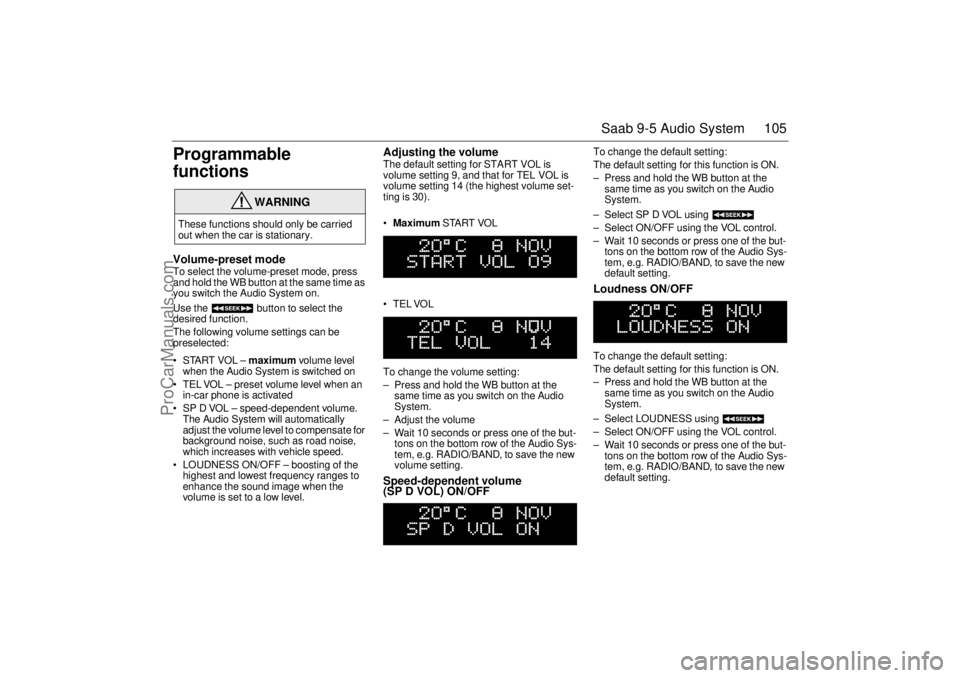
Adjusting the volume The default setting for START VOL is
volume setting 9, and that for TEL VOL is
volume setting 14 (the highest volume set-
ting is 30).
Maximum START VOL
TELVOL
To change the volume setting:
– Press and hold the WB button at the
same time as you switch on the Audio
System.
– Adjust the volume
– Wait 10 seconds or press one of the but-
tons on the bottom row of the Audio Sys-
tem, e.g. RADIO/BAND, to save the new
volume setting.Speed-dependent volume
(SP D VOL) ON/OFF
To change the default setting:
The default setting for this function is ON.
– Press and hold the WB button at the
same time as you switch on the Audio
System.
– Select SP D VOL using
– Select ON/OFF using the VOL control.
– Wait 10 seconds or press one of the but-
tons on the bottom row of the Audio Sys-
tem, e.g. RADIO/BAND, to save the new
default setting. Loudness ON/OFF To change the default setting:
The default setting for this function is ON.
– Press and hold the WB button at the
same time as you switch on the Audio
System.
– Select LOUDNESS using
– Select ON/OFF using the VOL control.
– Wait 10 seconds or press one of the but-
tons on the bottom row of the Audio Sys-
tem, e.g. RADIO/BAND, to save the new
default setting.
WARNING
These functions should only be carried
out when the car is stationary.
ProCarManuals.com
Page 106 of 288
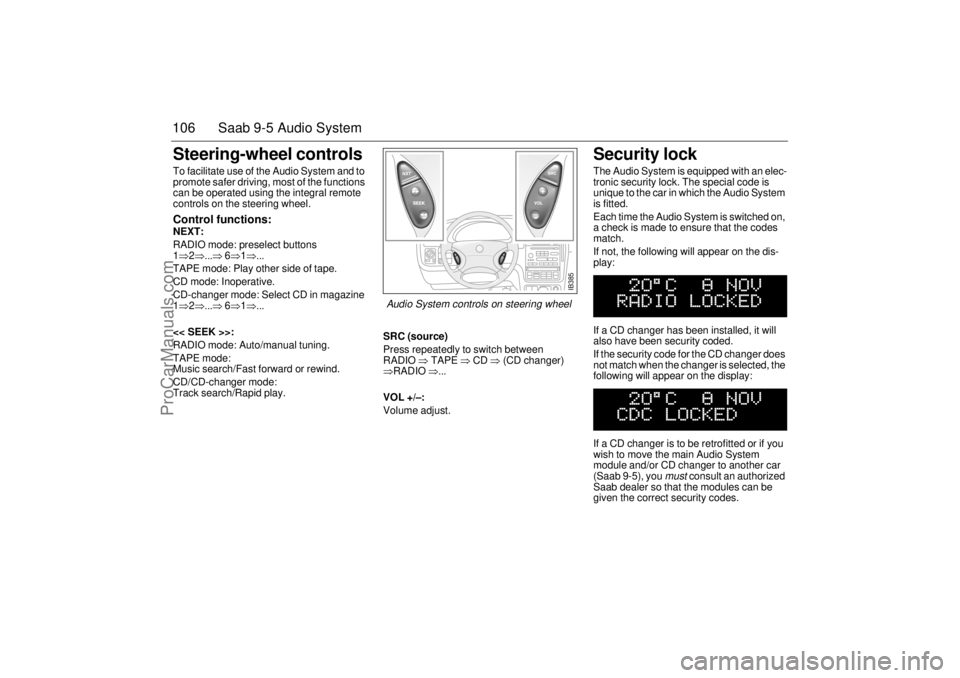
106 Saab 9-5 Audio SystemSteering-wheel controls To facilitate use of the Audio System and to
promote safer driving, most of the functions
can be operated using the integral remote
controls on the steering wheel. Control functions: NEXT:
RADIO mode: preselect buttons
1⇒2⇒...⇒ 6⇒1⇒...
TAPE mode: Play other side of tape.
CD mode: Inoperative.
CD-changer mode: Select CD in magazine
1⇒2⇒...⇒ 6⇒1⇒...
<< SEEK >>:
RADIO mode: Auto/manual tuning.
TAPE mode:
Music search/Fast forward or rewind.
CD/CD-changer mode:
Track search/Rapid play.SRC (source)
Press repeatedly to switch between
RADIO ⇒ TAPE ⇒ CD ⇒ (CD changer)
⇒RADIO ⇒...
VOL +/–:
Volume adjust.
Security lock The Audio System is equipped with an elec-
tronic security lock. The special code is
unique to the car in which the Audio System
is fitted.
Each time the Audio System is switched on,
a check is made to ensure that the codes
match.
If not, the following will appear on the dis-
play:
If a CD changer has been installed, it will
also have been security coded.
If the security code for the CD changer does
not match when the changer is selected, the
following will appear on the display:
If a CD changer is to be retrofitted or if you
wish to move the main Audio System
module and/or CD changer to another car
(Saab 9-5), you
must
consult an authorized
Saab dealer so that the modules can be
given the correct security codes.
IB385
Audio System controls on steering wheel
ProCarManuals.com
Page 107 of 288

107 Saab 9-5 Audio System
Technical data
These specifications comply with the new IHF Standard
Since the policy at Saab is one of continual improvement, we retain the right to alter
specifications and design without prior notice.
Dolby noise reduction is produced under licence from Dolby Laboratories Licensing
Corporation
”Dolby” and the double-D symbol are trademarks of Dolby Laboratories Licens-
ing Corporation
Changes or modifications not expressly approved by the manufacturer for compliance
could void the user´s authority to operate the equipment.
Tone controls
Bass ______________________ ±10 dB at 100 Hz
Treble _____________________ ±10 dB at 10,000 Hz
Power output
Premium __________________ 150 W
110 W at 1 % THD (total har-
monic distortion) and 13.5 V
Prestige __________________ 200 W
150 W at 1 % THD (total har-
monic distortion) and 13.5 V
Radio module
Radio system _______________ PLL dual-synthesizer tuner
Number of presets:
FM ______________________ 3 x 6
AM ______________________ 2 x 6
Frequency range:
FM ______________________ 87.9–107.9 MHz
AM ______________________ 530–1710 kHz
WB _______________________ 162.40–162.55 MHz
Tuning steps:
Automatic seek tuning: _______ FM 200 kHz
AM 10 kHz
WB 50 kHz
Manual tuning: _____________ FM 200 kHz
AM 10 kHzFrequency range (FM) ________ 40–15000 Hz
±1 dB
Distortion (FM) ______________ < 0.5 %
Cassette player
Fast forward/rewind __________ < 120 seconds (C-60)
Frequency range _____________ 40–16000 Hz
±2 dB
Wow and flutter ______________ 0.2 % WRMS
Signal-to-noise ratio __________ 45 dB
Dolby B/C NR effect __________ 8/16 dB
CD player and CD changer
1-bit system and 8 x oversampling
Frequency range _____________ 20–20000 Hz
±0.5 dB
Distortion __________________ < 0.008 %
Dynamics __________________ > 80 dB (1 kHz)
CD-changer capacity __________ 6 discs
ProCarManuals.com
Page 108 of 288
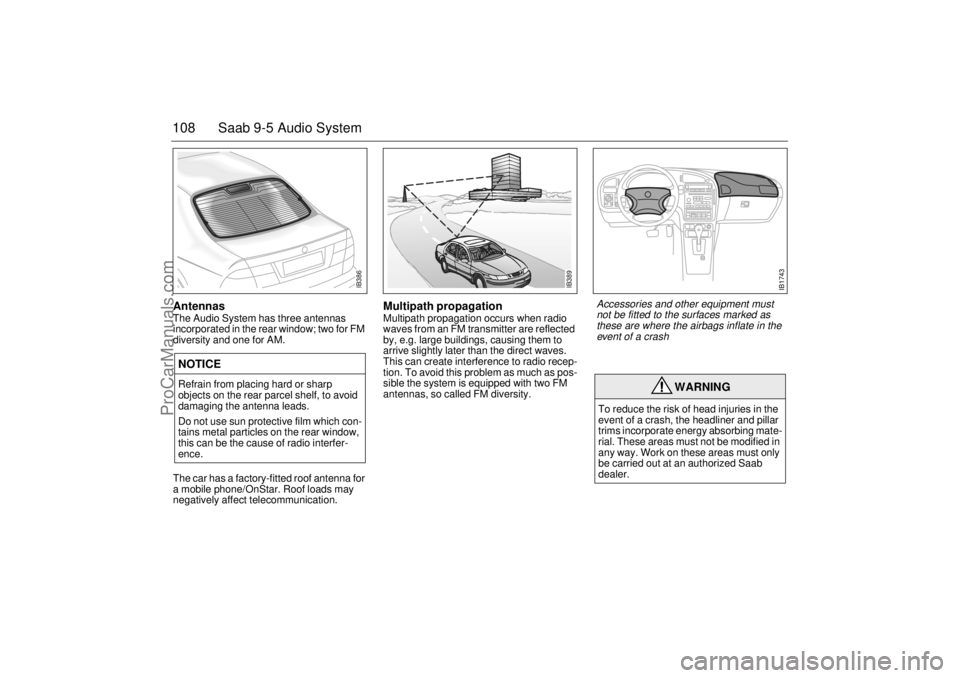
108 Saab 9-5 Audio SystemAntennas The Audio System has three antennas
incorporated in the rear window; two for FM
diversity and one for AM.
The car has a factory-fitted roof antenna for
a mobile phone/OnStar. Roof loads may
negatively affect telecommunication.
Multipath propagation Multipath propagation occurs when radio
waves from an FM transmitter are reflected
by, e.g. large buildings, causing them to
arrive slightly later than the direct waves.
This can create interference to radio recep-
tion. To avoid this problem as much as pos-
sible the system is equipped with two FM
antennas, so called FM diversity.
NOTICERefrain from placing hard or sharp
objects on the rear parcel shelf, to avoid
damaging the antenna leads.
Do not use sun protective film which con-
tains metal particles on the rear window,
this can be the cause of radio interfer-
ence.
WARNING
To reduce the risk of head injuries in the
event of a crash, the headliner and pillar
trims incorporate energy absorbing mate-
rial. These areas must not be modified in
any way. Work on these areas must only
be carried out at an authorized Saab
dealer.
IB386
IB389
IB1743
Accessories and other equipment must
not be fitted to the surfaces marked as
these are where the airbags inflate in the
event of a crash
ProCarManuals.com
Page 109 of 288
109 Saab 9-5 Audio System
Adjusting the frequency steps North
America/Europe If the car is taken from North America to
Europe, the radio’s frequency steps can be
adjusted.
Press and hold (mid-segment)
and switch the radio on at the same time.
The preset stations will be cancelled and
replaced by default frequencies.
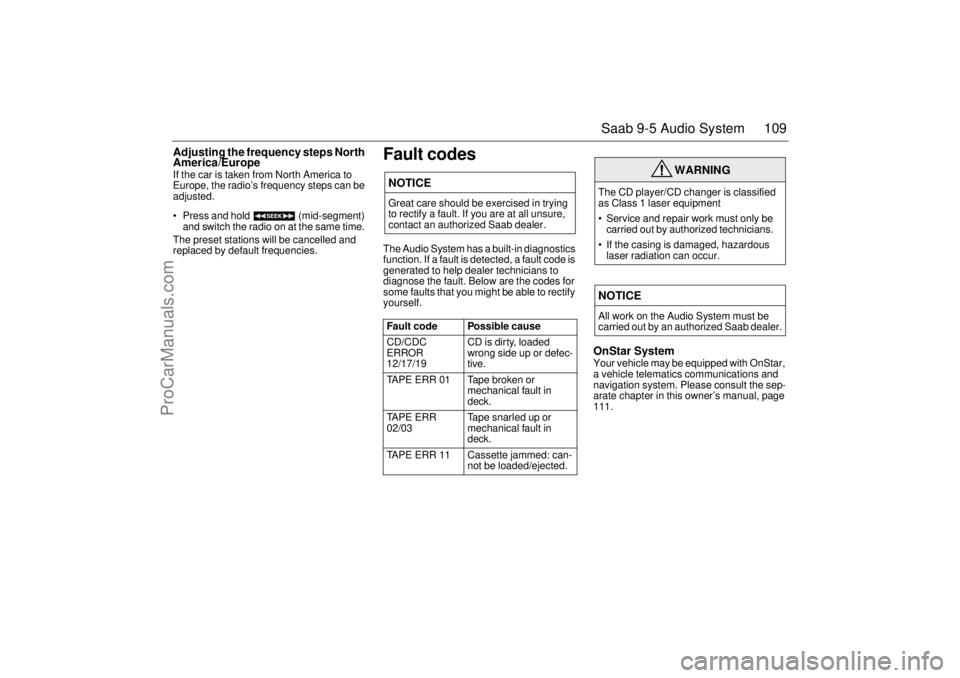
Fault codesThe Audio System has a built-in diagnostics
function. If a fault is detected, a fault code is
generated to help dealer technicians to
diagnose the fault. Below are the codes for
some faults that you might be able to rectify
yourself.
OnStar SystemYour vehicle may be equipped with OnStar,
a vehicle telematics communications and
navigation system. Please consult the sep-
arate chapter in this owner’s manual, page
111.
NOTICEGreat care should be exercised in trying
to rectify a fault. If you are at all unsure,
contact an authorized Saab dealer.
Fault code Possible cause
CD/CDC
ERROR
12/17/19 CD is dirty, loaded
wrong side up or defec-
tive.
TAPE ERR 01 Tape broken or
mechanical fault in
deck.
TAPE ERR
02/03 Tape snarled up or
mechanical fault in
deck.
TAPE ERR 11 Cassette jammed: can-
not be loaded/ejected.
WARNING
The CD player/CD changer is classified
as Class 1 laser equipment
Service and repair work must only be
carried out by authorized technicians.
If the casing is damaged, hazardous
laser radiation can occur. NOTICEAll work on the Audio System must be
carried out by an authorized Saab dealer.
ProCarManuals.com
Page 110 of 288

110 Saab 9-5 Audio System(This page has been left blank)
ProCarManuals.com
Page 112 of 288

112 OnStar - TelematicsYour new vehicle comes equipped with
advanced telematics hardware and one full
year of Onstar Directions and Connections.
Saab telematics is a sophisticated in-vehi-
cle system allowing convergence of wire-
less communications, GPS (Global Posi-
tioning System) satellites and advanced
vehicle electronics.
You must activate immediately to ensure
you receive your full year of service, as your
prepaid subscription begins at the time of
delivery.
Here’s how to activate your OnStar ser-
vice:
1 Push the blue OnStar button located in
your Saab. After a prerecorded mes-
sage explaining the benefits of OnStar,
you will be greeted by a live OnStar advi-
sor. The advisor will activate your
OnStar service.
2 Provide the information requested by
the advisor to activate your account and
set up your personal profile. This will
take approximately 10–15 minutes.
Using OnStarWelcome to OnStar. This section gives you
all the information you need to get started
using OnStar, including descriptions of all
OnStar services. It also introduces the
added services of Personal Calling, Virtual
advisor, and the Onstar Subscriber website.
For a complete explanation of these addi-
tional services, please see pages 116, 120
and 121.
NOTE: In order for OnStar to operate, the
car audio system must be switched on.OnStar is EasyIt’s easy to start using your OnStar system.
In fact, pressing the OnStar button is usually
all you need to do. Once you are connected,
an OnStar advisor will help you with the ser-
vices in your plan.
Inoperative if battery is discharged or
disconnected.
OnStar is powered by your vehicle´s battery
and will not operate if the battery is dis-
charged or disconnected.
Potentially inoperative if vehicle is in a
crash
If your vehicle is in a crash, some compo-
nents could be damaged or disconnected,
potentially rendering OnStar inoperative.Your onboard OnStar System consists of
three buttons:
OnStar Services Button
Press this button, and you are
connected to an OnStar advi-
sor. You will hear a chime, fol-
lowed by the words
”Connecting to OnStar.” Allow
20–30 seconds for initial con-
nection to the OnStar Call Cen-
ter. An advisor will then help
you with any of the services
included in your OnStar plan.
If cellular service is unavail-
able, OnStar will generate a
fast busy tone. The OnStar sys-
tem will retry calls a number of
times before returning to the
ready mode. To cancel the
automatic dialing, press the
White dot button.
ProCarManuals.com
Page 115 of 288

115 OnStar - Telematics
Roadside assistance**There’s nothing worse than being stranded
on the road with car trouble. No matter what
the problem is (flat tire, out of gas, or engine
trouble), just call OnStar. They will contact
the help you need to get you quickly back on
the road.Stolen vehicle trackingOnStar doesn’t just protect you, it protects
your Saab, too. If your vehicle is ever stolen,
just contact OnStar by calling
1-888-4-ONSTAR. They will put you in
touch with the authorities and aid them in
locating your Saab. Ask your insurance car-
rier about possible premium discounts.Accident Assist™Accident Assist™ provides step-by-step
guidance about what to do in case of a
crash. Working with leading insurance com-
panies OnStar has developed a ”best prac-
tices” list to assist you through most acci-
dent situations. OnStar Accident Assist™
can make the process of completing a
police report and/or insurance claim less
stressful.
OnStar Med-Net***OnStar MED-NET securely stores your per-
sonal medical information (e.g., physician’s
name, emergency contacts, medications,
chronic conditions) and, in an emergency,
can quickly send it to a medical facility. This
important information can help assist with
diagnosis and treatment. ******There will be no charge for Roadside Assistance as
long as your vehicle is under warranty.
***Requires activation and additional fee.
****Not available in Canada.Hands-free communicationTalking to an OnStar advisor is easy and
hands-free. Simply press the OnStar but-
ton, and a small microphone picks up your
voice while the OnStar advisor talks to you
through your stereo speakers. Note: Audio
system must be switched on. You can even
adjust the volume to your liking with the
steering wheel controls or the radio volume
knob. Your hands remain on the steering
wheel, while your eyes remain on the road.Being safe on the road is important, but
there’s more to life than security. There’s liv-
ing. That’s why we have created the OnStar
Directions and Connections Plan. It gives
you not only the important protections of the
Safe and Sound Plan, but also a whole
range of services which truly change driving
from a chore to a luxury. All new Saab
models come with one full year of the
OnStar Directions and Connections Plan.* * New retail deliveries only.
The OnStar Premium
Services Plan *Route supportWith OnStar Route Support, an advisor can
help you find your way, no matter how far off
course you are. You can get exact street
directions, or guidance to nearby gas sta-
tions, restaurants, hotels or ATMs.Ride AssistIf you need a lift, anytime of the day or night,
just call OnStar. They’ll contact transporta-
tion and send it right to you.Information and Convenience ser-
vicesOnStar advisors have access to over five
million service listings including hotels, res-
taurants, gas stations, dealerships, hospi-
tals, ATMs and airports — more than 250
service categories in all. OnStar advisors
can even assist you with hotel and restau-
rant reservations.*All Saab models come with a full year of Premium Ser-
vice. New retail deliveries only.
ProCarManuals.com
Page 119 of 288

119 OnStar - Telematics
Contact OnStar
You will need your OnStar Personal Identi-
fication Number (PIN) to authorize the
charge to your credit card on file.
If you are not in your Saab, you may call an
OnStar Advisor at 1-888-4-ONSTAR
(1-888-466-7827) to request unit replenish-
ment.
Security/Locking your SystemYou can set up a four-digit Personal Secu-
rity Code to ensure that unauthorized
people do not use the calling capability of
your system. With security set to ON, the
system will not allow any personal calls. You
must turn security OFF before calls can be
made.
Volume ControlThe volume of the audio portion of Personal
Calling is controlled with your steering
wheel volume controls or with the radio
volume knob. 1Press the
OnStar
White Dot
buttonOnStar will respond
”Ready”
2 Say ”Units” OnStar will respond
”Verify or Add”
3 Say ”Add” You will be connected to
OnStar for replenish-
ment
1 Press the
OnStar White
Dot buttonOnStar will respond
”Ready”
2 Say ”Security” OnStar will respond
”Enter Four-Digit
Security Code”
3 Say the 1st Digit OnStar will repeat
the digit
4 Say the 2nd Digit OnStar will repeat
the digit
5 Say the 3rd Digit OnStar will repeat
the digit
6 Say the 4th Digit OnStar reply ”Secu-
rity (code # # # #) is
now ON/OFF”
ProCarManuals.com
Page 138 of 288
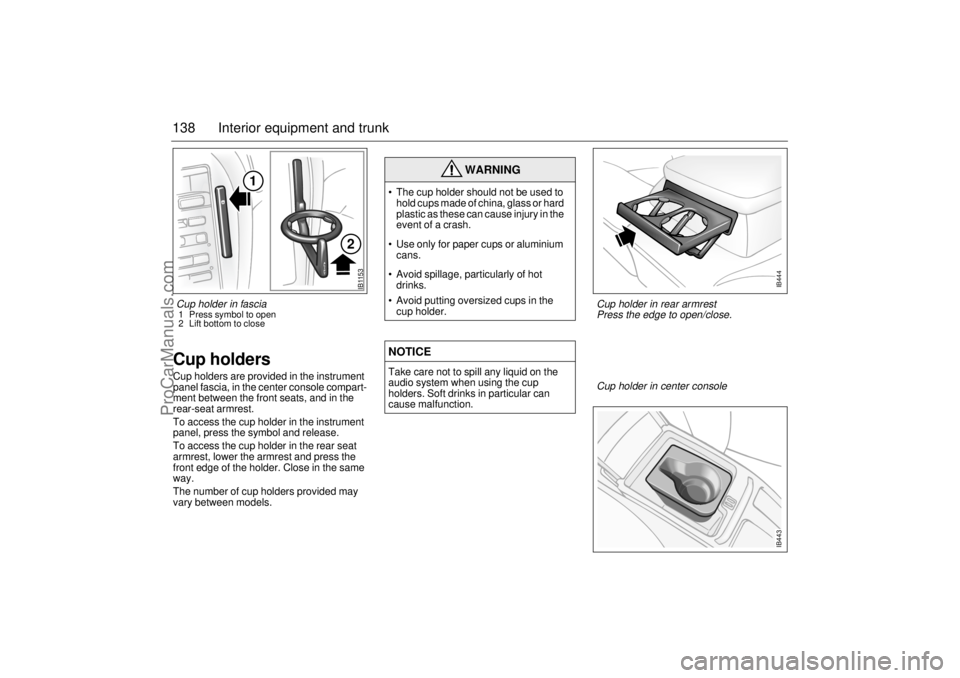
138 Interior equipment and trunkCup holders Cup holders are provided in the instrument
panel fascia, in the center console compart-
ment between the front seats, and in the
rear-seat armrest.
To access the cup holder in the instrument
panel, press the symbol and release.
To access the cup holder in the rear seat
armrest, lower the armrest and press the
front edge of the holder. Close in the same
way.
The number of cup holders provided may
vary between models.
WARNING
The cup holder should not be used to
hold cups made of china, glass or hard
plastic as these can cause injury in the
event of a crash.
Use only for paper cups or aluminium
cans.
Avoid spillage, particularly of hot
drinks.
Avoid putting oversized cups in the
cup holder.NOTICETake care not to spill any liquid on the
audio system when using the cup
holders. Soft drinks in particular can
cause malfunction.
IB1153
1
2
Cup holder in center console
IB443
Cup holder in rear armrest
Press the edge to open/close.
IB444
Cup holder in fascia 1 Press symbol to open
2 Lift bottom to close
ProCarManuals.com