change time SAAB 9-5 2005 User Guide
[x] Cancel search | Manufacturer: SAAB, Model Year: 2005, Model line: 9-5, Model: SAAB 9-5 2005Pages: 276, PDF Size: 16.72 MB
Page 99 of 276

97 Saab 9-5 Audio System
If for some reason the CD selected by the
preset button cannot be played, playback of
the current CD will continue. Track search (2) Press or repeatedly to move
to preceding or following tracks. Pressing
once will restart playback from the
beginning of the current track. Thus, to play
the preceding track, press twice. Rapid play When or is pressed and
held, rapid play will be initiated, with the time
and track showing on the display, e.g.:
If the button is depressed for more than
5 seconds, the rapid play will be even faster.
Rapid play stops when the button is rele-
ased.
Fast track search Press SEEK (mid-segment) once to switch
between the CD-PLAY and CD-TRACK
modes.
The CD-PLAY and CD-TRACK modes
change the function of and .
The selected mode will also be active the
next time the system is switched on.
Choose the mode that you find most
convenient:
CD PLAY Pressing and holding
or briefly
starts Rapid play
CD TRACK Pressing and holding
or briefly
starts Fast track search
IB1846
3
1
2
ProCarManuals.com
Page 101 of 276

99 Saab 9-5 Audio System
Programmable
functionsVolume-preset modeTo select the volume-preset mode, press
and hold the BAND button at the same time
as you switch the Audio System on.
Use the button to select the desi-
red function.
The following volume settings can be
preselected:
STARTVOL –
maximum
volume level
when the Audio System is switched on
TEL VOL – preset volume level when an
in-car phone is activated
SP D VOL – speed-dependent volume.
The Audio System will automatically
adjust the volume level to compensate for
background noise, such as road noise,
which increases with vehicle speed.
LOUDNESS ON/OFF – boosting of the
highest and lowest frequency ranges to
enhance the sound image when the
volume is set to a low level.
Adjusting the volume The default setting for START VOL is
volume setting 9, and that for TEL VOL is
volume setting 14 (the highest volume set-
ting is 30).
Maximum
START VOL
TELVOL
To change the volume setting:
– Press and hold the BAND button at the
same time as you switch on the Audio
System.
– After START VOL appears, release the
BAND button.
– Adjust the starting volume using the
volume knob.
– Wait 10 seconds or press one of the but-
tons on the bottom row of the Audio Sys-
tem, e.g. RADIO or BAND, to save the
new volume setting.
Speed-dependent volume
(SP D VOL) ON/OFF To change the default setting:
The default setting for this function is ON.
– Press and hold the BAND button at the
same time as you switch on the Audio
System.
– After START VOL appears, release the
BAND button.
– Select SP D VOL using
– Select ON or OFF using the VOL control.
– Wait 10 seconds or press one of the but-
tons on the bottom row of the Audio Sys-
tem, e.g. RADIO or BAND, to save the
new default setting.
WARNING
These functions should only be carried
out when the car is stationary.
ProCarManuals.com
Page 102 of 276
100 Saab 9-5 Audio SystemLoudness ON/OFF To change the default setting:
The default setting for this function is ON.
– Press and hold the BAND button at the
same time as you switch on the Audio
System.
– After START VOL appears, release the
BAND button.
– Select LOUDNESS using
– Select ON or OFF using the VOL control.
– Wait 10 seconds or press one of the but-
tons on the bottom row of the Audio Sys-
tem, e.g. RADIO/BAND, to save the new
default setting.
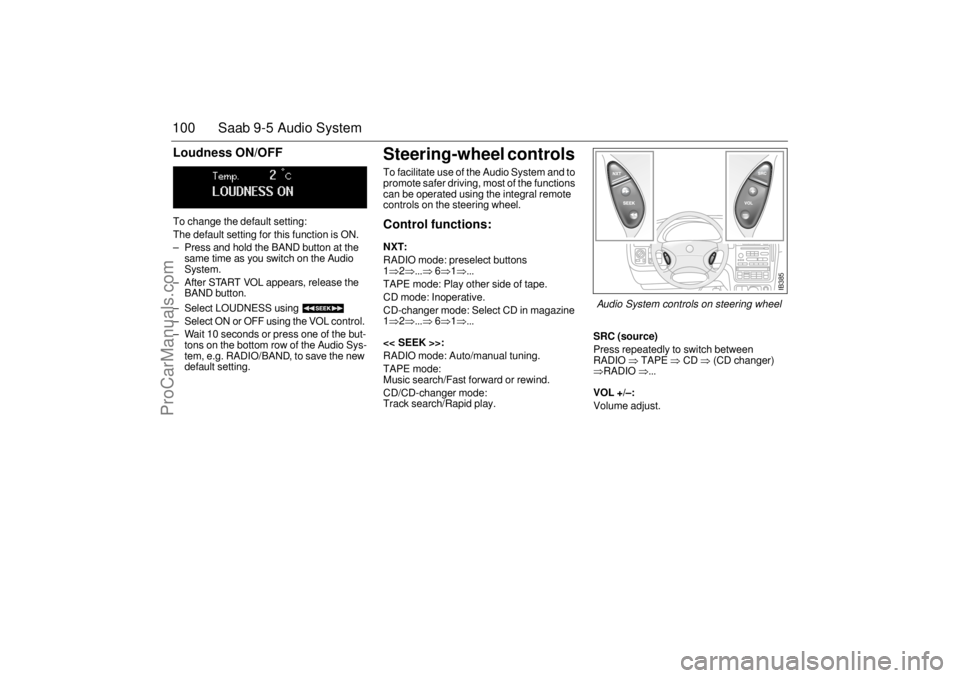
Steering-wheel controls To facilitate use of the Audio System and to
promote safer driving, most of the functions
can be operated using the integral remote
controls on the steering wheel. Control functions: NXT: RADIO mode: preselect buttons
1⇒2⇒...⇒
6⇒1⇒...
TAPE mode: Play other side of tape.
CD mode: Inoperative.
CD-changer mode: Select CD in magazine
1⇒2⇒...⇒
6⇒1⇒...
<< SEEK >>:
RADIO mode: Auto/manual tuning.
TAPE mode:
Music search/Fast forward or rewind.
CD/CD-changer mode:
Track search/Rapid play.
SRC (source)Press repeatedly to switch between
RADIO
⇒ TAPE
⇒ CD
⇒ (CD changer)
⇒RADIO
⇒...
VOL +/–: Volume adjust.
IB385
Audio System controls on steering wheel
ProCarManuals.com
Page 103 of 276
101 Saab 9-5 Audio System
Security lock The Audio System is equipped with an elec-
tronic security lock. The special code is
unique to the car in which the Audio System
is fitted.
Each time the Audio System is switched on,
a check is made to ensure that the codes
match.
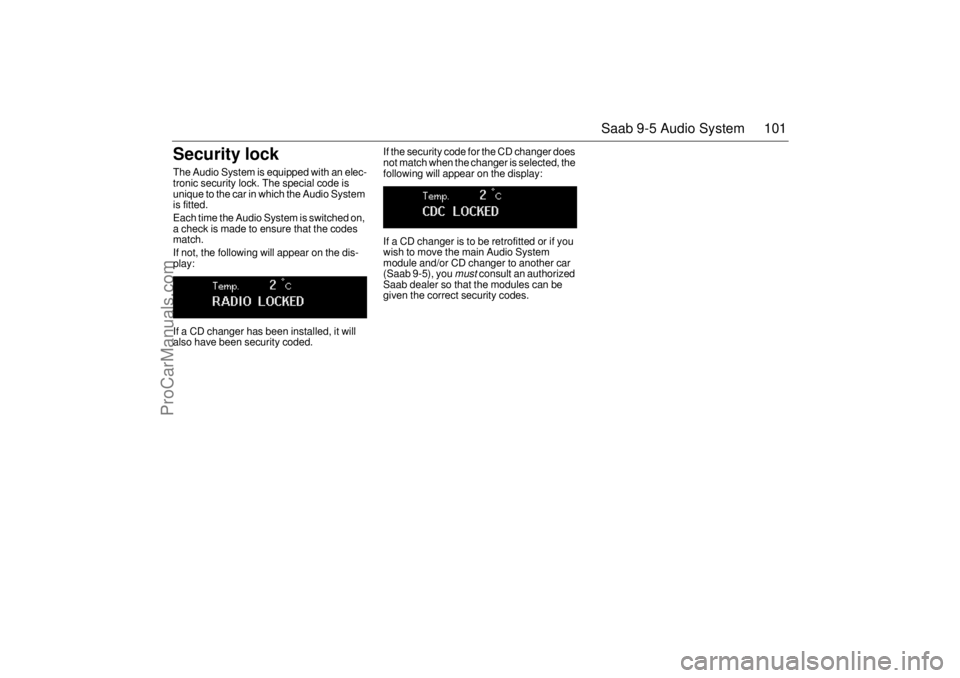
If not, the following will appear on the dis-
play:
If a CD changer has been installed, it will
also have been security coded. If the security code for the CD changer does
not match when the changer is selected, the
following will appear on the display:
If a CD changer is to be retrofitted or if you
wish to move the main Audio System
module and/or CD changer to another car
(Saab 9-5), you
must
consult an authorized
Saab dealer so that the modules can be
given the correct security codes.
ProCarManuals.com
Page 106 of 276
104 Saab 9-5 Audio SystemAdjusting the frequency steps
North America/Europe If the car is taken from North America to
Europe, the radio’s frequency steps can be
adjusted.
Press and hold (mid-segment)
and switch the radio on at the same time.
The preset stations will be cancelled and
replaced by default frequencies.
Fault codesThe Audio System has a built-in diagnostics
function. If a fault is detected, a fault code is
generated to help dealer technicians to
diagnose the fault. Below are the codes for
some faults that you might be able to rectify
yourself.
OnStar SystemYour vehicle may be equipped with OnStar,
a vehicle telematics communications sys-
tem. Please consult the separate OnStar
Owner’s Manual for system details.
NOTICEGreat care should be exercised in trying
to rectify a fault. If you are at all unsure,
contact an authorized Saab dealer. Fault code Possible cause CD/CDC
ERROR
12/17/19 CD is dirty, loaded
wrong side up or defec-
tive.
TAPE ERR 01 Tape broken or
mechanical fault in
deck.
TAPE ERR
02/03 Tape snarled up or
mechanical fault in
deck.
TAPE ERR 11 Cassette jammed: can-
not be loaded/ejected.
WARNING
The CD player/CD changer is classified
as Class 1 laser equipment
Service and repair work must only be
carried out by authorized technicians.
If the casing is damaged, hazardous
laser radiation can occur. NOTICEAll work on the Audio System must be
carried out by an authorized Saab dealer.
ProCarManuals.com
Page 111 of 276

109 Interior equipment and trunk
Preparations for first-time programmingBefore programming the garage opener for
the first time, you must delete any factory
codes.
Press and hold the two outer buttons until
the indicator light begins to flash-after
20 seconds. Release both buttons. Do not
hold for longer that 30 seconds. The garage
opener is now in the train (or learning) mode
and can be programmed at any time begin-
ning with "Programming" - step 2.ProgrammingThe garage opener can record and store the
frequencies of three different remote con-
trols.
The battery in the remote control should be
fairly new for programming to work well.Do not repeat "Programming" - step two
to train additional devices to a second or
third button. Begin with "Programming" -
step three.
1 Turn the ignition ON.
2 Press and hold the two outer buttons
(buttons one and three) - releasing only
when the indicator light begins to flash
(after 20 seconds).
Do not
hold the but-
tons for longer than 30 seconds and
do
not repeat step two
to program a
second and/or third hand-held transmit-
ter to the remaining two buttons.
3 Position the end of your hand-held trans-
mitter 1-3 inches (5-14 cm) away from
the button you wish to program while
keeping the indicator light in view. The transmitter should face the mirror from
below or left side of the mirror.
4 Simultaneously press and hold both the
chosen and hand-held transmitter but-
tons.
Do not release the buttons until
step 5 has been completed.
Note:
Some gate operators and garage
door openers may require you to replace
this Programming Step 4 with procedures
noted in the "Gate Operator / Canadian Pro-
gramming" section.
5 After the indicator light changes from a
slow to a rapidly blinking light, release
both the mirror and hand-held transmit-
ter buttons.
6 Press and hold the just-trained button
and observe the indicator light.
If the indicator light
stays on con-
stantly, programming is complete
and your device should activate when
the button is pressed and released.
Note:
To program the remaining two but-
tons, begin with "Programming" -
step
three. Do not repeat step two.
If the indicator light blinks
rapidly for two
seconds and then turns to a constant
light continue with "Programming"
steps 7-9
to complete the programming of
a rolling code equipped device (most com-
monly a garage door opener).
7 At the garage door opener receiver
(motor-head unit) in the garage, locate
the "learn" or "smart" button. This can
usually
be found where the hanging antenna wire is attached to the
motor-head unit.
8 Firmly press and release the "learn" or
"smart" button. (The name and color of
the button may vary by manufacturer.)
Note:
There are 30 seconds in which to ini-
tiate step nine.
9 Return to the vehicle and firmly
press,
hold for two seconds and release
the
programmed button. Repeat the
"press/hold/release"
sequence a
second time, and, depending on the
brand of the garage door opener (or
other rolling code equipped device),
repeat this sequence a third time to com-
plete the programming process.
The garage opener should now activate
your rolling code equipped device.
Note:
To program the remaining two but-
tons, begin with "Programming" -
step
three
. Do not repeat step two.
ProCarManuals.com
Page 113 of 276

111 Interior equipment and trunk
Opening a garage doorTo operate, simply press and release the
programmed button. Activation will now
occur for the trained device (i.e. garage door
opener, gate operator, security system,
entry door lock, home/office lighting, etc.).
For convenience, the hand-held transmitter
of the device may also be used at any time.
Rearview auto-dimming mirrors(accessory)The autodimming is activated and deacti-
vated with a short push on button 2.
If the mirror is equipped with Garage Door
Opener (option) the letter 1 is displayed on
compass bearing display briefly when auto
dimming is activated. When deactivating
the letter 0 is displayed.
The interior rearview mirror has two sen-
sors, one forward-facing and one
rear-facing. They also activate and deacti-
vate the auto dimming feature on door mir-
rors.
The system is activated when the for-
ward-facing sensor detects that it is dark
outside and the rear-facing sensor detects.
For example, if the car following has not
dimmed its headlights. The rearview mirrors
are then darkened to prevent the strong light
source from dazzling the driver. This dar-
kening is stepless.
The mirrors return to their normal states
when the strong light source diminishes.
The auto dimming function can be turned
OFF with the switch on the lower edge of the
rear-view mirror.
NOTE
Towing a trailer can cause the system to
malfunction, as the rear-facing sensor may
sense light from the trailer.
NOTICESwitch off the power supply to the garage
door or gate (or park the car beyond the
range of the remote control) while pro-
gramming using the "cycling" method to
prevent damaging the electrical motor.
1 Forward-facing sensor
2 ON/OFF switch, auto dimming function
3 Rear-facing sensor
This device complies with Part 15 of the FCC Rules.
Operation is subject to the following two conditions: (1)
this device may not cause harmful interference, and (2)
must accept any interference received, including interfe-
rence that may cause undesired operation.
Changes or modifications not expressly approved by the
manufacturer could void the user’s authority to operate
the equipment.
Canada only:
This device complies with RSS-210 of Industry Canada.
Operation is subject to the following two conditions: (1)
this device may not cause interference, and (2) this
device must accept any interference, including interfe-
rence that may cause undesired operation of this device.
ProCarManuals.com
Page 136 of 276

134 Starting and drivingIt is possible for air to enter the lubricating
system in conjunction with an oil or oil-filter
change, or if the car has been stored for
some time. This air can cause the hydraulic
cam followers to emit a ticking noise, which
can persist for up to 15 minutes after start-
ing. Although this is quite normal and does
not indicate any malfunction, it is advisable
not to exceed 3,000 rpm before the noise
has disappeared.
The hydraulic cam lifters are completely
service free; the valve clearance is set up at
the factory and will not need any subse-
quent adjustment.
Starting the engineAvoid racing the engine or putting a heavy
load on it before it has warmed up. Drive
away as soon as the oil warning light has
been extinguished to enable the engine to
attain its normal temperature as quickly as
possible.
The engine has an automatic choke and
should be started as follows:Cars with manual transmission
To start the engine the clutch pedal must
be fully depressed.1 Depress the clutch pedal fully but do not
touch the accelerator.
2 Start the engine. Let the ignition key
spring back as soon as the engine has
started and is running smoothly – at very
low temperatures, you may need to run
the starter for up to 25 seconds. Wait
20–30 seconds before running the star-
ter again, to give the battery time to reco-
ver.
Note:
On cars with manual transmission, if the
starter fails to engage when the ignition key
is turned to the start position, make sure the
clutch pedal is full depressed. Misposi-
tioned floor mats or other obstructions
under the clutch pedal may affect starting.
Let the engine idle for about 10 seconds. Do
not open the throttle wide for at least 2–
3 minutes after starting.
Cars with automatic transmission 1 The selector lever must be in the P or N
position.
2 Keep your foot on the brake pedal.
3 Start the engine. Let the ignition key
spring back as soon as the engine has
started and is running smoothly – at very
low temperatures, you may need to run
the starter for up to 25 seconds. Wait
20–30 seconds before running the star-
ter again, to give the battery time to reco-
ver.
Let the engine idle for about 10 seconds. Do
not open the throttle wide for at least
2–3 minutes after starting. The tail pipe of the exhaust system
can become very hot during driving.
Bear this in mind when loading and
unloading the car.
Do not rest or sleep in the car when
parked with the engine running. There
is a risk of depressing the accelerator
which could lead to engine damage.
ProCarManuals.com
Page 144 of 276

142 Starting and drivingEngine Break-In PeriodPistons, bores and bearings need time to
obtain uniform, wear-resistant surfaces.
If a new engine is driven too hard, this grad-
ual process of bedding-in will not be possi-
ble and the life of the engine will be short-
ened.
During the first 1,200 miles (2,000 km), do
not exceed 5,000 rpm.
In addition, refrain from driving the car at full
throttle, other than for brief instances,
during the first 1,800 miles (3,000 km).
Wearing in new brake padsNew brake pads take time to bed in, about
90 miles (150 km) if the car is driven largely
under stop-and-go conditions or about
300 miles (500 km) of highway driving.
To extend the useful life of the pads, avoid
hard braking as much as possible during
this period.
Gear changingManual transmissionTo start the engine the clutch pedal must
be fully depressed.The gear positions are marked on the gear
lever. Before reverse (R) can be engaged,
you must lift the ring underneath the gear-
lever knob.
To change gear, fully depress the clutch
pedal and then release it smoothly. It is
inadvisable to drive with your hand resting
on the gear lever, as this can increase the
wear on the transmission.
When changing down from 5th to 4th gear,
ease the gear lever straight back, without
applying any lateral pressure. This will pre-
vent 2nd gear being engaged by mistake,
which can result in overreving and possible
damage to the engine.
Before engaging reverse, wait till the car is
at a standstill, release the accelerator and
fully depress the clutch. From neutral, press
the gear lever firmly to the right before
easing it back into reverse.
ProCarManuals.com
Page 147 of 276
145 Starting and driving
Lock-up function The automatic transmission has a lock-up
function, which can render the torque con-
verter inoperative in 3rd, 4th and 5th gears,
thus reducing the engine speed and fuel
consumption.
When the lock-up function comes into oper-
ation, it may give the impression of an over-
drive being engaged.Kick-downWhen the accelerator is pressed down hard,
a change-down to the next gear will be
effected to provide maximum acceleration,
e.g. for overtaking.
Following this, the next higher gear will be
selected at the optimum engine speed for
acceleration or, if you ease off the acceler-
ator, before reaching this.
Park Brake Shift LockThe transmission has a security function
known as Park Brake Shift Lock. To move
the gear selector out of the P position, the
brake pedal must be depressed at the same
time as the gear selector catch (detent) is
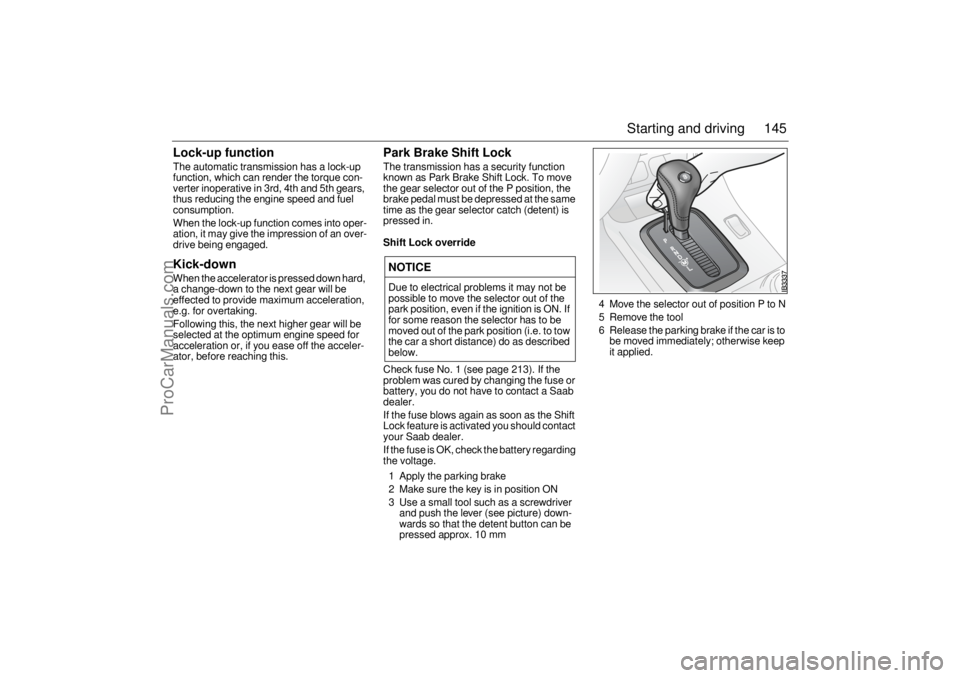
pressed in.Shift Lock overrideCheck fuse No. 1 (see page 213). If the
problem was cured by changing the fuse or
battery, you do not have to contact a Saab
dealer.
If the fuse blows again as soon as the Shift
Lock feature is activated you should contact
your Saab dealer.
If the fuse is OK, check the battery regarding
the voltage.
1 Apply the parking brake
2 Make sure the key is in position ON
3 Use a small tool such as a screwdriver
and push the lever (see picture) down-
wards so that the detent button can be
pressed approx. 10 mm4 Move the selector out of position P to N
5 Remove the tool
6 Release the parking brake if the car is to
be moved immediately; otherwise keep
it applied.NOTICEDue to electrical problems it may not be
possible to move the selector out of the
park position, even if the ignition is ON. If
for some reason the selector has to be
moved out of the park position (i.e. to tow
the car a short distance) do as described
below.
ProCarManuals.com