reset SAAB 9-5 2005 Owners Manual
[x] Cancel search | Manufacturer: SAAB, Model Year: 2005, Model line: 9-5, Model: SAAB 9-5 2005Pages: 276, PDF Size: 16.72 MB
Page 16 of 276

14 SafetyMemory driver’s seat(if equipped)
In certain models the driver´s seat is equip-
ped with a programmable memory function.
This function also includes the door mirrors.
Adjust the seat and door mirrors.
To save the settings, press and hold the M
button and, at the same time, press one of
the preselect buttons (1, 2 or 3). The Saab
Information Display (SID) will chime to con-
firm that the settings have been saved.To recall the programmed settings, press
and hold the appropriate preset button,
whereupon the seat and mirrors will be
adjusted automatically.
To change the settings stored in a preset
button, adjust the seat and mirrors as before
and save the new settings by pressing M
and the appropriate preset button.
To facilitate reversing, the passenger side
door mirror can be tilted down automati-
cally, e.g. to show the curb. To do this,
select reverse and press the small grey
button adjacent to the door-mirror control.
When you deselect reverse, the mirror will
automatically return to its original setting
(see page 107).
Ventilated front seats(if equipped)
Ventilated front seats, that enhance seating
comfort in hot weather, are an option on Arc
and Aero models (certain markets).
Ventilated seats are equipped with two fans
that extract the moist air from between the
seat and the body.
The fans have three speeds and are OFF
when the switch is set to 0.
IB404
IB405
ProCarManuals.com
Page 54 of 276
52 Instruments and controls
Indicator and warning
lights A number of indicator and warning lights will
come on when the ignition is switched on
prior to starting. Under normal conditions,
these should go out a few seconds after the
engine has started (see page 58).
This light will come on and a chime will
sound if a fault has been detected in any
system that is critical to safety. Any of the
following can activate the central warning
light and alarm:
Airbag system.
Low oil pressure in engine.
Parking brake is on (when car is moving).
Brake fluid level low.
Fault detected in ABS system.
Electronic brake force distribution (distri-
bution of brake pressure between front
and rear wheels).
Engine overheating.
Alternator not charging properly.
Central warning light
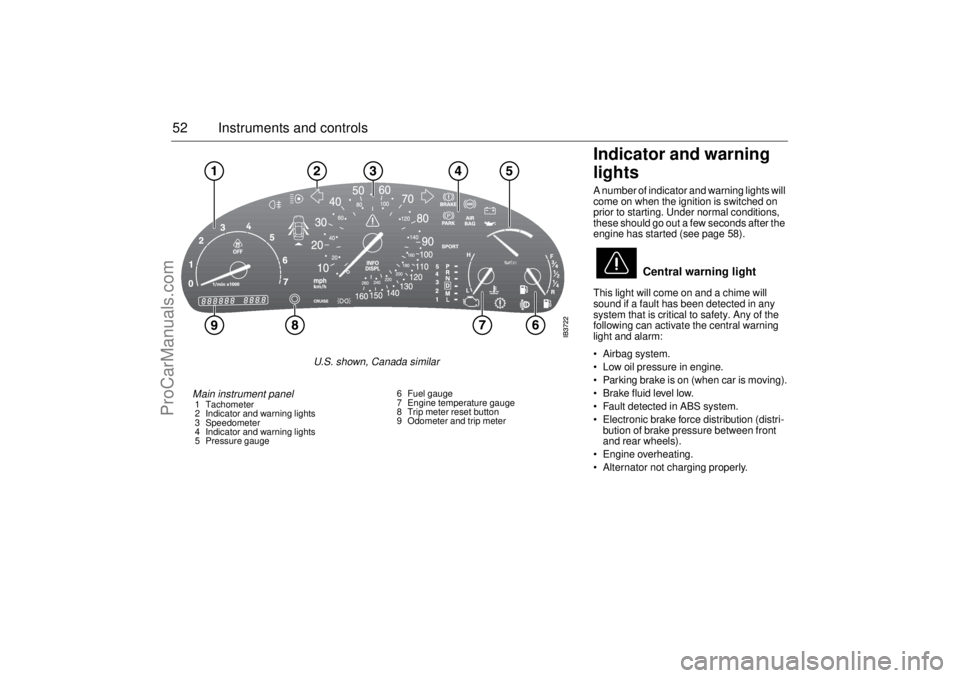
Main instrument panel 1 Tachometer
2 Indicator and warning lights
3 Speedometer
4 Indicator and warning lights
5 Pressure gauge6 Fuel gauge
7 Engine temperature gauge
8 Trip meter reset button
9 Odometer and trip meter
U.S. shown, Canada similar
ProCarManuals.com
Page 60 of 276
58 Instruments and controlsAutochecking of lights,
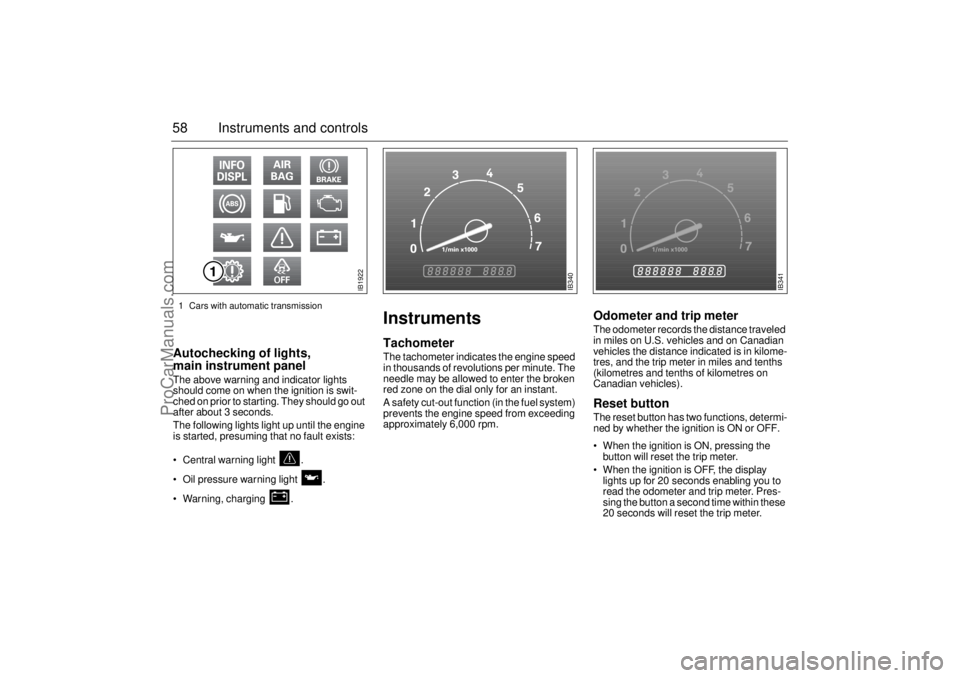
main instrument panel The above warning and indicator lights
should come on when the ignition is swit-
ched on prior to starting. They should go out
after about 3 seconds.
The following lights light up until the engine
is started, presuming that no fault exists:
Central warning light .
Oil pressure warning light .
Warning, charging .
InstrumentsTachometerThe tachometer indicates the engine speed
in thousands of revolutions per minute. The
needle may be allowed to enter the broken
red zone on the dial only for an instant.
A safety cut-out function (in the fuel system)
prevents the engine speed from exceeding
approximately 6,000 rpm.
Odometer and trip meter The odometer records the distance traveled
in miles on U.S. vehicles and on Canadian
vehicles the distance indicated is in kilome-
tres, and the trip meter in miles and tenths
(kilometres and tenths of kilometres on
Canadian vehicles). Reset button The reset button has two functions, determi-
ned by whether the ignition is ON or OFF.
When the ignition is ON, pressing the
button will reset the trip meter.
When the ignition is OFF, the display
lights up for 20 seconds enabling you to
read the odometer and trip meter. Pres-
sing the button a second time within these
20 seconds will reset the trip meter.
IB1922
IB340
IB341
1 Cars with automatic transmission
ProCarManuals.com
Page 63 of 276
61 Instruments and controls
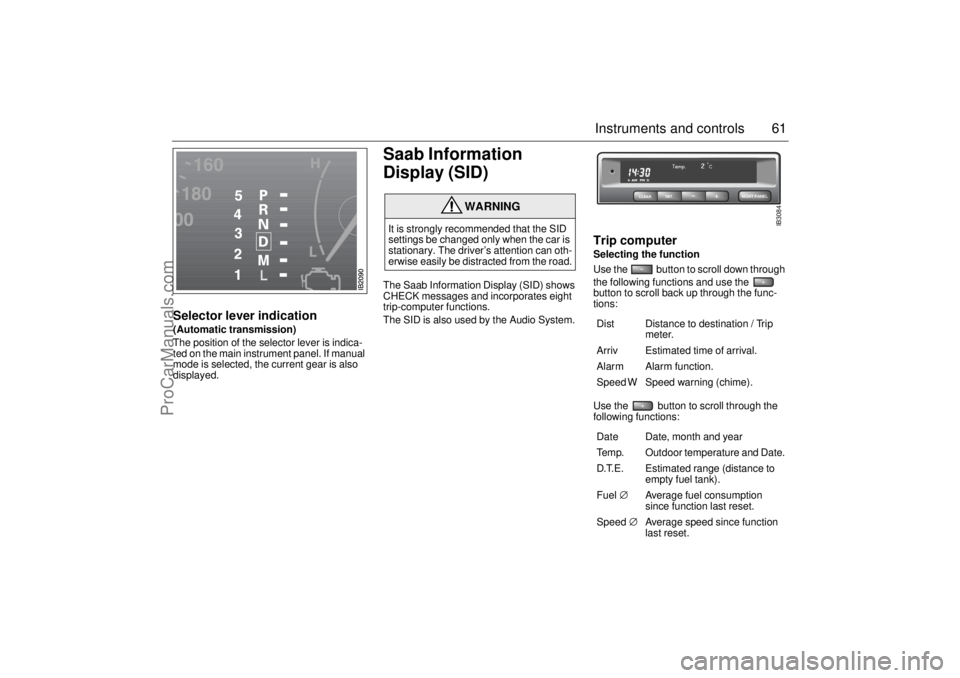
Selector lever indication(Automatic transmission)
The position of the selector lever is indica-
ted on the main instrument panel. If manual
mode is selected, the current gear is also
displayed.
Saab Information
Display (SID) The Saab Information Display (SID) shows
CHECK messages and incorporates eight
trip-computer functions.
The SID is also used by the Audio System.
Trip computerSelecting the function
Use the button to scroll down through
the following functions and use the
button to scroll back up through the func-
tions: Use the button to scroll through the
following functions:
WARNING
It is strongly recommended that the SID
settings be changed only when the car is
stationary. The driver’s attention can oth-
erwise easily be distracted from the road.
Dist Distance to destination / Trip
meter.
Arriv Estimated time of arrival.
Alarm Alarm function.
Speed W Speed warning (chime).
Date Date, month and year
Temp. Outdoor temperature and Date.
D.T.E. Estimated range (distance to
empty fuel tank).
Fuel∅ Average fuel consumption
since function last reset.
Speed∅ Average speed since function
last reset.
CLEARSET
NIGHT PANEL
IB3084
ProCarManuals.com
Page 64 of 276
62 Instruments and controlsOutdoor temperature(Frost warning)
Regardless of which function has been
selected, except Night Panel Mode, SID will
automatically display the outdoor tempera-
ture when it is between 26° and 38°F (–3°
and +3°C). This also applies if the
temperature has moved outside the range
of 21° to 43°F (–6° to +6°C) but is again bet-
ween 26° and 38°F (–3° and +3°C).
Entering values for the functions Values can be entered for the following
functions: Speed∅, Dist, Arriv, Alarm and
Speed W.
1 Select the desired function using
or .
2 Press the SET button for at least one
second (figures start to flash and a
chime sounds).
3 Use or to increase or
decrease the value (press CLEAR to
reset).
4 Press SET to record the value.
Average fuel consumption
The average fuel consumption is calculated
using the values for fuel consumed and dis-
tance driven since last reset. This value is
stored in the car’s trip computer even when
the engine is switched off.
Select Fuel Ø with .
To reset the value, press the CLEAR button
for 4 seconds. A chime will be heard and
CLEARED will be displayed.
Setting the date1 Use to select Date.
2 Press the SET button for at least one
second (year starts to flash and a chime
sounds).
3 Set the year using or .
4 Touch SET.
5 Set the month in the same way.
6 Touch SET.
7 Set the day in the same way.
8 Press SET to save the date setting.
WARNING
Remember that roads can be icy even at
temperatures of above 38°F (+3°C),
especially on bridges and stretches of
road that are sheltered from the sun.
ProCarManuals.com
Page 65 of 276

63 Instruments and controls
Turning the Alarm and Speed
warning on or off 1 Select the Alarm or Speed-warning
function.
2 Press SET to turn on the function.
Press CLEAR to turn off the function.
When either function is on, Alarm/Speed W
respectively will be visible on the display. An
asterisk
* will be visible on the right of the
display when either function is selected.
The Alarm and Speed-warning settings will
not be cancelled when the engine is swit-
ched off.
When the Alarm has been set to come on at
a specified time, it will only be activated
once – it will not come on at the same time
every day. Press SET to turn it on again.
The Alarm will continue to beep for one
minute if not switched off.
Calculation of arrival time and
average speed The settings must be made before the jour-
ney is started.
Calculation of arrival time:
1 Select Dist using the button.
2 Set the destination distance.
3 Press SET.
When Arriv. is selected during the journey,
the arrival time based on the average speed
over the past 20 minutes will be displayed.
The trip computer will include any stops in
the calculation of the estimated time of
arrival.
Press Dist and the distance remaining to the
destination will be displayed in the same
way.
After the distance to destination has
decreased to zero, the Dist will function as
a trip meter (see ”Using Dist as a trip
meter”). The starting value for the trip meter
will be the last distance set in the Dist
function.
Example: The Dist setting was 100 miles.
Once 100 miles (160 km) has been cove-
red, the Dist will start to function as a trip
meter, starting at the initial setting of
100 miles (160 km). Using Dist as a trip meter
If no value has been set for the Dist function,
Dist will now function as a trip meter (indica-
ted by an arrow on the far right of the dis-
play).
Press CLEAR to reset the trip meter.
Under 1000 miles the distance will be
shown in increments of 0.1 miles,
there-after, the reading will change in incre-
ments of 1.0 mile.
Metric units: for just under a kilometer, the
distance will be shown in increments of
10 meters, there-after, the reading will
change in increments of 100 meters.
When Dist is functioning as a trip meter, the
Arriv function will display the current time.
ProCarManuals.com
Page 66 of 276

64 Instruments and controlsTo calculate the arrival time if a specified
average speed is maintained
1 Select Dist using the button.
2 Set the distance to be covered.
3 Press to select Speed Ø.
4 Set the average speed you intend to
drive.
5 Press SET to display the estimated arri-
val time.
At the beginning of a journey, the Speed Ø
and Arriv functions will display current
values. If values are set during the journey,
the new values will be displayed after a
delay of about 10 seconds.
Calculating the requisite average speed:
1 Press to select Dist.
2 Set the distance to be covered.
3 Press to select Arriv.
4 Set the desired arrival time.
5 Press SET to display the average speed
you need to maintain to arrive at the
desired time.
At the beginning of a journey, the Speed Ø
and Arriv functions will display current
values. If values are set during the journey,
the new values will be displayed after a
delay of about 10 seconds.Resetting values
To reset the values, press CLEAR for at
least four seconds.
The following functions will be reset
simultaneously:
Estimated range on remaining fuel
(function based on a fuel consumption of
28 mpg).
Average fuel consumption.
Average speed.
Arrival time (function based on current
speed).
Programmed values for Dist, Alarm and
Speed W will not be reset (see the respec-
tive function).
CHECK messages When the engine is started, CHECKING will
appear on the display for about four
seconds, while the SID checks are being
performed.
When a CHECK message is generated
while the car is being driven, a chime will
sound, INFO DISPL will illuminate on the
main instrument panel, and the message
will appear on the SID. The number of mes-
sages that can be displayed by the SID
varies with the specification of the car.
If more than one CHECK message has
been generated, the
+ symbol will appear to
the left of the text on the display. The mes-
sages appear in order of priority.
If a new fault occurs while another message
is being displayed, the message relating to
the new one will appear for 10 seconds,
after which the display will return to the ear-
lier one.
Press CLEAR once to acknowledge a mes-
sage, whereupon it will be cleared from the
display. It will not be displayed again before
the ignition has been switched off and then
on again.
ProCarManuals.com
Page 87 of 276
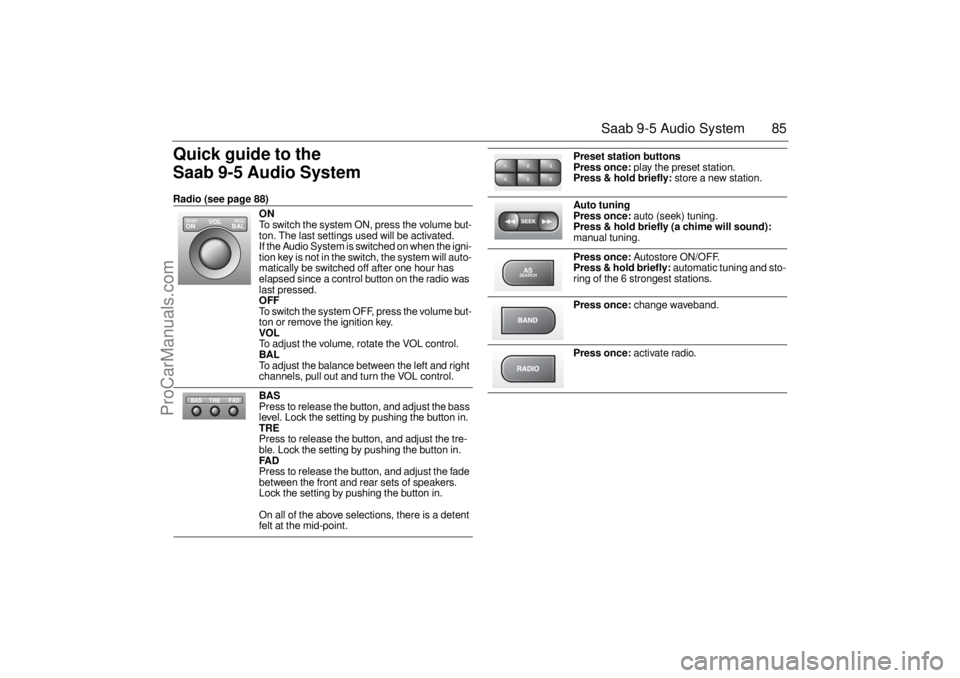
85 Saab 9-5 Audio System
Quick guide to the
Saab 9-5 Audio System Radio (see page 88)
ON
To switch the system ON, press the volume but-
ton. The last settings used will be activated.
If the Audio System is switched on when the igni-
tion key is not in the switch, the system will auto-
matically be switched off after one hour has
elapsed since a control button on the radio was
last pressed. OFF To switch the system OFF, press the volume but-
ton or remove the ignition key. VOL To adjust the volume, rotate the VOL control. BAL To adjust the balance between the left and right
channels, pull out and turn the VOL control. BAS Press to release the button, and adjust the bass
level. Lock the setting by pushing the button in. TRE Press to release the button, and adjust the tre-
ble. Lock the setting by pushing the button in. FAD Press to release the button, and adjust the fade
between the front and rear sets of speakers.
Lock the setting by pushing the button in.
On all of the above selections, there is a detent
felt at the mid-point.
VOL
BAL ON
PULL PUSH
TREFAD BAS
Preset station buttons
Press once:
play the preset station.
Press & hold briefly:
store a new station.
Auto tuning
Press once:
auto (seek) tuning.
Press & hold briefly (a chime will sound):
manual tuning.
Press once:
Autostore ON/OFF.
Press & hold briefly:
automatic tuning and sto-
ring of the 6 strongest stations.
Press once:
change waveband.
Press once:
activate radio.
2 13
5 46ASSEARCH
ProCarManuals.com
Page 90 of 276
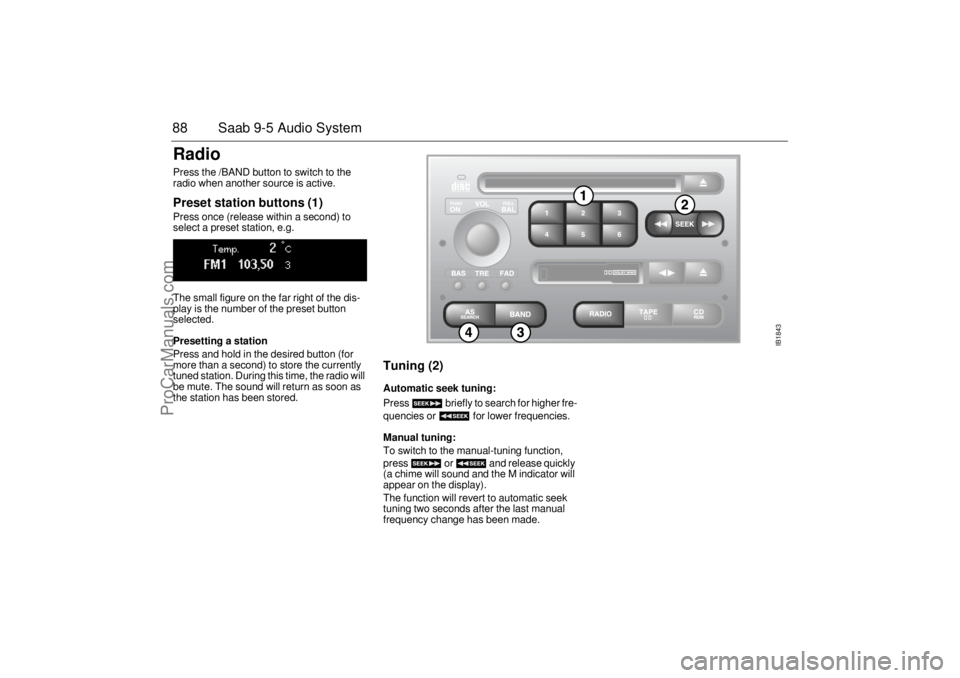
88 Saab 9-5 Audio SystemRadio Press the /BAND button to switch to the
radio when another source is active. Preset station buttons (1) Press once (release within a second) to
select a preset station, e.g.
The small figure on the far right of the dis-
play is the number of the preset button
selected. Presetting a station Press and hold in the desired button (for
more than a second) to store the currently
tuned station. During this time, the radio will
be mute. The sound will return as soon as
the station has been stored.
Tuning (2) Automatic seek tuning: Press briefly to search for higher fre-
quencies or for lower frequencies. Manual tuning: To switch to the manual-tuning function,
press or and release quickly
(a chime will sound and the M indicator will
appear on the display).
The function will revert to automatic seek
tuning two seconds after the last manual
frequency change has been made.
IB1843
ProCarManuals.com
Page 91 of 276

89 Saab 9-5 Audio System
Waveband selector (3) Press the BAND button repeatedly to move
through the waveband selections: FM1,
FM2, and AM.
AS, Autostore (4) The autostore mode provides an additional
preset function that can be used to search
for and to store stations when you are in an
area where you are unfamiliar with the sta-
tions and their frequencies.
Press the AS/SEARCH button to switch the
Autostore mode ON/OFF. When the Auto-
store mode is ON, the AS indicator will show
at the bottom of the display.
Press and hold in the AS/SEARCH button
for more than a second to initiate a search
for the six strongest stations.
Each time the system finds and stores a sta-
tion, the number on the far right of the dis-
play will change. If the system cannot find
six stations with good reception, the remain-
ing preset buttons will be empty. If one of
these empty buttons is pressed, U**** (FM)
or AM**** will appear on the display.
When the system leaves the AS mode, it
returns to the station that was selected
before the AS mode was activated.
The AS mode can also be used in the AM
band.
ProCarManuals.com