warning SAAB 9-5 2007 Workshop Manual
[x] Cancel search | Manufacturer: SAAB, Model Year: 2007, Model line: 9-5, Model: SAAB 9-5 2007Pages: 288, PDF Size: 18.14 MB
Page 90 of 288
90 Saab 9-5 Audio SystemSaab 9-5 Audio
System3To get the best out of your Saab 9-5 Audio
System, we recommend that you read
through this entire section.
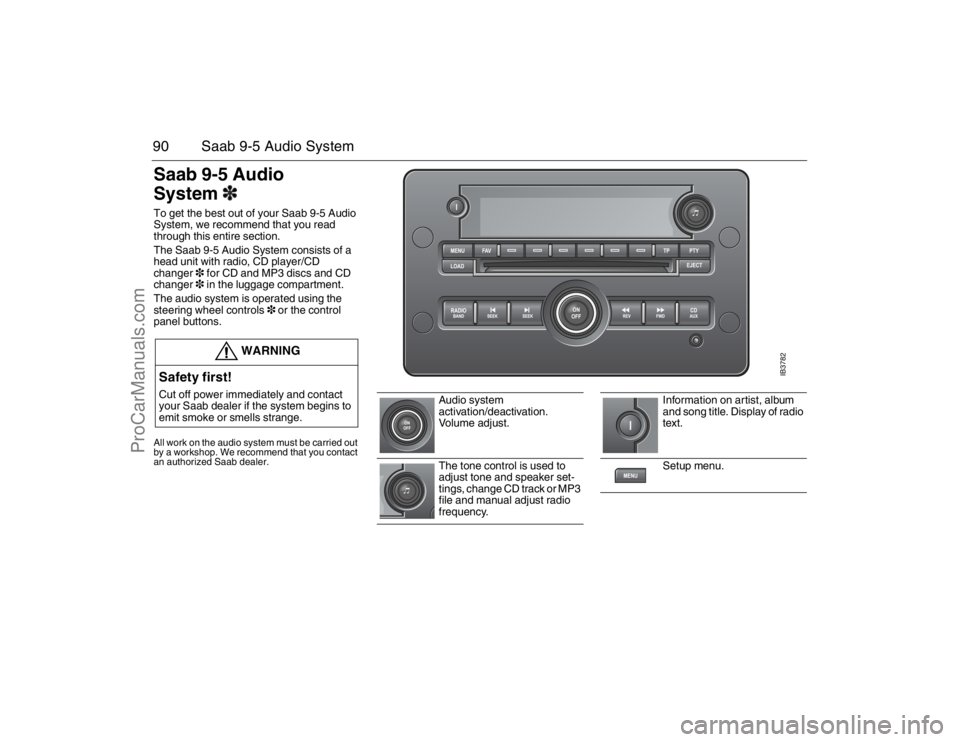
The Saab 9-5 Audio System consists of a
head unit with radio, CD player/CD
changer3 for CD and MP3 discs and CD
changer3 in the luggage compartment.
The audio system is operated using the
steering wheel controls3 or the control
panel buttons.All work on the audio system must be carried out
by a workshop. We recommend that you contact
an authorized Saab dealer.
WARNING
Safety first!Cut off power immediately and contact
your Saab dealer if the system begins to
emit smoke or smells strange.
Audio system
activation/deactivation.
Vo l u m e a d j u s t .
The tone control is used to
adjust tone and speaker set-
tings, change CD track or MP3
file and manual adjust radio
frequency.
Information on artist, album
and song title. Display of radio
text.
Setup menu.
IB3782
95_U S _M 07.book Page 90 Friday, June 9, 2006 8:58 AM
ProCarManuals.com
Page 104 of 288
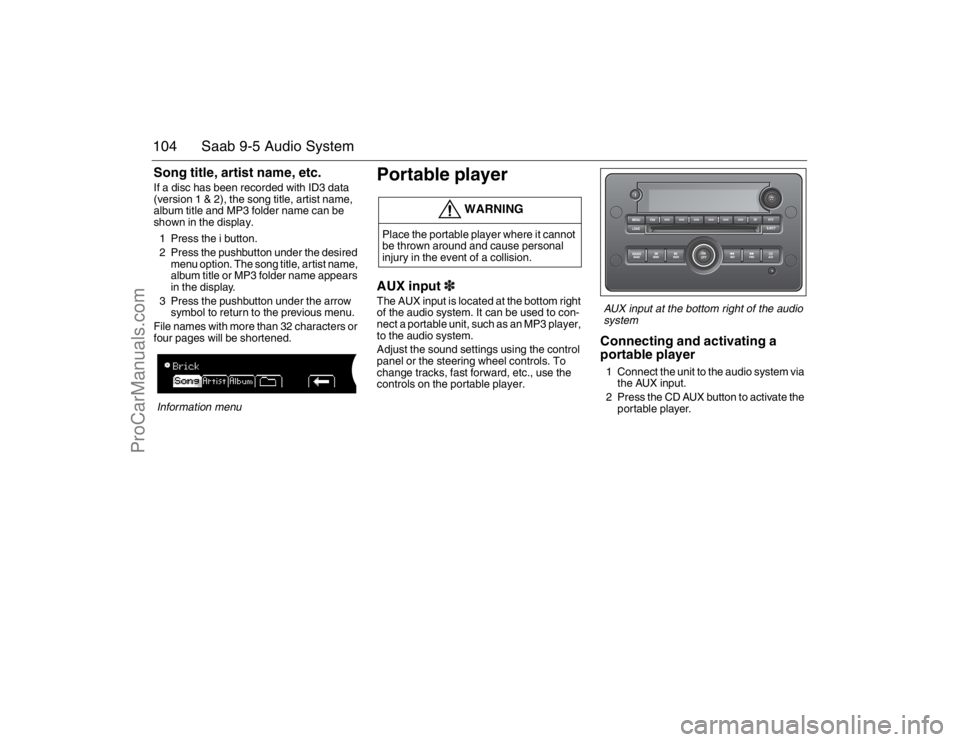
104 Saab 9-5 Audio SystemSong title, artist name, etc.If a disc has been recorded with ID3 data
(version 1 & 2), the song title, artist name,
album title and MP3 folder name can be
shown in the display.
1 Press the i button.
2 Press the pushbutton under the desired
menu option. The song title, artist name,
album title or MP3 folder name appears
in the display.
3 Press the pushbutton under the arrow
symbol to return to the previous menu.
File names with more than 32 characters or
four pages will be shortened.Information menu
Portable playerAUX input3The AUX input is located at the bottom right
of the audio system. It can be used to con-
nect a portable unit, such as an MP3 player,
to the audio system.
Adjust the sound settings using the control
panel or the steering wheel controls. To
change tracks, fast forward, etc., use the
controls on the portable player.
AUX input at the bottom right of the audio
systemConnecting and activating a
portable player1 Connect the unit to the audio system via
the AUX input.
2 Press the CD AUX button to activate the
portable player.
WARNING
Place the portable player where it cannot
be thrown around and cause personal
injury in the event of a collision.
95_U S _M 07.book Page 104 Friday, June 9, 2006 8:58 AM
ProCarManuals.com
Page 105 of 288

105 Saab 9-5 Audio System
General functionsSetting time and dateCars without CD changer
1 Press the Clock button.
2 Press the pushbutton under the menu
option you wish to change.
3 Press the pushbutton again to increase
time or date one increment at a time. You
can also adjust time and date by press-
ing the SEEK, FWD or REV button.Cars with CD changer
1 Press the MENU button.
2 Press the pushbutton under the clock
symbol in the display.
3 Press the pushbutton under the menu
option you wish to change.
4 Press the pushbutton again to increase
time or date one increment at a time. You
can also adjust time and date by press-
ing the SEEK, FWD or REV button.
Setting time and date
Time and date display
1 In the clock menu, press the pushbutton
under the arrow symbol in the display.
2 Specify whether time should be dis-
played with the 12-hour or 24-hour
system and in which order date is to be
indicated by pressing the pushbutton
under the desired menu option.Time and date display
WARNING
Adjustments should be made when the
car is stationary so that attention to traffic
is not reduced, increasing the likelihood
of an accident.
NOTICEThe menu option RDS
function on US/CA cars.
95_U S _M 07.book Page 105 Friday, June 9, 2006 8:58 AM
ProCarManuals.com
Page 112 of 288
112 Saab 9-5 Audio SystemError codesThe audio system has a built-in diagnostics
function. If a fault is detected, a error code
is generated to help workshop technicians
to diagnose the fault. Below are the codes
for some faults that you might be able to rec-
tify yourself.
Security lockThe audio system is equipped with an elec-
tronic security lock. The special code is
unique to the car in which the audio system
is fitted.
Each time the audio system is switched on,
a check is made to ensure that the code is
correct. If not, the following will appear on
the display:
Locked
If the audio system is to be transferred to
another car (Saab 9-5), a Saab dealer must
be contacted to provide the right code for
the audio system.
NOTICEProceed with care if rectifying a fault. If in
doubt, contact a workshop. We recom-
mend that you contact an authorized
Saab dealer.
Error code Possible cause
Check CD CD is dirty, scratched,
loaded wrong-side-up
or defective.
The CD may be
improperly burned.
WARNING
The CD player/CD changer is classified
as Class 1 laser equipment.
Service and repair work must only be
carried out by authorized technicians.
If the casing is damaged, hazardous
laser radiation can occur.NOTICEAll work on the audio system must be car-
ried out by a workshop. We recommend
that you contact an authorized Saab
dealer.
95_U S _M 07.book Page 112 Friday, June 9, 2006 8:58 AM
ProCarManuals.com
Page 114 of 288

114 Interior equipment and trunkSteering wheel
adjustment Fore-and-aft and tilt adjustment of the steer-
ing wheel is possible.
Pull down the lever fully until you hear a
click. Move the steering wheel to the desired
position and then raise the lever. The lever
should lock with a click.
Make sure that the lever is fully locked
before driving off.
HornThe horn is sounded by pressing the central
part of the steering wheel. Press closest to
the steering wheel rim.
WARNING
Never adjust the steering wheel unless
the car is stationary.
IB3868
To adjust the steering wheel
IB3869
95_U S _M 07.book Page 114 Friday, June 9, 2006 8:58 AM
ProCarManuals.com
Page 115 of 288

115 Interior equipment and trunk
Electric windowsThe electric motors of the front windows are
equipped with overload protection (inte-
grated thermal protection). This protection
operates when the windows are wound
down automatically (switch pressed fully
down).To open:
Front windows: press the front of the switch
Rear windows: Press the back of the switch.
The switches for the front windows have a
third position for automatic opening of the
window. Press the switch fully down to lower
the window completely.
To cancel automatic lowering of the win-
dow, lift the switch briefly.To close:
Front windows: Lift the front of the switch.
Rear windows: Lift the back of the switch.
The actuating motor will be switched off
automatically when the window is fully
closed or when the switch is released.
WARNING
Bear in mind the pinch hazard when the
side windows are being wound up.
Always remove the ignition key when
you leave the car. This prevents per-
sonal injury caused by the electric win-
dows, for example, due to children
playing.
The person operating the electric win-
dows is responsible for ensuring that
no one, especially children, has their
head, hands or fingers in the window
openings, before raising the windows.
Raising the windows could otherwise
cause serious or fatal injuries.
Do not extend your arm, head etc. out
of an open window while driving.
IB3231
1 Window switches
2 Switch for rendering rear door window switches inoperative
95_U S _M 07.book Page 115 Friday, June 9, 2006 8:58 AM
ProCarManuals.com
Page 118 of 288

118 Interior equipment and trunkRearview mirrorThe rearview mirror has day/night positions
that can be selected by means of a knob
beneath the mirror. Adjust the mirror in day
position.
Interior rearview auto-dimming
mirror with garage door opener,
and digital compass3
Retain your original garage door transmitter
for future programming procedures (i.e.,
new vehicle purchase). It is also suggested
that upon the sale of the vehicle, the pro-
grammed garage opener buttons be erased
for security purposes.
WARNING
Make sure that people and objects are out
of the way of a moving door or gate to pre-
vent potential harm or damage.
When programming the garage opener,
you may be operating a garage door or
gate operator. Therefore it is advised to
park outside of the garage.
Do not use the garage opener with any
garage door opener that lacks the safety
stop and reverse feature as required by
federal safety standards. (This includes
any garage door opener model manufac-
tured before April 1, 1982.). A garage
door opener which cannot detect an
object, signalling the door to stop and
reverse, does not meet current federal
safety standards. Using a garage door
opener without these features increases
risk of serious injury or death.
Rearview mirror 1 Day position
2 Night position
Buttons for garage opener and compass1-3 Garage opener
4 LED
5 Compass/auto dimming ON/OFF
6 Compass bearing
95_U S _M 07.book Page 118 Friday, June 9, 2006 8:58 AM
ProCarManuals.com
Page 123 of 288

123 Interior equipment and trunk
Moonroof3 The moonroof is operated by the switch on
the overhead panel above the rearview mir-
ror. The moonroof can be opened partially
or fully.
To open:
Slide the control towards the rear to open
the moonroof to the comfort position.
To open it fully, slide the control back a
second time. Press the control to stop it
earlier. To close:
Slide the control forwards until the moon-
roof is closed.
Ventilation position
Press the middle of the control (when
moonroof closed).
To close: slide the control forwards.
To fully open the moonroof from the ventila-
tion position, slide the control back.
The moonroof incorporates an interior,
manual, sliding sun blind.
If the car is newly waxed, the moonroof may
creak when opened to the ventilation posi-
tion or when driving with the moonroof
closed. The sound comes from the area
where the front edge of the moonroof meets the metal roof. Open the moonroof fully and,
using washer fluid, clean the seal on the
leading edge of the moonroof and the
painted surface against which this seals
when the moonroof is closed.
WARNING
Bear in mind the pinch hazard when clos-
ing the moonroof.
Always remove the ignition key when
you leave the car. This prevents per-
sonal injury caused by the electric
moonroof, for example, due to chil-
dren playing.
The person operating the electric
moonroof is responsible for ensuring
that no one, especially children, has
their head, hands or fingers in the
opening, before closing the moonroof.
Operating the moonroof could other-
wise cause serious or fatal injuries.
Do not extend your arm, head etc. out
of an open moonroof while driving.
IB430
1
3
2
Moonroof control 1 To open
2 To close
3 Ventilation position
95_U S _M 07.book Page 123 Friday, June 9, 2006 8:58 AM
ProCarManuals.com
Page 126 of 288

126 Interior equipment and trunkPower Outlet3You can use the electrical socket to charge
a mobile phone, for example.
Glove compartment The glove compartment can be cooled by
the air conditioning (ACC) system. Cold air
can be directed to the glove compartment
for keeping drinks cool, etc.
Slide the cover to open/close the air inlet.
Additional storage facilities are provided
(see next page).
WARNING
The maximum combined load for the two
power outlets is 240 W (20 A).
WARNING
The glove compartment must be closed
while travelling. An open glove compart-
ment door could cause leg injuries in the
event of a crash.
IB1286
Sliding cover in glove compartment to
admit cold air
95_U S _M 07.book Page 126 Friday, June 9, 2006 8:58 AM
ProCarManuals.com
Page 128 of 288

128 Interior equipment and trunkCup holders Cup holders are provided in the instrument
panel fascia, in the center console compart-
ment between the front seats, and in the
rear-seat armrest (certain variants only).
To access the cup holder in the instrument
panel, press the symbol and release.
To access the cup holder in the rear seat
armrest, lower the armrest and press the
front edge of the holder. Close in the same
way.
The number of cup holders provided may
vary between models.
WARNING
The cup holder should not be used to
hold cups made of china, glass or hard
plastic as these can cause injury in the
event of a crash.
Use only for paper cups or aluminium
cans.
Avoid spillage, particularly of hot
drinks.
Avoid putting oversized cups in the
cup holder.NOTICETake care not to spill any liquid on the
audio system, ignition switch or the like
when using the cup holders. Soft drinks in
particular can cause malfunction.
IB1153
1
2
Cup holder in center console
3
IB443
Cup holder in rear armrest
3
Press the edge to open/close.
IB444
Cup holder in fascia 1 Press symbol to open
2 Lift bottom to close 95_U S _M 07.book Page 128 Friday, June 9, 2006 8:58 AM
ProCarManuals.com