ignition SATURN ASTRA 2008 Owner's Manual
[x] Cancel search | Manufacturer: SATURN, Model Year: 2008, Model line: ASTRA, Model: SATURN ASTRA 2008Pages: 304, PDF Size: 1.92 MB
Page 109 of 304
System Settings
To enter the Settings menu, do one
of the following:
Press MAIN, if your vehicle has
this feature, on the audio system.
Press the SETTINGS button on
the audio system.
The Settings menu will appear.
The functions are displayed in the
following order:
1. Time, Date
2. Language
3. Units
4. Contrast
5. Day / Night
6. Ign. (Ignition) logicSetting Date and Time
To set the date and time:
1. Select Time, Date from the
Settings menu.
The menu for Time, Date is
displayed.
2. Select the menu items required.
3. Make the desired selection.
Language Selection
To select the display language for
some functions:
1. Select Language from the
Settings menu.
The available languages are
displayed.
2. Make the desired selection.
When selected, a
rappears
next to the item.Setting Units of Measure
To select which units of measure
are to be used:
1. Select Units from the
Settings menu.
The available units are displayed.
2. Make the desired selection.
When selected, a
Oappears
next to the item.
Adjusting Contrast
The vehicle may have this feature.
To adjust the contrast:
1. Select Contrast from the
Settings menu.
The menu for Contrast is
displayed.
2. Make the desired selection.
Instruments and Controls 4-33
ProCarManuals.com
Page 110 of 304
Day / Night
The vehicle may have this feature.
The display can be adjusted to
best match the lighting conditions.
To adjust this setting:
1. Select Day / Night from the
Settings menu.
The available options are
displayed:
Auto:Adjusts the display
automatically based on
the lighting conditions.
Day:Black or colored text on
a light background.
Night:White or colored text
on a dark background.
2. Make the desired selection.
When selected, a
Oappears next
to the item.
Ignition Logic
If the vehicle has this feature, see
Audio System(s) on page 6-1
for more information.
Trip Computer
The vehicle may have a trip
computer. The trip computer
provides information on driving
data. This information is
continually recorded and
evaluated electronically. If power
has been interrupted or if the battery
voltage has dropped too low, the
values stored in the trip computer
will be lost.
The trip computer main page
provides information on range
and instantaneous consumption.
To access other trip computer
vehicle data, do one of the following:
Press the BC button on the
audio system, if your vehicle
has this feature.
Press the left thumbwheel, if your
vehicle has this feature, on the
steering wheel.
Select the trip computer menu
front display.The functions are displayed in the
following order:
Range
This display shows the approximate
number of remaining miles (mi)
or kilometers (km) the vehicle
can be driven without refueling.
The message “Range” displays if
less than 31 miles (50 km) can be
driven with the fuel remaining in
the tank.
SeeDIC Warnings and Messages
(Base and Uplevel Systems) on
page 4-37for information on
acknowledging the message.
The fuel range estimate is based
on an average of the vehicle’s fuel
economy over recent driving history
and the amount of fuel remaining in
the fuel tank. This estimate will
change if driving conditions change.
4-34 Instruments and Controls
ProCarManuals.com
Page 112 of 304

Average Consumption
This display shows the approximate
average miles per gallon (mpg) or
liters per 100 kilometers (l/100 km).
This number is calculated based
on the number of mpg (l/100 km)
recorded since the last time this
menu item was reset.
The measurement can be reset to
zero at any time and restarted.
See “Reset” later in this section.
Timer
This display can be used as a timer.
Select Timer from the menu.
The Timer menu will display.
To start the timer, select Start.
To reset the timer, select Reset.The desired stop watch displays can
be selected from the Options menu,
if your vehicle has this feature:
Driving Time excl. Stops:The
time the vehicle is in motion is
recorded. Stationary time is not
included.
Driving Time incl. Stops:The time
the vehicle is in motion is recorded
along with the time the vehicle is
stationary with the key in the ignition.
Travel Time:Measurement of
the time from manual activation,
by selecting Start, to manual
deactivation, by selecting Reset.
Reset
The following trip computer
information can be reset:
Distance travelled
Average speed
Trip consumption
Average consumptionTo reset the value:
1. Select BC 1 or BC 2 from the trip
computer menu.
The information of the two
trip computers can be reset
separately, making it possible
to evaluate data from different
time periods.
2. To reset, do one of the following:
Select the desired trip
computer information.
The value for the selected
function will be reset and
recalculated.
To reset all information of
a trip computer, select All
values.
After resetting, dashes will display
for the trip computer information
selected. The recalculated values
will display after a brief delay.
4-36 Instruments and Controls
ProCarManuals.com
Page 119 of 304

Lighting
Lighting
Exterior Lamps Controls.....5-1
Daytime Running
Lamps (DRL)....................5-2
Delayed Headlamps............5-2
Fog Lamps.........................5-2
Instrument Panel
Brightness.........................5-3
Dome Lamp(s)....................5-3
Entry Lighting.....................5-3
Reading Lamps..................5-3
Rear Compartment Lamp.....5-4
Battery Run-Down
Protection.........................5-4
Lighting
Exterior Lamps Controls
The exterior lamp control is
located on the instrument panel
to the left of the steering wheel.
Turn the exterior lamp control to the
following positions:
T(Off):Turns off the exterior lamps.
AUTO (Automatic):Turns
the exterior lamps on and off
automatically, depending upon
outside lighting.
;(Parking Lamps):Turns on
the parking lamps together with the
following:
Taillamps
Sidemarkers
License Plate Lamps
2(Headlamps):Turns on the
headlamps, together with the
previously listed lamps.
After 15 minutes with the ignition
switched off and the low-beam
headlamps on, the parking lamps
turn on.
Lighting 5-1
ProCarManuals.com
Page 120 of 304
Daytime Running
Lamps (DRL)
Daytime Running Lamps (DRL) can
make it easier for others to see
the front of your vehicle during the
day. DRL can be helpful in many
different driving conditions, but they
can be especially helpful in the
short periods after dawn and before
sunset. Fully functional daytime
running lamps are required on all
vehicles rst sold in Canada.
The DRL system makes the
low-beam headlamps turn on at
a reduced brightness when
the following conditions are met:
The engine is running.
The light sensor determines it
is night and the exterior lamps
control is in the off position.
The light sensor determines
it is daytime.The taillamps and other lamps will
be off.
The DRL turns off when the engine
is not running.
The regular headlamps or parking
lamps should be used when needed.
Delayed Headlamps
Vehicles with headlamp exit delay,
keep the headlamps and taillamps
on for 30 seconds.
To activate:
1. Turn the ignition off and remove
the key from the ignition.
2. Open the driver door.
3. Pull the multifunction lever
toward the steering wheel.
To deactivate, do either of the
following:
Insert the key into the ignition.
Pull the multifunction lever toward
the steering wheel again while
the driver door is open.
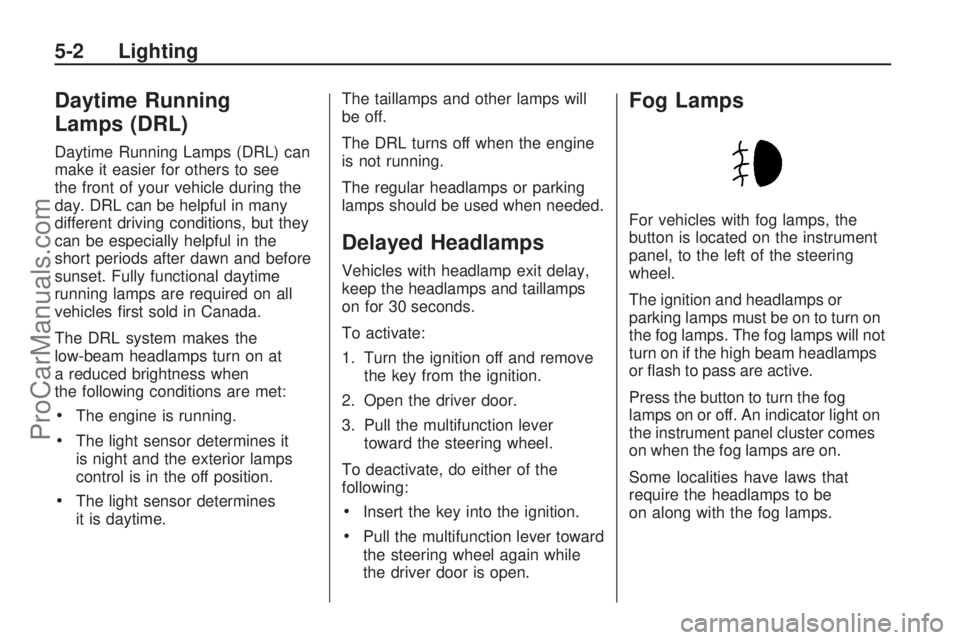
Fog Lamps
For vehicles with fog lamps, the
button is located on the instrument
panel, to the left of the steering
wheel.
The ignition and headlamps or
parking lamps must be on to turn on
the fog lamps. The fog lamps will not
turn on if the high beam headlamps
or ash to pass are active.
Press the button to turn the fog
lamps on or off. An indicator light on
the instrument panel cluster comes
on when the fog lamps are on.
Some localities have laws that
require the headlamps to be
on along with the fog lamps.
5-2 Lighting
ProCarManuals.com
Page 121 of 304

Instrument Panel
Brightness
D
(Instrument Panel
Brightness):The knob with this
symbol on it is located next to the
exterior lamps control to the left of
the steering wheel. Push the knob in
all the way until it extends out and
then turn the knob clockwise or
counterclockwise to brighten or dim
the lights. Push the knob back in
when nished.
Dome Lamp(s)
There are two dome lamps. The rear
dome lamp turns on automatically
with the front dome lamp.
+(On/Off):Press to turn the
front dome lamp on or off while
the doors are closed.
Entry Lighting
With entry lighting, the interior of the
vehicle is illuminated while entering
the vehicle. The interior lamps
turn on briey when the door
is unlocked using the key or the
Remote Keyless Entry (RKE)
transmitter and the ignition is in
LOCK/OFF. After a few seconds
have passed, the interior lamps
will slowly fade out.
Reading Lamps
Front Reading Lamps
The front reading lamps, located on
the headliner, can be controlled
separately by the buttons located
near each lamp.
\(On/Off):Press to turn the lamp
on or off.
Lighting 5-3
ProCarManuals.com
Page 122 of 304
Rear Reading Lamps
The rear seat reading lamps can be
turned on while the ignition is on.
9(Off):Press to turn the lamp off.
R(On):Press to turn the lamp on.
Rear Compartment Lamp
The liftgate lamp turns on when the
liftgate is opened and turns off
when the liftgate is closed.
Battery Run-Down
Protection
This feature helps prevent the
battery from being drained, if the
courtesy lamps, reading lamps, sun
visor, glovebox or rear compartment
lamp are left on. If any of these
lamps are left on, they automatically
turn off after approximately
20 minutes, if the ignition is off.
5-4 Lighting
ProCarManuals.com
Page 124 of 304
Radio(s)
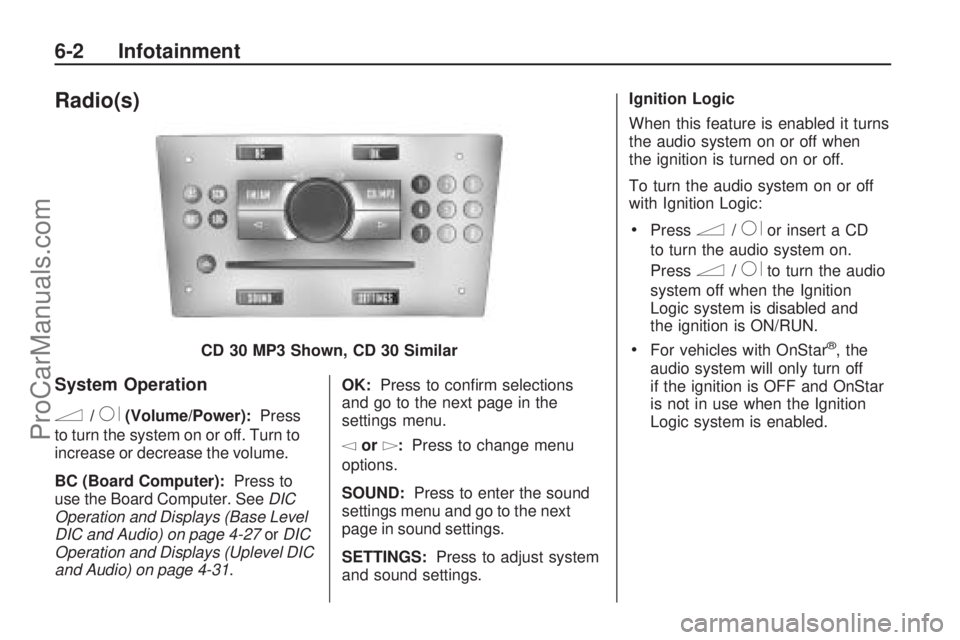
System Operation
n/R(Volume/Power):Press
to turn the system on or off. Turn to
increase or decrease the volume.
BC (Board Computer): Press to
use the Board Computer. See DIC
Operation and Displays (Base Level
DIC and Audio) on page 4-27 orDIC
Operation and Displays (Uplevel DIC
and Audio) on page 4-31 .OK:
Press to conrm selections
and go to the next page in the
settings menu.
\or]: Press to change menu
options.
SOUND: Press to enter the sound
settings menu and go to the next
page in sound settings.
SETTINGS: Press to adjust system
and sound settings. Ignition Logic
When this feature is enabled it turns
the audio system on or off when
the ignition is turned on or off.
To turn the audio system on or off
with Ignition Logic:
Pressn/Ror insert a CD
to turn the audio system on.
Press
n/Rto turn the audio
system off when the Ignition
Logic system is disabled and
the ignition is ON/RUN.
For vehicles with OnStar®, the
audio system will only turn off
if the ignition is OFF and OnStar
is not in use when the Ignition
Logic system is enabled.
CD 30 MP3 Shown, CD 30 Similar
6-2 Infotainment
ProCarManuals.com
Page 125 of 304

The Ignition Logic is preset to turn
off the audio system when the
ignition is turned off. To enable or
disable Ignition Logic:
1. Press SETTINGS until Audio
displays.
2. Press
\until System displays.
3. Press OK until Ign. Logic
ON or Ign. Logic OFF displays.
4. Press
\or]to select the
setting. The setting is saved
automatically.
Press SETTINGS again to
move back one level in
the menu.
Press FM/AM, CD/MP3, or
BC to turn on that feature.
Audio displays and the system
starts to play if SETTINGS, FM/AM,
CD/MP3, or BC is not pressed
within ve seconds after the setting
is saved.System Display
The following information shows on
the system display:
FM or AM, and the current
station frequency if the radio is
active.
The station name displays if RDS
is activated.
AS displays if the AS level is
activated.
CD displays, and the CD title
number or the CD title name
if the CD player is active.
MP3 displays if the CD is an
MP3 CD.
RDM displays if the CD is being
played in random mode.
The most recent selected audio
source plays when the audio system
is turned on and the display is lit.
The outside temperature, time,
and date display when the audio
system is turned off and the ignition
is ON/RUN, seeDriver Information
Center (DIC) on page 4-26.
Audio Settings
The audio settings can be set
for each audio source and are
stored separately for each radio
station and the CD player.
Adjusting the Tone (Bass/Treble)
To adjust the Bass:
1. Press SOUND until Bass
appears.
2. Press
\or]to adjust the level
from -12 through +12. The
setting is saved automatically.
Press SETTINGS again to go
back one level in the menu.
Press FM/AM, CD/MP3, or BC to
display that function.
Infotainment 6-3
ProCarManuals.com
Page 128 of 304
OnStar®Volume
For vehicles with OnStar, the OnStar
Volume is used to set the maximum
initial volume level for the OnStar
system when it is turned on.
To set OnStar Volume:
1. Press SETTINGS until Audio
appears.
2. Press OK until OnStar Vol.
appears.
3. Press
\or]to adjust the level
from -12 through 12. The setting
is saved automatically.
Press SETTINGS again to go
back one level in the menu.
Press FM/AM, CD/MP3, or BC to
display that function.On Volume
The On Volume is used to set the
maximum initial volume level for the
audio system when it is turned on.
The maximum initial volume level is
used only if the volume level before
turning the audio system off was
higher than the maximum initial
volume level set. This will work
when the audio system has been
off for at least ve minutes and the
ignition is OFF.
To set the On Volume level:
1. Press SETTINGS until Audio
appears.
2. Press OK until On Volume
appears.
3. Press
\or]to adjust the level
from -12 through 12. The setting
is saved automatically.
Press SETTINGS again to go
back one level in the menu.
Press FM/AM, CD/MP3, or BC to
display that function.
Using the Radio
FM/AM:Press to select between
FM, FM-AS, AM, and AM-AS,
or to listen to the radio while a CD
is playing.
RDS (Radio Data System):Press
to identify stations by name
instead of the radio frequency.
LOC (LOCAL/DX Function):Press
to change between LOC ON or LOC
OFF. When the LOC function is on,
it searches for the strongest radio
frequency. If none is found, it
automatically search for a weaker
radio frequency. If no frequency
is found after the second search,
the radio returns to the last active
frequency. If a new station search is
not started within one minute, the low
sensitivity (LOCAL) is set when the
next search is started. When LOC
OFF is set, a search is carried out
using the high sensitivity (DX).
6-6 Infotainment
ProCarManuals.com