trunk SATURN AURA 2010 User Guide
[x] Cancel search | Manufacturer: SATURN, Model Year: 2010, Model line: AURA, Model: SATURN AURA 2010Pages: 428, PDF Size: 2.78 MB
Page 166 of 428
Electric Power Management
The vehicle has Electric Power Management (EPM) that
estimates the battery’s temperature and state of
charge. It then adjusts the voltage for best performance
and extended life of the battery.
When the battery’s state of charge is low, the voltage is
raised slightly to quickly bring the charge back up.
When the state of charge is high, the voltage is lowered
slightly to prevent overcharging. If the vehicle has a
voltmeter gage or a voltage display on the Driver
Information Center (DIC), you may see the voltage move
up or down. This is normal. If there is a problem, an
alert will be displayed.
The battery can be discharged at idle if the electrical
loads are very high. This is true for all vehicles. This is
because the generator (alternator) may not be
spinning fast enough at idle to produce all the power
that is needed for very high electrical loads.
A high electrical load occurs when several of the
following are on, such as: headlamps, high beams, fog
lamps, rear window defogger, climate control fan at
high speed, heated seats, engine cooling fans, trailer
loads, and loads plugged into accessory power outlets.
EPM works to prevent excessive discharge of the
battery. It does this by balancing the generator’s output
and the vehicle’s electrical needs. It can increaseengine idle speed to generate more power, whenever
needed. It can temporarily reduce the power demands of
some accessories.
Normally, these actions occur in steps or levels, without
being noticeable. In rare cases at the highest levels
of corrective action, this action may be noticeable to the
driver. If so, a Driver Information Center (DIC)
message might be displayed, such as BATTERY
SAVER ACTIVE, BATTERY VOLTAGE LOW, or LOW
BATTERY. If this message is displayed, it is
recommended that the driver reduce the electrical loads
as much as possible. SeeDIC Warnings and Messages
on page 4-42.
Battery Run-Down Protection
The battery run-down feature is designed to protect the
vehicle’s battery.
When any interior lamp (trunk, reading lamps, or dome
lamp) is left on when the ignition is turned off, the
battery run-down protection system automatically shuts
the lamp off after 20 minutes. This prevents draining
of the battery.
To reactivate the interior lamps, do one of the following:
•Open any door.
•Press any Remote Keyless Entry (RKE) transmitter
button.
4-14
ProCarManuals.com
Page 167 of 428

•Press the power door lock switch.
•Press the remote trunk release.
•Turn the lamp that was left on to off and then
to on again.
Accessory Power Outlet(s)
Accessory power outlets can be used to connect
auxiliary electrical equipment, such as a cellular
telephone.
There are two accessory power outlets. One accessory
power outlet is inside the center storage console and
the other is located on the center storage console below
the climate controls.
To use an outlet, lift the protective cap. When not in
use, always cover the outlet with the protective cap.
The accessory power outlet is operational at all times.
Notice:Leaving electrical equipment plugged in for
an extended period of time while the vehicle is off
will drain the battery. Power is always supplied
to the outlets. Always unplug electrical equipment
when not in use and do not plug in equipment
that exceeds the maximum 20 ampere rating.Certain electrical accessories may not be compatible
with the accessory power outlet and could result
in blown vehicle or adapter fuses. If you experience a
problem, see your retailer for additional information
on the accessory power outlet.
Notice:Adding any electrical equipment to your
vehicle can damage it or keep other components
from working as they should. The repairs would not
be covered by your warranty. Do not use equipment
exceeding maximum amperage rating of 20 amperes.
Check with your dealer/retailer before adding
electrical equipment.
When adding electrical equipment, be sure to follow the
proper installation instructions included with the
equipment.
Notice:Improper use of the power outlet can cause
damage not covered by the vehicle warranty. Do
not hang any type of accessory or accessory
bracket from the plug because the power outlets are
designed for accessory power plugs only.
4-15
ProCarManuals.com
Page 197 of 428

on again while you are driving, your vehicle needs
service. Have the ESC inspected by your dealer/retailer
as soon as possible.
SERVICE TRACTION
If your vehicle has the Traction Control System (TCS),
this message displays and a chime sounds when
the system is not functioning properly. The ESC/TCS
light also appears on the instrument panel cluster. This
light stays on solid as long as the detected problem
remains present. When this message displays, the
system is not working. Adjust your driving accordingly.
SeeTraction Control System (TCS) on page 5-7
andElectronic Stability Control (ESC)/Traction Control
System (TCS) Indicator/Warning Light on page 4-32
for more information. Have the system serviced by your
dealer/retailer as soon as possible.
SVC (Service) TIRE MONITOR
On vehicles with the Tire Pressure Monitor System
(TPMS), this message displays if a part on the TPMS
is not working properly. The tire pressure light also
flashes and then remains on during the same ignition
cycle. SeeTire Pressure Light on page 4-34. Several
conditions may cause this message to appear. SeeTire
Pressure Monitor Operation on page 6-54for more
information. If the warning comes on and stays on, there
may be a problem with the TPMS. See your
dealer/retailer.
TIRE LOW ADD AIR
On vehicles with the Tire Pressure Monitor System
(TPMS), this message displays when the pressure in
one or more of the vehicle’s tires is low on air. The low
tire pressure warning light also comes on. SeeTire
Pressure Light on page 4-34. If this message appears
on the DIC, stop as soon as you can. Have the tire
pressures checked and set to those shown on the Tire
Loading Information label. SeeTires on page 6-44,
Loading the Vehicle on page 5-19, andInation - Tire
Pressure on page 6-51. The DIC also shows the
tire pressure values. SeeDIC Operation and Displays
on page 4-40.
TRACTION OFF
If your vehicle has the Traction Control System (TCS),
this message displays and the ESC/TCS light on
the instrument panel cluster comes on solid when the
system is turned off. Adjust your driving accordingly. See
Traction Control System (TCS) on page 5-7and
Electronic Stability Control (ESC)/Traction Control
System (TCS) Indicator/Warning Light on page 4-32for
more information.
TRUNK AJAR
This message displays when the trunk is not closed
completely. Make sure that the trunk is closed
completely. SeeTrunk on page 3-11for more
information.
4-45
ProCarManuals.com
Page 200 of 428
LIGHT FLASH
This feature, which allows the vehicle’s exterior
hazard/turn signal lighting to flash every time the lock,
unlock, or trunk release buttons on the Remote Keyless
Entry (RKE) transmitter are pressed, can be enabled
or disabled. When LIGHT FLASH appears on the
display, press and hold the reset button for at least one
second to scroll through the available settings:
OFF:The exterior hazard/turn signal lighting will not
flash when the lock, unlock, or trunk release buttons on
the RKE transmitter are pressed.
ON (default):The exterior hazard/turn signal lighting
will flash when the lock, unlock, or trunk release buttons
on the RKE transmitter are pressed.
SeeRemote Keyless Entry (RKE) System Operation on
page 3-3for more information.
To select a setting and move on to the next feature,
press the information button while the desired setting is
displayed on the DIC.
DELAY LOCK
This feature, which delays the actual locking of the
vehicle, can be enabled or disabled. When DELAY
LOCK appears on the display, press and hold the reset
button for at least one second to scroll through the
available settings:
ON (default):The doors will not lock until five seconds
after the last door is closed. You can temporarily
override delayed locking by pressing the power lock
switch or the lock button on the Remote Keyless Entry
(RKE) transmitter a second time.
OFF:The doors will lock immediately when pressing
the power lock switch or the lock button on the
RKE transmitter.
SeePower Door Locks on page 3-8,Delayed Locking
on page 3-9, andRemote Keyless Entry (RKE)
System Operation on page 3-3for more information.
To select a setting and move on to the next feature,
press the information button while the desired setting is
displayed on the DIC.
4-48
ProCarManuals.com
Page 282 of 428

Filling a Portable Fuel Container
{WARNING:
Never fill a portable fuel container while it is in the
vehicle. Static electricity discharge from the
container can ignite the fuel vapor. You can be
badly burned and the vehicle damaged if this
occurs. To help avoid injury to you and others:
•Dispense fuel only into approved containers.
•Do not fill a container while it is inside a
vehicle, in a vehicle’s trunk, pickup bed, or on
any surface other than the ground.
•Bring the fill nozzle in contact with the inside
of the fill opening before operating the nozzle.
Contact should be maintained until the filling
is complete.
•Do not smoke while pumping fuel.
•Do not use a cellular phone while
pumping fuel.
Checking Things Under
the Hood
{WARNING:
An electric fan under the hood can start up and
injure you even when the engine is not running.
Keep hands, clothing, and tools away from any
underhood electric fan.
{WARNING:
Things that burn can get on hot engine parts and
start a fire. These include liquids like fuel, oil,
coolant, brake fluid, windshield washer and other
fluids, and plastic or rubber. You or others could
be burned. Be careful not to drop or spill things
that will burn onto a hot engine.
6-12
ProCarManuals.com
Page 312 of 428
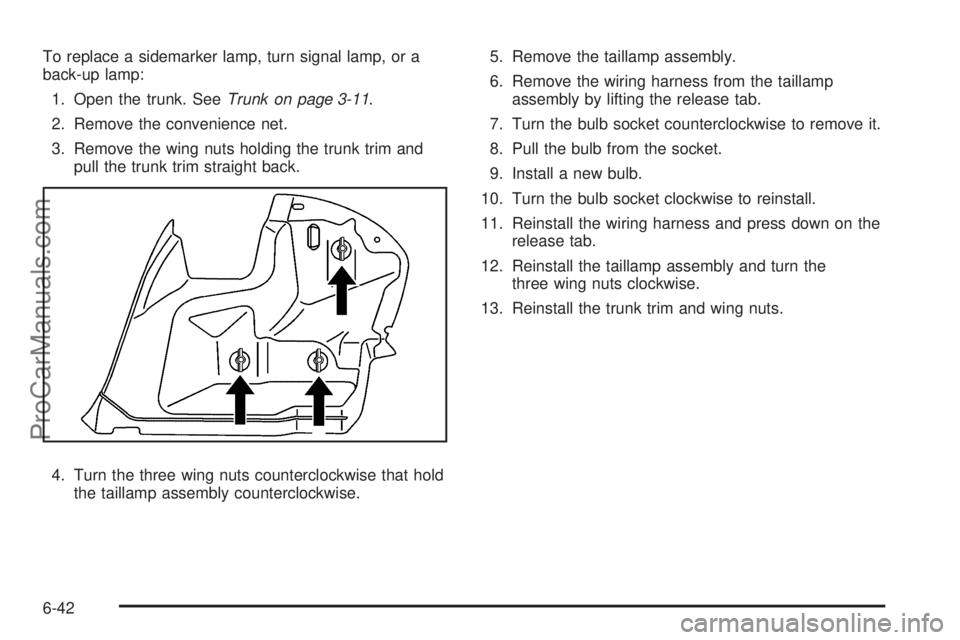
To replace a sidemarker lamp, turn signal lamp, or a
back-up lamp:
1. Open the trunk. SeeTrunk on page 3-11.
2. Remove the convenience net.
3. Remove the wing nuts holding the trunk trim and
pull the trunk trim straight back.
4. Turn the three wing nuts counterclockwise that hold
the taillamp assembly counterclockwise.5. Remove the taillamp assembly.
6. Remove the wiring harness from the taillamp
assembly by lifting the release tab.
7. Turn the bulb socket counterclockwise to remove it.
8. Pull the bulb from the socket.
9. Install a new bulb.
10. Turn the bulb socket clockwise to reinstall.
11. Reinstall the wiring harness and press down on the
release tab.
12. Reinstall the taillamp assembly and turn the
three wing nuts clockwise.
13. Reinstall the trunk trim and wing nuts.
6-42
ProCarManuals.com
Page 344 of 428

Tire Sealant and Compressor Kit
Storage
The tire sealant and compressor kit is located in the
trunk.
1. Open the trunk. SeeTrunk on page 3-11.
2. Lift the cover.
3. Turn the retainer clockwise and remove the tire
sealant and compressor kit.
To store the tire sealant and compressor kit, reverse
the steps.
Changing a Flat Tire
If a tire goes flat, avoid further tire and wheel damage
by driving slowly to a level place. Turn on the hazard
warning flashers. SeeHazard Warning Flashers
on page 4-3.
{WARNING:
Changing a tire can be dangerous. The vehicle
can slip off the jack and roll over or fall on you or
other people. You and they could be badly injured
or even killed. Find a level place to change your
tire. To help prevent the vehicle from moving:
1. Set the parking brake firmly.
2. Put the shift lever in P (Park).
3. Turn off the engine and do not restart while
the vehicle is raised.
4. Do not allow passengers to remain in the
vehicle.
WARNING: (Continued)
6-74
ProCarManuals.com
Page 346 of 428
Removing the Spare Tire and Tools
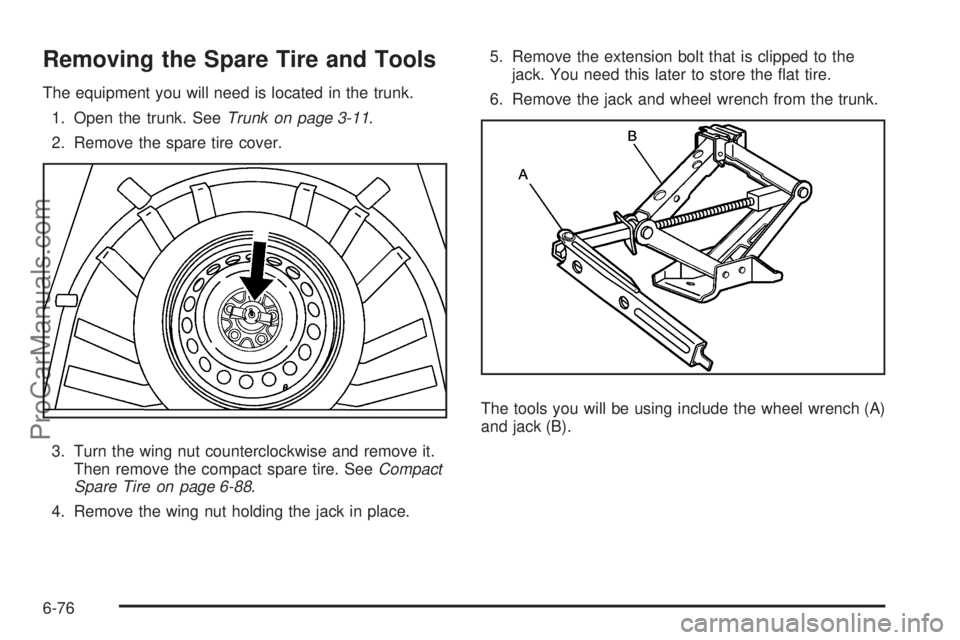
The equipment you will need is located in the trunk.
1. Open the trunk. SeeTrunk on page 3-11.
2. Remove the spare tire cover.
3. Turn the wing nut counterclockwise and remove it.
Then remove the compact spare tire. SeeCompact
Spare Tire on page 6-88.
4. Remove the wing nut holding the jack in place.5. Remove the extension bolt that is clipped to the
jack. You need this later to store the flat tire.
6. Remove the jack and wheel wrench from the trunk.
The tools you will be using include the wheel wrench (A)
and jack (B).
6-76
ProCarManuals.com
Page 353 of 428
{WARNING:
Wheel nuts that are improperly or incorrectly
tightened can cause the wheels to become loose
or come off. The wheel nuts should be tightened
with a torque wrench to the proper torque
specification after replacing. Follow the torque
specification supplied by the aftermarket
manufacturer when using accessory locking wheel
nuts. SeeCapacities and Specications on
page 6-105for original equipment wheel nut
torque specifications.
Notice:Improperly tightened wheel nuts can lead
to brake pulsation and rotor damage. To avoid
expensive brake repairs, evenly tighten the wheel
nuts in the proper sequence and to the proper
torque specication. SeeCapacities and
Specifications on page 6-105for the wheel nut
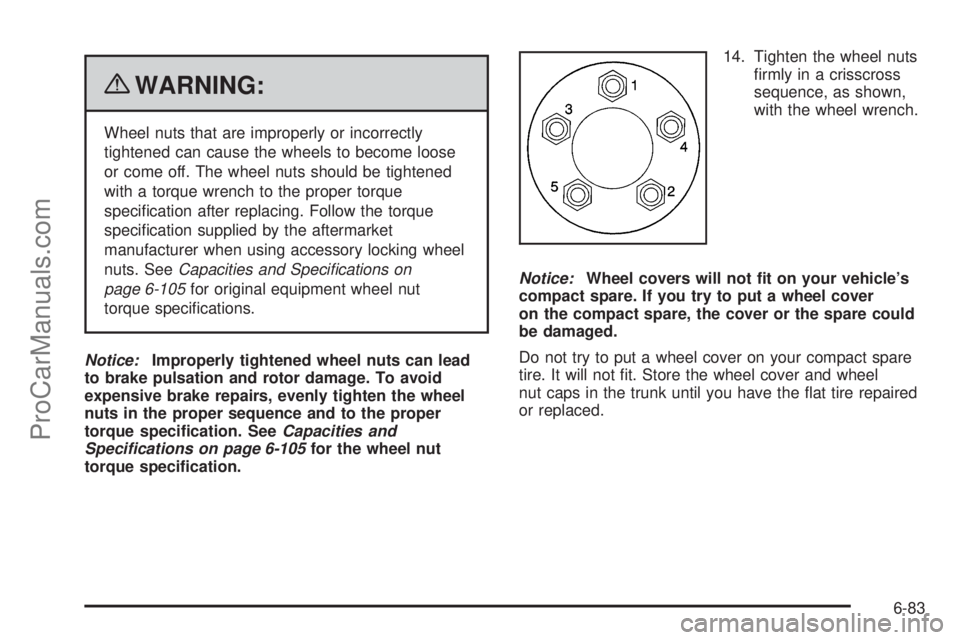
torque specication.14. Tighten the wheel nuts
firmly in a crisscross
sequence, as shown,
with the wheel wrench.
Notice:Wheel covers will not t on your vehicle’s
compact spare. If you try to put a wheel cover
on the compact spare, the cover or the spare could
be damaged.
Do not try to put a wheel cover on your compact spare
tire. It will not fit. Store the wheel cover and wheel
nut caps in the trunk until you have the flat tire repaired
or replaced.
6-83
ProCarManuals.com
Page 354 of 428

Storing a Flat or Spare Tire and
Tools
Storing a Flat Tire and Tools
{WARNING:
Storing a jack, a tire, or other equipment in the
passenger compartment of the vehicle could
cause injury. In a sudden stop or collision, loose
equipment could strike someone. Store all these in
the proper place.
To store the flat tire and tools in the compact spare tire
compartment:
1. Open the trunk. SeeTrunk on page 3-11.
2. Remove the bolt extension (in the yellow sleeve)
from the jack and remove the center cap from the
wheel.3. Collapse the wrench using the same button used to
extend it.
4. Attach the wrench to the jack by placing the tab on
the wrench into the hole on the side of the jack.
Then place the wrench handle over the tab on the
side of the jack.
6-84
ProCarManuals.com