radio SATURN OUTLOOK 2007 Repair Manual
[x] Cancel search | Manufacturer: SATURN, Model Year: 2007, Model line: OUTLOOK, Model: SATURN OUTLOOK 2007Pages: 538, PDF Size: 3.2 MB
Page 317 of 538
PROG (Program):Press this button to go to the
next preset radio station or channel set on the
main radio. This function is inactive, with
some radios, if the front seat passengers are
listening to the radio.
When a CD or DVD audio is playing, press this
button to go to the beginning of the CD or DVD
audio. This function is inactive, with some radios, if
the front seat passengers are listening to the disc.
When a disc audio is playing in the CD or DVD
changer, press this button to select the next disc, if
multiple discs are loaded. This function is inactive,
with some radios, if the front seat passengers are
listening to the disc.
When a DVD video menu is being displayed, press
the PROG button to perform the menu function,
enter.
Theft-Deterrent Feature
THEFTLOCK®is designed to discourage theft of
your vehicle’s radio. The feature works
automatically by learning a portion of the Vehicle
Identication Number (VIN). If the radio is
moved to a different vehicle, it does not operate
and LOCKED displays.
Audio Steering Wheel Controls
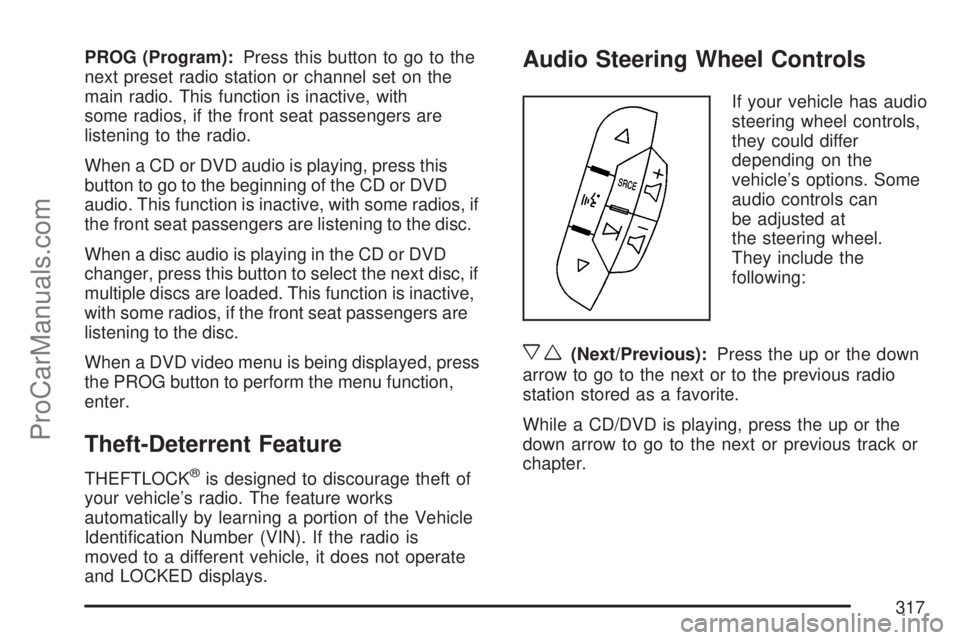
If your vehicle has audio
steering wheel controls,
they could differ
depending on the
vehicle’s options. Some
audio controls can
be adjusted at
the steering wheel.
They include the
following:
xw(Next/Previous):Press the up or the down
arrow to go to the next or to the previous radio
station stored as a favorite.
While a CD/DVD is playing, press the up or the
down arrow to go to the next or previous track or
chapter.
317
ProCarManuals.com
Page 318 of 538

g(Mute/Voice Recognition):Press and release
this button to silence the vehicle speakers only.
The audio of the wireless and wired headphones, if
your vehicle has these features, does not mute.
Press and release this button again, to turn
the sound on.
If your vehicle has the navigation system, press
and hold this button briey to initiate voice
recognition. See “Voice Recognition” in the
Navigation System manual for more information.
If your vehicle has OnStar
®, press and hold
this button briey to interact with the OnStar®
system. If your vehicle also has the navigation
system, press and hold this button briey to initiate
voice recognition and say “OnStar” to enter
OnStar
®mode. See theOnStar®System on
page 145in this manual for more information.SRCE (Source):Press this button to switch
between the radio (AM, FM), XM™ (if equipped),
CD, and if your vehicle has these features,
DVD, front auxiliary, and rear auxiliary.
+
e−e(Volume):Press the plus or minus
button to increase or to decrease the radio volume.
¨(Seek):Press the seek arrow to go to the
next radio station while in AM, FM, or XM™
(if equipped). Press this button to go to the next
track or chapter while sourced to the CD or
DVD slot.
Radio Reception
Frequency interference and static can occur
during normal radio reception if items such as cell
phone chargers, vehicle convenience accessories,
and external electronic devices are plugged
into the accessory power outlet. If there is
interference or static, unplug the item from the
accessory power outlet.
318
ProCarManuals.com
Page 319 of 538

AM
The range for most AM stations is greater than for
FM, especially at night. The longer range can cause
station frequencies to interfere with each other. For
better radio reception, most AM radio stations
boosts the power levels during the day, and then
reduce these levels during the night. Static can also
occur when things like storms and power lines
interfere with radio reception. When this happens,
try reducing the treble on your radio.
FM Stereo
FM stereo gives the best sound, but FM signals
only reach about 10 to 40 miles (16 to 65 km). Tall
buildings or hills can interfere with FM signals,
causing the sound to fade in and out.
XM™ Satellite Radio Service
XM™ Satellite Radio Service gives digital radio
reception from coast-to-coast in the 48 contiguous
United States, and in Canada. Just as with FM,
tall buildings or hills can interfere with satellite
radio signals, causing the sound to fade in and out.
In addition, traveling or standing under heavy
foliage, bridges, garages, or through tunnels could
cause loss of the XM™ signal for a period of
time. The radio might display NO XM SIGNAL to
indicate interference.
319
ProCarManuals.com
Page 320 of 538

Care of Your CDs and DVDs
Handle CDs carefully. Store them in their original
cases or other protective cases and away from
direct sunlight and dust. The CD player scans the
bottom surface of the disc. If the surface of a
CD is damaged, such as cracked, broken,
or scratched, the CD does not play properly or not
at all. If the surface of a CD is soiled, take a
soft, lint free cloth or dampen a clean, soft cloth in
a mild, neutral detergent solution mixed with
water, and clean it. Make sure the wiping process
starts from the center to the edge.
Do not touch the bottom side of a CD while
handling it; this could damage the surface. Pick up
CDs by grasping the outer edges or the edge of
the hole and the outer edge.
Care of the CD and DVD Player
The use of CD lens cleaners for CDs is not
advised, due to the risk of contaminating the lens
of the CD optics with lubricants internal to the
CD mechanism.
Multi-Band Antenna
The multi-band antenna is located on the roof of
your vehicle. This type of antenna is used with the
AM/FM radio, as well as OnStar
®and the XM™
Satellite Radio Service System, if your vehicle has
these features. Keep this antenna clear of snow
and ice build up for clear radio reception. If
your vehicle has a sunroof, the performance of the
radio system may be affected if the sunroof is
open. Loading items onto the roof of your vehicle
can interfere with the performance of the radio
system and, if your vehicle has this feature,
OnStar
®. Make sure the multi-band antenna is not
obstructed.
320
ProCarManuals.com
Page 415 of 538

Notice:Ignoring these steps could result in
costly damage to your vehicle that would
not be covered by your warranty.
Trying to start your vehicle by pushing or
pulling it will not work, and it could damage
your vehicle.
1. Check the other vehicle. It must have a
12-volt battery with a negative ground system.
Notice:If the other vehicle’s system is not a
12-volt system with a negative ground,
both vehicles can be damaged. Only use
vehicles with 12-volt systems with negative
grounds to jump start your vehicle.
2. Get the vehicles close enough so the jumper
cables can reach, but be sure the vehicles are
not touching each other. If they are, it could
cause a ground connection you do not
want. You would not be able to start your
vehicle, and the bad grounding could damage
the electrical systems.To avoid the possibility of the vehicles rolling,
set the parking brake rmly on both vehicles
involved in the jump start procedure. Put
an automatic transmission in PARK (P) or a
manual transmission in NEUTRAL before
setting the parking brake. If you have a
four-wheel-drive vehicle, be sure the transfer
case is not in NEUTRAL.
Notice:If you leave your radio or other
accessories on during the jump starting
procedure, they could be damaged. The repairs
would not be covered by your warranty.
Always turn off your radio and other
accessories when jump starting your vehicle.
3. Turn off the ignition on both vehicles.
Unplug unnecessary accessories plugged into
the cigarette lighter or the accessory power
outlets. Turn off the radio and all lamps
that are not needed. This will avoid sparks
and help save both batteries. And it could
save the radio!
415
ProCarManuals.com
Page 433 of 538

When to Check
Check your tires once a month or more. Do not
forget to check the compact spare tire, it should be
at 60 psi (420 kPa). For additional information
regarding the compact spare tire, seeCompact
Spare Tire on page 463.
How to Check
Use a good quality pocket-type gage to check tire
pressure. You cannot tell if your tires are
properly inated simply by looking at them. Radial
tires may look properly inated even when they
are under-inated. Check the tire’s ination
pressure when the tires are cold. Cold means your
vehicle has been sitting for at least three hours
or driven no more than 1 mile (1.6 km).
Remove the valve cap from the tire valve stem.
Press the tire gage rmly onto the valve to
get a pressure measurement. If the cold tire
ination pressure matches the recommended
pressure on the Tire and Loading Information
label, no further adjustment is necessary. If the
ination pressure is low, add air until you reach the
recommended amount.If you overll the tire, release air by pushing on
the metal stem in the center of the tire valve.
Re-check the tire pressure with the tire gage.
Be sure to put the valve caps back on the valve
stems. They help prevent leaks by keeping out dirt
and moisture.
Tire Pressure Monitor System
The Tire Pressure Monitor System (TPMS) uses
radio and sensor technology to check tire pressure
levels. TPMS sensors are mounted onto each
tire and wheel assembly, except the spare
tire. TPMS sensors monitor the air pressure in
your vehicle’s tires and transmit tire pressure
readings to a receiver located in the vehicle.
The TPMS is designed to alert the driver, if a low
tire pressure condition exists. If your vehicle has the
Driver Information Center (DIC), the driver can also
check tire pressure levels using the DIC.
When a low tire pressure condition is detected,
the TPMS illuminates the low tire pressure warning
symbol located on the instrument panel cluster.
433
ProCarManuals.com
Page 438 of 538

Federal Communications Commission
(FCC) and Industry and Science
Canada
The Tire Pressure Monitor System (TPMS)
operates on a radio frequency and complies with
Part 15 of the FCC Rules. Operation is subject
to the following two conditions:
1. This device may not cause harmful
interference.
2. This device must accept any interference
received, including interference that may
cause undesired operation.
The Tire Pressure Monitor System (TPMS)
operates on a radio frequency and complies with
RSS-210 of Industry and Science Canada.
Operation is subject to the following two
conditions:
1. This device may not cause interference.
2. This device must accept any interference
received, including interference that may
cause undesired operation of the device.
Changes or modications to this system by other
than an authorized service facility could void
authorization to use this equipment.
Tire Inspection and Rotation
Tires should be rotated every 5,000 to 8,000 miles
(8 000 to 13 000 km).
Any time you notice unusual wear, rotate your
tires as soon as possible and check wheel
alignment. Also check for damaged tires or wheels.
SeeWhen It Is Time for New Tires on page 440
andWheel Replacement on page 444for
more information.
The purpose of regular rotation is to achieve more
uniform wear for all tires on the vehicle. The
rst rotation is the most important. SeeScheduled
Maintenance on page 488.
438
ProCarManuals.com
Page 476 of 538

Power Windows and Other Power
Options
Circuit breakers in the fuse panel protect the
power windows and other power accessories.
When the current load is too heavy, the circuit
breaker opens and closes, protecting the circuit
until the problem is xed.
Fuses and Circuit Breakers
The wiring circuits in your vehicle are protected
from short circuits by a combination of fuses,
circuit breakers and fusible thermal links.
This greatly reduces the chance of res caused by
electrical problems.
Look at the silver-colored band inside the fuse. If
the band is broken or melted, replace the fuse.
Be sure you replace a bad fuse with a new one of
the identical size and rating.If you ever have a problem on the road and do not
have a spare fuse, you can borrow one that has
the same amperage. Just pick some feature
of your vehicle that you can get along without, like
the radio or cigarette lighter, and use its fuse if
it is the correct amperage. Replace it as soon as
you can.
Instrument Panel Fuse Block
The instrument panel fuse block is located under
the instrument panel on the passenger side of
the vehicle. Pull down on the cover to access the
fuse block.
476
ProCarManuals.com
Page 477 of 538

Fuses Usage
FRT/WSW Front Windshield Wiper
SPARE Spare
HTD/SEAT Front Heated Seats
STR/WHL/
ILLUMSteering Wheel Illumination
MSM Memory Seat Module
PWR/MIRRORS Power Mirrors
DR/LCK Door Locks
AIRBAG Airbag System
LT/TRN/SIG Driver Side Turn Signal
REAR WIPER Rear Window Wiper
PWR MODPassKey Module, Body Control
Module
BCK/UP/STOP Back-up Lamps, Stoplamps
HVAC Climate Control System
DISPLAY Display
RT/TRN/SIG Passenger Side Turn Signal
DRL* Daytime Running Lamps
RADIO Radio
PDM Power Mirrors, Liftgate Release
Fuse Side
477
ProCarManuals.com
Page 503 of 538

Customer Assistance and Information....... 504
Customer Satisfaction Procedure............... 504
Online Owner Center................................. 507
Customer Assistance for
Text Telephone (TTY) Users.................. 508
Customer Assistance Offices..................... 508
GM Mobility Reimbursement Program........ 509
Roadside Assistance Program................... 509
Collision Damage Repair........................... 513Reporting Safety Defects............................ 516
Reporting Safety Defects to the
United States Government..................... 516
Reporting Safety Defects to the
Canadian Government............................ 517
Reporting Safety Defects to Saturn............ 517
Service Publications Ordering Information ... 518
Vehicle Data Recording and Privacy......... 519
Event Data Recorders............................... 520
OnStar...................................................... 521
Navigation System..................................... 521
Radio Frequency Identication (RFID)........ 521
Section 7 Customer Assistance Information
503
ProCarManuals.com