lock SATURN OUTLOOK 2008 Owners Manual
[x] Cancel search | Manufacturer: SATURN, Model Year: 2008, Model line: OUTLOOK, Model: SATURN OUTLOOK 2008Pages: 488, PDF Size: 3 MB
Page 318 of 488
Tire Inspection and Rotation...........................5-63
When It Is Time for New Tires.......................5-64
Buying New Tires.........................................5-65
Different Size Tires and Wheels......................5-67
Uniform Tire Quality Grading..........................5-68
Wheel Alignment and Tire Balance..................5-70
Wheel Replacement......................................5-70
Tire Chains..................................................5-71
If a Tire Goes Flat........................................5-72
Tire Sealant and Compressor Kit....................5-73
Changing a Flat Tire.....................................5-84
Removing the Spare Tire and Tools................5-85
Removing the Flat Tire and Installing the
Spare Tire................................................5-88
Secondary Latch System...............................5-93
Storing a Flat or Spare Tire and Tools............5-96
Compact Spare Tire....................................5-100
Appearance Care..........................................5-100
Interior Cleaning.........................................5-100
Fabric/Carpet..............................................5-102
Leather......................................................5-102
Instrument Panel, Vinyl, and Other Plastic
Surfaces.................................................5-103
Care of Safety Belts....................................5-103
Weatherstrips.............................................5-103Washing Your Vehicle..................................5-104
Cleaning Exterior Lamps/Lenses....................5-104
Finish Care................................................5-104
Windshield, Backglass, and Wiper Blades.......5-105
Aluminum or Chrome-Plated Wheels
and Trim................................................5-106
Tires.........................................................5-106
Sheet Metal Damage...................................5-107
Finish Damage...........................................5-107
Underbody Maintenance...............................5-107
Chemical Paint Spotting..............................
.5-107
Vehicle Care/Appearance Materials................5-108
Vehicle Identication.....................................5-109
Vehicle Identication Number (VIN)................5-109
Service Parts Identication Label...................5-109
Electrical System..........................................5-110
High Voltage Devices and Wiring..................5-110
Add-On Electrical Equipment.........................5-110
Windshield Wiper Fuses...............................5-110
Power Windows and Other Power Options......5-111
Fuses and Circuit Breakers..........................5-111
Instrument Panel Fuse Block........................5-111
Underhood Fuse Block................................5-115
Capacities and Specications........................5-120
Section 5 Service and Appearance Care
5-2
ProCarManuals.com
Page 319 of 488

Service
For service and parts needs, visit your dealer/retailer.
You will receive genuine Saturn parts and Saturn-trained
and supported service people.
Genuine Saturn parts have one of these marks.
Accessories and Modications
When non-dealer/non-retailer accessories are added to
your vehicle they can affect your vehicle’s performance
and safety, including such things as, airbags, braking,
stability, ride and handling, emissions systems,
aerodynamics, durability, and electronic systems like
antilock brakes, traction control and stability control.
Some of these accessories could even cause malfunction
or damage not covered by warranty.
GM Accessories are designed to complement and
function with other systems on your vehicle. Your GM
dealer/retailer can accessorize your vehicle using
genuine GM Accessories. When you go to your GM
dealer/retailer and ask for GM Accessories, you will know
that GM-trained and supported service technicians will
perform the work using genuine GM Accessories.
Also, seeAdding Equipment to Your Airbag-Equipped
Vehicle on page 1-78.
5-3
ProCarManuals.com
Page 325 of 488
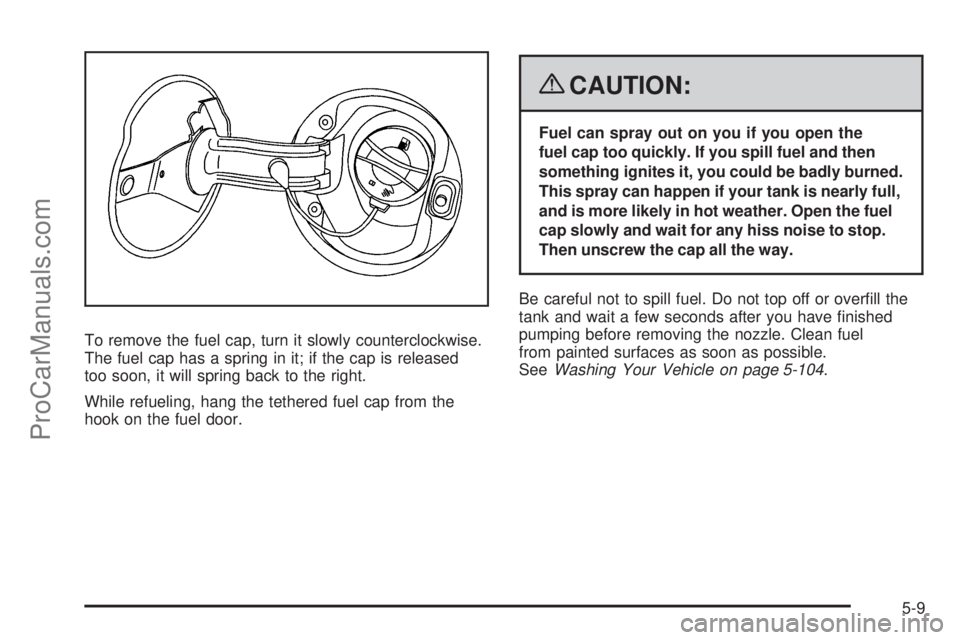
To remove the fuel cap, turn it slowly counterclockwise.
The fuel cap has a spring in it; if the cap is released
too soon, it will spring back to the right.
While refueling, hang the tethered fuel cap from the
hook on the fuel door.
{CAUTION:
Fuel can spray out on you if you open the
fuel cap too quickly. If you spill fuel and then
something ignites it, you could be badly burned.
This spray can happen if your tank is nearly full,
and is more likely in hot weather. Open the fuel
cap slowly and wait for any hiss noise to stop.
Then unscrew the cap all the way.
Be careful not to spill fuel. Do not top off or overll the
tank and wait a few seconds after you have nished
pumping before removing the nozzle. Clean fuel
from painted surfaces as soon as possible.
SeeWashing Your Vehicle on page 5-104.
5-9
ProCarManuals.com
Page 326 of 488

When replacing the fuel cap, turn it clockwise until it
clicks. Make sure the cap is fully installed. The diagnostic
system can determine if the fuel cap has been left off or
improperly installed. This would allow fuel to evaporate
into the atmosphere. SeeMalfunction Indicator Lamp
on page 3-48.
If your vehicle has a Driver Information Center (DIC),
the TIGHTEN GAS CAP message will be displayed if the
fuel cap is not properly installed.
{CAUTION:
If a re starts while you are refueling, do not
remove the nozzle. Shut off the ow of fuel by
shutting off the pump or by notifying the
station attendant. Leave the area immediately.
Notice:If you need a new fuel cap, be sure to get
the right type. Your dealer/retailer can get one
for you. If you get the wrong type, it may not t
properly. This may cause your malfunction indicator
lamp to light and may damage your
fuel tank and emissions system. SeeMalfunction
Indicator Lamp on page 3-48.
Filling a Portable Fuel Container
{CAUTION:
Never ll a portable fuel container while it is in
your vehicle. Static electricity discharge from
the container can ignite the fuel vapor. You can
be badly burned and your vehicle damaged if
this occurs. To help avoid injury to you and
others:
Dispense fuel only into approved
containers.
Do not ll a container while it is inside a
vehicle, in a vehicle’s trunk, pickup bed,
or on any surface other than the ground.
Bring the ll nozzle in contact with the
inside of the ll opening before operating
the nozzle. Contact should be maintained
until the lling is complete.
Do not smoke while pumping fuel.
Do not use a cellular phone while
pumping fuel.
5-10
ProCarManuals.com
Page 329 of 488

A. Radiator Pressure Cap (Out of View). SeeRadiator
Pressure Cap on page 5-23.
B. Engine Coolant Recovery Cap. SeeCooling System
on page 5-26.
C. Remote Negative (−) Terminal. SeeJump Starting
on page 5-38.
D. Underhood Fuse Block. SeeUnderhood Fuse Block
on page 5-115.
E. Remote Positive (+) Terminal. SeeJump Starting on
page 5-38.
F. Power Steering Fluid Reservoir (Out of View).
SeePower Steering Fluid on page 5-32.
G. Engine Oil Fill Cap. See “When to Add Engine Oil”
underEngine Oil on page 5-13.
H. Engine Oil Dipstick. See “Checking Engine Oil”
underEngine Oil on page 5-13.
I. Automatic Transmission Fluid Dipstick. See
“Checking the Fluid Level” underAutomatic
Transmission Fluid on page 5-20.
J. Brake Master Cylinder Reservoir. See “Brake Fluid”
underBrakes on page 5-34.K. Engine Air Cleaner/Filter. SeeEngine Air
Cleaner/Filter on page 5-18.
L. Windshield Washer Fluid Reservoir. See “Adding
Washer Fluid” underWindshield Washer Fluid
on page 5-33.
Engine Oil
Checking Engine Oil
It is a good idea to check the engine oil every time you
get fuel. In order to get an accurate reading, the oil
must be warm and the vehicle must be on level ground.
The engine oil dipstick handle is a yellow loop.
SeeEngine Compartment Overview on page 5-12
for the location of the engine oil dipstick.
1. Turn off the engine and give the oil several minutes
to drain back into the oil pan. If you do not do this,
the oil dipstick might not show the actual level.
2. Pull out the dipstick and clean it with a paper towel
or cloth, then push it back in all the way. Remove it
again, keeping the tip down, and check the level.
5-13
ProCarManuals.com
Page 333 of 488
How to Reset the Engine Oil Life
System
The Engine Oil Life System calculates when to change
the engine oil and lter based on vehicle use. Whenever
the oil is changed, reset the system so it can calculate
when the next oil change is required. If a situation occurs
where you change the oil prior to a CHANGE ENGINE
OIL SOON message being turned on, reset the system.
If your vehicle does not have Driver Information
Center (DIC) buttons:
1. Turn the ignition to ON/RUN, with the engine off.
The vehicle must be in PARK (P) to access this
display. Press the trip odometer reset stem until
OIL LIFE REMAINING displays.
2. Press and hold the trip odometer reset stem until
OIL LIFE REMAINING shows 100%. You will hear
three chimes and the CHANGE ENGINE OIL SOON
message will go off.3. Turn the key to LOCK/OFF.
If the CHANGE ENGINE OIL SOON message
comes back on when you start your vehicle, the
engine oil life system has not reset. Repeat
the procedure.
If your vehicle has Driver Information Center (DIC)
buttons:
1. Turn the ignition to ON/RUN, with the engine off.
2. Press the vehicle information button until OIL LIFE
REMAINING displays.
3. Press and hold the set/reset button until 100% is
displayed. You will hear three chimes and the
CHANGE ENGINE OIL SOON message will go off.
4. Turn the key to LOCK/OFF.
If the CHANGE ENGINE OIL SOON message comes
back on when you start your vehicle, the engine oil
life system has not reset. Repeat the procedure.
5-17
ProCarManuals.com
Page 346 of 488
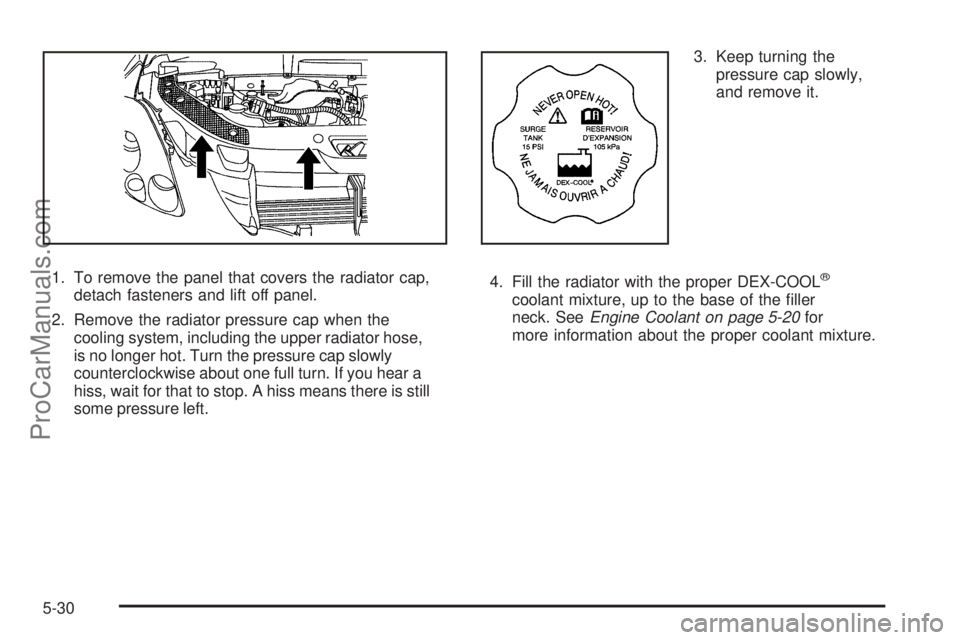
1. To remove the panel that covers the radiator cap,
detach fasteners and lift off panel.
2. Remove the radiator pressure cap when the
cooling system, including the upper radiator hose,
is no longer hot. Turn the pressure cap slowly
counterclockwise about one full turn. If you hear a
hiss, wait for that to stop. A hiss means there is still
some pressure left.3. Keep turning the
pressure cap slowly,
and remove it.
4. Fill the radiator with the proper DEX-COOL®
coolant mixture, up to the base of the ller
neck. SeeEngine Coolant on page 5-20for
more information about the proper coolant mixture.
5-30
ProCarManuals.com
Page 362 of 488

Taillamps, Turn Signal, Stoplamps
and Sidemarker Lamps
A. Sidemarker Lamp
B. TaillampTo replace one of these bulbs:
1. Open the liftgate. SeeLiftgate on page 2-13or
Power Liftgate on page 2-14.
2. Remove the convenience net, if the vehicle
has one.
3. Remove the two taillamp hex nut covers.
4. Remove the two hex nuts holding the taillamp
assembly in place.
5. Pull out the taillamp assembly.
6. Turn the bulb socket counterclockwise and pull it
straight out to remove it.
7. Replace the old bulb with a new one.
8. Reverse Steps 3 through 6 to reinstall the taillamp
assembly.
When reinstalling the taillamp assembly, make sure
the plastic pin on the taillamp assembly lines up
and is inserted correctly into the opening of
the vehicle.
5-46
ProCarManuals.com
Page 363 of 488

License Plate Lamp
To replace one of these bulbs:
1. Remove the two screws holding each of the license
plate lamps to the liftgate trim.
2. Turn and pull the license plate lamp forward
through the lift gate trim opening.3. Turn the bulb socket counterclockwise and pull the
bulb straight out of the socket.
4. Install the new bulb.
5. Reverse steps1–3toreinstall the license
plate lamp.
Replacement Bulbs
Exterior Lamp Bulb Number
License Plate Lamp 194
Rear Turn Signal and Taillamps 3157
For replacement bulbs not listed here, contact your
dealer.
5-47
ProCarManuals.com
Page 364 of 488
Windshield Wiper Blade
Replacement
Windshield wiper blades should be inspected for wear
or cracking. SeeScheduled Maintenance on page 6-4
for more information.
Replacement blades come in different types and are
removed in different ways. To replace the wiper
blade assembly, do the following:
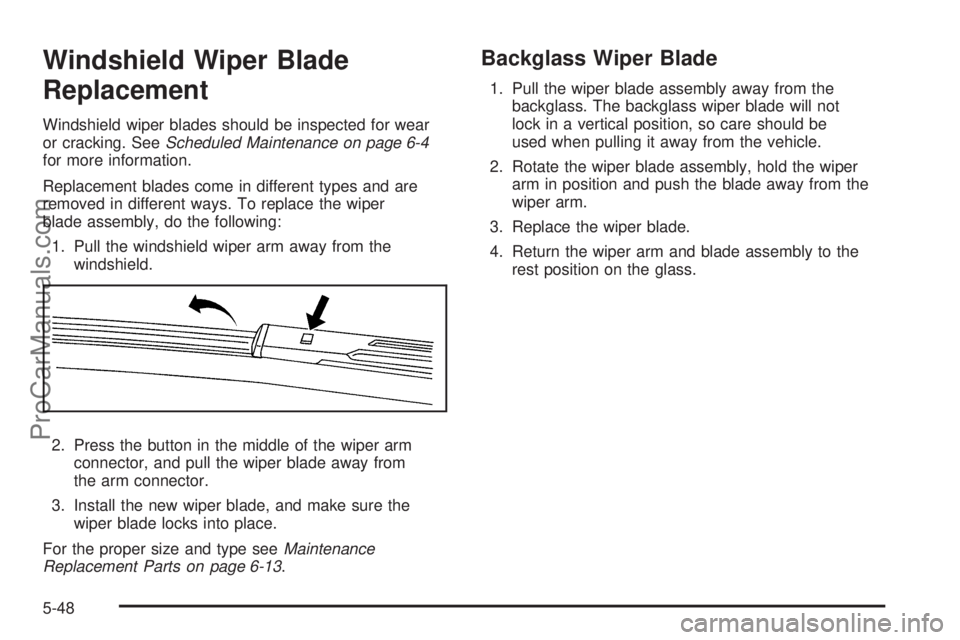
1. Pull the windshield wiper arm away from the
windshield.
2. Press the button in the middle of the wiper arm
connector, and pull the wiper blade away from
the arm connector.
3. Install the new wiper blade, and make sure the
wiper blade locks into place.
For the proper size and type seeMaintenance
Replacement Parts on page 6-13.
Backglass Wiper Blade
1. Pull the wiper blade assembly away from the
backglass. The backglass wiper blade will not
lock in a vertical position, so care should be
used when pulling it away from the vehicle.
2. Rotate the wiper blade assembly, hold the wiper
arm in position and push the blade away from the
wiper arm.
3. Replace the wiper blade.
4. Return the wiper arm and blade assembly to the
rest position on the glass.
5-48
ProCarManuals.com