instrument panel Seat Alhambra 2008 Owner's Guide
[x] Cancel search | Manufacturer: SEAT, Model Year: 2008, Model line: Alhambra, Model: Seat Alhambra 2008Pages: 295, PDF Size: 7.83 MB
Page 110 of 295
Lights and visibility
108Lights and visibilityLightsSwitching lights on and off
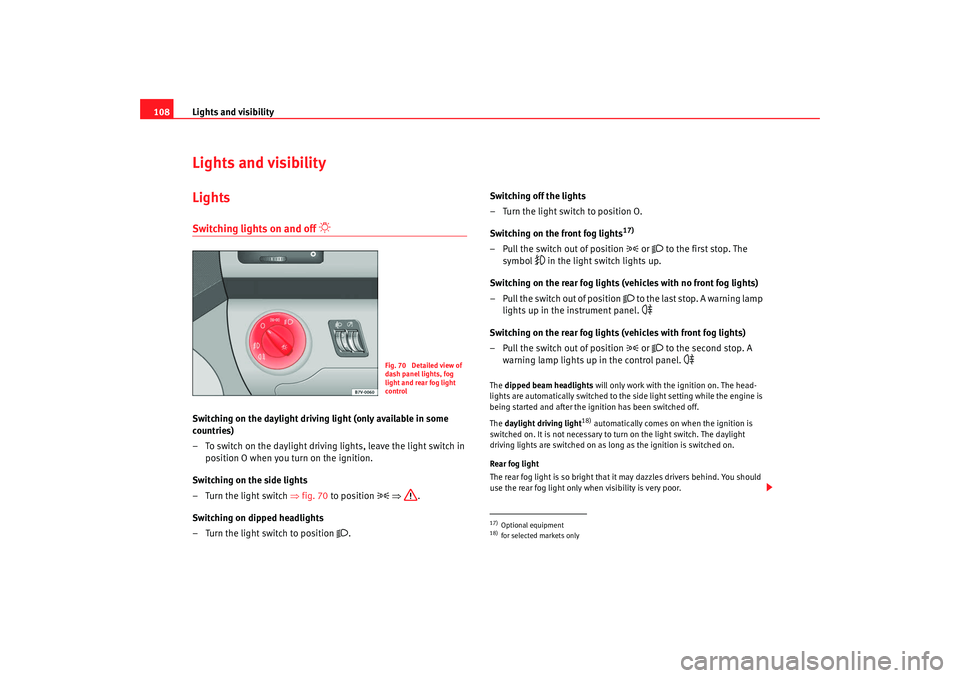
Switching on the daylight driving light (only available in some
countries)
– To switch on the daylight driving lights, leave the light switch in
position O when you turn on the ignition.
Switching on the side lights
– Turn the light switch ⇒fig. 70 to position
⇒ .
Switching on dipped headlights
– Turn the light switch to position
. Switching off the lights
– Turn the light switch to position O.
Switching on the front fog lights
17)
– Pull the switch out of position
or
to the first stop. The
symbol
in the light switch lights up.
Switching on the rear fog lights (vehicles with no front fog lights)
– Pull the switch out of position
to the last stop. A warning lamp
lights up in the instrument panel.
Switching on the rear fog lights (vehicles with front fog lights)
– Pull the switch out of position
or
to the second stop. A
warning lamp lights up in the control panel.
The dipped beam headlights will only work with the ignition on. The head-
lights are automatically switched to the side light setting while the engine is
being started and after the ignition has been switched off.
The daylight driving light
18) automatically comes on when the ignition is
switched on. It is not necessary to turn on the light switch. The daylight
driving lights are switched on as long as the ignition is switched on.
Rear fog light
The rear fog light is so bright that it may dazzles drivers behind. You should
use the rear fog light only when visibility is very poor.
Fig. 70 Detailed view of
dash panel lights, fog
light and rear fog light
control
17)Optional equipment18)for selected markets only
alhambra_ingles_0708 Seite 108 Mittwoch, 10. September 2008 10:55 10
Page 111 of 295
Lights and visibility109
Safety First
Operating instructions
Tips and Maintenance
Te c h n i c a l D a t a
If you are towing a trailer equipped with a rear fog light on a vehicle with a
factory-fitted
towing bracket
17), the rear fog light on the car will automatically
be switched off.
WARNING
•
Never drive with just the side lights on. Risk of accident. The side lights
are not bright enough to illuminate the road ahead and to ensure that other
road users are able to see you. Always use your dipped headlights if it is
dark or if visibility is poor.Note
•
If the lights are left on after the key has been taken out of the ignition lock,
a buzzer sounds when the driver door is opened. This is a reminder to switch
off the lights.
•
The rear fog light is so bright that it can dazzle drivers behind you. You
should use the rear fog light only when visibility is very poor.
•
If you are towing a trailer equipped with a rear fog light on a vehicle with
a factory-fitted towing bracket, the rear fog light on the car will automatically
be switched off.
•
The use of the lighting described here is subject to the relevant statutory
requirements.
Coming Home function (guide lights)
The Coming Home function (guide lights) allows the vehicle
lights to stay on for approximately 3 minutes after the ignition
is switched off.To activate the Coming Home function the vehicle lights should have
already been switched on. – Switch off vehicle lights.
–Switch off ignition.
– Keep all doors closed.
– Briefly pull the turn signal lever towards the steering wheel
within a maximum of 2 minutes after switching off the lights.
– Open the driver door.
When the driver's door is opened, the vehicle lights automatically light up for
approx. 3 minutes. If the door is closed within 3 minutes, the guide lights will
stay on for approximately. 30 seconds. If the door is closed after 3 minutes,
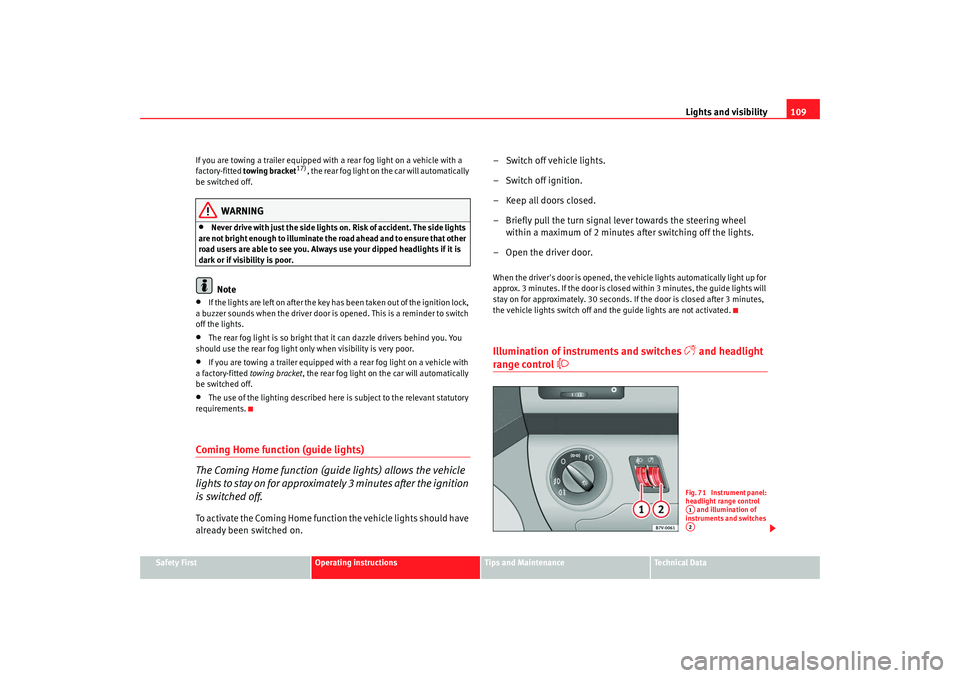
the vehicle lights switch off and the guide lights are not activated.Illumination of instruments and switches
and headlight
range control
Fig. 71 Instrument panel:
headlight range control and illumination of
instruments and switches A1A2
alhambra_ingles_0708 Seite 109 Mittwoch, 10. September 2008 10:55 10
Page 123 of 295
Seats and stowage121
Safety First
Operating instructions
Tips and Maintenance
Te c h n i c a l D a t a
Seats and stowageThe importance of correct seat adjustmentProper seat adjustment optimises the level of protection
offered by seat belts and airbags.The driver seat, front passenger seat, and seats in the passenger compart-
ment, can be adjusted in many ways to suit the physical requirements of the
vehicle occupants. The correct seat position is very important for:•
fast and easy operation of all controls on the instrument panel,
•
relaxed posture that does not cause drowsiness,
•
safe driving,
•
optimum protection from the seat belts and airbag system ⇒page 7.
Vehicle seats
Your vehicle has a total of five or seven
24) seats.
•
First row of seats: two seats
•
Second row of seats: three seats
•
Third row of seats
24): two seats
Each seat is equipped with a three-point seat belt.
WARNING
If the driver and passengers assume improper sitting positions, they may
sustain critical injuries.•
Never transport more people than there are seats available in the
vehicle.
•
Every occupant in the vehicle must properly fasten and wear the seat
belt belonging to his or her seat. Children must be protected with an appro-
priate child restraint system. Section “Child Safety”
•
The seats and all head restraints must always be adjusted to body size
and the seat belt must always be properly adjusted to provide you and your
passengers with optimum protection.
•
Always keep your feet in the footwell when the vehicle is moving; never
rest them on the dash panel, out of the window or on the seat. This also
applies to passengers. An incorrect sitting position exposes you to an
increased risk of injury in the event of a braking manoeuvre or an accident.
If the airbag is triggered, you could sustain fatal injuries due to an improper
sitting position.
•
It is important for the driver and front passenger to maintain a distance
of at least 25 cm from the steering wheel or dash panel. Failure to respect
the minimum distance means that the airbag will not protect you. Risk of
fatal injury. The distance between the driver and the steering wheel or
between the front passenger and the dash panel should always be as great
as possible.
•
Adjust the driver or front passenger seat only when the vehicle is
stationary. Otherwise your seat could move unexpectedly while the vehicle
is moving. This could increase the risk of an accident and therefore injury.
In addition, while adjusting your seat, you will assume an incorrect sitting
position. Risk of fatal accidents.
•
Special guidelines apply to installing a child seat on the front
passenger seat. When installing a child seat, observe the warning note in
“Child safety”.
•
The seats in the third row of seats may, for safety reasons, only be used
if the luggage compartment cover has been removed.
24)Optional equipment
WARNING (continued)
alhambra_ingles_0708 Seite 121 Mittwoch, 10. September 2008 10:55 10
Page 135 of 295
Seats and stowage133
Safety First
Operating instructions
Tips and Maintenance
Te c h n i c a l D a t a
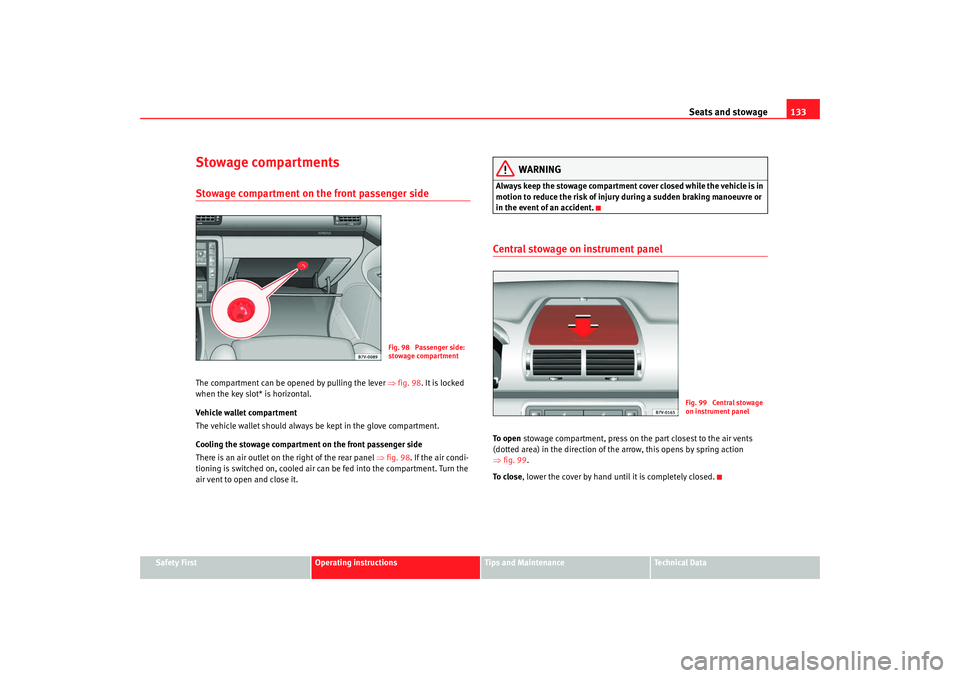
Stowage compartmentsStowage compartment on the front passenger sideThe compartment can be opened by pulling the lever ⇒fig. 98 . It is locked
when the key slot* is horizontal.
Vehicle wallet compartment
The vehicle wallet should always be kept in the glove compartment.
Cooling the stowage compartment on the front passenger side
There is an air outlet on the right of the rear panel ⇒ fig. 98. If the air condi-
tioning is switched on, cooled air can be fed into the compartment. Turn the
air vent to open and close it.
WARNING
Always keep the stowage compartment cover closed while the vehicle is in
motion to reduce the risk of injury during a sudden braking manoeuvre or
in the event of an accident.Central stowage on instrument panelTo o p e n stowage compartment, press on the part closest to the air vents
(dotted area) in the direction of the arrow, this opens by spring action
⇒ fig. 99 .
To c l o s e , lower the cover by hand until it is completely closed.
Fig. 98 Passenger side:
stowage compartment
Fig. 99 Central stowage
on instrument panel
alhambra_ingles_0708 Seite 133 Mittwoch, 10. September 2008 10:55 10
Page 136 of 295
Seats and stowage
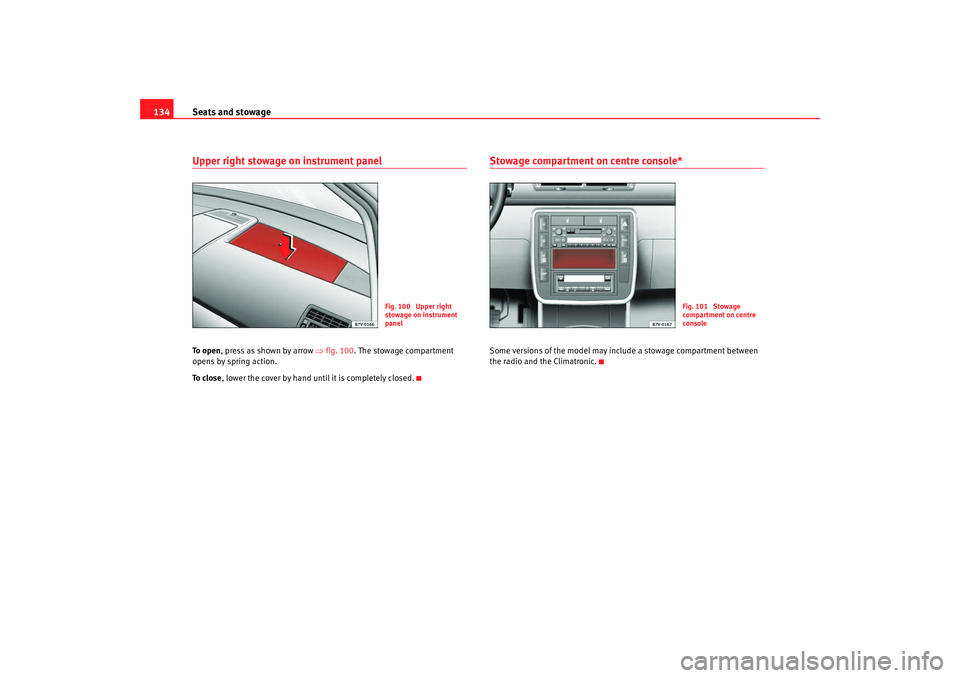
134Upper right stowage on instrument panelTo o p e n , press as shown by arrow ⇒fig. 100 . The stowage compartment
opens by spring action.
To c l o s e , lower the cover by hand until it is completely closed.
Stowage compartment on centre console*Some versions of the model may include a stowage compartment between
the radio and the Climatronic.
Fig. 100 Upper right
stowage on instrument
panel
Fig. 101 Stowage
compartment on centre
console
alhambra_ingles_0708 Seite 134 Mittwoch, 10. September 2008 10:55 10
Page 144 of 295
Seats and stowage
142AUX-IN InputGeneral notes
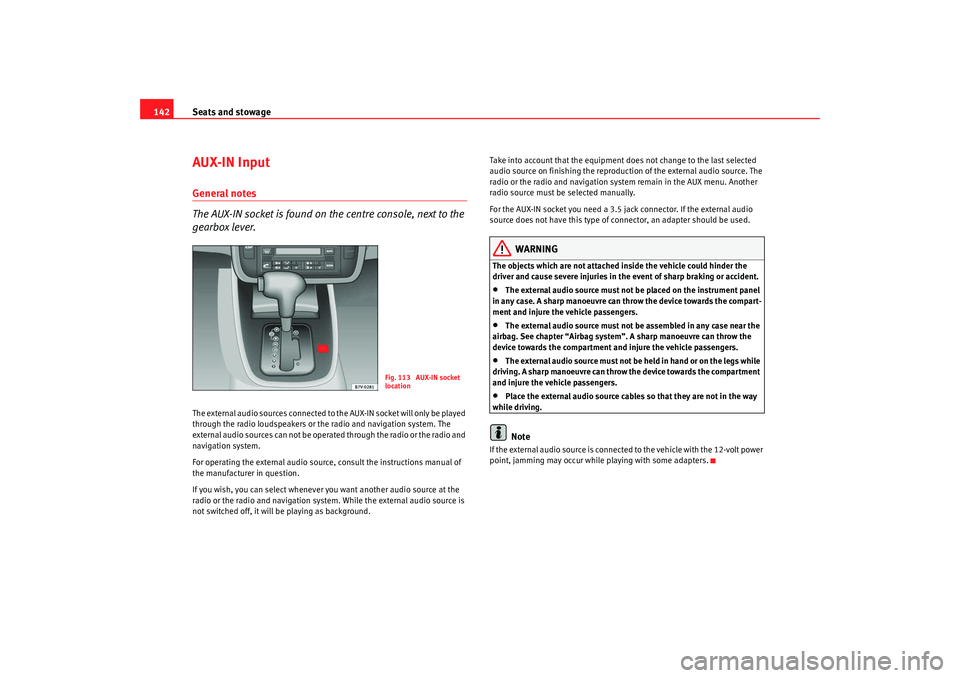
The AUX-IN socket is found on the centre console, next to the
gearbox lever.The external audio sources connected to the AUX-IN socket will only be played
through the radio loudspeakers or the radio and navigation system. The
external audio sources can not be operated through the radio or the radio and
navigation system.
For operating the external audio source , consult the instructions manual of
the manufacturer in question.
If you wish, you can select whenever you want another audio source at the
radio or the radio and navigation system. While the external audio source is
not switched off, it will be playing as background. Take into account that the equipment does not change to the last selected
audio source on finishing the reproduction of the external audio source. The
radio or the radio and navigation system remain in the AUX menu. Another
radio source must be selected manually.
For the AUX-IN socket you need a 3.5 jack connector. If the external audio
source does not have this type of connector, an adapter should be used.
WARNING
The objects which are not attached inside the vehicle could hinder the
driver and cause severe injuries in the event of sharp braking or accident.•
The external audio source must not be placed on the instrument panel
in any case. A sharp manoeuvre can throw the device towards the compart-
ment and injure the vehicle passengers.
•
The external audio source must not be assembled in any case near the
airbag. See chapter “Airbag system”. A sharp manoeuvre can throw the
device towards the compartment and injure the vehicle passengers.
•
T he e xter na l a udio sou rce m ust n ot b e hel d in ha n d or o n th e legs w hile
driving. A sharp manoeuvre can throw the device towards the compartment
and injure the vehicle passengers.
•
Place the external audio source cables so that they are not in the way
while driving.Note
If the external audio source is connected to the vehicle with the 12-volt power
point, jamming may occur while playing with some adapters.
Fig. 113 AUX-IN socket
location
alhambra_ingles_0708 Seite 142 Mittwoch, 10. September 2008 10:55 10
Page 154 of 295
Heating, Ventilation and Air conditioning
152Heating, Ventilation and Air conditioningClimatronicControls
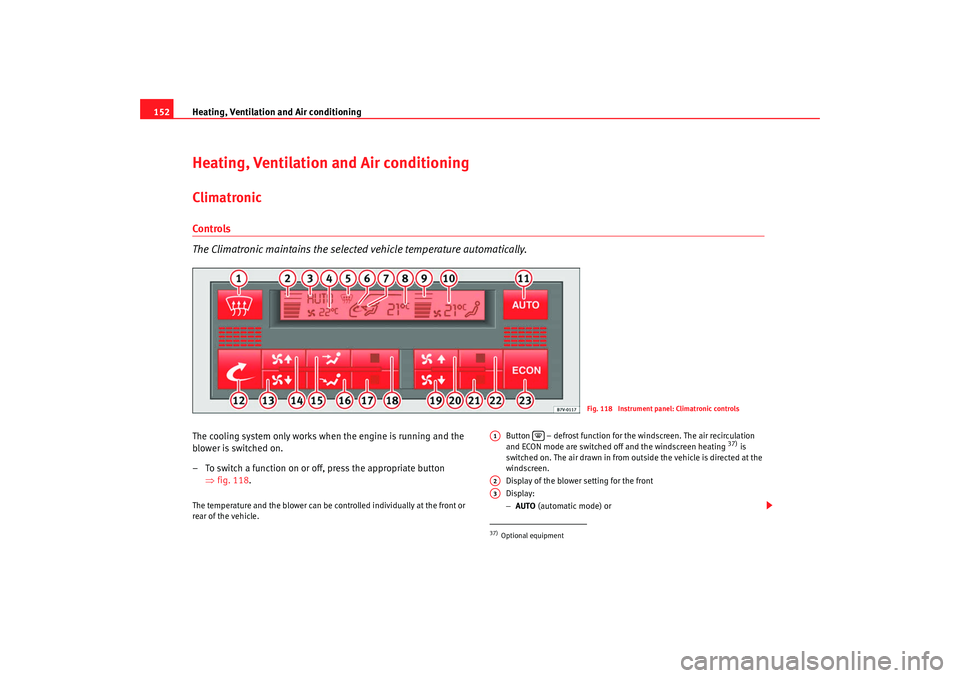
The Climatronic maintains the selected vehicle temperature automatically.The cooling system only works when the engine is running and the
blower is switched on.
– To switch a function on or off, press the appropriate button
⇒fig. 118 .The temperature and the blower can be controlled individually at the front or
rear of the vehicle. Button – defrost function for the windscreen. The air recirculation
and ECON mode are switched off and the windscreen heating
37) is
switched on. The air drawn in from outside the vehicle is directed at the
windscreen.
Display of the blower setting for the front
Display:
− AUTO (automatic mode) or
Fig. 118 Instrument panel: Climatronic controls
37)Optional equipmentA1
A2A3
alhambra_ingles_0708 Seite 152 Mittwoch, 10. September 2008 10:55 10
Page 156 of 295
Heating, Ventilation and Air conditioning
154If a temperature above +29°C (86°F) is selected, the display switches to HI In
this setting the system runs at maximum heating output and the temperature
is not controlled.
Climatronic maintains a constant temperature level fully automatically. This is
done by automatically adjusting the temperature of the air supplied to the
interior, the blower setting, and the air distribution. The system also allows
for the effect of strong sunlight, so there is no need for manual adjustment.
Therefore, automatic mode provides the best comfort for the vehicle occu-
pants in virtually all conditions throughout the year. Automatic mode is switched off whenever an adjustment is made using the
buttons for air distribution or blower. The temperature continues to be regu-
lated.
Note
In the automatic mode, at least one outlet in the instrument panel must be
open. The cooling system could otherwise ice over.
Manual mode
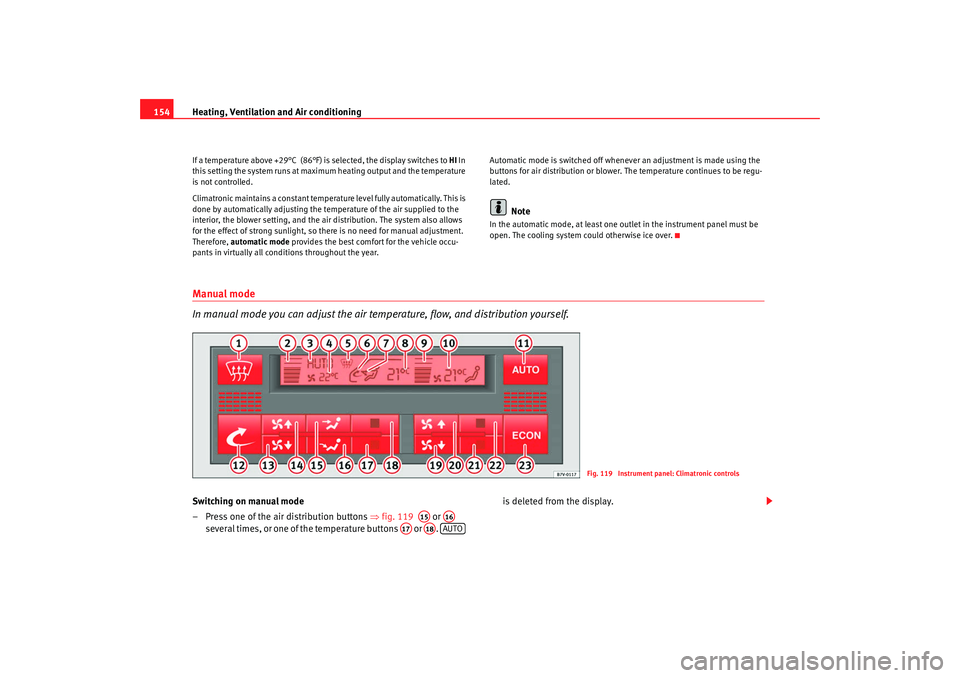
In manual mode you can adjust the air temp
erature, flow, and distribution yourself.Switching on manual mode
– Press one of the air distribution buttons ⇒fig. 119 or
several times, or one of the temperature buttons or . is deleted from the display.
Fig. 119 Instrument panel: Climatronic controls
A15
A16
A17
A18
AUTO
alhambra_ingles_0708 Seite 154 Mittwoch, 10. September 2008 10:55 10
Page 158 of 295
Heating, Ventilation and Air conditioning
156
WARNING
Do not leave the air recirculation function on for long periods. In air recircu-
lation mode, no fresh air enters the vehicle interior. Also, if the cooling
system is switched off, the windows can quickly mist over. Stale or contam-
inated air inside the vehicle may cause drowsiness, increasing the risk of
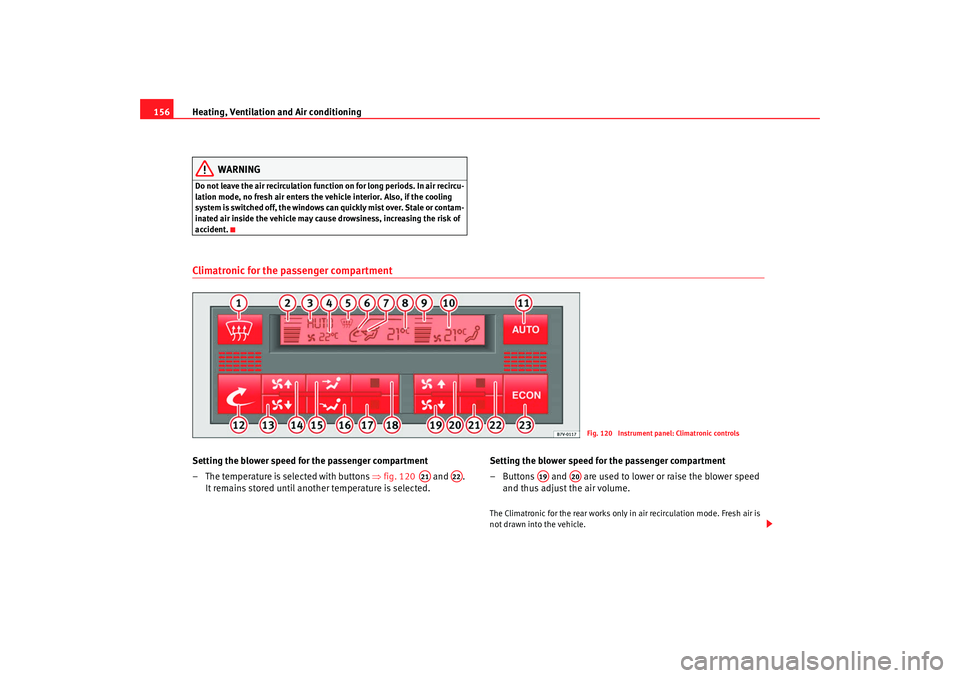
accident.Climatronic for the passenger compartmentSetting the blower speed for the passenger compartment
– The temperature is selected with buttons ⇒fig. 120 and .
It remains stored until another temperature is selected. Setting the blower speed for the passenger compartment
– Buttons and are used to lower or raise the blower speed
and thus adjust the air volume.
The Climatronic for the rear works only in air recirculation mode. Fresh air is
not drawn into the vehicle.
Fig. 120 Instrument panel: Climatronic controls
A21
A22
A19
A20
alhambra_ingles_0708 Seite 156 Mittwoch, 10. September 2008 10:55 10
Page 172 of 295
Driving
170
NoteThe two clutch system of the direct shift gearbox* has a system to protect
against excess strain, which may occur, for example, when the vehicle is held
on a hill with the clutch and the gearbox oil overheats. When the clutch is
overloaded, the vehicle begins to jerk and the position indicator of the
selector lever begins to flash. To avoid breakdowns, the clutch breaks the
power transmission between the engine and the gearbox, as a result of which
the vehicle loses impetus. If the clutch opens automatically due to over-
loading, depress the brake pedal and wait a few seconds before
continuing.Selector lever positions
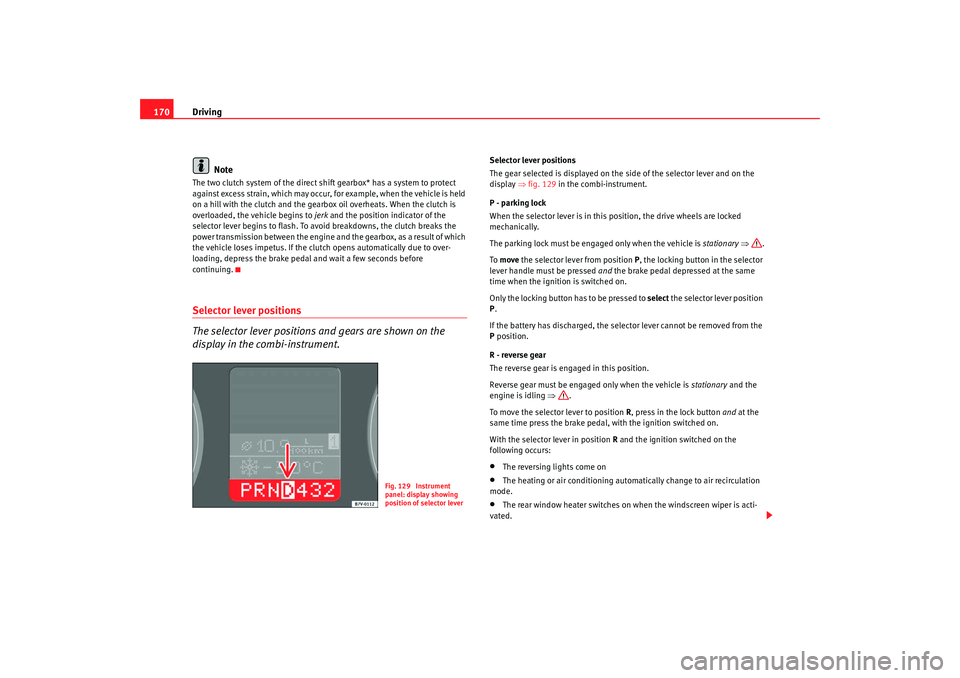
The selector lever positions and gears are shown on the
display in the combi-instrument.
Selector lever positions
The gear selected is displayed on the side of the selector lever and on the
display ⇒fig. 129 in the combi-instrument.
P - parking lock
When the selector lever is in this position, the drive wheels are locked
mechanically.
The parking lock must be engaged only when the vehicle is stationary ⇒ .
To move the selector lever from position P, the locking button in the selector
lever handle must be pressed and the brake pedal depressed at the same
time when the ignition is switched on.
Only the locking button has to be pressed to select the selector lever position
P .
If the battery has discharged, the selector lever cannot be removed from the
P position.
R - reverse gear
The reverse gear is engaged in this position.
Reverse gear must be engaged only when the vehicle is stationary and the
engine is idling ⇒.
To move the selector lever to position R, press in the lock button and at the
same time press the brake pedal, with the ignition switched on.
With the selector lever in position R and the ignition switched on the
following occurs:•
The reversing lights come on
•
The heating or air conditioning automatically change to air recirculation
mode.
•
The rear window heater switches on when the windscreen wiper is acti-
vated.
Fig. 129 Instrument
panel: display showing
position of selector lever
alhambra_ingles_0708 Seite 170 Mittwoch, 10. September 2008 10:55 10