warning light Seat Alhambra 2009 Workshop Manual
[x] Cancel search | Manufacturer: SEAT, Model Year: 2009, Model line: Alhambra, Model: Seat Alhambra 2009Pages: 285, PDF Size: 7.62 MB
Page 156 of 285
Heating, Ventilation and Air conditioning
154
− ECON (cooling system off) or
− OFF (entire system off)
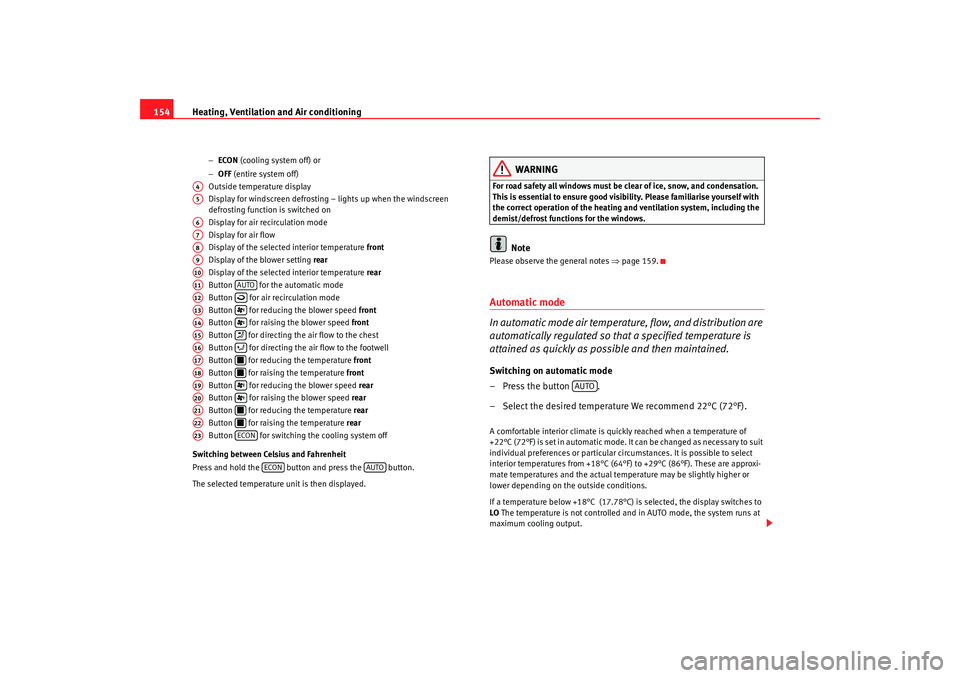
Outside temperature display
Display for windscreen defrosting – lights up when the windscreen
defrosting function is switched on
Display for air recirculation mode
Display for air flow
Display of the selected interior temperature front
Display of the blower setting rear
Display of the selected interior temperature rear
Button for the automatic mode
Button for air recirculation mode
Button for reducing the blower speed front
Button for raising the blower speed front
Button for directing the air flow to the chest
Button for directing the air flow to the footwell
Button for reducing the temperature front
Button for raising the temperature front
Button for reducing the blower speed rear
Button for raising the blower speed rear
Button for reducing the temperature rear
Button for raising the temperature rear
Button for switching the cooling system off
Switching between Celsius and Fahrenheit
Press and hold the button and press the button.
The selected temperature unit is then displayed.
WARNING
For road safety all windows must be clear of ice, snow, and condensation.
This is essential to ensure good visibility. Please familiarise yourself with
the correct operation of the heating and ventilation system, including the
demist/defrost functions for the windows.
Note
Please observe the general notes ⇒page 159.Automatic mode
In automatic mode air temperature, flow, and distribution are
automatically regulated so that a specified temperature is
attained as quickly as possible and then maintained.Switching on automatic mode
– Press the button .
– Select the desired temperature We recommend 22°C (72°F).A comfortable interior climate is quickly reached when a temperature of
+22°C (72°F) is set in automatic mode. It can be changed as necessary to suit
individual preferences or particular circumstances. It is possible to select
interior temperatures from +18°C (64°F) to +29°C (86°F). These are approxi-
mate temperatures and the actual temperature may be slightly higher or
lower depending on the outside conditions.
If a temperature below +18°C (17.78°C) is selected, the display switches to
LO The temperature is not controlled and in AUTO mode, the system runs at
maximum cooling output.
A4A5A6A7A8A9A10A11
AUTO
A12
A13
A14
A15
A16
A17
A18
A19
A20
A21
A22
A23
ECON
ECON
AUTO
AUTO
alhambra_aleman.book Seite 154 Montag, 23. M‰ rz 2009 1:12 13
Page 158 of 285
Heating, Ventilation and Air conditioning
156Te m p e r a t u r e
The selected temperature setting is shown on the display. It is possible to
select interior temperatures from +18°C (64°F) to +29°C (86°F). These are
approximate temperatures and the actual temperature may be slightly higher
or lower depending on the outside conditions.
If a temperature below +18°C (17.78°C) is selected, the display switches to
LO The temperature is not controlled and in AUTO mode, the system runs at
maximum cooling output.
If a temperature above +29°C (86°F) is selected, the display switches to HI In
this setting the system runs at maximum heating output and the temperature
is not controlled.
Blower
The blower can be adjusted gradually using the controls y . Always
have the blower running at a low setting to ensure a constant flow of fresh air
into the vehicle. If the blower is set to 0, the Climatronic is switched off.
Air distribution
The air distribution is adjusted using the buttons and . It is also
possible to open and close some of the air outlets separately.
Switching off the cooling system
Pressing the button switches off the air cooling system to save fuel.
The temperature continues to be controlled, but the air cannot be cooled. The
set temperature can then only be reached if it is higher than the outside
temperature.
Switching the Climatronic on/off
Press button until OFF is shown on display . The Climatronic is switched
off. This function should be used in certain situations only (e.g. if the system
develops a fault).
The Climatronic is switched back on by pressing button .
WARNING
When the Climatronic is off open a window to ensure an adequate supply of
fresh air in the vehicle. Otherwise, when the Climatronic is switched off, no
fresh air enters the vehicle. Stale or contaminated air inside the vehicle
may cause drowsiness, increasing the risk of accident.Air recirculation mode
Air recirculation mode prevents fumes or unpleasant smells
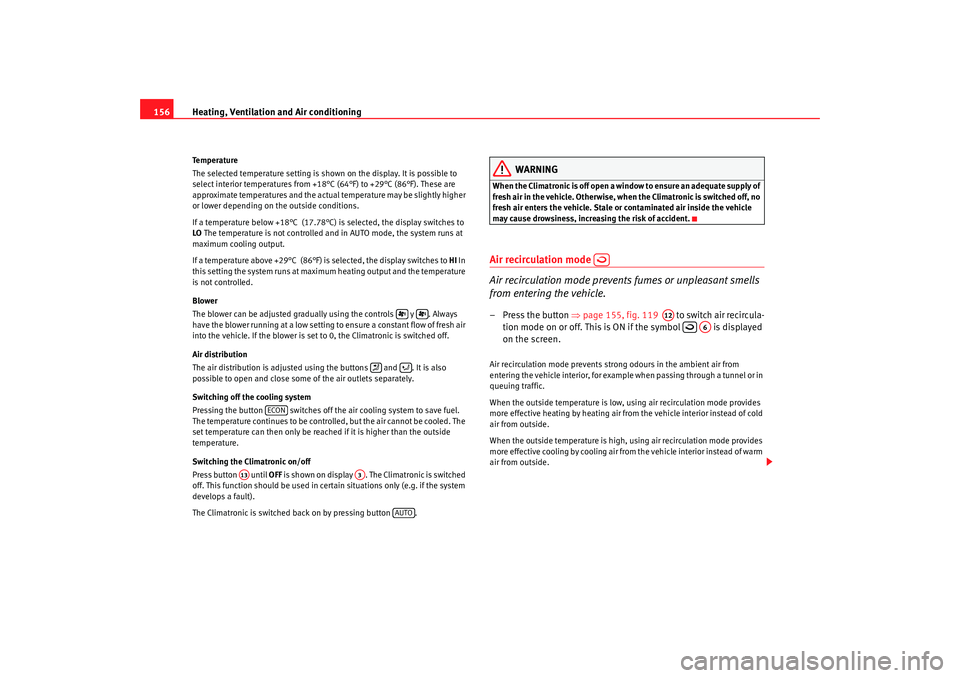
from entering the vehicle.– Press the button ⇒page 155, fig. 119 to switch air recircula-
tion mode on or off. This is ON if the symbol is displayed
on the screen.Air recirculation mode prevents strong odours in the ambient air from
entering the vehicle interior, for example when passing through a tunnel or in
queuing traffic.
When the outside temperature is low, using air recirculation mode provides
more effective heating by heating air from the vehicle interior instead of cold
air from outside.
When the outside temperature is high, using air recirculation mode provides
more effective cooling by cooling air from the vehicle interior instead of warm
air from outside.
ECON
A13
A3
AUTO
A12
A6
alhambra_aleman.book Seite 156 Montag, 23. M‰ rz 2009 1:12 13
Page 164 of 285
Driving
162•
Adjust the driver seat or steering wheel so that there is a distance of at
least 25 cm between the steering wheel and your breast bone ⇒page 161,
fig. 124 . If you fail to observe the minimum distance, the airbag will not
protect you. Risk of fatal injury.
•
If your physical constitution prevents you from maintaining the
minimum distance of 25 cm, contact an Authorised Service Centre. The
Authorised Service Centre will help you decide if special specific modifica-
tions are necessary.
•
If you adjust the steering wheel so that it points towards your face, the
dri ve r ai rba g w ill n ot p rotec t you prope r ly in t he e v en t of a n a ccide n t. M a ke
sure that the steering wheel points towards your chest.
•
When driving, always hold the steering wheel with both hands on the
outside of the ring at the 9 o'clock and 3 o'clock positions. Never hold the
steering wheel at the 12 o'clock position, or in any other manner (e.g. in
the centre of the steering wheel, or on the inside of the rim). In such cases,
you could receive severe injuries to the arms, hands and head.
SafetyElectronic stabilisation programme (ESP)
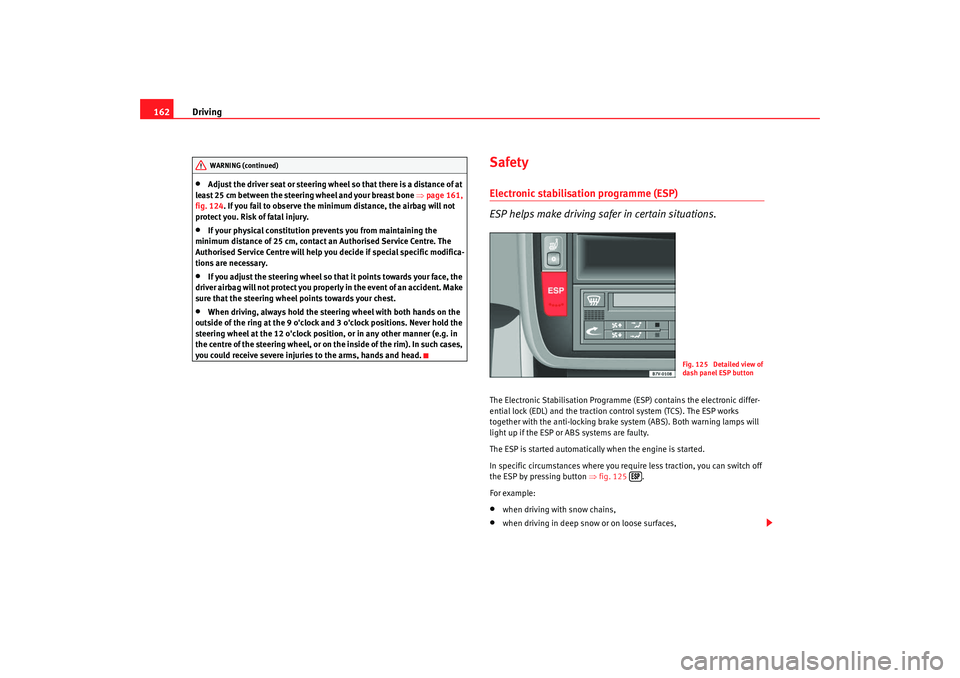
ESP helps make driving safer in certain situations.The Electronic Stabilisation Programme (ESP) contains the electronic differ-
ential lock (EDL) and the traction control system (TCS). The ESP works
together with the anti-locking brake system (ABS). Both warning lamps will
light up if the ESP or ABS systems are faulty.
The ESP is started automatically when the engine is started.
In specific circumstances where you require less traction, you can switch off
the ESP by pressing button ⇒fig. 125 .
For example:•
when driving with snow chains,
•
when driving in deep snow or on loose surfaces,
WARNING (continued)
Fig. 125 Detailed view of
dash panel ESP button
alhambra_aleman.book Seite 162 Montag, 23. M‰ rz 2009 1:12 13
Page 165 of 285
Driving163
Safety First
Operating instructions
Tips and Maintenance
Te c h n i c a l D a t a
•
when rocking the vehicle backwards and forwards to free it from mud, for
example.
You should press the button to switch the ESP back on when you no longer
need wheel spin.
The TCS and EDL are also switched off if the ESP is switched off. This means
that this technology is not available for as long as the ESP remains switched
off.
When does the inscription OFF light up on the button?
•
It will light up continuously if there is a malfunction in the ESP.
•
It will light up continuously if the ESP is switched off.
WARNING
•
The electronic stabilisation programme (ESP) cannot defy the laws of
physics. This should be kept in mind, particularly on slippery and wet
roads and when towing a trailer.
•
Always adapt your driving style to suit the condition of the roads and
the traffic situation. Do not let the extra safety afforded by ESP tempt you
into taking any risks when driving, this can cause accidents.
•
Please refer to the corresponding warning notes on ESP.
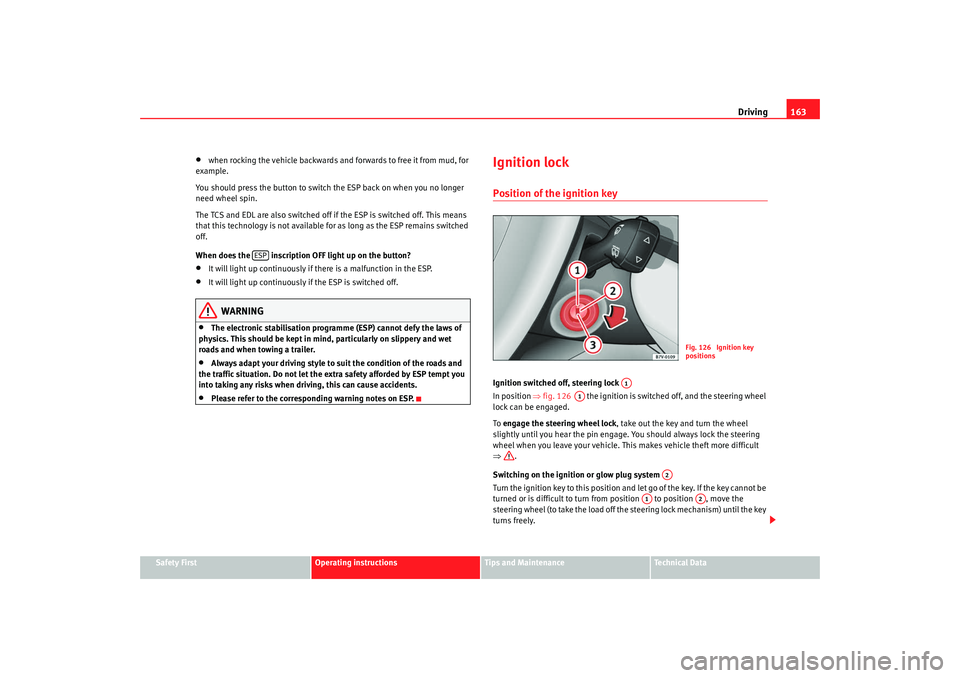
Ignition lockPosition of the ignition keyIgnition switched off, steering lock
In position ⇒fig. 126 the ignition is switched off, and the steering wheel
lock can be engaged.
To engage the steering wheel lock , take out the key and turn the wheel
slightly until you hear the pin engage. You should always lock the steering
wheel when you leave your vehicle. This makes vehicle theft more difficult
⇒ .
Switching on the ignition or glow plug system
Turn the ignition key to this position and let go of the key. If the key cannot be
turned or is difficult to turn from position to position , move the
steering wheel (to take the load off the steering lock mechanism) until the key
turns freely.
ESP
Fig. 126 Ignition key
positions
A1
A1
A2
A1
A2
alhambra_aleman.book Seite 163 Montag, 23. M‰ rz 2009 1:12 13
Page 168 of 285
Driving
166
– In vehicles with a manual gearbox, depress the clutch pedal fully and hold it in this position, the starter will then only have to turn
the engine.
– Turn the ignition key to position ⇒page 163, fig. 126 . The
warning lamp
lights up to show that the glow plugs are
preheating the engine.
– When the warning lamp goes out, turn the key to position to start the engine. Do not press the accelerator.
– Let go of the ignition key as soon as the engine starts, the starter motor must not be allowed to run on with the engine.
When starting from cold, the engine may be a little noisy for the first few
seconds until oil pressure has built up in the hydraulic valve lifters. This is
quite normal, and no cause for concern.
If you have problems starting the engine, please refer to Help with Ignition.
Glow plug system
To avoid unnecessary loads on the battery, do not use any other major elec-
trical equipment while the glow plugs are preheating.
Start the engine as soon as the glow plug warning lamp goes out.
Starting a diesel engine after the fuel tank has been completely run dry
If the fuel tank has been completely run dry, it may take longer than normal
(up to one minute) to start a diesel engine after refuelling. This is because air
needs to be bled from the fuel system while starting.
WARNING
•
Never start or run the engine in unventilated or closed rooms. The
exhaust fumes contain carbon monoxide, an odourless and colourless poisonous gas. Risk of fatal accidents. Carbon monoxide can cause people
to lose consciousness. It can also cause death.
•
Never leave the vehicle unattended if the engine is running.
•
Never use “cold start sprays”, they could explode or cause the engine
to run at high revs. Risk of injury.Caution
•
When the engine is cold, you should avoid high engine speeds, driving at
full throttle and over-loading the engine. Risk of engine damage.
•
The vehicle should not be pushed or towed for more than approximately
50 metres to start the engine. Fuel could enter the catalytic converter and
damage it.
•
Before attempting to push-start or tow a vehicle to start it, you should first
try to start it using the battery of another vehicle. Observe the warnings in the
chapter Help with Ignition.For the sake of the environment
Do not warm up the engine by running it with the car stationary. You should
drive off as soon as you start the engine. This helps the engine reach oper-
ating temperature faster and reduces emissions.Switching off the engine– Stopping the engine.
– Turn the ignition key to position ⇒page 163, fig. 126 .
A2A3
WARNING (continued)
A1
alhambra_aleman.book Seite 166 Montag, 23. M‰ rz 2009 1:12 13
Page 170 of 285
Driving
168•
The reversing lights come on.
•
The heating or air conditioning automatically change to air recirculation
mode.
•
The rear window heater switches on when the windscreen wiper is acti-
vated.
WARNING
•
When the engine is running, the vehicle will start to move as soon as a
gear is engaged and the clutch released.
•
Never select the reverse gear when the vehicle is in motion. Risk of acci-
dent.Caution
•
Do not rest your hand on the gear lever when driving. The pressure of your
hand could cause premature wear on the selector forks in the gearbox.
•
When changing gear, you should always depress the clutch fully to avoid
unnecessary wear and damage.
•
Do not hold the car “on the clutch” on hills. This causes premature wear
and damages the clutch. It can also prevent power being transferred from the
engine to the gearbox.
Automatic gearboxGearbox programmes
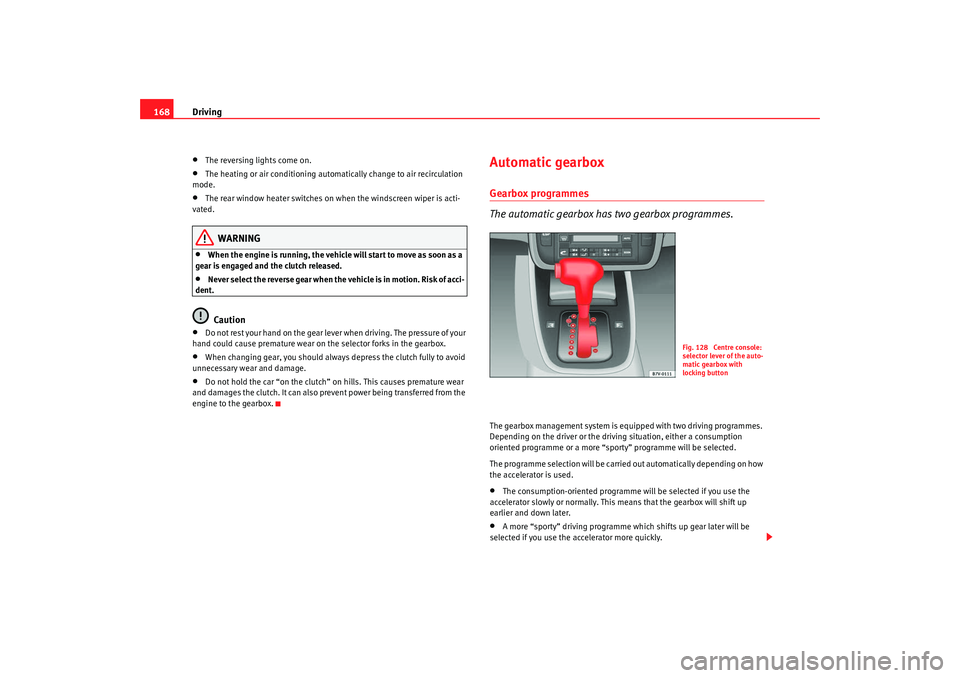
The automatic gearbox has two gearbox programmes.The gearbox management system is equipped with two driving programmes.
Depending on the driver or the driving situation, either a consumption
oriented programme or a more “sporty” programme will be selected.
The programme selection will be carried out automatically depending on how
the accelerator is used.•
The consumption-oriented programme will be selected if you use the
accelerator slowly or normally. This means that the gearbox will shift up
earlier and down later.
•
A more “sporty” driving programme which shifts up gear later will be
selected if you use the accelerator more quickly.
Fig. 128 Centre console:
selector lever of the auto-
matic gearbox with
locking button
alhambra_aleman.book Seite 168 Montag, 23. M‰ rz 2009 1:12 13
Page 172 of 285
Driving
170
– Press and hold the lock button, move the selector lever to P and
release the lock button.
Driving up and down hills
– Press the selector lever from position D to the right into the
“Tiptronic” selector gate.
– Lightly press the selector lever back to change down.
Holding the car on a hill
– You should always hold the vehicle in position with the footbrake
to stop it from “rolling backwards” ⇒. Do not try to prevent
the vehicle from “rolling backwards” by increasing the engine
speed while a range of gears is selected
Moving away on an incline
– With a gear engaged, take your foot from the brake and depress the accelerator.The steeper the gradient, the lower the gear you will need. This increases the
braking effect of the engine. For example, you should drive down a very steep
slope in 3rd gear. If the engine brake effect is not sufficient, the vehicle will
gain speed. The automatic gearbox / direct shift gearbox automatically
changes up to prevent the engine over revving. Use the foot brake to reduce
speed and change into 3rd gear using “Tiptronic” ⇒.
Your vehicle has an automatic interlock which prevents the selector lever
being put into a position for driving forwards or in reverse from positions P or
N if the brake pedal is not depressed.
The ignition key cannot be removed unless the selector lever is in position P.
WARNING
•
As a driver you should never leave your vehicle if the engine is running
and a gear is engaged. If you have to leave your vehicle while the engine is
running, you must apply the parking brake and engage parking lock P.
•
If the engine is running and if D, S or R is engaged, you will need to hold
the car on the foot brake. The car will creep forward as the power transmis-
sion is not fully interrupted even when the engine is idling.
•
Never press the accelerator when you move the selector lever. Risk of
accident.
•
Never move the selector lever to R or P when driving. Risk of accident!
•
Before you drive down a steep gradient, reduce your speed and use
“Tiptronic” to select a low gear.
•
If you have to stop the vehicle on a gradient, always hold the vehicle in
position using the foot brake to stop it from rolling back.
•
Never allow the brake to rub and do not use the brake pedal too often
or for long periods. Constant braking will cause the brakes to overheat and
will considerably reduce the brake effect. This increases the braking
distance and could cause the brake system to fail.
•
Never allow the car to roll down a gradient with the gear in neutral N, or
in selector lever position D, even if the engine is not running.Caution
•
If you stop the vehicle on a gradient, do not attempt to stop it from rolling
by depressing the accelerator when a gear has been selected. Otherwise, the
automatic gearbox /direct shift gearbox* may overheat causing damage. Pull
the handbrake on fully or depress the brake pedal to prevent the vehicle from
rolling away.
•
If you allow the car to roll with the selector lever in position N with the
engine switched off, the automatic gearbox / direct shift gearbox* will be
damaged as it will not be lubricated.
alhambra_aleman.book Seite 170 Montag, 23. M‰ rz 2009 1:12 13
Page 175 of 285
Driving173
Safety First
Operating instructions
Tips and Maintenance
Te c h n i c a l D a t a
Changing gear with “Tiptronic”
The “Tiptronic” system allows the driver to change gears
manually.
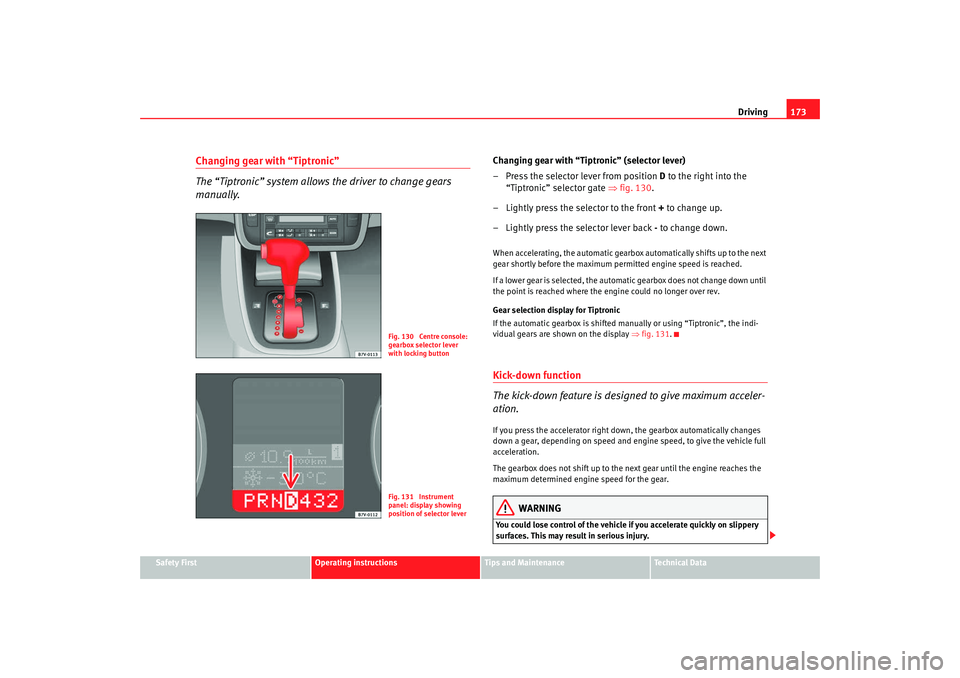
Changing gear with “Tiptronic” (selector lever)
– Press the selector lever from position D to the right into the
“Tiptronic” selector gate ⇒fig. 130.
– Lightly press the selector to the front + to change up.
– Lightly press the selector lever back - to change down.When accelerating, the automatic gearbox automatically shifts up to the next
gear shortly before the maximum permitted engine speed is reached.
If a lower gear is selected, the automatic gearbox does not change down until
the point is reached where the engine could no longer over rev.
Gear selection display for Tiptronic
If the automatic gearbox is shifted manually or using “Tiptronic”, the indi-
vidual gears are shown on the display ⇒fig. 131 .Kick-down function
The kick-down feature is designed to give maximum acceler-
ation.If you press the accelerator right down, the gearbox automatically changes
down a gear, depending on speed and engine speed, to give the vehicle full
acceleration.
The gearbox does not shift up to the next gear until the engine reaches the
maximum determined engine speed for the gear.
WARNING
You could lose control of the vehicle if you accelerate quickly on slippery
surfaces. This may result in serious injury.
Fig. 130 Centre console:
gearbox selector lever
with locking buttonFig. 131 Instrument
panel: display showing
position of selector lever
alhambra_aleman.book Seite 173 Montag, 23. M‰ rz 2009 1:12 13
Page 176 of 285
Driving
174•
Be particularly careful, therefore, when using the kick-down function on
slippery road surfaces.
•
You should use the kick-down function only when traffic and weather
conditions allow it to be used safely.
HandbrakeUsing the handbrake
The handbrake should be applied firmly to prevent the
vehicle from accidentally rolling away.Always apply the handbrake when you leave your vehicle and when
you park.
Using the handbrake
– Firmly pull the handbrake lever up all the way.
Releasing the handbrake
– Firmly pull the handbrake lever up all the way.
– Push in the lock button on the handbrake lever.
– Keep the locking knob pressed and push the lever all the way down ⇒ .The handbrake is located at the side of the driver seat. Always apply the
handbrake firmly. This prevents you driving with the handbrake applied
⇒ . The handbrake warning lamp
lights up when the handbrake is applied
and the ignition switched on. The warning lamp goes out when the hand-
brake is released.
WARNING
•
Never use the handbrake to slow down the vehicle when it is in motion.
The braking distance is considerably longer, as braking is only applied to
the rear wheels. Risk of accident!
•
Never drive with the handbrake slightly applied. This could cause the
rear brakes to overheat and lose their braking efficiency. Risk of accident.
This also causes premature wear on the rear brake pads/linings.Caution
Always apply the handbrake before you leave the vehicle. On cars with a
manual gearbox engage 1st gear, or on an automatic move the selector lever
to P .Parking
The handbrake should always be firmly applied when the
vehicle is parked.Always note the following points when parking the vehicle:
– Use the foot brake to stop the vehicle.
– Apply the handbrake firmly.
– On a manual gearbox engage 1st gear. On an automatic move
the selector lever to P.
WARNING (continued)
alhambra_aleman.book Seite 174 Montag, 23. M‰ rz 2009 1:12 13
Page 177 of 285

Driving175
Safety First
Operating instructions
Tips and Maintenance
Te c h n i c a l D a t a
– Switch off the engine and remove the key from the ignition lock.
Turn the steering wheel slightly to engage the steering lock.
– Always take you car keys with you when you leave the vehicle ⇒ .Additional notes on parking the vehicle on gradients:
Turn the steering wheel so that the vehicle would roll against the kerb if it did
start to roll.•
If the vehicle is facing downhill , turn the front wheels so that they point
towards the kerb .
•
If the vehicle is facing uphill , turn the front wheels so that they point away
from the kerb .
WARNING
Take measures to reduce the risk of injury when you leave your vehicle
unattended.•
Never park where the hot exhaust system could ignite inflammable
materials, such as dry grass, low bushes, spilt fuel etc.
•
Never allow vehicle occupants to remain in the vehicle when it is
locked. They would be unable to open the vehicle from the inside, and
could become trapped in the vehicle in an emergency. In the event of an
emergency, locked doors will delay assistance to occupants.
•
Never leave children unsupervised in the vehicle. They could set the
vehicle in motion, for example, by releasing the handbrake or the gear
lever / selector lever.
•
Depending on weather conditions, it may become extremely hot or cold
inside the vehicle. This can be fatal.
Parking distance warning system*Description
The parking distance warning system is a parking aid which
draws your attention to obstacles in front or behind the
vehicle.The parking distance warning system assists the driver when parking. If the
rear of the vehicle is approaching an obstacle, an intermittent sound signal is
emitted. The shorter the distance, the shorter the intervals between tones. If
the vehicle is too close to the obstacle, the sound signal becomes constant.
The distance to an obstacle at the front is indicated via a high tone and via a
low tone at the rear. The shorter the distance, the shorter the intervals
between tones. If the vehicle is too close to the obstacle, the sound signal
becomes constant.
The obstacle may no longer be detected if the vehicle gets even closer to it!
The warning signal will stop when•
the vehicle moves away from the obstacle
•
the outer sensors measure a constant distance for approximately 3
seconds.
The signal will not be switched off once the vehicle has reached the perma-
nent tone area.
Registering the obstacle
•
Exterior front and rear sensors: from approx 80 cm
•
Front central sensors: from approx 120 cm
•
Rear central sensors: from approx 160 cm
alhambra_aleman.book Seite 175 Montag, 23. M‰ rz 2009 1:12 13