engine Seat Alhambra 2011 User Guide
[x] Cancel search | Manufacturer: SEAT, Model Year: 2011, Model line: Alhambra, Model: Seat Alhambra 2011Pages: 385, PDF Size: 7.92 MB
Page 63 of 385
61
Cockpit
Calibrating compass
To c alibr
ate the compass you must be in one of the valid magnetic zones
with sufficient space to be able to trace a circumference with the vehicle.
● Switch the ignition on.
● Select the Settings
menu followed by the option Compass and Calibrate.
● Confirm the message Des
cribe a complete circumference to calibrate the
compass with OK and then trace a complete circumference driving at ap-
pro x
imately 10 km/h (6 mph).
When the corresponding cardinal point is displayed, the calibration is com-
plete.
Service interval display The inspection display appears on the instrument panel
⇒ fig. 35 4 .
SEA T m
akes a difference between services with engine oil change (Mainte-
nance Service) and services without engine oil change (Inspection Service).
The service interval display only gives information for service dates which
involve an engine oil change. The dates of the remaining services (for exam-
ple, the next Inspection Service or change of brake fluid) are listed on the
label attached to the door strut, or even in the Maintenance Programme.
In vehicles with Services established by time or mileage , the service inter-
vals are already pre-defined.
In vehicles with LongLife Service , the intervals are determined individually.
Technical progress has made it possible to considerably reduce servicing re-
quirements. The technology used by SEAT ensures that your vehicle only
has an maintenance service when it is necessary. To establish when the
Maintenance Service is due (max. 2 years), the vehicle's conditions of use
and individual driving styles are considered. The service pre-warning first
appears 20 days before the date established for the corresponding service.
The kilometres remaining until the next service are always rounded up to the nearest 100 km and the remaining time is given in complete days. The
current
service message cannot be viewed until 500 km after the last serv-
ice. Prior to this only lines are visible on the display.
Inspection reminder
When the Service date is approaching, when the ignition is switched on a
Service reminder is displayed.
In vehicles without text messages , a spanner is displayed on the instrument
panel with a figure given in km. The number of kilometres shown is the
maximum number that may be driven until the next service. After a few sec-
onds,the display mode changes. A clock symbol appears and the number of
days until the next service appointment is due.
In vehicles with text messages , Service in --- km or --- days is displayed on
the instrument panel.
Service due
After the service date, an audible warning is given when the ignition is
switched on and the spanner displayed on the screen flashes for a few sec-
onds. In vehicles with text messages , Service in --- km or --- days is dis-
played on the instrument panel.
Reading a service notification
With the ignition switched on, the engine off and the vehicle at a standstill,
the current service notification can be read:
● Press the button on the instrument panel several times until the
sp anner symbo
l is displayed .
● ALTERNATIVELY: select the Settin
gs menu.
● From the Servic
e submenu, select the option Info.
When the service date has past , a minus sign is displayed in front of the
number of kilometres or days. In vehicles with text messages the following
is displayed: Service --- km or --- days ago . Safety First Operating instructions Practical tips Technical Data
Page 64 of 385
62
Cockpit
The service interval display is reset
If the ser v
ice was not carried out by a Technical Service, the display can be
reset as follows: In vehicles with text messages:
Select the
Settings
menu.In the submenu Serv
ic
e, select the option Reset.Confirm with
OK when requested to do so by the system.
In vehicles without text messages:
Switch the ignition off.
Press and hold the
0.0 / S
ET button.
Switch the ignition back on.
Release the
0.0 / S
ET button and, press
for the next 20 seconds.
Do not reset the indicator to zero between two intervals, otherwise the dis-
p l
ay will be incorrect.
If, while the LongLife service is valid, the service interval display is reset to
zero, the “service will be activated by time or mileage”. The service interval
is no longer calculated individually ⇒ Booklet Maintenance Programme.Note
● The service message disappears after a few seconds, when the engine is
s t
arted or when OK is pressed.
● In vehicles with the LongLife system in which the battery has been dis-
connect ed f
or a long period of time, it is not possible to calculate the date
of the next service. Therefore the service interval display may not be correct.
In this case, please check the maximum permitted service intervals ⇒ Book-
let Maintenance Programme. SEAT information system
Introduction With the ignition switched on, it is possible to read the different functions of
the dis
p
lay by scrolling through the menus.
In vehicles with a multifunction steering wheel, there are no buttons on the
windscreen wiper lever. The multifunction display can only be controlled
from the buttons on the multifunction steering wheel.
The number of menus displayed on the instrument panel will vary according
to the vehicle electronics and equipment.
A specialised dealer will be able to programme or modify additional func-
tions, according to the vehicle equipment. SEAT recommends visiting a
Technical Service.
Some menu options can only be read when the vehicle is at a standstill.
As long as a priority 1 warning is displayed, it will not be possible to read
the menus. To display the menus, confirm the warning by pressing OK .
Addition a
l information and warnings:
● Exterior mirrors ⇒ pag
e 110
● Auxiliary heating ⇒ pag
e 163 WARNING
Any distraction may lead to an accident, with the risk of injury.
● Do not read the instrument panel menus when driving.
Page 68 of 385
66
Cockpit
Main menu Menu Function See
MFI Information and possible configurations of
the multif
u
nction display (MFI). ⇒ page 66
Audio
If the radio is on, the station is displayed.
In CD mode, the curr
ent
CD is played. ⇒ Booklet Ra-
dio or ⇒
Book-
let navigation system Navigation Navigation system information:
when the nav
ig
ation to destination is on,
change of direction arrows and a proximity
bar are displayed. These symbols are similar
to those used in the navigation system.
If navigation to destination is not on, the di-
rection of travel (compass) and the name of
the street on which you are driving are dis-
played. ⇒ Book-
l et
Navigation system Parking
heatin
g Information and configurations of the park-
ing he
atin
g:
switching the parking heating on or off. Se-
lect the operating mode and duration. ⇒ page 163
Vehicle con-
dition Current warning or information texts.
This
option on
ly appears when one of the
following texts is available. The number of
available messages is displayed. Example
1/1 or 2/2. ⇒ page 57
Settings Different setting options, for example, the
Con
v
enience, Lighting & Visibility menus,
and the time, speed warning with winter
tyres, language, units of measurement, or
“Display off”. ⇒ page 67
MFI display menu The multifunction display (MFI) has two automatic memories:
1 - Parti
al
memory and 2 - Total memory . The selected memory will be shown in the
upper right-hand corner of the display. With the ignition switched on, and memory 1 or 2 displayed, briefly press
OK to change from one memory to another.
1 Trip memo-
ry
(f
or a
single jour-
ney). The memory stores the values for the journey and the con-
sumption fr
om the moment
the ignition is switched on un-
til it is switched off again.
If the journey is broken for more than two hours, the mem-
ory is automatically erased. If the journey is continued in
less than two hours after the ignition is switched off, the
new data is added to the data already stored in the memo-
ry. 2 Total mem-
ory
(f
or all
journeys). The memory records the values for a specific number of
par
ti
al trips, up to a total of 19 hours and 59 minutes or 99
hours and 59 minutes, or 1999.9 km (or miles) for 9999
km (or miles), depending on the model of instrument pan-
el. On reaching either of these limits, the memory is auto-
matically erased and starts to count from 0 again. Possible displays
Menu Function
Journey duration This indicates the hours (h) and minutes (min) since
the ignition wa
s
switched on. Current fuel con-
sumption The current fuel consumption while driving is dis-
pl
a
yed in l/100 km (or miles per gallon, mpg); when
the engine is running but the vehicle is not moving,
in l/h (or gallons per hour).
Page 69 of 385
67
Cockpit Menu Function
Average fuel con-
sumption When the ignition is switched on, the average con-
sumption (in l/100 km or in mp
g) i
s displayed after
the vehicle has moved approximately 100 metres
(328 feet). Otherwise horizontal lines are displayed.
The value shown is updated approximately every 5
seconds. Distance to empty
(the dis
t
ance you
can travel with the
remaining fuel) Approximate distance in km (or miles) that can still
be trav
el
led with the fuel remaining in the tank, as-
suming the same style of driving is maintained. This
is calculated using the current fuel consumption. Distance covered Distance travelled, after ignition is switched on, in
km (or mil
e
s). Average speed After the ignition is switched on, the average speed
wi
l
l be shown after a distance of approximately 100
metres (328 feet) has been travelled. Otherwise hori-
zontal lines are displayed. The value shown is upda-
ted approximately every 5 seconds. Digital display of
speed Current speed displayed digitally.
Oil temperature digi-
ta
l
display Updated engine oil temperature digital display
Speed warning to ---
km/h If the stored speed is exceeded (between
30 - 250 km/h, or 18 - 155 mph), an audibl
e w
arning
is given together with a visual warning. Changing between display modes
●
In vehicles without multifunction steering wheel: pres
s the lever.
● Vehicles with a multifunction steering wheel: pres
s or
.
Storin g a s
peed for the speed warning
● Select the display Speed warnin
g at --- km/h.
● Press OK to store the current speed and switch off the warning. ●
In addition, set the required speed by pressing the rocker switch on the
w ind
screen wiper lever or buttons or
on the multifunction steering
wheel f or 5 sec
onds. Next, press OK again or wait a few seconds. The
speed i s
stored and the warning activated.
● To switch off , pres
s OK . The stored speed is deleted.
Manua l
ly erasing memory 1 or 2
● Select the memory to be erased.
● Press and hold OK for approximately two seconds.
Per son
alising the displays
It is possible to select which of the displays in the multifunction display you
wish to see on the instrument panel in the settings menu. The units of
measurement can also be modified ⇒ page 67.
Configuration Menu Configuration
Menu Function
Multifunction
dis
p
lay data Configuration of the multifunction display data which you
wi
sh t
o see on the instrument panel display ⇒ page 66. Compass Changing the magnetic region and calibration of the com-
pa
s
s. To calibrate the compass, please follow the instruc-
tions given on the instrument panel display. Convenience Changing vehicle convenience functions
⇒ page 68. Lights & visi-
bi
lity Configuration of vehicle lighting
⇒ page 69. Time Changing the hours and minutes of the clock and the navi-
gation sy
s
tem. The time can be set here and the choice
can be made between the 24 hour and 12 hour display.
The S in the upper part of the display indicates that the
clock is set to summer time. Safety First Operating instructions Practical tips Technical Data
Page 73 of 385
71
Unlocking and locking
Unlocking and locking
Vehicle key set
Introduction Additional information and warnings:
●
Adjustments to the SEAT information system ⇒ page 62
● C
entral locking and locking system ⇒ page 74
● St
art and stop the engine ⇒ page 170
● Not
es for the user ⇒ page 255
● Emer
gency locking and unlocking ⇒ page 314WARNING
Careless or incorrect use of vehicle keys may result in severe injury and
acc ident
.
● Always take all the keys with you whenever you leave the vehicle.
Childr
en and unauthorised individuals could lock the doors or the tail-
gate, start the engine or turn the ignition on activating electrical sys-
tems, for example: the electric windows.
● Never leave children or disabled people alone in the car. They could
be trapped in the c
ar in an emergency and will not be able to get them-
selves to safety. For example, depending on the time of the year, temper-
atures inside a locked and closed vehicle can be extremely high or ex-
tremely low resulting in serious injuries and illness or even death, partic-
ularly for young children.
● Never remove the key from the ignition if the vehicle is in motion. The
steerin
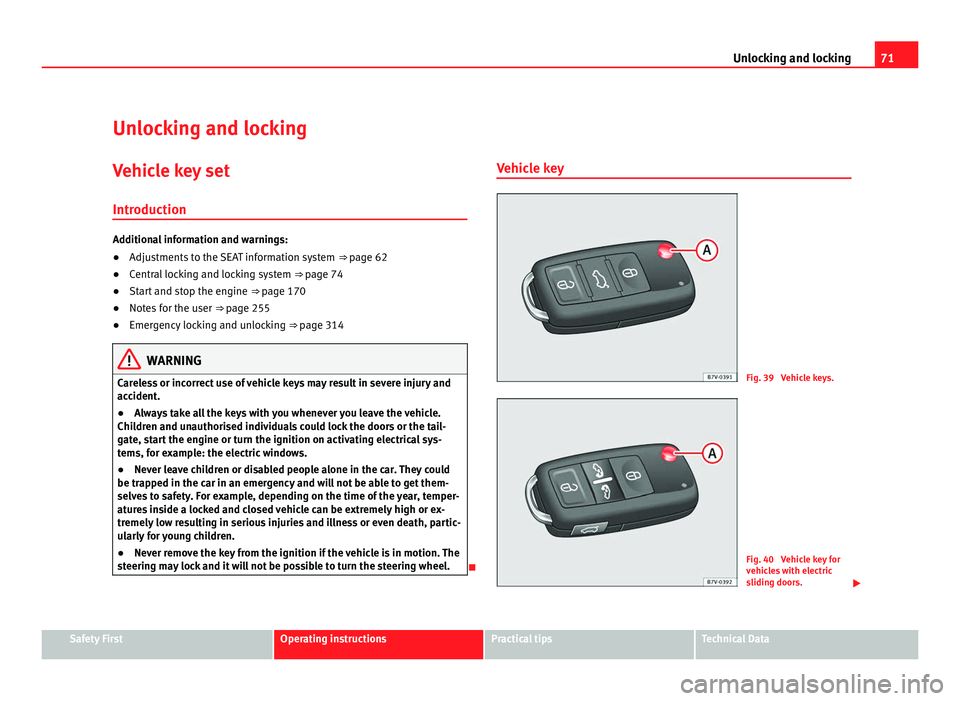
g may lock and it will not be possible to turn the steering wheel. Vehicle key
Fig. 39 Vehicle keys.
Fig. 40 Vehicle key for
vehic
l
es with electric
sliding doors. Safety First Operating instructions Practical tips Technical Data
Page 85 of 385
83
Unlocking and locking
If an object gets in the way of the sliding door while it is closing , it opens
again.
If an object gets in the way of the sliding door while it is opening, the door
stops moving.
● Check the reason for which the sliding door does not open or close.
● Try to open or close the sliding door again.
To clo
se the sliding door without the rollback anti-trap function
● Turn off the ignition and turn it on again.
● Press and hold the ⇒
fig. 51 b
utton. The sliding door closes with full
force. WARNING
Closing the electric windows without the anti-trap function can cause se-
rious injur
y.
● Always close the sliding doors carefully.
● Nobody should ever get in the way of the electric sliding doors, espe-
cia
lly when closing without the anti-trap function.
● The anti-trap function does not prevent fingers or other parts of the
body gettin
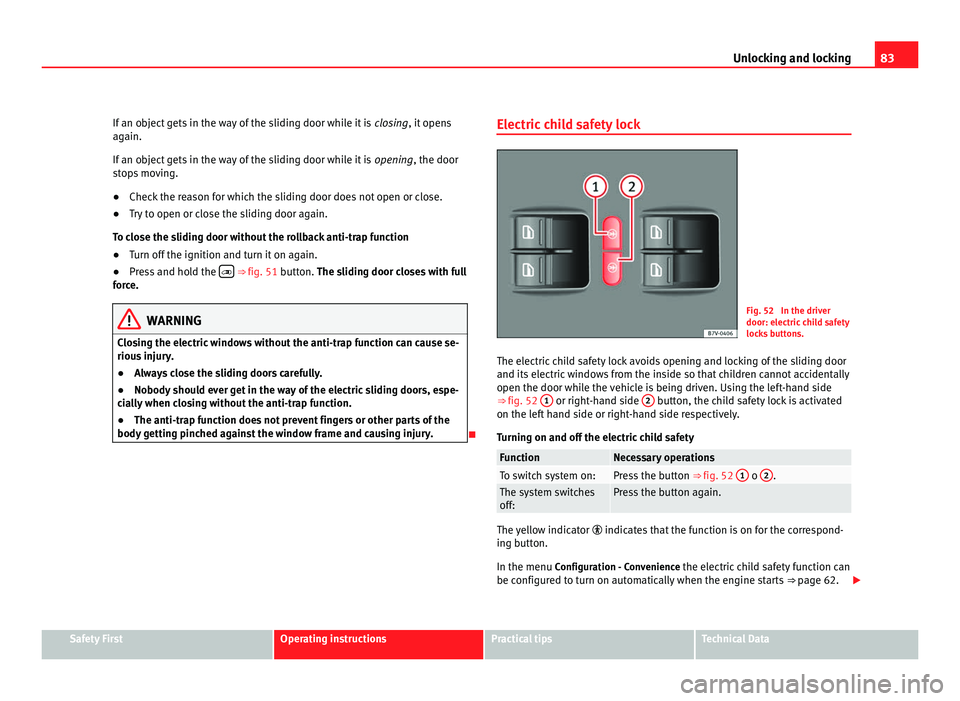
g pinched against the window frame and causing injury. Electric child safety lock Fig. 52 In the driver
door: electric
c
hild safety
locks buttons.
The electric child safety lock avoids opening and locking of the sliding door
and its electric
windows from the inside so that children cannot accidentally
open the door while the vehicle is being driven. Using the left-hand side
⇒ fig. 52 1 or right-hand side
2 button, the child safety lock is activated
on the lef t
hand side or right-hand side respectively.
Turning on and off the electric child safety Function Necessary operations
To switch system on: Press the button
⇒ fig. 52 1 o
2 .
The system switches
off: Press the button again.
The yellow indicator
indicate
s that the function is on for the correspond-
ing button.
In the menu Configuration - Convenience the electric child safety function can
be configured to turn on automatically when the engine starts ⇒ page 62. Safety First Operating instructions Practical tips Technical Data
Page 94 of 385
92
Unlocking and locking
Panorama sliding sunroof*
Introduction Additional information and warnings:
●
SEAT information system ⇒ pag e 62
● C
entral locking and locking system ⇒ page 74
● Emer
gency locking and unlocking ⇒ page 314WARNING
Careless use of the panorama sliding sunroof can cause serious injury.
● Only close the panorama sliding sunroof and the sunshade when no-
body i s
in the way.
● Always take all the keys with you whenever you leave the vehicle.
● Never leave children or disabled persons in the vehicle, particularly if
they hav
e access to the keys. Uncontrolled use of the key could lock the
vehicle, start the engine, turn on the ignition and operate the sliding
sunroof.
● The sliding sunroof can be operated for up to about ten minutes after
the ignition has
been switched off, provided the driver door and the front
passenger door are not opened. Note
In case of a fault in the operation of the sliding sunroof, the anti-trap func-
tion wi l
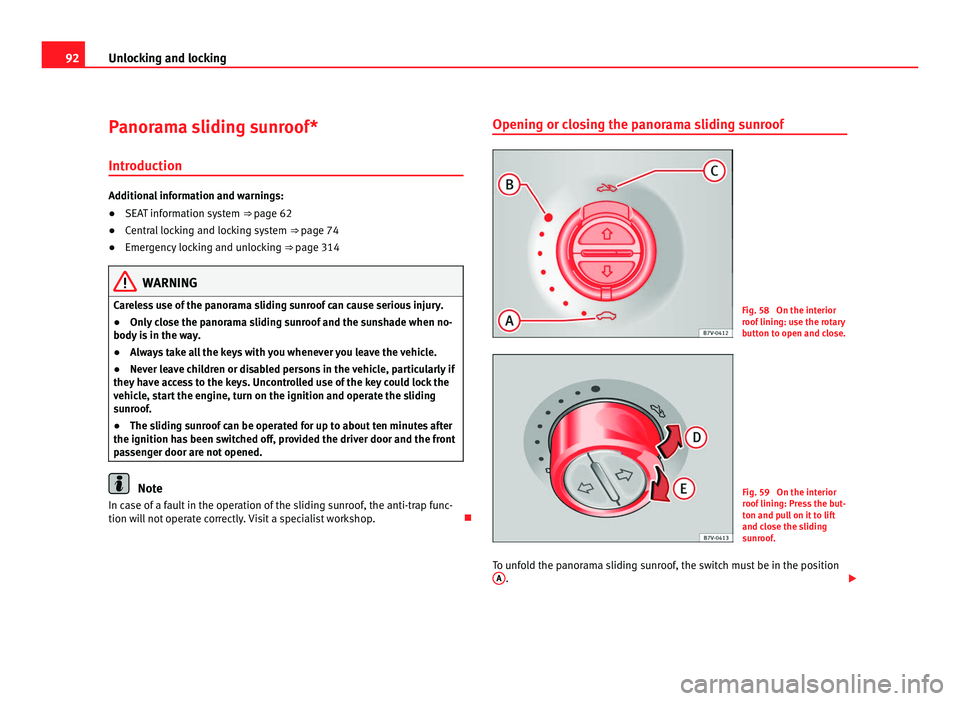
l not operate correctly. Visit a specialist workshop. Opening or closing the panorama sliding sunroof
Fig. 58 On the interior
roof
linin
g: use the rotary
button to open and close. Fig. 59 On the interior
roof
linin
g: Press the but-
ton and pull on it to lift
and close the sliding
sunroof.
To unfold the panorama sliding sunroof, the switch must be in the position A .
Page 107 of 385
105
Lights and visibility
Windscreen wiper and washer
Introduction Additional information and warnings:
●
Recirculation of air conditioning air ⇒ p age 155
● Working in the engine compartment ⇒ page 275
● C
aring for and cleaning the vehicle exterior ⇒ page 242WARNING
Water from the windscreen washer water bottle may freeze on the wind-
sc r
een if it does not contain enough anti-freeze, reducing forward visibili-
ty.
● In winter, ensure the windscreen washer contains enough anti-freeze.
● In cold conditions, you should not use the wash / wipe system unless
you hav
e warmed the windscreen with the ventilation system. The anti-
freeze could freeze on the windscreen and reduce visibility. WARNING
Worn or dirty wiper blades reduce visibility and increase the risk of acci-
dent and seriou s
injury.
● Always replace damaged or worn blades or blades which do not clean
the winds
creen correctly. CAUTION
In icy conditions, always check that the wiper blades are not frozen to the
gla s
s before using the wipers for the first time. In cold weather, it may help
to leave the vehicle parked with the wipers in service position ⇒ page 107. Control lamp lights up Possible cause Solution
Windscreen wiper fluid level
too lo
w Top up the windscreen wiper
bottle a
s
soon as possible
⇒ page 109. Several warning and control lamps should light up for a few seconds when
the ignition is
sw
itched. This signals that the lamp is working properly. They
will switch off after a few seconds. CAUTION
Failure to heed the warning lamps and text messages when they appear
ma y
result in faults in the vehicle. Safety First Operating instructions Practical tips Technical Data
Page 111 of 385
109
Lights and visibility
● Damaged blades: A film of water on the damaged blades may lengthen
the activ ation time, r
educe the washing intervals or result in a fast and con-
tinuous wipe.
● Insects: insects on the sensor may trigger the windscreen wipers.
● Salt on roads: in winter, salt spread in the roads may cause an extra
long wipe when the w
indscreen is almost dry.
● Dirt: dry dust, wax, coating on glass (Lotus effect) or traces of detergent
(car wa
sh) may reduce the effectiveness of the rain sensor or make it react
more slowly, later or not at all.
● Cracked windscreen: the impact of a stone will trigger a single wipe cy-
cle w
ith the rain sensor on. Next the rain sensor detects the reduction in the
sensitive surface area and adapts accordingly. The behaviour of the sensor
will vary with the size of the damage caused by the stone. WARNING
The rain sensor may not detect enough rain to switch on the wipers.
● If necessary, switch on the wipers manually when water on the wind-
sc r
een obstructs visibility. Note
● Clean the sensitive surface of the rain sensor regularly and check the
b l
ades for damage ⇒ fig. 70 (arrow).
● To remove wax and coatings, we recommend a window cleaner contain-
ing alcoho
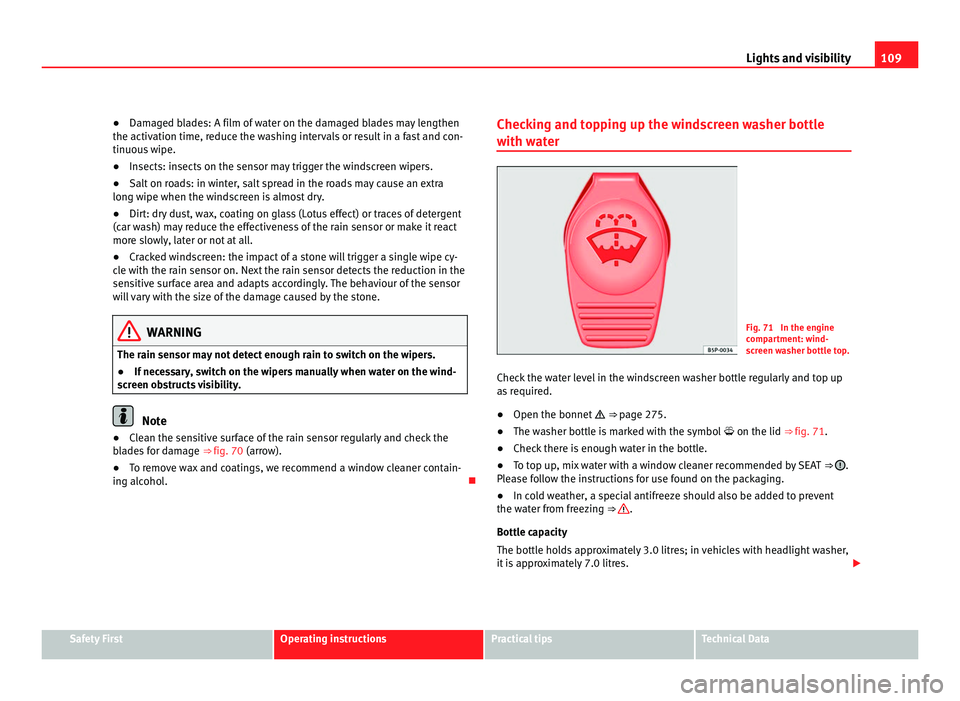
l. Checking and topping up the windscreen washer bottle
with wat
er Fig. 71 In the engine
comp
ar
tment: wind-
screen washer bottle top.
Check the water level in the windscreen washer bottle regularly and top up
as r
equired.
● Open the bonnet ⇒ pag
e 275.
● The washer bottle is marked with the symbol on the lid ⇒ fig. 71.
● Check there is enough water in the bottle.
● To top up, mix water with a window cleaner recommended by SEAT ⇒ .
Ple a
se follow the instructions for use found on the packaging.
● In cold weather, a special antifreeze should also be added to prevent
the water fr
om freezing ⇒ .
Bottle c ap
acity
The bottle holds approximately 3.0 litres; in vehicles with headlight washer,
it is approximately 7.0 litres. Safety First Operating instructions Practical tips Technical Data
Page 112 of 385
110
Lights and visibility WARNING
Never mix an unsuitable antifreeze or other similar products with the
wind s
creen washer water. A greasy layer may be formed on the wind-
screen which will impair visibility.
● Use clean water with a window cleaner recommended by SEAT.
● If necessary, add a suitable antifreeze to the water bottle. CAUTION
● Do not mix cleaning products recommended by SEAT with other prod-
ucts. Thi
s could lead to flocculation and may block the windscreen washer
jets.
● When topping up service fluids, make absolutely certain that you fill the
fluids int
o the correct reservoirs. Failure to observe this point will result in
serious malfunctions and engine damage!
Rear vision mirror
Intr oduction Additional information and warnings:
●
Personal convenience settings in the SEAT information system
⇒ pag
e 62
● Se
at memory ⇒ page 117
● Ch
anging gear ⇒ page 174
● Br
aking, stopping and parking ⇒ page 183 WARNING
The automatic anti-dazzle rear vision mirror contains an electrolytic fluid
which m a
y leak if the mirror is broken. This fluid can cause irritation to
the skin, eyes and respiratory organs.
● The electrolytic fluid may cause irritation to the skin, eyes and respi-
rator
y organs, particularly in individuals suffering from asthma or other
illnesses. Make sure that adequate quantities of fresh air enter and leave
the vehicle if it is not possible to open all the doors and windows.
● If the electrolytic fluid comes into contact with eyes or skin, wash the
area f
or at least 15 minutes with plenty of water, and seek medical ad-
vice.
● If the electrolytic fluid comes into contact with shoes or clothing,
wash the ar
ea for at least 15 minutes with plenty of water. Wash shoes
and clothing before wearing them again.
● If the electrolytic fluid is swallowed, wash the mouth with plenty of
water f
or at least 15 minutes. Do not try to provoke vomiting unless rec-
ommended by a Doctor. Seek medical advice immediately. CAUTION
If an automatic anti-dazzle rear vision mirror is broken, the electrolytic fluid
ma y
leak out. This fluid attacks plastic surfaces. Therefore, it should be
cleaned as fast as possible with a damp sponge or similar.