engine Seat Alhambra 2011 Owner's Guide
[x] Cancel search | Manufacturer: SEAT, Model Year: 2011, Model line: Alhambra, Model: Seat Alhambra 2011Pages: 385, PDF Size: 7.92 MB
Page 117 of 385
115
Seats and storage compartments
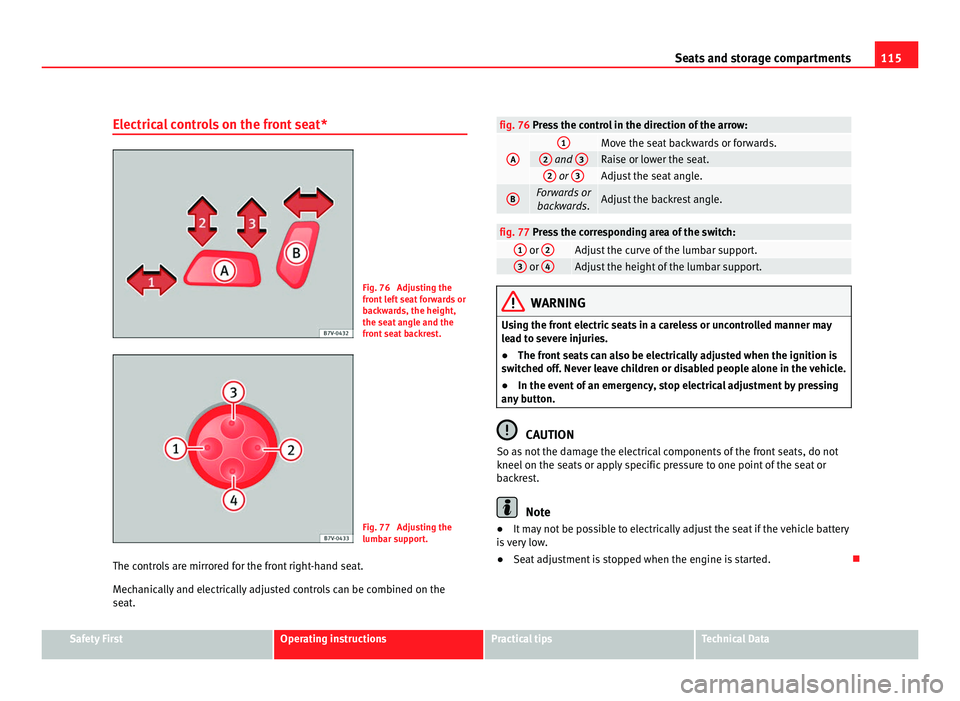
Electrical controls on the front seat* Fig. 76 Adjusting the
front
l
eft seat forwards or
backwards, the height,
the seat angle and the
front seat backrest. Fig. 77 Adjusting the
lumbar s
up
port.
The controls are mirrored for the front right-hand seat.
Mech
anically and electrically adjusted controls can be combined on the
seat. fig. 76 Press the control in the direction of the arrow:
A 1
Move the seat backwards or forwards.
2
and
3 Raise or lower the seat.
2
or
3 Adjust the seat angle.
B Forwards or
backwar ds. Adjust the backrest angle.
fig. 77 Press the corresponding area of the switch:
1
or
2 Adjust the curve of the lumbar support.
3
or
4 Adjust the height of the lumbar support.
WARNING
Using the front electric seats in a careless or uncontrolled manner may
le a
d to severe injuries.
● The front seats can also be electrically adjusted when the ignition is
switc
hed off. Never leave children or disabled people alone in the vehicle.
● In the event of an emergency, stop electrical adjustment by pressing
any b
utton. CAUTION
So as not the damage the electrical components of the front seats, do not
kneel on the se ats
or apply specific pressure to one point of the seat or
backrest. Note
● It may not be possible to electrically adjust the seat if the vehicle battery
i s
very low.
● Seat adjustment is stopped when the engine is started. Safety First Operating instructions Practical tips Technical Data
Page 154 of 385
152
Seats and storage compartments WARNING
Improper use of the sockets or electrical devices could lead to a fire and
cau se seriou
s injuries.
● Never leave children unsupervised in the vehicle. The sockets and
equipment connect
ed to them can be used when the ignition is switched
on.
● Should a connected electrical device overheat, switch it off and un-
plug it immedi
ately. CAUTION
● To avoid damage to the vehicle's electrical system, never connect equip-
ment th
at generates electrical current, such as solar panels or battery charg-
ers, to the 12 Volt sockets in order to charge the vehicle's battery.
● Only use accessories with approved electromagnetic compatibility ac-
cordin
g to current regulations.
● To avoid damage due to voltage variations, switch off all appliances con-
nected to the 12
V sockets before switching the ignition on or off and before
starting the engine.
● Never connect an appliance to the 12 Volt socket that consumes more
than the pow
er indicated in watts. Exceeding the maximum power absorp-
tion could damage the vehicle's electrical system. For the sake of the environment
Do not leave the engine running when the vehicle is at a standstill. Note
● Using electrical appliances with the engine stopped and the ignition
sw it
ched on will drain the battery.
● Unshielded equipment can cause interference on the radio equipment
and the vehic
le's electrical system.
● Interference can occur on the radio's AM waveband if electrical applian-
ces
are used near the rear window aerial.
Page 155 of 385
153
Seats and storage compartments
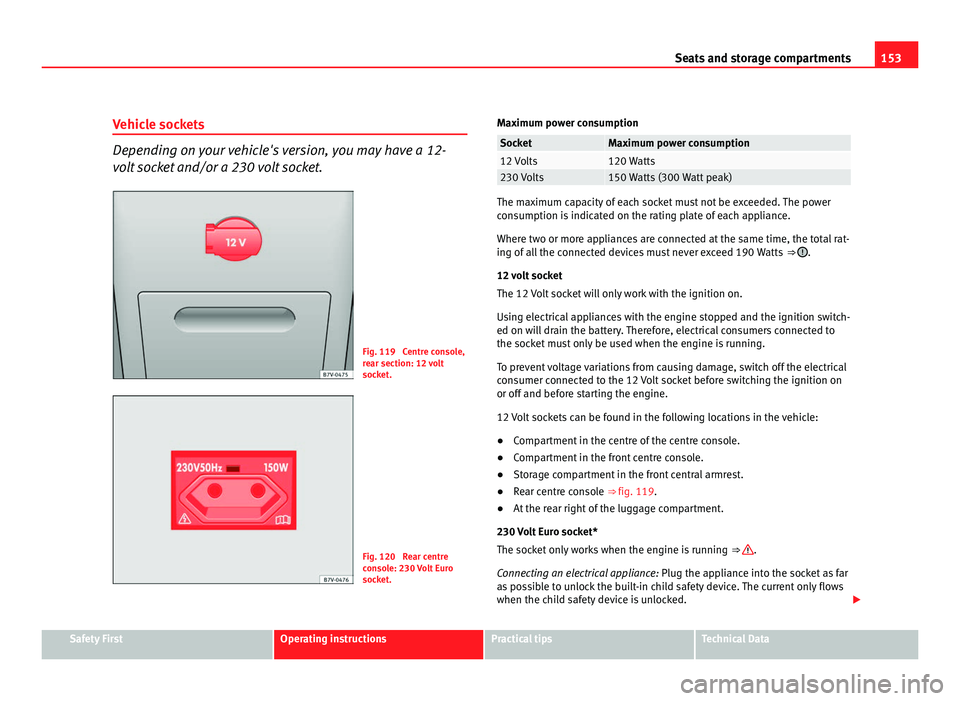
Vehicle sockets Depending on your vehicle's version, you may have a 12-
volt
socket and/or a 230 volt socket. Fig. 119 Centre console,
re
ar section: 12
volt
socket. Fig. 120 Rear centre
con
so
le: 230 Volt Euro
socket. Maximum power consumption Socket Maximum power consumption
12 Volts 120 Watts
230 Volts 150 Watts (300 Watt peak)
The maximum capacity of each socket must not be exceeded. The power
con
s
umption is indicated on the rating plate of each appliance.
Where two or more appliances are connected at the same time, the total rat-
ing of all the connected devices must never exceed 190 Watts ⇒ .
12 v o
lt socket
The 12 Volt socket will only work with the ignition on.
Using electrical appliances with the engine stopped and the ignition switch-
ed on will drain the battery. Therefore, electrical consumers connected to
the socket must only be used when the engine is running.
To prevent voltage variations from causing damage, switch off the electrical
consumer connected to the 12 Volt socket before switching the ignition on
or off and before starting the engine.
12 Volt sockets can be found in the following locations in the vehicle:
● Compartment in the centre of the centre console.
● Compartment in the front centre console.
● Storage compartment in the front central armrest.
● Rear centre console ⇒ fig. 119.
● At the rear right of the luggage compartment.
230 Vo
lt Euro socket*
The socket only works when the engine is running ⇒ .
Conn e
cting an electrical appliance: Plug the appliance into the socket as far
as possible to unlock the built-in child safety device. The current only flows
when the child safety device is unlocked. Safety First Operating instructions Practical tips Technical Data
Page 157 of 385
155
Heating, Ventilation and Air conditioning
Heating, Ventilation and Air conditioning Climate Control
Introduction Viewing Climatronic information
The fact
or
y-fitted radio or navigation system screen briefly displays informa-
tion relating to Climatronic.
The units of temperature measurement is displayed on the factory-installed
radio or navigation system and, depending on the vehicle equipment, can
be set using the Configuration menu on the instrument panel.
Additional information and warnings:
● SEAT information system ⇒ page 62
● W
indscreen wash system ⇒ page 105
● Aux
iliary heating ⇒ page 163
● C
aring for and cleaning the vehicle exterior ⇒ page 242WARNING
Reduced visibility through the windows increases the risk of serious acci-
dents.
● Ens
ure that all windows are free of ice and snow and that they are not
fogg
ed up preventing a clear view of everything outside.
● The maximum heat output required to defrost windows quickly is only
avail
able when the engine has reached its normal running temperature.
Only drive when you have good visibility. WARNING (Continued)
● Always ensure that you use the climate control and heated rear win-
do w t
o maintain good visibility.
● Never leave the air recirculation on for a long period of time. If the
coolin
g mode is switched off and air recirculation mode switched on, the
windows can mist over very quickly, considerably limiting visibility.
● Switch air recirculation mode off when it is not required. WARNING
Stuffy or used air will increase fatigue and reduce driver concentration
pos s
ibly resulting in a serious accident.
● Never leave the fresh air fan turned off or use the air recirculation for
long periods
of time; the air inside the passenger compartment will not
be refreshed. CAUTION
● Switch the climate control system off if you think it may be broken. This
w i
ll avoid additional damage. Have the climate control system checked by a
Technical Service.
● Repairs to the climate control system require specialist knowledge and
speci
al tools. SEAT recommends visiting a Technical Service.
● Do not smoke when air recirculation is switched on in vehicles with a cli-
mate c
ontrol system. The smoke taken in could lie on the cooling system va-
poriser and on the activated charcoal cartridge of the dust and pollen filter,
leading to a permanently unpleasant smell. Safety First Operating instructions Practical tips Technical Data
Page 160 of 385
158
Heating, Ventilation and Air conditioning
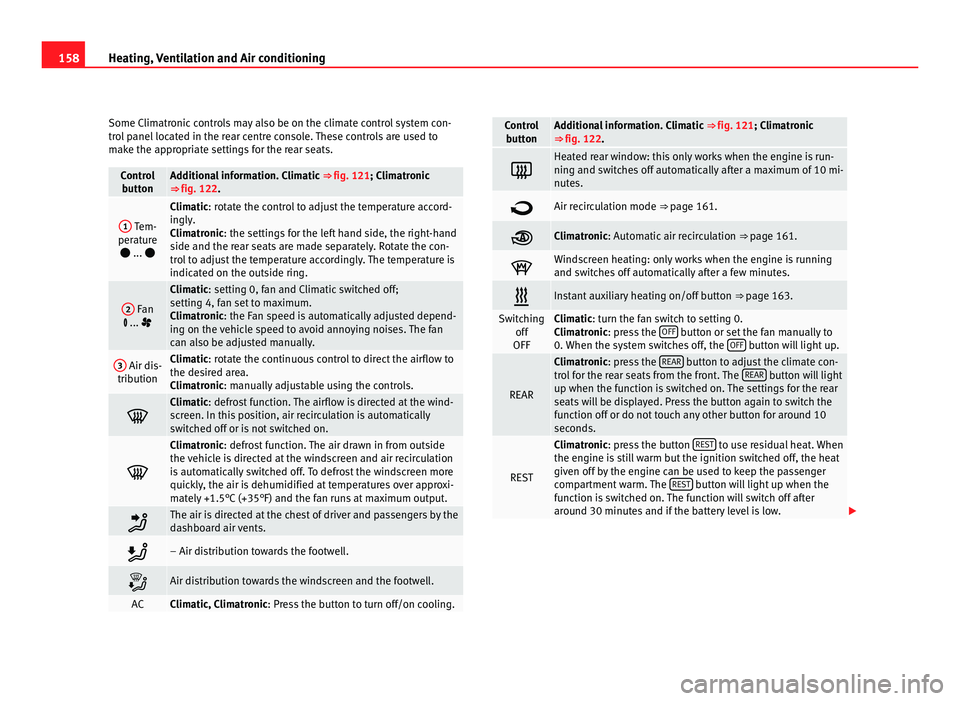
Some Climatronic controls may also be on the climate control system con-
tro l
panel located in the rear centre console. These controls are used to
make the appropriate settings for the rear seats. Control
butt on Additional information. Climatic
⇒ fig. 121; Climatr
onic
⇒ fig. 122. 1
Tem-
perat ur
e
... Climatic: rotate the control to adjust the temperature accord-
in
gly
.
Climatronic: the settings for the left hand side, the right-hand
side and the rear seats are made separately. Rotate the con-
trol to adjust the temperature accordingly. The temperature is
indicated on the outside ring. 2
Fan
... Climatic: setting 0, f
an and C
limatic switched off;
setting 4, fan set to maximum.
Climatronic: the Fan speed is automatically adjusted depend-
ing on the vehicle speed to avoid annoying noises. The fan
can also be adjusted manually. 3
Air dis-
tribution Climatic: rotate the continuous control to direct the airflow to
the de
s
ired area.
Climatronic: manually adjustable using the controls. Climatic: defro
s
t function. The airflow is directed at the wind-
screen. In this position, air recirculation is automatically
switched off or is not switched on. Climatronic: defro
s
t function. The air drawn in from outside
the vehicle is directed at the windscreen and air recirculation
is automatically switched off. To defrost the windscreen more
quickly, the air is dehumidified at temperatures over approxi-
mately +1.5°C (+35°F) and the fan runs at maximum output. The air is directed at the chest of driver and passengers by the
da
shbo
ard air vents. – Air distribution towards the footwell.
Air distribution towards the windscreen and the footwell.
AC Climatic, Climatronic: Pre
s
s the button to turn off/on cooling. Control
butt on Additional information. Climatic
⇒ fig. 121; Climatr
onic
⇒ fig. 122. Heated rear window: this only works when the engine is run-
ning and sw
it
ches off automatically after a maximum of 10 mi-
nutes. Air recirculation mode ⇒ pag
e 161. Climatronic: Autom
atic
air recirculation ⇒ page 161. Windscreen heating: only works when the engine is running
and swit
c
hes off automatically after a few minutes. Instant auxiliary heating on/off button
⇒ page 163. Switching
off
OFF Climatic: turn the fan switch to setting 0.
C
lim
atronic: press the OFF button or set the fan manually to
0. When the sy s
tem switches off, the OFF button will light up.
REAR Climatronic: pre
s
s the REAR button to adjust the climate con-
tro l
for the rear seats from the front. The REAR button will light
up when the fu nction i
s switched on. The settings for the rear
seats will be displayed. Press the button again to switch the
function off or do not touch any other button for around 10
seconds. REST Climatronic: pre
s
s the button REST to use residual heat. When
the engine i s
still warm but the ignition switched off, the heat
given off by the engine can be used to keep the passenger
compartment warm. The REST button will light up when the
fu nction i
s switched on. The function will switch off after
around 30 minutes and if the battery level is low.
Page 161 of 385
159
Heating, Ventilation and Air conditioning Control
butt on Additional information. Climatic
⇒ fig. 121; Climatr onic
⇒ fig. 122. Climatronic: tran
sf
erring the driver's seat temperature set-
tings to the other seats. If the button is not lit up, the set
temper at
ure in the driver's seat will also apply to the other
seats.
Press the button or the temperature control for the front pas-
senger's seat or the rear seats to set them to a different tem-
perature. The button lights with an indicator.
Vehicles with auxiliary heating: observe the description of the AUTO button.
AUTO Automatic temperature, fan, and air distribution control.
WARNING
Never turn off the air fan for a long time or the air in the passenger com-
par tment
will not be refreshed.
● Stuffy or used air will increase fatigue and reduce driver and passen-
ger conc
entration possibly resulting in a serious accident. Note
● Not all Climatronic buttons are operational in REAR mode.
● The REAR button is locked in defrost mode.
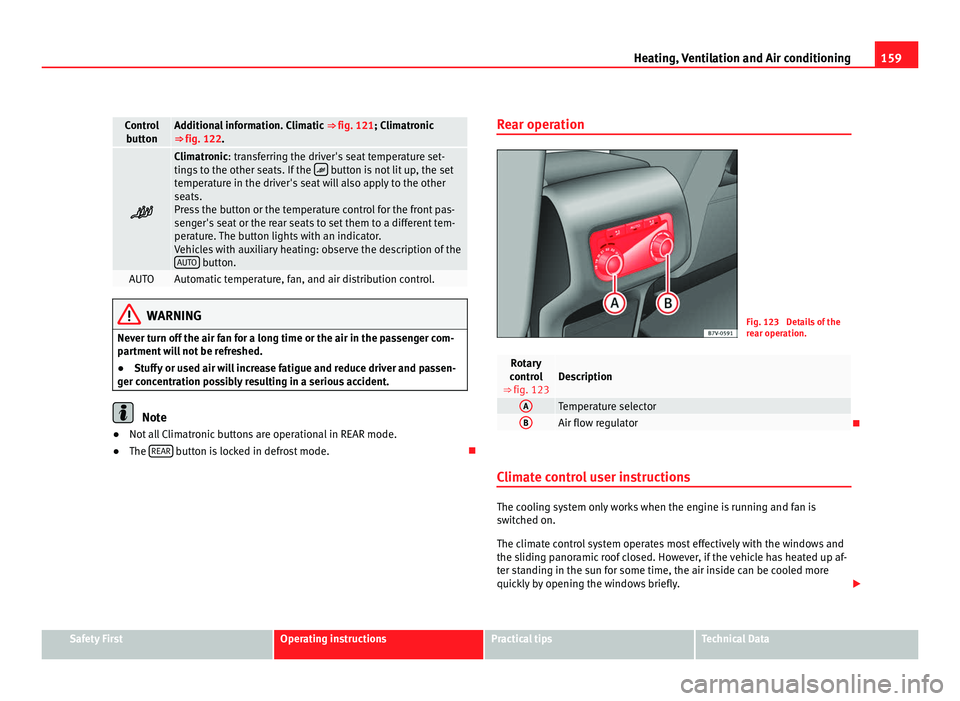
Rear operation Fig. 123 Details of the
re
ar oper
ation. Rotary
contr o
l
⇒ fig. 123 Description
A
Temperature selector
B
Air flow regulator
Climate control user instructions The cooling system only works when the engine is running and fan is
swit
c
hed on.
The climate control system operates most effectively with the windows and
the sliding panoramic roof closed. However, if the vehicle has heated up af-
ter standing in the sun for some time, the air inside can be cooled more
quickly by opening the windows briefly. Safety First Operating instructions Practical tips Technical Data
Page 162 of 385
160
Heating, Ventilation and Air conditioning
Keep the air vents in front of the windscreen free of snow, ice and leaves to
ens ur
e heating and cooling are not impaired and to prevent the windows
from misting over.
Adjustment for safer driving
When the air conditioning is switched on, the temperature and the air hu-
midity in the vehicle interior drop. Hence, when the outside air humidity is
high, the windows do not mist over and comfort for the vehicle occupants is
improved:
With Climatic
● Disable air recirculation mode ⇒ pag
e 161.
● Set the fan to setting 1 or 2.
● Turn the temperature control to the centre position.
● Open the air outlets in the dash panel ⇒ pag
e 161.
● Turn the air distribution control to the required position.
● Press the AC button to turn on cooling. The button will light up.
With C lim
atronic
● Press the AUTO button.
● Set the temperature to +22°C (+72°F).
● Open the air outlets in the dash panel ⇒ pag
e 161.
Switching the Climatronic temperature measuring unit
Press and hold the AC and
AUT
O buttons to switch the temperature display
between C el
sius and Fahrenheit.
Heat
The maximum heat output required to defrost windows quickly is only avail-
able when the engine has reached its normal running temperature.
The air conditioning system does not switch on
If the air conditioning system cannot be switched on, this may be caused by
the following: ●
The engine is not running.
● The fan i
s switched off.
● The climate control fuse has blown.
● The outside temperature is lower than approximately +3°C (+38°F).
● The climate control system compressor has been temporarily switched
off becau
se the engine coolant temperature is too high.
● Another fault in the vehicle. Have the climate control system checked by
a Tec
hnical Service.
Things to note
If the humidity and temperature outside the vehicle are high, condensation
can drip off the evaporator in the cooling system and form a pool under-
neath the vehicle. This is normal and does not indicate a leak!
Dust and pollen filter
The dust and pollen filter with its activated charcoal cartridge serves as a
barrier against impurities in the ambient air.
For the climate control system to work with maximum efficiency, the dust
and pollen filter must be replaced at the intervals specified in the Mainte-
nance Programme.
If the filter loses efficiency prematurely due to use in areas with very high
levels of air pollution, the filter must be changed more frequently than sta-
ted in the Service Schedule. Note
● The climate control system must left running for a few minutes to reach
the set t
emperature in the vehicle interior.
● After starting it, any residual humidity in the climate control system
coul
d mist over the windscreen.
● The air from the vents flows through the passenger compartment and
out through the outl
ets below the rear window. Do not cover these outlets
with items of clothing or other objects.
Page 168 of 385
166
Heating, Ventilation and Air conditioning
Checking programming
If the timer h
as been switched on after switching the ignition off, the instant
on button will remain lit for around ten seconds.
WARNING
Never program the independent heating system to be activated and oper-
ated in c lo
sed, unventilated areas. The auxiliary heater fumes contain
carbon dioxide, an odourless and colourless toxic gas. Carbon monoxide
can cause people to lose consciousness. It can also cause death.
Operating instructions The auxiliary heater exhaust system located below the vehicle must be kept
cl
e
ar of snow, mud and other objects. The exhaust fumes must not be ob-
structed in any way. The exhaust fumes generated by the auxiliary heater
are removed via an exhaust pipe fitted underneath the vehicle.
On heating the vehicle interior, depending on the outside temperature the
warm air is first directed at the windscreen and then to the rest of the pas-
senger compartment through the air vents. If the air vents are turned to-
wards the windows, for example, the form of air distribution may be affec-
ted.
Depending on the outside temperature, the temperature at which the auxili-
ary heater warms the vehicle interior may be somewhat higher if the heating
or climate control temperature control is set to maximum before switching
the heating on.
Depending on the engine, vehicles with auxiliary heater may be fitted with a
second battery in the luggage compartment that is responsible for powering
the auxiliary heater. Cases in which the auxiliary heater will not switch on
●
The auxiliary heater requires about as much power as the dipped head-
lights. If the batt
ery charge is low, the auxiliary heater will switch off auto-
matically or will not even switch on. This avoids problems when starting the
engine.
● The heater will switch just once each time. The timer will also have to be
switc
hed back on every time it is required. Note
● Noise will be heard while the auxiliary heater is running.
● When the air humidity i
s high and the outside temperature low, the
heating sy
stem may evaporate condensation from the auxiliary heater. In
this case, steam may be released from underneath the vehicle. This is com-
pletely normal and there is no need to suspect a fault!
● If the auxiliary heater runs several times over a prolonged period, the ve-
hicle b
attery may run flat. To re-charge the battery, drive the vehicle for a
long distance. In general: drive for as much time as the auxiliary heating
was working.
Page 169 of 385
167
Driving
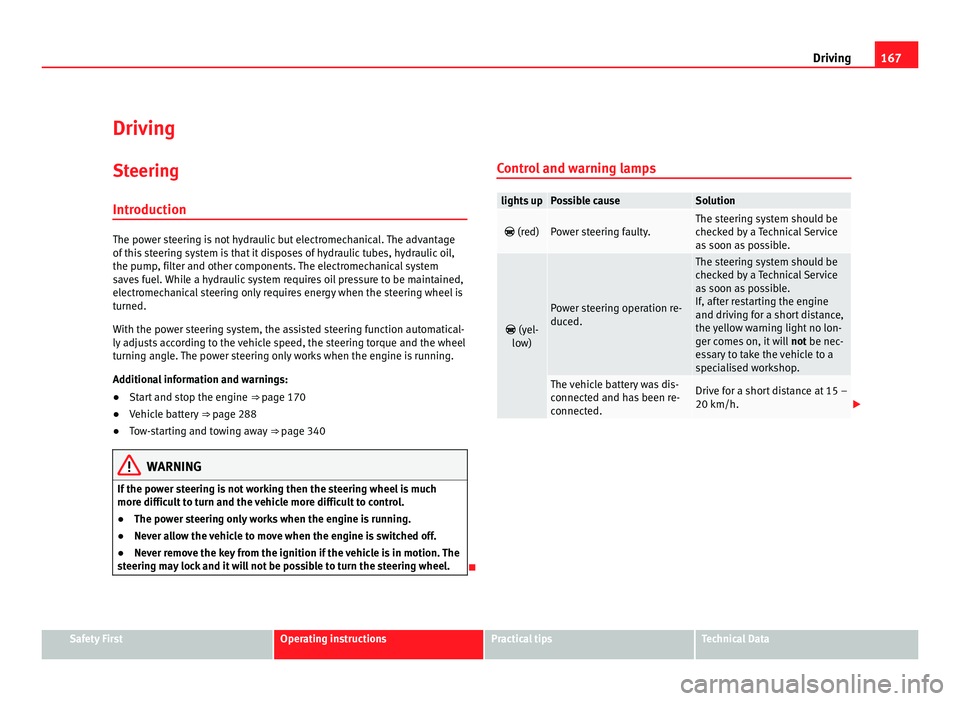
Driving SteeringIntroduction The power steering is not hydraulic but electromechanical. The advantage
of thi
s
steering system is that it disposes of hydraulic tubes, hydraulic oil,
the pump, filter and other components. The electromechanical system
saves fuel. While a hydraulic system requires oil pressure to be maintained,
electromechanical steering only requires energy when the steering wheel is
turned.
With the power steering system, the assisted steering function automatical-
ly adjusts according to the vehicle speed, the steering torque and the wheel
turning angle. The power steering only works when the engine is running.
Additional information and warnings:
● Start and stop the engine ⇒ page 170
● V
ehicle battery ⇒ page 288
● T
ow-starting and towing away ⇒ page 340WARNING
If the power steering is not working then the steering wheel is much
more diffic u
lt to turn and the vehicle more difficult to control.
● The power steering only works when the engine is running.
● Never allow the vehicle to move when the engine is switched off.
● Never remove the key from the ignition if the vehicle is in motion. The
steerin
g may lock and it will not be possible to turn the steering wheel. Control and warning lamps lights up Possible cause Solution
(red) Power steering faulty. The steering system should be
chec
k
ed by a Technical Service
as soon as possible.
(yel-
lo w) Power steering operation re-
duced. The steering system should be
chec
k
ed by a Technical Service
as soon as possible.
If, after restarting the engine
and driving for a short distance,
the yellow warning light no lon-
ger comes on, it will not be nec-
essary to take the vehicle to a
specialised workshop. The vehicle battery was dis-
connect
ed and h
as been re-
connected. Drive for a short distance at 15 –
20 km/h.
Safety First Operating instructions Practical tips Technical Data
Page 170 of 385
168
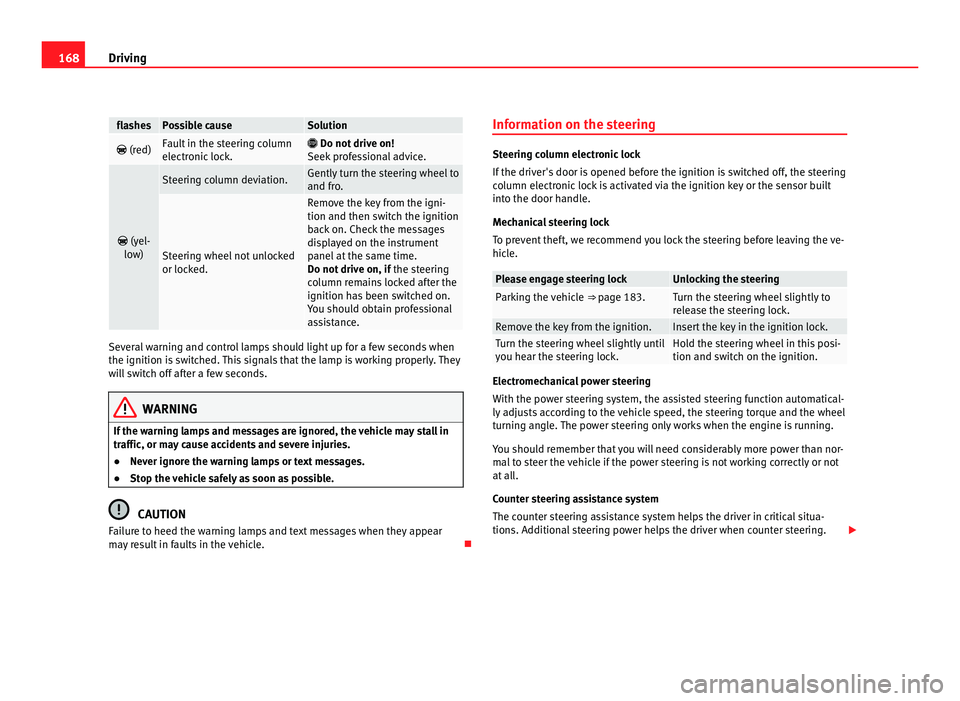
Driving flashes Possible cause Solution
(red) Fault in the steering column
electr
onic
lock.
Do not drive on!
Seek pr
ofessional advice.
(yel-
lo w) Steering column deviation. Gently turn the steering wheel to
and fro
. Steering wheel not unlocked
or lock
ed. Remove the key from the igni-
tion and then swit
c
h the ignition
back on. Check the messages
displayed on the instrument
panel at the same time.
Do not drive on, if the steering
column remains locked after the
ignition has been switched on.
You should obtain professional
assistance. Several warning and control lamps should light up for a few seconds when
the ignition is
sw
itched. This signals that the lamp is working properly. They
will switch off after a few seconds. WARNING
If the warning lamps and messages are ignored, the vehicle may stall in
traffic, or m a
y cause accidents and severe injuries.
● Never ignore the warning lamps or text messages.
● Stop the vehicle safely as soon as possible. CAUTION
Failure to heed the warning lamps and text messages when they appear
ma y
result in faults in the vehicle. Information on the steering Steering column electronic lock
If the driv
er's
door is opened before the ignition is switched off, the steering
column electronic lock is activated via the ignition key or the sensor built
into the door handle.
Mechanical steering lock
To prevent theft, we recommend you lock the steering before leaving the ve-
hicle. Please engage steering lock Unlocking the steering
Parking the vehicle
⇒ page 183. Turn the steering wheel slightly to
rel
e
ase the steering lock. Remove the key from the ignition. Insert the key in the ignition lock.
Turn the steering wheel slightly until
you he
ar the s
teering lock. Hold the steering wheel in this posi-
tion and swit
c
h on the ignition. Electromechanical power steering
With the po
w
er steering system, the assisted steering function automatical-
ly adjusts according to the vehicle speed, the steering torque and the wheel
turning angle. The power steering only works when the engine is running.
You should remember that you will need considerably more power than nor-
mal to steer the vehicle if the power steering is not working correctly or not
at all.
Counter steering assistance system
The counter steering assistance system helps the driver in critical situa-
tions. Additional steering power helps the driver when counter steering.