lock Seat Alhambra 2011 User Guide
[x] Cancel search | Manufacturer: SEAT, Model Year: 2011, Model line: Alhambra, Model: Seat Alhambra 2011Pages: 385, PDF Size: 7.92 MB
Page 51 of 385
49
Child safety
Lifting the cushion
● Pull the unlock lever ⇒ fig. 29 A on the cushion in the direction of the
arro w 1 .
● Fold both sides B up in the direction of the arrow
2 .
● Push the cushion C back in the direction of the arrow
3 until it engag-
es.
Fittin g the s
ide head restraint
● Fold the backrest of the rear seat forwards ⇒ page 117.
● R
emove the head restraint.
● Make sure the belt guide handle on the window side is on the side head
res
traint ⇒ page 49.
● Insert the guide rods ⇒ fig. 30 1 of the head restraint into the guides
on the side he a
d restraint 2 .
● Insert the head restraint and the side head restraint into the guides on
the corr e
sponding backrest B .
● Push the head restraint down as far as it will go.
● Fold the backrest of the rear seat back.
● Pull the rear seat and the backrest to check whether they are engaged
properly . Se
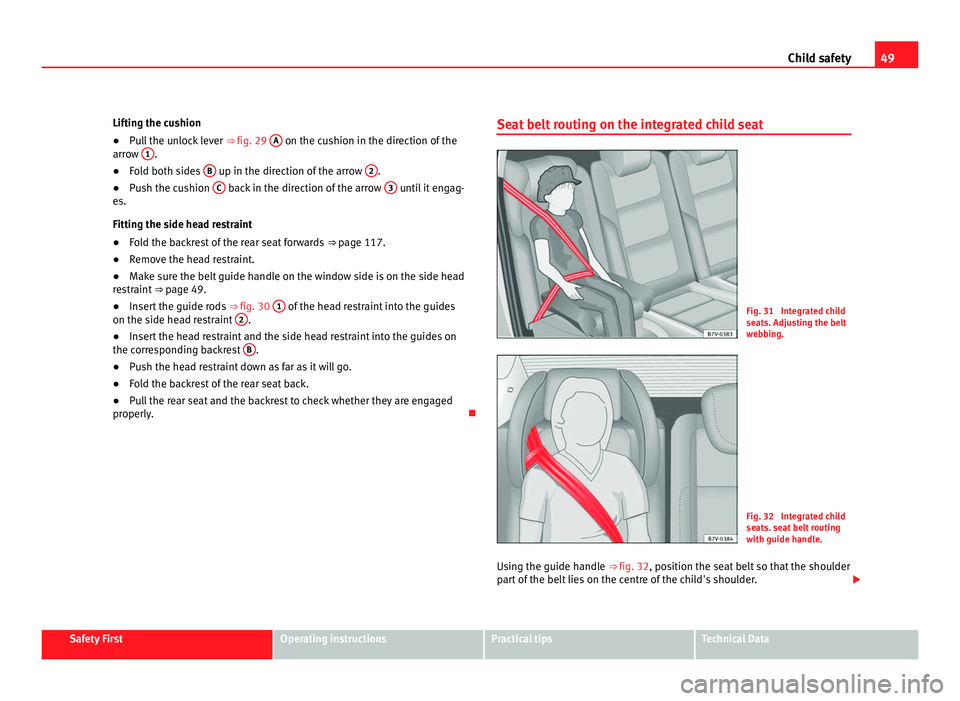
at belt routing on the integrated child seat Fig. 31 Integrated child
seat
s. Adju
sting the belt
webbing. Fig. 32 Integrated child
seat
s. se
at belt routing
with guide handle.
Using the guide handle ⇒ fig. 32, position the se
at belt so that the shoulder
part of the belt lies on the centre of the child's shoulder. Safety First Operating instructions Practical tips Technical Data
Page 52 of 385
50
Child safety
Seat belt guide handle
● Secure the seat belt guide handle to the side head restraint on the win-
dow s ide.
The guide handle is secured by a button.
● Open the upper button on the seat belt guide handle and pass the belt
webb
ing below the side head restraint and through the guide handle.
● Close the button again.
Adjustin
g the belt routing
● Guide the automatic three-point seat belt below the side head restraint.
● Pull the latch plate and slowly place the belt webbing across the child's
ches
t and lap.
● Insert the latch plate into the buckle for the appropriate seat and push it
down unti
l it is securely locked with an audible click.
● Pull the belt to ensure that the latch plate is securely engaged in the
buck
le. WARNING
The seat belt only offers maximum protection from severe or fatal injuries
when it i s
correctly positioned.
● Children must assume the proper sitting position and be properly bel-
ted in whil
e travelling.
● The shoulder belt must be positioned against the middle of the
shoulder
.
● The seat belt must lie flat and fit comfortably.
● Allow the belt to retract until it fits tightly over the child's seat.
● The lap part of the seat belt must lie across the pelvis, never across
the stom
ach.
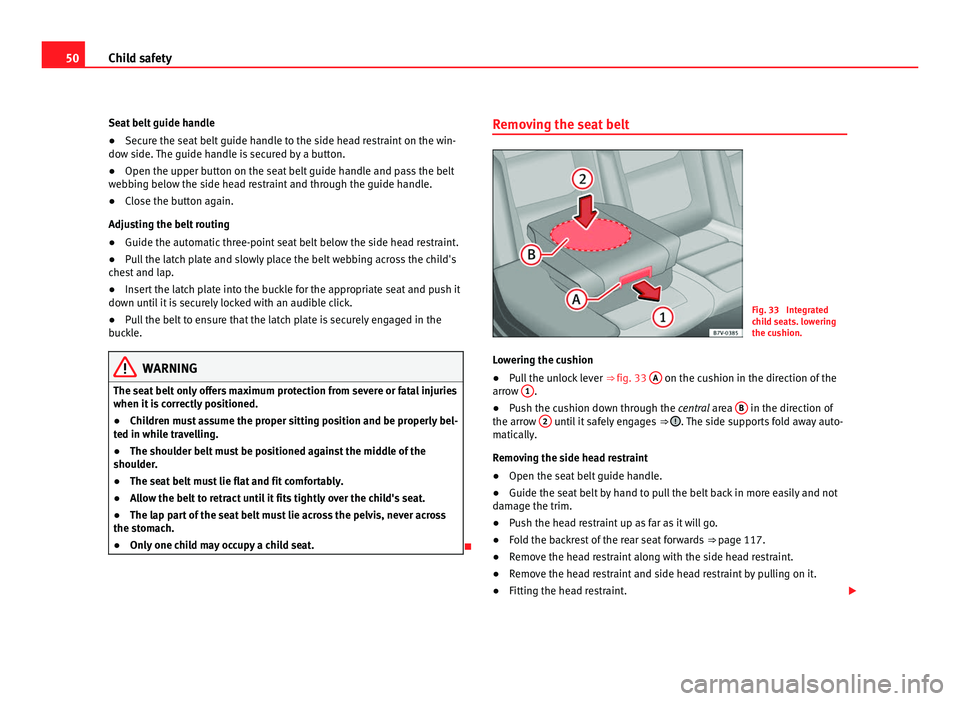
● Only one child may occupy a child seat. Removing the seat belt
Fig. 33 Integrated
chi
l
d seats. lowering
the cushion.
Lowering the cushion
● Pull the unlock lever ⇒ fig. 33 A on the cushion in the direction of the
arro w 1 .
● Push the cushion down through the cen tr
al area B in the direction of
the arro w 2 until it safely engages
⇒ . The side supports fold away auto-
matic al
ly.
Removing the side head restraint
● Open the seat belt guide handle.
● Guide the seat belt by hand to pull the belt back in more easily and not
damag
e the trim.
● Push the head restraint up as far as it will go.
● Fold the backrest of the rear seat forwards ⇒ page 117.
● R
emove the head restraint along with the side head restraint.
● Remove the head restraint and side head restraint by pulling on it.
● Fitting the head restraint.
Page 55 of 385
53
Cockpit
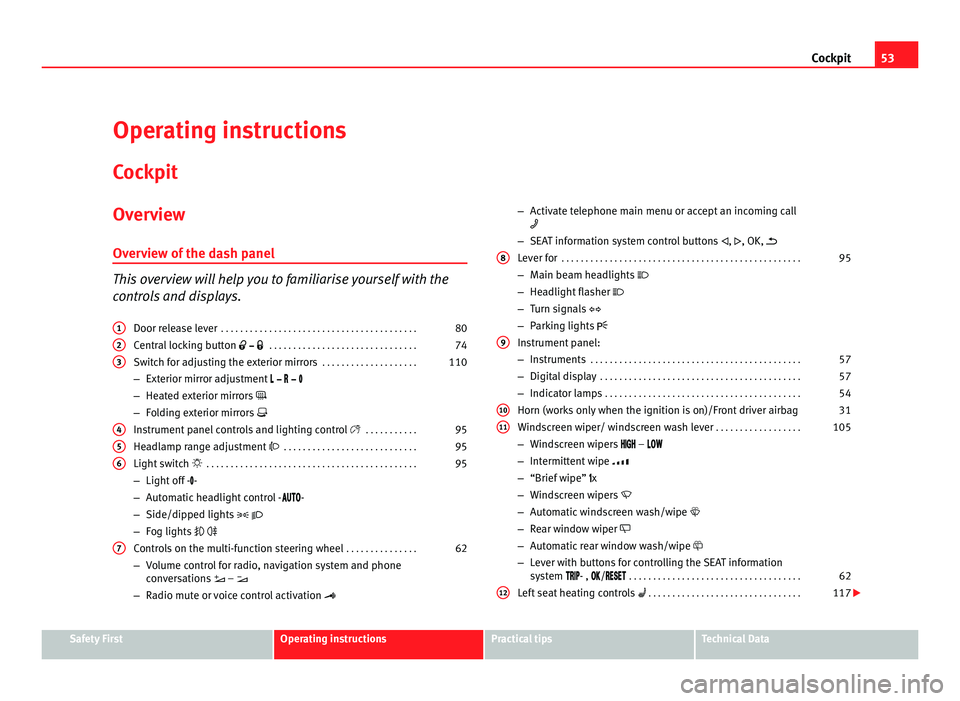
Operating instructions Coc kpit
Ov
erview
Overv
iew of the dash panel This overview will help you to familiarise yourself with the
con
tr
ols and displays.
Door release lever . . . . . . . . . . . . . . . . . . . . . . . . . . . . . . . . . . . . . . . . . 80
Central locking button . . . . . . . . . . . . . . . . . . . . . . . . . . . . . . . 74
Switch for adjusting the exterior mirrors . . . . . . . . . . . . . . . . . . . .110
– Exterior mirror adjustment
– Heat
ed exterior mirrors
– Folding exterior mirrors
Instrument panel controls and lighting control . . . . . . . . . . . 95
Headlamp range adjustment . . . . . . . . . . . . . . . . . . . . . . . . . . . . 95
Light switch . . . . . . . . . . . . . . . . . . . . . . . . . . . . . . . . . . . . . . . . . . . . 95
– Light off - -
– Autom
atic headlight control - -
– Side/dipped lights
– Fog lights
Controls on the multi-function steering wheel . . . . . . . . . . . . . . .62
– Volume control for radio, navigation system and phone
con
versations –
– Radio mute or voice control activation
1 2
3
4
5
6
7 –
Activate telephone main menu or accept an incoming call
– SEA
T information system control buttons , , OK,
Lever for . . . . . . . . . . . . . . . . . . . . . . . . . . . . . . . . . . . . . . . . . . . . . . . . . . 95
– Main beam headlights
– Hea
dlight flasher
– Turn signals
– Parking lights
Instrument panel:
– Instruments . . . . . . . . . . . . . . . . . . . . . . . . . . . . . . . . . . . . . . . . . . . . 57
– Digital display . . . . . . . . . . . . . . . . . . . . . . . . . . . . . . . . . . . . . . . . . . 57
– Indicator lamps . . . . . . . . . . . . . . . . . . . . . . . . . . . . . . . . . . . . . . . . . 54
Horn (work
s only when the ignition is on)/Front driver airbag 31
Windscreen wiper/ windscreen wash lever . . . . . . . . . . . . . . . . . .105
– Windscreen wipers –
– Int
ermittent wipe
– “Brief wipe” x
– Windscreen wipers
– Automatic windscreen wash/wipe
– Rear window wiper
– Automatic rear window wash/wipe
– Lever with buttons for controlling the SEAT information
system - , / . . . . . . . . . . . . . . . . . . . . . . . . . . . . . . . . . . . . 62
Left seat heating controls . . . . . . . . . . . . . . . . . . . . . . . . . . . . . . . . 117
8
9
10
11
12
Safety First Operating instructions Practical tips Technical Data
Page 56 of 385
54
Cockpit
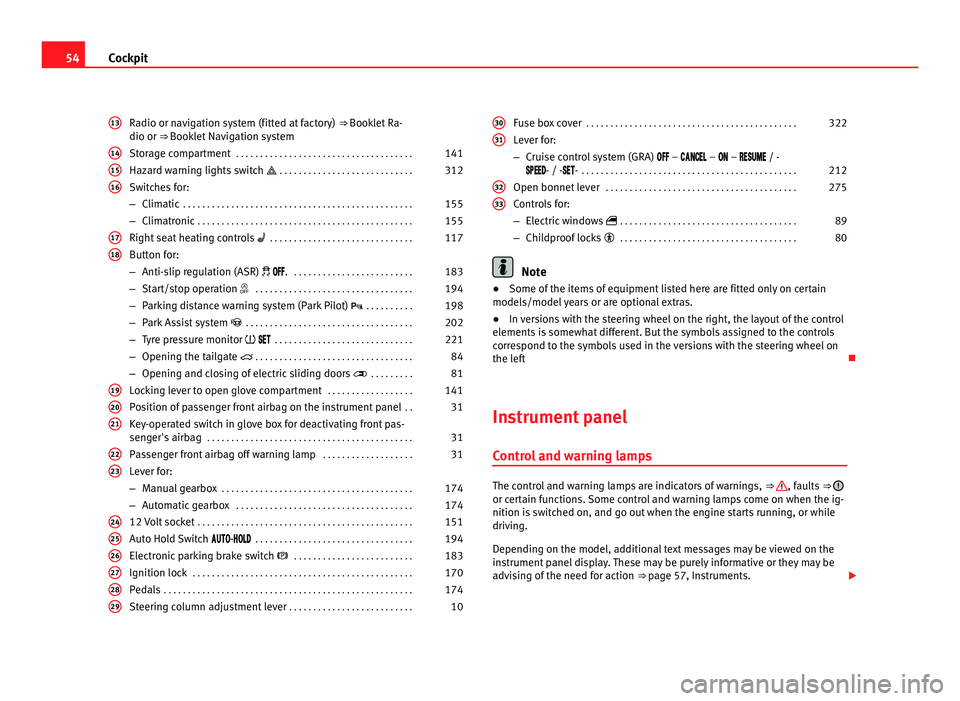
Radio or navigation system (fitted at factory) ⇒ Booklet Ra-
dio or ⇒ Booklet Navigation system
Storage compartment . . . . . . . . . . . . . . . . . . . . . . . . . . . . . . . . . . . . . 141
Hazard warning lights switch . . . . . . . . . . . . . . . . . . . . . . . . . . . . 312
Switches for:
– Climatic . . . . . . . . . . . . . . . . . . . . . . . . . . . . . . . . . . . . . . . . . . . . . . . . 155
– C
limatronic . . . . . . . . . . . . . . . . . . . . . . . . . . . . . . . . . . . . . . . . . . . . . 155
Right se
at heating controls . . . . . . . . . . . . . . . . . . . . . . . . . . . . . . 117
Button for:
– Anti-slip r
egulation (ASR) . . . . . . . . . . . . . . . . . . . . . . . . . . 183
– Start/stop operation . . . . . . . . . . . . . . . . . . . . . . . . . . . . . . . . . 194
– Parking distance warning system (Park Pilot) . . . . . . . . . . 198
– Park Assist system . . . . . . . . . . . . . . . . . . . . . . . . . . . . . . . . . . . 202
– Tyre pressure monitor
. . . . . . . . . . . . . . . . . . . . . . . . . . . . . 221
– Opening the tailgate . . . . . . . . . . . . . . . . . . . . . . . . . . . . . . . . . 84
– Opening and closing of electric sliding doors . . . . . . . . . 81
Loc
king lever to open glove compartment . . . . . . . . . . . . . . . . . .141
Position of passenger front airbag on the instrument panel . .31
Key-operated switch in glove box for deactivating front pas-
senger's
airbag . . . . . . . . . . . . . . . . . . . . . . . . . . . . . . . . . . . . . . . . . . . 31
Passenger front airbag off warning lamp . . . . . . . . . . . . . . . . . . .31
Lever for:
– Manual g
earbox . . . . . . . . . . . . . . . . . . . . . . . . . . . . . . . . . . . . . . . . 174
– Automatic gearbox . . . . . . . . . . . . . . . . . . . . . . . . . . . . . . . . . . . . . 174
12 V
olt socket . . . . . . . . . . . . . . . . . . . . . . . . . . . . . . . . . . . . . . . . . . . . . 151
Auto Hold Switch - . . . . . . . . . . . . . . . . . . . . . . . . . . . . . . . . . 194
Electr
onic parking brake switch . . . . . . . . . . . . . . . . . . . . . . . . . 183
Ignition lock . . . . . . . . . . . . . . . . . . . . . . . . . . . . . . . . . . . . . . . . . . . . . . 170
Pedals . . . . . . . . . . . . . . . . . . . . . . . . . . . . . . . . . . . . . . . . . . . . . . . . . . . . 174
Steering column adjustment lever . . . . . . . . . . . . . . . . . . . . . . . . . . 10
13 14
15
16
17
18
19
20
21
22
23
24
25
26
27
28
29 Fuse box cover
. . . . . . . . . . . . . . . . . . . . . . . . . . . . . . . . . . . . . . . . . . . . 322
Lever for:
– Crui se c
ontrol system (GRA) – – – / -
- / -- . . . . . . . . . . . . . . . . . . . . . . . . . . . . . . . . . . . . . . . . . . . . . 212
Open bonnet lever . . . . . . . . . . . . . . . . . . . . . . . . . . . . . . . . . . . . . . . . 275
Controls for:
– Electric w
indows . . . . . . . . . . . . . . . . . . . . . . . . . . . . . . . . . . . . . 89
– Childproof locks . . . . . . . . . . . . . . . . . . . . . . . . . . . . . . . . . . . . . 80 Note
● Some of the items of equipment listed here are fitted only on certain
model s/model
years or are optional extras.
● In versions with the steering wheel on the right, the layout of the control
elements i
s somewhat different. But the symbols assigned to the controls
correspond to the symbols used in the versions with the steering wheel on
the left
Instrument panel Contro
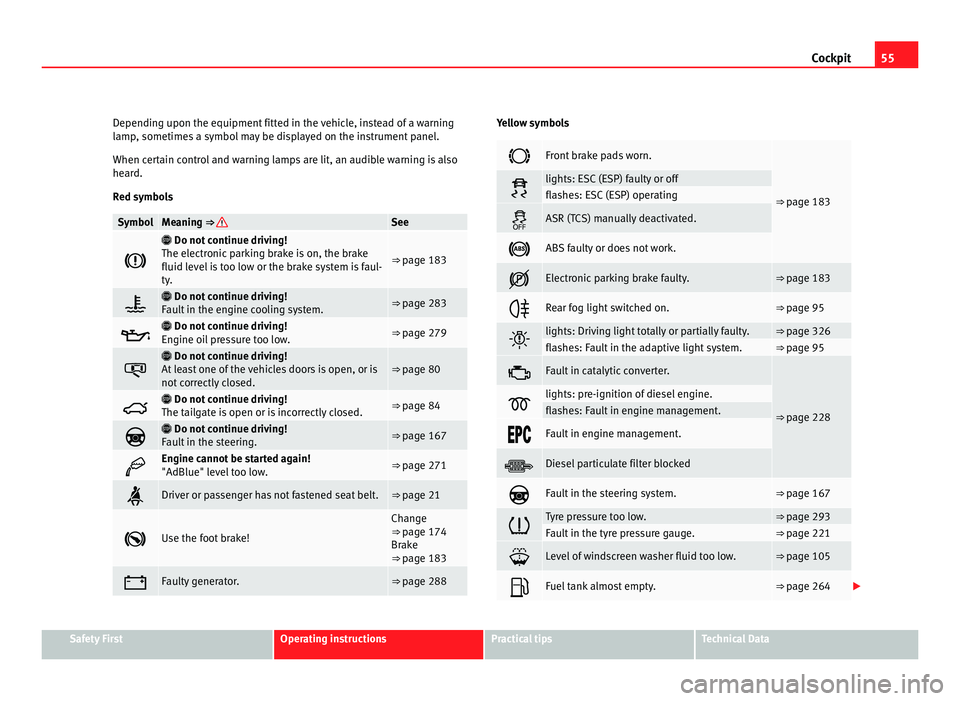
l and warning lamps The control and warning lamps are indicators of warnings,
⇒ , faults
⇒ or certain functions. Some control and warning lamps come on when the ig-
nition is
sw
itched on, and go out when the engine starts running, or while
driving.
Depending on the model, additional text messages may be viewed on the
instrument panel display. These may be purely informative or they may be
advising of the need for action ⇒ page 57, Instruments.
30 31
32
33
Page 57 of 385
55
Cockpit
Depending upon the equipment fitted in the vehicle, instead of a warning
lamp , sometime
s a symbol may be displayed on the instrument panel.
When certain control and warning lamps are lit, an audible warning is also
heard.
Red symbols Symbol Meaning ⇒ See
Do not continue driving!
The el ectr
onic parking brake is on, the brake
fluid level is too low or the brake system is faul-
ty. ⇒ page 183
Do not continue driving!
F au
lt in the engine cooling system. ⇒ page 283
Do not continue driving!
En gine oi
l pressure too low. ⇒ page 279
Do not continue driving!
At l
east one of the vehicles doors is open, or is
not correctly closed. ⇒ page 80
Do not continue driving!
The t ai
lgate is open or is incorrectly closed. ⇒ page 84
Do not continue driving!
F au
lt in the steering. ⇒ page 167
Engine cannot be started again!
"AdBlue" lev
el
too low. ⇒ page 271
Driver or passenger has not fastened seat belt. ⇒ page 21
Use the foot brake! Change
⇒ pag
e 174
Br
ake
⇒ page 183 Faulty generator. ⇒ page 288 Yellow symbols
Front brake pads worn.
⇒ page 183 lights: ESC (ESP) faulty or off
flashes: ESC (ESP) operating
ASR (TCS) manually deactivated.
ABS faulty or does not work.
Electronic parking brake faulty. ⇒ page 183
Rear fog light switched on. ⇒ page 95
lights: Driving light totally or partially faulty. ⇒ page 326
flashes: Fault in the adaptive light system. ⇒ page 95
Fault in catalytic converter.
⇒ page 228 lights: pre-ignition of diesel engine.
flashes: Fault in engine management.
Fault in engine management.
Diesel particulate filter blocked
Fault in the steering system. ⇒ page 167
Tyre pressure too low. ⇒ page 293
Fault in the tyre pressure gauge. ⇒ page 221
Level of windscreen washer fluid too low. ⇒ page 105
Fuel tank almost empty. ⇒ page 264
Safety First Operating instructions Practical tips Technical Data
Page 60 of 385
58
Cockpit
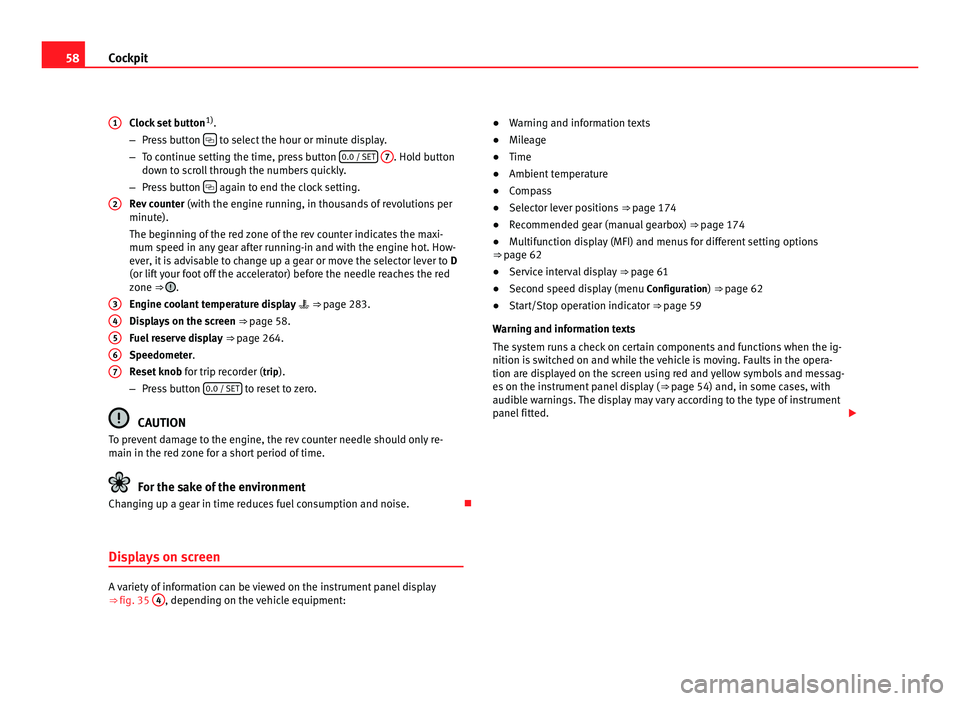
Clock set button 1)
.
– Pre s
s button to select the hour or minute display.
– To c ontinue settin
g the time, press button 0.0 / SET
7 . Hold button
down t o s
croll through the numbers quickly.
– Press button again to end the clock setting.
Rev c
ounter (with the engine running, in thousands of revolutions per
minute).
The beginning of the red zone of the rev counter indicates the maxi-
mum speed in any gear after running-in and with the engine hot. How-
ever, it is advisable to change up a gear or move the selector lever to D
(or lift your foot off the accelerator) before the needle reaches the red
zone ⇒ .
Engine c oo
lant temperature display ⇒ page 283.
Displays on the screen ⇒ page 58.
Fuel reserve display ⇒ page 264.
Speedometer.
Reset knob for trip recorder (trip).
– Press button 0.0 / SET to reset to zero.
CAUTION
To prevent damage to the engine, the rev counter needle should only re-
main in the r ed
zone for a short period of time. For the sake of the environment
Changing up a gear in time reduces fuel consumption and noise.
Displays on screen A variety of information can be viewed on the instrument panel display
⇒
fig. 35 4 , depending on the vehicle equipment:
1
2
3
4
5
6
7 ●
Warning and information texts
● Mil
eage
● Time
● Ambient temperature
● Compass
● Selector lever positions ⇒ page 174
● R
ecommended gear (manual gearbox) ⇒ page 174
● M
ultifunction display (MFI) and menus for different setting options
⇒ page 62
● Ser
vice interval display ⇒ page 61
● Sec
ond speed display (menu Configuration
) ⇒ page 62
● Start/Stop operation indicator ⇒ pag
e 59
Warning and information texts
The system runs a check on certain components and functions when the ig-
nition is switched on and while the vehicle is moving. Faults in the opera-
tion are displayed on the screen using red and yellow symbols and messag-
es on the instrument panel display ( ⇒ page 54) and, in some cases, with
audible warnings. The display may vary according to the type of instrument
panel fitted.
Page 63 of 385
61
Cockpit
Calibrating compass
To c alibr
ate the compass you must be in one of the valid magnetic zones
with sufficient space to be able to trace a circumference with the vehicle.
● Switch the ignition on.
● Select the Settings
menu followed by the option Compass and Calibrate.
● Confirm the message Des
cribe a complete circumference to calibrate the
compass with OK and then trace a complete circumference driving at ap-
pro x
imately 10 km/h (6 mph).
When the corresponding cardinal point is displayed, the calibration is com-
plete.
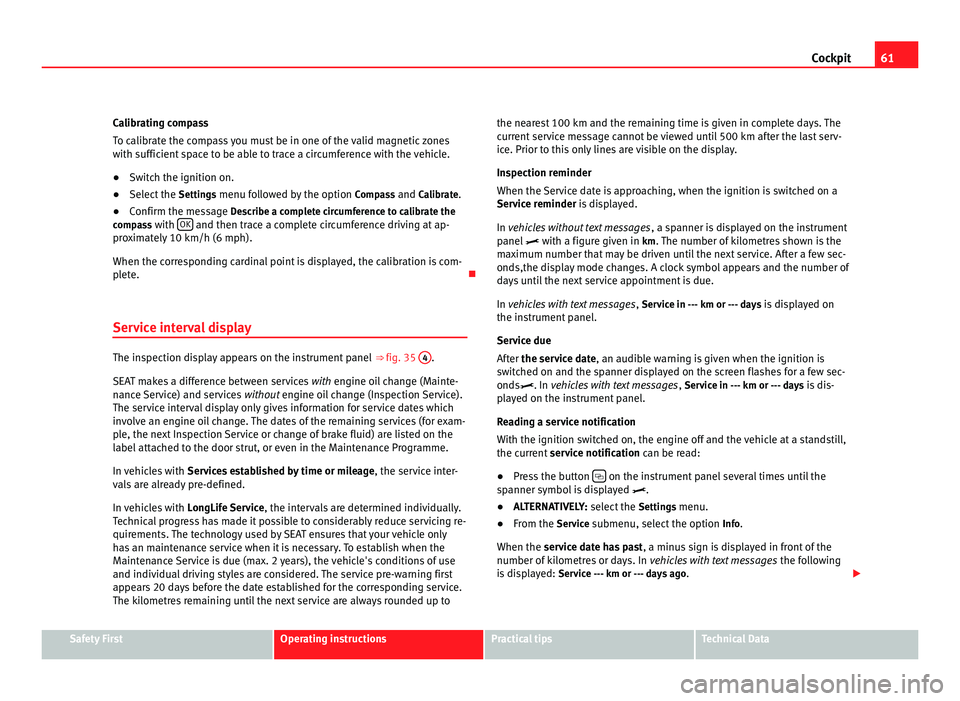
Service interval display The inspection display appears on the instrument panel
⇒ fig. 35 4 .
SEA T m
akes a difference between services with engine oil change (Mainte-
nance Service) and services without engine oil change (Inspection Service).
The service interval display only gives information for service dates which
involve an engine oil change. The dates of the remaining services (for exam-
ple, the next Inspection Service or change of brake fluid) are listed on the
label attached to the door strut, or even in the Maintenance Programme.
In vehicles with Services established by time or mileage , the service inter-
vals are already pre-defined.
In vehicles with LongLife Service , the intervals are determined individually.
Technical progress has made it possible to considerably reduce servicing re-
quirements. The technology used by SEAT ensures that your vehicle only
has an maintenance service when it is necessary. To establish when the
Maintenance Service is due (max. 2 years), the vehicle's conditions of use
and individual driving styles are considered. The service pre-warning first
appears 20 days before the date established for the corresponding service.
The kilometres remaining until the next service are always rounded up to the nearest 100 km and the remaining time is given in complete days. The
current
service message cannot be viewed until 500 km after the last serv-
ice. Prior to this only lines are visible on the display.
Inspection reminder
When the Service date is approaching, when the ignition is switched on a
Service reminder is displayed.
In vehicles without text messages , a spanner is displayed on the instrument
panel with a figure given in km. The number of kilometres shown is the
maximum number that may be driven until the next service. After a few sec-
onds,the display mode changes. A clock symbol appears and the number of
days until the next service appointment is due.
In vehicles with text messages , Service in --- km or --- days is displayed on
the instrument panel.
Service due
After the service date, an audible warning is given when the ignition is
switched on and the spanner displayed on the screen flashes for a few sec-
onds. In vehicles with text messages , Service in --- km or --- days is dis-
played on the instrument panel.
Reading a service notification
With the ignition switched on, the engine off and the vehicle at a standstill,
the current service notification can be read:
● Press the button on the instrument panel several times until the
sp anner symbo
l is displayed .
● ALTERNATIVELY: select the Settin
gs menu.
● From the Servic
e submenu, select the option Info.
When the service date has past , a minus sign is displayed in front of the
number of kilometres or days. In vehicles with text messages the following
is displayed: Service --- km or --- days ago . Safety First Operating instructions Practical tips Technical Data
Page 65 of 385
63
Cockpit
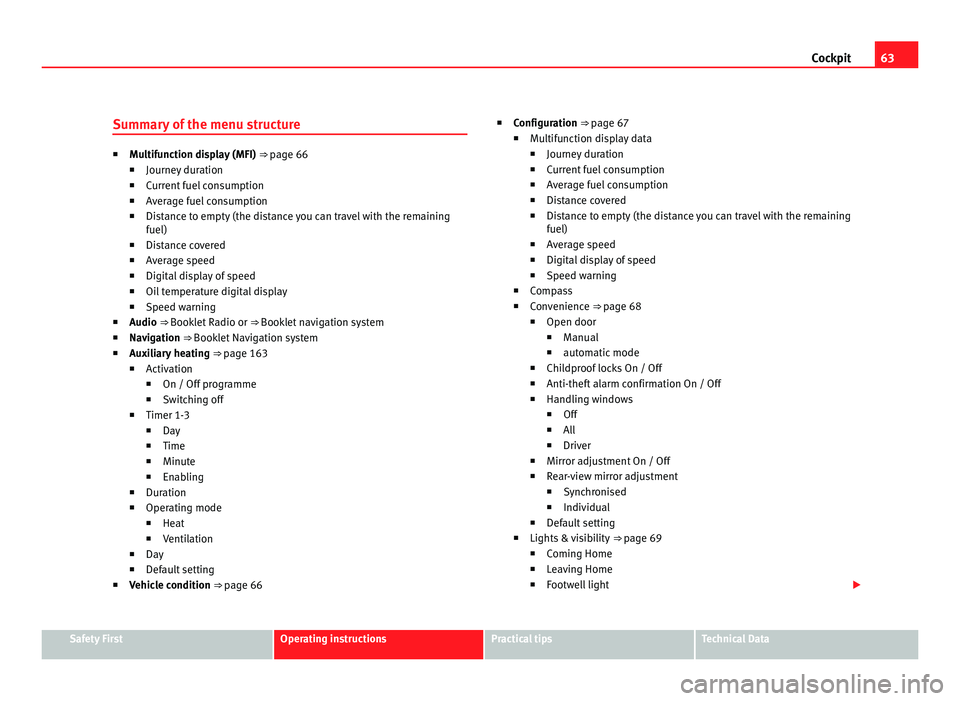
Summary of the menu structure ■
Multif
unction display (MFI) ⇒ page 66
■ Journey duration
■ Current fuel consumption
■ Average fuel consumption
■ Distance to empty (the distance you can travel with the remaining
fuel)
■ Distance covered
■ Average speed
■ Digital display of speed
■ Oil temperature digital display
■ Speed warning
■ Audio ⇒ Booklet Radio or ⇒ Booklet navigation system
■ Navigation ⇒ Booklet Navigation system
■ Auxiliary heating ⇒ page 163
■ Activation
■ On / Off programme
■ Switching off
■ Timer 1-3
■ Day
■ Time
■ Minute
■ Enabling
■ Duration
■ Operating mode
■ Heat
■ Ventilation
■ Day
■ Default setting
■ Vehicle condition ⇒ page 66 ■
Configuration
⇒ page 67
■ Multifunction display data
■ Journey duration
■ Current fuel consumption
■ Average fuel consumption
■ Distance covered
■ Distance to empty (the distance you can travel with the remaining
fuel)
■ Average speed
■ Digital display of speed
■ Speed warning
■ Compass
■ Convenience ⇒ page 68
■ Open door
■ Manual
■ automatic mode
■ Childproof locks On / Off
■ Anti-theft alarm confirmation On / Off
■ Handling windows
■ Off
■ All
■ Driver
■ Mirror adjustment On / Off
■ Rear-view mirror adjustment
■ Synchronised
■ Individual
■ Default setting
■ Lights & visibility ⇒ page 69
■ Coming Home
■ Leaving Home
■ Footwell light Safety First Operating instructions Practical tips Technical Data
Page 69 of 385
67
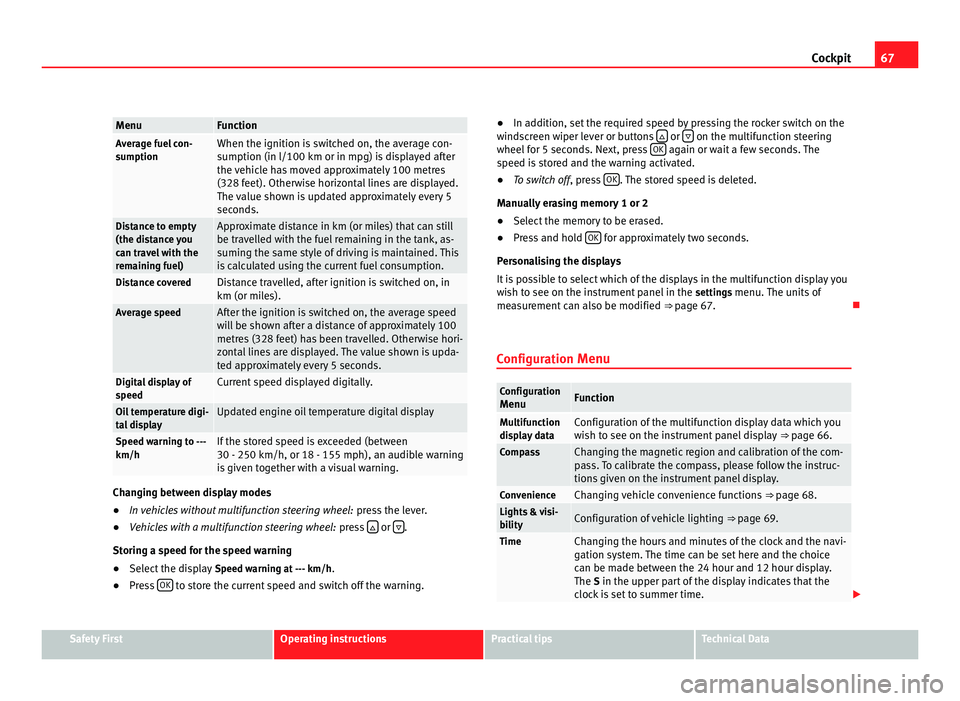
Cockpit Menu Function
Average fuel con-
sumption When the ignition is switched on, the average con-
sumption (in l/100 km or in mp
g) i
s displayed after
the vehicle has moved approximately 100 metres
(328 feet). Otherwise horizontal lines are displayed.
The value shown is updated approximately every 5
seconds. Distance to empty
(the dis
t
ance you
can travel with the
remaining fuel) Approximate distance in km (or miles) that can still
be trav
el
led with the fuel remaining in the tank, as-
suming the same style of driving is maintained. This
is calculated using the current fuel consumption. Distance covered Distance travelled, after ignition is switched on, in
km (or mil
e
s). Average speed After the ignition is switched on, the average speed
wi
l
l be shown after a distance of approximately 100
metres (328 feet) has been travelled. Otherwise hori-
zontal lines are displayed. The value shown is upda-
ted approximately every 5 seconds. Digital display of
speed Current speed displayed digitally.
Oil temperature digi-
ta
l
display Updated engine oil temperature digital display
Speed warning to ---
km/h If the stored speed is exceeded (between
30 - 250 km/h, or 18 - 155 mph), an audibl
e w
arning
is given together with a visual warning. Changing between display modes
●
In vehicles without multifunction steering wheel: pres
s the lever.
● Vehicles with a multifunction steering wheel: pres
s or
.
Storin g a s
peed for the speed warning
● Select the display Speed warnin
g at --- km/h.
● Press OK to store the current speed and switch off the warning. ●
In addition, set the required speed by pressing the rocker switch on the
w ind
screen wiper lever or buttons or
on the multifunction steering
wheel f or 5 sec
onds. Next, press OK again or wait a few seconds. The
speed i s
stored and the warning activated.
● To switch off , pres
s OK . The stored speed is deleted.
Manua l
ly erasing memory 1 or 2
● Select the memory to be erased.
● Press and hold OK for approximately two seconds.
Per son
alising the displays
It is possible to select which of the displays in the multifunction display you
wish to see on the instrument panel in the settings menu. The units of
measurement can also be modified ⇒ page 67.
Configuration Menu Configuration
Menu Function
Multifunction
dis
p
lay data Configuration of the multifunction display data which you
wi
sh t
o see on the instrument panel display ⇒ page 66. Compass Changing the magnetic region and calibration of the com-
pa
s
s. To calibrate the compass, please follow the instruc-
tions given on the instrument panel display. Convenience Changing vehicle convenience functions
⇒ page 68. Lights & visi-
bi
lity Configuration of vehicle lighting
⇒ page 69. Time Changing the hours and minutes of the clock and the navi-
gation sy
s
tem. The time can be set here and the choice
can be made between the 24 hour and 12 hour display.
The S in the upper part of the display indicates that the
clock is set to summer time. Safety First Operating instructions Practical tips Technical Data
Page 70 of 385
68
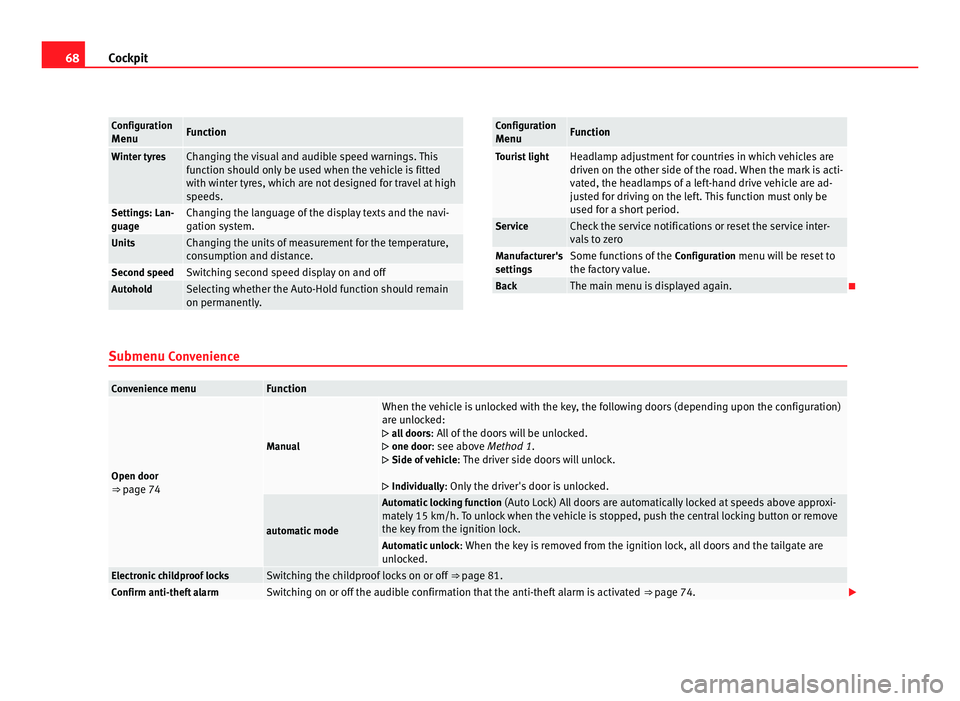
Cockpit Configuration
Menu Function
Winter tyres Changing the visual and audible speed warnings. This
fu
nction shou
ld only be used when the vehicle is fitted
with winter tyres, which are not designed for travel at high
speeds. Settings: Lan-
guage Changing the language of the display texts and the navi-
gation sy
s
tem. Units Changing the units of measurement for the temperature,
con
s
umption and distance. Second speed Switching second speed display on and off
Autohold Selecting whether the Auto-Hold function should remain
on permanently
. Configuration
Menu Function
Tourist light Headlamp adjustment for countries in which vehicles are
driven on the other s
ide of
the road. When the mark is acti-
vated, the headlamps of a left-hand drive vehicle are ad-
justed for driving on the left. This function must only be
used for a short period. Service Check the service notifications or reset the service inter-
val
s
to zero Manufacturer's
setting
s Some functions of the
Configuration
menu will be reset to
the factory value. Back The main menu is displayed again.
Submenu Con v
enienceConvenience menu Function
Open door
⇒ pag
e 74 Manual When the vehicle is unlocked with the key, the following doors (depending upon the configuration)
are u
n
locked:
all doors : All of the doors will be unlocked.
one door: see above Method 1.
Side of vehicle : The driver side doors will unlock.
Individually: Only the driver's door is unlocked. automatic mode Automatic locking function
(Auto Loc
k) All doors are automatically locked at speeds above approxi-
mately 15 km/h. To unlock when the vehicle is stopped, push the central locking button or remove
the key from the ignition lock. Automatic unlock
: When the key
is removed from the ignition lock, all doors and the tailgate are
unlocked. Electronic childproof locks Switching the childproof locks on or off
⇒ page 81. Confirm anti-theft alarm Switching on or off the audible confirmation that the anti-theft alarm is activated
⇒ page 74.