mirror Seat Alhambra 2011 User Guide
[x] Cancel search | Manufacturer: SEAT, Model Year: 2011, Model line: Alhambra, Model: Seat Alhambra 2011Pages: 385, PDF Size: 7.92 MB
Page 112 of 385
110
Lights and visibility WARNING
Never mix an unsuitable antifreeze or other similar products with the
wind s
creen washer water. A greasy layer may be formed on the wind-
screen which will impair visibility.
● Use clean water with a window cleaner recommended by SEAT.
● If necessary, add a suitable antifreeze to the water bottle. CAUTION
● Do not mix cleaning products recommended by SEAT with other prod-
ucts. Thi
s could lead to flocculation and may block the windscreen washer
jets.
● When topping up service fluids, make absolutely certain that you fill the
fluids int
o the correct reservoirs. Failure to observe this point will result in
serious malfunctions and engine damage!
Rear vision mirror
Intr oduction Additional information and warnings:
●
Personal convenience settings in the SEAT information system
⇒ pag
e 62
● Se
at memory ⇒ page 117
● Ch
anging gear ⇒ page 174
● Br
aking, stopping and parking ⇒ page 183 WARNING
The automatic anti-dazzle rear vision mirror contains an electrolytic fluid
which m a
y leak if the mirror is broken. This fluid can cause irritation to
the skin, eyes and respiratory organs.
● The electrolytic fluid may cause irritation to the skin, eyes and respi-
rator
y organs, particularly in individuals suffering from asthma or other
illnesses. Make sure that adequate quantities of fresh air enter and leave
the vehicle if it is not possible to open all the doors and windows.
● If the electrolytic fluid comes into contact with eyes or skin, wash the
area f
or at least 15 minutes with plenty of water, and seek medical ad-
vice.
● If the electrolytic fluid comes into contact with shoes or clothing,
wash the ar
ea for at least 15 minutes with plenty of water. Wash shoes
and clothing before wearing them again.
● If the electrolytic fluid is swallowed, wash the mouth with plenty of
water f
or at least 15 minutes. Do not try to provoke vomiting unless rec-
ommended by a Doctor. Seek medical advice immediately. CAUTION
If an automatic anti-dazzle rear vision mirror is broken, the electrolytic fluid
ma y
leak out. This fluid attacks plastic surfaces. Therefore, it should be
cleaned as fast as possible with a damp sponge or similar.
Page 113 of 385
111
Lights and visibility
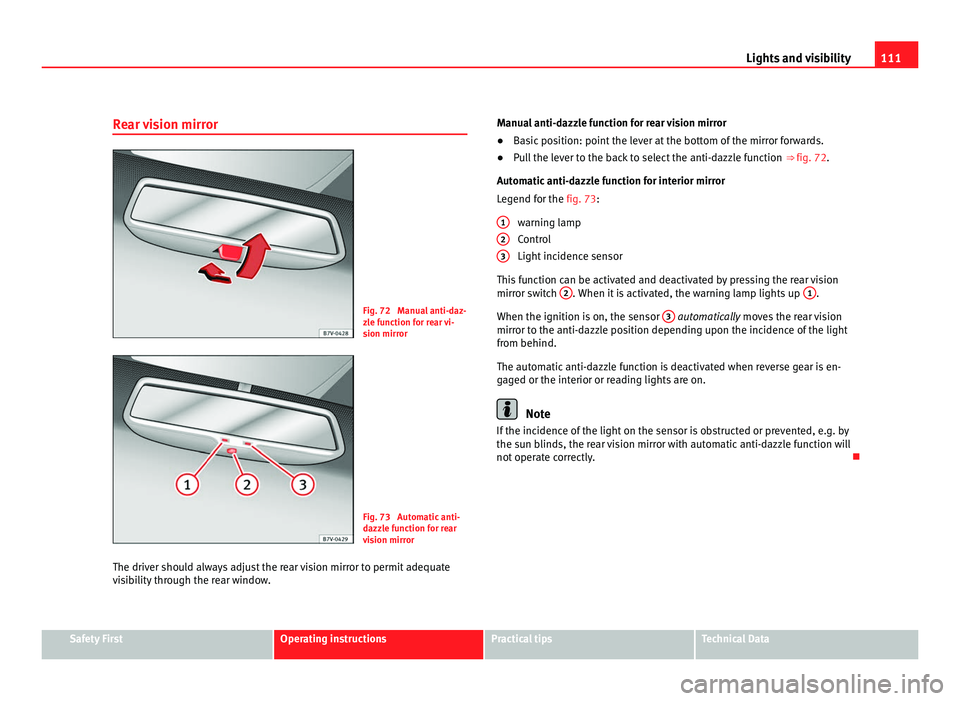
Rear vision mirror Fig. 72 Manual anti-daz-
zl
e f
unction for rear vi-
sion mirror Fig. 73 Automatic anti-
dazz
l
e function for rear
vision mirror
The driver should always adjust the rear vision mirror to permit adequate
vis
ibility through the rear window. Manual anti-dazzle function for rear vision mirror
●
Basic position: point the lever at the bottom of the mirror forwards.
● Pull the lever to the back to select the anti-dazzle function ⇒ fig. 72.
Automatic
anti-dazzle function for interior mirror
Legend for the fig. 73:
warning lamp
Control
Light incidence sensor
This function can be activated and deactivated by pressing the rear vision
mirror switch 2 . When it is activated, the warning lamp lights up
1 .
When the ignition is on, the sen
sor 3 automatically moves the rear vision
mirr or t
o the anti-dazzle position depending upon the incidence of the light
from behind.
The automatic anti-dazzle function is deactivated when reverse gear is en-
gaged or the interior or reading lights are on. Note
If the incidence of the light on the sensor is obstructed or prevented, e.g. by
the su n b
linds, the rear vision mirror with automatic anti-dazzle function will
not operate correctly.
1 2
3
Safety First Operating instructions Practical tips Technical Data
Page 114 of 385
112
Lights and visibility
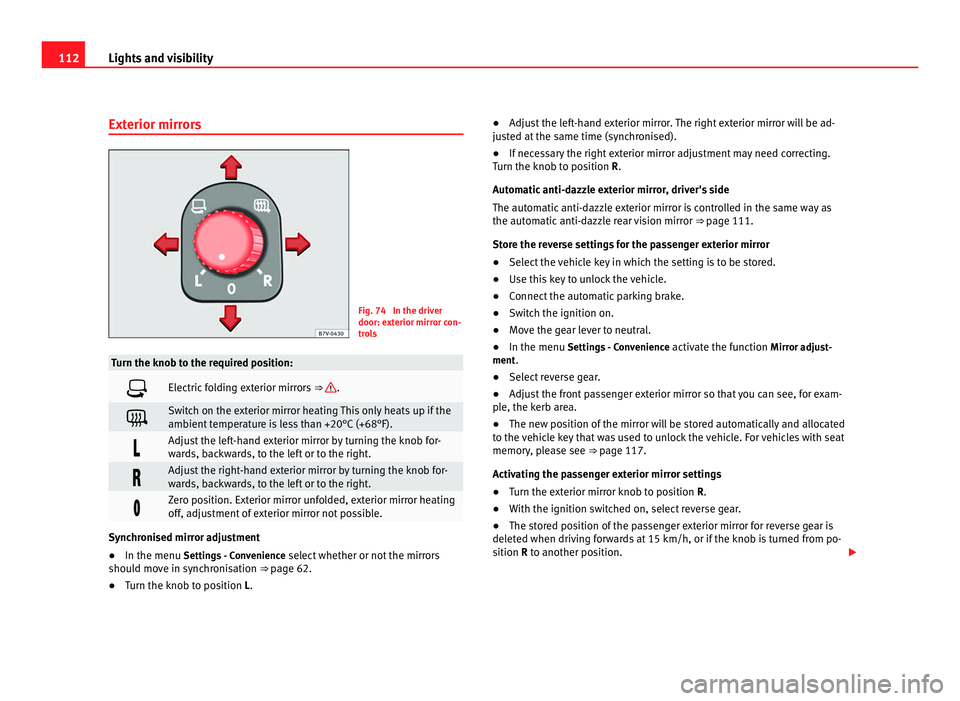
Exterior mirrors Fig. 74 In the driver
door: ext
erior mirr
or con-
trols Turn the knob to the required position:
Electric folding exterior mirrors
⇒ .
Switch on the exterior mirror heating This only heats up if the
ambient
t
emperature is less than +20°C (+68°F). Adjust the left-hand exterior mirror by turning the knob for-
war
d
s, backwards, to the left or to the right. Adjust the right-hand exterior mirror by turning the knob for-
war
d
s, backwards, to the left or to the right. Zero position. Exterior mirror unfolded, exterior mirror heating
off, a
dju
stment of exterior mirror not possible. Synchronised mirror adjustment
●
In the menu Setting s
- Convenience select whether or not the mirrors
should move in synchronisation ⇒ page 62.
● Turn the knob to position L. ●
Adjust the left-hand exterior mirror. The right exterior mirror will be ad-
jus
ted at the same time (synchronised).
● If necessary the right exterior mirror adjustment may need correcting.
Turn the knob t
o position R.
Automatic anti-dazzle exterior mirror, driver's side
The automatic anti-dazzle exterior mirror is controlled in the same way as
the automatic anti-dazzle rear vision mirror ⇒ page 111.
Store the reverse settings for the passenger exterior mirror
● Select the vehicle key in which the setting is to be stored.
● Use this key to unlock the vehicle.
● Connect the automatic parking brake.
● Switch the ignition on.
● Move the gear lever to neutral.
● In the menu Settings
- Convenience activate the function Mirror adjust-
ment.
● Select reverse gear.
● Adjust the front passenger exterior mirror so that you can see, for exam-
ple, the k
erb area.
● The new position of the mirror will be stored automatically and allocated
to the v
ehicle key that was used to unlock the vehicle. For vehicles with seat
memory, please see ⇒ page 117.
Activating the passenger exterior mirror settings
● Turn the exterior mirror knob to position R.
● With the ignition switched on, select reverse gear.
● The stored position of the passenger exterior mirror for reverse gear is
deleted when driv
ing forwards at 15 km/h, or if the knob is turned from po-
sition R to another position.
Page 115 of 385
113
Lights and visibility WARNING
Fold and unfold the exterior mirror, taking care to avoid injuries.
● Only fold or unfold the exterior mirror when there is no-one in the way
of the mirr or
.
● When moving the mirror, take care not to trap fingers between the
mirror and the mirror br
acket. WARNING
Failure to correctly estimate the distance of the vehicle behind could lead
to serious
accident.
● Rear-view convex or aspheric mirrors increase the field of vision, how-
ever ob
jects appear smaller and further away in the mirrors.
● The use of these mirrors to estimate the distance to the next vehicle
when chan
ging lane is imprecise and could result in serious accident.
● If possible, use the rear vision mirror to estimate distances to vehi-
cle
s behind you or in other circumstances.
● Make sure that the rear visibility is adequate. CAUTION
● Before entering a car wash, always ensure that the exterior mirrors are
c orr
ectly folded in.
● Electrically-folding exterior mirrors should not be folded and unfolded
mechanic
ally as this may damage the electrical operation. For the sake of the environment
The exterior mirror heating should be switched off when it is no longer nee-
ded. Otherw i
se, it is an unnecessary fuel waste. Note
● The exterior mirror heating initially heats up with a high power, after two
minut e
s the heat will depend upon the ambient temperature.
● In the event of faults, the electric exterior mirrors can be adjusted man-
ually b
y pressing the edge of the mirror surface. Safety First Operating instructions Practical tips Technical Data
Page 116 of 385
114
Seats and storage compartments
Seats and storage compartments
Seat adjustment
Mec h
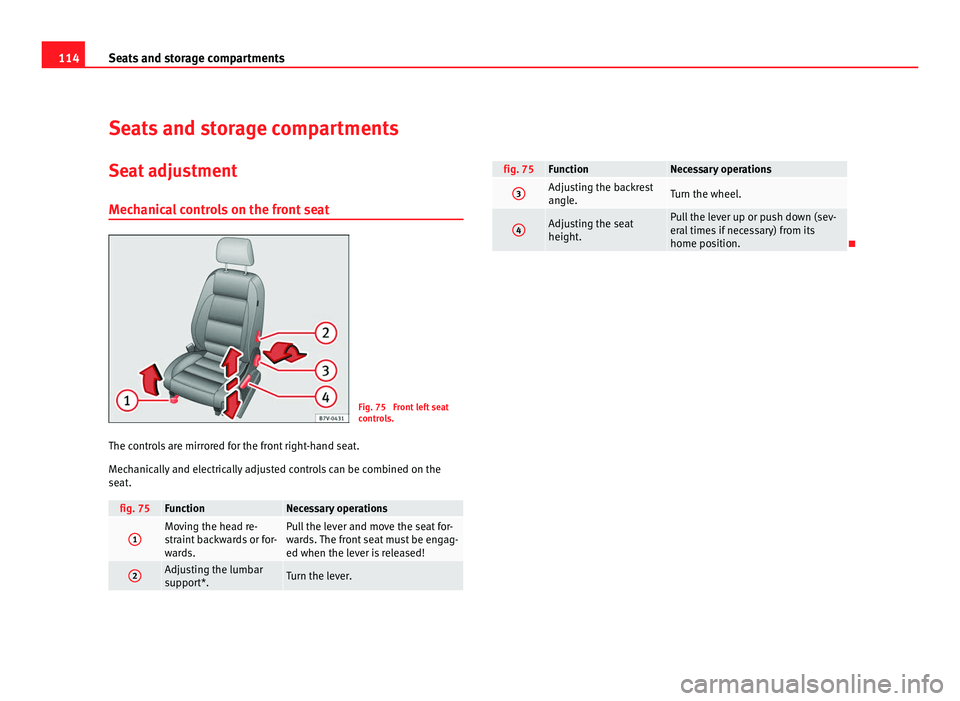
anical controls on the front seat Fig. 75 Front left seat
contr
o
ls.
The controls are mirrored for the front right-hand seat.
Mech
anically and electrically adjusted controls can be combined on the
seat. fig. 75 Function Necessary operations
1 Moving the head re-
str
aint
backwards or for-
wards. Pull the lever and move the seat for-
war
d
s. The front seat must be engag-
ed when the lever is released! 2 Adjusting the lumbar
sup
por
t*. Turn the lever. fig. 75 Function Necessary operations
3 Adjusting the backrest
angl
e. Turn the wheel.
4 Adjusting the seat
height. Pull the lever up or push down (sev-
eral
time
s if necessary) from its
home position.
Page 117 of 385
115
Seats and storage compartments
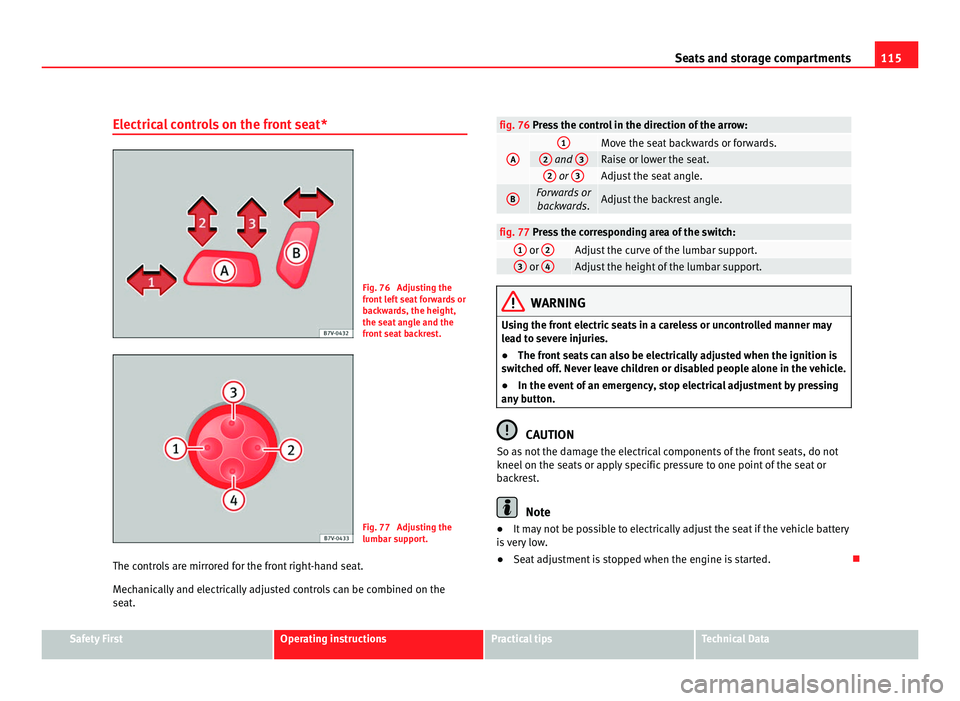
Electrical controls on the front seat* Fig. 76 Adjusting the
front
l
eft seat forwards or
backwards, the height,
the seat angle and the
front seat backrest. Fig. 77 Adjusting the
lumbar s
up
port.
The controls are mirrored for the front right-hand seat.
Mech
anically and electrically adjusted controls can be combined on the
seat. fig. 76 Press the control in the direction of the arrow:
A 1
Move the seat backwards or forwards.
2
and
3 Raise or lower the seat.
2
or
3 Adjust the seat angle.
B Forwards or
backwar ds. Adjust the backrest angle.
fig. 77 Press the corresponding area of the switch:
1
or
2 Adjust the curve of the lumbar support.
3
or
4 Adjust the height of the lumbar support.
WARNING
Using the front electric seats in a careless or uncontrolled manner may
le a
d to severe injuries.
● The front seats can also be electrically adjusted when the ignition is
switc
hed off. Never leave children or disabled people alone in the vehicle.
● In the event of an emergency, stop electrical adjustment by pressing
any b
utton. CAUTION
So as not the damage the electrical components of the front seats, do not
kneel on the se ats
or apply specific pressure to one point of the seat or
backrest. Note
● It may not be possible to electrically adjust the seat if the vehicle battery
i s
very low.
● Seat adjustment is stopped when the engine is started. Safety First Operating instructions Practical tips Technical Data
Page 119 of 385
117
Seats and storage compartments
Seat functions Introduction Additional information and warnings
●
Adjust the seat position ⇒ page 10
● Se
at belts ⇒ page 21
● Airb
ag system ⇒ page 31
● Chi
ld seats (accessories) ⇒ page 39
● Int
egrated child seats ⇒ page 46
● Ext
erior mirrors ⇒ page 110
● L
uggage compartment ⇒ page 125 WARNING
Inappropriate use of the seat functions can cause severe injuries.
● Assume the proper sitting position before your trip and remain in it
throughout .
This also applies to the other occupants.
● Only adjust the seat position memory when the vehicle is stationary.
● Only switch the lumbar massage function on and off when the vehicle
is s
tationary.
● Keep hands, fingers, feet and other limbs away from the seat operat-
ing and adju
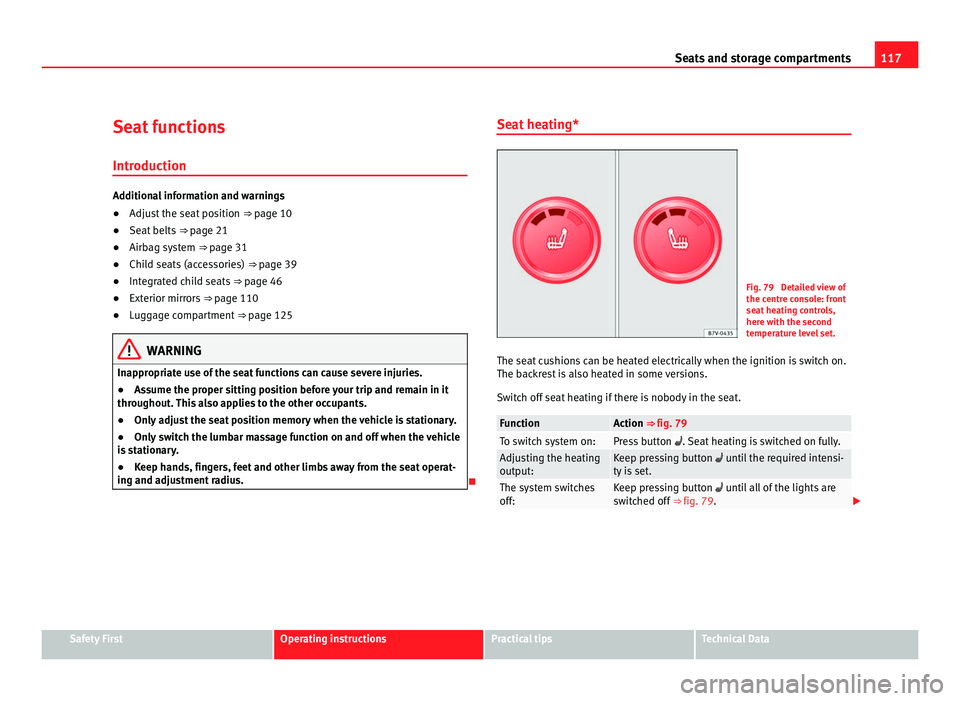
stment radius. Seat heating* Fig. 79 Detailed view of
the centr
e c
onsole: front
seat heating controls,
here with the second
temperature level set.
The seat cushions can be heated electrically when the ignition is switch on.
The back
rest is also heated in some versions.
Switch off seat heating if there is nobody in the seat. Function Action ⇒ fig. 79
To switch system on: Press button
. Seat
heating is switched on fully. Adjusting the heating
output: Keep pressing button unti
l
the required intensi-
ty is set. The system switches
off: Keep pressing button unti
l
all of the lights are
switched off ⇒ fig. 79. Safety First Operating instructions Practical tips Technical Data
Page 120 of 385
118
Seats and storage compartments WARNING
People whose pain and temperature threshold has been affected by some
kind of medic
ine, paraplegia or chronic illness (e.g. diabetes) may sus-
tain burns to the back, buttocks and legs from use of the seat heating
that may lead to a long healing process or that may never completely
heal. Seek medical advice if you have doubts regarding your health.
● People with a limit pain and temperature threshold must never use
seat he
ating. CAUTION
● To avoid damaging the heating elements of the seat heating, please do
not kneel
on the seat or apply sharp pressure at a single point to the seat
cushion and backrest.
● Liquids, sharp objects and insulating materials on the seat could dam-
age the seat
heating.
● In the event of smells, switch off the seat heating immediately and have
the unit in
spected by a Technical Service. For the sake of the environment
The seat heating should remain on only when needed. Otherwise, it is an
unnec e
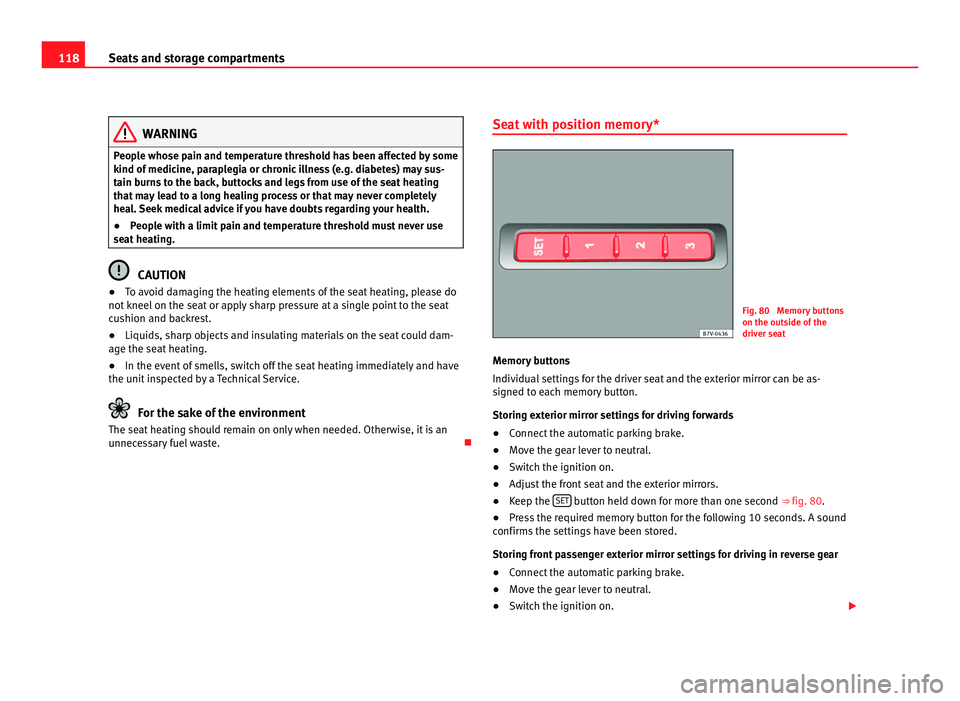
ssary fuel waste. Seat with position memory* Fig. 80 Memory buttons
on the outs
ide of
the
driver seat
Memory buttons
Individual settin
gs for the driver seat and the exterior mirror can be as-
signed to each memory button.
Storing exterior mirror settings for driving forwards
● Connect the automatic parking brake.
● Move the gear lever to neutral.
● Switch the ignition on.
● Adjust the front seat and the exterior mirrors.
● Keep the SET button held down for more than one second ⇒ fig. 80.
● Press the required memory button for the following 10 seconds. A sound
confirms the settin
gs have been stored.
Storing front passenger exterior mirror settings for driving in reverse gear
● Connect the automatic parking brake.
● Move the gear lever to neutral.
● Switch the ignition on.
Page 121 of 385
119
Seats and storage compartments
● Press the required memory button.
● Select
reverse gear.
● Adjust the front passenger exterior mirror so that you can see, for exam-
ple, the k
erb area.
● The new position of the mirror will be stored automatically and allocated
to the v
ehicle key that was used to unlock the vehicle.
Activating exterior mirror settings
● With the driver's door open and the ignition turned off, push the memo-
ry b
utton of the corresponding door briefly.
● ALTERNATIVELY: With the ignition swit
ched on, hold in the correspond-
ing memory button until the memorised position is reached.
To activate the memory function of the vehicle key
Important: a position must be memorised in the memory.
● Open the driver-side door.
● Press and hold any memory button.
● Within the following three seconds, push the button to open the vehi-
cl e on the
vehicle key. A sound confirms the settings have been activated.
Adjusting the wing mirrors for driving and assigning driver seat settings to
a vehicle key
● Activate the memory function of the vehicle key
● Adjust the front seat and the exterior mirrors.
● Lock the vehicle. The settings are assigned to the vehicle key.
To deactiv
ate the memory function of the vehicle key
Important: a position must be memorised in the memory.
● Press and hold the SET button.
● Within the following ten seconds, push the button to open the vehi-
cl e on the
vehicle key. A sound confirms the settings have been deactiva-
ted. Initialising the seat position memory
The position memor
y system must be initialised if, for example, the driver's
seat has been changed.
Initialisation deletes all memories and assignments for the seat with posi-
tion memory. The memory buttons can then be reprogrammed and the vehi-
cle keys re-assigned.
● Open the driver's door and do not get into the vehicle.
● Operating the seat settings from outside the vehicle.
● Move the angle of the backrest completely forwards.
● Release the control to set the angle and then press again until a sound
is he
ard. Note
The front passenger side wing mirror automatically changes from the posi-
tion st or
ed for reversing as soon as the vehicle moves forward at a speed of
at least 15 km/h or when the gear selection lever is changed to a position
other than R. Safety First Operating instructions Practical tips Technical Data
Page 221 of 385
219
Driving
Indication on display Fig. 153 Dash panel display: Examples of speed
limits
or o
vertaking prohibitions detected together
with the corresponding additional signs. Display text of Sign Assist
on the ins
trument
panel Cause and solution
Error: Sign Assist System fault.
Have the sy
s
tem checked by a specialist
workshop. Sign Assist: Clean the wind-
sc
r
een! The windscreen is dirty in the area of the
camer
a.
C
lean the windscreen. Sign Assist: only partly availa-
bl
e at
the moment. No data is being transmitted from the navi-
gat
or
.
Connect the navigator and insert the navi-
gation data medium.
ALTERNATIVELY: Sign Assist is not suppor-
ted in the country in which you are driving
at this time. WARNING
If the warning lamps and messages are ignored, the vehicle may stall in
traffic, or m a
y cause accidents and severe injuries.
● Never ignore the warning lamps or text messages.
● Stop the vehicle safely as soon as possible. CAUTION
Failure to heed the warning lamps and text messages when they appear
ma y
result in faults in the vehicle.
Operation mode Sign Assist does not work in all countries. This must be taken into account
when trav
el
ling abroad.
Display of traffic signs
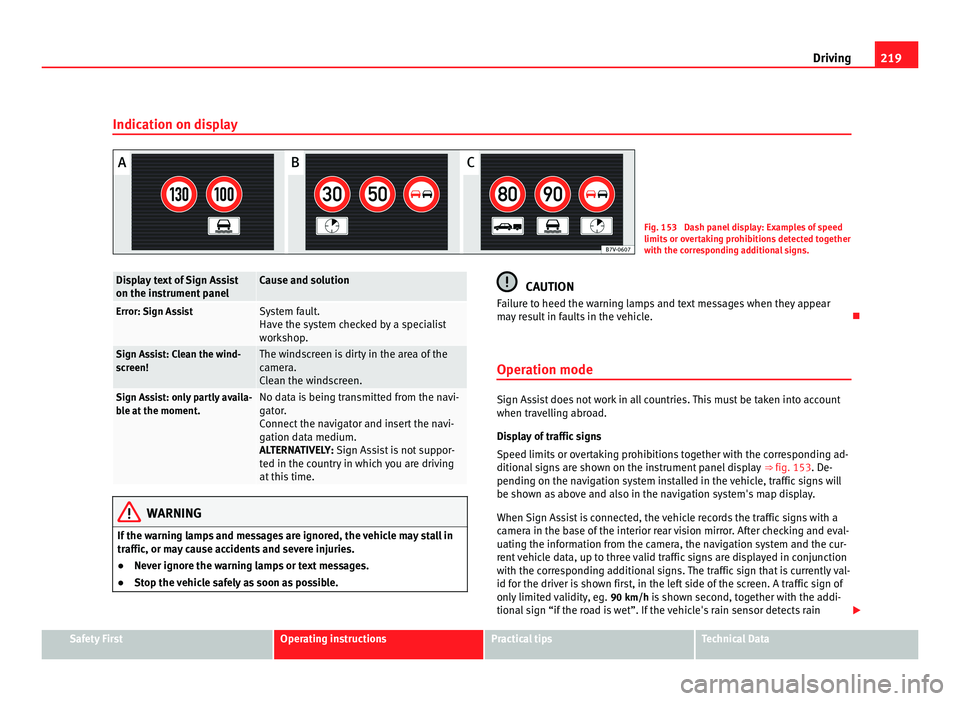
Speed limits or overtaking prohibitions together with the corresponding ad-
ditional signs are shown on the instrument panel display ⇒ fig. 153. De-
pending on the navigation system installed in the vehicle, traffic signs will
be shown as above and also in the navigation system's map display.
When Sign Assist is connected, the vehicle records the traffic signs with a
camera in the base of the interior rear vision mirror. After checking and eval-
uating the information from the camera, the navigation system and the cur-
rent vehicle data, up to three valid traffic signs are displayed in conjunction
with the corresponding additional signs. The traffic sign that is currently val-
id for the driver is shown first, in the left side of the screen. A traffic sign of
only limited validity, eg. 90 km/h is shown second, together with the addi-
tional sign “if the road is wet”. If the vehicle's rain sensor detects rain Safety First Operating instructions Practical tips Technical Data