tow Seat Alhambra 2011 Owner's Guide
[x] Cancel search | Manufacturer: SEAT, Model Year: 2011, Model line: Alhambra, Model: Seat Alhambra 2011Pages: 385, PDF Size: 7.92 MB
Page 189 of 385
187
Driving
● On slopes, turn the front wheels so that they are against the edge of the
k erb
.
● Uphill, turn the wheels towards the centre of the road. WARNING
The components of the exhaust system reach very high temperatures.
This c
ould cause a fire and considerable damage.
● Always park your vehicle so that no part of the exhaust system can
come in cont
act with flammable materials (such as wood, leaves, spilled
fuel, dried grass, etc). CAUTION
● Special care should be taken when parking in areas with high kerbs or
fi x
ed barriers. Objects protruding from the ground may damage the bumper
or other parts of the vehicle during manoeuvres. To avoid damage, stop be-
fore the wheels touched the barrier or kerb.
● Special attention is required when driving through entrances, over
ramps, k
erbs or other objects. The vehicle underbody, bumpers, mudguards
and running gear, and the engine and exhaust system could be damaged as
you drive over these objects.
Information about the brakes For the first 200 to 300 km (100 to 200 miles),
new brake p
ads have not yet
reached their maximum braking capacity, and need to be “run in” first ⇒ .
The slightly r
educed braking effect can be compensated for by increasing
pressure on the brake pedal. While running in, the full braking distance or
emergency braking distance is larger then when the brake pads have been
run in. While running in, avoid full power braking or situations requiring
braking performance. For example, in heavy traffic. The rate of wear of the brake pads
depends
to a great extent on the condi-
tions in which the vehicle is used and the way the vehicle is driven. If the
vehicle is used frequently in city traffic or for short trips or driven sport style,
visit a specialist workshop regularly more frequently than advised in the
Maintenance Programme to have the bake pads checked.
If you drive with wet brakes, for example, after crossing areas of water, in
heavy rainfall or even after washing the car, the effect of the brakes is less-
ened as the brake discs are wet or even frozen (in winter). At higher speed,
dry the brakes as quickly as possible by braking gently several times. Only
do this without endangering vehicles behind you or any other road users
⇒ .
A la y
er of salt on the discs and brake pads will reduce brake efficiency and
increase braking distance. If you drive for a prolonged period on salted
roads without braking then brake carefully several times to eliminate the
layer of salt on the brakes ⇒ .
If the v
ehicle remains parked for considerable lengths of time, is used little,
or if the brakes are not used, there may be corrosion on the brake discs and
a buildup of dirt on the brake pads. If the brakes are not used frequently, or
if rust has formed on the discs, SEAT recommends cleaning the pads and
discs by braking firmly a few times at a moderately high speed. Only do this
without endangering vehicles behind you or any other road users ⇒ .
Fau lt
s in the brake system
During braking, if you notice that the vehicle does not react as usual (that
the braking distance has increased suddenly) it may be possible that there
is a fault in the braking system. The warning lamp lights up and a text
message displayed. Take the vehicle to a Technical Service immediately and
have the fault repaired. Drive at a moderate speed and be prepared to use
more pressure on the brake pedal, and allow for longer stopping distances.
Brake servo
The brake servo only operates when the engine is running and the pressure
applied by the driver on the brake pedal increases. Safety First Operating instructions Practical tips Technical Data
Page 190 of 385
188
Driving
If the brake servo does not operate or the vehicle must be towed, then the
brak e ped
al will have to be pressed with more force given that the braking
distance will be increased when the brake servo does not operate ⇒ .
WARNING
New brake pads do not brake to full efficiency.
● For the first 320 km (200 miles), new brake pads have not yet reached
their max imum br
aking capacity, and need to be run in first. For this, to
compensate for reduced braking efficiency the brake pedal will have to
be pressed with more force.
● To avoid losing control of the vehicle and causing serious accidents,
alwa
ys take great care when driving with new brake pads.
● When running in new brake pads, always respect the safety distances
between y
ou and other vehicles and do not cause situations requiring ex-
treme braking performance. WARNING
When brakes overheat, braking is less efficient and braking distances in-
cr e
ase.
● When driving on slopes, brakes can be overloaded and overheat
quickly
.
● Reduce speed, move down a gear or select a shorter range of gears
before lon
g steep slopes. This allows you to use the engine braking ef-
fect and to reduce the strain on the brake system.
● Non-standard or damaged front spoilers could restrict the airflow to
the brake
s and cause them to overheat. WARNING
Wet, frozen or salt-covered brakes take time to brake and this increases
brak in
g distances.
● Test the brakes carefully.
● Dry the brakes, free them of ice and salt by braking gently several
times, when we
ather, road and traffic conditions permit. WARNING
Driving without the brake servo may significantly increase the braking
dist
ance and result in a severe accident.
● Never allow the vehicle to move forwards when the engine is switched
off.
● If the br
ake servo does not operate or the vehicle must be towed,
then the brake ped
al will have to be pressed with more force given that
the braking distance will be increased when the brake servo does not op-
erate. CAUTION
● Never make the brakes slip by pressing the pedal gently, if it is not really
nec e
ssary to brake. Continuously pressing on the brake pedal will heat the
brakes. This could significantly reduce braking power, increase braking dis-
tance or even result in the total failure of the brake system.
● Reduce speed, move down a gear or select a shorter range of gears be-
fore lon
g steep slopes. This allows you to use the engine braking effect and
to reduce the strain on the brake system. Otherwise, the brakes may over-
heat and fail. Only use the brakes to reduce speed or to stop.
Page 198 of 385
196
Driving
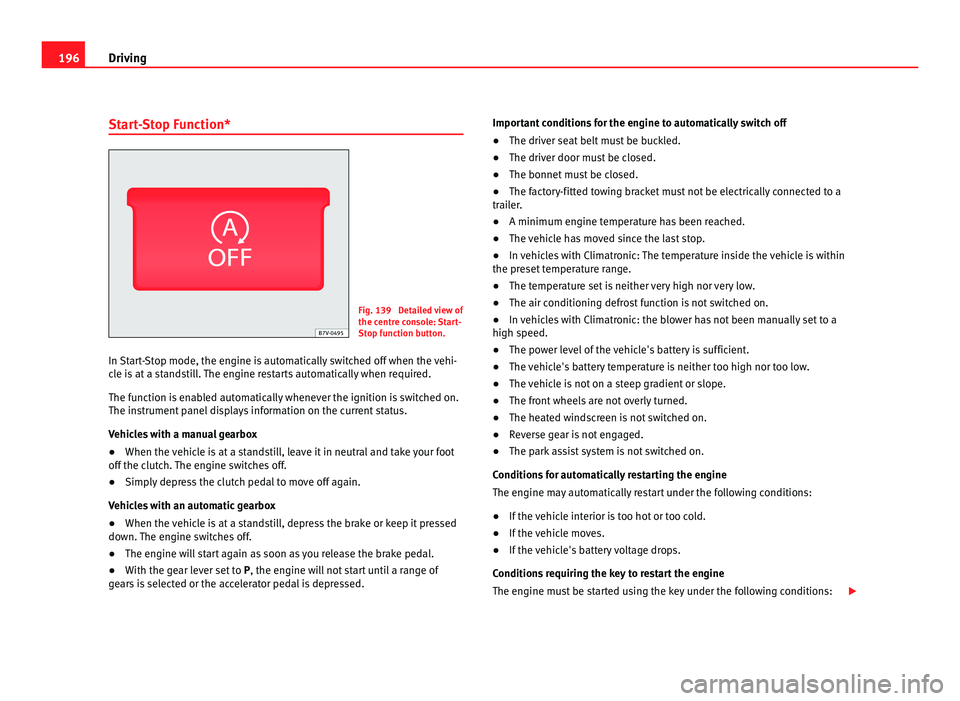
Start-Stop Function* Fig. 139 Detailed view of
the centr
e c
onsole: Start-
Stop function button.
In Start-Stop mode, the engine is automatically switched off when the vehi-
cle i
s at a standstill. The engine restarts automatically when required.
The function is enabled automatically whenever the ignition is switched on.
The instrument panel displays information on the current status.
Vehicles with a manual gearbox
● When the vehicle is at a standstill, leave it in neutral and take your foot
off the clut
ch. The engine switches off.
● Simply depress the clutch pedal to move off again.
Vehicl
es with an automatic gearbox
● When the vehicle is at a standstill, depress the brake or keep it pressed
down. The en
gine switches off.
● The engine will start again as soon as you release the brake pedal.
● With the gear lever set to P, the engine wi
ll not start until a range of
gears is selected or the accelerator pedal is depressed. Important conditions for the engine to automatically switch off
●
The driver seat belt must be buckled.
● The driver door must be closed.
● The bonnet must be closed.
● The factory-fitted towing bracket must not be electrically connected to a
trail
er.
● A minimum engine temperature has been reached.
● The vehicle has moved since the last stop.
● In vehicles with Climatronic: The temperature inside the vehicle is within
the preset
temperature range.
● The temperature set is neither very high nor very low.
● The air conditioning defrost function is not switched on.
● In vehicles with Climatronic: the blower has not been manually set to a
high speed.
● The pow
er level of the vehicle's battery is sufficient.
● The vehicle's battery temperature is neither too high nor too low.
● The vehicle is not on a steep gradient or slope.
● The front wheels are not overly turned.
● The heated windscreen is not switched on.
● Reverse gear is not engaged.
● The park assist system is not switched on.
Conditions
for automatically restarting the engine
The engine may automatically restart under the following conditions:
● If the vehicle interior is too hot or too cold.
● If the vehicle moves.
● If the vehicle's battery voltage drops.
Conditions
requiring the key to restart the engine
The engine must be started using the key under the following conditions:
Page 203 of 385
201
Driving Distance from the vehicle to the
ob
s
tacle Acoustic sig-
nal Displayed in colour on
the sc r
een: colour of the
segment if an obstacle is recognised in front: approx. 31 – 120 cm
behind: ap
pr
ox. 31 – 160 cm beeping
sound Yellow
approx. 0 – 30 cm
in fr
ont or be-
hind a) permanent
sound Red
a)
The permanent sound starts at a somewhat greater distance on vehicles with a factory-fit-
ted t o
wing bracket.
With towing bracket
A specific image is displayed on the screen of vehicles with a factory-fitted
towing bracket and an electrically connected trailer. In this case, the distan-
ces behind the vehicle are not indicated.
Switching the parking sensor system sound on and off
If the button on the radio or navigation system screen may mute the
sound of OP
S warnings. To switch the warnings back on, press the button
again briefly.
When the OPS is switched off and back on again, muting is cancelled. Error
messages cannot be switched off. WARNING
Do not be distracted from the traffic when looking at the screen.
Safety First Operating instructions Practical tips Technical Data
Page 204 of 385
202
Driving
Park Assist system*
Introduction The Park Assist system helps the driver to find a suitable place to park, to
inser
t
the vehicle into parallel and perpendicular parking places and to
leave parallel parking places.
The Park Assist system is limited to the system abilities and requires that
the driver is especially attentive ⇒ .
The park in
g sensor system is a component of the Park Assist system that
helps to park the vehicle.
For vehicles with the optical parking system, the radio navigation systems
screen displays the detected zones in front of and behind the vehicle, indi-
cating - within the limits of the system - the position of obstacles compared
to the vehicle.
The park assist system cannot be switched on if the factory-fitted towing
bracket is electrically connected to a trailer.
Additional information and warnings:
● Braking, stopping and parking ⇒ page 183
● P
arking sensor system ⇒ page 198
● C
aring for and cleaning the vehicle exterior ⇒ page 242
● A
ccessories, parts replacement, repairs and modifications ⇒ page 257 WARNING
Despite the assistance provided by the park assist system, do not run
any ri
sks when parking. The system is not a replacement for driver
awareness.
● Unintentional movements of the vehicle could cause serious injury.
● Adjust your speed and driving style to visibility, road, traffic and
weather c
onditions.
● The surface of certain objects and items of clothing and external
sound sourc
es may have a negative affect on the park assist signals or on
the system sensors or may not reflect its signals.
● The sensors have blind spots in which obstacles and people are not
regi
stered.
● Always observe the area around the vehicle, as the sensors do not al-
way
s detect small children, animals or objects. CAUTION
● The park assist system aims exclusively at other parked vehicles, with-
out t
aking curbs or other circumstances into account. Make sure you do not
damage the tyres and wheel rims when parking. Where necessary, stop ma-
noeuvring to avoid damaging the vehicle.
● The sensors may not always be able to detect objects such as trailer
draw b
ars, thin rails, fences, posts and trees, etc. This could result in dam-
age to your car.
● Although the parking sensor system detects and warns of the presence
of an ob
stacle, the obstacle could disappear from the angle of measure-
ment of the sensors if it is too high or low and the system would no longer
indicate it. Therefore, it will not warn you of these objects. Ignoring the
warnings of the parking sensor system could cause considerable damage to
the vehicle. This is also valid when using the park assist (e.g. to park be-
hind a truck or motorcycle). Therefore, always keep a close watch on the
area in front of and behind the vehicle while parking, and intervene prompt-
ly if necessary.
Page 211 of 385
209
Driving
Things to note 1) Do not use the rear assist system in the following cases:
– If there is a fault in the dynamic chassis control (DCC).
– If the image displayed is not very clear or reliable (low visibility or dirty
len
s). – If the space behind the vehicle cannot be clearly or completely recog-
nised.
– If the vehicle has been overloaded at the rear.
– If the driver is not familiar with the system.
– If the tailgate is open.
– If the position and installation angle of the camera have been changed,
e.g. in a r
e
ar-end collision. Have a specialised workshop check the system. 2) Optical illusions of the camera (examples)
The rear assist camera produces two-dimensional images. Any cracks in or
ob
j
ects protruding from the ground or from other vehicles are more diffi-
cult to spot or cannot be seen due to a lack of depth in the image dis-
played. Objects or other vehicles may seem to be closer or further away than what
they r
e
ally are: – On changing from a flat surface to a slope or gradient.
– On changing from a slope or gradient to a flat surface.
– If the vehicle has been overloaded at the rear.
– On approaching protruding objects. These objects may be outside the
angl
e of
vision of the camera when reversing. Cleaning the camera lens
Keep the c
amer
a lens clean and clear of snow and ice:
● Moisten the lens using a commercially available, alcohol-based glass
cle
aning agent and clean the lens with a dry cloth ⇒ .
● Remove snow using a small brush.
● Use de-icing spray to remove any ice ⇒ . CAUTION
● Never use abrasive cleaners to clean the camera lens.
● Nev er r
emove snow or ice from the camera lens using warm or hot water.
This c
ould damage the lens. Note
● SEAT recommends that you practise parking with the rear assist system
in a quiet loc
ation or in a car park to become familiar with the system, in-
cluding the orientation lines and their function.
● The orientation lines will not be displayed on the screen if the tailgate is
open or the factor
y-fitted towing bracket is electrically connected to a trailer.
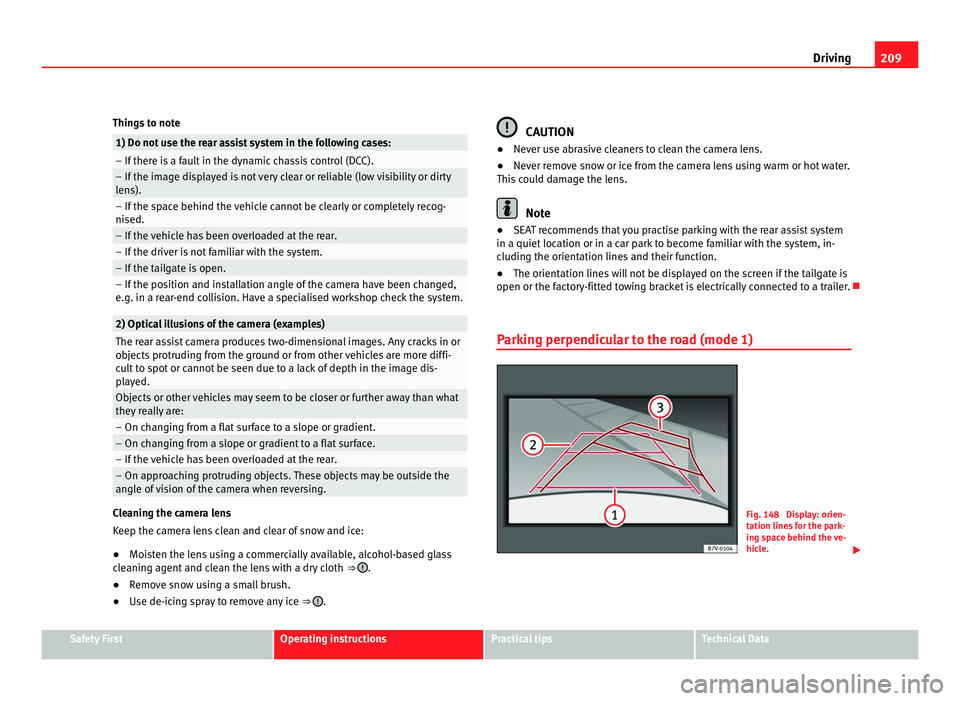
Parking perpendicular to the road (mode 1) Fig. 148 Display: orien-
tation line
s
for the park-
ing space behind the ve-
hicle. Safety First Operating instructions Practical tips Technical Data
Page 212 of 385
210
Driving
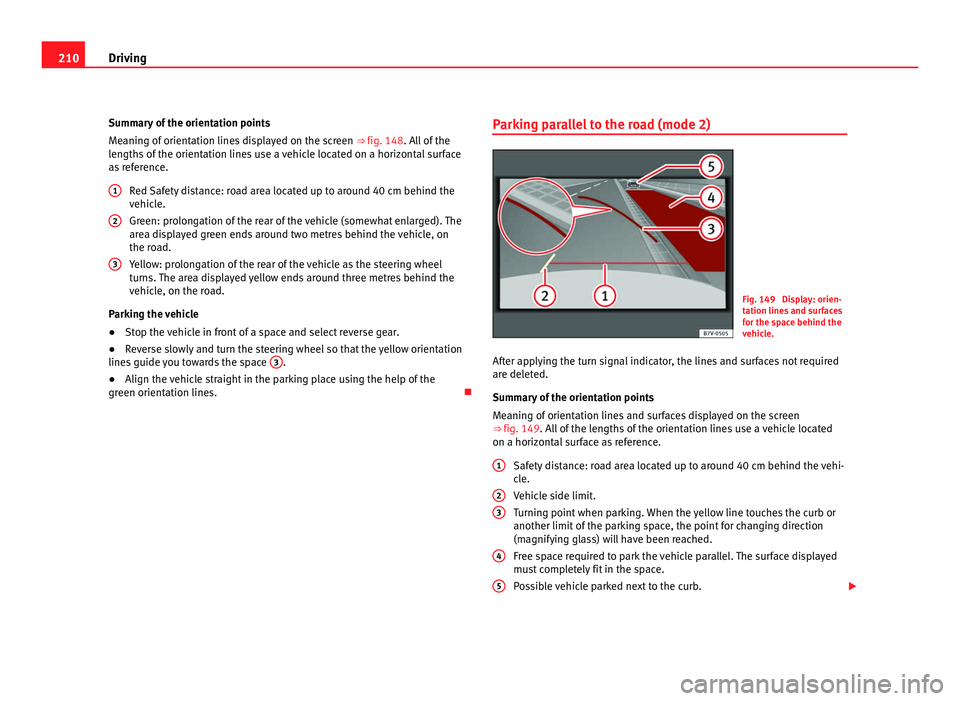
Summary of the orientation points
Me anin
g of orientation lines displayed on the screen ⇒ fig. 148. All of the
lengths of the orientation lines use a vehicle located on a horizontal surface
as reference.
Red Safety distance: road area located up to around 40 cm behind the
vehicle.
Green: prolongation of the rear of the vehicle (somewhat enlarged). The
area displayed green ends around two metres behind the vehicle, on
the road.
Yellow: prolongation of the rear of the vehicle as the steering wheel
turns. The area displayed yellow ends around three metres behind the
vehicle, on the road.
Parking the vehicle
● Stop the vehicle in front of a space and select reverse gear.
● Reverse slowly and turn the steering wheel so that the yellow orientation
lines guide
you towards the space 3 .
● Align the vehicle straight in the parking place using the help of the
green orient ation line
s.
1 2
3 Parking parallel to the road (mode 2)
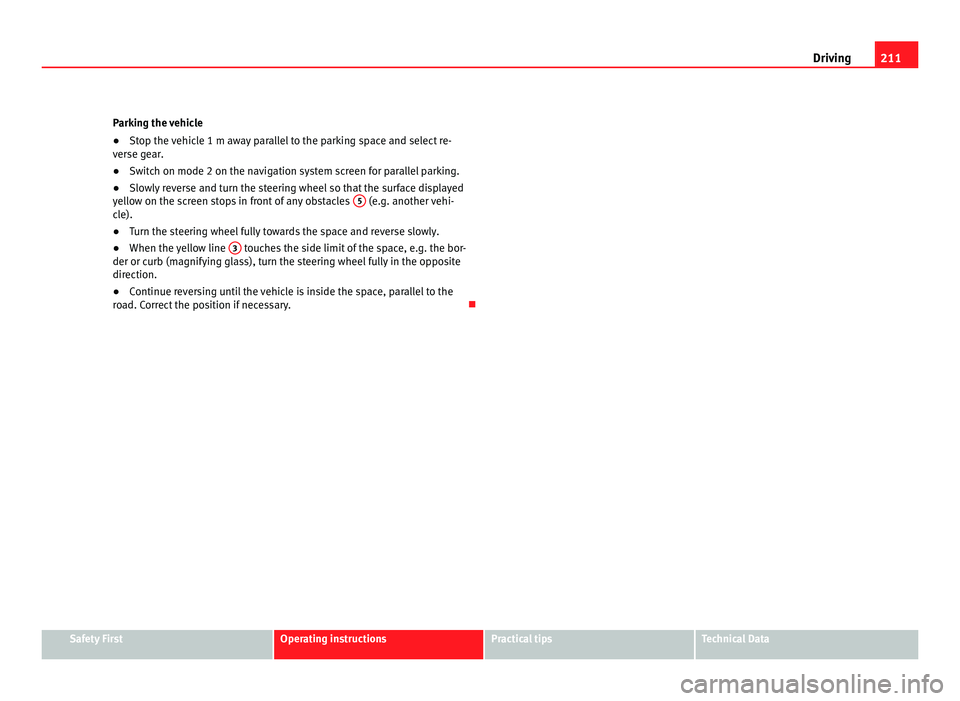
Fig. 149 Display: orien-
tation line
s
and surfaces
for the space behind the
vehicle.
After applying the turn signal indicator, the lines and surfaces not required
are delet
ed.
Summary of the orientation points
Meaning of orientation lines and surfaces displayed on the screen
⇒ fig. 149. All of the lengths of the orientation lines use a vehicle located
on a horizontal surface as reference.
Safety distance: road area located up to around 40 cm behind the vehi-
cle.
Vehicle side limit.
Turning point when parking. When the yellow line touches the curb or
another limit of the parking space, the point for changing direction
(magnifying glass) will have been reached.
Free space required to park the vehicle parallel. The surface displayed
must completely fit in the space.
Possible vehicle parked next to the curb.
1 2
3
4
5
Page 213 of 385
211
Driving
Parking the vehicle
● Stop the vehicle 1 m away parallel to the parking space and select re-
ver se g
ear.
● Switch on mode 2 on the navigation system screen for parallel parking.
● Slowly reverse and turn the steering wheel so that the surface displayed
yello
w on the screen stops in front of any obstacles 5 (e.g. another vehi-
cl e).
● T
urn the steering wheel fully towards the space and reverse slowly.
● When the yellow line 3 touches the side limit of the space, e.g. the bor-
der or curb (m agnif
ying glass), turn the steering wheel fully in the opposite
direction.
● Continue reversing until the vehicle is inside the space, parallel to the
roa
d. Correct the position if necessary. Safety First Operating instructions Practical tips Technical Data
Page 222 of 385
220
Driving
during travel, the traffic sign valid at this moment will move to the first posi-
tion along the a d
ditional sign “if the road is wet”.
The permanent display on the instrument panel screen is shown as you
pass the real traffic signs. The signs for entering and leaving towns activate
the display of the usual speed limits for that country on roads in populated
areas and national highways, even if the speed is not limited by an actual
traffic sign.
The end of a prohibition or limitation is not displayed. If you exceed the
speed limits shown, a warning will not appear. The system does not detect
areas with little traffic. The current legal provisions apply.
Connection and disconnection
● Connect or disconnect the assist system in the Settings
menu within the
Seat information system ⇒ page 62.
● ALTERNATIVELY: Pres
s the button for the driver assist systems on the
main beam lever.
Trailer
Connect or disconnect the additional display of speed limits and overtaking
prohibitions valid for trailers (trailer mode) in the Settings menu inside with-
in the Seat information system ⇒ page 62.
Page 225 of 385
223
Driving WARNING (Continued)
● If tyres are inflated at different pressures or a tyre pressure is too low,
a ty r
e may be damaged and burst resulting in a loss of control of the ve-
hicle.
● The driver is responsible for ensuring that all of the vehicle tyres are
correctly
inflated to the right pressure. The recommended tyre pressure
is indicated on the label ⇒ fig. 176.
● The tyre monitoring system can only operate correctly if all of the
tyre
s are inflated to the correct pressure when cold.
● Driving with tyres at the wrong pressure can cause damage to them
and res
ult in an accident. Ensure that the tyre pressures of all the tyres
correspond to the vehicle load.
● Before starting a journey, always inflated tyres to the correct pres-
sure.
● If
tyre pressure is too low then the tyre is subject to greater forces
and it ma
y be heated to such an extent that the tread can rupture and the
tyre will burst.
● With an overloaded vehicle at high speed, the tyres can overheat and
burs
t resulting in a loss of vehicle control.
● Tyre pressures which are too high or too low reduce the useful life of
the tyre, aff
ecting the vehicle's performance.
● If a tyre has not been punctured then it does not have to be changed
immediately; driv
e to the nearest specialist workshop at a moderate
speed and have the tyre checked and inflated to the correct pressure. WARNING
If the warning lamps and messages are ignored, the vehicle may stall in
traffic, or m a
y cause accidents and severe injuries.
● Never ignore the warning lamps or text messages.
● Stop the vehicle safely as soon as possible. CAUTION
Failure to heed the warning lamps and text messages when they appear
ma y
result in faults in the vehicle.
Tyre monitoring indicator Fig. 154 Detailed view of
the centr
e c
onsole: but-
ton for the tyre pressure
monitoring indicator.
The tyre monitor indicator compares wheel revolutions and, with this infor-
mation, the tr e
ad of each wheel using the ABS sensors. If the tread of a
wheel is changed, the tyre monitoring indicator will indicate as such on the
instrument panel. The wheel tread changes when:
● Tyre pressure is insufficient.
● Tyre structure is damaged.
● The vehicle is unbalanced because of a load.
● The wheels on an axle are subject to a heavier load (e.g. when towing a
trail
er). Safety First Operating instructions Practical tips Technical Data