ESP Seat Alhambra 2011 Repair Manual
[x] Cancel search | Manufacturer: SEAT, Model Year: 2011, Model line: Alhambra, Model: Seat Alhambra 2011Pages: 385, PDF Size: 7.92 MB
Page 207 of 385
205
Driving
● A suitable parking space length is at least 1.1 m greater than the length
of the
vehicle.
● If the results of the park assist system are not as good after changing
the wheels, the sys
tem must memorise the perimeter of the new wheels.
This process is performed automatically while the vehicle is in motion. To
help this process, turn slowly (at less than 20 km/h), e.g. in an empty car
park.
Leaving a parking space using the Park Assist system Driving off
●
Switch on the engine.
● Press button . When the function is enabled, the button
⇒ fig. 144
wi l
l light up.
● Apply the turn signal indicator for the side on which you want to leave
the parkin
g space.
● Select reverse gear.
● Follow the instructions given by the park assist system.
● When the next indication appears, release the steering wheel ⇒ in
Park in
g using the park assist system on page 204: The system will move the
steering wheel! Observe the surrounding area.
● Observe the surrounding area and accelerate carefully at a maximum of
up to 7 km/h.
● The park
assist system is only r
esponsible for moving the steering wheel
during the manoeuvre. The driver applies the accelerator, the clutch, the
gears and the brake.
● When it is possible to leave the parking space, the Park Assist system
wil
l stop. Take control of the steering and when traffic conditions permit,
leave the parking space. Automatic stoppage of the manoeuvre
The park a
ssist system stops the manoeuvre in the event of one of the fol-
lowing:
● Driving faster than 7 km/h.
● The driver moves the steering wheel.
● A sliding door is opened. To restart the manoeuvre, close the sliding
door and pres
s the button again.
● There is a system malfunction (system temporarily unavailable).
● The ASR (TCS) system is switched off or the ASR (TCS) or ESC (ESP) is
work in
g. WARNING
The steering wheel turns quickly automatically when leaving a parking
sp ac
e using the park assist system. Placing your hand between the steer-
ing wheel spokes could lead to injuries.
Park Assist brake operation The Park Assist system helps the driver by braking automatically. Automatic
brak
in
g does not relieve the driver of responsibility for controlling the accel-
erator, brake and clutch ⇒ .
Brak in
g to avoid damage at excess speed
It is possible that the system operates the brakes to reduce excess speed.
The parking manoeuvre can then continue. The brakes will intervene during
each parking process.
Braking to minimise damage
When approaching an obstacle, the vehicle may brake automatically. In cer-
tain circumstances (for example, storm, detection of ultrasounds, vehicle Safety First Operating instructions Practical tips Technical Data
Page 208 of 385
206
Driving
status, load, inclination), the Park Assist system may stop the vehicle com-
pl et
ely before an object.
● Press the foot brake ⇒ !
Fo l
lowing the intervention of the brakes, the Park Assist will stop. WARNING
Despite the assistance provided by the park assist system, do not run
any ri
sks when parking. The system is not a replacement for driver
awareness.
● Always be ready to brake.
● Automatic brake intervention will end after 1.5 seconds approximate-
ly. Fo
llowing automatic intervention of the brakes, stop the vehicle your-
self.
Page 219 of 385
217
Driving
Switching the lane assist system on or off
● Select the corresponding menu option using the button for the driver as-
si s
t systems ⇒ page 62.
● ALTERNATIVELY: Activat
e or deactivate the system in the menu Settings,
sub-menu Assist systems , menu Lane Assist ⇒ page 62. The “confirmation
sign” indicates that the driver assist system is switched on.
Automatic deactivation: the lane assist system can be deactivated automat-
ically if there is a system malfunction. Control lamp switches off.
The lane assist system is inactive (control lamp lit in yellow)
● When the speed of travel drops to below approx. 65 km/h (40 mph).
● When the lane assist system does not detect the dividing lines of the
roa
d. For example, in the event of road works, and snow, dirt, moisture or
reflections.
● When the radius of a curve is too small.
● When there is no dividing line.
● When the distance to the next dividing line is excessive.
● When there are more than two lane markings per lane.
● When the TCS is disconnected.
● When the system does not detect any active rotation of the steering
wheel by
the driver during a prolonged period.
● Temporarily, in the event of very dynamic driving.
● When the turn signal is connected. Note
Before starting travel, verify that the camera's field of vision is not covered
⇒ fig. 152
. Note
Keep the camera window clean. Disconnect the lane assist system in the following
sit
uation
s Due to the limits of the lane assist system, disconnect it in the following sit-
uations:
●
When mor e att
ention is required of the driver
● For very sporty driving
● In very unfavourable weather conditions
● In very unfavourable road conditions
● In areas of road works Safety First Operating instructions Practical tips Technical Data
Page 221 of 385
219
Driving
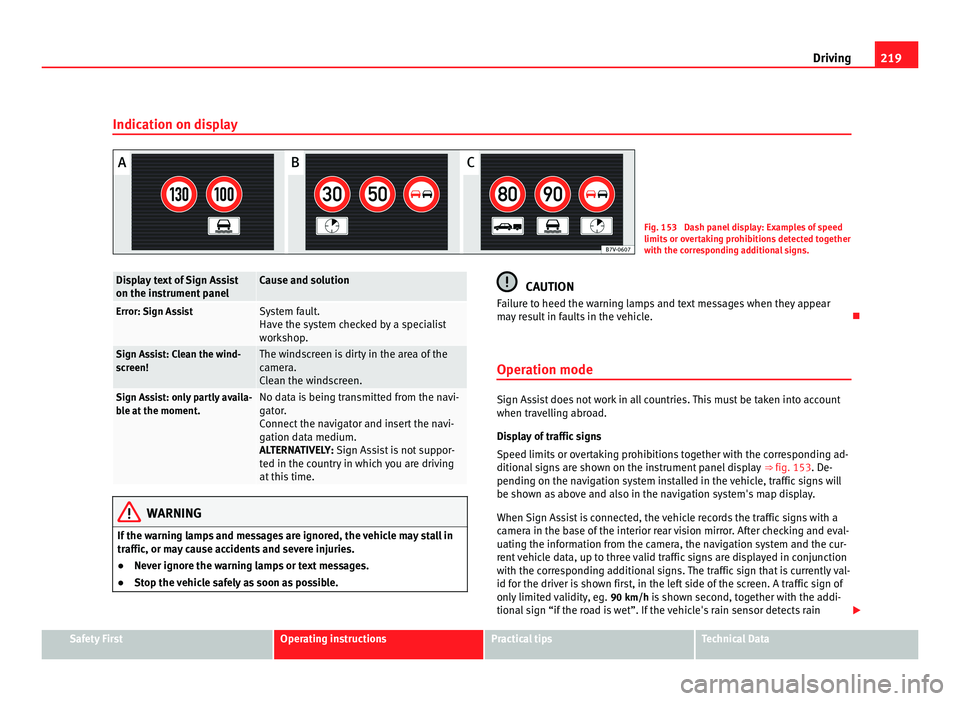
Indication on display Fig. 153 Dash panel display: Examples of speed
limits
or o
vertaking prohibitions detected together
with the corresponding additional signs. Display text of Sign Assist
on the ins
trument
panel Cause and solution
Error: Sign Assist System fault.
Have the sy
s
tem checked by a specialist
workshop. Sign Assist: Clean the wind-
sc
r
een! The windscreen is dirty in the area of the
camer
a.
C
lean the windscreen. Sign Assist: only partly availa-
bl
e at
the moment. No data is being transmitted from the navi-
gat
or
.
Connect the navigator and insert the navi-
gation data medium.
ALTERNATIVELY: Sign Assist is not suppor-
ted in the country in which you are driving
at this time. WARNING
If the warning lamps and messages are ignored, the vehicle may stall in
traffic, or m a
y cause accidents and severe injuries.
● Never ignore the warning lamps or text messages.
● Stop the vehicle safely as soon as possible. CAUTION
Failure to heed the warning lamps and text messages when they appear
ma y
result in faults in the vehicle.
Operation mode Sign Assist does not work in all countries. This must be taken into account
when trav
el
ling abroad.
Display of traffic signs
Speed limits or overtaking prohibitions together with the corresponding ad-
ditional signs are shown on the instrument panel display ⇒ fig. 153. De-
pending on the navigation system installed in the vehicle, traffic signs will
be shown as above and also in the navigation system's map display.
When Sign Assist is connected, the vehicle records the traffic signs with a
camera in the base of the interior rear vision mirror. After checking and eval-
uating the information from the camera, the navigation system and the cur-
rent vehicle data, up to three valid traffic signs are displayed in conjunction
with the corresponding additional signs. The traffic sign that is currently val-
id for the driver is shown first, in the left side of the screen. A traffic sign of
only limited validity, eg. 90 km/h is shown second, together with the addi-
tional sign “if the road is wet”. If the vehicle's rain sensor detects rain Safety First Operating instructions Practical tips Technical Data
Page 225 of 385
223
Driving WARNING (Continued)
● If tyres are inflated at different pressures or a tyre pressure is too low,
a ty r
e may be damaged and burst resulting in a loss of control of the ve-
hicle.
● The driver is responsible for ensuring that all of the vehicle tyres are
correctly
inflated to the right pressure. The recommended tyre pressure
is indicated on the label ⇒ fig. 176.
● The tyre monitoring system can only operate correctly if all of the
tyre
s are inflated to the correct pressure when cold.
● Driving with tyres at the wrong pressure can cause damage to them
and res
ult in an accident. Ensure that the tyre pressures of all the tyres
correspond to the vehicle load.
● Before starting a journey, always inflated tyres to the correct pres-
sure.
● If
tyre pressure is too low then the tyre is subject to greater forces
and it ma
y be heated to such an extent that the tread can rupture and the
tyre will burst.
● With an overloaded vehicle at high speed, the tyres can overheat and
burs
t resulting in a loss of vehicle control.
● Tyre pressures which are too high or too low reduce the useful life of
the tyre, aff
ecting the vehicle's performance.
● If a tyre has not been punctured then it does not have to be changed
immediately; driv
e to the nearest specialist workshop at a moderate
speed and have the tyre checked and inflated to the correct pressure. WARNING
If the warning lamps and messages are ignored, the vehicle may stall in
traffic, or m a
y cause accidents and severe injuries.
● Never ignore the warning lamps or text messages.
● Stop the vehicle safely as soon as possible. CAUTION
Failure to heed the warning lamps and text messages when they appear
ma y
result in faults in the vehicle.
Tyre monitoring indicator Fig. 154 Detailed view of
the centr
e c
onsole: but-
ton for the tyre pressure
monitoring indicator.
The tyre monitor indicator compares wheel revolutions and, with this infor-
mation, the tr e
ad of each wheel using the ABS sensors. If the tread of a
wheel is changed, the tyre monitoring indicator will indicate as such on the
instrument panel. The wheel tread changes when:
● Tyre pressure is insufficient.
● Tyre structure is damaged.
● The vehicle is unbalanced because of a load.
● The wheels on an axle are subject to a heavier load (e.g. when towing a
trail
er). Safety First Operating instructions Practical tips Technical Data
Page 227 of 385
225
Driving and the environment
Practical tips Drivin g and the en
vironment
Running-in Please observe the instructions for running-in new components.
Ru
nnin
g-in the engine
The engine needs to be run-in over the first 1500 km (1000 miles). During
its first few hours of running, the internal friction in the engine is greater
than later on when all the moving parts have bedded down.
How the vehicle is driven for the first 1500 km (1000 miles) influences the
future engine performance. Throughout the life of the vehicle, it should be
driven at a moderate speed – especially when the engine is cold – this will
reduce engine wear and increase its useful life. Never drive at extremely low
engine speeds. Always engage a lower gear when the engine works “irregu-
larly”. For the first 1000 km or 600 miles, please note:
● Do not use full throttle.
● Do not force the engine above two thirds of its maximum speed.
● Do not tow a trailer.
Between 1000 and 1500 k
ilometres (600 to 1000 miles) , gradually in-
crease power until reaching the maximum speed and high engine speeds.
Running in new tyres and brake pads
● Replacement of new tyres and wheel rims ⇒ pag
e 293
● Notes on the brakes ⇒ pag
e 187 For the sake of the environment
If the engine is run in gently, the life of the engine will be increased and the
engine oi l
consumption reduced.
Ecological driving Introduction Fuel consumption, environmental impact and engine, brake and tyre wear
depend lar
g
ely on three factors:
● Personal driving style.
● Conditions of use (weather, road surface).
● Technical requirements.
Saving
s of up to 25% in fuel consumption are possible with an appropriate
driving style and the adoption of certain simple tips. WARNING
Always adapt your speed and the distance to the vehicles ahead in line
with v
isibility, weather conditions, the condition of the road and the traf-
fic situation.
Safety First Operating instructions Practical tips Technical Data
Page 230 of 385
228
Driving and the environment
Avoid carrying unnecessary loads
The lighter the v
ehicle, the more economical and ecological the driving
style. For example, an additional weight of 100 kg will increase fuel con-
sumption up to 0.3 l/100 km.
Remove any unnecessary objects or loads from the vehicle.
Remove optional equipment and unnecessary accessories
The more aerodynamic the vehicle, the lower the fuel consumption. Option-
al equipment and accessories (such as roof racks or bike carriers) reduce
the aerodynamic benefits of the vehicle.
Therefore, we recommend you remove all optional and unnecessary equip-
ment and racks, especially if you intend to drive at high speeds.
Engine management and exhaust gas
purification sy
stem
Introduction Additional information and warnings:
●
Changing gear ⇒ p ag
e 174
● Refuelling ⇒ pag
e 264
● Fuel ⇒ page 267
● En
gine oil ⇒ pag
e 279
● Vehicle battery ⇒ pag
e 288
● Information stored in the control units ⇒ pag
e 257
● Tow-starting and towing away ⇒ pag
e 340 WARNING
The components of the exhaust system reach very high temperatures.
This c
ould cause a fire.
● Always park your vehicle so that no part of the exhaust system can
come in cont
act with flammable materials (such as dried grass).
● Do not apply additional underseal or anti-corrosion coatings to the
exhau
st pipes, catalytic converter, heat shields or the diesel particulate
filter.
Warning lamps lights up Possible cause Solution
Fault in engine management
(Electr
onic
Power Control). Take the vehicle to a Technical
Serv
ic
e as soon as possible and
have the engine checked. Pre-heating a diesel engine
befor
e s
tarting the engine. ⇒ page 170
Fault in catalytic converter. You should reduce speed ac-
cor
din
gly. Drive carefully until
you reach the next qualified
workshop. Have the engine
checked there. Diesel particulate filter
bloc
k
ed Drive for 15 minutes in 4th gear
(manual
g
earbox), or in D (auto-
matic gearbox) at a minimum
speed of 70 km/h (45 mph).
Observe speed limits ⇒ .
If the w arnin
g lamp remains lit
up, take the vehicle to a Techni-
cal Service ⇒ page 229.
Page 231 of 385
229
Driving and the environment flashes Possible cause Solution
Fault in the engine manage-
ment (die
sel
engines). Take the vehicle to a Technical
Serv
ic
e as soon as possible and
have the engine checked. Combustion fault which could
dam
ag
e the catalytic convert-
er. You should reduce speed ac-
cor
din
gly. Drive carefully until
you reach the next qualified
workshop. Have the engine
checked there. Several warning and control lamps should light up for a few seconds when
the ignition is
sw
itched. This signals that the lamp is working properly. They
will switch off after a few seconds. WARNING
Observe traffic regulations when cleaning the diesel particulate filter
whil e driv
ing.
● Only carry on driving if visibility, weather, road and traffic conditions
so permit.
● Never end
anger your safety or that of other road users. CAUTION
Always pay attention to any lit lamps and to the corresponding descriptions
and ins truction
s to avoid damage to the vehicle. Note
While the control lamps , or r
emain lit, there may be engine prob-
lems, fuel consumption may be greater and the engine may lose power. Catalytic converter The catalytic converter permits the subsequent treatment of the exhaust
ga
se
s thus reducing contaminating gas emissions. To ensure a longer work-
ing life for the exhaust system and catalytic converter in a petrol engine:
● Always use unleaded petrol.
● Never run the tank completely dry.
● Do not top up with too much engine oil ⇒ page 279.
● Do not
tow-start the vehicle; use the starter cables ⇒ page 337.
If
you should notice misfiring, uneven running or loss of power when the car
is moving, reduce speed immediately. Have the car inspected by a Technical
Service. If this happens, unburnt fuel can enter the exhaust system and es-
cape into the atmosphere. The catalytic converter can also be damaged by
overheating. For the sake of the environment
Even when the emission control system is working perfectly, there may be a
smell of
sulphur from the exhaust gas under some conditions. This depends
on the sulphur content of the fuel being used.
Diesel particulate filter The diesel particulate filter removes soot particulates from the exhaust gas.
The filt
er r
etains these particulates and burns them. To assist the combus-
tion process, SEAT recommends you avoid frequent short trips.
● Always use diesel with a low sulphur content ⇒ page 267.
● Nev
er use petrol or fuel oil.
● Never use biodiesel. However, a blend prepared by the diesel manufac-
turer c
ontaining biodiesel within the limits established by the EN 590
standard may be used ⇒ page 267. Safety First Operating instructions Practical tips Technical Data
Page 235 of 385
233
Trailer towing
Driving with a trailer Tec hnic
al requirements If the car is supplied with a
factor
y-fitted tow hitch it will already have the
necessary technical modifications and meet the statutory requirements for
towing a trailer.
Only use an approved trailer hitch for the gross trailer weight rating. The tow
hitch must be suitable for both the vehicle and trailer and must be securely
fitted to the vehicle chassis. Only use a tow hitch with a removable ball
joint. Always check and take into account the tow hitch manufacturer's in-
structions. Never fit a trailer tow hitch “that distributes the load” or “balan-
ces the load”.
Bumper mounted tow hitch
Never fit a tow hitch or its attachments to the bumper. A tow hitch should
never interfere with the bumper performance. Do not modify the exhaust
system and brake system. Regularly check the tow hitch to ensure it is firmly
fitted.
Engine cooling system
Driving with a trailer increases the load on the engine and cooling system.
The cooling system should always have sufficient coolant and to be able to
cope with the vehicle and trailer.
Electric trailer brake
If the trailer has its own braking system, please note the relevant legal re-
quirements. The trailer braking system should never be connected to the ve-
hicle braking system.
Trailer cable
Always use a cable between the vehicle and the trailer ⇒ page 235.Trailer rear lights
The rear lights
of a trailer must fulfil the corresponding standards
⇒ page 235.
Never connect the trailer's rear lights directly to the vehicle electric system.
In case of any doubt about the electrical connection of the trailer, ask a spe-
cialist workshop. SEAT recommends visiting a Technical Service.
Wing mirrors
When the field of vision behind the trailer cannot be seen using the stand-
ard wing mirrors of the towing vehicle, additional wing mirrors are required
according to the legal requirements of each country. The wing mirrors must
be fitted before driving and must provide a sufficient field of vision behind.
Trailer electricity consumption
Never exceed the specifications: Electrical consumer Maximum power
Position lights and rear lights 50 Watts
Indicator (each side) 54 Watts
Brake lights (total) 84 Watts
Reversing lights (total) 42 Watts
Rear fog light 42 Watts
WARNING
If the tow hitch is badly fitted or unsuitable, the trailer may separate from
the v ehic
le causing an accident with serious consequences. Safety First Operating instructions Practical tips Technical Data
Page 240 of 385
238
Trailer towing
●The vehicle centre of gravity and handling change because of the trailer
lo a
d and because of the increased combined mass of the vehicle and trail-
er.
● If the towing vehicle is empty and the trailer loaded then the load distri-
bution is
incorrect. If you must travel in these conditions, drive carefully and
reduce your speed accordingly.
Hill starts with a trailer
Depending on the hill and the gross combined weight, it is possible that the
combined vehicle and trailer move backwards slightly when starting.
For a hill start with a trailer, proceed as follows:
● Press and hold the brake pedal.
● Press the button once to turn off the electric parking brake
⇒ p ag
e 183.
● Press and hold the button to hold the vehicle and trailer combination
us in
g the parking brake.
● With a manual gearbox: press the clutch pedal to the floor.
● Engage first gear or the gear range D ⇒ page 174, Ch
anging gear.
● Release the brake pedal.
● Move off slowly. To do this, gently release the clutch pedal (for manual
gearbo
x).
● Release the button only when the engine provides sufficient power
to mo v
e the vehicle and trailer combination. WARNING
Jerking the trailer in an unsuitable manner could cause loss of vehicle
contr o
l with the subsequent serious consequences.
● Driving with a trailer and transporting heavy or a large objects will
chan
ge the vehicle handling and braking distances. WARNING (Continued)
● Antic ipate traffic and be extremely cautious. Brake early.
● Adju
s
t your speed and driving style to visibility, road, traffic and
weather c
onditions. Reduce your speed, especially on steep hills.
● Accelerate gently and carefully. Avoid brusque manoeuvres and sud-
den brakin
g.
● Always take the following precautions seriously. Reduce your speed
immediately
if you observe the trailer rocking from side to side.
● Never try to stop the “snaking” by increasing speed.
● Always take the speed limits for vehicles with and without trailers in
each c
ountry into account.
Stabilising the vehicle and trailer combination Stabilisation of the vehicle and trailer combination is an extension of the
electr
onic
stability control ESC (ESP) and helps, with the assistance of the
trajectory control, to reduce trailer “snaking”.
Stabilisation of the vehicle and trailer combination is active when the ESC
(ESP) indicator on the dashboard remains lit for about two seconds more
than the ABS indicator.
Requirements for stabilising the vehicle/trailer combination
● An original tow hitch is fitted by the manufacturer or a compatible model
is r
etrofitted.
● The ESC (ESP) is on. The warning indicator in the control panel is not
lit
.
● The trailer is connected to the vehicle using the socket.
● The vehicle is driven faster than 60 km/h.
● The maximum drawbar load is used.