heating Seat Alhambra 2011 Owner's Manual
[x] Cancel search | Manufacturer: SEAT, Model Year: 2011, Model line: Alhambra, Model: Seat Alhambra 2011Pages: 385, PDF Size: 7.92 MB
Page 5 of 385
Table of Contents
Manual structure
. . . . . . . . . . . . . . . . . . . . 5
Content . . . . . . . . . . . . . . . . . . . . . . . . . . . . . . . . 6
Safety First . . . . . . . . . . . . . . . . . . . . . . . . . . . . 7
Safe driving . . . . . . . . . . . . . . . . . . . . . . . . . . . . . . . 7
Dear SEAT Driver . . . . . . . . . . . . . . . . . . . . . . . . . . 7
Tips for driving . . . . . . . . . . . . . . . . . . . . . . . . . . . 7
Adjusting the seat position . . . . . . . . . . . . . . . . . 10
Transporting objects . . . . . . . . . . . . . . . . . . . . . . . 13
Seat belts . . . . . . . . . . . . . . . . . . . . . . . . . . . . . . . . . 16
Brief introduction . . . . . . . . . . . . . . . . . . . . . . . . . 16
Why wear seat belts? . . . . . . . . . . . . . . . . . . . . . . 19
Seat belts . . . . . . . . . . . . . . . . . . . . . . . . . . . . . . . 21
Seat belt tensioners . . . . . . . . . . . . . . . . . . . . . . . 26
Airbag system . . . . . . . . . . . . . . . . . . . . . . . . . . . . . 28
Brief introduction . . . . . . . . . . . . . . . . . . . . . . . . . 28
Airbag system . . . . . . . . . . . . . . . . . . . . . . . . . . . . 31
Child safety . . . . . . . . . . . . . . . . . . . . . . . . . . . . . . . 39
Child seats (accessories) . . . . . . . . . . . . . . . . . . . 39
Integrated child seat . . . . . . . . . . . . . . . . . . . . . . . 46
Operating instructions . . . . . . . . . . . . . 53
Cockpit . . . . . . . . . . . . . . . . . . . . . . . . . . . . . . . . . . . 53
Overview . . . . . . . . . . . . . . . . . . . . . . . . . . . . . . . . 53
Instrument panel . . . . . . . . . . . . . . . . . . . . . . . . . . 54
Instruments . . . . . . . . . . . . . . . . . . . . . . . . . . . . . . 57
SEAT information system . . . . . . . . . . . . . . . . . . . 62 Unlocking and locking
. . . . . . . . . . . . . . . . . . . . . 71
Vehicle key set . . . . . . . . . . . . . . . . . . . . . . . . . . . 71
Central locking and locking system . . . . . . . . . . . 74
Doors . . . . . . . . . . . . . . . . . . . . . . . . . . . . . . . . . . . 80
Sliding doors . . . . . . . . . . . . . . . . . . . . . . . . . . . . . 81
Tailgate . . . . . . . . . . . . . . . . . . . . . . . . . . . . . . . . . 84
Electric windows . . . . . . . . . . . . . . . . . . . . . . . . . . 89
Panorama sliding sunroof* . . . . . . . . . . . . . . . . . 92
Lights and visibility . . . . . . . . . . . . . . . . . . . . . . . . 95
Lights . . . . . . . . . . . . . . . . . . . . . . . . . . . . . . . . . . . 95
Sun blind . . . . . . . . . . . . . . . . . . . . . . . . . . . . . . . . 103
Windscreen wiper and washer . . . . . . . . . . . . . . . 105
Rear vision mirror . . . . . . . . . . . . . . . . . . . . . . . . . 110
Seats and storage compartments . . . . . . . . . . 114
Seat adjustment . . . . . . . . . . . . . . . . . . . . . . . . . . 114
Seat functions . . . . . . . . . . . . . . . . . . . . . . . . . . . . 117
Head restraints . . . . . . . . . . . . . . . . . . . . . . . . . . . 123
Centre armrest . . . . . . . . . . . . . . . . . . . . . . . . . . . . 125
Loading luggage compartment . . . . . . . . . . . . . . 125
Roof carrier system* . . . . . . . . . . . . . . . . . . . . . . . 138
Storage compartments . . . . . . . . . . . . . . . . . . . . . 141
Cup holders . . . . . . . . . . . . . . . . . . . . . . . . . . . . . . 148
Ashtray and cigarette lighter* . . . . . . . . . . . . . . . 150
Sockets . . . . . . . . . . . . . . . . . . . . . . . . . . . . . . . . . 151
Heating, Ventilation and Air conditioning . . . 155
Climate Control . . . . . . . . . . . . . . . . . . . . . . . . . . . 155
Auxiliary heater* (additional heater) . . . . . . . . . . 163
Driving . . . . . . . . . . . . . . . . . . . . . . . . . . . . . . . . . . . . 167
Steering . . . . . . . . . . . . . . . . . . . . . . . . . . . . . . . . . 167
Stopping and starting the engine . . . . . . . . . . . . 170
Changing gear . . . . . . . . . . . . . . . . . . . . . . . . . . . . 174
Braking, stopping and parking . . . . . . . . . . . . . . 183
Start assist systems . . . . . . . . . . . . . . . . . . . . . . . 194
Parking sensor system* . . . . . . . . . . . . . . . . . . . . 198 Park Assist system* . . . . . . . . . . . . . . . . . . . . . . . 202
Rear Assist system* . . . . . . . . . . . . . . . . . . . . . . . 207
Cruise control system* . . . . . . . . . . . . . . . . . . . . . 212
Lane Assist system* . . . . . . . . . . . . . . . . . . . . . . . 215
Sign Assist* . . . . . . . . . . . . . . . . . . . . . . . . . . . . . . 218
Tyre monitoring systems . . . . . . . . . . . . . . . . . . . . 221
Practical tips . . . . . . . . . . . . . . . . . . . . . . . . . . 225
Driving and the environment . . . . . . . . . . . . . . . 225
Running-in . . . . . . . . . . . . . . . . . . . . . . . . . . . . . . . 225
Ecological driving . . . . . . . . . . . . . . . . . . . . . . . . . 225
Engine management and exhaust gas
purific ation sy
stem . . . . . . . . . . . . . . . . . . . . . . . . 228
Trailer towing . . . . . . . . . . . . . . . . . . . . . . . . . . . . . . 231
Introduction . . . . . . . . . . . . . . . . . . . . . . . . . . . . . . 231
Driving with a trailer . . . . . . . . . . . . . . . . . . . . . . . 233
Vehicle maintenance and cleaning . . . . . . . . . 242
Care and cleaning the vehicle exterior . . . . . . . . 242
Caring for and cleaning the vehicle interior . . . . 249
Notes for the user . . . . . . . . . . . . . . . . . . . . . . . . . 255
Accessories, parts replacement and
modifications . . . . . . . . . . . . . . . . . . . . . . . . . . . . .
257
Accessories, replacement of parts and
modifications
. . . . . . . . . . . . . . . . . . . . . . . . . . . . 257
Checking and refilling levels . . . . . . . . . . . . . . . 264
Filling the tank . . . . . . . . . . . . . . . . . . . . . . . . . . . . 264
Fuel . . . . . . . . . . . . . . . . . . . . . . . . . . . . . . . . . . . . 267
Selective Catalytic Reduction* (AdBlue) . . . . . . . 271
Working in the engine compartment . . . . . . . . . . 275
Engine oil . . . . . . . . . . . . . . . . . . . . . . . . . . . . . . . . 279
Engine coolant . . . . . . . . . . . . . . . . . . . . . . . . . . . 283
Vehicle battery . . . . . . . . . . . . . . . . . . . . . . . . . . . 288 3
Table of Contents
Page 16 of 385
14
Safe driving WARNING
The driving behaviour and braking ability change when transporting
heavy and l
arge objects.
● Adjust your speed and driving style to visibility, road, traffic and
weather c
onditions.
● Accelerate gently and carefully.
● Avoid sudden braking and manoeuvres.
● Brake early.
Transporting a load Secure all objects in the vehicle
●
Distribute the load throughout the vehicle, on the roof and in a trailer as
unif orm
ly as possible.
● Transport heavy objects as far forward as possible in the luggage com-
partment
and lock the seat backs in the vertical position.
● Secure luggage in the luggage compartment with suitable straps on the
fas
tening rings ⇒ page 125.
● Check the headlight adjustment ⇒ page 95.
● U
se the suitable tyre pressure according to the load being transported.
Rea
d the tire inflation information label ⇒ page 293.
● For vehicles with a tire pressure indicator, change the vehicle load status
⇒ page 221. CAUTION
Objects on the shelf could chafe against the wires of the heating element in
the re ar w
indow and cause damage. Note
Please note the information about loading a trailer ⇒ pag
e 233 and the
roof carrier system ⇒ page 138.
Driving with the tailgate open Driving with the tailgate open creates an additional risk. Secure all objects
and secur
e the t
ailgate correctly and take all measures possible to reduce
toxic gases from entering the vehicle. WARNING
Driving with the tailgate unlocked or open could cause serious injuries.
● Always drive with the tailgate closed.
● Secure all objects in the vehicle. Loose items could fall out of the ve-
hicl e and injur
e other road users or damage other vehicles.
● Drive particularly carefully and think ahead.
● Avoid sudden manoeuvres and braking given that this could cause an
uncontr
olled movement of the open tailgate.
● When transporting objects that protrude out of the luggage compart-
ment, indicate them s
uitably. Observe legal requirements.
● If objects must project out of the luggage compartment, the tailgate
must
never be used to “secure” or “attach” objects.
● If a baggage rack is fitted on the tailgate, it should be removed before
travel
ling with the tailgate open.
Page 17 of 385
15
Safe driving WARNING
Toxic gases may enter the vehicle interior when the tailgate is open. This
cou l
d cause loss of consciousness, carbon monoxide poisoning, serious
injury and accidents.
● To avoid toxic gases entering the vehicle always drive with the tail-
gate c
losed.
● In exceptional circumstances, if you must drive with the tailgate
open, obser
ve the following to reduce the entry of toxic gases inside the
vehicle:
–Close all windows and the sliding roof.
– Turn off the air recirculation for the heating and air conditioning.
– Open all of the air outlets in the dashboard.
– Turn the heating fan and heater to the highest level. CAUTION
An open tailgate changes the length and height of the vehicle.
Driving a loaded vehicle For the best handling when driving a loaded vehicle, note the following:
●
Secure all objects
⇒ pag
e 14.
● A
ccelerate gently and carefully.
● Avoid sudden braking and manoeuvres.
● Brake early.
● If necessary, read the instructions for driving with a trailer
⇒ page 233.
● If
necessary, read the instructions for driving with a roof carrier system
⇒ page 138. WARNING
A sliding load could considerably affect the stability and safety of the ve-
hicl e r
esulting in an accident with serious consequences.
● Secure loads correctly so they do not move.
● When transporting heavy objects, use suitable ropes or straps.
● Lock the seat backs in vertical position.
Specific vehicle weight information The instructions in the official vehicle documents take precedence. All the
tec
hnic
al data provided in this documentation is applicable to the basic
model. The vehicle data label in the Maintenance Programme or the vehicle
documents show which engine is installed in your vehicle.
The figures may be different depending on if additional equipment is fitted,
for different models and for special vehicles. WARNING
Exceeding the maximum authorised weight and the load on the axles
cou l
d cause damage to the vehicle, accidents and serious injuries.
● The real load on the axles should never exceed the maximum permit-
ted.
● The loa
d and its distribution in the vehicle have effects on the vehicle
handling and the br
aking ability. Always drive at a suitable speed. CAUTION
Distribute the load as uniformly and as low down on the vehicle as possible.
When tran s
porting heavy objects in the trunk/boot, these should be placed
as far forward as possible or over the rear axle to have as little influence on
handling as possible. Safety First Operating instructions Practical tips Technical Data
Page 55 of 385
53
Cockpit
Operating instructions Coc kpit
Ov
erview
Overv
iew of the dash panel This overview will help you to familiarise yourself with the
con
tr
ols and displays.
Door release lever . . . . . . . . . . . . . . . . . . . . . . . . . . . . . . . . . . . . . . . . . 80
Central locking button . . . . . . . . . . . . . . . . . . . . . . . . . . . . . . . 74
Switch for adjusting the exterior mirrors . . . . . . . . . . . . . . . . . . . .110
– Exterior mirror adjustment
– Heat
ed exterior mirrors
– Folding exterior mirrors
Instrument panel controls and lighting control . . . . . . . . . . . 95
Headlamp range adjustment . . . . . . . . . . . . . . . . . . . . . . . . . . . . 95
Light switch . . . . . . . . . . . . . . . . . . . . . . . . . . . . . . . . . . . . . . . . . . . . 95
– Light off - -
– Autom
atic headlight control - -
– Side/dipped lights
– Fog lights
Controls on the multi-function steering wheel . . . . . . . . . . . . . . .62
– Volume control for radio, navigation system and phone
con
versations –
– Radio mute or voice control activation
1 2
3
4
5
6
7 –
Activate telephone main menu or accept an incoming call
– SEA
T information system control buttons , , OK,
Lever for . . . . . . . . . . . . . . . . . . . . . . . . . . . . . . . . . . . . . . . . . . . . . . . . . . 95
– Main beam headlights
– Hea
dlight flasher
– Turn signals
– Parking lights
Instrument panel:
– Instruments . . . . . . . . . . . . . . . . . . . . . . . . . . . . . . . . . . . . . . . . . . . . 57
– Digital display . . . . . . . . . . . . . . . . . . . . . . . . . . . . . . . . . . . . . . . . . . 57
– Indicator lamps . . . . . . . . . . . . . . . . . . . . . . . . . . . . . . . . . . . . . . . . . 54
Horn (work
s only when the ignition is on)/Front driver airbag 31
Windscreen wiper/ windscreen wash lever . . . . . . . . . . . . . . . . . .105
– Windscreen wipers –
– Int
ermittent wipe
– “Brief wipe” x
– Windscreen wipers
– Automatic windscreen wash/wipe
– Rear window wiper
– Automatic rear window wash/wipe
– Lever with buttons for controlling the SEAT information
system - , / . . . . . . . . . . . . . . . . . . . . . . . . . . . . . . . . . . . . 62
Left seat heating controls . . . . . . . . . . . . . . . . . . . . . . . . . . . . . . . . 117
8
9
10
11
12
Safety First Operating instructions Practical tips Technical Data
Page 56 of 385
54
Cockpit
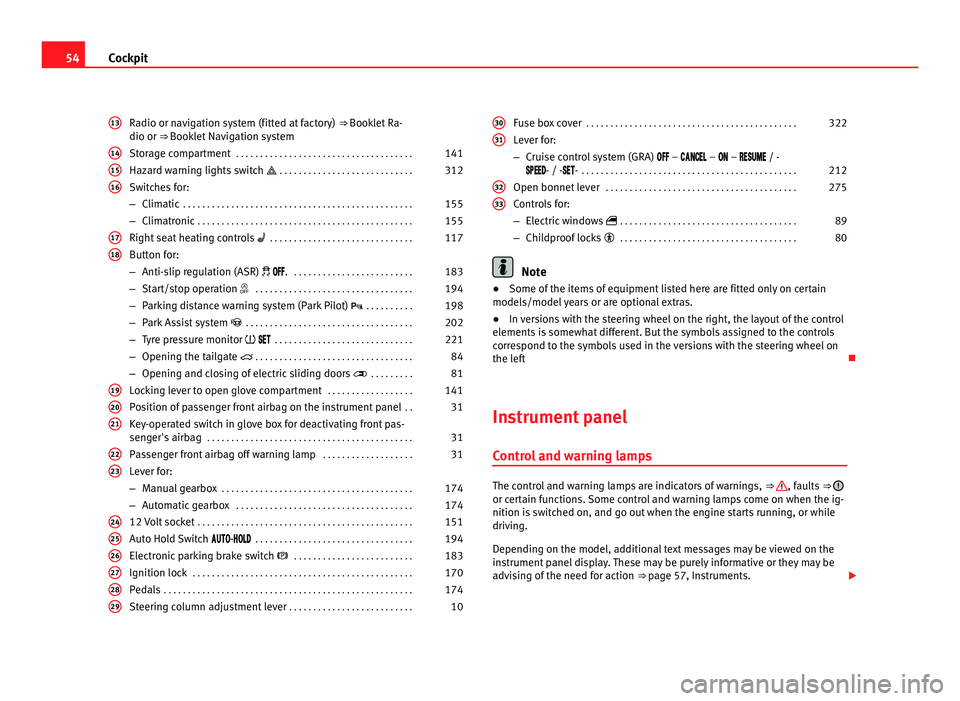
Radio or navigation system (fitted at factory) ⇒ Booklet Ra-
dio or ⇒ Booklet Navigation system
Storage compartment . . . . . . . . . . . . . . . . . . . . . . . . . . . . . . . . . . . . . 141
Hazard warning lights switch . . . . . . . . . . . . . . . . . . . . . . . . . . . . 312
Switches for:
– Climatic . . . . . . . . . . . . . . . . . . . . . . . . . . . . . . . . . . . . . . . . . . . . . . . . 155
– C
limatronic . . . . . . . . . . . . . . . . . . . . . . . . . . . . . . . . . . . . . . . . . . . . . 155
Right se
at heating controls . . . . . . . . . . . . . . . . . . . . . . . . . . . . . . 117
Button for:
– Anti-slip r
egulation (ASR) . . . . . . . . . . . . . . . . . . . . . . . . . . 183
– Start/stop operation . . . . . . . . . . . . . . . . . . . . . . . . . . . . . . . . . 194
– Parking distance warning system (Park Pilot) . . . . . . . . . . 198
– Park Assist system . . . . . . . . . . . . . . . . . . . . . . . . . . . . . . . . . . . 202
– Tyre pressure monitor
. . . . . . . . . . . . . . . . . . . . . . . . . . . . . 221
– Opening the tailgate . . . . . . . . . . . . . . . . . . . . . . . . . . . . . . . . . 84
– Opening and closing of electric sliding doors . . . . . . . . . 81
Loc
king lever to open glove compartment . . . . . . . . . . . . . . . . . .141
Position of passenger front airbag on the instrument panel . .31
Key-operated switch in glove box for deactivating front pas-
senger's
airbag . . . . . . . . . . . . . . . . . . . . . . . . . . . . . . . . . . . . . . . . . . . 31
Passenger front airbag off warning lamp . . . . . . . . . . . . . . . . . . .31
Lever for:
– Manual g
earbox . . . . . . . . . . . . . . . . . . . . . . . . . . . . . . . . . . . . . . . . 174
– Automatic gearbox . . . . . . . . . . . . . . . . . . . . . . . . . . . . . . . . . . . . . 174
12 V
olt socket . . . . . . . . . . . . . . . . . . . . . . . . . . . . . . . . . . . . . . . . . . . . . 151
Auto Hold Switch - . . . . . . . . . . . . . . . . . . . . . . . . . . . . . . . . . 194
Electr
onic parking brake switch . . . . . . . . . . . . . . . . . . . . . . . . . 183
Ignition lock . . . . . . . . . . . . . . . . . . . . . . . . . . . . . . . . . . . . . . . . . . . . . . 170
Pedals . . . . . . . . . . . . . . . . . . . . . . . . . . . . . . . . . . . . . . . . . . . . . . . . . . . . 174
Steering column adjustment lever . . . . . . . . . . . . . . . . . . . . . . . . . . 10
13 14
15
16
17
18
19
20
21
22
23
24
25
26
27
28
29 Fuse box cover
. . . . . . . . . . . . . . . . . . . . . . . . . . . . . . . . . . . . . . . . . . . . 322
Lever for:
– Crui se c
ontrol system (GRA) – – – / -
- / -- . . . . . . . . . . . . . . . . . . . . . . . . . . . . . . . . . . . . . . . . . . . . . 212
Open bonnet lever . . . . . . . . . . . . . . . . . . . . . . . . . . . . . . . . . . . . . . . . 275
Controls for:
– Electric w
indows . . . . . . . . . . . . . . . . . . . . . . . . . . . . . . . . . . . . . 89
– Childproof locks . . . . . . . . . . . . . . . . . . . . . . . . . . . . . . . . . . . . . 80 Note
● Some of the items of equipment listed here are fitted only on certain
model s/model
years or are optional extras.
● In versions with the steering wheel on the right, the layout of the control
elements i
s somewhat different. But the symbols assigned to the controls
correspond to the symbols used in the versions with the steering wheel on
the left
Instrument panel Contro
l and warning lamps The control and warning lamps are indicators of warnings,
⇒ , faults
⇒ or certain functions. Some control and warning lamps come on when the ig-
nition is
sw
itched on, and go out when the engine starts running, or while
driving.
Depending on the model, additional text messages may be viewed on the
instrument panel display. These may be purely informative or they may be
advising of the need for action ⇒ page 57, Instruments.
30 31
32
33
Page 61 of 385
59
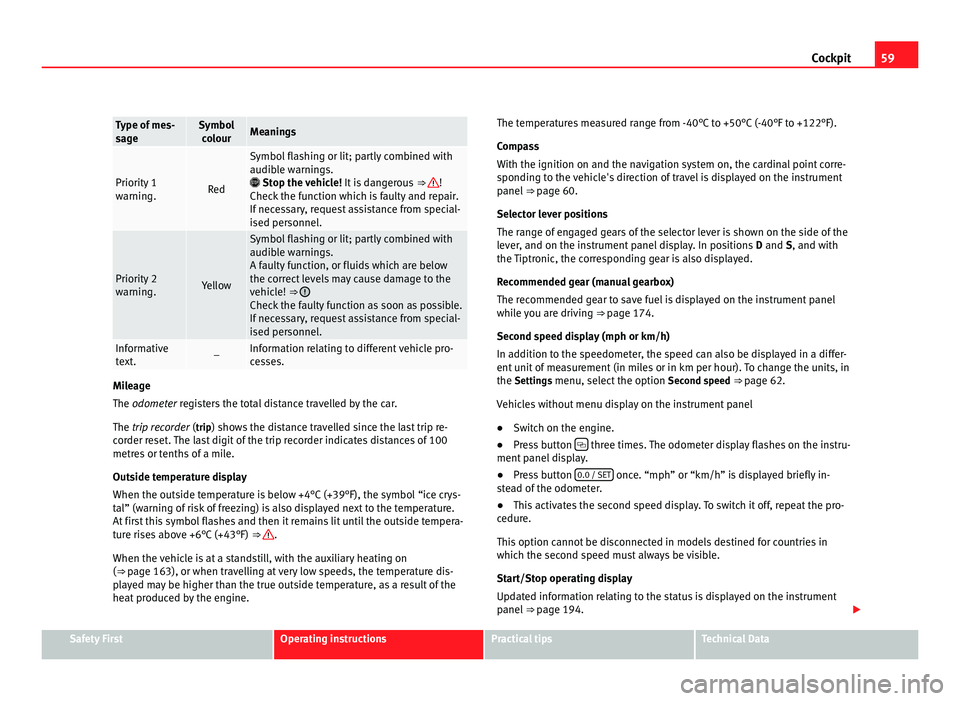
Cockpit Type of mes-
sag
e Symbol
co lour Meanings
Priority 1
warnin
g. Red Symbol flashing or lit; partly combined with
audibl
e w
arnings.
Stop the vehicle! It is dangerous ⇒ !
Check the f
unction which is faulty and repair.
If necessary, request assistance from special-
ised personnel. Priority 2
warnin
g. Yellow Symbol flashing or lit; partly combined with
audibl
e w
arnings.
A faulty function, or fluids which are below
the correct levels may cause damage to the
vehicle! ⇒ Check the faulty function as soon as possible.
If nec
e
ssary, request assistance from special-
ised personnel. Informative
te
xt
. – Information relating to different vehicle pro-
ce
s
ses. Mileage
The odometer
r
egisters the total distance travelled by the car.
The trip recorder (trip) shows the distance travelled since the last trip re- corder reset. The last digit of the trip recorder indicates distances of 100
metres or tenths of a mile.
Outside temperature display
When the outside temperature is below +4°C (+39°F), the symbol “ice crys-
tal” (warning of risk of freezing) is also displayed next to the temperature.
At first this symbol flashes and then it remains lit until the outside tempera-
ture rises above +6°C (+43°F) ⇒ .
When the v ehic
le is at a standstill, with the auxiliary heating on
(⇒ page 163), or when travelling at very low speeds, the temperature dis-
played may be higher than the true outside temperature, as a result of the
heat produced by the engine. The temperatures measured range from -40°C to +50°C (-40°F to +122°F).
Compa
ss
With the ignition on and the navigation system on, the cardinal point corre-
sponding to the vehicle's direction of travel is displayed on the instrument
panel ⇒ page 60.
Selector lever positions
The range of engaged gears of the selector lever is shown on the side of the
lever, and on the instrument panel display. In positions D and S, and with
the Tiptronic, the corresponding gear is also displayed.
Recommended gear (manual gearbox)
The recommended gear to save fuel is displayed on the instrument panel
while you are driving ⇒ page 174.
Second speed display (mph or km/h)
In addition to the speedometer, the speed can also be displayed in a differ-
ent unit of measurement (in miles or in km per hour). To change the units, in
the Settings menu, select the option Second speed ⇒ page 62.
Vehicles without menu display on the instrument panel
● Switch on the engine.
● Press button three times. The odometer display flashes on the instru-
ment p anel
display.
● Press button 0.0 / SET once. “mph” or “km/h” is displayed briefly in-
st e
ad of the odometer.
● This activates the second speed display. To switch it off, repeat the pro-
cedure.
Thi
s option cannot be disconnected in models destined for countries in
which the second speed must always be visible.
Start/Stop operating display
Updated information relating to the status is displayed on the instrument
panel ⇒ page 194. Safety First Operating instructions Practical tips Technical Data
Page 64 of 385
62
Cockpit
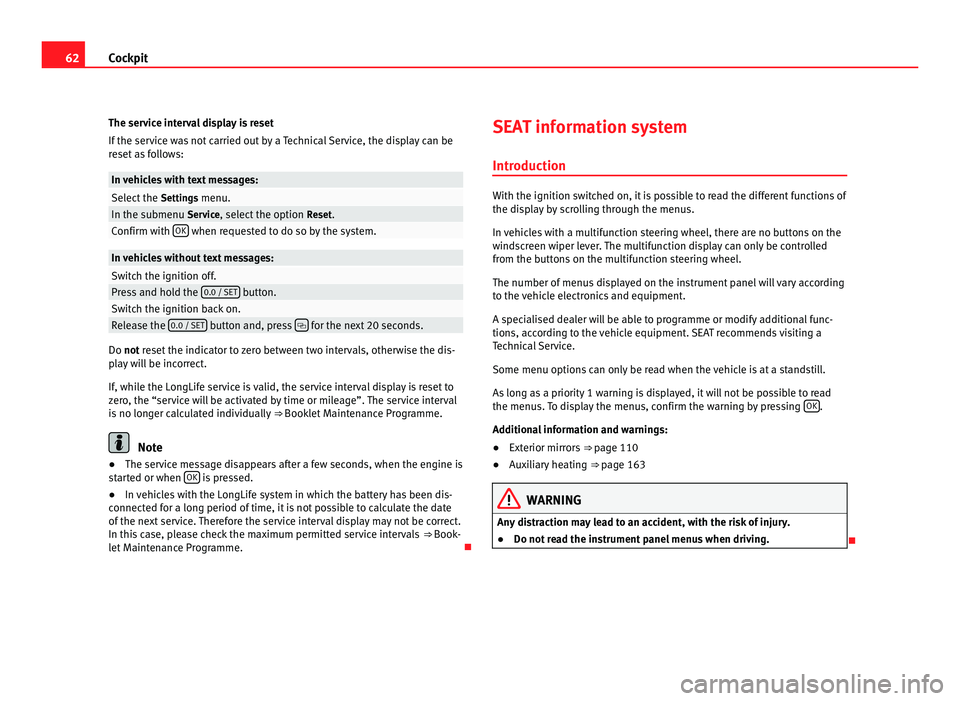
The service interval display is reset
If the ser v
ice was not carried out by a Technical Service, the display can be
reset as follows: In vehicles with text messages:
Select the
Settings
menu.In the submenu Serv
ic
e, select the option Reset.Confirm with
OK when requested to do so by the system.
In vehicles without text messages:
Switch the ignition off.
Press and hold the
0.0 / S
ET button.
Switch the ignition back on.
Release the
0.0 / S
ET button and, press
for the next 20 seconds.
Do not reset the indicator to zero between two intervals, otherwise the dis-
p l
ay will be incorrect.
If, while the LongLife service is valid, the service interval display is reset to
zero, the “service will be activated by time or mileage”. The service interval
is no longer calculated individually ⇒ Booklet Maintenance Programme.Note
● The service message disappears after a few seconds, when the engine is
s t
arted or when OK is pressed.
● In vehicles with the LongLife system in which the battery has been dis-
connect ed f
or a long period of time, it is not possible to calculate the date
of the next service. Therefore the service interval display may not be correct.
In this case, please check the maximum permitted service intervals ⇒ Book-
let Maintenance Programme. SEAT information system
Introduction With the ignition switched on, it is possible to read the different functions of
the dis
p
lay by scrolling through the menus.
In vehicles with a multifunction steering wheel, there are no buttons on the
windscreen wiper lever. The multifunction display can only be controlled
from the buttons on the multifunction steering wheel.
The number of menus displayed on the instrument panel will vary according
to the vehicle electronics and equipment.
A specialised dealer will be able to programme or modify additional func-
tions, according to the vehicle equipment. SEAT recommends visiting a
Technical Service.
Some menu options can only be read when the vehicle is at a standstill.
As long as a priority 1 warning is displayed, it will not be possible to read
the menus. To display the menus, confirm the warning by pressing OK .
Addition a
l information and warnings:
● Exterior mirrors ⇒ pag
e 110
● Auxiliary heating ⇒ pag
e 163 WARNING
Any distraction may lead to an accident, with the risk of injury.
● Do not read the instrument panel menus when driving.
Page 65 of 385
63
Cockpit
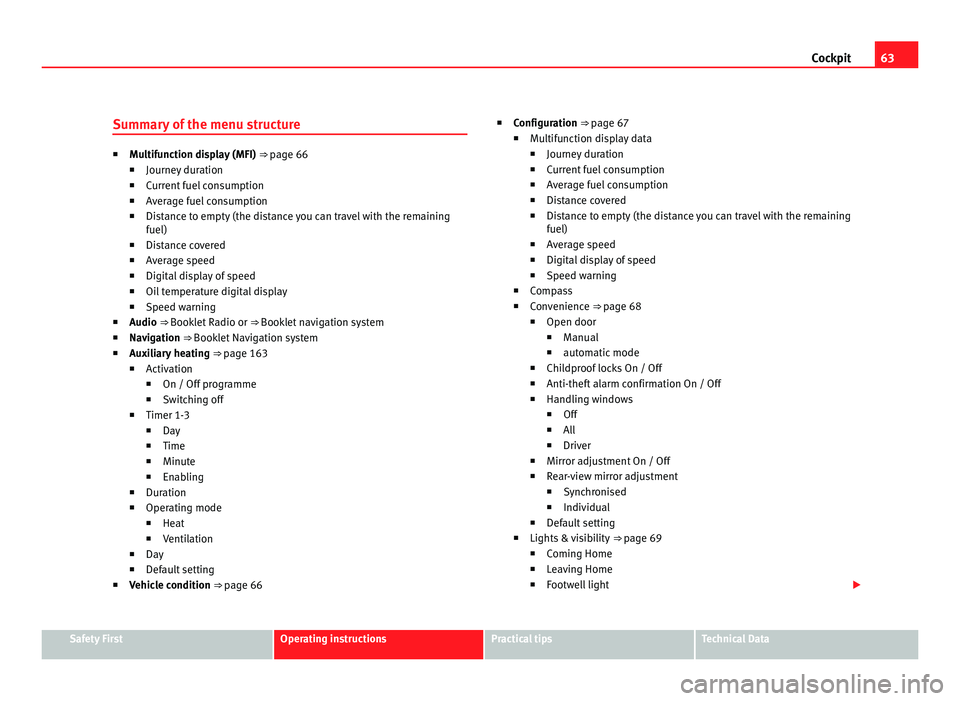
Summary of the menu structure ■
Multif
unction display (MFI) ⇒ page 66
■ Journey duration
■ Current fuel consumption
■ Average fuel consumption
■ Distance to empty (the distance you can travel with the remaining
fuel)
■ Distance covered
■ Average speed
■ Digital display of speed
■ Oil temperature digital display
■ Speed warning
■ Audio ⇒ Booklet Radio or ⇒ Booklet navigation system
■ Navigation ⇒ Booklet Navigation system
■ Auxiliary heating ⇒ page 163
■ Activation
■ On / Off programme
■ Switching off
■ Timer 1-3
■ Day
■ Time
■ Minute
■ Enabling
■ Duration
■ Operating mode
■ Heat
■ Ventilation
■ Day
■ Default setting
■ Vehicle condition ⇒ page 66 ■
Configuration
⇒ page 67
■ Multifunction display data
■ Journey duration
■ Current fuel consumption
■ Average fuel consumption
■ Distance covered
■ Distance to empty (the distance you can travel with the remaining
fuel)
■ Average speed
■ Digital display of speed
■ Speed warning
■ Compass
■ Convenience ⇒ page 68
■ Open door
■ Manual
■ automatic mode
■ Childproof locks On / Off
■ Anti-theft alarm confirmation On / Off
■ Handling windows
■ Off
■ All
■ Driver
■ Mirror adjustment On / Off
■ Rear-view mirror adjustment
■ Synchronised
■ Individual
■ Default setting
■ Lights & visibility ⇒ page 69
■ Coming Home
■ Leaving Home
■ Footwell light Safety First Operating instructions Practical tips Technical Data
Page 68 of 385
66
Cockpit
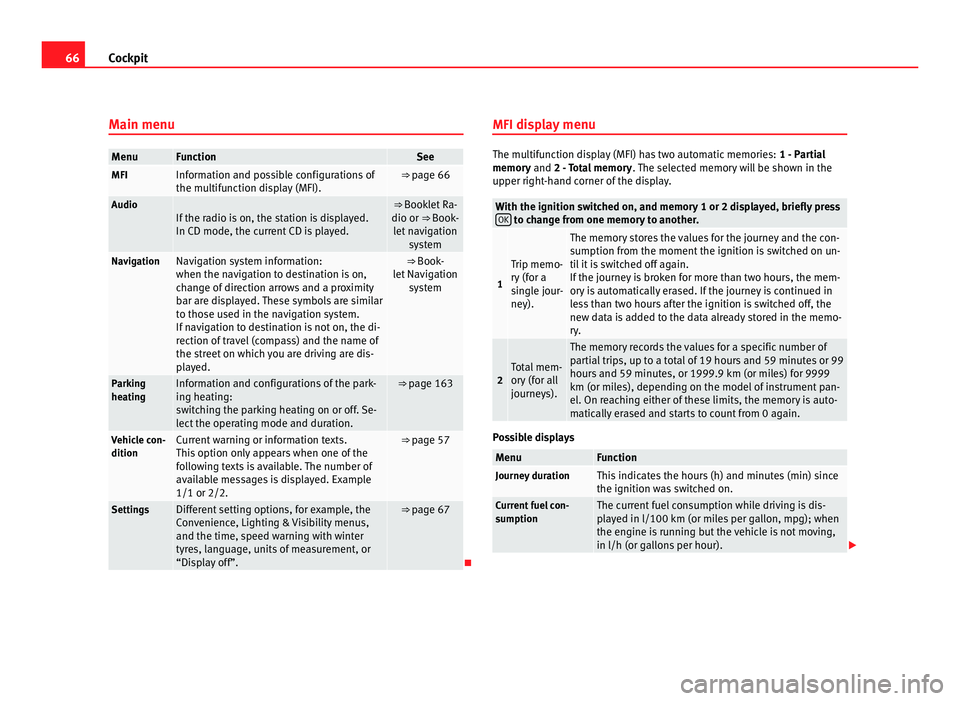
Main menu Menu Function See
MFI Information and possible configurations of
the multif
u
nction display (MFI). ⇒ page 66
Audio
If the radio is on, the station is displayed.
In CD mode, the curr
ent
CD is played. ⇒ Booklet Ra-
dio or ⇒
Book-
let navigation system Navigation Navigation system information:
when the nav
ig
ation to destination is on,
change of direction arrows and a proximity
bar are displayed. These symbols are similar
to those used in the navigation system.
If navigation to destination is not on, the di-
rection of travel (compass) and the name of
the street on which you are driving are dis-
played. ⇒ Book-
l et
Navigation system Parking
heatin
g Information and configurations of the park-
ing he
atin
g:
switching the parking heating on or off. Se-
lect the operating mode and duration. ⇒ page 163
Vehicle con-
dition Current warning or information texts.
This
option on
ly appears when one of the
following texts is available. The number of
available messages is displayed. Example
1/1 or 2/2. ⇒ page 57
Settings Different setting options, for example, the
Con
v
enience, Lighting & Visibility menus,
and the time, speed warning with winter
tyres, language, units of measurement, or
“Display off”. ⇒ page 67
MFI display menu The multifunction display (MFI) has two automatic memories:
1 - Parti
al
memory and 2 - Total memory . The selected memory will be shown in the
upper right-hand corner of the display. With the ignition switched on, and memory 1 or 2 displayed, briefly press
OK to change from one memory to another.
1 Trip memo-
ry
(f
or a
single jour-
ney). The memory stores the values for the journey and the con-
sumption fr
om the moment
the ignition is switched on un-
til it is switched off again.
If the journey is broken for more than two hours, the mem-
ory is automatically erased. If the journey is continued in
less than two hours after the ignition is switched off, the
new data is added to the data already stored in the memo-
ry. 2 Total mem-
ory
(f
or all
journeys). The memory records the values for a specific number of
par
ti
al trips, up to a total of 19 hours and 59 minutes or 99
hours and 59 minutes, or 1999.9 km (or miles) for 9999
km (or miles), depending on the model of instrument pan-
el. On reaching either of these limits, the memory is auto-
matically erased and starts to count from 0 again. Possible displays
Menu Function
Journey duration This indicates the hours (h) and minutes (min) since
the ignition wa
s
switched on. Current fuel con-
sumption The current fuel consumption while driving is dis-
pl
a
yed in l/100 km (or miles per gallon, mpg); when
the engine is running but the vehicle is not moving,
in l/h (or gallons per hour).
Page 71 of 385
69
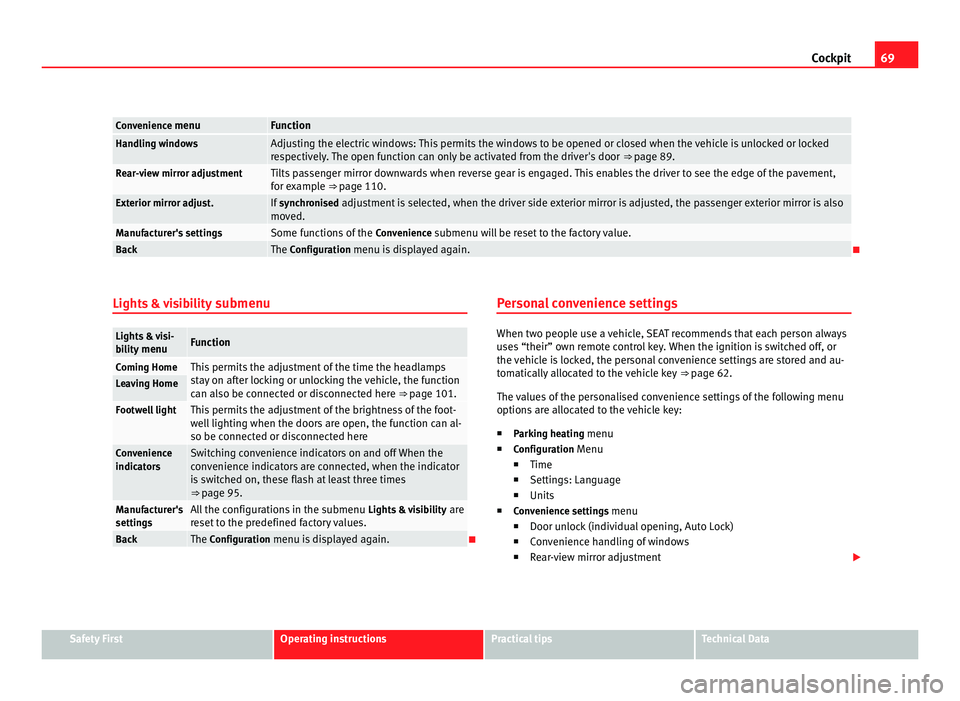
Cockpit Convenience menu Function
Handling windows Adjusting the electric windows: This permits the windows to be opened or closed when the vehicle is unlocked or locked
re
s
pectively. The open function can only be activated from the driver's door ⇒ page 89.Rear-view mirror adjustment Tilts passenger mirror downwards when reverse gear is engaged. This enables the driver to see the edge of the pavement,
for e
x
ample ⇒ page 110. Exterior mirror adjust. If
synchronised adjustment is selected, when the driver side exterior mirror is adjusted, the passenger exterior mirror is also
mo v
ed. Manufacturer's settings Some functions of the
Conv
enience submenu will be reset to the factory value.Back The Configuration menu is displayed again.
Lights & visibility submenuLights & visi-
bi
lity
menu Function
Coming Home This permits the adjustment of the time the headlamps
st
a
y on after locking or unlocking the vehicle, the function
can also be connected or disconnected here ⇒ page 101. Leaving Home
Footwell light This permits the adjustment of the brightness of the foot-
wel
l
lighting when the doors are open, the function can al-
so be connected or disconnected here Convenience
indicat
or
s Switching convenience indicators on and off When the
con
v
enience indicators are connected, when the indicator
is switched on, these flash at least three times
⇒ page 95. Manufacturer's
setting
s All the configurations in the submenu
Lights &
visibility are
reset to the predefined factory values. Back The Configuration menu is displayed again. Personal convenience settings When two people use a vehicle, SEAT recommends that each person always
use
s
“their” own remote control key. When the ignition is switched off, or
the vehicle is locked, the personal convenience settings are stored and au-
tomatically allocated to the vehicle key ⇒ page 62.
The values of the personalised convenience settings of the following menu
options are allocated to the vehicle key: ■ Parking heating menu
■ Configuration Menu
■ Time
■ Settings: Language
■ Units
■ Convenience settings menu
■Door unlock (individual opening, Auto Lock)
■ Convenience handling of windows
■ Rear-view mirror adjustment Safety First Operating instructions Practical tips Technical Data