ignition Seat Alhambra 2012 Owners Manual
[x] Cancel search | Manufacturer: SEAT, Model Year: 2012, Model line: Alhambra, Model: Seat Alhambra 2012Pages: 388, PDF Size: 6.72 MB
Page 295 of 388

293
Checking and refilling levels
CAUTION
● Never disconnect the battery if the ignition is switched on or if the en-
gine is running. This could damage the electrical system or electronic com-
ponents.
● Do not expose the battery to direct sunlight over a long period of time,
as the intense ultraviolet radiation can damage the battery housing.
● If the car is left standing for long periods, protect the battery from ex-
treme cold temperature so that it does not “freeze up” and become dam-
aged.
Warning lamp
lights upPossible causeSolution
Faulty generator.
Contact a specialised workshop.
Have the electrical system
checked.
Disconnect any unnecessary
electrical consumers. The gener-
ator does not charge the battery
while the vehicle is in motion.
Several warning and control lamps should light up for a few seconds when
the ignition is switched. This signals that the lamp is working properly. They
will switch off after a few seconds.
WARNING
If the warning lamps and messages are ignored, the vehicle may stall in
traffic, or may cause accidents and severe injuries.
● Never ignore the warning lamps or text messages.
● Stop the vehicle safely as soon as possible.
CAUTION
Failure to heed the warning lamps and text messages when they appear
may result in faults in the vehicle.
Safety FirstOperating instructionsPractical tipsTechnical Specifications
Page 297 of 388

295
Checking and refilling levels
WARNING (Continued)
● Battery acid is very corrosive and caustic. It can burn skin and cause
blindness. When handling the battery, protect yourself from splashes of
acids, above all your hands, arms and face.
● Never tilt the vehicle battery. Battery acid could spill out of the open-
ings to release gases and cause corrosion damage.
● Never open the vehicle battery.
● If battery acid splashes on you, immediately rinse your eyes and skin
abundantly with water for several minutes. Then seek medical care imme-
diately.
● If acid is swallowed by mistake, consult a doctor immediately.
Charging, replacing and connecting or disconnecting the
battery
Charging the battery
The vehicle battery should be charged by a specialised workshop only, as
batteries using special technology have been installed and they must be
charged in a controlled environment ⇒
. SEAT recommends visiting a
Technical Service.
Replacing a vehicle battery
The battery has been developed to suit the conditions of its location and
has special safety features. If the battery must be replaced, consult a Tech-
nical Service for information on electromagnetic compatibility, the size and
maintenance, performance and safety requirements of the new battery in
your vehicle before you purchase one. SEAT recommends you have the bat-
tery replaced by a Technical Service.
Use only maintenance-free genuine batteries conforming to TL 825 06 and
VW 7 50 73 Standards. These standards must be dated April 2008 or later. Start-Stop systems (
⇒ page 198) are equipped with a special battery. There-
fore, it must only be replaced with a battery of the same specifications.
Disconnecting the vehicle's battery
If you must disconnect the battery from the electrical system, please note
the following:
● Switch off the ignition and all electrical equipment.
● The vehicle must be unlocked before disconnecting the battery, other-
wise the alarm will be triggered.
● First disconnect the negative cable and then the positive ⇒
.
Connecting the vehicle's battery
● Before reconnecting the battery, switch off the engine, the ignition and
electric devices.
● First reconnect the positive cable and then the negative ⇒
.
Different control lamps may light up after connecting the battery and switch-
ing the ignition on. They will be turned off after a short trip at a speed of
between 15 - 20 km/h (10 - 12 mph). If the warning indicators remain lit,
please visit a specialised workshop to have the vehicle checked.
If the battery has been disconnected for a long time, it is possible that the
next service date is not displayed or calculated correctly ⇒ page 57. Respect
the maximum service intervals permitted ⇒ Booklet Maintenance Pro-
gramme.
Automatic consumer disconnection
The intelligent vehicle electrical system automatically implements a range
of measures to prevent the battery from discharging when high demands
are made on it:
Safety FirstOperating instructionsPractical tipsTechnical Specifications
Page 298 of 388
296Checking and refilling levels
● the idling speed is increased so that the alternator provides more elec-
tricity.
● where necessary, the power of the most powerful consumers is reduced
or even completely disconnected.
● On starting the engine, the power supply from the 12-volt sockets and
the cigarette lighter may be interrupted for a short time.
The on-board management program cannot always prevent the battery from
running flat. For example, if the ignition is left on for a long period with the
engine off or if the side lights or parking lights are left on while the vehicle
is stationary.
Why does the battery run flat?
● When stationary for a long time without starting the engine, particularly
if the ignition is switched on.
● Use of electrical consumers with the engine switched off.
● If the auxiliary heater is running ⇒ page 165.
WARNING
Incorrectly securing the battery or using the wrong battery can cause
short-circuits, fire and serious injuries.
● Always use only maintenance free batteries that do not run flat alone
and whose properties, specifications and size correspond to the stand-
ard battery. The specifications are indicated on the battery case.
WARNING
A highly explosive mixture of gases is released when the battery is under
charge.
● The batteries should be charged in a well-ventilated room only.
● Never charge a frozen or recently thawed battery. A flat battery can al-
so freeze at temperatures close to 0 °C (+32 °F).
WARNING (Continued)
● Always replace a battery which has frozen.
● Battery cables not correctly connected may cause a short circuit. Re-
connect first the positive cable and then the negative cable.
CAUTION
● Never disconnect the battery if the ignition is switched on or if the en-
gine is running. This could damage the electrical system or electronic com-
ponents.
● Never plug accessories supply current, such as solar panels or a battery
charger, to the 12-volt sockets or the cigarette lighter. This could damage
the vehicle's electrical system.
For the sake of the environment
● Dispose of the battery in an environment-friendly manner. Batteries con-
tain toxic substances such as sulphuric acid and lead.
● Battery acid can contaminate the environment. Collect any spilt service
fluids and allow a dispose of them correctly.
Page 312 of 388
310Wheels and tyres
WARNING (Continued)
● Only use suitable tools that are not damaged when changing a wheel.
● Always stop the engine, turn on the electronic parking brake and
place the gear selector lever in position P, for an automatic gearbox, or
engage a gear for a manual gearbox to reduce the risk of the vehicle mov-
ing accidentally.
● Have the tightening torque of the wheel bolts checked as soon as
possible with a reliable torque wrench.
Preparations for changing a wheel
Check list
Before changing a wheel, complete the following operations in the order
given ⇒
:
Park the vehicle on an even and solid surface.
Connect the electronic parking brake ⇒ page 185.
Automatic gearbox: Move selector lever to position P ⇒ page 176.
Stop the engine and remove the key from the ignition ⇒ page 172.
Manual gearbox: Select a gear ⇒ page 176.
Have all vehicle occupants get out of the vehicle and wait in a safe
place (for example, behind the safety barrier).
Block the opposite wheel with wedges or a similar object.
When towing a trailer: unhook the trailer from the towing vehicle and
park it correctly.
If the luggage compartment is full: take the baggage out of the vehicle. Take the vehicle tool kit out of the luggage compartment.
Remove the wheel trims ⇒ page 308.
1.
2.
3.
4.
5.
6.
7.
8.
9.
10.
11.
WARNING
Failure to follow the checklist prepared for your own safety could lead to
accidents and severe injuries.
● Always complete the operations given in the checklist and observe
the general rules of safety.
Page 319 of 388

317
If and when
Move the selector lever to its intermediate position or to P ⇒ page 176.
Stop the engine and remove the key from the ignition ⇒ page 172.
Have all occupants leave the vehicle and move to safety, for example
behind a guard rail.
When leaving the vehicle, take all keys with you.
Place an emergency warning triangle to indicate the position of your ve-
hicle to other road users.
Allow the engine to cool and check if a specialist is required.
Examples of when to use the hazard warning lights:
● If the vehicles ahead suddenly slow down or reach the end of a traffic
jam, to warn the vehicles behind.
● In case of an emergency.
● If the vehicle breaks down.
● When being towed.
Always comply with the applicable laws regarding the use of hazard warn-
ing lights.
If the hazard warning lights are not working, you must use an alternative
method of drawing attention to your vehicle. This method must comply with
traffic legislation.
WARNING
Failure to follow the checklist prepared for your own safety could lead to
accidents and severe injuries.
● Always complete the operations given in the checklist and observe
the general rules of safety.
4.
5.
6.
7.
8.
9.WARNING
The components of the exhaust system reach very high temperatures.
This could cause a fire and considerable damage.
● Always park your vehicle so that no part of the exhaust system can
come in contact with flammable materials (such as dried grass or fuel).
Note
● The vehicle battery will discharge and run down if the hazard warning
lights remain on for too much time (even with the ignition turned off).
● For some vehicles, the brake lights will blink when braking suddenly at
speeds of approximately 80 km/h to warn vehicles behind. If braking con-
tinues, then the hazard warning lights will automatically be turned on at the
speed of less than approximately 10 km an hour. The brake lights remain lit.
Upon accelerating, the hazard warning lights will be automatically turned
off.
Safety FirstOperating instructionsPractical tipsTechnical Specifications
Page 321 of 388

319
If and when
WARNING
Opening and closing doors carelessly can cause serious injury.
● If the vehicle is locked from outside, the doors and windows cannot
be opened from the inside.
● Never leave children or disabled people alone in the car. They could
be trapped in the car in an emergency and will not be able to get them-
selves to safety.
● Depending on the time of the year, temperatures inside a locked and
closed vehicle can be extremely high or extremely low resulting in seri-
ous injuries and illness or even death, particularly for young children.
WARNING
Getting in the way of the doors and the panoramic sliding roof is danger-
ous and can lead to serious injury.
● Open and close the doors and the panoramic sliding roof only when
nobody is in the way.
CAUTION
When opening and closing in an emergency, carefully disassemble compo-
nents and then reassemble them carefully to avoid damage to the vehicle. Manually locking and unlocking the driver's door
Fig. 190 Driver's door
handle: Hidden lock cyl-
inder.
In general, when the driver's door is locked all other doors are locked. Un-
locking manually only opens the driver's door. Please note the instructions
for the anti-theft alarm ⇒ page 74.
● Unfold the key shaft ⇒ page 71.
● Insert the key shaft into the opening in the cover on the driver's door
handle from below ⇒ fig. 190 (arrow) then remove the cover upwards.
● Insert the key shaft into the lock cylinder to unlock or lock the vehicle.
Unlocking notes:
● The anti-theft alarm will remain active when vehicles are unlocked. How-
ever, the alarm will not yet be triggered ⇒ page 74.
● If the driver's door is opened, the alarm will be triggered.
● Switch the ignition on. When the ignition is switched on, the electronic
immobiliser recognises a valid vehicle key and deactivates the anti-theft
alarm system.
Safety FirstOperating instructionsPractical tipsTechnical Specifications
Page 325 of 388
323
If and when
Manually unlocking the gear selection lever
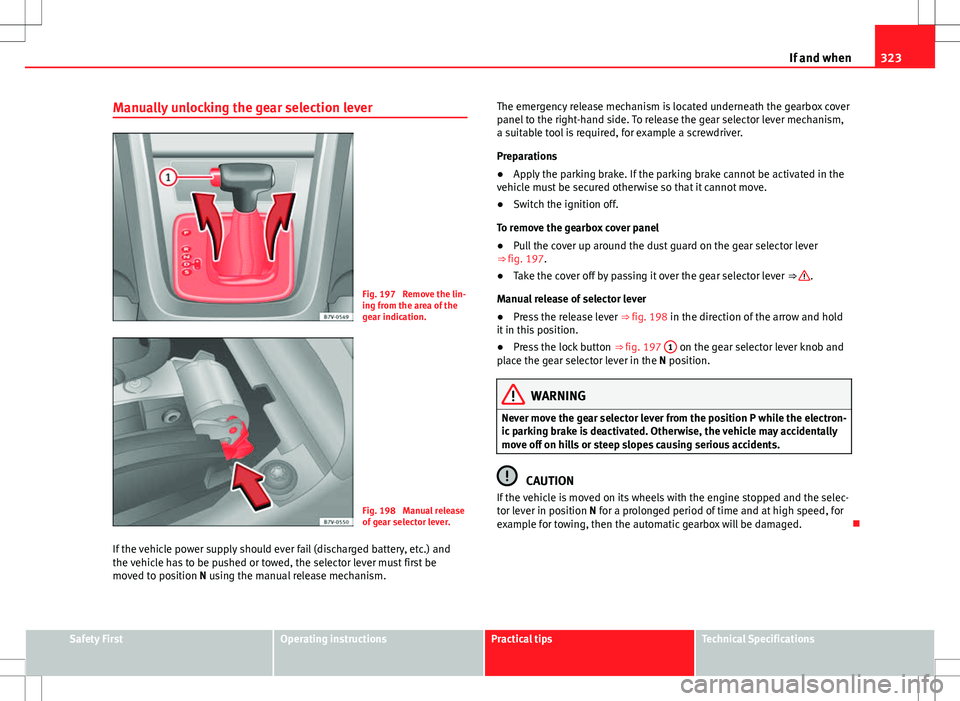
Fig. 197 Remove the lin-
ing from the area of the
gear indication.
Fig. 198 Manual release
of gear selector lever.
If the vehicle power supply should ever fail (discharged battery, etc.) and
the vehicle has to be pushed or towed, the selector lever must first be
moved to position N using the manual release mechanism. The emergency release mechanism is located underneath the gearbox cover
panel to the right-hand side. To release the gear selector lever mechanism,
a suitable tool is required, for example a screwdriver.
Preparations
●
Apply the parking brake. If the parking brake cannot be activated in the
vehicle must be secured otherwise so that it cannot move.
● Switch the ignition off.
To remove the gearbox cover panel
● Pull the cover up around the dust guard on the gear selector lever
⇒ fig. 197.
● Take the cover off by passing it over the gear selector lever ⇒
.
Manual release of selector lever
● Press the release lever ⇒ fig. 198 in the direction of the arrow and hold
it in this position.
● Press the lock button ⇒ fig. 197 1
on the gear selector lever knob and
place the gear selector lever in the N position.
WARNING
Never move the gear selector lever from the position P while the electron-
ic parking brake is deactivated. Otherwise, the vehicle may accidentally
move off on hills or steep slopes causing serious accidents.
CAUTION
If the vehicle is moved on its wheels with the engine stopped and the selec-
tor lever in position N for a prolonged period of time and at high speed, for
example for towing, then the automatic gearbox will be damaged.
Safety FirstOperating instructionsPractical tipsTechnical Specifications
Page 328 of 388
326If and when
Fuses
Introduction
Due to the constant update of vehicles, fuse assignments depending on
equipment and the use of the same fuse for various electrical components,
at the time of printing this manual it is not possible to provide an up-to-date
summary of the electrical components fuse positions. For detailed informa-
tion about the fuse positions, please consult a Technical Service.
In general, a fuse can be assigned to various electrical components. Like-
wise, an electrical component can be protected by several fuses.
Only replace fuses when the cause of the problem has been solved. If a
newly inserted fuse blows after a short time, you must have the electrical
system checked by a qualified dealership as soon as possible.
Additional information and warnings:
● Working in the engine compartment ⇒ page 279
WARNING
The high voltages in the electrical system can give serious electrical
shocks, causing burns and even death!
● Never touch the electrical wiring of the ignition system.
● Take care not to cause short circuits in the electrical system.
WARNING
Using unsuitable fuses, repairing fuses or bridging a current circuit with-
out fuses can cause a fire and serious injury.
● Never use a fuse with a higher value. Only replace fuses with a fuse of
the same amperage (same colour and markings) and size.
● Never repair a fuse.
● Never replace a fuse by a metal strip, staple or similar.
CAUTION
● To avoid damage to the vehicles electric system, before replacing a fuse
turn off the ignition, the lights and all electrical elements and remove the
keys from the ignition.
● If you replace a fuse with higher-rating fuse, you could cause damage to
another part of the electrical system.
● Protect the fuse boxes when open to avoid the entry of dust or humidity.
Dirt and humidity inside fuse boxes can cause damage to the electrical sys-
tem.
Note
● One single consumer could have more than one fuse.
● Several consumers could run over one single fuse.
Page 330 of 388
328If and when
CAUTION
● Always carefully remove the fuse box covers and refit them correctly to
avoid problems with your vehicle.
● Protect the fuse boxes when open to avoid the entry of dust or humidity.
Dirt and humidity inside fuse boxes can cause damage to the electrical sys-
tem.
Note
In the vehicle, there are more fuses than those indicated in this chapter.
These should only be changed by a specialised workshop.
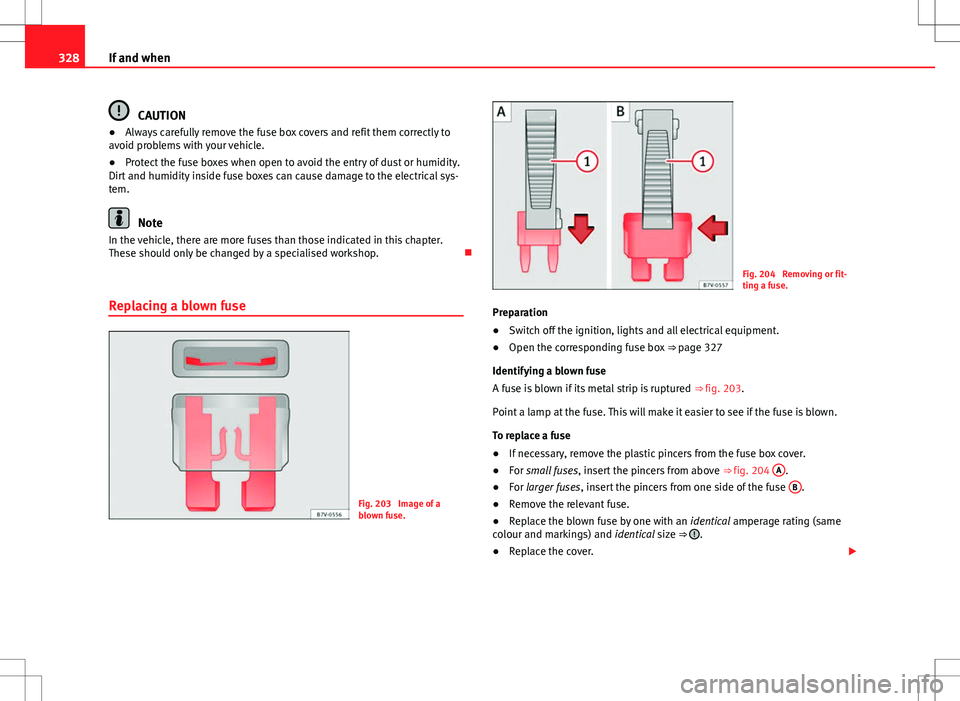
Replacing a blown fuse
Fig. 203 Image of a
blown fuse.
Fig. 204 Removing or fit-
ting a fuse.
Preparation
● Switch off the ignition, lights and all electrical equipment.
● Open the corresponding fuse box ⇒ page 327
Identifying a blown fuse
A fuse is blown if its metal strip is ruptured ⇒ fig. 203.
Point a lamp at the fuse. This will make it easier to see if the fuse is blown.
To replace a fuse
● If necessary, remove the plastic pincers from the fuse box cover.
● For small fuses, insert the pincers from above ⇒ fig. 204 A
.
● For larger fuses , insert the pincers from one side of the fuse B.
● Remove the relevant fuse.
● Replace the blown fuse by one with an identical amperage rating (same
colour and markings) and identical size ⇒
.
● Replace the cover.
Page 333 of 388

331
If and when
Several warning and control lamps should light up for a few seconds when
the ignition is switched. This signals that the lamp is working properly. They
will switch off after a few seconds.
Checking the bulbs of a trailer
For vehicles with the factory fitted trailer system, certain trailer lights are al-
so controlled if the socket is correctly connected.
A fault on a trailer turn indicator is indicated on the instrument panel by the
indicator blinking twice as fast ( or ) ⇒ page 95.
● General fault of all indicators on one side.
● Fault in one tail light (on some models, also the registration light).
● Fault in two brake lights.
WARNING
If the warning lamps and messages are ignored, the vehicle may stall in
traffic, or may cause accidents and severe injuries.
● Never ignore the warning lamps or text messages.
● Stop the vehicle safely as soon as possible.
CAUTION
Failure to heed the warning lamps and text messages when they appear
may result in faults in the vehicle.
Note
A fault in the LED on the tail lights will not be indicated. However, if the fault
affects all the LEDs then this will be indicated by the indicator . Information for replacing bulbs
Checklist
To replace a bulb, carry out the following operations always in the order giv-
en ⇒
:
Park the vehicle a safe distance from traffic and on suitable ground.
Connect the electronic parking brake ⇒ page 185.
Turn the light switch to position 0 ⇒ page 95.
Move the gear lever into the neutral position ⇒ page 95.
Automatic gearbox: Move selector lever to position P ⇒ page 176.
Stop the engine and remove the key from the ignition ⇒ page 172.
Manual gearbox: Select a gear ⇒ page 176.
Wait until all of the passenger compartment lights are turned off
⇒ page 95.
Allow the corresponding bulb to cool. Visually inspect fuses to see if any are blown ⇒ page 326.
Replace the bulb according to the instructions ⇒
. Bulbs should only
be replaced by new identical models. Bulb information is displayed on
the bulb socket or on the bulb itself.
In general, never touch the bulb glass directly. The heat of the bulb
would cause the fingerprint to evaporate and condense on the reflector.
This will impair the brightness of the headlight.
Check if the new bulb is working. If the bulb is not working, it may not
have been correctly fitted, it could be damaged or the connector may
not be correctly connected.
Every time a bulb for the headlights is replaced, visit a specialised
workshop to check the headlights.
1.
2.
3.
4.
5.
6.
7.
8.
9.
10.
11.
12.
13.
14.
Safety FirstOperating instructionsPractical tipsTechnical Specifications