turn signal Seat Alhambra 2012 User Guide
[x] Cancel search | Manufacturer: SEAT, Model Year: 2012, Model line: Alhambra, Model: Seat Alhambra 2012Pages: 388, PDF Size: 6.72 MB
Page 168 of 388
166Air conditioning
Remote control
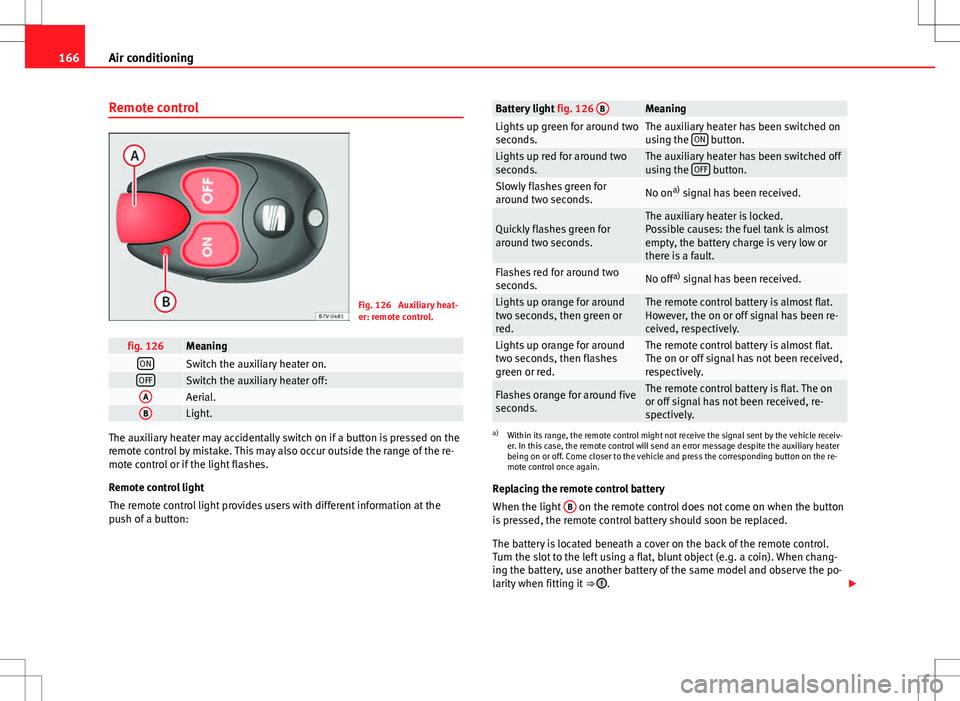
Fig. 126 Auxiliary heat-
er: remote control.
fig. 126MeaningONSwitch the auxiliary heater on.OFFSwitch the auxiliary heater off:AAerial.BLight.
The auxiliary heater may accidentally switch on if a button is pressed on the
remote control by mistake. This may also occur outside the range of the re-
mote control or if the light flashes.
Remote control light
The remote control light provides users with different information at the
push of a button:
Battery light fig. 126 BMeaningLights up green for around two
seconds.The auxiliary heater has been switched on
using the ON button.Lights up red for around two
seconds.The auxiliary heater has been switched off
using the OFF button.Slowly flashes green for
around two seconds.No ona)
signal has been received.
Quickly flashes green for
around two seconds.The auxiliary heater is locked.
Possible causes: the fuel tank is almost
empty, the battery charge is very low or
there is a fault.
Flashes red for around two
seconds.No off a)
signal has been received.
Lights up orange for around
two seconds, then green or
red.The remote control battery is almost flat.
However, the on or off signal has been re-
ceived, respectively.
Lights up orange for around
two seconds, then flashes
green or red.The remote control battery is almost flat.
The on or off signal has not been received,
respectively.
Flashes orange for around five
seconds.The remote control battery is flat. The on
or off signal has not been received, re-
spectively.
a) Within its range, the remote control might not receive the signal sent by the vehicle receiv-
er. In this case, the remote control will send an error message despite the auxiliary heater
being on or off. Come closer to the vehicle and press the corresponding button on the re-
mote control once again.
Replacing the remote control battery
When the light B
on the remote control does not come on when the button
is pressed, the remote control battery should soon be replaced.
The battery is located beneath a cover on the back of the remote control.
Turn the slot to the left using a flat, blunt object (e.g. a coin). When chang-
ing the battery, use another battery of the same model and observe the po-
larity when fitting it ⇒
.
Page 172 of 388
170Driving
flashesPossible causeSolution
(red)Fault in the steering column
electronic lock. Do not drive on!
Seek professional advice.
(yel-
low)
Steering column deviation.Gently turn the steering wheel to
and fro.
Steering wheel not unlocked
or locked.
Remove the key from the igni-
tion and then switch the ignition
back on. Check the messages
displayed on the instrument
panel at the same time.
Do not drive on, if the steering
column remains locked after the
ignition has been switched on.
You should obtain professional
assistance.
Several warning and control lamps should light up for a few seconds when
the ignition is switched. This signals that the lamp is working properly. They
will switch off after a few seconds.
WARNING
If the warning lamps and messages are ignored, the vehicle may stall in
traffic, or may cause accidents and severe injuries.
● Never ignore the warning lamps or text messages.
● Stop the vehicle safely as soon as possible.
CAUTION
Failure to heed the warning lamps and text messages when they appear
may result in faults in the vehicle. Information on the steering
Steering column electronic lock
If the driver's door is opened before the ignition is switched off, the steering
column electronic lock is activated via the ignition key or the sensor built
into the door handle.
Mechanical steering lock
To prevent theft, we recommend you lock the steering before leaving the ve-
hicle.
Please engage steering lockUnlocking the steeringParking the vehicle
⇒ page 185.Turn the steering wheel slightly to
release the steering lock.
Remove the key from the ignition.Insert the key in the ignition lock.Turn the steering wheel slightly until
you hear the steering lock.Hold the steering wheel in this posi-
tion and switch on the ignition.
Electromechanical power steering
With the power steering system, the assisted steering function automatical-
ly adjusts according to the vehicle speed, the steering torque and the wheel
turning angle. The power steering only works when the engine is running.
You should remember that you will need considerably more power than nor-
mal to steer the vehicle if the power steering is not working correctly or not
at all.
Counter steering assistance system
The counter steering assistance system helps the driver in critical situa-
tions. Additional steering power helps the driver when counter steering.
Page 179 of 388
177
Driving
WARNING
Do not allow the brakes to “rub” for a prolonged period of time, or brake
frequently or for long periods of time. Continuous braking heats up the
brakes. This could significantly reduce braking power, increase braking
distance or even result in the total failure of the brake system.
CAUTION
● Never make the brakes slip by pressing the pedal gently, if it is not really
necessary to brake. This will increase wear.
● Reduce speed, move down a gear or select a shorter range of gears be-
fore long steep slopes. This allows you to use the engine braking effect and
to reduce the strain on the brake system. Otherwise, the brakes may over-
heat and fail. Only use the brakes to reduce speed or to stop.
Warning and control lamps
lights upPossible causeSolution (red)Brake pedal not pressed!Press brake pedal to the floor.
(green)Brake pedal not pressed.
To select a range of gears, press
the brake pedal.
Please also see "Electronic park-
ing brake" ⇒ page 185.
flashesPossible causeSolution
(green)The selector lever locking but-
ton has not engaged. The ve-
hicle does not start to move.Engage the selector lever lock
⇒ page 180.
Several warning and control lamps should light up for a few seconds when
the ignition is switched. This signals that the lamp is working properly. They
will switch off after a few seconds.
WARNING
If the warning lamps and messages are ignored, the vehicle may stall in
traffic, or may cause accidents and severe injuries.
● Never ignore the warning lamps or text messages.
● Stop the vehicle safely as soon as possible.
● If the vehicle stops and must be stopped for repairs, always park a
safe distance from surrounding traffic, turn on the hazard warning lights,
stop the engine and take all of the safety measures necessary to warn
other road users.
CAUTION
Failure to heed the warning lamps and text messages when they appear
may result in faults in the vehicle.
Safety FirstOperating instructionsPractical tipsTechnical Specifications
Page 207 of 388
205
Driving
● To ensure that the system works properly, the bumper sensors must be
kept clean, free of ice and snow and uncovered.
● The bumper sensors may become damaged or misaligned, for example,
when parking.
● When cleaning the sensors with high-pressure or steam cleaning equip-
ment, spray the sensors briefly at a distance of no less than 10 cm.
Note
Contact a specialised workshop with any system faults. SEAT recommends
visiting a Technical Service.
Parking using the park assist system
Fig. 145 Detailed view of
the centre console: but-
ton to switch the park as-
sist system on manually.
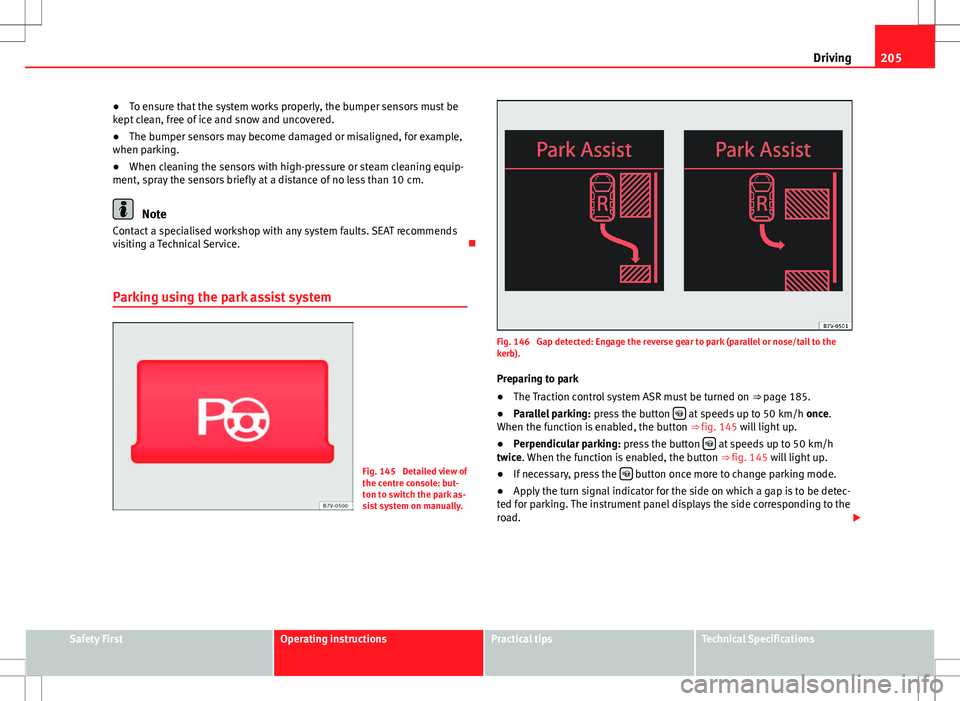
Fig. 146 Gap detected: Engage the reverse gear to park (parallel or nose/tail to the
kerb). Preparing to park
● The Traction control system ASR must be turned on ⇒ page 185.
● Parallel parking: press the button
at speeds up to 50 km/h once.
When the function is enabled, the button ⇒ fig. 145 will light up.
● Perpendicular parking: press the button
at speeds up to 50 km/h
twice. When the function is enabled, the button ⇒ fig. 145 will light up.
● If necessary, press the
button once more to change parking mode.
● Apply the turn signal indicator for the side on which a gap is to be detec-
ted for parking. The instrument panel displays the side corresponding to the
road.
Safety FirstOperating instructionsPractical tipsTechnical Specifications
Page 208 of 388
206Driving
Parking
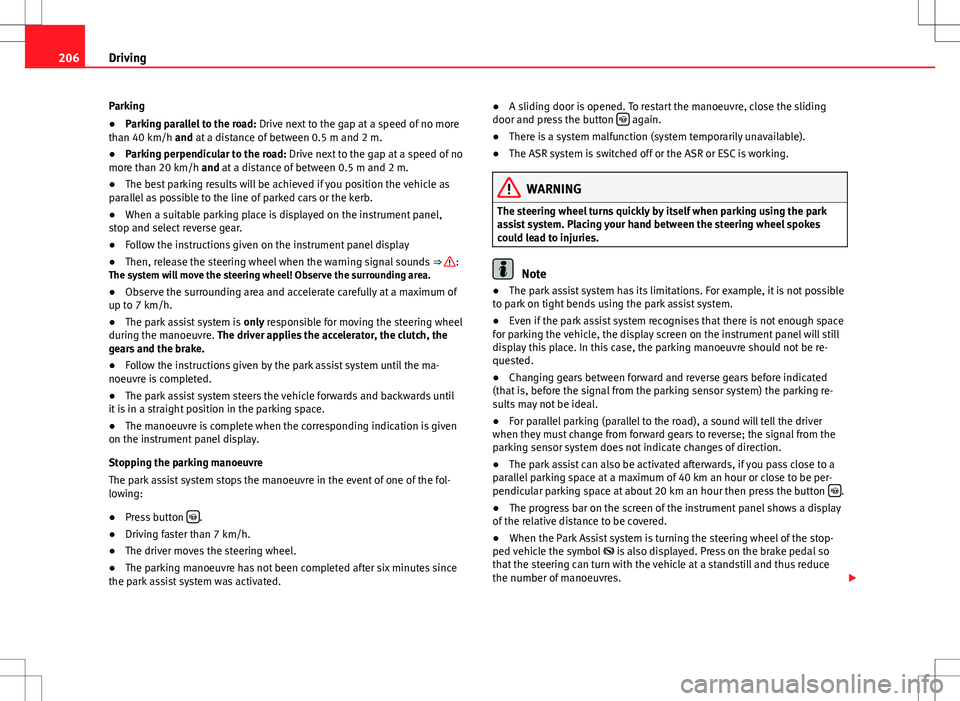
● Parking parallel to the road: Drive next to the gap at a speed of no more
than 40 km/h and at a distance of between 0.5 m and 2 m.
● Parking perpendicular to the road: Drive next to the gap at a speed of no
more than 20 km/h and at a distance of between 0.5 m and 2 m.
● The best parking results will be achieved if you position the vehicle as
parallel as possible to the line of parked cars or the kerb.
● When a suitable parking place is displayed on the instrument panel,
stop and select reverse gear.
● Follow the instructions given on the instrument panel display
● Then, release the steering wheel when the warning signal sounds ⇒
:
The system will move the steering wheel! Observe the surrounding area.
● Observe the surrounding area and accelerate carefully at a maximum of
up to 7 km/h.
● The park assist system is only responsible for moving the steering wheel
during the manoeuvre. The driver applies the accelerator, the clutch, the
gears and the brake.
● Follow the instructions given by the park assist system until the ma-
noeuvre is completed.
● The park assist system steers the vehicle forwards and backwards until
it is in a straight position in the parking space.
● The manoeuvre is complete when the corresponding indication is given
on the instrument panel display.
Stopping the parking manoeuvre
The park assist system stops the manoeuvre in the event of one of the fol-
lowing:
● Press button
.
● Driving faster than 7 km/h.
● The driver moves the steering wheel.
● The parking manoeuvre has not been completed after six minutes since
the park assist system was activated. ●
A sliding door is opened. To restart the manoeuvre, close the sliding
door and press the button
again.
● There is a system malfunction (system temporarily unavailable).
● The ASR system is switched off or the ASR or ESC is working.
WARNING
The steering wheel turns quickly by itself when parking using the park
assist system. Placing your hand between the steering wheel spokes
could lead to injuries.
Note
● The park assist system has its limitations. For example, it is not possible
to park on tight bends using the park assist system.
● Even if the park assist system recognises that there is not enough space
for parking the vehicle, the display screen on the instrument panel will still
display this place. In this case, the parking manoeuvre should not be re-
quested.
● Changing gears between forward and reverse gears before indicated
(that is, before the signal from the parking sensor system) the parking re-
sults may not be ideal.
● For parallel parking (parallel to the road), a sound will tell the driver
when they must change from forward gears to reverse; the signal from the
parking sensor system does not indicate changes of direction.
● The park assist can also be activated afterwards, if you pass close to a
parallel parking space at a maximum of 40 km an hour or close to be per-
pendicular parking space at about 20 km an hour then press the button
.
● The progress bar on the screen of the instrument panel shows a display
of the relative distance to be covered.
● When the Park Assist system is turning the steering wheel of the stop-
ped vehicle the symbol is also displayed. Press on the brake pedal so
that the steering can turn with the vehicle at a standstill and thus reduce
the number of manoeuvres.
Page 209 of 388
207
Driving
● A suitable parking space length is at least 1.1 m greater than the length
of the vehicle.
● If the results of the park assist system are not as good after changing
the wheels, the system must memorise the perimeter of the new wheels.
This process is performed automatically while the vehicle is in motion. To
help this process, turn slowly (at less than 20 km/h), e.g. in an empty car
park.
Leaving a parking space using the Park Assist system
Driving off
● Switch on the engine.
● Press button
. When the function is enabled, the button
⇒ fig. 145
will light up.
● Apply the turn signal indicator for the side on which you want to leave
the parking space.
● Select reverse gear.
● Follow the instructions given by the park assist system.
● When the next indication appears, release the steering wheel ⇒
in
Parking using the park assist system on page 206: The system will move the
steering wheel! Observe the surrounding area.
● Observe the surrounding area and accelerate carefully at a maximum of
up to 7 km/h.
● The park assist system is only responsible for moving the steering wheel
during the manoeuvre. The driver applies the accelerator, the clutch, the
gears and the brake.
● When it is possible to leave the parking space, the Park Assist system
will stop. Take control of the steering and when traffic conditions permit,
leave the parking space. Automatic stoppage of the manoeuvre
The park assist system stops the manoeuvre in the event of one of the fol-
lowing:
●
Driving faster than 7 km/h.
● The driver moves the steering wheel.
● A sliding door is opened. To restart the manoeuvre, close the sliding
door and press the button
again.
● There is a system malfunction (system temporarily unavailable).
● The ASR system is switched off or the ASR or ESC is working.
WARNING
The steering wheel turns quickly automatically when leaving a parking
space using the park assist system. Placing your hand between the steer-
ing wheel spokes could lead to injuries.
Park Assist brake operation
The Park Assist system helps the driver by braking automatically. Automatic
braking does not relieve the driver of responsibility for controlling the accel-
erator, brake and clutch ⇒
.
Braking to avoid damage at excess speed
It is possible that the system operates the brakes to reduce excess speed.
The parking manoeuvre can then continue. The brakes will intervene during
each parking process.
Braking to minimise damage
When approaching an obstacle, the vehicle may brake automatically. In cer-
tain circumstances (for example, storm, detection of ultrasounds, vehicle
status, load, inclination), the Park Assist system may stop the vehicle com-
pletely before an object.
Safety FirstOperating instructionsPractical tipsTechnical Specifications
Page 214 of 388
212Driving
Summary of the orientation points
Meaning of orientation lines displayed on the screen ⇒ fig. 149. All of the
lengths of the orientation lines use a vehicle located on a horizontal surface
as reference.
Red Safety distance: road area located up to around 40 cm behind the
vehicle.
Green: prolongation of the rear of the vehicle (somewhat enlarged). The
area displayed green ends around two metres behind the vehicle, on
the road.
Yellow: prolongation of the rear of the vehicle as the steering wheel
turns. The area displayed yellow ends around three metres behind the
vehicle, on the road.
Parking the vehicle
● Stop the vehicle in front of a space and select reverse gear.
● Reverse slowly and turn the steering wheel so that the yellow orientation
lines guide you towards the space 3
.
● Align the vehicle straight in the parking place using the help of the
green orientation lines.
1
2
3
Parking parallel to the road (mode 2)
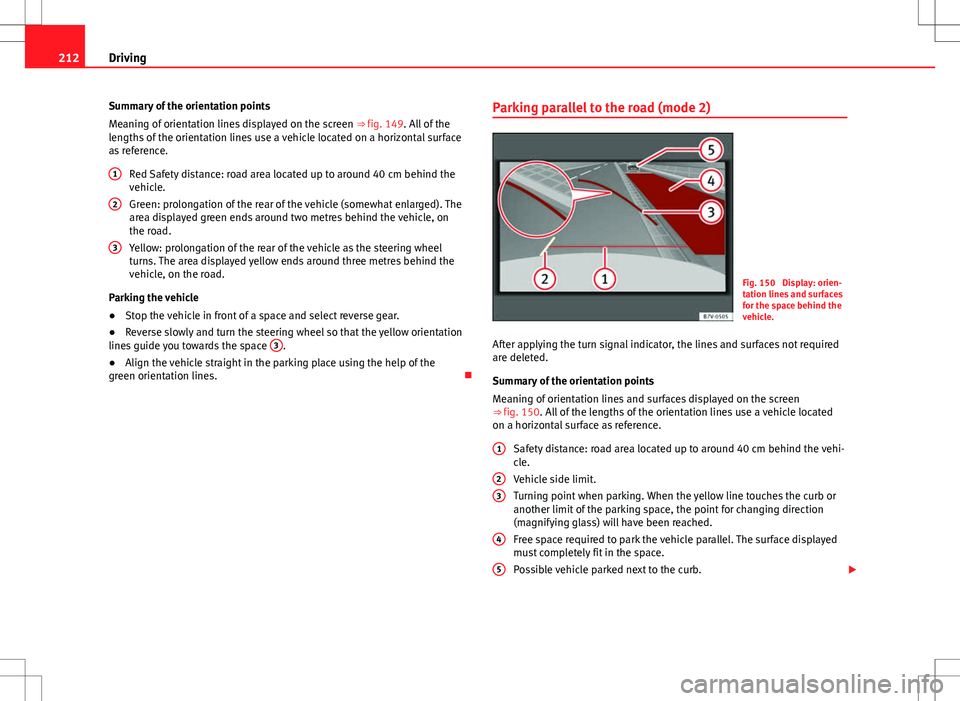
Fig. 150 Display: orien-
tation lines and surfaces
for the space behind the
vehicle.
After applying the turn signal indicator, the lines and surfaces not required
are deleted.
Summary of the orientation points
Meaning of orientation lines and surfaces displayed on the screen
⇒ fig. 150. All of the lengths of the orientation lines use a vehicle located
on a horizontal surface as reference. Safety distance: road area located up to around 40 cm behind the vehi-
cle.
Vehicle side limit.
Turning point when parking. When the yellow line touches the curb or
another limit of the parking space, the point for changing direction
(magnifying glass) will have been reached.
Free space required to park the vehicle parallel. The surface displayed
must completely fit in the space.
Possible vehicle parked next to the curb.
1
23
4
5
Page 216 of 388
214Driving
Cruise control system*
Introduction
The cruise control system (CCS) is able to maintain the set speed when driv-
ing forwards from approx. 20 km/h (12 mph).
The CCS only slows down by reducing the accelerator but not by braking.
⇒
.
Additional information and warnings:
● Changing gear ⇒ page 176
● Accessories, parts replacement, repairs and modifications ⇒ page 261
WARNING
Use of the cruise control could cause accidents and severe injuries if it is
not possible to drive at a constant speed maintaining the safety distance.
● Do not use the CCS in heavy traffic, if the distance from the vehicle in
front is insufficient, on steep roads, with several bends or in slippery cir-
cumstances (snow, ice, rain or loose gravel), or on flooded roads.
● Never use the CCS when driving off-road or on unpaved roads.
● Always adapt your speed and the distance to the vehicles ahead in
line with visibility, weather conditions, the condition of the road and the
traffic situation.
● To avoid unexpected operation of the cruise control system, turn it off
every time you finish using it.
● It is dangerous to use a set speed which is too high for the prevailing
road, traffic or weather conditions.
● When travelling down hills, the CCS cannot maintain a constant
speed. The vehicle tends to accelerate under its own weight. Select a
lower gear or use the foot brake to slow the vehicle.
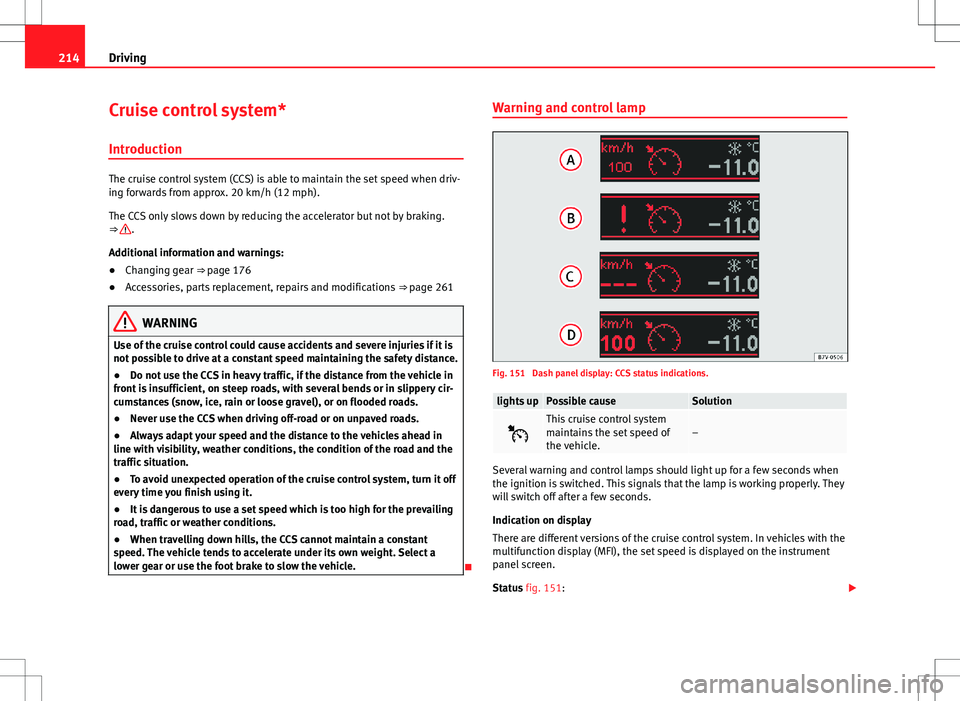
Warning and control lamp
Fig. 151 Dash panel display: CCS status indications.
lights upPossible causeSolution
This cruise control system
maintains the set speed of
the vehicle.–
Several warning and control lamps should light up for a few seconds when
the ignition is switched. This signals that the lamp is working properly. They
will switch off after a few seconds.
Indication on display
There are different versions of the cruise control system. In vehicles with the
multifunction display (MFI), the set speed is displayed on the instrument
panel screen.
Status fig. 151:
Page 220 of 388
218Driving
Control lamps
Blinks or lights
upPossible causeSolution
(yellow)Lane assist system con-
nected but inactive.
The system cannot clearly
detect the lane. See and
page 219, The lane assist
system is inactive (control
lamp lit in yellow).
(green)Lane assist system con-
nected and active.–
Several warning and control lamps should light up for a few seconds when
the ignition is switched. This signals that the lamp is working properly. They
will switch off after a few seconds.
WARNING
If the warning lamps and messages are ignored, the vehicle may stall in
traffic, or may cause accidents and severe injuries.
● Never ignore the warning lamps or text messages.
● Stop the vehicle safely as soon as possible.
CAUTION
Failure to heed the warning lamps and text messages when they appear
may result in faults in the vehicle. Operation mode
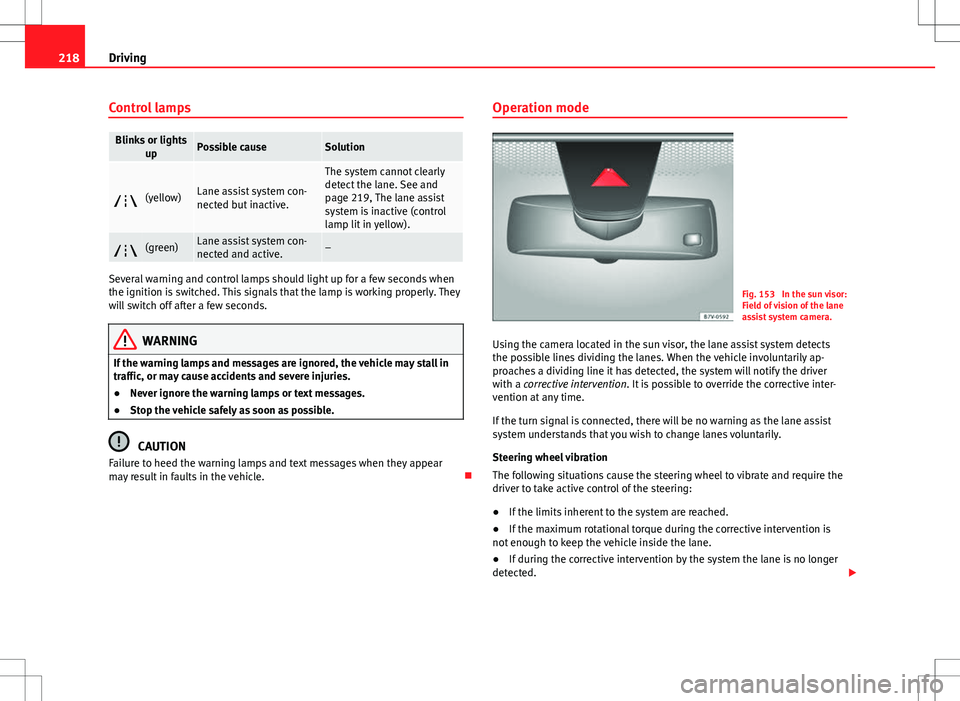
Fig. 153 In the sun visor:
Field of vision of the lane
assist system camera.
Using the camera located in the sun visor, the lane assist system detects
the possible lines dividing the lanes. When the vehicle involuntarily ap-
proaches a dividing line it has detected, the system will notify the driver
with a corrective intervention. It is possible to override the corrective inter-
vention at any time.
If the turn signal is connected, there will be no warning as the lane assist
system understands that you wish to change lanes voluntarily.
Steering wheel vibration
The following situations cause the steering wheel to vibrate and require the
driver to take active control of the steering:
● If the limits inherent to the system are reached.
● If the maximum rotational torque during the corrective intervention is
not enough to keep the vehicle inside the lane.
● If during the corrective intervention by the system the lane is no longer
detected.
Page 221 of 388
219
Driving
Switching the lane assist system on or off
● Select the corresponding menu option using the button for the driver as-
sist systems ⇒ page 62.
● ALTERNATIVELY: Activate or deactivate the system in the menu Settings,
sub-menu Assist systems , menu Lane Assist ⇒ page 62. The “confirmation
sign” indicates that the driver assist system is switched on.
Automatic deactivation: the lane assist system can be deactivated automat-
ically if there is a system malfunction. Control lamp switches off.
The lane assist system is inactive (control lamp lit in yellow)
● When the speed of travel drops to below approx. 65 km/h (40 mph).
● When the lane assist system does not detect the dividing lines of the
road. For example, in the event of road works, and snow, dirt, moisture or
reflections.
● When the radius of a curve is too small.
● When there is no dividing line.
● When the distance to the next dividing line is excessive.
● When there are more than two lane markings per lane.
● When the ASR is switched off.
● When the system does not detect any active rotation of the steering
wheel by the driver during a prolonged period.
● Temporarily, in the event of very dynamic driving.
● When the turn signal is connected.
Note
Before starting travel, verify that the camera's field of vision is not covered
⇒ fig. 153.
Note
Keep the camera window clean. Disconnect the lane assist system in the following
situations
Due to the limits of the lane assist system, disconnect it in the following sit-
uations:
●
When more attention is required of the driver
● For very sporty driving
● In very unfavourable weather conditions
● In very unfavourable road conditions
● In areas of road works
Safety FirstOperating instructionsPractical tipsTechnical Specifications