tow Seat Alhambra 2012 Owner's Guide
[x] Cancel search | Manufacturer: SEAT, Model Year: 2012, Model line: Alhambra, Model: Seat Alhambra 2012Pages: 388, PDF Size: 6.72 MB
Page 213 of 388
211
Driving
Things to note
1) Do not use the rear assist system in the following cases:– If there is a fault in the dynamic chassis control (DCC).– If the image displayed is not very clear or reliable (low visibility or dirty
lens).
– If the space behind the vehicle cannot be clearly or completely recog-
nised.
– If the vehicle has been overloaded at the rear.– If the driver is not familiar with the system.– If the tailgate is open.– If the position and installation angle of the camera have been changed,
e.g. in a rear-end collision. Have a specialised workshop check the system.
2) Optical illusions of the camera (examples)The rear assist camera produces two-dimensional images. Any cracks in or
objects protruding from the ground or from other vehicles are more diffi-
cult to spot or cannot be seen due to a lack of depth in the image dis-
played.
Objects or other vehicles may seem to be closer or further away than what
they really are:
– On changing from a flat surface to a slope or gradient.– On changing from a slope or gradient to a flat surface.– If the vehicle has been overloaded at the rear.– On approaching protruding objects. These objects may be outside the
angle of vision of the camera when reversing.
Cleaning the camera lens
Keep the camera lens clean and clear of snow and ice:
● Moisten the lens using a commercially available, alcohol-based glass
cleaning agent and clean the lens with a dry cloth ⇒
.
● Remove snow using a small brush.
● Use de-icing spray to remove any ice ⇒
.
CAUTION
● Never use abrasive cleaners to clean the camera lens.
● Never remove snow or ice from the camera lens using warm or hot water.
This could damage the lens.
Note
● SEAT recommends that you practise parking with the rear assist system
in a quiet location or in a car park to become familiar with the system, in-
cluding the orientation lines and their function.
● The orientation lines will not be displayed on the screen if the tailgate is
open or the factory-fitted towing bracket is electrically connected to a trailer.
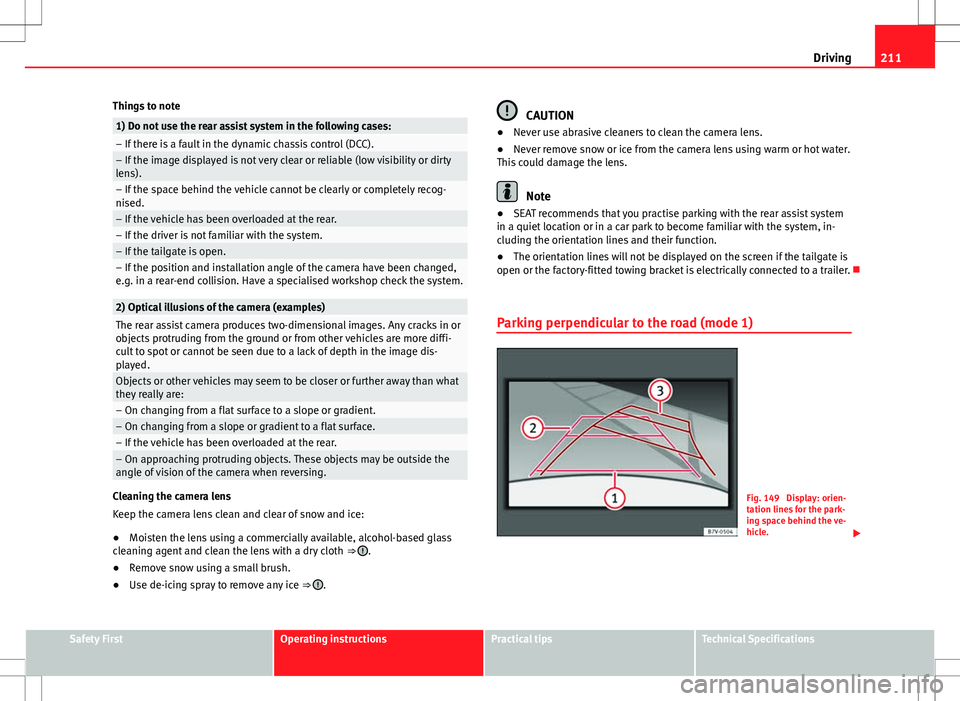
Parking perpendicular to the road (mode 1)
Fig. 149 Display: orien-
tation lines for the park-
ing space behind the ve-
hicle.
Safety FirstOperating instructionsPractical tipsTechnical Specifications
Page 214 of 388
212Driving
Summary of the orientation points
Meaning of orientation lines displayed on the screen ⇒ fig. 149. All of the
lengths of the orientation lines use a vehicle located on a horizontal surface
as reference.
Red Safety distance: road area located up to around 40 cm behind the
vehicle.
Green: prolongation of the rear of the vehicle (somewhat enlarged). The
area displayed green ends around two metres behind the vehicle, on
the road.
Yellow: prolongation of the rear of the vehicle as the steering wheel
turns. The area displayed yellow ends around three metres behind the
vehicle, on the road.
Parking the vehicle
● Stop the vehicle in front of a space and select reverse gear.
● Reverse slowly and turn the steering wheel so that the yellow orientation
lines guide you towards the space 3
.
● Align the vehicle straight in the parking place using the help of the
green orientation lines.
1
2
3
Parking parallel to the road (mode 2)
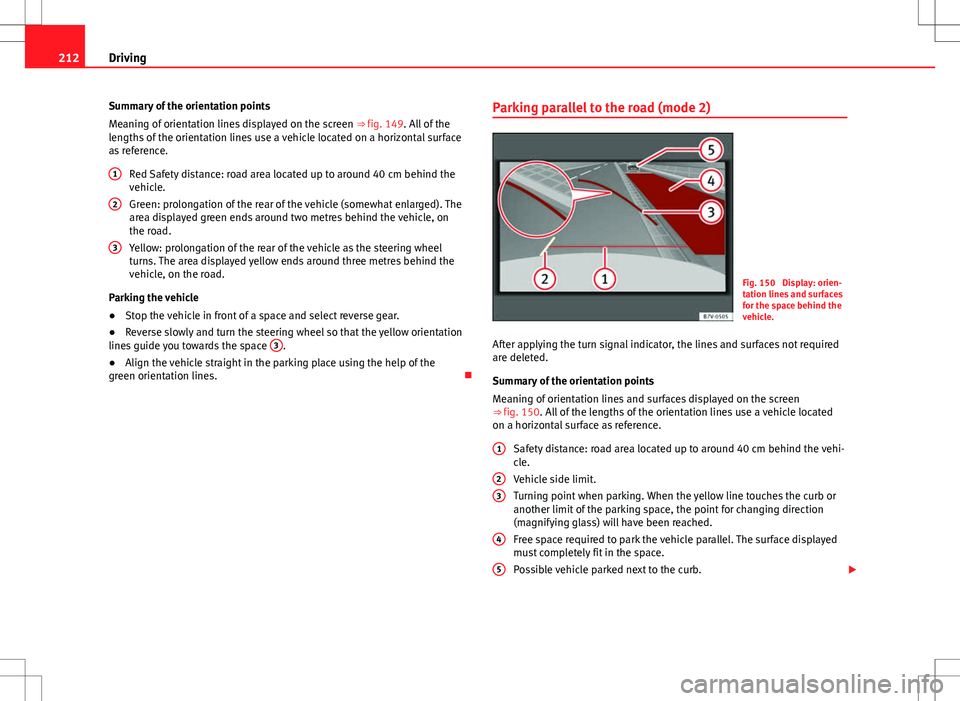
Fig. 150 Display: orien-
tation lines and surfaces
for the space behind the
vehicle.
After applying the turn signal indicator, the lines and surfaces not required
are deleted.
Summary of the orientation points
Meaning of orientation lines and surfaces displayed on the screen
⇒ fig. 150. All of the lengths of the orientation lines use a vehicle located
on a horizontal surface as reference. Safety distance: road area located up to around 40 cm behind the vehi-
cle.
Vehicle side limit.
Turning point when parking. When the yellow line touches the curb or
another limit of the parking space, the point for changing direction
(magnifying glass) will have been reached.
Free space required to park the vehicle parallel. The surface displayed
must completely fit in the space.
Possible vehicle parked next to the curb.
1
23
4
5
Page 215 of 388
213
Driving
Parking the vehicle
● Stop the vehicle 1 m away parallel to the parking space and select re-
verse gear.
● Switch on mode 2 on the navigation system screen for parallel parking.
● Slowly reverse and turn the steering wheel so that the surface displayed
yellow on the screen stops in front of any obstacles 5
(e.g. another vehi-
cle).
● Turn the steering wheel fully towards the space and reverse slowly.
● When the yellow line 3
touches the side limit of the space, e.g. the bor-
der or curb (magnifying glass), turn the steering wheel fully in the opposite
direction.
● Continue reversing until the vehicle is inside the space, parallel to the
road. Correct the position if necessary.
Safety FirstOperating instructionsPractical tipsTechnical Specifications
Page 224 of 388
222Driving
during travel, the traffic sign valid at this moment will move to the first posi-
tion along the additional sign “if the road is wet”.
The permanent display on the instrument panel screen is shown as you
pass the real traffic signs. The signs for entering and leaving towns activate
the display of the usual speed limits for that country on roads in populated
areas and national highways, even if the speed is not limited by an actual
traffic sign.
The end of a prohibition or limitation is not displayed. If you exceed the
speed limits shown, a warning will not appear. The system does not detect
areas with little traffic. The current legal provisions apply.
Connection and disconnection
● Connect or disconnect the assist system in the Settings menu in the
SEAT information system ⇒ page 62.
● ALTERNATIVELY: Press the button for the driver assist systems on the
main beam lever.
Trailer
Connect or disconnect the secondary display for speed limits and overtak-
ing bans that apply to trailers (trailer mode) in the Settings menu in the
SEAT information system ⇒ page 62.
Page 229 of 388
227
Driving
WARNING (Continued)
● If tyres are inflated at different pressures or a tyre pressure is too low,
a tyre may be damaged and burst resulting in a loss of control of the ve-
hicle.
● The driver is responsible for ensuring that all of the vehicle tyres are
correctly inflated to the right pressure. The recommended tyre pressure
is indicated on the label ⇒ fig. 178.
● The tyre monitoring system can only operate correctly if all of the
tyres are inflated to the correct pressure when cold.
● Driving with tyres at the wrong pressure can cause damage to them
and result in an accident. Ensure that the tyre pressures of all the tyres
correspond to the vehicle load.
● Before starting a journey, always inflated tyres to the correct pres-
sure.
● If tyre pressure is too low then the tyre is subject to greater forces
and it may be heated to such an extent that the tread can rupture and the
tyre will burst.
● With an overloaded vehicle at high speed, the tyres can overheat and
burst resulting in a loss of vehicle control.
● Tyre pressures which are too high or too low reduce the useful life of
the tyre, affecting the vehicle's performance.
● If a tyre has not been punctured then it does not have to be changed
immediately; drive to the nearest specialised workshop at a moderate
speed and have the tyre checked and inflated to the correct pressure.
WARNING
If the warning lamps and messages are ignored, the vehicle may stall in
traffic, or may cause accidents and severe injuries.
● Never ignore the warning lamps or text messages.
● Stop the vehicle safely as soon as possible.
CAUTION
Failure to heed the warning lamps and text messages when they appear
may result in faults in the vehicle.
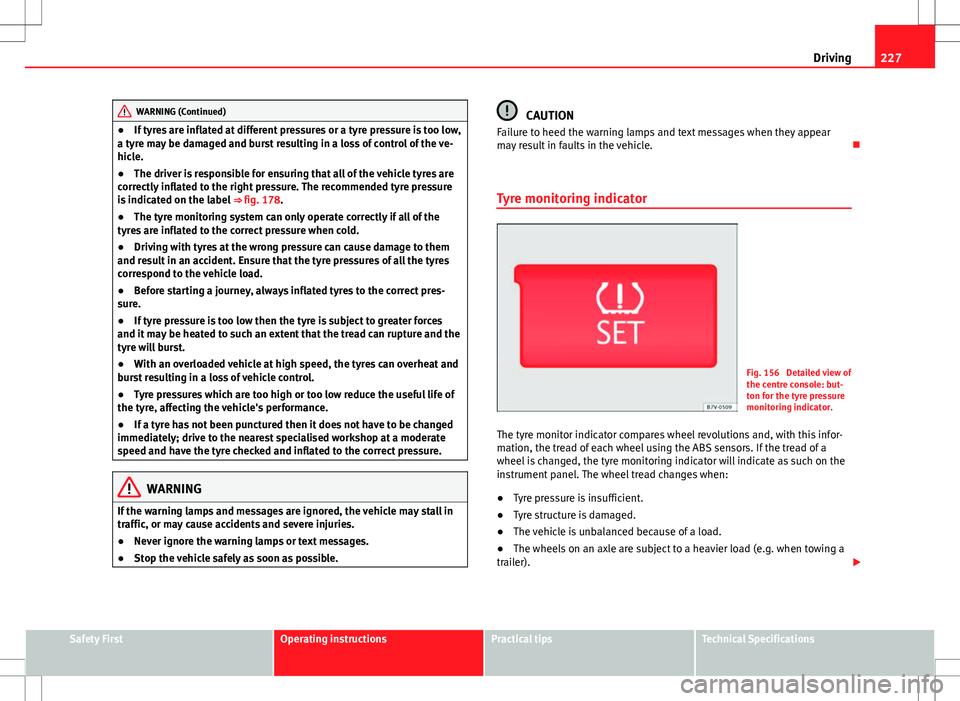
Tyre monitoring indicator
Fig. 156 Detailed view of
the centre console: but-
ton for the tyre pressure
monitoring indicator.
The tyre monitor indicator compares wheel revolutions and, with this infor-
mation, the tread of each wheel using the ABS sensors. If the tread of a
wheel is changed, the tyre monitoring indicator will indicate as such on the
instrument panel. The wheel tread changes when:
● Tyre pressure is insufficient.
● Tyre structure is damaged.
● The vehicle is unbalanced because of a load.
● The wheels on an axle are subject to a heavier load (e.g. when towing a
trailer).
Safety FirstOperating instructionsPractical tipsTechnical Specifications
Page 230 of 388
228Driving
● The vehicle is fitted with snow chains.
● The wheel on one axle is changed.
There may be a delay in the reaction of the tyre monitoring indicator or it
may not indicate anything under certain circumstances (e.g. sports driving,
snow-covered or unpaved roads).
Adaptation of the tyre monitoring indicator
On adjusting tyre pressure or changing one or more wheels, the ⇒ fig. 156
button on the tyre monitoring indicator must be kept pressed down, with
the ignition on, until a signal is heard. Do the same, for example, when the
front and rear wheels are swapped ⇒ fig. 177.
If the wheels are subjected to an excessive load (towing a trailer, heavy
load), the tyre pressure must be increased to the maximum recommended
pressure ⇒ page 297. Press the tyre monitoring indicator button to confirm
the new pressure value.
Note
An erroneous indication may be given when snow chains are in use because
the chains increase the tread of the wheel.
Page 231 of 388
229
Driving and the environment
Practical tips Driving and the environment
Running-in
Please observe the instructions for running-in new components.
Running-in the engine
The engine needs to be run-in over the first 1500 km (1000 miles). During
its first few hours of running, the internal friction in the engine is greater
than later on when all the moving parts have bedded down.
How the vehicle is driven for the first 1500 km (1000 miles) influences the
future engine performance. Throughout the life of the vehicle, it should be
driven at a moderate speed – especially when the engine is cold – this will
reduce engine wear and increase its useful life. Never drive at extremely low
engine speeds. Always engage a lower gear when the engine works “irregu-
larly”. For the first 1000 km or 600 miles, please note:
● Do not use full throttle.
● Do not force the engine above two thirds of its maximum speed.
● Do not tow a trailer.
Between 1000 and 1500 kilometres (600 to 1000 miles), gradually in-
crease power until reaching the maximum speed and high engine speeds.
Running in new tyres and brake pads
● Replacement of new tyres and wheel rims ⇒ page 297
● Notes on the brakes ⇒ page 189
For the sake of the environment
If the engine is run in gently, the life of the engine will be increased and the
engine oil consumption reduced.
Ecological driving Introduction
Fuel consumption, environmental impact and engine, brake and tyre wear
depend largely on three factors:
● Personal driving style.
● Conditions of use (weather, road surface).
● Technical requirements.
Savings of up to 25% in fuel consumption are possible with an appropriate
driving style and the adoption of certain simple tips.
WARNING
Always adapt your speed and the distance to the vehicles ahead in line
with visibility, weather conditions, the condition of the road and the traf-
fic situation.
Safety FirstOperating instructionsPractical tipsTechnical Specifications
Page 233 of 388
231
Driving and the environment
Other factors which increase fuel consumption (examples):
● Fault in engine management.
● Driving on hills.
● Trailer towing.
Saving fuel while driving
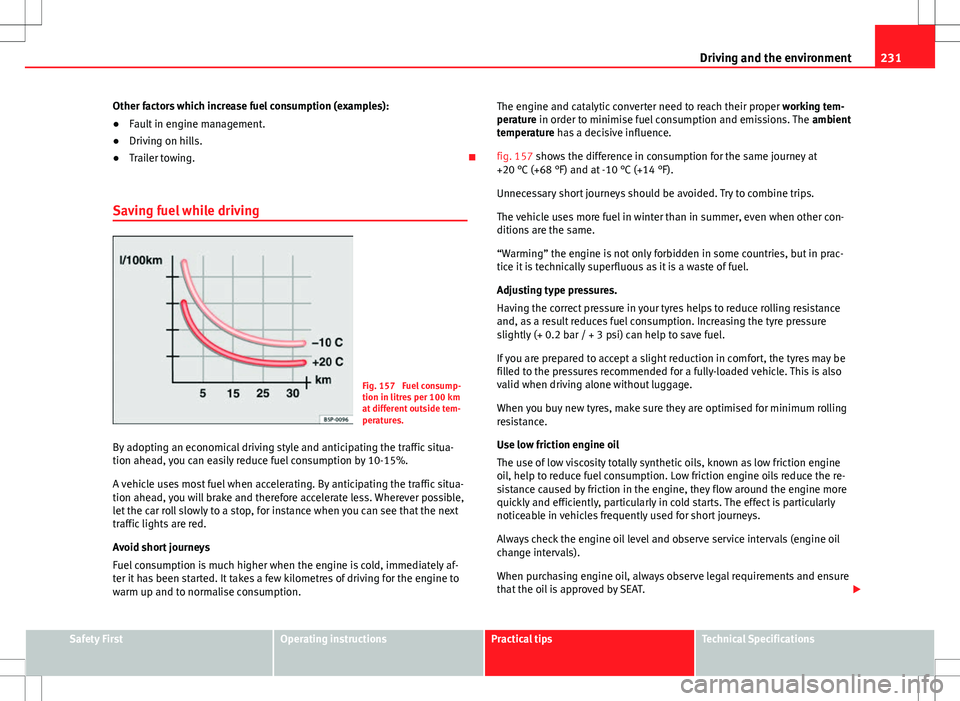
Fig. 157 Fuel consump-
tion in litres per 100 km
at different outside tem-
peratures.
By adopting an economical driving style and anticipating the traffic situa-
tion ahead, you can easily reduce fuel consumption by 10-15%.
A vehicle uses most fuel when accelerating. By anticipating the traffic situa-
tion ahead, you will brake and therefore accelerate less. Wherever possible,
let the car roll slowly to a stop, for instance when you can see that the next
traffic lights are red.
Avoid short journeys
Fuel consumption is much higher when the engine is cold, immediately af-
ter it has been started. It takes a few kilometres of driving for the engine to
warm up and to normalise consumption. The engine and catalytic converter need to reach their proper
working tem-
perature in order to minimise fuel consumption and emissions. The ambient
temperature has a decisive influence.
fig. 157 shows the difference in consumption for the same journey at
+20 °C (+68 °F) and at -10 °C (+14 °F).
Unnecessary short journeys should be avoided. Try to combine trips.
The vehicle uses more fuel in winter than in summer, even when other con-
ditions are the same.
“Warming” the engine is not only forbidden in some countries, but in prac-
tice it is technically superfluous as it is a waste of fuel.
Adjusting type pressures.
Having the correct pressure in your tyres helps to reduce rolling resistance
and, as a result reduces fuel consumption. Increasing the tyre pressure
slightly (+ 0.2 bar / + 3 psi) can help to save fuel.
If you are prepared to accept a slight reduction in comfort, the tyres may be
filled to the pressures recommended for a fully-loaded vehicle. This is also
valid when driving alone without luggage.
When you buy new tyres, make sure they are optimised for minimum rolling
resistance.
Use low friction engine oil
The use of low viscosity totally synthetic oils, known as low friction engine
oil, help to reduce fuel consumption. Low friction engine oils reduce the re-
sistance caused by friction in the engine, they flow around the engine more
quickly and efficiently, particularly in cold starts. The effect is particularly
noticeable in vehicles frequently used for short journeys.
Always check the engine oil level and observe service intervals (engine oil
change intervals).
When purchasing engine oil, always observe legal requirements and ensure
that the oil is approved by SEAT.
Safety FirstOperating instructionsPractical tipsTechnical Specifications
Page 234 of 388
232Driving and the environment
Avoid carrying unnecessary loads
The lighter the vehicle, the more economical and ecological the driving
style. For example, an additional weight of 100 kg will increase fuel con-
sumption up to 0.3 l/100 km.
Remove any unnecessary objects or loads from the vehicle.
Remove optional equipment and unnecessary accessories
The more aerodynamic the vehicle, the lower the fuel consumption. Option-
al equipment and accessories (such as roof racks or bike carriers) reduce
the aerodynamic benefits of the vehicle.
Therefore, we recommend you remove all optional and unnecessary equip-
ment and racks, especially if you intend to drive at high speeds.
Engine management and exhaust gas
purification system Introduction
Additional information and warnings:
● Changing gear ⇒ page 176
● Refuelling ⇒ page 268
● Fuel ⇒ page 271
● Engine oil ⇒ page 283
● Vehicle battery ⇒ page 292
● Information stored in the control units ⇒ page 261
● Tow-starting and towing away ⇒ page 344
WARNING
The components of the exhaust system reach very high temperatures.
This could cause a fire.
● Always park your vehicle so that no part of the exhaust system can
come in contact with flammable materials (such as dried grass).
● Do not apply additional underseal or anti-corrosion coatings to the
exhaust pipes, catalytic converter, heat shields or the diesel particulate
filter.
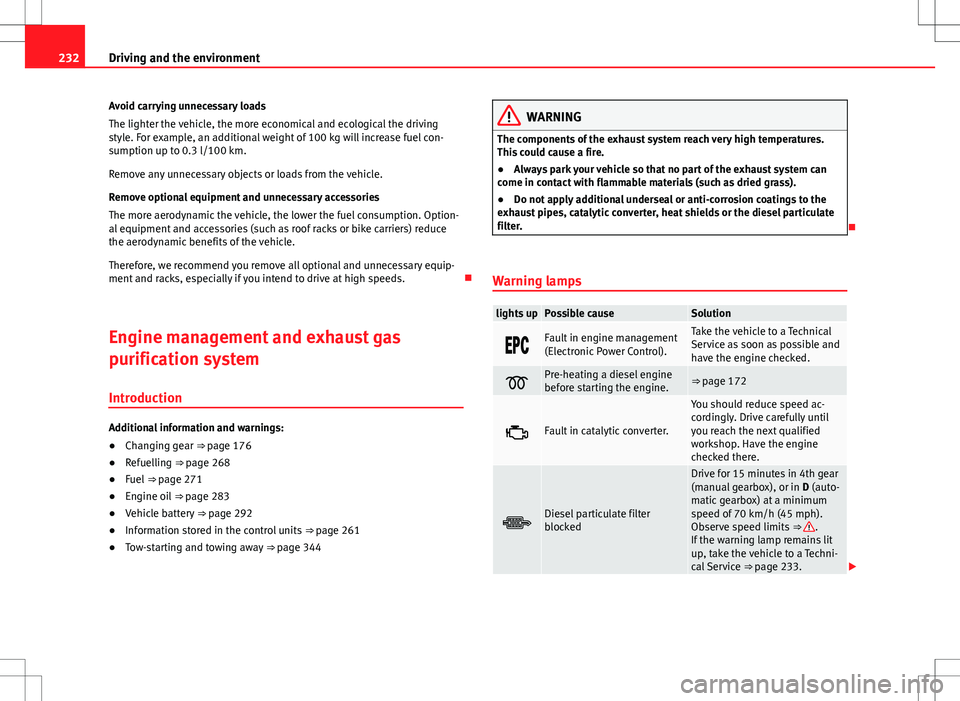
Warning lamps
lights upPossible causeSolution
Fault in engine management
(Electronic Power Control).Take the vehicle to a Technical
Service as soon as possible and
have the engine checked.
Pre-heating a diesel engine
before starting the engine.⇒ page 172
Fault in catalytic converter.
You should reduce speed ac-
cordingly. Drive carefully until
you reach the next qualified
workshop. Have the engine
checked there.
Diesel particulate filter
blocked
Drive for 15 minutes in 4th gear
(manual gearbox), or in D (auto-
matic gearbox) at a minimum
speed of 70 km/h (45 mph).
Observe speed limits ⇒
.
If the warning lamp remains lit
up, take the vehicle to a Techni-
cal Service ⇒ page 233.
Page 235 of 388
233
Driving and the environment
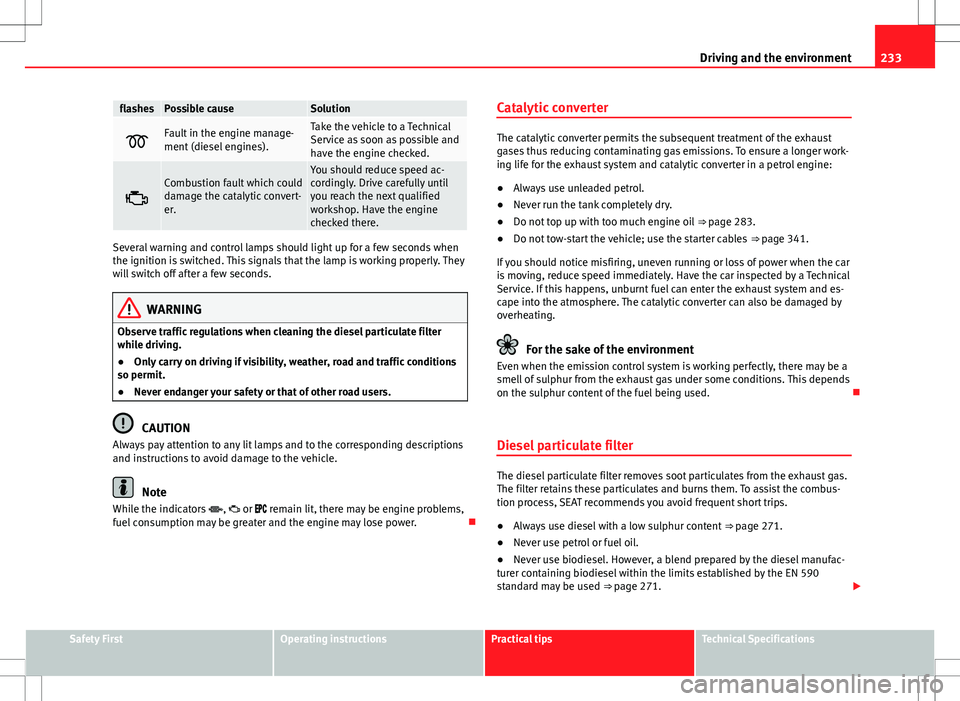
flashesPossible causeSolution
Fault in the engine manage-
ment (diesel engines).Take the vehicle to a Technical
Service as soon as possible and
have the engine checked.
Combustion fault which could
damage the catalytic convert-
er.You should reduce speed ac-
cordingly. Drive carefully until
you reach the next qualified
workshop. Have the engine
checked there.
Several warning and control lamps should light up for a few seconds when
the ignition is switched. This signals that the lamp is working properly. They
will switch off after a few seconds.
WARNING
Observe traffic regulations when cleaning the diesel particulate filter
while driving.
● Only carry on driving if visibility, weather, road and traffic conditions
so permit.
● Never endanger your safety or that of other road users.
CAUTION
Always pay attention to any lit lamps and to the corresponding descriptions
and instructions to avoid damage to the vehicle.
Note
While the indicators , or remain lit, there may be engine problems,
fuel consumption may be greater and the engine may lose power. Catalytic converter
The catalytic converter permits the subsequent treatment of the exhaust
gases thus reducing contaminating gas emissions. To ensure a longer work-
ing life for the exhaust system and catalytic converter in a petrol engine:
●
Always use unleaded petrol.
● Never run the tank completely dry.
● Do not top up with too much engine oil ⇒ page 283.
● Do not tow-start the vehicle; use the starter cables ⇒ page 341.
If you should notice misfiring, uneven running or loss of power when the car
is moving, reduce speed immediately. Have the car inspected by a Technical
Service. If this happens, unburnt fuel can enter the exhaust system and es-
cape into the atmosphere. The catalytic converter can also be damaged by
overheating.
For the sake of the environment
Even when the emission control system is working perfectly, there may be a
smell of sulphur from the exhaust gas under some conditions. This depends
on the sulphur content of the fuel being used.
Diesel particulate filter
The diesel particulate filter removes soot particulates from the exhaust gas.
The filter retains these particulates and burns them. To assist the combus-
tion process, SEAT recommends you avoid frequent short trips.
● Always use diesel with a low sulphur content ⇒ page 271.
● Never use petrol or fuel oil.
● Never use biodiesel. However, a blend prepared by the diesel manufac-
turer containing biodiesel within the limits established by the EN 590
standard may be used ⇒ page 271.
Safety FirstOperating instructionsPractical tipsTechnical Specifications