lock Seat Alhambra 2012 Service Manual
[x] Cancel search | Manufacturer: SEAT, Model Year: 2012, Model line: Alhambra, Model: Seat Alhambra 2012Pages: 388, PDF Size: 6.72 MB
Page 93 of 388

91
Unlocking and locking
To close windows without the anti-trap function
● Attempt to close the corresponding electric window within 10 seconds
after by holding the button. The window is closed without the anti-trap
function, deactivated for a short time.
● After more than 10 seconds, the anti-trap function is reactivated. The
window will stop once again if there is another difficulty or obstacle.
● If the window will still not close, visit a specialised workshop.
WARNING
Closing the electric windows without the anti-trap function can cause se-
rious injury.
● Always close the electric windows carefully.
● Nobody should be in the way of the electric windows, especially when
the anti-trap function is deactivated.
● The anti-trap function does not prevent fingers or other parts of the
body getting pinched against the window frame and causing injury.
Note
The anti-trap function also operates if the windows are closed from the out-
side of the vehicle using the ignition key for convenience closing
⇒ page 90.
Safety FirstOperating instructionsPractical tipsTechnical Specifications
Page 94 of 388
92Unlocking and locking
Panorama sliding sunroof*
Introduction
Additional information and warnings:
● SEAT information system ⇒ page 62
● Central locking and locking system ⇒ page 74
● Emergency locking and unlocking ⇒ page 318
WARNING
Careless use of the panorama sliding sunroof can cause serious injury.
● Only close the panorama sliding sunroof and the sunshade when no-
body is in the way.
● Always take all the keys with you whenever you leave the vehicle.
● Never leave children or disabled persons in the vehicle, particularly if
they have access to the keys. Uncontrolled use of the key could lock the
vehicle, start the engine, turn on the ignition and operate the sliding
sunroof.
● The sliding sunroof can be operated for up to about ten minutes after
the ignition has been switched off, provided the driver door and the front
passenger door are not opened.
Note
In case of a fault in the operation of the sliding sunroof, the anti-trap func-
tion will not operate correctly. Visit a specialised workshop. Opening or closing the panorama sliding sunroof
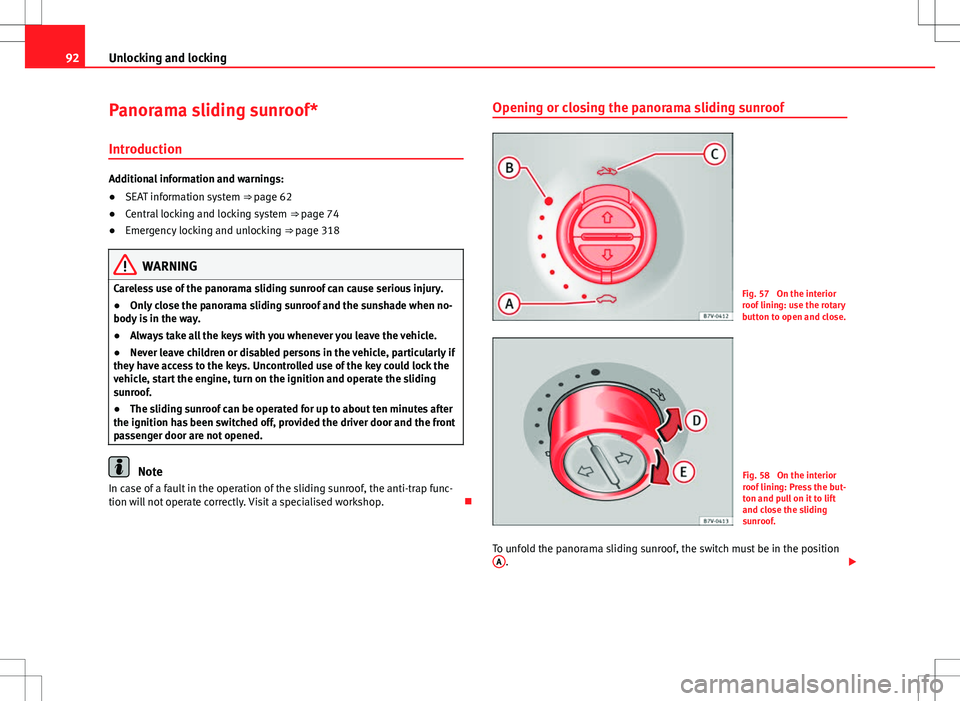
Fig. 57 On the interior
roof lining: use the rotary
button to open and close.
Fig. 58 On the interior
roof lining: Press the but-
ton and pull on it to lift
and close the sliding
sunroof.
To unfold the panorama sliding sunroof, the switch must be in the position A
.
Page 95 of 388

93
Unlocking and locking
FunctionSwitch settingNecessary operations ⇒ fig. 57 To open the sliding
sunroof completely:C
Rotate the switch to the re-
quired position.To choose the con- venience position
for the sliding sun- roof:
B
To close the sliding
sunroof completely:A
⇒ fig. 58 To completely de-
ploy the roof deflec- tor:DBriefly push the switch up
(arrow).
To stop automaticoperation:D or EBriefly push the button
again back or pull on it.
To completely close
the roof deflector:EBriefly push the switch up
(arrow).
To set the inter-
mediate position:D or EHolding the button or hold
it back until the roof is in
the required position.
The panorama sliding sunroof will only work with the ignition on. The slid-
ing sunroof can be operated for up to about ten minutes after the ignition
has been switched off, provided the driver door and the front passenger
door are not opened. Opening or closing the sunshade
Fig. 59 On the interior
roof lining: switches for
the sunshade.
FunctionNecessary operationsTo open completely
(automatic):Press the button ⇒ fig. 59 1 briefly.
To stop automatic
operation:Press the button ⇒ fig. 59 1 or ⇒ fig. 59 2.
To set the intermedi-
ate position:Hold the button ⇒ fig. 59 1 or ⇒ fig. 59 2 until
the required position is reached.
To close completely (automatic):Press the button ⇒ fig. 59 2 briefly.
The sliding sunroof can be operated for up to about ten minutes after the
ignition has been switched off, provided the driver door and the front pas-
senger door are not opened.
Safety FirstOperating instructionsPractical tipsTechnical Specifications
Page 96 of 388
94Unlocking and locking
Panorama sliding sunroof: operation
Convenience open/close function
The panorama sliding sunroof can be opened or closed from outside the ve-
hicle using the vehicle key:
●Hold in the unlocking for locking button for the vehicle. The panorama
sliding sunroof is adjusted or closes.
● Release the unlock or lock button to stop the function.
During convenience closing, first the windows and then the sliding sunroof
will be closed.
Note
The sliding sunroof rotary button remains in the last position selected if the
roof is closed using convenience closing from outside the vehicle and will
have to be re-positioned the next time you drive.
Anti-trap function of the panorama sliding sunroof and the
sunshade
The anti-trap function reduces the risk of injury when opening and closing
the panorama sliding sunroof and sunshade ⇒ . When the panorama
sliding sunroof or the sunshade encounter difficulty or an obstacle when
closing, they will stop and reopen.
● Check why the panorama sliding sunroof or the sunshade did not close.
● Attempt to close the panorama sliding sunroof or sunshade once again.
● If the panorama sliding sunroof or sunshade is still obstructed, it will
stop at the corresponding position. Now close the panorama sliding sun-
roof or sunshade without the anti-trap function. Closing without the roll-back function
●
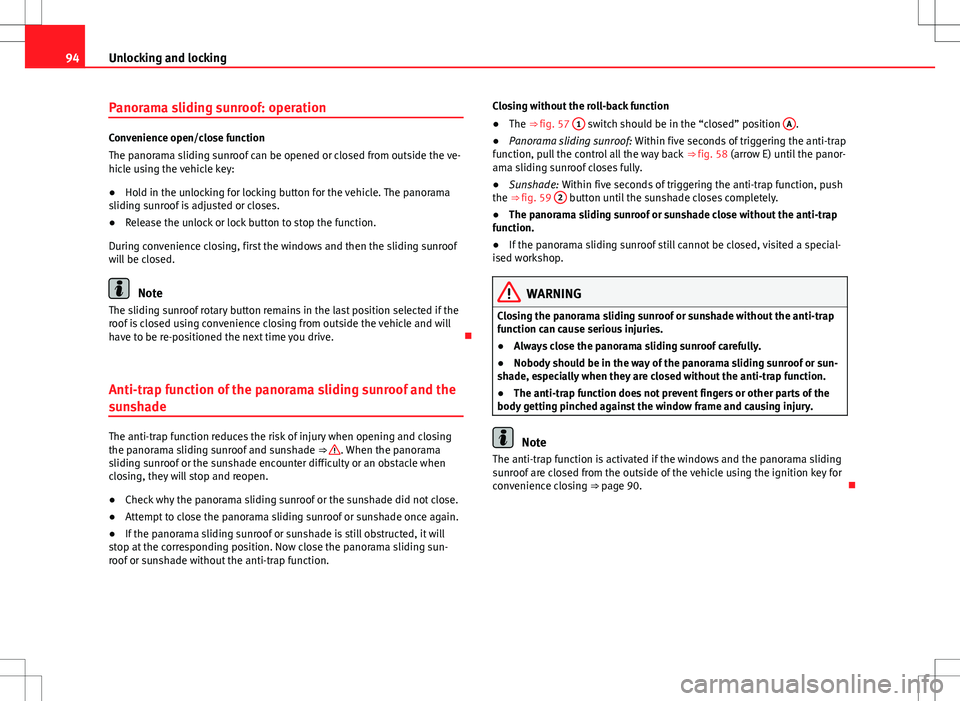
The ⇒ fig. 57 1
switch should be in the “closed” position A.
● Panorama sliding sunroof: Within five seconds of triggering the anti-trap
function, pull the control all the way back ⇒ fig. 58 (arrow E) until the panor-
ama sliding sunroof closes fully.
● Sunshade: Within five seconds of triggering the anti-trap function, push
the ⇒ fig. 59 2
button until the sunshade closes completely.
● The panorama sliding sunroof or sunshade close without the anti-trap
function.
● If the panorama sliding sunroof still cannot be closed, visited a special-
ised workshop.
WARNING
Closing the panorama sliding sunroof or sunshade without the anti-trap
function can cause serious injuries.
● Always close the panorama sliding sunroof carefully.
● Nobody should be in the way of the panorama sliding sunroof or sun-
shade, especially when they are closed without the anti-trap function.
● The anti-trap function does not prevent fingers or other parts of the
body getting pinched against the window frame and causing injury.
Note
The anti-trap function is activated if the windows and the panorama sliding
sunroof are closed from the outside of the vehicle using the ignition key for
convenience closing ⇒ page 90.
Page 103 of 388

101
Lights and visibility
Note
Use of the Tourist light option and the adhesives on the headlights is only
allowed if they are to be used for a short period of time. To modify the direc-
tion of the headlights permanently, please take the vehicle to a specialised
workshop. SEAT recommends visiting a Technical Service.
“Coming home” and “Leaving home” function (guidance
lights)
The “Coming home” function should be switched on manually. However the
“Leaving home” function is automatically controlled by a photo sensor.
“Coming Home”Necessary operations
To switch sys-
tem on:
– Switch off the ignition.
– Briefly flash the headlights for approximately one sec-
ond ⇒ page 96.
The “Coming home” lighting comes on when the driver's
door is opened. The delay in switching off the headlights
is counted from when the last door or tailgate is closed.
The system
switches off:
– Automatically at the end of the delay period.
– Automatically, if 30 seconds after coming on, a vehicle
door or tailgate remains open.
– If the light switch is turned to position .
– If the ignition is switched on.
“Leaving home”Necessary operationsTo switch sys-
tem on:– Unlock the vehicle when the light switch is in position
and the photo sensor detects darkness.
The system
switches off:– Automatically, at the end of the delay period.
– When the vehicle is locked.
– When the light switch is turned to position .
– When the ignition is switched on.
Lighting around the exterior mirrors
The lighting around the exterior mirrors illuminates the door area on enter-
ing and leaving the vehicles. It comes on when the vehicle is unlocked,
when the vehicle door is opened and when the “Coming home” or “Leaving
home” function is switched on. If the equipment includes the light sensor,
the lighting around the exterior mirrors only comes when it is dark.
Note
● The time taken for the headlights to go off can be changed in the Lights
& Visibility menu and the function can be switched on or off ⇒ page 62.
● When the “Coming home” function is on, if the vehicle door is opened
there is no audible warning signal to advise that the light is still on.
Headlight range control, instrument and switch lighting
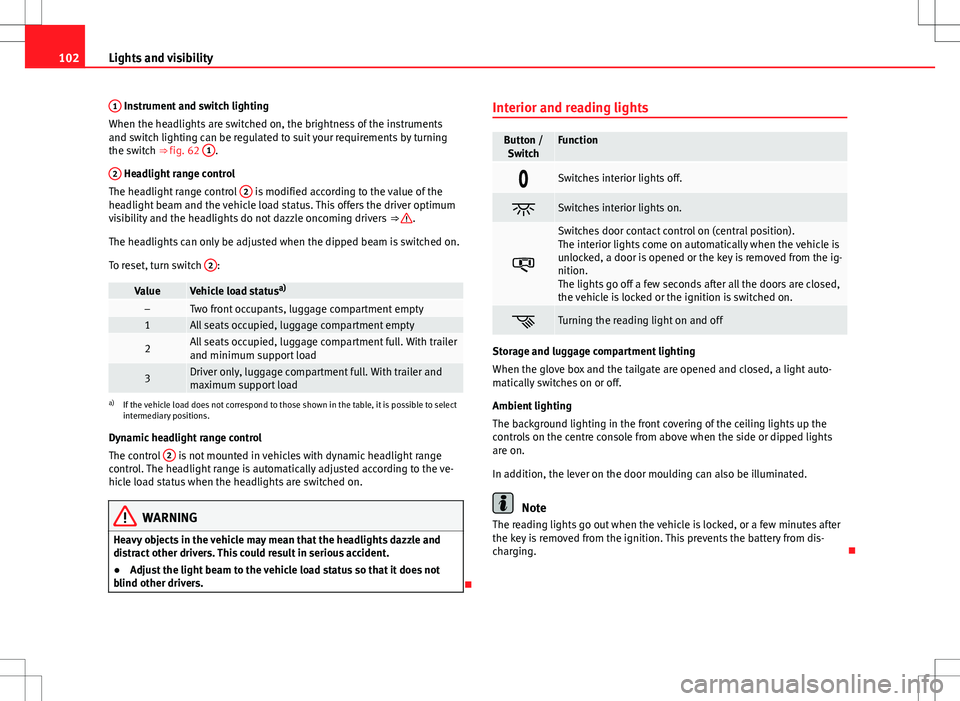
Fig. 62 Next to the
steering wheel: instru-
ment and switch lighting
control 1
and headlight
range control 2.
Safety FirstOperating instructionsPractical tipsTechnical Specifications
Page 104 of 388
102Lights and visibility
1
Instrument and switch lighting
When the headlights are switched on, the brightness of the instruments
and switch lighting can be regulated to suit your requirements by turning
the switch ⇒ fig. 62 1
.
2
Headlight range control
The headlight range control 2 is modified according to the value of the
headlight beam and the vehicle load status. This offers the driver optimum
visibility and the headlights do not dazzle oncoming drivers ⇒
.
The headlights can only be adjusted when the dipped beam is switched on.
To reset, turn switch 2
:
ValueVehicle load statusa)–Two front occupants, luggage compartment empty1All seats occupied, luggage compartment empty
2All seats occupied, luggage compartment full. With trailer
and minimum support load
3Driver only, luggage compartment full. With trailer and
maximum support load
a)
If the vehicle load does not correspond to those shown in the table, it is possible to select
intermediary positions.
Dynamic headlight range control
The control 2
is not mounted in vehicles with dynamic headlight range
control. The headlight range is automatically adjusted according to the ve-
hicle load status when the headlights are switched on.
WARNING
Heavy objects in the vehicle may mean that the headlights dazzle and
distract other drivers. This could result in serious accident.
● Adjust the light beam to the vehicle load status so that it does not
blind other drivers.
Interior and reading lights
Button /
SwitchFunction
Switches interior lights off.
Switches interior lights on.
Switches door contact control on (central position).
The interior lights come on automatically when the vehicle is
unlocked, a door is opened or the key is removed from the ig-
nition.
The lights go off a few seconds after all the doors are closed,
the vehicle is locked or the ignition is switched on.
Turning the reading light on and off
Storage and luggage compartment lighting
When the glove box and the tailgate are opened and closed, a light auto-
matically switches on or off.
Ambient lighting
The background lighting in the front covering of the ceiling lights up the
controls on the centre console from above when the side or dipped lights
are on.
In addition, the lever on the door moulding can also be illuminated.
Note
The reading lights go out when the vehicle is locked, or a few minutes after
the key is removed from the ignition. This prevents the battery from dis-
charging.
Page 109 of 388

107
Lights and visibility
Windscreen wiper functions
Windscreen wiper performance in different situations:If the vehicle is at a stand-
still:The activated position provisionally changes
to the previous position.
During the automatic wipe:
The air conditioning comes on for approxi-
mately 30 seconds in air recirculation mode
to prevent the smell of the windscreen wash-
er fluid entering the inside of the vehicle.
For the intermittent wipe:The intervals between wipes vary according
to the speed of the vehicle. The higher the
vehicle speed the shorter the intervals.
Heated windscreen washer jets
The heating only thaws the frozen jets, it does not thaw the water in the
washer hoses. The heated windscreen washer jets automatically adjust the
heat depending on the ambient temperature, when the ignition is switched
on.
Headlight wash /wipe system
The headlight washers/wipers clean the headlight lenses.
After the ignition is switched on, the first and every fifth time the wind-
screen washer is switched on, the headlights are also washed. Therefore,
the windscreen wiper lever should be pulled towards the steering wheel
when the dipped beam or main beam are on. Any incrusted dirt (such as in-
sects) should be cleaned regularly (e.g. when refuelling).
To ensure the headlight washers work correctly in winter, any snow which
has got into the bumper jet supports should be cleaned away. If necessary,
remove snow with an anti-icing spray.
Note
The wiper will try to wipe away any obstacles that are on the windscreen.
The wiper will stop moving if the obstacle blocks its path. Remove the ob-
stacle and switch the wiper back on again.
Windscreen wipers service position
Fig. 67 Wipers in service
position.
The wiper arms can be raised when the wipers are in service position
⇒ fig. 67. To place the windscreen wipers in the service position, proceed as follows:
● The bonnet must be closed ⇒ page 279.
● Switching the ignition on and off.
● Press the windscreen wiper lever downwards briefly ⇒ fig. 65 4
.
Before driving, always lower the wiper arms. Using the windscreen wiper
lever, the windscreen wiper arms return to their initial position.
Safety FirstOperating instructionsPractical tipsTechnical Specifications
Page 112 of 388
110Lights and visibility
WARNING
Never mix an unsuitable antifreeze or other similar products with the
windscreen washer water. A greasy layer may be formed on the wind-
screen which will impair visibility.
● Use clean water with a window cleaner recommended by SEAT.
● If necessary, add a suitable antifreeze to the water bottle.
CAUTION
● Do not mix cleaning products recommended by SEAT with other prod-
ucts. This could lead to flocculation and may block the windscreen washer
jets.
● When topping up service fluids, make absolutely certain that you fill the
fluids into the correct reservoirs. Using the wrong fluids could cause serious
malfunctions and engine damage!
Rear vision mirror
Introduction
Additional information and warnings:
● Personal convenience settings in the SEAT information system
⇒ page 62
● Seat memory
⇒ page 117
● Changing gear
⇒ page 176
● Braking, stopping and parking
⇒ page 185
WARNING
The automatic anti-dazzle rear vision mirror contains an electrolytic fluid
which may leak if the mirror is broken. This fluid can cause irritation to
the skin, eyes and respiratory organs.
● The electrolytic fluid may cause irritation to the skin, eyes and respi-
ratory organs, particularly in individuals suffering from asthma or other
illnesses. Make sure that adequate quantities of fresh air enter and leave
the vehicle if it is not possible to open all the doors and windows.
● If the electrolytic fluid comes into contact with eyes or skin, wash the
area for at least 15 minutes with plenty of water, and seek medical ad-
vice.
● If the electrolytic fluid comes into contact with shoes or clothing,
wash the area for at least 15 minutes with plenty of water. Wash shoes
and clothing before wearing them again.
● If the electrolytic fluid is swallowed, wash the mouth with plenty of
water for at least 15 minutes. Do not try to provoke vomiting unless rec-
ommended by a Doctor. Seek medical advice immediately.
CAUTION
If an automatic anti-dazzle rear vision mirror is broken, the electrolytic fluid
may leak out. This fluid attacks plastic surfaces. Therefore, it should be
cleaned as fast as possible with a damp sponge or similar.
Page 114 of 388
112Lights and visibility
Exterior mirrors
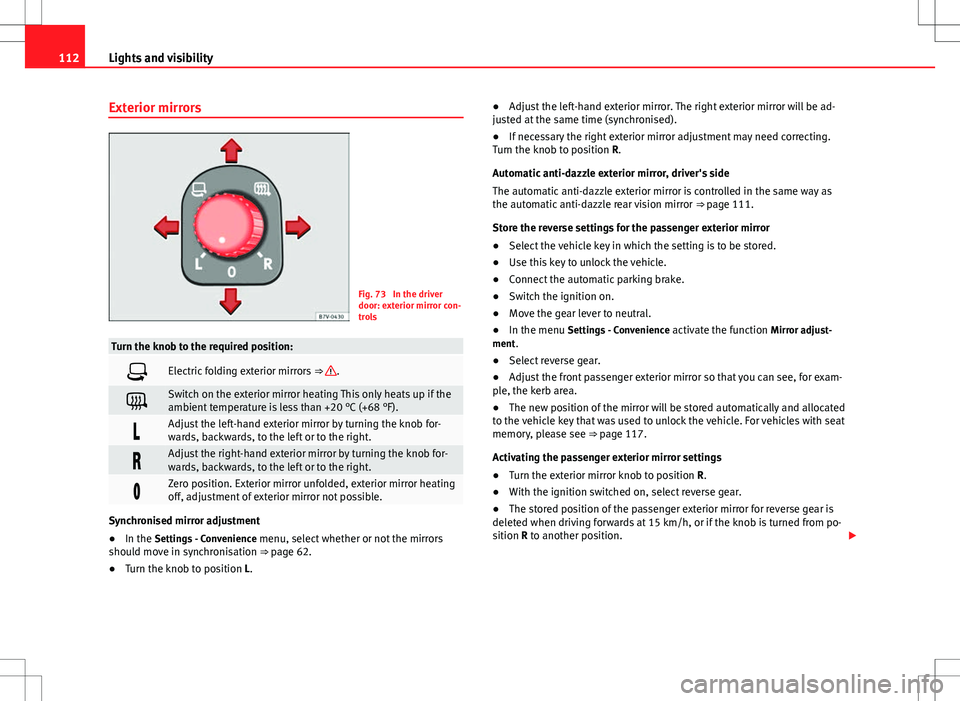
Fig. 73 In the driver
door: exterior mirror con-
trols
Turn the knob to the required position:
Electric folding exterior mirrors ⇒ .
Switch on the exterior mirror heating This only heats up if the
ambient temperature is less than +20 °C (+68 °F).
Adjust the left-hand exterior mirror by turning the knob for-
wards, backwards, to the left or to the right.
Adjust the right-hand exterior mirror by turning the knob for-
wards, backwards, to the left or to the right.
Zero position. Exterior mirror unfolded, exterior mirror heating
off, adjustment of exterior mirror not possible.
Synchronised mirror adjustment
●In the Settings - Convenience menu, select whether or not the mirrors
should move in synchronisation ⇒ page 62.
● Turn the knob to position L. ●
Adjust the left-hand exterior mirror. The right exterior mirror will be ad-
justed at the same time (synchronised).
● If necessary the right exterior mirror adjustment may need correcting.
Turn the knob to position R.
Automatic anti-dazzle exterior mirror, driver's side
The automatic anti-dazzle exterior mirror is controlled in the same way as
the automatic anti-dazzle rear vision mirror ⇒ page 111.
Store the reverse settings for the passenger exterior mirror
● Select the vehicle key in which the setting is to be stored.
● Use this key to unlock the vehicle.
● Connect the automatic parking brake.
● Switch the ignition on.
● Move the gear lever to neutral.
● In the menu Settings - Convenience activate the function Mirror adjust-
ment.
● Select reverse gear.
● Adjust the front passenger exterior mirror so that you can see, for exam-
ple, the kerb area.
● The new position of the mirror will be stored automatically and allocated
to the vehicle key that was used to unlock the vehicle. For vehicles with seat
memory, please see ⇒ page 117.
Activating the passenger exterior mirror settings
● Turn the exterior mirror knob to position R.
● With the ignition switched on, select reverse gear.
● The stored position of the passenger exterior mirror for reverse gear is
deleted when driving forwards at 15 km/h, or if the knob is turned from po-
sition R to another position.
Page 121 of 388

119
Seats and storage compartments
● Press the required memory button.
● Select reverse gear.
● Adjust the front passenger exterior mirror so that you can see, for exam-
ple, the kerb area.
● The new position of the mirror will be stored automatically and allocated
to the vehicle key that was used to unlock the vehicle.
Activating exterior mirror settings
● With the driver's door open and the ignition turned off, push the memo-
ry button of the corresponding door briefly.
● ALTERNATIVELY: With the ignition switched on, hold in the correspond-
ing memory button until the memorised position is reached.
To activate the memory function of the vehicle key
Important: a position must be memorised in the memory.
● Open the driver-side door.
● Press and hold any memory button.
● Within the following three seconds, push the button
to open the vehi-
cle on the vehicle key. A sound confirms the settings have been activated.
Adjusting the wing mirrors for driving and assigning driver seat settings to
a vehicle key
● Activate the memory function of the vehicle key
● Adjust the front seat and the exterior mirrors.
● Lock the vehicle. The settings are assigned to the vehicle key.
To deactivate the memory function of the vehicle key
Important: a position must be memorised in the memory.
● Press and hold the SET
button.
● Within the following ten seconds, push the button to open the vehi-
cle on the vehicle key. A sound confirms the settings have been deactiva-
ted. Initialising the seat position memory
The position memory system must be initialised if, for example, the driver's
seat has been changed.
Initialisation deletes all memories and assignments for the seat with posi-
tion memory. The memory buttons can then be reprogrammed and the vehi-
cle keys re-assigned.
●
Open the driver's door and do not get into the vehicle.
● Operating the seat settings from outside the vehicle.
● Move the angle of the backrest completely forwards.
● Release the control to set the angle and then press again until a sound
is heard.
Note
The front passenger side wing mirror automatically changes from the posi-
tion stored for reversing as soon as the vehicle moves forward at a speed of
at least 15 km/h or when the gear selection lever is changed to a position
other than R.
Safety FirstOperating instructionsPractical tipsTechnical Specifications