change time Seat Alhambra 2013 User Guide
[x] Cancel search | Manufacturer: SEAT, Model Year: 2013, Model line: Alhambra, Model: Seat Alhambra 2013Pages: 387, PDF Size: 6.13 MB
Page 143 of 387
141
Seats and storage
Loading the roof carrier system
Loads can only be correctly secured when the roof carrier system is correctly
fitted ⇒ .
Maximum authorised roof load
The maximum authorised roof load is 100 kg (about 220 lbs). The roof load
includes the roof carrier system and the load being transported ⇒
.
Always check the roof carrier system weight and the weight of the load to be
transported and, if necessary, weigh them. Never exceed the maximum au-
thorised roof load.
If you are using a roof carrier with a lower weight rating, you cannot trans-
port the maximum roof load. Do not exceed the maximum weight limit for
the roof carrier given in the fitting instructions.
Distributing a load
Uniformly distribute loads and secure them correctly ⇒
.
Check attachments
After fitting the base supports and the roof carrier system, always check the
attachments after a short trip or at regular intervals.
WARNING
Exceeding the maximum authorised roof load can result in accidents
and/or vehicle damage.
● Always respect the maximum authorised weight for the roof, the max-
imum authorised weight on the axles and the total maximum authorised
weight of the vehicle.
● Never exceed the capacity of the roof carrier system even if this is
less than the maximum authorised roof load.
● Secure heavy objects towards the front and distribute the load even-
ly.
WARNING
Loose and incorrectly secured loads can fall from the roof carrier system
causing accidents and injury.
● Always use suitable ropes and straps in good condition.
● Always secure loads correctly.
Storage compartments Introduction
Storage compartments must only be used to store light or small objects.
The front central armrest compartment houses the factory-fitted AUX-IN or
multimedia (MEDIA-IN) connection sockets.
The factory-fitted CD changer is located in the left-hand storage compart-
ment of the luggage compartment.
Additional information and warnings:
● Child seats (accessories) ⇒ page 40
● Luggage compartment ⇒ page 126
● Care and cleaning of the vehicle interior ⇒ page 252
● ⇒ Booklet Radio or ⇒ Booklet navigation system
Safety FirstOperating instructionsPractical tipsTechnical Specifications
Page 172 of 387
170Driving
WARNING
The counter steering assistance system combined with ESC helps the
driver to steer the vehicle in critical driving conditions. At all times, it is
the driver who steers the vehicle. The counter steering system does not
steer the vehicle.
Adjusting the steering wheel position
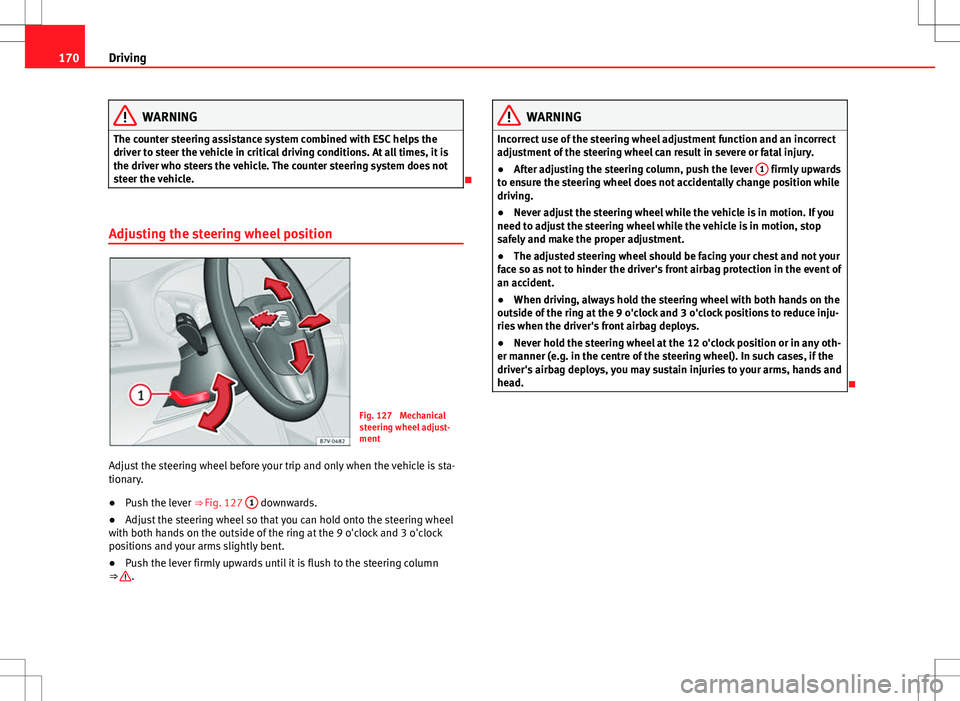
Fig. 127 Mechanical
steering wheel adjust-
ment
Adjust the steering wheel before your trip and only when the vehicle is sta-
tionary.
● Push the lever ⇒ Fig. 127 1
downwards.
● Adjust the steering wheel so that you can hold onto the steering wheel
with both hands on the outside of the ring at the 9 o'clock and 3 o'clock
positions and your arms slightly bent.
● Push the lever firmly upwards until it is flush to the steering column
⇒
.
WARNING
Incorrect use of the steering wheel adjustment function and an incorrect
adjustment of the steering wheel can result in severe or fatal injury.
● After adjusting the steering column, push the lever 1
firmly upwards
to ensure the steering wheel does not accidentally change position while
driving.
● Never adjust the steering wheel while the vehicle is in motion. If you
need to adjust the steering wheel while the vehicle is in motion, stop
safely and make the proper adjustment.
● The adjusted steering wheel should be facing your chest and not your
face so as not to hinder the driver's front airbag protection in the event of
an accident.
● When driving, always hold the steering wheel with both hands on the
outside of the ring at the 9 o'clock and 3 o'clock positions to reduce inju-
ries when the driver's front airbag deploys.
● Never hold the steering wheel at the 12 o'clock position or in any oth-
er manner (e.g. in the centre of the steering wheel). In such cases, if the
driver's airbag deploys, you may sustain injuries to your arms, hands and
head.
Page 183 of 387
181
Driving
Changing gears with Tiptronic*
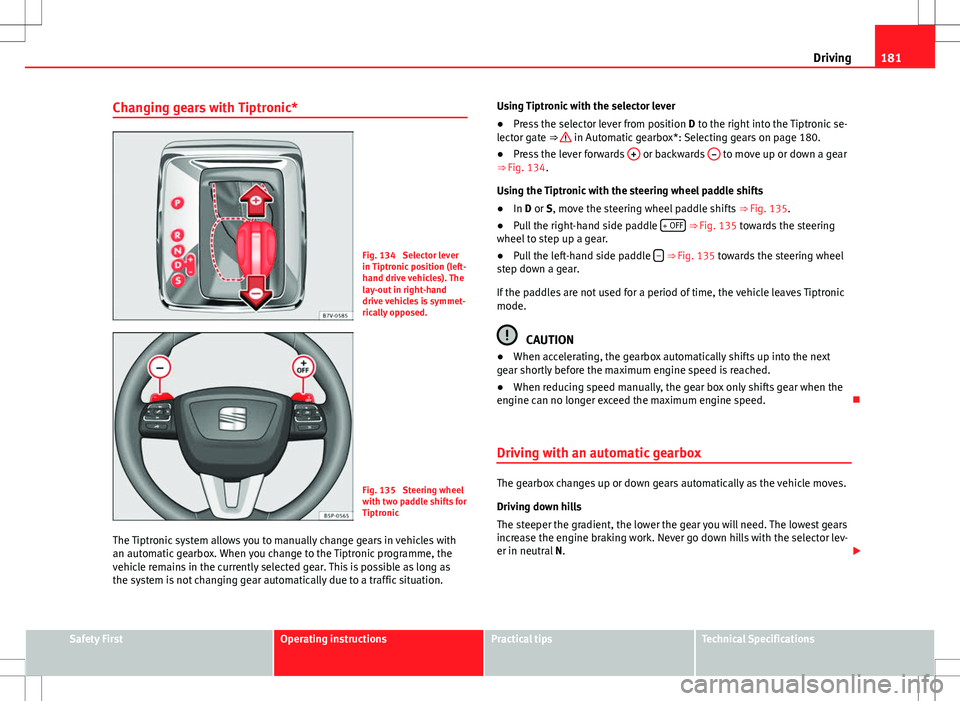
Fig. 134 Selector lever
in Tiptronic position (left-
hand drive vehicles). The
lay-out in right-hand
drive vehicles is symmet-
rically opposed.
Fig. 135 Steering wheel
with two paddle shifts for
Tiptronic
The Tiptronic system allows you to manually change gears in vehicles with
an automatic gearbox. When you change to the Tiptronic programme, the
vehicle remains in the currently selected gear. This is possible as long as
the system is not changing gear automatically due to a traffic situation. Using Tiptronic with the selector lever
●
Press the selector lever from position D to the right into the Tiptronic se-
lector gate ⇒
in Automatic gearbox*: Selecting gears on page 180.
● Press the lever forwards + or backwards – to move up or down a gear
⇒ Fig. 134.
Using the Tiptronic with the steering wheel paddle shifts
● In D or S, move the steering wheel paddle shifts ⇒ Fig. 135.
● Pull the right-hand side paddle + OFF
⇒ Fig. 135 towards the steering
wheel to step up a gear.
● Pull the left-hand side paddle –
⇒ Fig. 135 towards the steering wheel
step down a gear.
If the paddles are not used for a period of time, the vehicle leaves Tiptronic
mode.
CAUTION
● When accelerating, the gearbox automatically shifts up into the next
gear shortly before the maximum engine speed is reached.
● When reducing speed manually, the gear box only shifts gear when the
engine can no longer exceed the maximum engine speed.
Driving with an automatic gearbox
The gearbox changes up or down gears automatically as the vehicle moves.
Driving down hills
The steeper the gradient, the lower the gear you will need. The lowest gears
increase the engine braking work. Never go down hills with the selector lev-
er in neutral N.
Safety FirstOperating instructionsPractical tipsTechnical Specifications
Page 198 of 387
196Driving
If any of the conditions necessary for the Auto Hold function change while
the vehicle stopped, the system is turned off as is the indicator on the but-
ton ⇒ Fig. 139. The electronic parking brake engages where necessary to
park the vehicle safely ⇒
.
Conditions for keeping the vehicle at a standstill with Auto Hold:
● The driver door must be closed.
● The driver seat belt must be buckled.
● The engine must be running.
● The ASR system is switched on ⇒ page 184.
Switching Auto Hold on and off manually
Press the AUTO HOLD
button ⇒ . The control lamp on the button switches
off when the Auto Hold function is switched off.
Permanent Auto Hold connection
The Auto Hold function must be switched on every time the engine is star-
ted. However, to switch the Auto Hold function on permanently, the mark
must be switched on in the Settings menu, “Autohold” submenu
⇒ page 62.
Auto Hold works automatically under the following conditions:
All points must be fulfilled simultaneously ⇒ : manual gearboxAutomatic gearbox1.If the vehicle is stopped using the brake pedal on a flat or slope.2.The engine must be running smoothly.3.On a slope, the 1st gear is engag-
ed uphill or the reverse gear is en-
gaged for a downhill. The clutch
must be held down.A gear for driving is selected from
R, D or S.
Upon accelerating and pressing in
the clutch simultaneously, the
brake releases gradually.Upon accelerating, the brake re-
leases gradually.
Auto Hold turns off automatically under the following conditions:
manual gearboxAutomatic gearbox1.If one of the conditions mentioned in table on page 196 changes.2.If the engine is not running regularly or if there is a malfunction.3.When changing to idle speed.If the selector lever is placed in
neutral (N).
4.If the engine is turned off or stalls.If the engine is switched off.5.If the driver accelerates while
pressing the clutch in.If the vehicle is accelerated.
6. When one of the wheels has mini-
mal contact with the ground (for
example, on uneven ground).
WARNING
The Auto Hold technology is limited by the laws of physics. The improved
comfort provided by Auto Hold should never prompt you to take risks.
● Never leave the vehicle running and with the Auto Hold function
switched on.
● Auto Hold cannot always stop the vehicle uphill and downhill (for ex-
ample, if the ground is slippery or frozen).
CAUTION
Before entering an automatic car wash, always switch the Auto Hold func-
tion off, as it could be damaged when the electronic parking brake automat-
ically engages.
Page 202 of 387
200Driving
Parking sensor system*
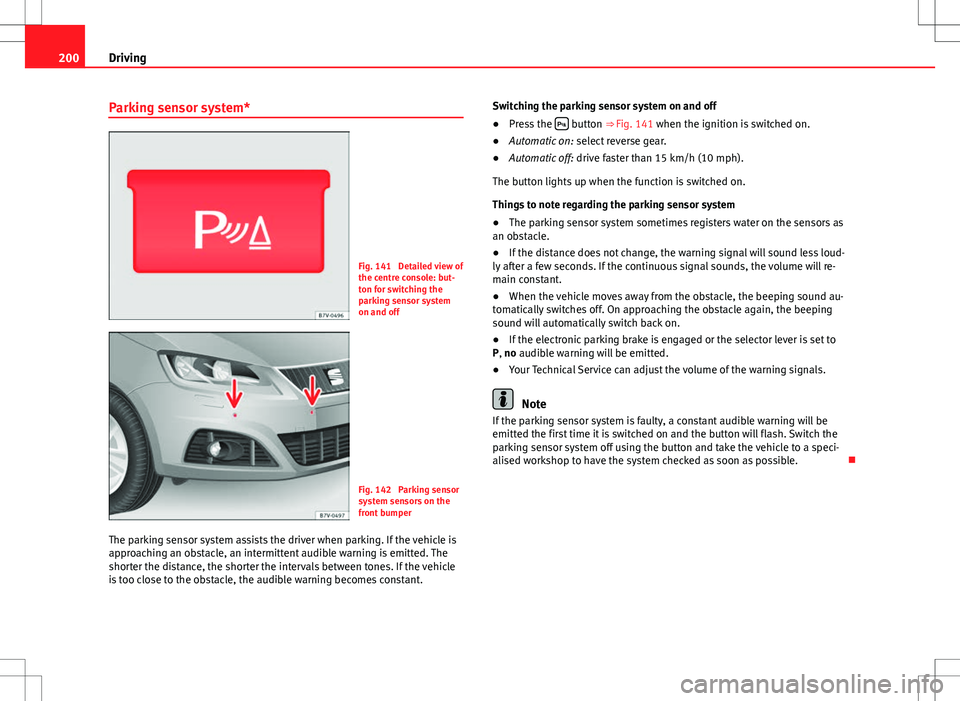
Fig. 141 Detailed view of
the centre console: but-
ton for switching the
parking sensor system
on and off
Fig. 142 Parking sensor
system sensors on the
front bumper
The parking sensor system assists the driver when parking. If the vehicle is
approaching an obstacle, an intermittent audible warning is emitted. The
shorter the distance, the shorter the intervals between tones. If the vehicle
is too close to the obstacle, the audible warning becomes constant. Switching the parking sensor system on and off
●
Press the
button ⇒
Fig. 141 when the ignition is switched on.
● Automatic on: select reverse gear.
● Automatic off: drive faster than 15 km/h (10 mph).
The button lights up when the function is switched on.
Things to note regarding the parking sensor system
● The parking sensor system sometimes registers water on the sensors as
an obstacle.
● If the distance does not change, the warning signal will sound less loud-
ly after a few seconds. If the continuous signal sounds, the volume will re-
main constant.
● When the vehicle moves away from the obstacle, the beeping sound au-
tomatically switches off. On approaching the obstacle again, the beeping
sound will automatically switch back on.
● If the electronic parking brake is engaged or the selector lever is set to
P, no audible warning will be emitted.
● Your Technical Service can adjust the volume of the warning signals.
Note
If the parking sensor system is faulty, a constant audible warning will be
emitted the first time it is switched on and the button will flash. Switch the
parking sensor system off using the button and take the vehicle to a speci-
alised workshop to have the system checked as soon as possible.
Page 217 of 387
215
Driving
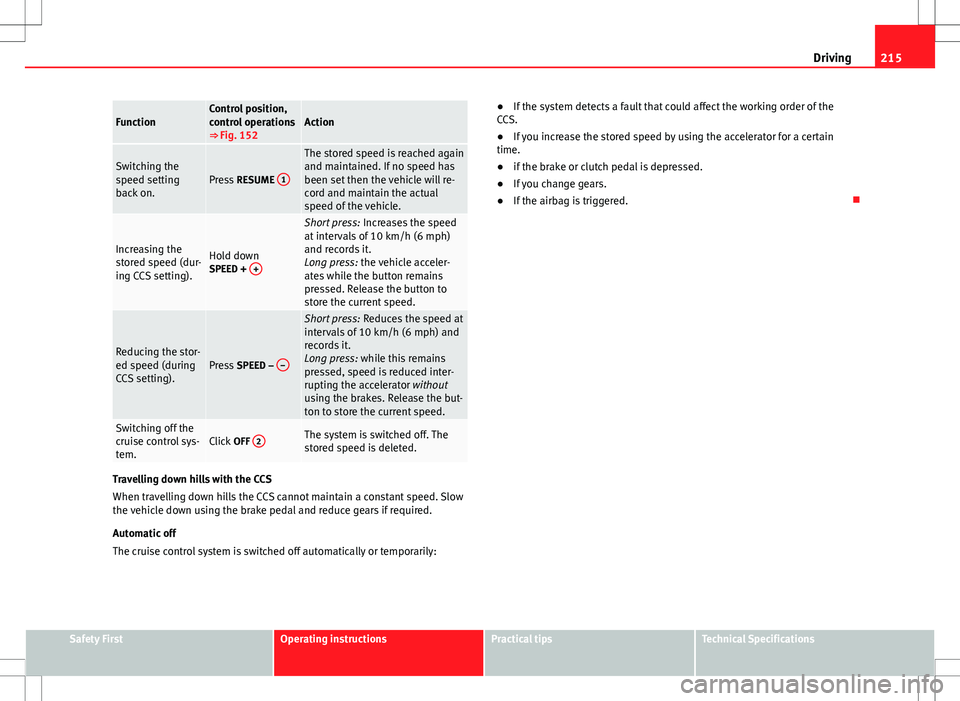
FunctionControl position,
control operations
⇒ Fig. 152Action
Switching the
speed setting
back on.Press RESUME 1
The stored speed is reached again
and maintained. If no speed has
been set then the vehicle will re-
cord and maintain the actual
speed of the vehicle.
Increasing the
stored speed (dur-
ing CCS setting).Hold down
SPEED + +
Short press:
Increases the speed
at intervals of 10 km/h (6 mph)
and records it.
Long press: the vehicle acceler-
ates while the button remains
pressed. Release the button to
store the current speed.
Reducing the stor-
ed speed (during
CCS setting).Press SPEED – –
Short press:
Reduces the speed at
intervals of 10 km/h (6 mph) and
records it.
Long press: while this remains
pressed, speed is reduced inter-
rupting the accelerator without
using the brakes. Release the but-
ton to store the current speed.
Switching off the
cruise control sys-
tem.Click OFF 2The system is switched off. The
stored speed is deleted.
Travelling down hills with the CCS
When travelling down hills the CCS cannot maintain a constant speed. Slow
the vehicle down using the brake pedal and reduce gears if required.
Automatic off
The cruise control system is switched off automatically or temporarily: ●
If the system detects a fault that could affect the working order of the
CCS.
● If you increase the stored speed by using the accelerator for a certain
time.
● if the brake or clutch pedal is depressed.
● If you change gears.
● If the airbag is triggered.
Safety FirstOperating instructionsPractical tipsTechnical Specifications
Page 218 of 387
216Driving
Lane Assist system*
Introduction
Additional information and warnings:
● SEAT information system ⇒ page 62
● Accessories, parts replacement, repairs and modifications ⇒ page 260
WARNING
The intelligent technology in the lane assist system cannot change the
limits imposed by the laws of physics and by the system itself. Careless
or uncontrolled use of the lane assist system may cause accidents and in-
jury. The system is not a replacement for driver awareness.
● Always adapt your speed and the distance to the vehicles ahead in
line with visibility, weather conditions, the condition of the road and the
traffic situation.
● Always keep your hands on the steering wheel so you can turn it at
any time.
● The lane assist system does not detect all road markings. In some cir-
cumstances, the poor state of the road, structures located on it or certain
objects may be mistakenly recognised as road markings by the lane as-
sist system. In such situations, switch the lane assist system off immedi-
ately.
● Pay attention to the instructions on the instrument panel display and
act accordingly to its requests.
● Always pay attention to the vehicle's surroundings.
Note
The lane assist system has been exclusively developed for driving on as-
phalted roads.
Note
If the lane assist system does not work as described in this chapter, do not
use it and contact a specialised workshop.
Note
If you observe any system malfunction, have the system checked by a speci-
alised workshop.
Page 219 of 387
217
Driving
Control lamps
Blinks or
lights upPossible causeSolution
(yellow)Lane assist system connec-
ted but inactive.
The system cannot clearly de-
tect the lane. See and
page 218, The lane assist sys-
tem is inactive (control lamp lit
in yellow).
(green)Lane assist system connec-
ted and active.–
Several warning and control lamps should light up for a few seconds when
the ignition is switched on, signalling that the function is being verified.
They will switch off after a few seconds.
WARNING
If the warning lamps and messages are ignored, the vehicle may stall in
traffic, or may cause accidents and severe injuries.
● Never ignore the warning lamps or text messages.
● Stop the vehicle safely as soon as possible.
CAUTION
Failure to heed the control lamps and text messages when they appear may
result in faults in the vehicle. Operation mode
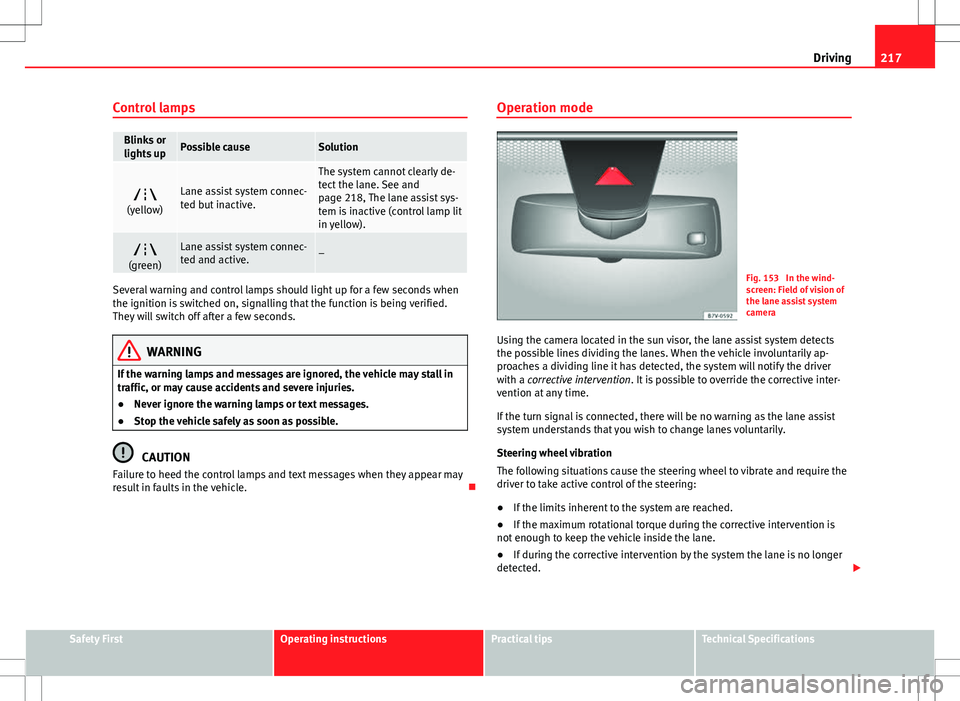
Fig. 153 In the wind-
screen: Field of vision of
the lane assist system
camera
Using the camera located in the sun visor, the lane assist system detects
the possible lines dividing the lanes. When the vehicle involuntarily ap-
proaches a dividing line it has detected, the system will notify the driver
with a corrective intervention. It is possible to override the corrective inter-
vention at any time.
If the turn signal is connected, there will be no warning as the lane assist
system understands that you wish to change lanes voluntarily.
Steering wheel vibration
The following situations cause the steering wheel to vibrate and require the
driver to take active control of the steering:
● If the limits inherent to the system are reached.
● If the maximum rotational torque during the corrective intervention is
not enough to keep the vehicle inside the lane.
● If during the corrective intervention by the system the lane is no longer
detected.
Safety FirstOperating instructionsPractical tipsTechnical Specifications
Page 226 of 387
224Driving
Tyre monitoring systems
Introduction
The tyre monitor indicator monitors the tyre pressure of each wheel during
driving using the ABS sensors. The ABS sensors monitor the tyre tread pe-
rimeter and vibrations of each tire. The tyre monitor indicator warns the driv-
er if it detects a considerable drop in tyre pressure of one or several tyres
while driving. Loss of tyre pressure will be indicated by the indicator as
well as an audible warning and sometimes a text message on the instru-
ment panel display. When you open the driver door, you will find a label in-
dicating the tyre pressure recommended by the manufacturer for the maxi-
mum vehicle load for each tyre approved for the vehicle in question. By
pressing the adjustment button on the tyre monitoring indicator, you may
change the reference pressure for the tyres so that the tyre pressure to be
monitored coincides with actual tyre pressure ⇒ page 226.
Suitable use of the adjustment button ⇒ page 226.
Additional information and warnings:
● Transporting ⇒ page 13
● Braking, stopping and parking ⇒ page 184
● Caring for and cleaning the vehicle exterior ⇒ page 245
● Wheels and tyres ⇒ page 296
● Accessories, parts replacement, repairs and modifications ⇒ page 260
WARNING
Unsuitable handling of the wheels and tyres may lead to sudden tyre
pressure losses, to tread separation or even to a blow-out.
● Check tyre pressures regularly and ensure they are maintained at the
pressures indicated. If the tyre pressure is too low, the tyres could over-
heat, resulting in tread detachment or even burst tyres.
● Tyre pressure should be that indicated on the label when the tyres are
cold at all times ⇒ page 300.
● Regularly check the cold inflation pressure of the tyres. If necessary,
change the tyre pressure of the vehicle tyres while they are cold.
● Regularly check your tyres for damage and wear.
● Never exceed the maximum permitted speed or loads specified for the
type of tyre fitted on your vehicle.
WARNING
Incorrect use of the tyre monitoring indicator button could result in the
indicator giving erroneous messages or prevented from indicating the
danger caused by a defective tyre ⇒ page 226.
CAUTION
● The tyre valves may be damaged if the cap is not in place. Check that the
caps are identical to the standard caps and have been correctly tightened.
Do not use metal caps ⇒ page 226.
● Do not damage the valves when changing the tyres ⇒ page 226.
For the sake of the environment
Under-inflated tyres lead to increased fuel consumption and tyre wear.
Page 231 of 387
229
Driving and the environment
Economic driving style
Changing gear early
General instructions: The highest gear is always the most economical gear.
As a guideline, for the majority of vehicles: At a speed of 30 km/h (20 mph),
drive in third gear, at 40 km/h (25 mph) in fourth gear and at 50 km/h
(30 mph) in fifth gear.
In addition, skipping gears when shifting up helps to save fuel, weather and
traffic conditions permitting.
Do not wait until the last moment before changing gear. Only use first gear
when you move off and change to second gear quickly. Avoid the kick-down
function in vehicles with automatic gearbox.
Vehicles with a gear display help to achieve an economical driving style as
the display indicates the best moment to change gear.
Let the vehicle roll
If you take your foot off the accelerator, the fuel supply is stopped and con-
sumption is reduced.
Allow the vehicle to roll without accelerating, for example when approach-
ing a red traffic light. However, if the vehicle is rolling too slowly or the dis-
tance is too long, the clutch pedal should be pressed to declutch. The en-
gine will then operate at idle speed.
If the vehicle is going to be at a standstill for a period of time, switch off the
engine; for example, while waiting at a level crossing. In vehicles which
have the Start-Stop function on, the engine switches off automatically when
the vehicle is not moving.
Think ahead and “flow” with the traffic
Frequent acceleration and braking considerably increase fuel consumption.
If you think ahead as you drive and keep a safe distance from the vehicle in
front, it is possible to slow down by simply lifting your foot off the accelera-
tor. This eliminates the need for constant braking and acceleration. Calm and steady driving
Constancy is more important than speed: The more you drive at a constant
speed, the lower the fuel consumption.
When driving on the motorway, it is more efficient to drive at a constant and
more moderate speed than to be continuously accelerating and braking. As
a general rule, you will reach your destination just as quickly when you drive
at a constant speed.
The cruise control function helps you to achieve a constant style of driving.
Moderate use of additional electrical appliances
It is important to travel in comfort, but convenience systems should be used
in an ecological manner.
Some equipment, when connected, increase fuel consumption considera-
bly, for example:
●
Air conditioning cooling system: If the air conditioning system is re-
quired to cool to significantly lower temperatures than the true outside tem-
perature, it will require a large quantity of energy from the engine. There-
fore, we recommend that the selected temperature for the vehicle is not too
different to the outside temperature. It is a good idea to open all the win-
dows of the car before starting your journey, and to drive a short distance
with all the windows open to allow the vehicle to cool down slightly. Only
then should you close all the windows and switch on the air conditioning.
Keep windows closed when travelling at high speeds. Driving with the win-
dows open increases fuel consumption.
● Switch off the seat heating when the seats have warmed up.
● Switch off the heated rear window and the windscreen heating when the
windows have demisted and are free of ice.
● Do not leave the auxiliary heater switched on when the vehicle is mov-
ing ⇒ page 164.
Safety FirstOperating instructionsPractical tipsTechnical Specifications