change time Seat Alhambra 2013 Owner's Manual
[x] Cancel search | Manufacturer: SEAT, Model Year: 2013, Model line: Alhambra, Model: Seat Alhambra 2013Pages: 387, PDF Size: 6.13 MB
Page 57 of 387
55
Cockpit
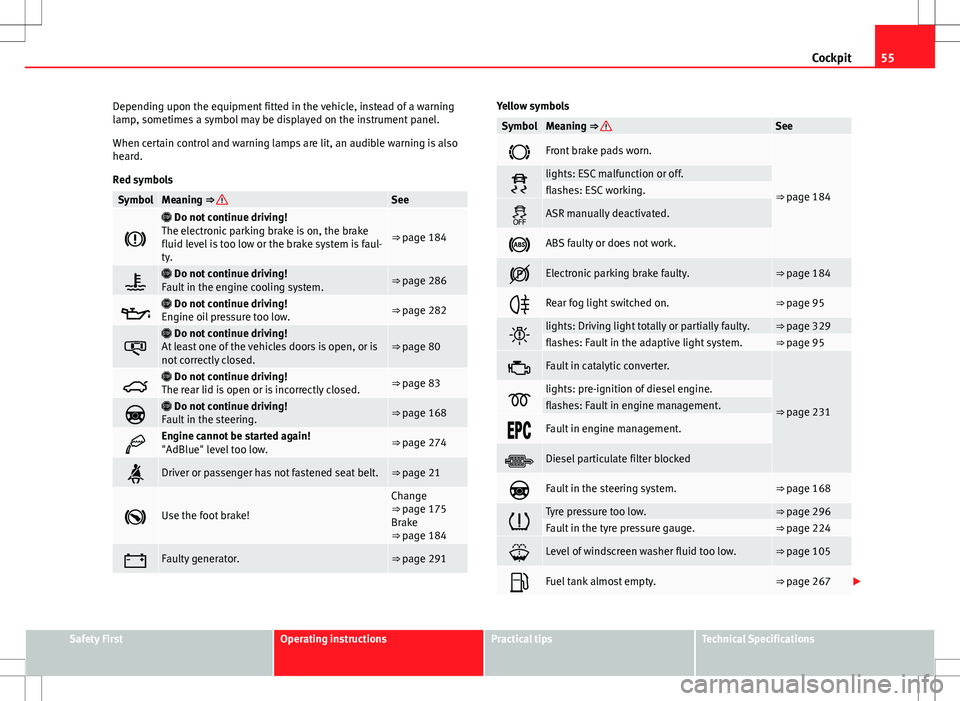
Depending upon the equipment fitted in the vehicle, instead of a warning
lamp, sometimes a symbol may be displayed on the instrument panel.
When certain control and warning lamps are lit, an audible warning is also
heard.
Red symbols
SymbolMeaning ⇒ See
Do not continue driving!
The electronic parking brake is on, the brake
fluid level is too low or the brake system is faul-
ty.
⇒ page 184
Do not continue driving!
Fault in the engine cooling system.⇒ page 286
Do not continue driving!
Engine oil pressure too low.⇒ page 282
Do not continue driving!
At least one of the vehicles doors is open, or is
not correctly closed.⇒ page 80
Do not continue driving!
The rear lid is open or is incorrectly closed.⇒ page 83
Do not continue driving!
Fault in the steering.⇒ page 168
Engine cannot be started again!
"AdBlue" level too low.⇒ page 274
Driver or passenger has not fastened seat belt.⇒ page 21
Use the foot brake!
Change
⇒ page 175
Brake
⇒ page 184
Faulty generator.⇒ page 291
Yellow symbols
SymbolMeaning ⇒ See
Front brake pads worn.
⇒ page 184lights: ESC malfunction or off.flashes: ESC working.
ASR manually deactivated.
ABS faulty or does not work.
Electronic parking brake faulty.⇒ page 184
Rear fog light switched on.⇒ page 95
lights: Driving light totally or partially faulty.⇒ page 329flashes: Fault in the adaptive light system.⇒ page 95
Fault in catalytic converter.
⇒ page 231lights: pre-ignition of diesel engine.flashes: Fault in engine management.
Fault in engine management.
Diesel particulate filter blocked
Fault in the steering system.⇒ page 168
Tyre pressure too low.⇒ page 296Fault in the tyre pressure gauge.⇒ page 224
Level of windscreen washer fluid too low.⇒ page 105
Fuel tank almost empty.⇒ page 267
Safety FirstOperating instructionsPractical tipsTechnical Specifications
Page 60 of 387
58Cockpit
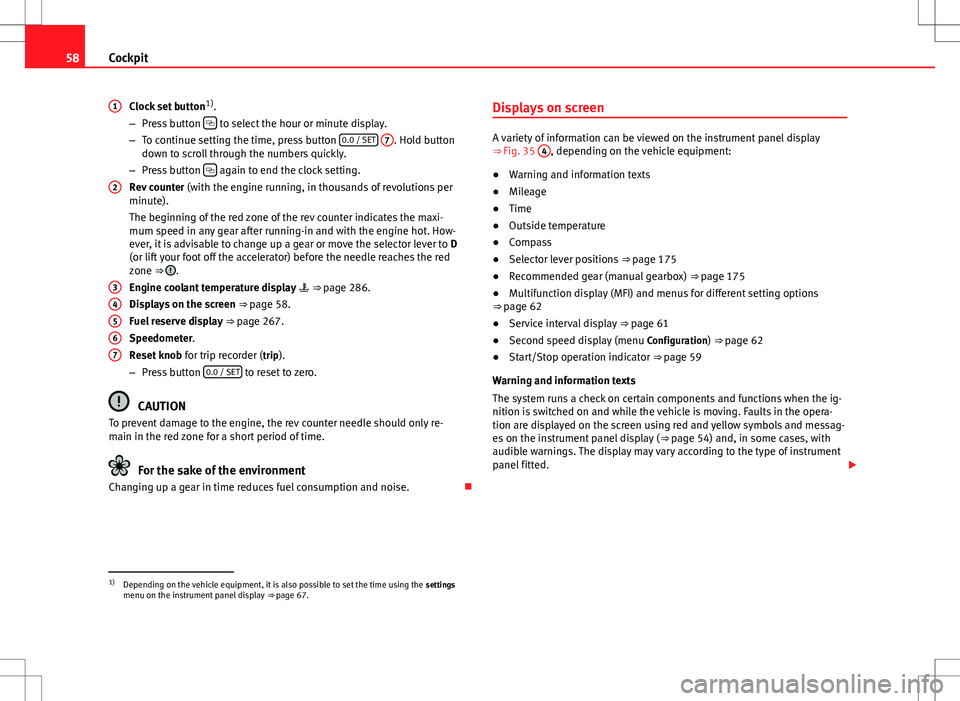
Clock set button 1)
.
– Press button
to select the hour or minute display.
– To continue setting the time, press button 0.0 / SET
7. Hold button
down to scroll through the numbers quickly.
– Press button
again to end the clock setting.
Rev counter (with the engine running, in thousands of revolutions per
minute).
The beginning of the red zone of the rev counter indicates the maxi-
mum speed in any gear after running-in and with the engine hot. How-
ever, it is advisable to change up a gear or move the selector lever to D
(or lift your foot off the accelerator) before the needle reaches the red
zone ⇒
.
Engine coolant temperature display ⇒ page 286.
Displays on the screen ⇒ page 58.
Fuel reserve display ⇒ page 267.
Speedometer.
Reset knob for trip recorder (trip).
– Press button 0.0 / SET
to reset to zero.
CAUTION
To prevent damage to the engine, the rev counter needle should only re-
main in the red zone for a short period of time.
For the sake of the environment
Changing up a gear in time reduces fuel consumption and noise.
1
2
34567
Displays on screen
A variety of information can be viewed on the instrument panel display
⇒
Fig. 35 4, depending on the vehicle equipment:
● Warning and information texts
● Mileage
● Time
● Outside temperature
● Compass
● Selector lever positions ⇒ page 175
● Recommended gear (manual gearbox) ⇒ page 175
● Multifunction display (MFI) and menus for different setting options
⇒ page 62
● Service interval display ⇒ page 61
● Second speed display (menu Configuration) ⇒ page 62
● Start/Stop operation indicator ⇒ page 59
Warning and information texts
The system runs a check on certain components and functions when the ig-
nition is switched on and while the vehicle is moving. Faults in the opera-
tion are displayed on the screen using red and yellow symbols and messag-
es on the instrument panel display ( ⇒ page 54) and, in some cases, with
audible warnings. The display may vary according to the type of instrument
panel fitted.
1)
Depending on the vehicle equipment, it is also possible to set the time using the settings
menu on the instrument panel display ⇒ page 67.
Page 61 of 387
59
Cockpit
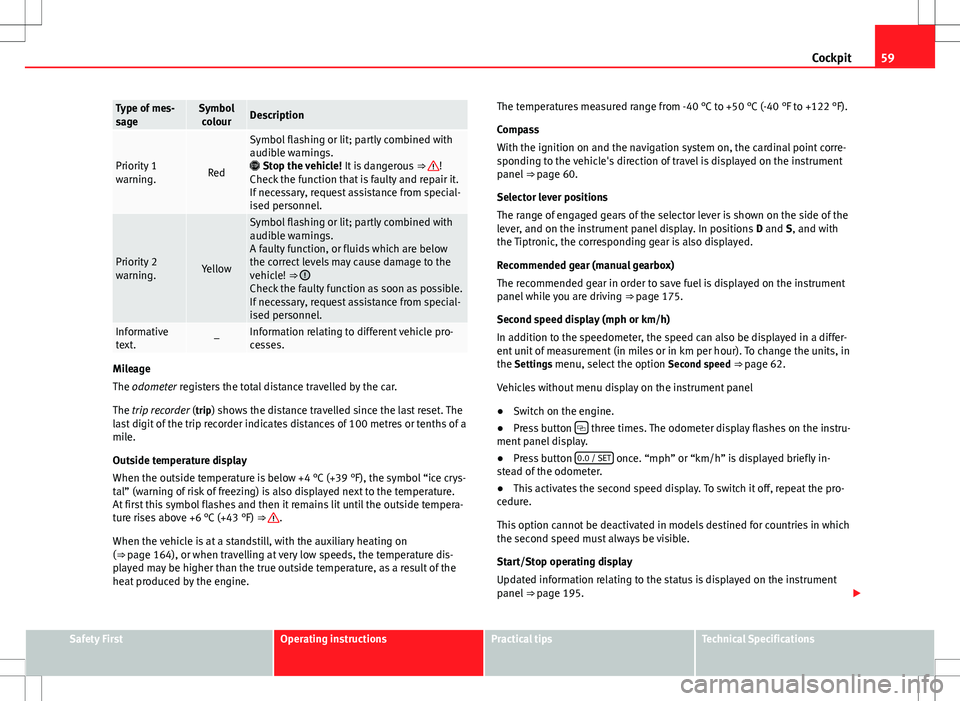
Type of mes-
sageSymbol
colourDescription
Priority 1
warning.Red
Symbol flashing or lit; partly combined with
audible warnings.
Stop the vehicle! It is dangerous ⇒
!
Check the function that is faulty and repair it.
If necessary, request assistance from special-
ised personnel.
Priority 2
warning.Yellow
Symbol flashing or lit; partly combined with
audible warnings.
A faulty function, or fluids which are below
the correct levels may cause damage to the
vehicle! ⇒
Check the faulty function as soon as possible.
If necessary, request assistance from special-
ised personnel.
Informative
text.–Information relating to different vehicle pro-
cesses.
Mileage
The odometer registers the total distance travelled by the car.
The trip recorder (trip) shows the distance travelled since the last reset. The last digit of the trip recorder indicates distances of 100 metres or tenths of a
mile.
Outside temperature display
When the outside temperature is below +4 °C (+39 °F), the symbol “ice crys-
tal” (warning of risk of freezing) is also displayed next to the temperature.
At first this symbol flashes and then it remains lit until the outside tempera-
ture rises above +6 °C (+43 °F) ⇒
.
When the vehicle is at a standstill, with the auxiliary heating on
(⇒ page 164), or when travelling at very low speeds, the temperature dis-
played may be higher than the true outside temperature, as a result of the
heat produced by the engine. The temperatures measured range from -40 °C to +50 °C (-40 °F to +122 °F).
Compass
With the ignition on and the navigation system on, the cardinal point corre-
sponding to the vehicle's direction of travel is displayed on the instrument
panel
⇒ page 60.
Selector lever positions
The range of engaged gears of the selector lever is shown on the side of the
lever, and on the instrument panel display. In positions D and S, and with
the Tiptronic, the corresponding gear is also displayed.
Recommended gear (manual gearbox)
The recommended gear in order to save fuel is displayed on the instrument
panel while you are driving ⇒ page 175.
Second speed display (mph or km/h)
In addition to the speedometer, the speed can also be displayed in a differ-
ent unit of measurement (in miles or in km per hour). To change the units, in
the Settings menu, select the option Second speed ⇒ page 62.
Vehicles without menu display on the instrument panel
● Switch on the engine.
● Press button
three times. The odometer display flashes on the instru-
ment panel display.
● Press button 0.0 / SET
once. “mph” or “km/h” is displayed briefly in-
stead of the odometer.
● This activates the second speed display. To switch it off, repeat the pro-
cedure.
This option cannot be deactivated in models destined for countries in which
the second speed must always be visible.
Start/Stop operating display
Updated information relating to the status is displayed on the instrument
panel ⇒ page 195.
Safety FirstOperating instructionsPractical tipsTechnical Specifications
Page 63 of 387
61
Cockpit
Calibrating compass
To calibrate the compass you must be in one of the valid magnetic zones
with sufficient space to be able to trace a circumference with the vehicle.
● Switch the ignition on.
● Select the Settings menu followed by the option Compass and Calibrate.
● Confirm the message Describe a complete circumference to calibrate the
compass with OK
and then trace a complete circumference driving at ap-
proximately 10 km/h (6 mph).
When the corresponding cardinal point is displayed, the calibration is com-
plete.
Service interval display
The service indication is shown on the instrument panel display
⇒ Fig. 35 4.
SEAT makes a difference between services with engine oil change (Interval
Service) and services without engine oil change (Inspection Service). The
service interval display only gives information for service dates which in-
volve an engine oil change. The dates of the remaining services (for exam-
ple, the next Inspection Service or change of brake fluid) are listed on the
label attached to the door strut, or even in the Maintenance Programme.
In vehicles with Services established by time or mileage , the service inter-
vals are already pre-defined.
In vehicles with LongLife Service , the intervals are determined individually.
Technical progress has made it possible to considerably reduce servicing re-
quirements. The technology used by SEAT ensures that your vehicle only
has an Interval Service when it is necessary. To establish when the Interval
Service is due (max. 2 years), the vehicle's conditions of use and individual
driving styles are considered. The service pre-warning first appears 20 days
before the date established for the corresponding service. The kilometres remaining until the next service are always rounded up to the nearest
100 km (miles) and the remaining time is given in complete days. The cur-
rent service message cannot be viewed until 500 km (miles) after the last
service. Prior to this only lines are visible on the display.
Inspection reminder
When the Service date is approaching, when the ignition is switched on a
Service reminder is displayed.
In vehicles without text messages
, a spanner is displayed on the instrument
panel with a figure given in km. The number of kilometres shown is the
maximum number that may be driven until the next service. After a few sec-
onds, the display mode changes. A clock symbol appears and the number
of days until the next service appointment is due.
In vehicles with text messages , Service in --- km (miles) or --- days is dis-
played on the instrument panel.
Service due
After the service date, an audible warning is given when the ignition is
switched on and the spanner displayed on the screen flashes for a few sec-
onds . In vehicles with text messages , Service in --- km (miles) or --- days is
displayed on the instrument panel.
Reading a service notification
With the ignition switched on, the engine off and the vehicle at a standstill,
the current service notification can be read:
● Press the button
on the instrument panel several times until the
spanner symbol is displayed .
● OR: select the Settings menu.
● From the Service submenu, select the option Info.
When the service date has past , a minus sign is displayed in front of the
number of kilometres or days. In vehicles with text messages the following
is displayed: Service --- km (miles) or --- days ago .
Safety FirstOperating instructionsPractical tipsTechnical Specifications
Page 67 of 387
65
Cockpit
Using the menus on the instrument panel
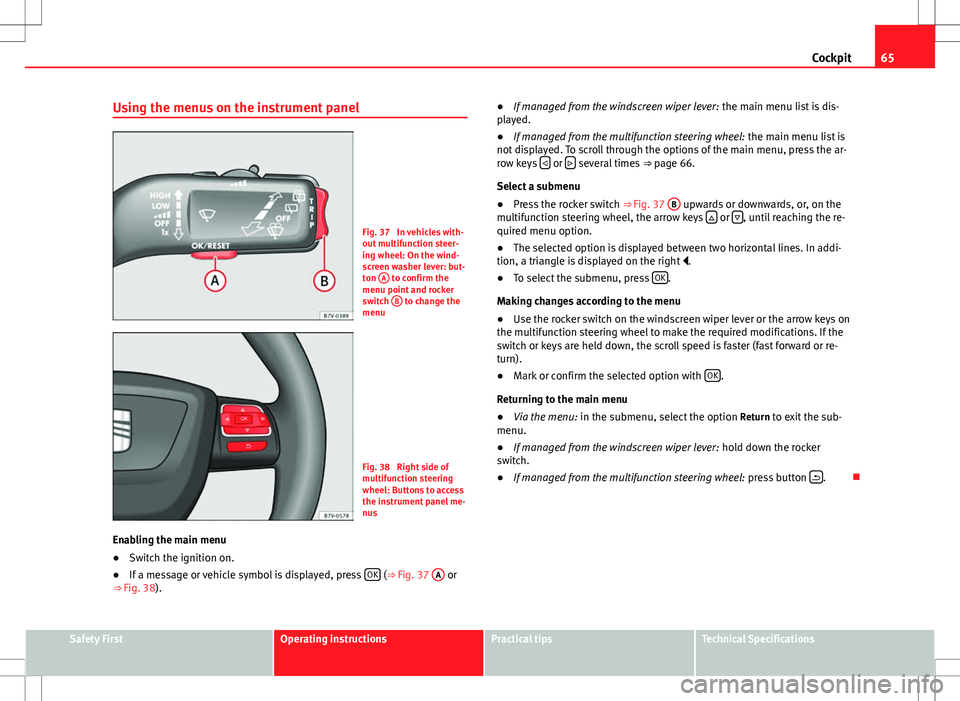
Fig. 37 In vehicles with-
out multifunction steer-
ing wheel: On the wind-
screen washer lever: but-
ton A
to confirm the
menu point and rocker
switch B
to change the
menu
Fig. 38 Right side of
multifunction steering
wheel: Buttons to access
the instrument panel me-
nus
Enabling the main menu
● Switch the ignition on.
● If a message or vehicle symbol is displayed, press OK
(⇒
Fig. 37 A or
⇒ Fig. 38). ●
If managed from the windscreen wiper lever: the main menu list is dis-
played.
● If managed from the multifunction steering wheel: the main menu list is
not displayed. To scroll through the options of the main menu, press the ar-
row keys
or several times
⇒ page 66.
Select a submenu
● Press the rocker switch ⇒ Fig. 37 B
upwards or downwards, or, on the
multifunction steering wheel, the arrow keys or , until reaching the re-
quired menu option.
● The selected option is displayed between two horizontal lines. In addi-
tion, a triangle is displayed on the right .
● To select the submenu, press OK
.
Making changes according to the menu
● Use the rocker switch on the windscreen wiper lever or the arrow keys on
the multifunction steering wheel to make the required modifications. If the
switch or keys are held down, the scroll speed is faster (fast forward or re-
turn).
● Mark or confirm the selected option with OK
.
Returning to the main menu
● Via the menu: in the submenu, select the option Return to exit the sub-
menu.
● If managed from the windscreen wiper lever: hold down the rocker
switch.
● If managed from the multifunction steering wheel: press button
.
Safety FirstOperating instructionsPractical tipsTechnical Specifications
Page 68 of 387
66Cockpit
Main menu
MenuFunctionSeeMFIInformation and possible configurations of
the multifunction display (MFI).⇒ page 66
AudioIf the radio is on, the station is displayed.
In CD mode, the current CD is played.⇒ Booklet Ra-
dio or ⇒ Book- let navigation system
NavigationNavigation system information:
when the navigation to destination is on,
change of direction arrows and a proximity
bar are displayed. These symbols are similar
to those used in the navigation system.
If navigation to destination is not on, the di-
rection of travel (compass) and the name of
the street on which you are driving are dis-
played.⇒ Book-
let Navigation system
Parking
heatingInformation and configurations of the park-
ing heating:
switching the parking heating on or off. Se-
lect the operating mode and duration.⇒ page 164
Vehicle con-
ditionCurrent warning or information texts.
This option only appears when one of the
following texts is available. The number of
available messages is displayed. Example
1/1 or 2/2.⇒ page 57
SettingsDifferent setting options, for example, the
Convenience, Lighting & Visibility menus,
and the time, speed warning with winter
tyres, language, units of measurement, or
“Display off”.⇒ page 67
MFI (multifunction display) menu
The multifunction display (MFI) has two automatic memories:
1 - Partial
memory and 2 - Total memory . The selected memory will be shown in the
upper right-hand corner of the display.
With the ignition switched on, and memory 1 or 2 displayed, briefly press OK to change from one memory to another.
1
Trip memo-
ry (for a
single jour-
ney).
The memory stores the values for the journey and the con-
sumption from the moment the ignition is switched on un-
til it is switched off again.
If the journey is broken for more than two hours, the mem-
ory is automatically erased. If the journey is continued in
less than two hours after the ignition is switched off, the
new data is added to the data already stored in the memo-
ry.
2Total mem-
ory (for all
journeys).
The memory records the values for a specific number of
partial trips, up to a total of 19 hours and 59 minutes or 99
hours and 59 minutes, or 1999.9 km (or miles) for
9999 km (or miles), depending on the model of instrument
panel. On reaching either of these limits, the memory is
automatically erased and starts to count from 0 again.
Possible displays
MenuFunctionJourney durationThis indicates the hours (h) and minutes (min) since
the ignition was switched on.
Current fuel con-
sumptionThe current fuel consumption while driving is dis-
played in l/100 km (or miles per gallon, mpg); when
the engine is running but the vehicle is not moving,
in l/h (or gallons per hour).
Page 75 of 387
73
Opening and closing
Control lamp on the vehicle key
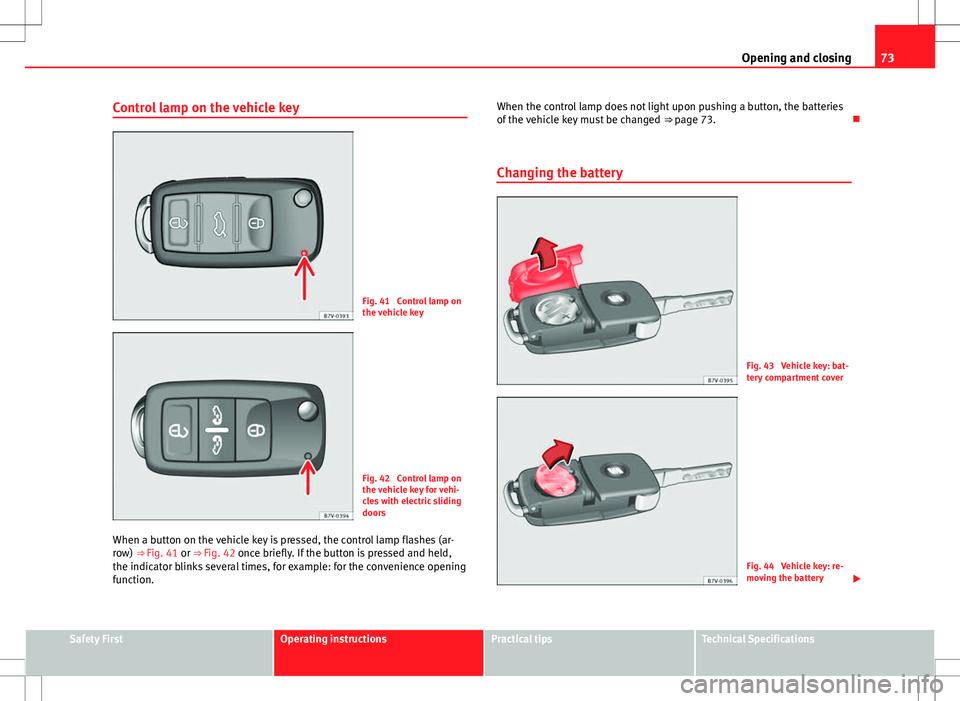
Fig. 41 Control lamp on
the vehicle key
Fig. 42 Control lamp on
the vehicle key for vehi-
cles with electric sliding
doors
When a button on the vehicle key is pressed, the control lamp flashes (ar-
row) ⇒ Fig. 41 or ⇒ Fig. 42 once briefly. If the button is pressed and held,
the indicator blinks several times, for example: for the convenience opening
function. When the control lamp does not light upon pushing a button, the batteries
of the vehicle key must be changed
⇒ page 73.
Changing the battery
Fig. 43 Vehicle key: bat-
tery compartment cover
Fig. 44 Vehicle key: re-
moving the battery
Safety FirstOperating instructionsPractical tipsTechnical Specifications
Page 101 of 387
99
Lights and visibility
Adaptive headlights (AFS)
The adaptive headlights only operate when the dipped beam is on and at
speeds of over 10 km/h (6 mph). When taking a bend, the adaptive head-
lights automatically light up the road better.
The adaptive headlights can be switched on and off from the infotainment
system.
Static turning lights
When turning slowly to change direction or going round a tight bend, the
static cornering lights automatically come on. The static cornering lights on-
ly work at speeds of less than 40 km/h (25 mph).
The static cornering lights may be incorporated into the fog lights or the
front headlights, depending upon the equipment.
WARNING
If the road is not well lit and other road users cannot see the vehicle well
enough or at all, accidents may occur.
● The automatic dipped beam control ( ) only switches on the dip-
ped beam when there are no changes in brightness, and not, for example
when it is foggy.
● Never drive with daytime lights if the road is not well lit due to weath-
er or lighting conditions. Daytime lights do not provide enough light to
illuminate the road properly or be seen by other road users.
Headlight adjustment
Headlight adjustment (Light Assist)
The headlight adjustment automatically connects and disconnects the main
beam headlights depending on the environmental and traffic conditions
and on the speed, within the limitations of the system ⇒
. This is moni-tored by a sensor located on the inside of the windscreen, above the interior
rear vision mirror.
The automatic headlight adjustment automatically switches on the main
beam depending on the vehicles travelling in front and in the opposite di-
rection, and of other environmental and traffic conditions from an approxi-
mate speed of 60 km/h (37 mph) and turns them off again at speeds below
approximately 30 km/h (18 mph).
Switching on and off
How it worksSwitching
on:– With the ignition on, turn the lights control to the position
and put the turn signal and main beam lever in the
main beam position ⇒ page 96. When the headlight adjust-
ment (automatic also) is activated, the warning lamp lights
up in the instrument panel display
.
Switching
off:– Disconnect the on button.
– OR: turn the lights control to a different position to
⇒ page 97.
– OR: place the turn signal and main beam lever in the
headlight flasher or main beam position ⇒ page 96.
The following conditions can cause the headlight adjustment to fail to turn
off the main beam or fail to do so in time:
●On roads with insufficient lighting with very reflective signs
● If road users are insufficiently lit up, e.g. pedestrians or cyclists
● On closed curves, when the traffic in the opposite direction is partially
hidden, on pronounced slopes
● On roads with traffic in the opposite direction and with a central reserva-
tion barrier when the driver can see through gaps or over it e.g. lorry drivers
● If the camera is damaged or if the power supply has been cut off
● In the event of fog, snow or heavy rain
● In the event of dust or sand storms
Safety FirstOperating instructionsPractical tipsTechnical Specifications
Page 103 of 387
101
Lights and visibility
“Leaving home”Necessary operationsTo switch sys-
tem on:– Unlock the vehicle when the light switch is in position
and the photo sensor detects darkness.
To switch sys-
tem off:– Automatically, at the end of the delay period.
– When the vehicle is locked.
– When the light switch is turned to position .
– When the ignition is switched on.
Lighting around the exterior mirrors
The lighting around the exterior mirrors illuminates the door area on enter-
ing and leaving the vehicles. It comes on when the vehicle is unlocked,
when the vehicle door is opened and when the “Coming home” or “Leaving
home” function is switched on. If the equipment includes the light sensor,
the lighting around the exterior mirrors only comes when it is dark.
Note
● The time taken for the headlights to go off can be changed in the Lights
& Visibility menu and the function can be switched on or off ⇒ page 62.
● When the “Coming home” function is on, if the vehicle door is opened
there is no audible warning signal to advise that the light is still on. Headlight range control, instrument and switch lighting
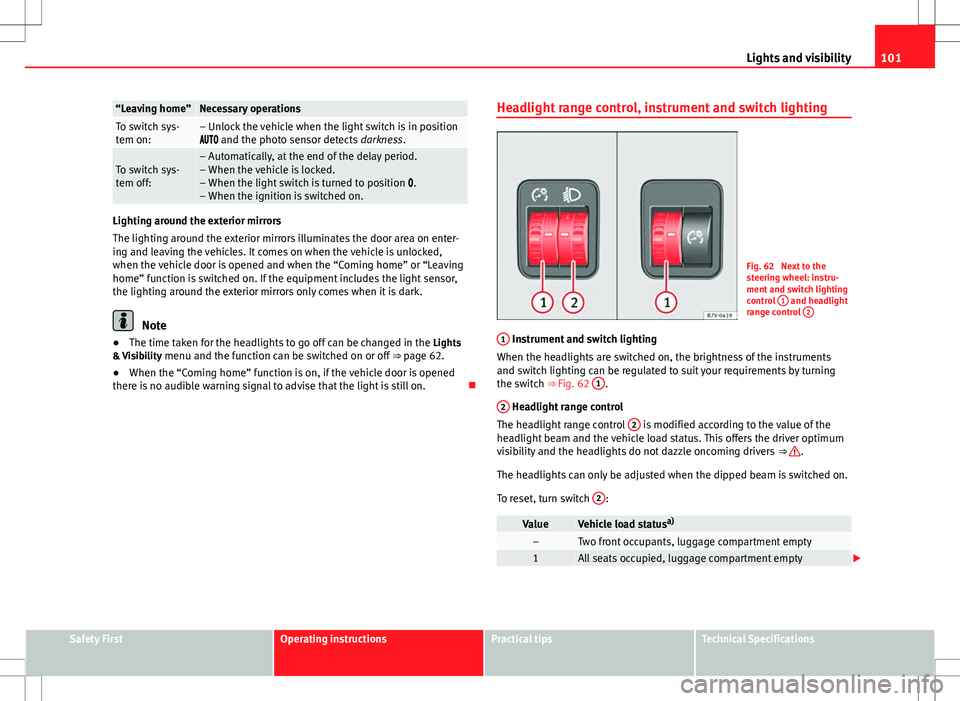
Fig. 62 Next to the
steering wheel: instru-
ment and switch lighting
control
1
and headlight
range control 2
1 Instrument and switch lighting
When the headlights are switched on, the brightness of the instruments
and switch lighting can be regulated to suit your requirements by turning
the switch ⇒ Fig. 62 1
.
2
Headlight range control
The headlight range control 2 is modified according to the value of the
headlight beam and the vehicle load status. This offers the driver optimum
visibility and the headlights do not dazzle oncoming drivers ⇒
.
The headlights can only be adjusted when the dipped beam is switched on.
To reset, turn switch 2
:
ValueVehicle load statusa)–Two front occupants, luggage compartment empty1All seats occupied, luggage compartment empty
Safety FirstOperating instructionsPractical tipsTechnical Specifications
Page 109 of 387
107
Lights and visibility
Windscreen wiper functions
Windscreen wiper performance in different situations:If the vehicle is at a stand-
still:The activated position provisionally changes
to the previous position.
During the automatic wipe:
The air conditioner comes on for approxi-
mately 30 seconds in air recirculation mode
to prevent the smell of the windscreen wash-
er fluid entering the inside the vehicle.
For the interval wipe:The intervals between wipes vary according
to the speed of the vehicle. The higher the
vehicle speed the shorter the intervals.
Heated windscreen washer jets
The heating only thaws the frozen jets, it does not thaw the water in the
washer hoses. The heated windscreen washer jets automatically adjust the
heat depending on the ambient temperature, when the ignition is switched
on.
Headlight wash/wipe system
The headlight washers/wipers clean the headlight lenses.
After the ignition is switched on, the first and every fifth time the wind-
screen washer is switched on, the headlights are also washed. Therefore,
the windscreen wiper lever should be pulled towards the steering wheel
when the dipped beam or main beam are on. Any incrusted dirt (such as in-
sects) should be cleaned regularly (e.g. when refuelling).
To ensure the headlight washers work correctly in winter, any snow which
has got into the bumper jet supports should be cleaned away. If necessary,
remove snow with an anti-icing spray.
Note
The wiper will try to wipe away any obstacles that are on the windscreen.
The wiper will stop moving if the obstacle blocks its path. Remove the ob-
stacle and switch the wiper back on again.
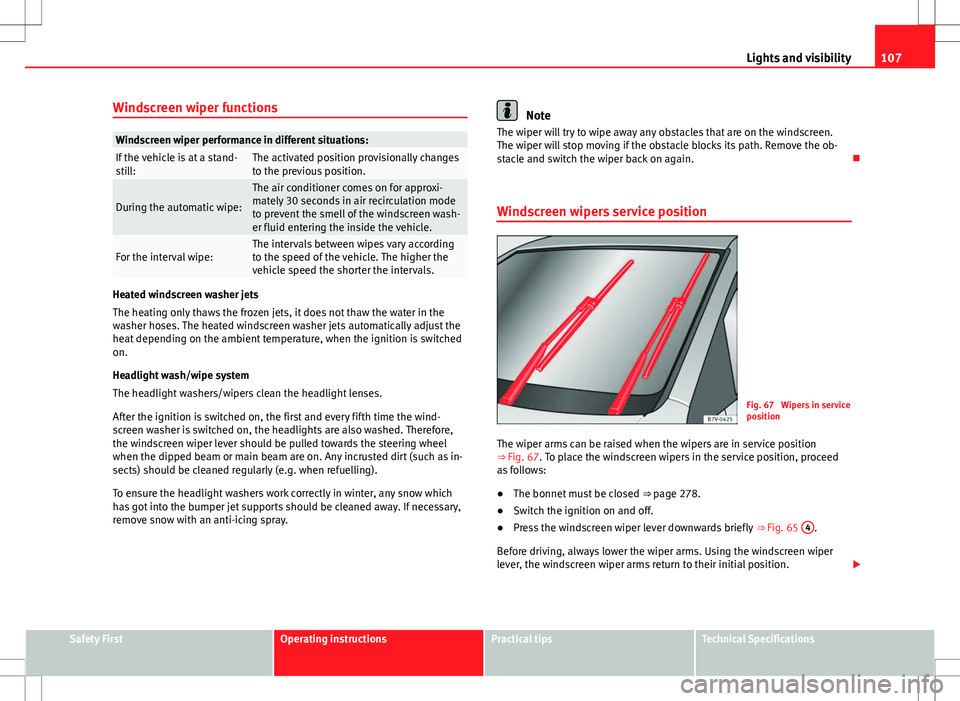
Windscreen wipers service position
Fig. 67 Wipers in service
position
The wiper arms can be raised when the wipers are in service position
⇒ Fig. 67. To place the windscreen wipers in the service position, proceed
as follows:
● The bonnet must be closed ⇒ page 278.
● Switch the ignition on and off.
● Press the windscreen wiper lever downwards briefly ⇒ Fig. 65 4
.
Before driving, always lower the wiper arms. Using the windscreen wiper
lever, the windscreen wiper arms return to their initial position.
Safety FirstOperating instructionsPractical tipsTechnical Specifications