light Seat Alhambra 2013 User Guide
[x] Cancel search | Manufacturer: SEAT, Model Year: 2013, Model line: Alhambra, Model: Seat Alhambra 2013Pages: 387, PDF Size: 6.13 MB
Page 39 of 387
37
Airbag system
Side airbags
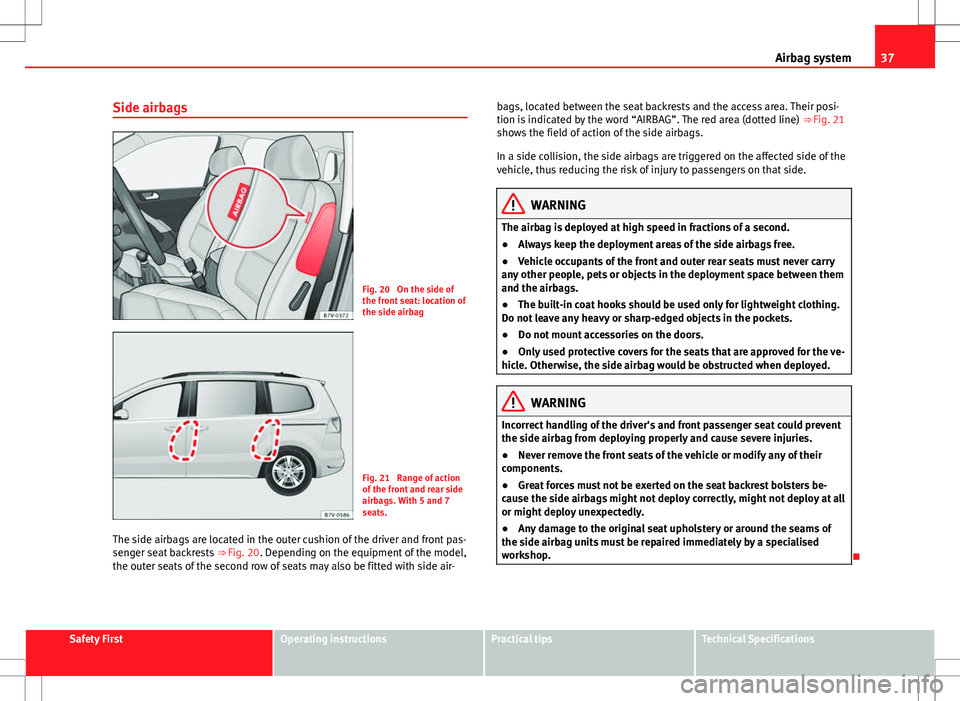
Fig. 20 On the side of
the front seat: location of
the side airbag
Fig. 21 Range of action
of the front and rear side
airbags. With 5 and 7
seats.
The side airbags are located in the outer cushion of the driver and front pas-
senger seat backrests ⇒ Fig. 20. Depending on the equipment of the model,
the outer seats of the second row of seats may also be fitted with side air- bags, located between the seat backrests and the access area. Their posi-
tion is indicated by the word “AIRBAG”. The red area (dotted line)
⇒ Fig. 21
shows the field of action of the side airbags.
In a side collision, the side airbags are triggered on the affected side of the
vehicle, thus reducing the risk of injury to passengers on that side.
WARNING
The airbag is deployed at high speed in fractions of a second.
● Always keep the deployment areas of the side airbags free.
● Vehicle occupants of the front and outer rear seats must never carry
any other people, pets or objects in the deployment space between them
and the airbags.
● The built-in coat hooks should be used only for lightweight clothing.
Do not leave any heavy or sharp-edged objects in the pockets.
● Do not mount accessories on the doors.
● Only used protective covers for the seats that are approved for the ve-
hicle. Otherwise, the side airbag would be obstructed when deployed.
WARNING
Incorrect handling of the driver's and front passenger seat could prevent
the side airbag from deploying properly and cause severe injuries.
● Never remove the front seats of the vehicle or modify any of their
components.
● Great forces must not be exerted on the seat backrest bolsters be-
cause the side airbags might not deploy correctly, might not deploy at all
or might deploy unexpectedly.
● Any damage to the original seat upholstery or around the seams of
the side airbag units must be repaired immediately by a specialised
workshop.
Safety FirstOperating instructionsPractical tipsTechnical Specifications
Page 41 of 387
39
Airbag system
WARNING (Continued)
● Vehicle occupants of the front and outer rear seats must never carry
any other people, pets or objects in the deployment space between them
and the airbags.
● The built-in coat hooks should be used only for lightweight clothing.
Do not leave any heavy or sharp-edged objects in the pockets.
● Do not mount accessories on the doors.
● Do not fit curtains to the windows other than those expressly ap-
proved for use in the vehicle.
● Only turn the sun blinds towards the windows if there is no object,
e.g. pens or garage remote controls, secured to the sun blind.
Knee airbag
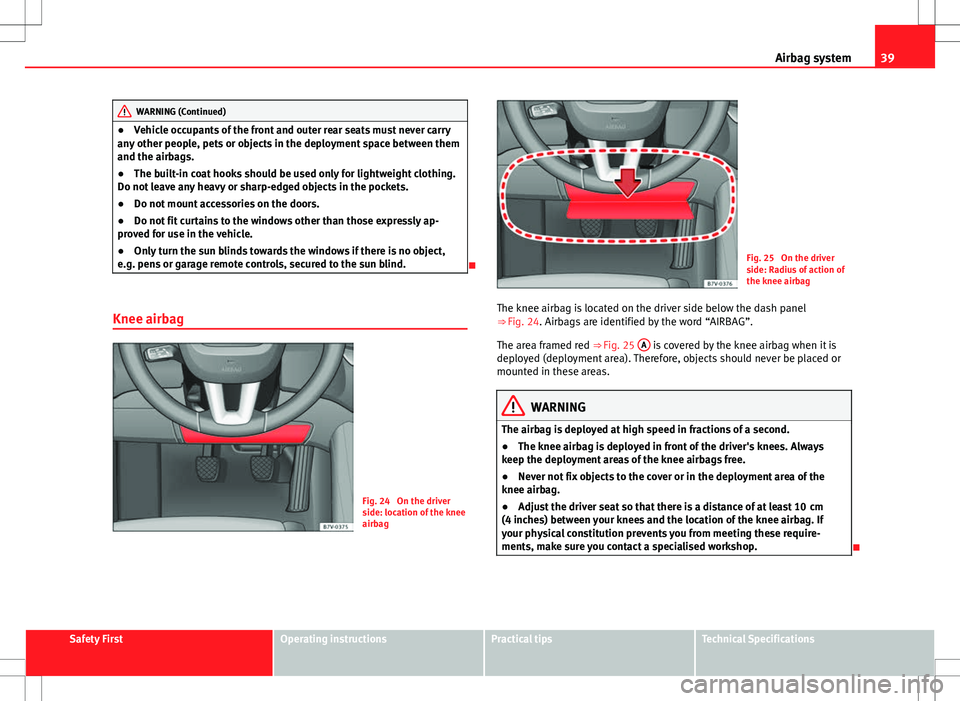
Fig. 24 On the driver
side: location of the knee
airbag
Fig. 25 On the driver
side: Radius of action of
the knee airbag
The knee airbag is located on the driver side below the dash panel
⇒ Fig. 24. Airbags are identified by the word “AIRBAG”.
The area framed red ⇒ Fig. 25 A
is covered by the knee airbag when it is
deployed (deployment area). Therefore, objects should never be placed or
mounted in these areas.
WARNING
The airbag is deployed at high speed in fractions of a second.
● The knee airbag is deployed in front of the driver's knees. Always
keep the deployment areas of the knee airbags free.
● Never not fix objects to the cover or in the deployment area of the
knee airbag.
● Adjust the driver seat so that there is a distance of at least 10 cm
(4 inches) between your knees and the location of the knee airbag. If
your physical constitution prevents you from meeting these require-
ments, make sure you contact a specialised workshop.
Safety FirstOperating instructionsPractical tipsTechnical Specifications
Page 55 of 387
53
Cockpit
Operating instructions Cockpit
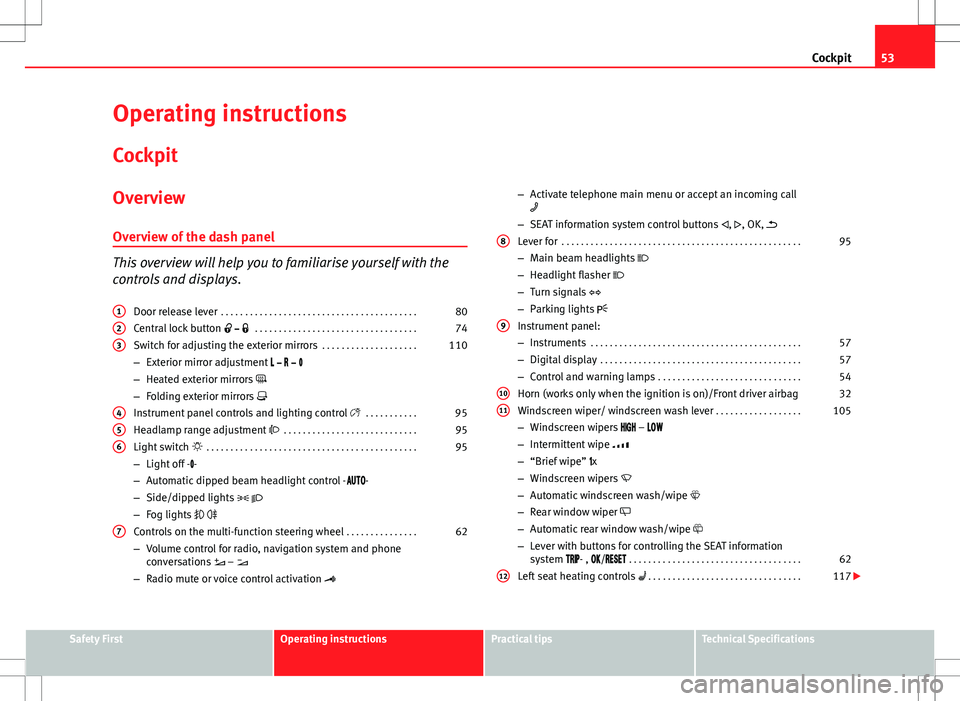
Overview Overview of the dash panel
This overview will help you to familiarise yourself with the
controls and displays. Door release lever . . . . . . . . . . . . . . . . . . . . . . . . . . . . . . . . . . . . . . . . . 80
Central lock button . . . . . . . . . . . . . . . . . . . . . . . . . . . . . . . . . . 74
Switch for adjusting the exterior mirrors . . . . . . . . . . . . . . . . . . . .110
– Exterior mirror adjustment
– Heated exterior mirrors
– Folding exterior mirrors
Instrument panel controls and lighting control . . . . . . . . . . .95
Headlamp range adjustment . . . . . . . . . . . . . . . . . . . . . . . . . . . . 95
Light switch . . . . . . . . . . . . . . . . . . . . . . . . . . . . . . . . . . . . . . . . . . . . 95
– Light off - -
– Automatic dipped beam headlight control - -
– Side/dipped lights
– Fog lights
Controls on the multi-function steering wheel . . . . . . . . . . . . . . .62
– Volume control for radio, navigation system and phone
conversations –
– Radio mute or voice control activation
1
23
456
7
–
Activate telephone main menu or accept an incoming call
– SEAT information system control buttons , , OK,
Lever for . . . . . . . . . . . . . . . . . . . . . . . . . . . . . . . . . . . . . . . . . . . . . . . . . . 95
– Main beam headlights
– Headlight flasher
– Turn signals
– Parking lights
Instrument panel:
– Instruments . . . . . . . . . . . . . . . . . . . . . . . . . . . . . . . . . . . . . . . . . . . . 57
– Digital display . . . . . . . . . . . . . . . . . . . . . . . . . . . . . . . . . . . . . . . . . . 57
– Control and warning lamps . . . . . . . . . . . . . . . . . . . . . . . . . . . . . . 54
Horn (works only when the ignition is on)/Front driver airbag 32
Windscreen wiper/ windscreen wash lever . . . . . . . . . . . . . . . . . .105
– Windscreen wipers –
– Intermittent wipe
– “Brief wipe” x
– Windscreen wipers
– Automatic windscreen wash/wipe
– Rear window wiper
– Automatic rear window wash/wipe
– Lever with buttons for controlling the SEAT information
system - , / . . . . . . . . . . . . . . . . . . . . . . . . . . . . . . . . . . . . 62
Left seat heating controls . . . . . . . . . . . . . . . . . . . . . . . . . . . . . . . . 117
8
9
1011
12
Safety FirstOperating instructionsPractical tipsTechnical Specifications
Page 56 of 387
54Cockpit
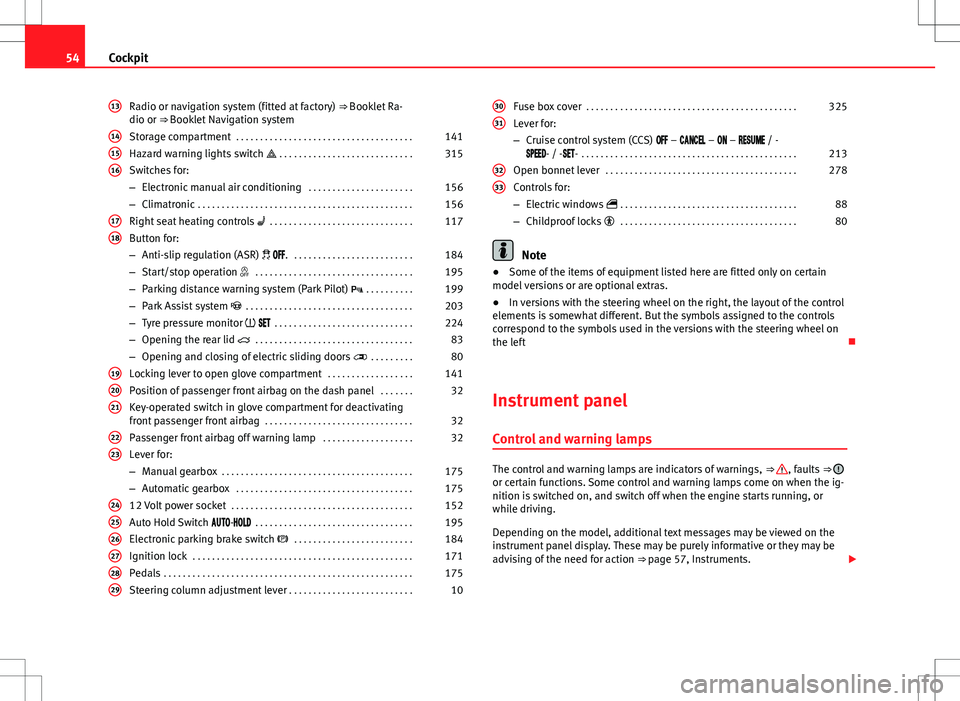
Radio or navigation system (fitted at factory) ⇒ Booklet Ra-
dio or ⇒ Booklet Navigation system
Storage compartment . . . . . . . . . . . . . . . . . . . . . . . . . . . . . . . . . . . . . 141
Hazard warning lights switch . . . . . . . . . . . . . . . . . . . . . . . . . . . . 315
Switches for:
– Electronic manual air conditioning . . . . . . . . . . . . . . . . . . . . . .156
– Climatronic . . . . . . . . . . . . . . . . . . . . . . . . . . . . . . . . . . . . . . . . . . . . . 156
Right seat heating controls . . . . . . . . . . . . . . . . . . . . . . . . . . . . . . 117
Button for:
– Anti-slip regulation (ASR) . . . . . . . . . . . . . . . . . . . . . . . . . . 184
– Start/stop operation . . . . . . . . . . . . . . . . . . . . . . . . . . . . . . . . . 195
– Parking distance warning system (Park Pilot) . . . . . . . . . . 199
– Park Assist system . . . . . . . . . . . . . . . . . . . . . . . . . . . . . . . . . . . 203
– Tyre pressure monitor . . . . . . . . . . . . . . . . . . . . . . . . . . . . . 224
– Opening the rear lid . . . . . . . . . . . . . . . . . . . . . . . . . . . . . . . . . 83
– Opening and closing of electric sliding doors . . . . . . . . . 80
Locking lever to open glove compartment . . . . . . . . . . . . . . . . . .141
Position of passenger front airbag on the dash panel . . . . . . .32
Key-operated switch in glove compartment for deactivating
front passenger front airbag . . . . . . . . . . . . . . . . . . . . . . . . . . . . . . . 32
Passenger front airbag off warning lamp . . . . . . . . . . . . . . . . . . .32
Lever for:
– Manual gearbox . . . . . . . . . . . . . . . . . . . . . . . . . . . . . . . . . . . . . . . . 175
– Automatic gearbox . . . . . . . . . . . . . . . . . . . . . . . . . . . . . . . . . . . . . 175
12 Volt power socket . . . . . . . . . . . . . . . . . . . . . . . . . . . . . . . . . . . . . . 152
Auto Hold Switch - . . . . . . . . . . . . . . . . . . . . . . . . . . . . . . . . . 195
Electronic parking brake switch . . . . . . . . . . . . . . . . . . . . . . . . . 184
Ignition lock . . . . . . . . . . . . . . . . . . . . . . . . . . . . . . . . . . . . . . . . . . . . . . 171
Pedals . . . . . . . . . . . . . . . . . . . . . . . . . . . . . . . . . . . . . . . . . . . . . . . . . . . . 175
Steering column adjustment lever . . . . . . . . . . . . . . . . . . . . . . . . . . 10
13
141516
1718
192021
2223
242526272829
Fuse box cover
. . . . . . . . . . . . . . . . . . . . . . . . . . . . . . . . . . . . . . . . . . . . 325
Lever for:
– Cruise control system (CCS) – – – / -
- / -- . . . . . . . . . . . . . . . . . . . . . . . . . . . . . . . . . . . . . . . . . . . . . 213
Open bonnet lever . . . . . . . . . . . . . . . . . . . . . . . . . . . . . . . . . . . . . . . . 278
Controls for:
– Electric windows . . . . . . . . . . . . . . . . . . . . . . . . . . . . . . . . . . . . . 88
– Childproof locks . . . . . . . . . . . . . . . . . . . . . . . . . . . . . . . . . . . . . 80
Note
● Some of the items of equipment listed here are fitted only on certain
model versions or are optional extras.
● In versions with the steering wheel on the right, the layout of the control
elements is somewhat different. But the symbols assigned to the controls
correspond to the symbols used in the versions with the steering wheel on
the left
Instrument panel Control and warning lamps
The control and warning lamps are indicators of warnings, ⇒ , faults ⇒ or certain functions. Some control and warning lamps come on when the ig-
nition is switched on, and switch off when the engine starts running, or
while driving.
Depending on the model, additional text messages may be viewed on the
instrument panel display. These may be purely informative or they may be
advising of the need for action ⇒ page 57, Instruments.
30
31
3233
Page 57 of 387
55
Cockpit
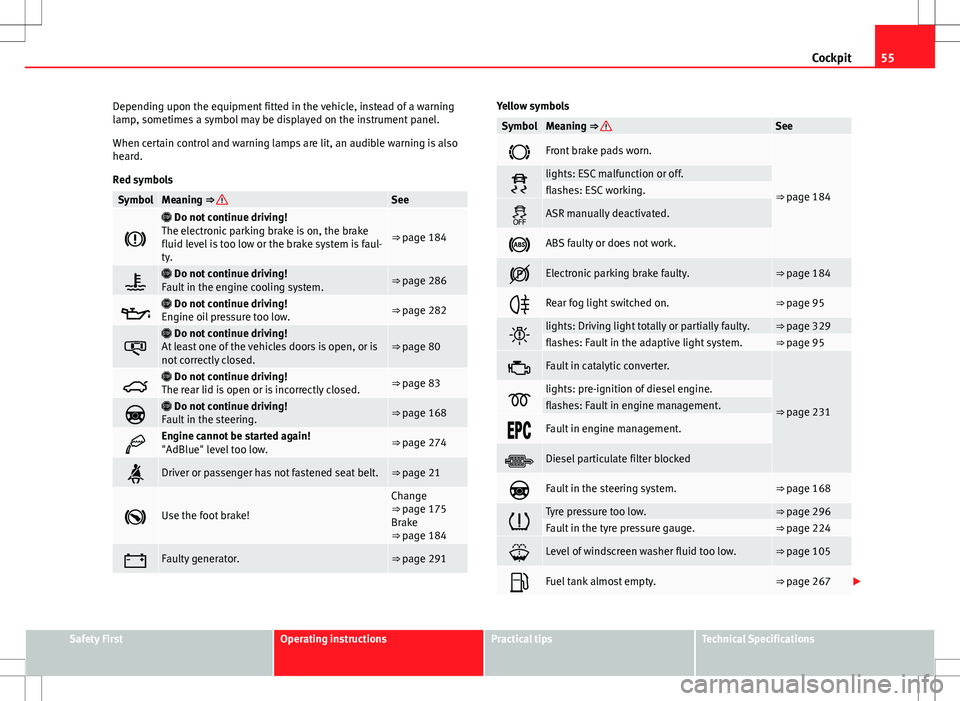
Depending upon the equipment fitted in the vehicle, instead of a warning
lamp, sometimes a symbol may be displayed on the instrument panel.
When certain control and warning lamps are lit, an audible warning is also
heard.
Red symbols
SymbolMeaning ⇒ See
Do not continue driving!
The electronic parking brake is on, the brake
fluid level is too low or the brake system is faul-
ty.
⇒ page 184
Do not continue driving!
Fault in the engine cooling system.⇒ page 286
Do not continue driving!
Engine oil pressure too low.⇒ page 282
Do not continue driving!
At least one of the vehicles doors is open, or is
not correctly closed.⇒ page 80
Do not continue driving!
The rear lid is open or is incorrectly closed.⇒ page 83
Do not continue driving!
Fault in the steering.⇒ page 168
Engine cannot be started again!
"AdBlue" level too low.⇒ page 274
Driver or passenger has not fastened seat belt.⇒ page 21
Use the foot brake!
Change
⇒ page 175
Brake
⇒ page 184
Faulty generator.⇒ page 291
Yellow symbols
SymbolMeaning ⇒ See
Front brake pads worn.
⇒ page 184lights: ESC malfunction or off.flashes: ESC working.
ASR manually deactivated.
ABS faulty or does not work.
Electronic parking brake faulty.⇒ page 184
Rear fog light switched on.⇒ page 95
lights: Driving light totally or partially faulty.⇒ page 329flashes: Fault in the adaptive light system.⇒ page 95
Fault in catalytic converter.
⇒ page 231lights: pre-ignition of diesel engine.flashes: Fault in engine management.
Fault in engine management.
Diesel particulate filter blocked
Fault in the steering system.⇒ page 168
Tyre pressure too low.⇒ page 296Fault in the tyre pressure gauge.⇒ page 224
Level of windscreen washer fluid too low.⇒ page 105
Fuel tank almost empty.⇒ page 267
Safety FirstOperating instructionsPractical tipsTechnical Specifications
Page 58 of 387
56Cockpit
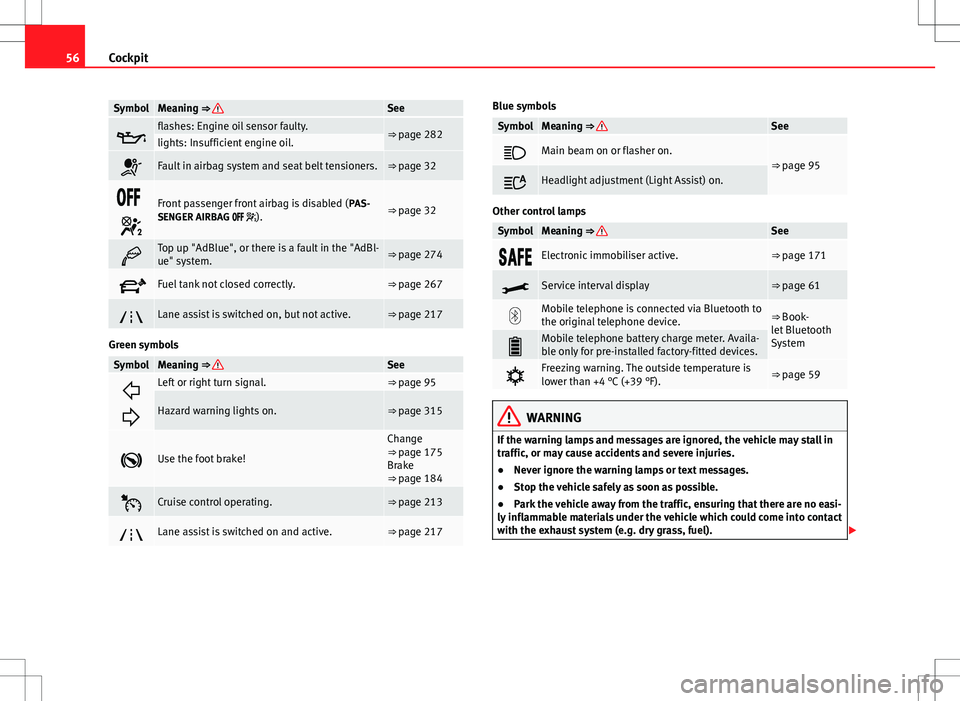
SymbolMeaning ⇒ See
flashes: Engine oil sensor faulty.⇒ page 282lights: Insufficient engine oil.
Fault in airbag system and seat belt tensioners.⇒ page 32
Front passenger front airbag is disabled ( PAS-
SENGER AIRBAG ).⇒ page 32
Top up "AdBlue", or there is a fault in the "AdBl-
ue" system.⇒ page 274
Fuel tank not closed correctly.⇒ page 267
Lane assist is switched on, but not active.⇒ page 217
Green symbols
SymbolMeaning ⇒ See
Left or right turn signal.⇒ page 95
Hazard warning lights on.⇒ page 315
Use the foot brake!
Change
⇒ page 175
Brake
⇒ page 184
Cruise control operating.⇒ page 213
Lane assist is switched on and active.⇒ page 217
Blue symbols
SymbolMeaning ⇒ See
Main beam on or flasher on.⇒ page 95
Headlight adjustment (Light Assist) on.
Other control lamps
SymbolMeaning ⇒ See
Electronic immobiliser active.⇒ page 171
Service interval display⇒ page 61
Mobile telephone is connected via Bluetooth to
the original telephone device.⇒ Book-
let Bluetooth
System
Mobile telephone battery charge meter. Availa-
ble only for pre-installed factory-fitted devices.
Freezing warning. The outside temperature is
lower than +4 °C (+39 °F).⇒ page 59
WARNING
If the warning lamps and messages are ignored, the vehicle may stall in
traffic, or may cause accidents and severe injuries.
● Never ignore the warning lamps or text messages.
● Stop the vehicle safely as soon as possible.
● Park the vehicle away from the traffic, ensuring that there are no easi-
ly inflammable materials under the vehicle which could come into contact
with the exhaust system (e.g. dry grass, fuel).
Page 65 of 387
63
Cockpit
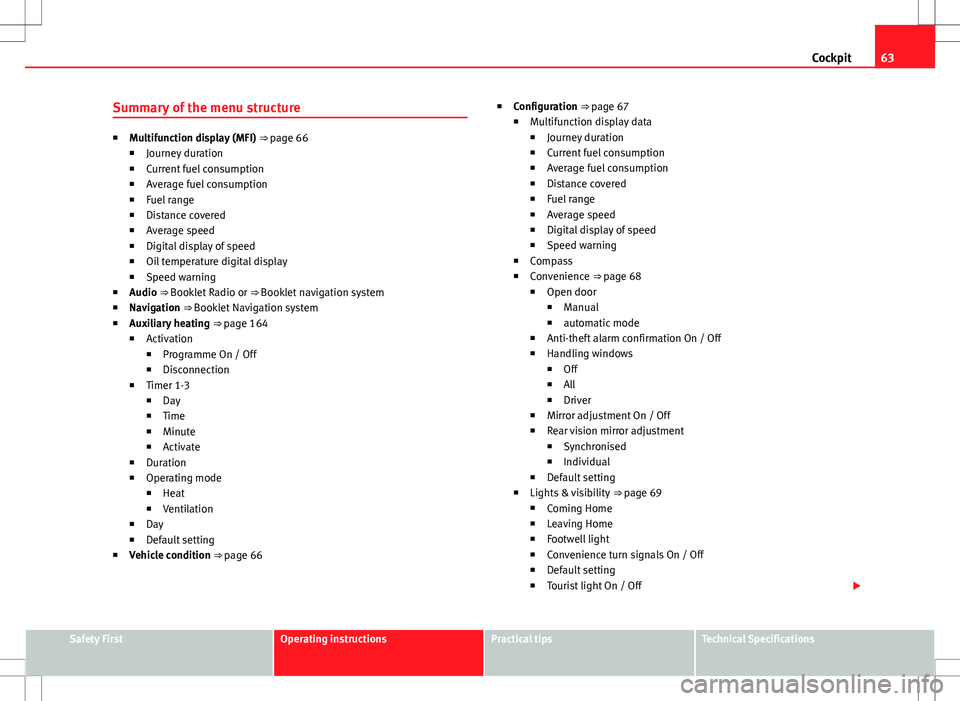
Summary of the menu structure
■ Multifunction display (MFI) ⇒ page 66
■ Journey duration
■ Current fuel consumption
■ Average fuel consumption
■ Fuel range
■ Distance covered
■ Average speed
■ Digital display of speed
■ Oil temperature digital display
■ Speed warning
■ Audio ⇒ Booklet Radio or ⇒ Booklet navigation system
■ Navigation ⇒ Booklet Navigation system
■ Auxiliary heating ⇒ page 164
■ Activation
■ Programme On / Off
■ Disconnection
■ Timer 1-3
■ Day
■ Time
■ Minute
■ Activate
■ Duration
■ Operating mode
■ Heat
■ Ventilation
■ Day
■ Default setting
■ Vehicle condition ⇒ page 66 ■
Configuration ⇒ page 67
■ Multifunction display data
■ Journey duration
■ Current fuel consumption
■ Average fuel consumption
■ Distance covered
■ Fuel range
■ Average speed
■ Digital display of speed
■ Speed warning
■ Compass
■ Convenience ⇒ page 68
■ Open door
■ Manual
■ automatic mode
■ Anti-theft alarm confirmation On / Off
■ Handling windows
■ Off
■ All
■ Driver
■ Mirror adjustment On / Off
■ Rear vision mirror adjustment
■ Synchronised
■ Individual
■ Default setting
■ Lights & visibility ⇒ page 69
■ Coming Home
■ Leaving Home
■ Footwell light
■ Convenience turn signals On / Off
■ Default setting
■ Tourist light On / Off
Safety FirstOperating instructionsPractical tipsTechnical Specifications
Page 68 of 387
66Cockpit
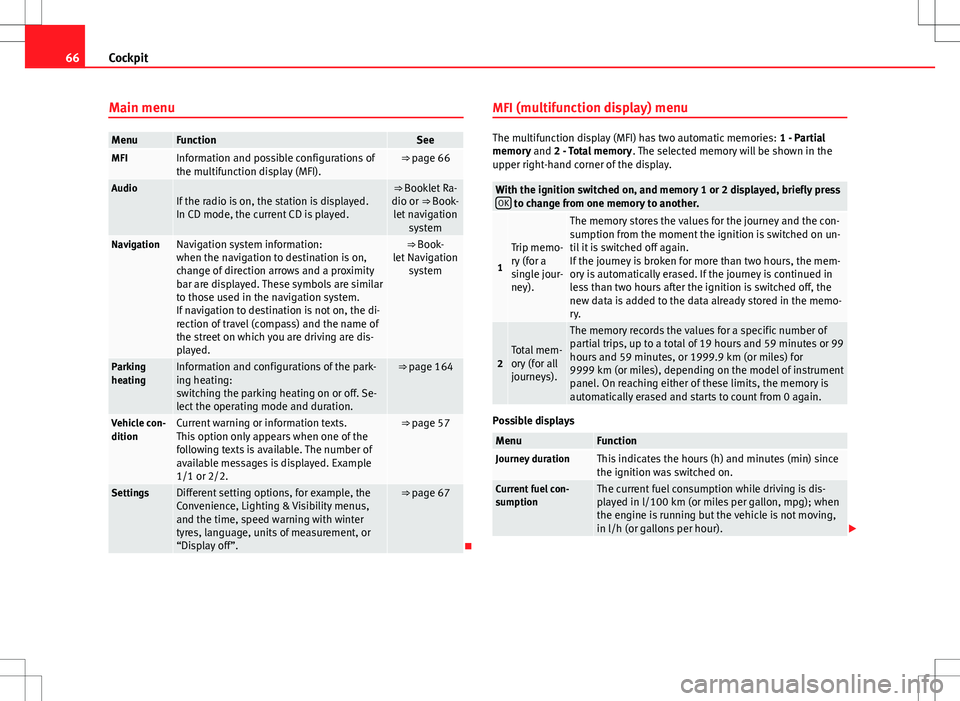
Main menu
MenuFunctionSeeMFIInformation and possible configurations of
the multifunction display (MFI).⇒ page 66
AudioIf the radio is on, the station is displayed.
In CD mode, the current CD is played.⇒ Booklet Ra-
dio or ⇒ Book- let navigation system
NavigationNavigation system information:
when the navigation to destination is on,
change of direction arrows and a proximity
bar are displayed. These symbols are similar
to those used in the navigation system.
If navigation to destination is not on, the di-
rection of travel (compass) and the name of
the street on which you are driving are dis-
played.⇒ Book-
let Navigation system
Parking
heatingInformation and configurations of the park-
ing heating:
switching the parking heating on or off. Se-
lect the operating mode and duration.⇒ page 164
Vehicle con-
ditionCurrent warning or information texts.
This option only appears when one of the
following texts is available. The number of
available messages is displayed. Example
1/1 or 2/2.⇒ page 57
SettingsDifferent setting options, for example, the
Convenience, Lighting & Visibility menus,
and the time, speed warning with winter
tyres, language, units of measurement, or
“Display off”.⇒ page 67
MFI (multifunction display) menu
The multifunction display (MFI) has two automatic memories:
1 - Partial
memory and 2 - Total memory . The selected memory will be shown in the
upper right-hand corner of the display.
With the ignition switched on, and memory 1 or 2 displayed, briefly press OK to change from one memory to another.
1
Trip memo-
ry (for a
single jour-
ney).
The memory stores the values for the journey and the con-
sumption from the moment the ignition is switched on un-
til it is switched off again.
If the journey is broken for more than two hours, the mem-
ory is automatically erased. If the journey is continued in
less than two hours after the ignition is switched off, the
new data is added to the data already stored in the memo-
ry.
2Total mem-
ory (for all
journeys).
The memory records the values for a specific number of
partial trips, up to a total of 19 hours and 59 minutes or 99
hours and 59 minutes, or 1999.9 km (or miles) for
9999 km (or miles), depending on the model of instrument
panel. On reaching either of these limits, the memory is
automatically erased and starts to count from 0 again.
Possible displays
MenuFunctionJourney durationThis indicates the hours (h) and minutes (min) since
the ignition was switched on.
Current fuel con-
sumptionThe current fuel consumption while driving is dis-
played in l/100 km (or miles per gallon, mpg); when
the engine is running but the vehicle is not moving,
in l/h (or gallons per hour).
Page 69 of 387
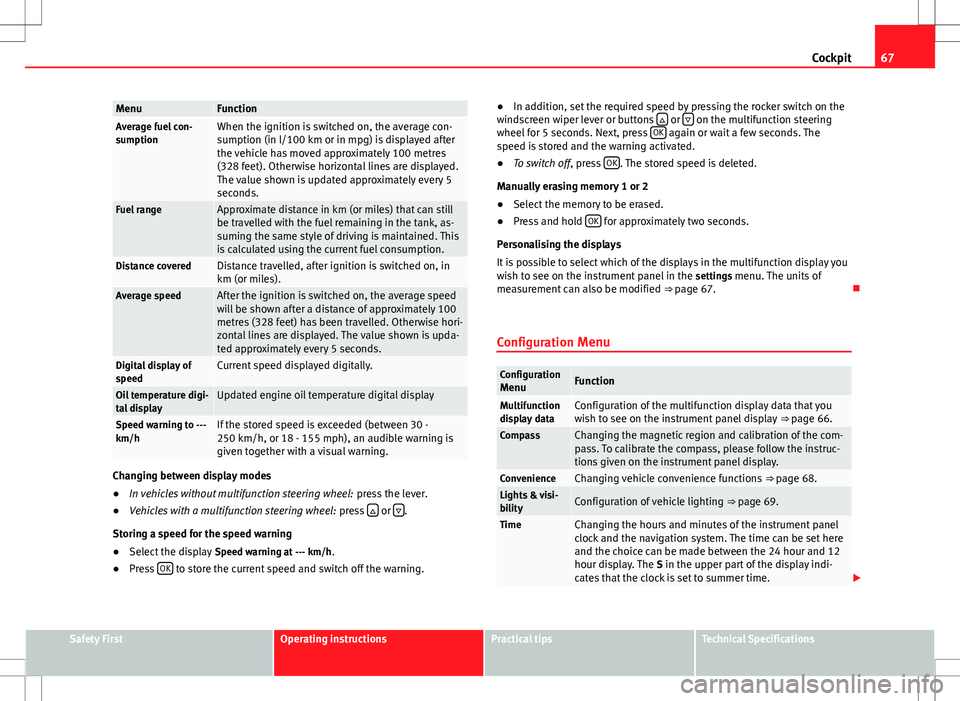
67
Cockpit
MenuFunctionAverage fuel con-
sumptionWhen the ignition is switched on, the average con-
sumption (in l/100 km or in mpg) is displayed after
the vehicle has moved approximately 100 metres
(328 feet). Otherwise horizontal lines are displayed.
The value shown is updated approximately every 5
seconds.
Fuel rangeApproximate distance in km (or miles) that can still
be travelled with the fuel remaining in the tank, as-
suming the same style of driving is maintained. This
is calculated using the current fuel consumption.
Distance coveredDistance travelled, after ignition is switched on, in
km (or miles).
Average speedAfter the ignition is switched on, the average speed
will be shown after a distance of approximately 100
metres (328 feet) has been travelled. Otherwise hori-
zontal lines are displayed. The value shown is upda-
ted approximately every 5 seconds.
Digital display of
speedCurrent speed displayed digitally.
Oil temperature digi-
tal displayUpdated engine oil temperature digital display
Speed warning to ---
km/hIf the stored speed is exceeded (between 30 -
250 km/h, or 18 - 155 mph), an audible warning is
given together with a visual warning.
Changing between display modes
● In vehicles without multifunction steering wheel: press the lever.
● Vehicles with a multifunction steering wheel: press
or .
Storing a speed for the speed warning
● Select the display Speed warning at --- km/h.
● Press OK
to store the current speed and switch off the warning. ●
In addition, set the required speed by pressing the rocker switch on the
windscreen wiper lever or buttons
or on the multifunction steering
wheel for 5 seconds. Next, press OK again or wait a few seconds. The
speed is stored and the warning activated.
● To switch off , press OK
. The stored speed is deleted.
Manually erasing memory 1 or 2
● Select the memory to be erased.
● Press and hold OK
for approximately two seconds.
Personalising the displays
It is possible to select which of the displays in the multifunction display you
wish to see on the instrument panel in the settings menu. The units of
measurement can also be modified ⇒ page 67.
Configuration Menu
Configuration MenuFunction
Multifunction
display dataConfiguration of the multifunction display data that you
wish to see on the instrument panel display ⇒ page 66.
CompassChanging the magnetic region and calibration of the com-
pass. To calibrate the compass, please follow the instruc-
tions given on the instrument panel display.
ConvenienceChanging vehicle convenience functions ⇒ page 68.Lights & visi-
bilityConfiguration of vehicle lighting ⇒ page 69.
TimeChanging the hours and minutes of the instrument panel
clock and the navigation system. The time can be set here
and the choice can be made between the 24 hour and 12
hour display. The S in the upper part of the display indi-
cates that the clock is set to summer time.
Safety FirstOperating instructionsPractical tipsTechnical Specifications
Page 71 of 387
69
Cockpit
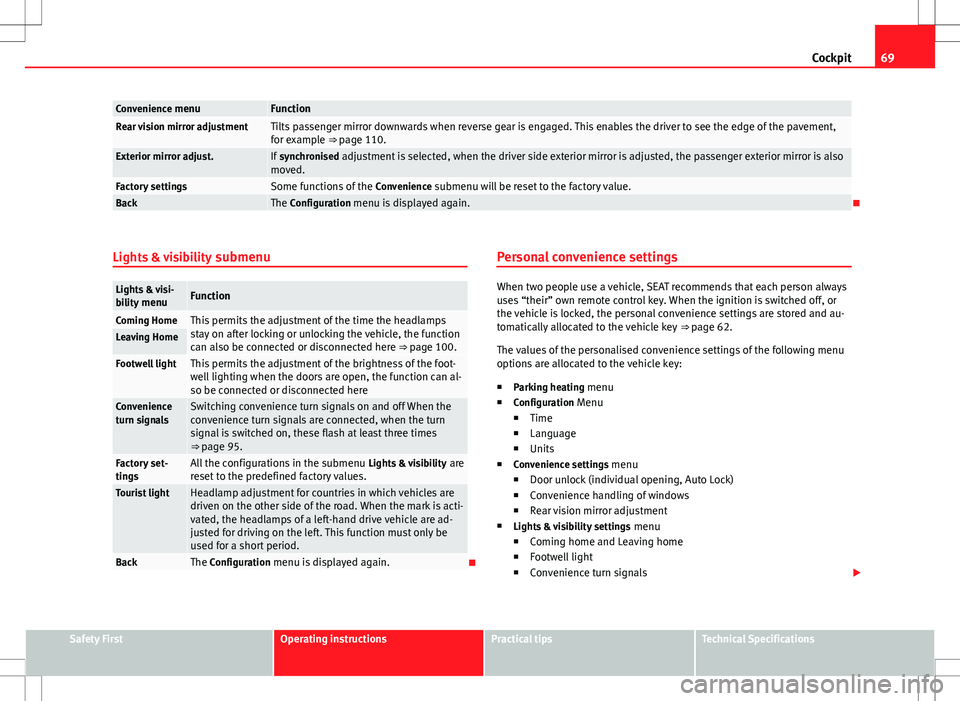
Convenience menuFunctionRear vision mirror adjustmentTilts passenger mirror downwards when reverse gear is engaged. This enables the driver to see the edge of the pavement,
for example ⇒ page 110.
Exterior mirror adjust.If synchronised adjustment is selected, when the driver side exterior mirror is adjusted, the passenger exterior mirror is also
moved.
Factory settingsSome functions of the Convenience submenu will be reset to the factory value.BackThe Configuration menu is displayed again.
Lights & visibility submenu
Lights & visi-
bility menuFunction
Coming HomeThis permits the adjustment of the time the headlamps
stay on after locking or unlocking the vehicle, the function
can also be connected or disconnected here ⇒ page 100.Leaving Home
Footwell lightThis permits the adjustment of the brightness of the foot-
well lighting when the doors are open, the function can al-
so be connected or disconnected here
Convenience
turn signalsSwitching convenience turn signals on and off When the
convenience turn signals are connected, when the turn
signal is switched on, these flash at least three times
⇒ page 95.
Factory set-
tingsAll the configurations in the submenu Lights & visibility are
reset to the predefined factory values.
Tourist lightHeadlamp adjustment for countries in which vehicles are
driven on the other side of the road. When the mark is acti-
vated, the headlamps of a left-hand drive vehicle are ad-
justed for driving on the left. This function must only be
used for a short period.
BackThe Configuration menu is displayed again. Personal convenience settings
When two people use a vehicle, SEAT recommends that each person always
uses “their” own remote control key. When the ignition is switched off, or
the vehicle is locked, the personal convenience settings are stored and au-
tomatically allocated to the vehicle key
⇒ page 62.
The values of the personalised convenience settings of the following menu
options are allocated to the vehicle key: ■ Parking heating menu
■ Configuration Menu
■ Time
■ Language
■ Units
■ Convenience settings menu
■ Door unlock (individual opening, Auto Lock)
■ Convenience handling of windows
■ Rear vision mirror adjustment
■ Lights & visibility settings menu
■ Coming home and Leaving home
■ Footwell light
■ Convenience turn signals
Safety FirstOperating instructionsPractical tipsTechnical Specifications