radio Seat Alhambra 2013 User Guide
[x] Cancel search | Manufacturer: SEAT, Model Year: 2013, Model line: Alhambra, Model: Seat Alhambra 2013Pages: 387, PDF Size: 6.13 MB
Page 203 of 387
201
Driving
Optical parking system* (OPS)
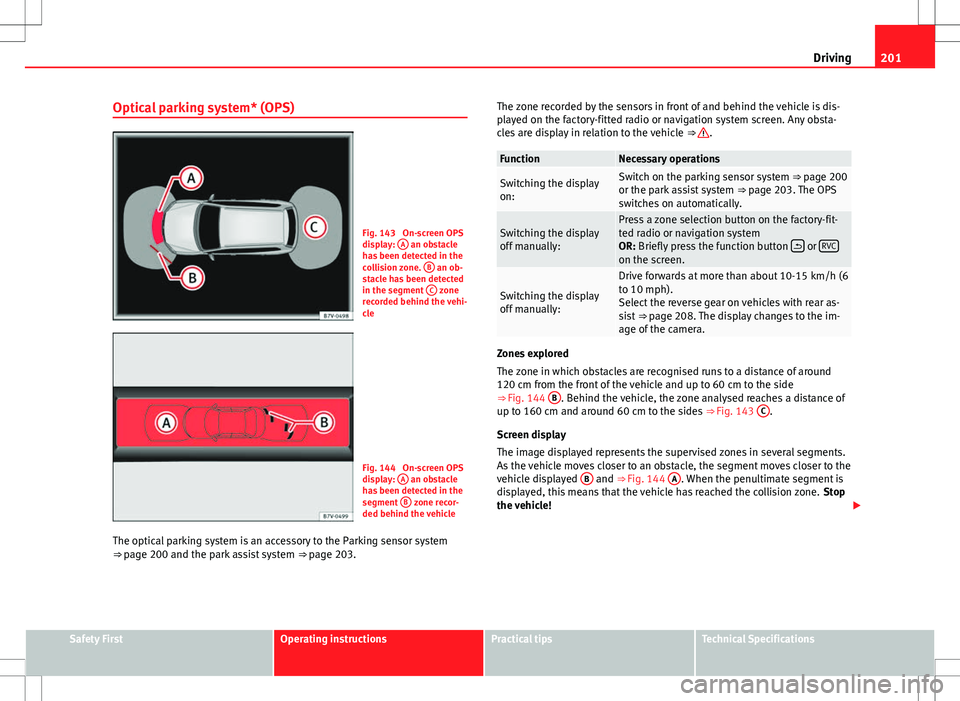
Fig. 143 On-screen OPS
display: A an obstacle
has been detected in the
collision zone. B
an ob-
stacle has been detected
in the segment C
zone
recorded behind the vehi-
cle
Fig. 144 On-screen OPS
display: A an obstacle
has been detected in the
segment B
zone recor-
ded behind the vehicle
The optical parking system is an accessory to the Parking sensor system
⇒ page 200 and the park assist system ⇒ page 203. The zone recorded by the sensors in front of and behind the vehicle is dis-
played on the factory-fitted radio or navigation system screen. Any obsta-
cles are display in relation to the vehicle
⇒
.
FunctionNecessary operations
Switching the display
on:Switch on the parking sensor system ⇒ page 200
or the park assist system ⇒ page 203. The OPS
switches on automatically.
Switching the display
off manually:Press a zone selection button on the factory-fit-
ted radio or navigation system
OR: Briefly press the function button
or RVCon the screen.
Switching the display
off manually:
Drive forwards at more than about 10-15 km/h (6
to 10 mph).
Select the reverse gear on vehicles with rear as-
sist
⇒ page 208. The display changes to the im-
age of the camera.
Zones explored
The zone in which obstacles are recognised runs to a distance of around
120 cm from the front of the vehicle and up to 60 cm to the side
⇒ Fig. 144 B
. Behind the vehicle, the zone analysed reaches a distance of
up to 160 cm and around 60 cm to the sides ⇒ Fig. 143 C.
Screen display
The image displayed represents the supervised zones in several segments.
As the vehicle moves closer to an obstacle, the segment moves closer to the
vehicle displayed B
and ⇒ Fig. 144 A. When the penultimate segment is
displayed, this means that the vehicle has reached the collision zone. Stop
the vehicle!
Safety FirstOperating instructionsPractical tipsTechnical Specifications
Page 204 of 387
202Driving
Distance from the vehicle to the
obstacleAudible warn-
ingDisplayed in colour on
the screen: colour of the
segment if an obstacle is recognised
in front: approx. 31 - 120 cm
behind: approx. 31 - 160 cmbeepingsoundYellow
approx. 0 – 30 cm in front or be-
hind a)permanent
soundRed
a) The permanent sound starts at a somewhat greater distance on vehicles with a factory-fit-
ted towing bracket.
With towing bracket
A specific image is displayed on the screen of vehicles with a factory-fitted
towing bracket and an electrically connected trailer. In this case, the distan-
ces behind the vehicle are not indicated.
Switching the parking sensor system sound on and off
If the
button on the radio or navigation system screen may mute the
sound of OPS warnings. To switch the warnings back on, press the button
again briefly.
When the OPS is switched off and back on again, muting is cancelled. Error
messages cannot be switched off.
WARNING
Do not be distracted from the traffic when looking at the screen.
Page 205 of 387
203
Driving
Park Assist system* Introduction
The Park Assist system helps the driver to find a suitable place to park, to
insert the vehicle into parallel and perpendicular parking places and to
leave parallel parking places.
The Park Assist system is limited to the system abilities and requires that
the driver is especially attentive ⇒
.
The parking sensor system is a component of the Park Assist system that
helps to park the vehicle.
For vehicles with the optical parking system, the radio navigation systems
screen displays the detected zones in front of and behind the vehicle, indi-
cating - within the limits of the system - the position of obstacles compared
to the vehicle.
The park assist system cannot be switched on if the factory-fitted towing
bracket is electrically connected to a trailer.
Additional information and warnings:
● Braking, stopping and parking ⇒ page 184
● Parking sensor system ⇒ page 199
● Caring for and cleaning the vehicle exterior ⇒ page 245
● Accessories, parts replacement, repairs and modifications ⇒ page 260
WARNING
Despite the assistance provided by the park assist system, do not run
any risks when parking. The system is not a replacement for driver
awareness.
● Unintentional movements of the vehicle could cause serious injury.
● Adjust your speed and driving style to visibility, road, traffic and
weather conditions.
● The surface of certain objects and items of clothing and external
sound sources may have a negative affect on the park assist signals or on
the system sensors or may not reflect its signals.
● The sensors have blind spots in which obstacles and people are not
registered.
● Always observe the area around the vehicle, as the sensors do not al-
ways detect small children, animals or objects.
CAUTION
● The park assist system aims exclusively at other parked vehicles, with-
out taking curbs or other circumstances into account. Make sure you do not
damage the tyres and wheel rims when parking. Where necessary, stop ma-
noeuvring to avoid damaging the vehicle.
● The sensors may not always be able to detect objects such as trailer
draw bars, thin rails, fences, posts and trees, etc. This could result in dam-
age to your car.
● Although the parking sensor system detects and warns of the presence
of an obstacle, the obstacle could disappear from the angle of measure-
ment of the sensors if it is too high or low and the system would no longer
indicate it. Therefore, it will not warn you of these objects. Ignoring the
warnings of the parking sensor system could cause considerable damage to
the vehicle. This is also valid when using the park assist (e.g. to park be-
hind a truck or motorcycle). Therefore, always keep a close watch on the
area in front of and behind the vehicle while parking, and intervene prompt-
ly if necessary.
Safety FirstOperating instructionsPractical tipsTechnical Specifications
Page 210 of 387
208Driving
Rear Assist system*
Introduction
The camera fitted to the rear lid helps drivers during parking or reversing
manoeuvres. The camera image and certain orientation points generated by
the system are indicated on the factory-fitted radio or navigation system
screen.
Two types of location point (modes) can be selected:
● Mode 1: reverse parking perpendicular to the road (e.g. in a car park).
● Mode 2: reverse parking parallel to the curb.
The mode can be changed by pressing the button on the radio or navigation
system screen. Only the mode to which the points can be changed will be
displayed.
Additional information and warnings:
● Accessories, parts replacement, repairs and modifications ⇒ page 260
WARNING
Use of the camera to calculate the distance from obstacles (people, vehi-
cles, etc.) is inaccurate and may cause accidents and severe injuries.
● The camera lens expands and distorts the field of vision and displays
the objects on the screen in a different, vague manner.
● Some objects may not be displayed or may not be very clear (e.g. very
thin posts or fences), due to the resolution of the monitor or if the light is
dim.
● The camera has blind spots in which obstacles and people are not
registered.
● Keep the camera lens clean and clear of snow and ice. Do not cover it.
WARNING
The intelligent technology in the rear assist system cannot change the
limits imposed by the laws of physics and by the system itself. Careless
or uncontrolled use of the rear assist system may result in severe injuries
and accidents. The system is not a replacement for driver awareness.
● Adjust your speed and driving style to visibility, road, traffic and
weather conditions.
● Always keep a close eye on the area around the vehicle and always
look towards where you are parking. The display shows the path of the
rear end of the vehicle using the current steering angle. The front of the
vehicle turns more in comparison with the rear.
● Do not be distracted from the traffic when looking at the screen.
● Always observe the area around the vehicle, as the cameras do not al-
ways detect children, animals or objects.
● The system might not show all areas clearly.
● Only use the rear assist system when the rear lid is completely
closed.
CAUTION
● The camera only displays 2D images on the screen. Due to the lack of
depth, it might be difficult or impossible to recognise protruding objects or
cracks in the road.
● The cameras may not always be able to detect objects such as thin rails,
fences, posts and trees, etc. This could result in damage to your car.
Page 211 of 387
209
Driving
User instructions
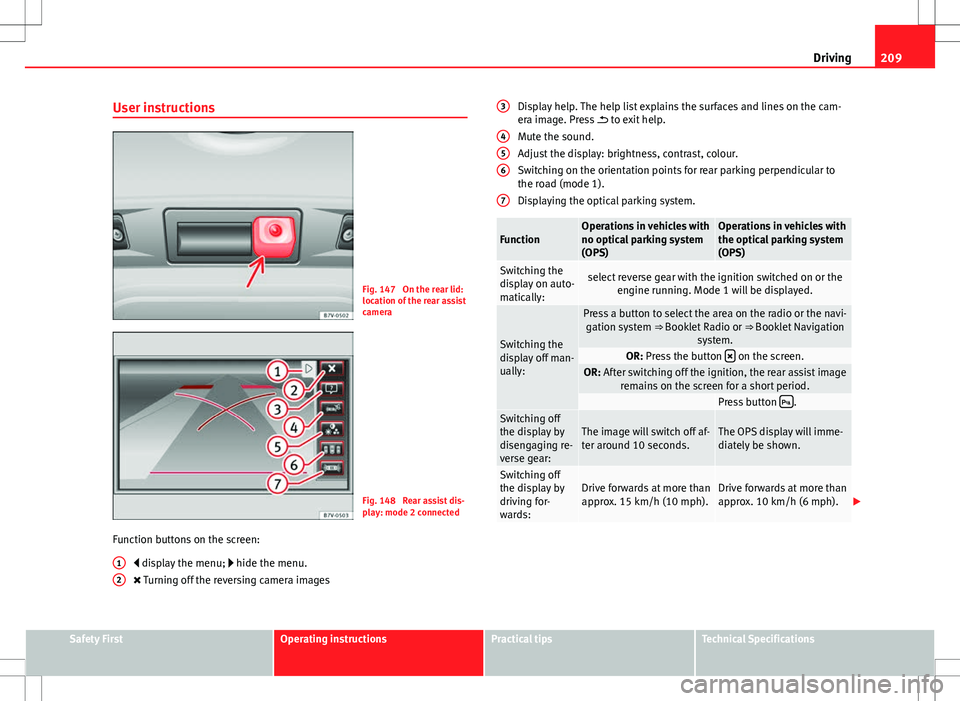
Fig. 147 On the rear lid:
location of the rear assist
camera
Fig. 148 Rear assist dis-
play: mode 2 connected
Function buttons on the screen: display the menu; hide the menu.
Turning off the reversing camera images
1
2
Display help. The help list explains the surfaces and lines on the cam-
era image. Press
to exit help.
Mute the sound.
Adjust the display: brightness, contrast, colour.
Switching on the orientation points for rear parking perpendicular to
the road (mode 1).
Displaying the optical parking system.
FunctionOperations in vehicles with
no optical parking system
(OPS)Operations in vehicles with
the optical parking system
(OPS)
Switching the
display on auto-
matically:select reverse gear with the ignition switched on or the engine running. Mode 1 will be displayed.
Switching the
display off man-
ually:
Press a button to select the area on the radio or the navi-gation system ⇒ Booklet Radio or ⇒ Booklet Navigation
system.
OR: Press the button on the screen.OR: After switching off the ignition, the rear assist image
remains on the screen for a short period.
Press button .Switching off
the display by
disengaging re-
verse gear:The image will switch off af-
ter around 10 seconds.The OPS display will imme-
diately be shown.
Switching off
the display by
driving for-
wards:Drive forwards at more than
approx. 15 km/h (10 mph).Drive forwards at more than
approx. 10 km/h (6 mph).
3
456
7
Safety FirstOperating instructionsPractical tipsTechnical Specifications
Page 260 of 387
258Vehicle maintenance and cleaning
Notes for the user
Labels and plates
Some parts in the engine compartment come from the factory with certifi-
cates of safety, labels or plates containing important information regarding
the operation of the vehicle, for example, on the petrol cap, on the passeng-
er's sun visor, on the driver door strut, or on the floor of the luggage com-
partment.
● Never remove these certificates of safety, labels or plates, and ensure
they are kept in good condition and are legible.
● If a vehicle part, bearing a certificate of safety, label or plate, is re-
placed, the specialised workshop should attach the information back in the
same place.
Certificate of safety
A certificate of safety on the door strut states that all the safety standards
and regulations established by the national traffic authorities responsible
for road safety were met at the time of manufacture. It may also give the
month and year of manufacture, together with the chassis number.
Warning of high voltage label*
There is a label close to the bonnet lock which warns of high voltage in the
vehicle electrical installation. The vehicle ignition system complies with sev-
eral standards, including the Canadian standard, ICES-002.
Using your vehicle in other countries and continents
The vehicle is manufactured at the factory for use in a particular country in
accordance with the national legislation in force at the time of manufacture. If the vehicle is sold in another country or used in another country for an ex-
tended period of time, the applicable legislation of that country should be
observed.
It may be necessary to fit or remove certain pieces of equipment or to deac-
tivate certain functions. Service work may also be affected. This is particu-
larly true if the vehicle is used in a different climate for an extended period
of time.
As there are different types of frequency bands around the world, you may
find that the radio or navigation system supplied at the factory does not
work in another country.
CAUTION
● SEAT does not accept liability for any damage to the vehicle due to the
use of a lower quality fuel, an inadequate service or the non-availability of
genuine spare parts.
● SEAT does not accept liability if the vehicle does not comply in part or in
full with the legal requirements of other countries or continents.
Radio reception and the aerial
The aerial of radio and navigation systems fitted at the factory may be
mounted in different parts of the vehicle:
● On the inside of the rear window, next to the rear window heating,
● on the inside of the rear side windows,
● on the inside of the windscreen,
● on the roof of the vehicle.
Aerials mounted on the inside of a window can be recognised by the fine
wires.
Page 265 of 387
263
Accessories, replacement of parts and modifications
Retro-fitting of two-way radios
An exterior aerial is required for the use of two-way radios in the vehicle.
The retro-fitting of electrical or electronic appliances in the vehicle is sub-
ject to their approval for use in your vehicle. Under certain circumstances,
this could mean that your vehicle registration documents are no longer val-
id.
SEAT has approved your vehicle for use with two-way radios providing the
following conditions are observed:
● The exterior aerial must be mounted professionally.
● The maximum transmitting power is 10 watts.
The optimal reach of the equipment is only achieved with an external aerial.
Check first with a specialised workshop if you wish to use a two-way radio
with a transmitting power of over 10 watts. The specialised workshops are
familiar with the technical options for installation. SEAT recommends visit-
ing a Technical Service.
All legal requirements, together with the instructions for the use of two-way
radios must be observed.
WARNING
If the two-way radio is not securely fastened in position, it could be sent
flying around the vehicle in the event of sharp braking, sudden manoeu-
vres or accident, causing injury.
● While driving, two-way radios must be securely fastened in position,
outside the radius of action of the airbags, or safely stowed away.
WARNING
When using a two-way radio without a connection to an exterior aerial,
the maximum permitted levels of electromagnetic radiation may be ex-
ceeded. This is also the case if the aerial has not been correctly installed.
● You should only use a two-way radio inside the vehicle if it has first
been correctly connected to an exterior aerial.
Information stored by the control units
Your vehicle is fitted at the factory with a series of electronic control units
responsible for the engine and gearbox management. In addition, the con-
trol units supervise the performance of the exhaust gas system and the air-
bag systems.
Therefore, while the vehicle is being driven, these electronic control units
are continuously analysing the vehicle data. In the event of faults or devia-
tions from the theoretical values, only this data is stored. Normally, the
warning lamps on the instrument panel light up in the event of faults.
This data can only be read and analysed using special equipment.
The storing of the data allows specialised workshops to detect and repair
faults. Stored data may include:
● Data relating to the engine or the gearbox
● Speed
● Direction of travel
● Braking force
● Detection of seat belt
The vehicle control units never record conversations held by passengers in
the vehicle.
Safety FirstOperating instructionsPractical tipsTechnical Specifications
Page 266 of 387
264Accessories, replacement of parts and modifications
In vehicles equipped with an emergency call function via the mobile phone
or other appliances connected in the vehicle, it is possible to send the vehi-
cle position. If the control unit records an accident with airbag activation,
the system may automatically send a signal. This will depend on the net-
work operator. Normally, transmission is only possible in areas with good
coverage.
Event Data Recorder
The vehicle is not fitted with an event data recorder.
An event data recorder temporarily stores the vehicle information. There-
fore, in the event of accident, it is possible to obtain detailed information
about how the accident occurred. For example, in vehicles with airbag sys-
tems, data relating to speed of impact, seat belt status, seat positions and
airbag activation times may be stored. The volume of data depends on the
manufacturer.
Event data recorders can only be mounted with authorisation from the vehi-
cle owner and, in some countries, they are governed by local legislation.
Reprogramming control units
On the whole, all the data required for the component management is stor-
ed in the control units. The programming of certain convenience functions,
such as the convenience turn signals, individual door opening and instruc-
tions on the display can be modified using special equipment at the work-
shop. If this is the case, the information and descriptions given in the In-
struction Manual will not match the original functions. Therefore, SEAT rec-
ommends that any modifications are recorded in the section “Other work-
shop notes” in the Maintenance Programme.
The Technical Service must have a record of any modification to the pro-
gramming.
Reading the vehicle fault memory
There is a diagnostics connector in the vehicle interior for reading the vehi-
cle fault memory. The fault memory documents errors and deviations from
the theoretical values of the electronic control units. The diagnostics connector is in the driver side footwell area, next to the lev-
er for opening the bonnet, below a cover.
The fault memory should only be read and reset by a specialised workshop.
Using a mobile telephone in a vehicle without connection
to an exterior aerial
Mobile telephones transmit and receive radio waves, both when in use and
when on stand-by. Scientific studies state that radio waves exceeding cer-
tain values may be harmful to the human body. International committees
and authorities have established limits and directives in order to ensure
electromagnetic radiation from mobile phones remains within certain limits
that do not endanger human health. Nevertheless, there is no conclusive
scientific evidence that wireless telephones are totally safe.
Therefore, some experts recommend that use of mobile phone be kept to a
minimum until the results of current research are published.
When a mobile phone not connected to an exterior aerial is used inside the
vehicle, the electromagnetic radiation may be greater than if the mobile
phone were connected to a built-in aerial or to another exterior aerial.
If the vehicle is fitted with a suitable hands-free device, it will comply with
the legislation in many countries which only permits the use of mobile
phones inside vehicles using a hands-free device.
The hands-free system mounted at the factory has been designed for use
with conventional mobile phones and phones with Bluetooth technology.
Mobile phones should be placed on a suitable phone cradle. In addition,
the cradle should always be correctly fitted into the base plate. This ensures
that the mobile phone is securely attached to the dash panel, it is always
within reach of the driver and is connected to the vehicle exterior aerial.
If the mobile phone is connected to an aerial incorporated into the vehicle
or an exterior aerial connected to the vehicle, this will help to reduce the
Page 269 of 387
267
Checking and refilling levels
Checking and refilling levels Filling the tank
Introduction
The fuel tank flap is on the rear right of the vehicle.
Additional information and warnings:
● Fuel ⇒ page 270
● Selective Catalytic Reduction (AdBlue) ⇒ page 274
● Working in the engine compartment ⇒ page 278
WARNING
Refuelling or handling fuel carelessly can cause an explosion or fire re-
sulting in serious burns and injuries.
● Always make sure that you correctly close the fuel cap to avoid evap-
oration and fuel spillage.
● Fuels are highly explosive and inflammable substances that can
cause serious burns and injuries.
● Fuel could leak out or be spilt if the engine is not switched off or if the
filler fuel nozzle is not fully inserted into the tank filler neck when refuel-
ling. This could lead to a fire, explosion and severe injuries.
● When refuelling, turn off the engine, the auxiliary heating
(⇒ page 164) and turn off the ignition for safety reasons.
● Always turn off mobile telephones, radio apparatus and other radio
wave emitting equipment before refuelling. Electromagnetic waves could
cause sparks and lead to a fire.
WARNING (Continued)
● Never enter the vehicle while refuelling. If it is absolutely necessary
to enter the vehicle, close the door and touch a metal surface before
touching the filler nozzle again. This will prevent the generation of static
electricity. Sparks could cause a fire when refuelling.
● Never handle fuel close to open flames, sparks or objects with slow
combustion (e.g. cigarettes).
● Avoid static electricity and electro-magnetic radiation when refuel-
ling.
● Observe the safety regulations of the service station.
● Never spill fuel on the vehicle or in the luggage compartment.
WARNING
For safety reasons, SEAT does not recommend carrying a spare fuel canis-
ter in the vehicle. Fuel could be spilled and catch fire, above all in case of
an accident and this applies to a full container as well as empty contain-
ers. This could lead to explosions, fires and injuries.
● Observe the following if you exceptionally have to carry fuel in a can-
ister:
–Never place a fuel container to fill it inside the vehicle or on the ve-
hicle, for example, in the luggage compartment or on the rear lid. Fill-
ing in these circumstances could create an electrostatic charge and
spark that could ignite fuel fumes.
– Always place the canister on the ground to fill it.
– Insert the fuel nozzle into the neck of the canister as far as possi-
ble.
Safety FirstOperating instructionsPractical tipsTechnical Specifications
Page 378 of 387
N
Net Luggage compartment . . . . . . . . . . . . . . . . 138
Net partition . . . . . . . . . . . . . . . . . . . . . . . . . . . 133
New engine . . . . . . . . . . . . . . . . . . . . . . . . . . . . 228
New tyres . . . . . . . . . . . . . . . . . . . . . . . . . . . . . 299
New tyres and wheels About your tyres and wheels . . . . . . . . . . . 297
Noise Auxiliary heater . . . . . . . . . . . . . . . . . . . . . 167
Engine . . . . . . . . . . . . . . . . . . . . . . . . . . . . . 272
Parking brake . . . . . . . . . . . . . . . . . . . . . . . 187
Tyres . . . . . . . . . . . . . . . . . . . . . . . . . . . . . . 304
Noises Brake assist systems . . . . . . . . . . . . . . . . . 192
Engine . . . . . . . . . . . . . . . . . . . . . . . . . . . . . 174
Notes for the user . . . . . . . . . . . . . . . . . . . . . . . 258
Number of seats . . . . . . . . . . . . . . . . . . . . . . . . . 10
O Octane rating . . . . . . . . . . . . . . . . . . . . . . . . . . 271
Odometer . . . . . . . . . . . . . . . . . . . . . . . . . . . . . . 57
Oil See engine oil . . . . . . . . . . . . . . . . . . . . . . . 282
Older tyres . . . . . . . . . . . . . . . . . . . . . . . . . . . . 298
Onboard diagnostic system (ODB) . . . . . . . . . 264
Opening Doors . . . . . . . . . . . . . . . . . . . . . . . . . . . . . . . 80
Electric sliding door . . . . . . . . . . . . . . . . . . . 81
Electric windows . . . . . . . . . . . . . . . . . . . . . . 89 From the inside . . . . . . . . . . . . . . . . . . . . . . . 77
Panoramic sliding sunroof . . . . . . . . . . . . . . 92
Rear lid . . . . . . . . . . . . . . . . . . . . . . . . . . . . . 85
See "Unlocking" . . . . . . . . . . . . . . . . . . . . . . 76
Sliding doors . . . . . . . . . . . . . . . . . . . . . . . . 80
Sun blind . . . . . . . . . . . . . . . . . . . . . . . . . . . 93
Opening doors individually . . . . . . . . . . . . . . . . 75
Operating fault Immobiliser . . . . . . . . . . . . . . . . . . . . . . . . . 171
Operating faults Radio reception . . . . . . . . . . . . . . . . . . . . . 259
Optical parking system . . . . . . . . . . . . . . . . . . 201
Outside temperature . . . . . . . . . . . . . . . . . . . . . 59
Overview Dash panel . . . . . . . . . . . . . . . . . . . . . . . . . . 53
P Panoramic sliding sunroof . . . . . . . . . . . . . . . . . 92 Anti-trap function . . . . . . . . . . . . . . . . . . . . . 94
Closing . . . . . . . . . . . . . . . . . . . . . . . . . . . . . 92
Convenience closing . . . . . . . . . . . . . . . . . . 94
Convenience opening . . . . . . . . . . . . . . . . . 94
Emergency locking . . . . . . . . . . . . . . . . . . . 321
Fault . . . . . . . . . . . . . . . . . . . . . . . . . . . . . . . 92
Opening . . . . . . . . . . . . . . . . . . . . . . . . . . . . 92
Sun blind . . . . . . . . . . . . . . . . . . . . . . . . . . . 93
Park Assist . . . . . . . . . . . . . . . . . . . . . . . . . . . . 203 Brake operation . . . . . . . . . . . . . . . . . . . . . 206
Park assist system Automatic stoppage . . . . . . . . . . . . . . . . . . 206
Fault . . . . . . . . . . . . . . . . . . . . . . . . . . . . . . 204
Leaving the parking space . . . . . . . . . . . . . 206 Parking . . . . . . . . . . . . . . . . . . . . . . . . . . . . 205
Preparing to park . . . . . . . . . . . . . . . . . . . . 204
Stopping . . . . . . . . . . . . . . . . . . . . . . . . . . . 205
Switching on or off (leaving the parking
space) . . . . . . . . . . . . . . . . . . . . . . . . . . . 206
Switching on or off (parking) . . . . . . . . . . . 205
Park Assist system . . . . . . . . . . . . . . . . . . . . . . 203
Parking . . . . . . . . . . . . . . . . . . . . . . . . . . . 184, 187
Parking aid . . . . . . . . . . . . . . . . . . . . . . . . . . . . 200
Parking aid system Use of high pressure cleaning equipment 247
Parking brake . . . . . . . . . . . . . . . . . . . . . . . . . . 186 Automatic release . . . . . . . . . . . . . . . . . . . 186
Connection . . . . . . . . . . . . . . . . . . . . . . . . . 186
Emergency braking function . . . . . . . . . . . 187
Release . . . . . . . . . . . . . . . . . . . . . . . . . . . . 186
See "Parking brake" . . . . . . . . . . . . . . . . . . 186
Parking distance warning system Use of high pressure cleaning equipment 247
Parking indicator . . . . . . . . . . . . . . . . . . . . . . . 200
Parking light . . . . . . . . . . . . . . . . . . . . . . . . . . . . 98
Parking sensor system . . . . . . . . . . . . . . . 199, 200 Fault . . . . . . . . . . . . . . . . . . . . . . . . . . . . . . 200
Optical parking system . . . . . . . . . . . . . . . 201
With towing bracket . . . . . . . . . . . . . . . . . . 200
Particulate filter . . . . . . . . . . . . . . . . . . . . . . . . 232
Pedals . . . . . . . . . . . . . . . . . . . . . . . . . . . . . 12, 177
Petrol Additives . . . . . . . . . . . . . . . . . . . . . . . . . . . 271
Filling the tank . . . . . . . . . . . . . . . . . . . . . . 269
Fuel . . . . . . . . . . . . . . . . . . . . . . . . . . . . . . . 271
Fuel gauge . . . . . . . . . . . . . . . . . . . . . . . . . 268
Types . . . . . . . . . . . . . . . . . . . . . . . . . . . . . . 271
376 Index