ignition Seat Alhambra 2013 Owner's Guide
[x] Cancel search | Manufacturer: SEAT, Model Year: 2013, Model line: Alhambra, Model: Seat Alhambra 2013Pages: 387, PDF Size: 6.13 MB
Page 79 of 387
77
Opening and closing
Locking and unlocking the vehicle from the inside
Fig. 47 In the driver
door: central locking but-
ton
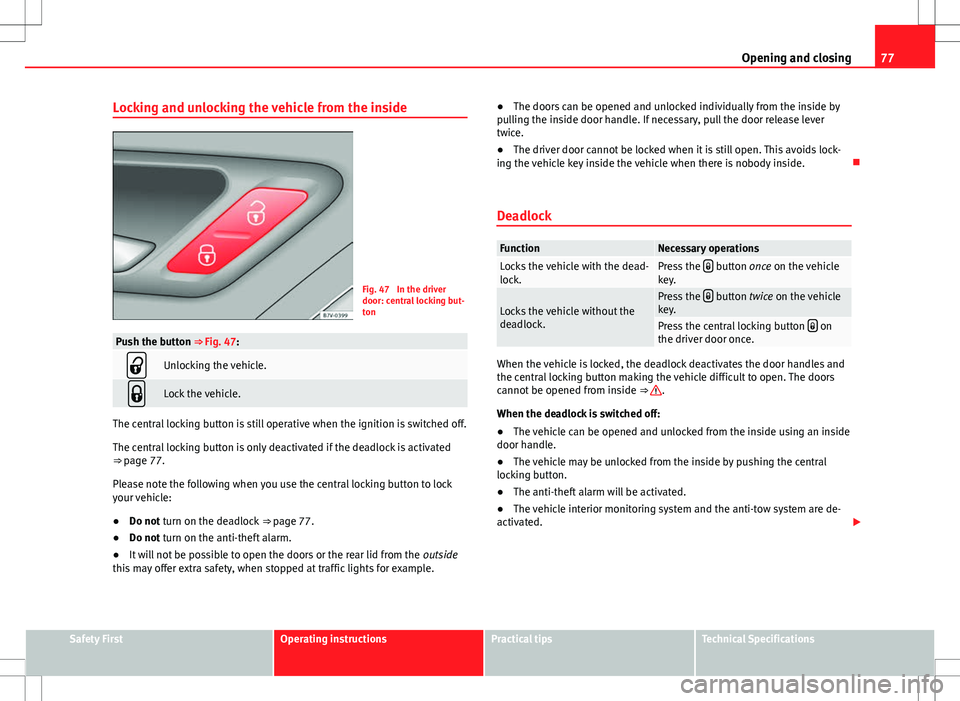
Push the button ⇒ Fig. 47:
Unlocking the vehicle.
Lock the vehicle.
The central locking button is still operative when the ignition is switched off.
The central locking button is only deactivated if the deadlock is activated
⇒ page 77.
Please note the following when you use the central locking button to lock
your vehicle:
● Do not turn on the deadlock ⇒ page 77.
● Do not turn on the anti-theft alarm.
● It will not be possible to open the doors or the rear lid from the outside
this may offer extra safety, when stopped at traffic lights for example. ●
The doors can be opened and unlocked individually from the inside by
pulling the inside door handle. If necessary, pull the door release lever
twice.
● The driver door cannot be locked when it is still open. This avoids lock-
ing the vehicle key inside the vehicle when there is nobody inside.
Deadlock
FunctionNecessary operationsLocks the vehicle with the dead-
lock.Press the button once on the vehicle
key.
Locks the vehicle without the
deadlock.Press the button twice on the vehicle
key.
Press the central locking button on
the driver door once.
When the vehicle is locked, the deadlock deactivates the door handles and
the central locking button making the vehicle difficult to open. The doors
cannot be opened from inside ⇒
.
When the deadlock is switched off:
● The vehicle can be opened and unlocked from the inside using an inside
door handle.
● The vehicle may be unlocked from the inside by pushing the central
locking button.
● The anti-theft alarm will be activated.
● The vehicle interior monitoring system and the anti-tow system are de-
activated.
Safety FirstOperating instructionsPractical tipsTechnical Specifications
Page 80 of 387
78Opening and closing
Driver door control lamp.
When the vehicle is locked:MeaningThe red LED flashes for approximately 2
seconds at short intervals and then more
slowly.The deadlock is switched on.
The red LED flashes for about two sec-
onds then turns off. After 30 seconds, the
LED flashes again.The deadlock is switched off.
The red LED remains lit for about 30 sec-
onds.There is a fault in the locking
system. Contact a specialised
workshop.
WARNING
Careless use of the deadlock can cause serious injury.
● Never leave anybody inside the vehicle if this is locked using the key.
When the deadlock is activated, doors cannot be opened from the inside!
● When the doors are locked, it is difficult to get to passengers in the
vehicle interior in case of an emergency. Passengers could remain trap-
ped inside in case of emergency.
Anti-theft alarm
The anti-theft alarm makes it more difficult to break into the vehicle or steal
it.
The anti-theft alarm is automatically turned on when the vehicle is locked
with the key.
When does the system trigger an alarm?
The anti-theft alarm siren will be triggered for about 30 seconds accompa-
nied by optical warning signals for about five minutes when the vehicle is
locked and the following unauthorised actions are taken: ●
When the door is mechanically unlocked using the vehicle key without
turning the ignition within the following 15 seconds.
● A door is opened.
● The bonnet is opened.
● The rear lid is opened.
● When the ignition is switched on with a non-authorised key.
● When the vehicle battery is disconnected.
● When there is movement inside the vehicle (vehicles with interior moni-
toring).
● When the vehicle is towed (vehicles with anti-tow system)
● When the vehicle is lifted (vehicles with anti-tow system).
● Transporting the vehicle on a ferry or by railroad (vehicles with an anti-
tow system or interior monitoring).
● Unhitch a trailer connected to the anti-theft alarm ⇒ page 236.
How to turn OFF the alarm
Unlock the vehicle with the unlocking button on the key or turn on the igni-
tion with a valid key.
Note
● The alarm will be triggered once more when anybody enters the same
zone of surveillance or any other zone. If, for example, after opening a door,
the rear lid is also opened.
● The anti-theft alarm is not activated when the vehicle is locked from
within using the central locking button
.
● If the driver door is unlocked mechanically with the key, only the driver
door is unlocked, the rest of the doors remain locked. Only when the igni-
tion has been turned on will the other doors be available - but not unlocked
- and the central lock button activated.
● If the vehicle battery is run down or flat then the anti-theft alarm will not
operate correctly.
Page 82 of 387
80Opening and closing
Doors
Introduction
Additional information and warnings:
● Vehicle key set ⇒ page 71
● Central locking and locking system ⇒ page 74
● Emergency locking and unlocking ⇒ page 317
WARNING
If a door is not correctly closed, it could open unexpectedly when driving
and cause serious injuries.
● Always stop immediately and close the door.
● When closing, ensure that the door has closed correctly. A closed
door should be flush with the corresponding parts of the bodywork.
● Open and close doors only when nobody is in the way of the door.
WARNING
A door held open by its retainer could be blown closed by the wind or
close if the vehicle is on a hill causing injury.
● When opening and closing doors, always use the door handle.
Warning lamp
lights upPossible causeSolution
At least one vehicle door is
open or not correctly shut. Stop driving immediately!
Open the corresponding door
and close it immediately.
Several warning and control lamps should light up for a few seconds when
the ignition is switched on, signalling that the function is being verified.
They will switch off after a few seconds.
If a door is open or incorrectly closed, the warning lamp or on the in-
strument panel will light.
Depending on the vehicle equipment, a symbol may be displayed on the
dash panel screen instead of the warning lamp. The indication is also visi-
ble when the ignition is switched off. The indication disappears around 15
seconds after the vehicle has been locked.
Sliding doors Introduction
Additional information:
● Vehicle key set ⇒ page 71
● Central locking and locking system ⇒ page 74
● Emergency locking and unlocking ⇒ page 317
WARNING
If a sliding door is not correctly closed, it could open unexpectedly when
driving and cause serious injuries.
● Always stop immediately and close the sliding door.
● When closing, ensure that the sliding door has closed correctly. A
closed sliding door should be flush with the corresponding parts of the
bodywork.
● Only open and close sliding doors when no body is in the way of the
door.
Page 84 of 387
82Opening and closing
FunctionNecessary operations
Opens the sliding door electri-
cally.
Press the ⇒ Fig. 50 button on the dash
panel, on the remote control key and on
the interior lining of the sliding door.
The sliding door opens with the rollback
anti-trap function as long as the button
is not pressed again.
Pull briefly on the interior or exterior
handle the door. The sliding door opens
automatically.
Closing the sliding door electri-
cally.
Press the ⇒ Fig. 50 button on the dash
panel, on the remote control key and on
the interior lining of the sliding door.
The sliding door closes with the rollback
anti-trap function as long as the button
is not pressed again. As it closes, a
warning sound is given.
Pull briefly on the interior or exterior
handle the door. The sliding door closes
with the roll-back function. As it closes,
a warning sound is given.
Note
● When the fuel tank cover is open, the right-hand side electric sliding
door is locked and can only be opened manually.
● If the window of a sliding door is lowered them this door cannot open
fully.
Rollback anti-trap function of the electric sliding doors
The rollback anti-trap function of the electric sliding doors can reduce the
risk of injury when opening and closing the sliding doors ⇒ .If an object gets in the way of the sliding door while it is
closing, it opens
again.
If an object gets in the way of the sliding door while it is opening, the door
stops moving.
● Check the reason for which the sliding door does not open or close.
● Try to open or close the sliding door again.
To close the sliding door without the rollback anti-trap function
● Turn off the ignition and turn it on again.
● Press and hold the
⇒ Fig. 50 button. The sliding door closes with
full force.
WARNING
Closing the electric windows without the anti-trap function can cause se-
rious injury.
● Always close the sliding doors carefully.
● Nobody should ever get in the way of the electric sliding doors, espe-
cially when closing without the anti-trap function.
● The anti-trap function does not prevent fingers or other parts of the
body getting pinched against the window frame and causing injury.
Page 86 of 387
84Opening and closing
WARNING (Continued)
● Ensure the rear lid is locked after closing, otherwise, it may open un-
expectedly while driving. A closed rear lid should be flush with the corre-
sponding parts of the bodywork.
● Always keep the rear lid closed while driving to avoid toxic gases en-
tering the vehicle interior.
● Do not open the rear lid when there is a load carrier installed. Like-
wise, the rear lid cannot be opened when a load is attached to it, for ex-
ample bicycles. An open rear lid could close itself if there is an additional
weight on it. If necessary, press down on the rear lid and remove the
load.
● Close and lock both the rear lid and all the other doors when you are
not using the vehicle. Ensure that nobody remains inside the vehicle.
● Never allow children to play inside or around the vehicle without su-
pervision, especially if the rear lid is open. Children could enter the lug-
gage compartment, close the rear lid and become trapped. Depending on
the time of the year, temperatures inside a locked and closed vehicle can
be extremely high or extremely low resulting in serious injuries and ill-
ness or even death, particularly for young children.
● Never leave children or disabled people alone in the vehicle. If the ve-
hicle key or the central locking button is used, they may be locked in the
vehicle.
CAUTION
Before opening the rear lid, ensure that there is sufficient free space to
open and close it, for example if you are towing a trailer or in a garage. Warning lamp
lights upPossible causeSolution
The rear lid is open or not
correctly shut.
Stop driving immediately!
Open the rear lid and close it
again.
Several warning and control lamps should light up for a few seconds when
the ignition is switched on, signalling that the function is being verified.
They will switch off after a few seconds.
A warning lamp appears on the instrument panel if the rear lid is open or
not properly closed.
Depending on the vehicle equipment, a symbol may be displayed on the
dash panel screen instead of the warning lamp. The indication is also visi-
ble when the ignition is switched off. The indication disappears around 15
seconds after the vehicle has been locked.
WARNING
If the rear lid is not correctly closed, it could open unexpectedly when
driving and cause serious injuries.
● Always stop immediately and close the rear lid.
● Ensure that the rear lid has been locked into place by the element on
the lock carrier when you close it.
Page 87 of 387
85
Opening and closing
Opening the rear lid
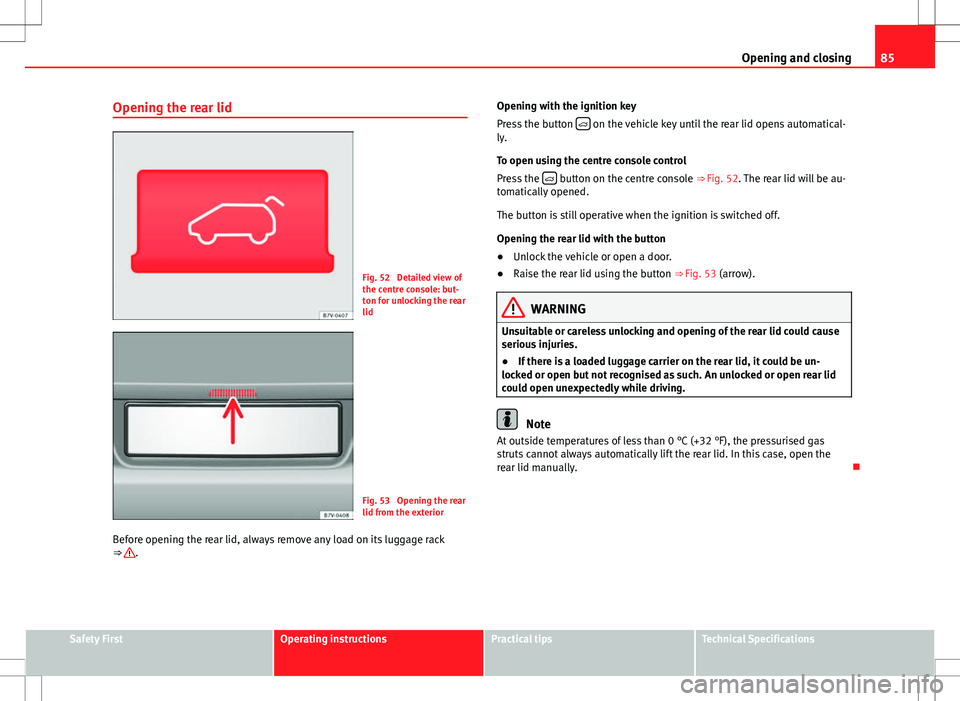
Fig. 52 Detailed view of
the centre console: but-
ton for unlocking the rear
lid
Fig. 53 Opening the rear
lid from the exterior
Before opening the rear lid, always remove any load on its luggage rack
⇒
. Opening with the ignition key
Press the button
on the vehicle key until the rear lid opens automatical-
ly.
To open using the centre console control
Press the
button on the centre console ⇒ Fig. 52. The rear lid will be au-
tomatically opened.
The button is still operative when the ignition is switched off.
Opening the rear lid with the button
● Unlock the vehicle or open a door.
● Raise the rear lid using the button ⇒ Fig. 53 (arrow).
WARNING
Unsuitable or careless unlocking and opening of the rear lid could cause
serious injuries.
● If there is a loaded luggage carrier on the rear lid, it could be un-
locked or open but not recognised as such. An unlocked or open rear lid
could open unexpectedly while driving.
Note
At outside temperatures of less than 0 °C (+32 °F), the pressurised gas
struts cannot always automatically lift the rear lid. In this case, open the
rear lid manually.
Safety FirstOperating instructionsPractical tipsTechnical Specifications
Page 90 of 387
88Opening and closing
WARNING
It is possible that the rear lid does not open completely or, if it is open,
closes alone if a large amount of snow has built up on it or if a luggage
rack is fitted. In this case, the rear lid must be supported.
CAUTION
● When using a trailer, ensure that there is sufficient space to open and
close the rear lid.
● Before opening the rear lid, any kind of equipment carrier should be re-
moved, for example a bicycle carrier.
CAUTION
In case of repeated short-term use, the system is turned off to avoid over-
heating.
● When it has cooled, it may be used once again. During this time, the
rear lid may be manually opened or closed applying a little more effort.
● If the vehicle battery is disconnected or the fuse blows when the rear lid
is open, the rear lid system must be re-initialised. To do this, close the rear
lid.
Note
Before closing the rear lid, make sure that the key has not been left inside
the luggage compartment. Electric windows
Introduction
Additional information and warnings:
● SEAT information system ⇒ page 62
● Central locking and locking system ⇒ page 74
WARNING
Careless use of the electric windows can cause serious injury.
● Only operate the electric windows when nobody is in the way.
● Never leave children or disabled people alone in the vehicle if the
doors are to be locked. The windows cannot be opened in case of an
emergency.
● Always take all the keys with you whenever you leave the vehicle. Af-
ter turning off the ignition, the windows can be opened and closed for a
short time using the buttons on the door as long as the driver door or
passenger side door is not open.
● When transporting children in the rear seats, always deactivate the
rear electric windows with the child safety lock so that they cannot be
opened and closed.
Page 91 of 387
89
Opening and closing
Opening and closing the electric windows
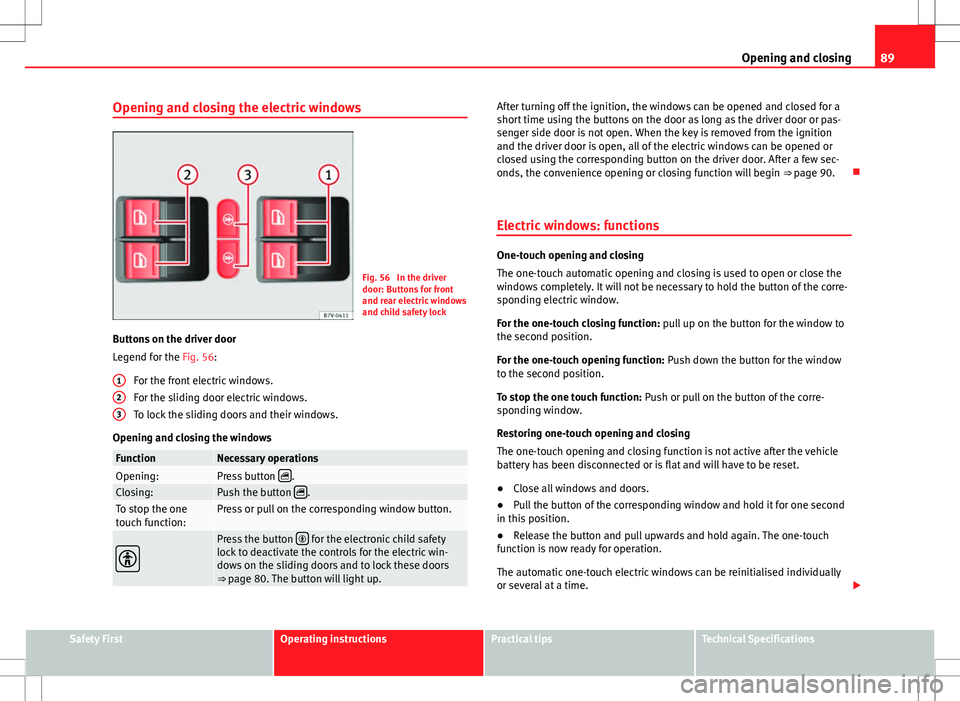
Fig. 56 In the driver
door: Buttons for front
and rear electric windows
and child safety lock
Buttons on the driver door
Legend for the Fig. 56: For the front electric windows.
For the sliding door electric windows.
To lock the sliding doors and their windows.
Opening and closing the windows
FunctionNecessary operationsOpening:Press button .Closing:Push the button .To stop the one
touch function:Press or pull on the corresponding window button.
Press the button for the electronic child safety
lock to deactivate the controls for the electric win-
dows on the sliding doors and to lock these doors
⇒ page 80. The button will light up.
123
After turning off the ignition, the windows can be opened and closed for a
short time using the buttons on the door as long as the driver door or pas-
senger side door is not open. When the key is removed from the ignition
and the driver door is open, all of the electric windows can be opened or
closed using the corresponding button on the driver door. After a few sec-
onds, the convenience opening or closing function will begin ⇒ page 90.
Electric windows: functions
One-touch opening and closing
The one-touch automatic opening and closing is used to open or close the
windows completely. It will not be necessary to hold the button of the corre-
sponding electric window.
For the one-touch closing function: pull up on the button for the window to
the second position.
For the one-touch opening function: Push down the button for the window
to the second position.
To stop the one touch function: Push or pull on the button of the corre-
sponding window.
Restoring one-touch opening and closing
The one-touch opening and closing function is not active after the vehicle
battery has been disconnected or is flat and will have to be reset.
● Close all windows and doors.
● Pull the button of the corresponding window and hold it for one second
in this position.
● Release the button and pull upwards and hold again. The one-touch
function is now ready for operation.
The automatic one-touch electric windows can be reinitialised individually
or several at a time.
Safety FirstOperating instructionsPractical tipsTechnical Specifications
Page 92 of 387
90Opening and closing
Convenience opening and closing function
The electric windows can be opened or closed from outside using the vehi-
cle key:
● Keep the vehicle unlocking or locking button pressed. All windows
which function electrically will be either opened or closed.
● To interrupt the function, release the locking or unlocking button.
During convenience closing, first the windows and then the sliding sunroof
will be closed.
In the Configuration - convenience menu, there are different settings for oper- ating the windows ⇒ page 62.
WARNING
Careless use of the electric windows can cause serious injury.
● Only operate the electric windows when nobody is in the way.
● Never leave children or disabled people alone in the vehicle if the
doors are to be locked. The windows cannot be opened in case of an
emergency.
● Always take all the keys with you whenever you leave the vehicle. Af-
ter turning off the ignition, the windows can be opened and closed for a
short time using the buttons on the door as long as the driver door or
passenger side door is not open.
● When transporting children in the rear seats, always deactivate the
rear electric windows with the child safety lock so that they cannot be
opened and closed.
Note
The one-touch function and roll-back function will not work if there is a mal-
function in the electric windows. Visit a specialised workshop. Electric Windows anti-trap function
The anti-trap function of the electric windows can reduce the risk of injury
when opening and closing the electric windows
⇒ . If a window is not
able to close because it is stiff or because of an obstruction, it will automati-
cally open again.
● Check why the window does not close.
● Attempt to close the window again.
● If you try within the following 10 seconds and the window closes with
difficulty or there is an obstruction once again, the one-touch closing will
stop working for 10 seconds.
● If the window is still obstructed, it will stop at the corresponding posi-
tion. When the button is operated within 10 seconds, the window will close
without the anti-trap function ⇒
.
To close windows without the anti-trap function
● Attempt to close the corresponding electric window within 10 seconds
after by holding the button. The window is closed without the anti-trap
function, deactivated for a short time.
● After more than 10 seconds, the anti-trap function is reactivated. The
window will stop once again if there is another difficulty or obstacle.
● If the window will still not close, visit a specialised workshop.
WARNING
Closing the electric windows without the anti-trap function can cause se-
rious injury.
● Always close the electric windows carefully.
● Nobody should be in the way of the electric windows, especially when
the anti-trap function is deactivated.
● The anti-trap function does not prevent fingers or other parts of the
body getting pinched against the window frame and causing injury.
Page 93 of 387
91
Opening and closing
Note
The anti-trap function also operates if the windows are closed from the out-
side of the vehicle using the ignition key for convenience closing
⇒ page 90.
Safety FirstOperating instructionsPractical tipsTechnical Specifications