page 74 Seat Alhambra 2013 Repair Manual
[x] Cancel search | Manufacturer: SEAT, Model Year: 2013, Model line: Alhambra, Model: Seat Alhambra 2013Pages: 387, PDF Size: 6.13 MB
Page 100 of 387
98Lights and visibility
if the ignition is switched offwhen the ignition is on
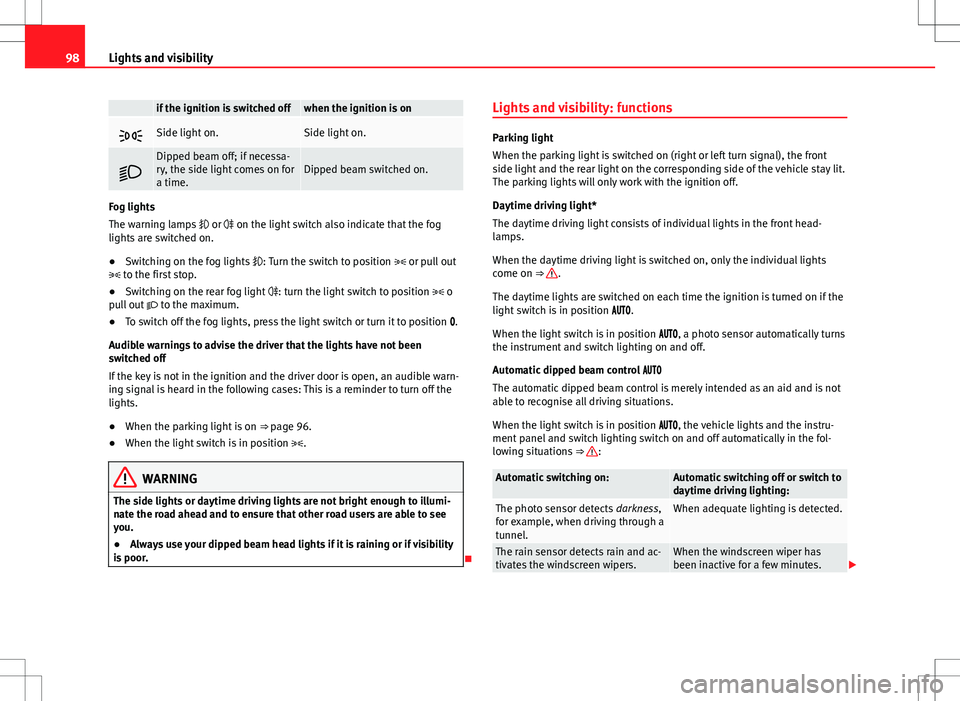
Side light on.Side light on.
Dipped beam off; if necessa-
ry, the side light comes on for
a time.Dipped beam switched on.
Fog lights
The warning lamps or on the light switch also indicate that the fog
lights are switched on.
● Switching on the fog lights : Turn the switch to position or pull out
to the first stop.
● Switching on the rear fog light : turn the light switch to position o
pull out to the maximum.
● To switch off the fog lights, press the light switch or turn it to position .
Audible warnings to advise the driver that the lights have not been
switched off
If the key is not in the ignition and the driver door is open, an audible warn-
ing signal is heard in the following cases: This is a reminder to turn off the
lights.
● When the parking light is on ⇒ page 96.
● When the light switch is in position .
WARNING
The side lights or daytime driving lights are not bright enough to illumi-
nate the road ahead and to ensure that other road users are able to see
you.
● Always use your dipped beam head lights if it is raining or if visibility
is poor.
Lights and visibility: functions
Parking light
When the parking light is switched on (right or left turn signal), the front
side light and the rear light on the corresponding side of the vehicle stay lit.
The parking lights will only work with the ignition off.
Daytime driving light*
The daytime driving light consists of individual lights in the front head-
lamps.
When the daytime driving light is switched on, only the individual lights
come on ⇒
.
The daytime lights are switched on each time the ignition is turned on if the
light switch is in position .
When the light switch is in position , a photo sensor automatically turns
the instrument and switch lighting on and off.
Automatic dipped beam control
The automatic dipped beam control is merely intended as an aid and is not
able to recognise all driving situations.
When the light switch is in position , the vehicle lights and the instru-
ment panel and switch lighting switch on and off automatically in the fol-
lowing situations ⇒
:
Automatic switching on:Automatic switching off or switch to
daytime driving lighting:
The photo sensor detects darkness,
for example, when driving through a
tunnel.When adequate lighting is detected.
The rain sensor detects rain and ac-
tivates the windscreen wipers.When the windscreen wiper has
been inactive for a few minutes.
Page 101 of 387
99
Lights and visibility
Adaptive headlights (AFS)
The adaptive headlights only operate when the dipped beam is on and at
speeds of over 10 km/h (6 mph). When taking a bend, the adaptive head-
lights automatically light up the road better.
The adaptive headlights can be switched on and off from the infotainment
system.
Static turning lights
When turning slowly to change direction or going round a tight bend, the
static cornering lights automatically come on. The static cornering lights on-
ly work at speeds of less than 40 km/h (25 mph).
The static cornering lights may be incorporated into the fog lights or the
front headlights, depending upon the equipment.
WARNING
If the road is not well lit and other road users cannot see the vehicle well
enough or at all, accidents may occur.
● The automatic dipped beam control ( ) only switches on the dip-
ped beam when there are no changes in brightness, and not, for example
when it is foggy.
● Never drive with daytime lights if the road is not well lit due to weath-
er or lighting conditions. Daytime lights do not provide enough light to
illuminate the road properly or be seen by other road users.
Headlight adjustment
Headlight adjustment (Light Assist)
The headlight adjustment automatically connects and disconnects the main
beam headlights depending on the environmental and traffic conditions
and on the speed, within the limitations of the system ⇒
. This is moni-tored by a sensor located on the inside of the windscreen, above the interior
rear vision mirror.
The automatic headlight adjustment automatically switches on the main
beam depending on the vehicles travelling in front and in the opposite di-
rection, and of other environmental and traffic conditions from an approxi-
mate speed of 60 km/h (37 mph) and turns them off again at speeds below
approximately 30 km/h (18 mph).
Switching on and off
How it worksSwitching
on:– With the ignition on, turn the lights control to the position
and put the turn signal and main beam lever in the
main beam position ⇒ page 96. When the headlight adjust-
ment (automatic also) is activated, the warning lamp lights
up in the instrument panel display
.
Switching
off:– Disconnect the on button.
– OR: turn the lights control to a different position to
⇒ page 97.
– OR: place the turn signal and main beam lever in the
headlight flasher or main beam position ⇒ page 96.
The following conditions can cause the headlight adjustment to fail to turn
off the main beam or fail to do so in time:
●On roads with insufficient lighting with very reflective signs
● If road users are insufficiently lit up, e.g. pedestrians or cyclists
● On closed curves, when the traffic in the opposite direction is partially
hidden, on pronounced slopes
● On roads with traffic in the opposite direction and with a central reserva-
tion barrier when the driver can see through gaps or over it e.g. lorry drivers
● If the camera is damaged or if the power supply has been cut off
● In the event of fog, snow or heavy rain
● In the event of dust or sand storms
Safety FirstOperating instructionsPractical tipsTechnical Specifications
Page 102 of 387
100Lights and visibility
● If the windscreen is damaged by the impact from a stone in the camera's
field of vision
● If the camera's field of vision is misted up, dirty or covered by a sticker,
snow or ice.
WARNING
The greater comfort that the headlight adjustment provides (automatic
also) must not cause you to take risks. The system is not a replacement
for driver awareness.
● Always monitor the lights yourself and adjust them depending on the
light, visibility and traffic conditions.
● The headlight adjustment (automatic also) may not correctly detect
all situations and in certain situations may only provide limited function.
● If the windscreen is damaged or modifications are made to the vehi-
cle lighting, this may harm the functioning of the headlight adjustment
(automatic also), for example, if additional headlight are fitted.
Note
Main beam and flashed headlights can be turned on and off manually at
any time with the turn signal and main beam lever ⇒ page 96.
Adhesive strips for headlights or adjusting headlights
In those countries where vehicles drive on the other side of the road to the
home country, the asymmetric dipped beam may dazzle drivers of oncom-
ing vehicles. Therefore, when driving abroad, adhesive strips should be at-
tached to the headlights or the headlights should be adjusted accordingly.
The direction of the headlights can be adjusted from the instrument panel,
in the Tourist light submenu of the Configuration menu
⇒ page 67. For those vehicles in which it is not possible to adjust the headlights from
the menu, adhesive strips are used to cover certain parts of the headlamp
cover or the headlights may be adjusted at a specialised workshop. For fur-
ther information, please refer to a specialised workshop. SEAT recommends
visiting a Technical Service.
Note
Use of the Tourist light option and the adhesives on the headlights is only
allowed if they are to be used for a short period of time. To modify the direc-
tion of the headlights permanently, please take the vehicle to a specialised
workshop. SEAT recommends visiting a Technical Service.
“Coming home” and “Leaving home” function (guidance
lights)
The “Coming home” function should be switched on manually. However the
“Leaving home” function is automatically controlled by a photo sensor.
“Coming home”Necessary operations
To switch sys-
tem on:
– Switch off the ignition.
– Briefly flash the headlights for approximately one sec-
ond ⇒ page 96.
The “Coming home” lighting comes on when the driver
door is opened. The delay in switching off the headlights
is counted from when the last door or rear lid is closed.
To switch sys-
tem off:
– Automatically at the end of the delay period.
– Automatically, if 30 seconds after coming on, a vehicle
door rear lid remains open.
– If the light switch is turned to position .
– If the ignition is switched on.
Page 103 of 387
101
Lights and visibility
“Leaving home”Necessary operationsTo switch sys-
tem on:– Unlock the vehicle when the light switch is in position
and the photo sensor detects darkness.
To switch sys-
tem off:– Automatically, at the end of the delay period.
– When the vehicle is locked.
– When the light switch is turned to position .
– When the ignition is switched on.
Lighting around the exterior mirrors
The lighting around the exterior mirrors illuminates the door area on enter-
ing and leaving the vehicles. It comes on when the vehicle is unlocked,
when the vehicle door is opened and when the “Coming home” or “Leaving
home” function is switched on. If the equipment includes the light sensor,
the lighting around the exterior mirrors only comes when it is dark.
Note
● The time taken for the headlights to go off can be changed in the Lights
& Visibility menu and the function can be switched on or off ⇒ page 62.
● When the “Coming home” function is on, if the vehicle door is opened
there is no audible warning signal to advise that the light is still on. Headlight range control, instrument and switch lighting
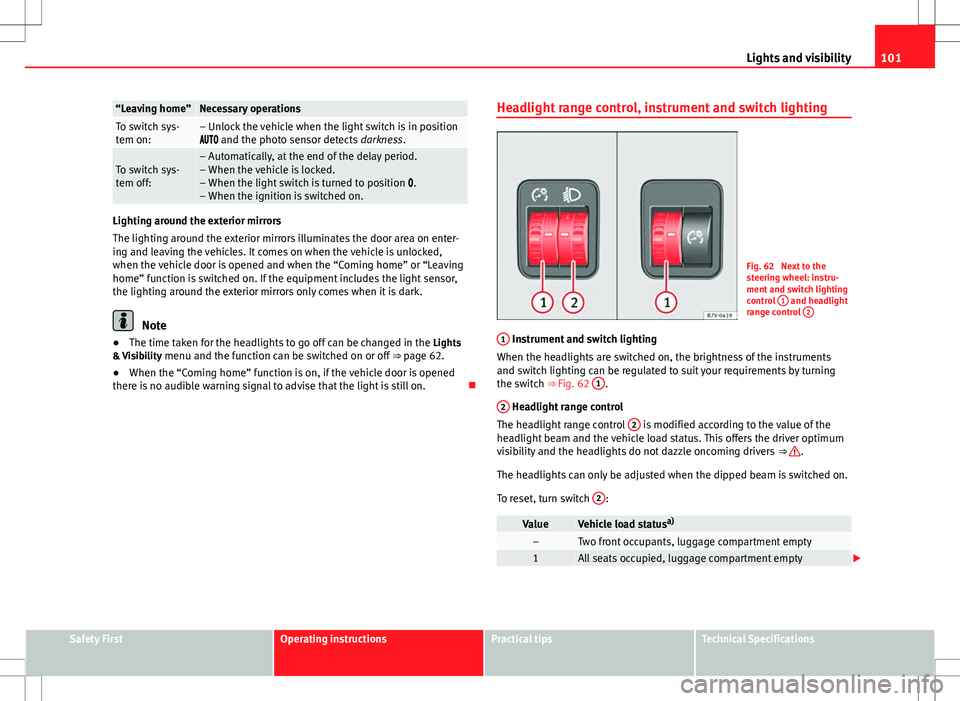
Fig. 62 Next to the
steering wheel: instru-
ment and switch lighting
control
1
and headlight
range control 2
1 Instrument and switch lighting
When the headlights are switched on, the brightness of the instruments
and switch lighting can be regulated to suit your requirements by turning
the switch ⇒ Fig. 62 1
.
2
Headlight range control
The headlight range control 2 is modified according to the value of the
headlight beam and the vehicle load status. This offers the driver optimum
visibility and the headlights do not dazzle oncoming drivers ⇒
.
The headlights can only be adjusted when the dipped beam is switched on.
To reset, turn switch 2
:
ValueVehicle load statusa)–Two front occupants, luggage compartment empty1All seats occupied, luggage compartment empty
Safety FirstOperating instructionsPractical tipsTechnical Specifications
Page 107 of 387
105
Lights and visibility
Windscreen wiper and washer
Introduction
Additional information and warnings:
● Recirculation of air conditioner air ⇒ page 156
● Working in the engine compartment ⇒ page 278
● Caring for and cleaning the vehicle exterior ⇒ page 245
WARNING
Water from the windscreen washer water bottle may freeze on the wind-
screen if it does not contain enough anti-freeze, reducing forward visibili-
ty.
● In winter, ensure the windscreen washer contains enough anti-freeze.
● In cold conditions, you should not use the wash/wipe system unless
you have warmed the windscreen with the ventilation system. The anti-
freeze could freeze on the windscreen and reduce visibility.
WARNING
Worn or dirty wiper blades reduce visibility and increase the risk of acci-
dent and serious injury.
● Always replace damaged or worn blades or blades which do not clean
the windscreen correctly.
CAUTION
In icy conditions, always check that the wiper blades are not frozen to the
glass before using the wipers for the first time. In cold weather, it may help
to leave the vehicle parked with the wipers in service position ⇒ page 107. Control lamp
lights upPossible causeSolution
Windscreen wiper fluid level
too lowTop up the windscreen wiper
reservoir as soon as possible
⇒ page 109.
Several warning and control lamps should light up for a few seconds when
the ignition is switched on, signalling that the function is being verified.
They will switch off after a few seconds.
CAUTION
Failure to heed the control lamps and text messages when they appear may
result in faults in the vehicle.
Safety FirstOperating instructionsPractical tipsTechnical Specifications
Page 109 of 387
107
Lights and visibility
Windscreen wiper functions
Windscreen wiper performance in different situations:If the vehicle is at a stand-
still:The activated position provisionally changes
to the previous position.
During the automatic wipe:
The air conditioner comes on for approxi-
mately 30 seconds in air recirculation mode
to prevent the smell of the windscreen wash-
er fluid entering the inside the vehicle.
For the interval wipe:The intervals between wipes vary according
to the speed of the vehicle. The higher the
vehicle speed the shorter the intervals.
Heated windscreen washer jets
The heating only thaws the frozen jets, it does not thaw the water in the
washer hoses. The heated windscreen washer jets automatically adjust the
heat depending on the ambient temperature, when the ignition is switched
on.
Headlight wash/wipe system
The headlight washers/wipers clean the headlight lenses.
After the ignition is switched on, the first and every fifth time the wind-
screen washer is switched on, the headlights are also washed. Therefore,
the windscreen wiper lever should be pulled towards the steering wheel
when the dipped beam or main beam are on. Any incrusted dirt (such as in-
sects) should be cleaned regularly (e.g. when refuelling).
To ensure the headlight washers work correctly in winter, any snow which
has got into the bumper jet supports should be cleaned away. If necessary,
remove snow with an anti-icing spray.
Note
The wiper will try to wipe away any obstacles that are on the windscreen.
The wiper will stop moving if the obstacle blocks its path. Remove the ob-
stacle and switch the wiper back on again.
Windscreen wipers service position
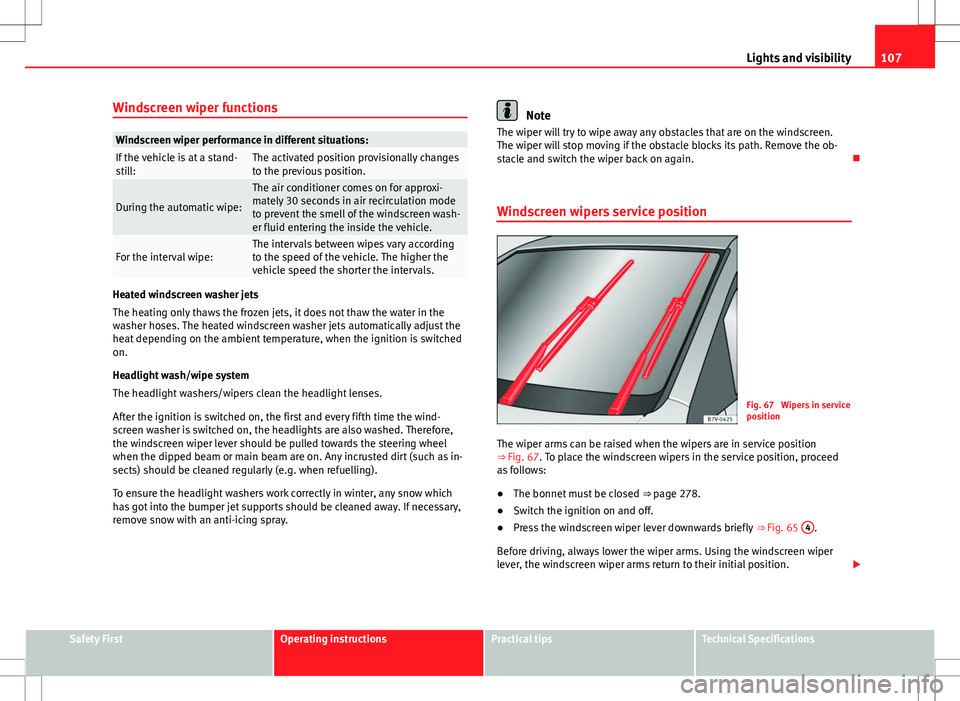
Fig. 67 Wipers in service
position
The wiper arms can be raised when the wipers are in service position
⇒ Fig. 67. To place the windscreen wipers in the service position, proceed
as follows:
● The bonnet must be closed ⇒ page 278.
● Switch the ignition on and off.
● Press the windscreen wiper lever downwards briefly ⇒ Fig. 65 4
.
Before driving, always lower the wiper arms. Using the windscreen wiper
lever, the windscreen wiper arms return to their initial position.
Safety FirstOperating instructionsPractical tipsTechnical Specifications
Page 110 of 387
108Lights and visibility
Lifting and returning windscreen wiper arms
● Place the wiper arms in the service position ⇒
.
● Only hold the wiper arms at the point where the blade is fixed.
CAUTION
● To prevent damage to the bonnet and the wiper arms, only leave them in
the service position.
● Before driving, always lower the wiper arms.
Rain sensor*
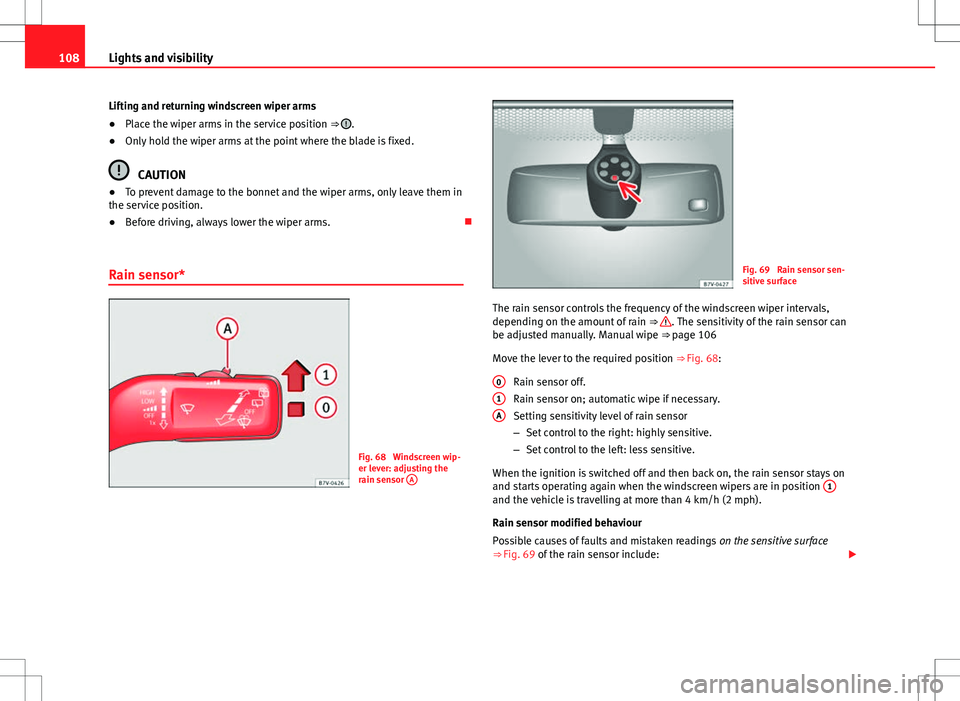
Fig. 68 Windscreen wip-
er lever: adjusting the
rain sensor A
Fig. 69 Rain sensor sen-
sitive surface
The rain sensor controls the frequency of the windscreen wiper intervals,
depending on the amount of rain ⇒
. The sensitivity of the rain sensor can
be adjusted manually. Manual wipe ⇒ page 106
Move the lever to the required position ⇒ Fig. 68:
Rain sensor off.
Rain sensor on; automatic wipe if necessary.
Setting sensitivity level of rain sensor
– Set control to the right: highly sensitive.
– Set control to the left: less sensitive.
When the ignition is switched off and then back on, the rain sensor stays on
and starts operating again when the windscreen wipers are in position 1
and the vehicle is travelling at more than 4 km/h (2 mph).
Rain sensor modified behaviour
Possible causes of faults and mistaken readings
on the sensitive surface
⇒ Fig. 69 of the rain sensor include:
0
1A
Page 111 of 387
109
Lights and visibility
● Damaged blades: A film of water on the damaged blades may lengthen
the activation time, reduce the washing intervals or result in a fast and con-
tinuous wipe.
● Insects: insects on the sensor may trigger the windscreen washer.
● Salt on roads: in winter, salt spread in the roads may cause an extra
long wipe when the windscreen is almost dry.
● Dirt: dry dust, wax, coating on glass (Lotus effect) or traces of detergent
(car wash) may reduce the effectiveness of the rain sensor or make it react
more slowly, later or not at all.
● Cracked windscreen: the impact of a stone will trigger a single wipe cy-
cle with the rain sensor on. Next the rain sensor detects the reduction in the
sensitive surface area and adapts accordingly. The behaviour of the sensor
will vary with the size of the damage caused by the stone.
WARNING
The rain sensor may not detect enough rain to switch on the wipers.
● If necessary, switch on the wipers manually when water on the wind-
screen obstructs visibility.
Note
● Clean the sensitive surface of the rain sensor regularly and check the
blades for damage ⇒ Fig. 69 (arrow).
● To remove wax and coatings, we recommend a window cleaner contain-
ing alcohol. Checking and topping up the windscreen washer reservoir
with water
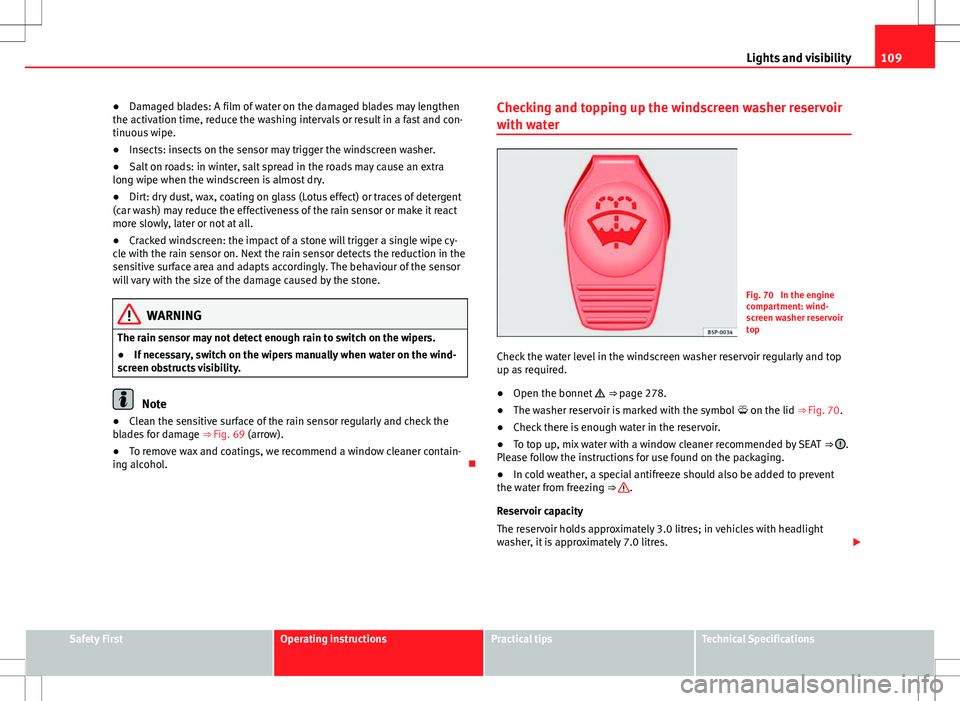
Fig. 70 In the engine
compartment: wind-
screen washer reservoir
top
Check the water level in the windscreen washer reservoir regularly and top
up as required.
● Open the bonnet
⇒ page 278.
● The washer reservoir is marked with the symbol on the lid
⇒ Fig. 70.
● Check there is enough water in the reservoir.
● To top up, mix water with a window cleaner recommended by SEAT
⇒
.
Please follow the instructions for use found on the packaging.
● In cold weather, a special antifreeze should also be added to prevent
the water from freezing ⇒
.
Reservoir capacity
The reservoir holds approximately 3.0 litres; in vehicles with headlight
washer, it is approximately 7.0 litres.
Safety FirstOperating instructionsPractical tipsTechnical Specifications
Page 112 of 387
110Lights and visibility
WARNING
Never mix an unsuitable antifreeze or other similar additives with the
windscreen washer water. A greasy layer may be formed on the wind-
screen which will impair visibility.
● Use clean water with a window cleaner recommended by SEAT.
● If necessary, add a suitable antifreeze to the water in the reservoir.
CAUTION
● Do not mix cleaning products recommended by SEAT with other prod-
ucts. This could lead to flocculation and may block the windscreen washer
jets.
● When topping up service fluids, make absolutely certain that you fill the
fluids into the correct reservoirs. Using the wrong fluids could cause serious
malfunctions and engine damage!
Rear vision mirror
Introduction
Additional information and warnings:
● Personal convenience settings in the SEAT information system
⇒ page 62
● Seat memory
⇒ page 117
● Changing gear
⇒ page 175
● Braking, stopping and parking
⇒ page 184
WARNING
The automatic anti-dazzle rear vision mirror contains an electrolytic fluid
which may leak if the mirror is broken. This fluid can cause irritation to
the skin, eyes and respiratory organs.
● The electrolytic fluid may cause irritation to the skin, eyes and respi-
ratory organs, particularly in individuals suffering from asthma or other
illnesses. Make sure that adequate quantities of fresh air enter and leave
the vehicle if it is not possible to open all the doors and windows.
● If the electrolytic fluid comes into contact with eyes or skin, wash the
area for at least 15 minutes with plenty of water, and seek medical ad-
vice.
● If the electrolytic fluid comes into contact with shoes or clothing,
wash the area for at least 15 minutes with plenty of water. Wash shoes
and clothing before wearing them again.
● If the electrolytic fluid is swallowed, wash your mouth with plenty of
water for at least 15 minutes. Do not try to provoke vomiting unless rec-
ommended by a Doctor. Seek medical advice immediately.
CAUTION
In the event that an automatic anti-dazzle rear vision mirror breaks, an elec-
trolyte fluid may leak. This liquid attacks plastic surfaces. Therefore, it
should be cleaned as fast as possible with a damp sponge or similar.
Page 114 of 387
112Lights and visibility
Exterior mirrors
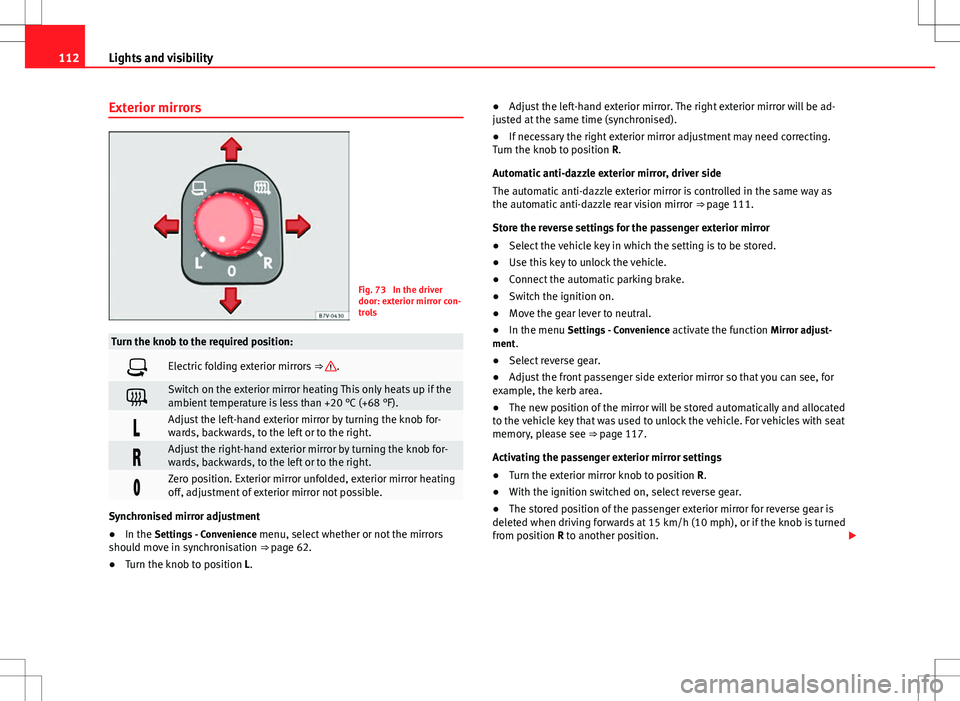
Fig. 73 In the driver
door: exterior mirror con-
trols
Turn the knob to the required position:
Electric folding exterior mirrors ⇒ .
Switch on the exterior mirror heating This only heats up if the
ambient temperature is less than +20 °C (+68 °F).
Adjust the left-hand exterior mirror by turning the knob for-
wards, backwards, to the left or to the right.
Adjust the right-hand exterior mirror by turning the knob for-
wards, backwards, to the left or to the right.
Zero position. Exterior mirror unfolded, exterior mirror heating
off, adjustment of exterior mirror not possible.
Synchronised mirror adjustment
●In the Settings - Convenience menu, select whether or not the mirrors
should move in synchronisation ⇒ page 62.
● Turn the knob to position L. ●
Adjust the left-hand exterior mirror. The right exterior mirror will be ad-
justed at the same time (synchronised).
● If necessary the right exterior mirror adjustment may need correcting.
Turn the knob to position R.
Automatic anti-dazzle exterior mirror, driver side
The automatic anti-dazzle exterior mirror is controlled in the same way as
the automatic anti-dazzle rear vision mirror ⇒ page 111.
Store the reverse settings for the passenger exterior mirror
● Select the vehicle key in which the setting is to be stored.
● Use this key to unlock the vehicle.
● Connect the automatic parking brake.
● Switch the ignition on.
● Move the gear lever to neutral.
● In the menu Settings - Convenience activate the function Mirror adjust-
ment.
● Select reverse gear.
● Adjust the front passenger side exterior mirror so that you can see, for
example, the kerb area.
● The new position of the mirror will be stored automatically and allocated
to the vehicle key that was used to unlock the vehicle. For vehicles with seat
memory, please see ⇒ page 117.
Activating the passenger exterior mirror settings
● Turn the exterior mirror knob to position R.
● With the ignition switched on, select reverse gear.
● The stored position of the passenger exterior mirror for reverse gear is
deleted when driving forwards at 15 km/h (10 mph), or if the knob is turned
from position R to another position.