instrument panel Seat Alhambra 2014 User Guide
[x] Cancel search | Manufacturer: SEAT, Model Year: 2014, Model line: Alhambra, Model: Seat Alhambra 2014Pages: 381, PDF Size: 5.75 MB
Page 60 of 381
58Cockpit
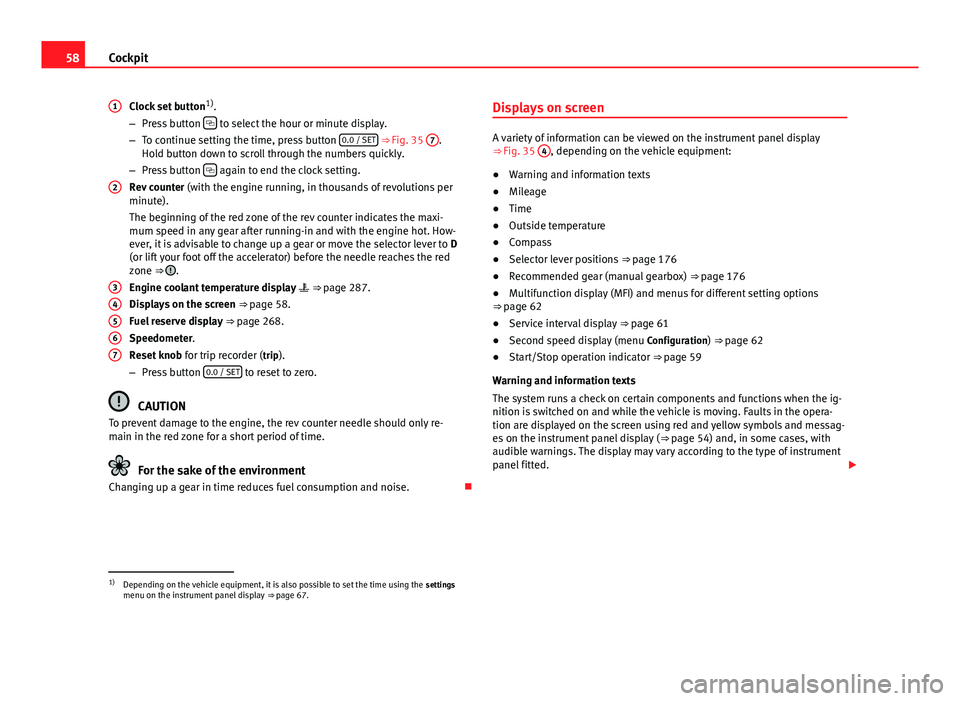
Clock set button 1)
.
– Press button
to select the hour or minute display.
– To continue setting the time, press button 0.0 / SET ⇒
Fig. 35 7.
Hold button down to scroll through the numbers quickly.
– Press button
again to end the clock setting.
Rev counter (with the engine running, in thousands of revolutions per
minute).
The beginning of the red zone of the rev counter indicates the maxi-
mum speed in any gear after running-in and with the engine hot. How-
ever, it is advisable to change up a gear or move the selector lever to D
(or lift your foot off the accelerator) before the needle reaches the red
zone ⇒
.
Engine coolant temperature display ⇒ page 287.
Displays on the screen ⇒ page 58.
Fuel reserve display ⇒ page 268.
Speedometer.
Reset knob for trip recorder (trip).
– Press button 0.0 / SET
to reset to zero.
CAUTION
To prevent damage to the engine, the rev counter needle should only re-
main in the red zone for a short period of time.
For the sake of the environment
Changing up a gear in time reduces fuel consumption and noise.
1
2
34567
Displays on screen
A variety of information can be viewed on the instrument panel display
⇒
Fig. 35 4, depending on the vehicle equipment:
● Warning and information texts
● Mileage
● Time
● Outside temperature
● Compass
● Selector lever positions ⇒ page 176
● Recommended gear (manual gearbox) ⇒ page 176
● Multifunction display (MFI) and menus for different setting options
⇒ page 62
● Service interval display ⇒ page 61
● Second speed display (menu Configuration) ⇒ page 62
● Start/Stop operation indicator ⇒ page 59
Warning and information texts
The system runs a check on certain components and functions when the ig-
nition is switched on and while the vehicle is moving. Faults in the opera-
tion are displayed on the screen using red and yellow symbols and messag-
es on the instrument panel display ( ⇒ page 54) and, in some cases, with
audible warnings. The display may vary according to the type of instrument
panel fitted.
1)
Depending on the vehicle equipment, it is also possible to set the time using the settings
menu on the instrument panel display ⇒ page 67.
Page 61 of 381
59
Cockpit
Type of mes-
sageSymbol
colourDescription
Priority 1
warning.Red
Symbol flashing or lit; partly combined with
audible warnings.
Stop the vehicle! It is dangerous ⇒
!
Check the function that is faulty and repair it.
If necessary, request assistance from special-
ised personnel.
Priority 2
warning.Yellow
Symbol flashing or lit; partly combined with
audible warnings.
A faulty function, or fluids which are below
the correct levels may cause damage to the
vehicle! ⇒
Check the faulty function as soon as possible.
If necessary, request assistance from special-
ised personnel.
Informative
text.–Information relating to different vehicle pro-
cesses.
Mileage
The odometer registers the total distance travelled by the car.
The odometer (trip) shows the distance travelled since the last odometer re- set. The last digit of the trip recorder indicates distances of 100 metres or
one tenths of a mile.
Outside temperature display
When the outside temperature is below +4 °C (+39 °F), the symbol “ice crys-
tal” (warning of risk of freezing) is also displayed next to the temperature.
At first this symbol flashes and then it remains lit until the outside tempera-
ture rises above +6 °C (+43 °F) ⇒
.
When the vehicle is at a standstill, with the auxiliary heating on
(⇒ page 165), or when travelling at very low speeds, the temperature dis-
played may be higher than the true outside temperature, as a result of the
heat produced by the engine. The temperatures measured range from -40 °C to +50 °C (-40 °F to +122 °F).
Compass
With the ignition on and the navigation system on, the cardinal point corre-
sponding to the vehicle's direction of travel is displayed on the instrument
panel
⇒ page 60.
Selector lever positions
The range of engaged gears of the selector lever is shown on the side of the
lever, and on the instrument panel display. In positions D and S, and with
the Tiptronic, the corresponding gear is also displayed.
Recommended gear (manual gearbox)
The recommended gear in order to save fuel is displayed on the instrument
panel while you are driving ⇒ page 176.
Second speed display (mph or km/h)
In addition to the speedometer, the speed can also be displayed in a differ-
ent unit of measurement (in miles or in km per hour). To change the units, in
the Settings menu, select the option Second speed ⇒ page 62.
Vehicles without menu display on the instrument panel
● Switch on the engine.
● Press button
three times. The odometer display flashes on the instru-
ment panel display.
● Press button 0.0 / SET
once. “mph” or “km/h” is displayed briefly in-
stead of the odometer.
● This activates the second speed display. To switch it off, repeat the pro-
cedure.
This option cannot be deactivated in models destined for countries in which
the second speed must always be visible.
Start/Stop operating display
Updated information relating to the status is displayed on the instrument
panel ⇒ page 196.
Safety FirstOperating instructionsPractical TipsTechnical Specifications
Page 62 of 381
60Cockpit
WARNING
If the warning lamps and messages are ignored, the vehicle may stall in
traffic, or may cause accidents and severe injuries.
● Never ignore the warning lamps or text messages.
● Stop the vehicle safely as soon as possible.
● A faulty vehicle represents a risk of accident for the driver and for oth-
er road users. If necessary, switch on the hazard warning lamps and put
out the warning triangle to advise other drivers.
● Park the vehicle away from the traffic, ensuring that there are no easi-
ly inflammable materials under the vehicle which could come into contact
with the exhaust system (e.g. dry grass, fuel).
WARNING
Although the outside temperature is above freezing, some roads and
bridges may be frozen.
● At an outside temperature of above +4 °C (+39 °F), even when the
“ice crystal” is not visible, there may still be ice on the road.
● Never rely on the outside temperature indicator!
CAUTION
Failure to heed the control lamps and text messages when they appear may
result in faults in the vehicle.
Note
● Different versions of the instrument panel are available and therefore
the versions and instructions on the display may vary. In the case of dis-
plays without warning or information texts, faults are indicated exclusively
by the warning lamps.
● When several warnings are active at the same time, the symbols are
shown successively for a few seconds. The symbols will stay on until the
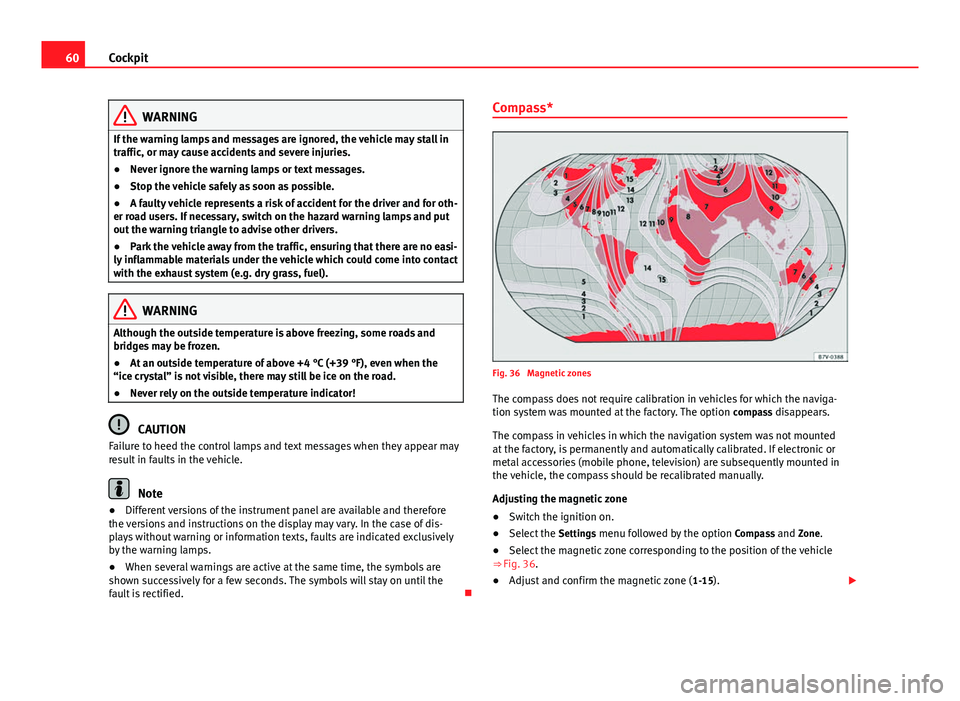
fault is rectified. Compass*
Fig. 36 Magnetic zones
The compass does not require calibration in vehicles for which the naviga-
tion system was mounted at the factory. The option compass disappears.
The compass in vehicles in which the navigation system was not mounted
at the factory, is permanently and automatically calibrated. If electronic or
metal accessories (mobile phone, television) are subsequently mounted in
the vehicle, the compass should be recalibrated manually.
Adjusting the magnetic zone
● Switch the ignition on.
● Select the Settings menu followed by the option Compass and Zone.
● Select the magnetic zone corresponding to the position of the vehicle
⇒ Fig. 36.
● Adjust and confirm the magnetic zone ( 1-15).
Page 63 of 381
61
Cockpit
Calibrating compass
To calibrate the compass you must be in one of the valid magnetic zones
with sufficient space to be able to trace a circumference with the vehicle.
● Switch the ignition on.
● Select the Settings menu followed by the option Compass and Calibrate.
● Confirm the message Describe a complete circumference to calibrate the
compass with OK
and then trace a complete circumference driving at ap-
proximately 10 km/h (6 mph).
When the corresponding cardinal point is displayed, the calibration is com-
plete.
Service interval display
The service indication is shown on the instrument panel display ⇒ Fig. 35
4.
SEAT makes a difference between services with engine oil change (Interval
Service) and services without engine oil change (Inspection Service). The
service interval display only gives information for service dates which in-
volve an engine oil change. The dates of the remaining services (for exam-
ple, the next Inspection Service or change of brake fluid) are listed on the
label attached to the door strut, or even in the Maintenance Programme.
In vehicles with Services established by time or mileage , the service inter-
vals are already pre-defined.
In vehicles with LongLife Service , the intervals are determined individually.
Technical progress has made it possible to considerably reduce servicing re-
quirements. The technology used by SEAT ensures that your vehicle only
has an Interval Service when it is necessary. To establish when the Interval
Service is due (max. 2 years), the vehicle's conditions of use and individual
driving styles are considered. The service pre-warning first appears 20 days
before the date established for the corresponding service. The kilometres remaining until the next service are always rounded up to the nearest 100
km (miles) and the remaining time is given in complete days. The current
service message cannot be viewed until 500 km (miles) after the last serv-
ice. Prior to this only lines are visible on the display.
Inspection reminder
When the Service date is approaching, when the ignition is switched on a
Service reminder is displayed.
In vehicles without text messages
, a spanner is displayed on the instrument
panel with a figure given in km. The number of kilometres shown is the
maximum number that may be driven until the next service. After a few sec-
onds, the display mode changes. A clock symbol appears and the number
of days until the next service appointment is due.
In vehicles with text messages , Service in --- km (miles) or --- days is dis-
played on the instrument panel.
Service due
After the service date, an audible warning is given when the ignition is
switched on and the spanner displayed on the screen flashes for a few sec-
onds . In vehicles with text messages , Service in --- km or --- days is dis-
played on the instrument panel.
Reading a service notification
With the ignition switched on, the engine off and the vehicle at a standstill,
the current service notification can be read:
● Press the button
on the instrument panel several times until the
spanner symbol is displayed .
● OR: select the Settings menu.
● From the Service submenu, select the option Info.
When the service date has past , a minus sign is displayed in front of the
number of kilometres or days. In vehicles with text messages the following
is displayed: Service --- km (miles) or --- days ago .
Safety FirstOperating instructionsPractical TipsTechnical Specifications
Page 64 of 381
62Cockpit
The service interval display is reset
If the service was not carried out by a Technical Service, the display can be
reset as follows:
In vehicles with text messages:Select the Settings menu.In the submenu Service, select the option Reset.Confirm with OK when requested to do so by the system.
In vehicles without text messages:Switch the ignition off.Press and hold the 0.0 / SET button.Switch the ignition back on.Release the 0.0 / SET button and, press for the next 20 seconds.
Do not reset the indicator to zero between two intervals, otherwise the dis-
play will be incorrect.
If, while the LongLife service is valid, the service interval display is reset to
zero, the “service will be activated by time or mileage”. The service interval
is no longer calculated individually
⇒ Booklet Maintenance Programme.
Note
● The service message disappears after a few seconds, when the engine is
started or when OK
is pressed.
● In vehicles with the LongLife system in which the battery has been dis-
connected for a long period of time, it is not possible to calculate the date
of the next service. Therefore the service interval display may not be correct.
In this case, please check the maximum permitted service intervals ⇒ Book-
let Maintenance Programme. SEAT information system
Introduction
With the ignition switched on, it is possible to read the different functions of
the display by scrolling through the menus.
In vehicles with a multifunction steering wheel, there are no buttons on the
windscreen wiper lever. The multifunction display can only be controlled
from the buttons on the multifunction steering wheel.
The number of menus displayed on the instrument panel will vary according
to the vehicle electronics and equipment.
A specialised dealer will be able to programme or modify additional func-
tions, according to the vehicle equipment. SEAT recommends visiting a
Technical Service.
Some menu options can only be read when the vehicle is at a standstill.
As long as a priority 1 warning is displayed, it will not be possible to read
the menus. To display the menus, confirm the warning by pressing OK
.
Additional information and warnings:
● Exterior mirrors ⇒ page 111
● Auxiliary heating ⇒ page 165
WARNING
Any distraction may lead to an accident, with the risk of injury.
● Do not read the instrument panel menus when driving.
Page 67 of 381
65
Cockpit
Using the menus on the instrument panel
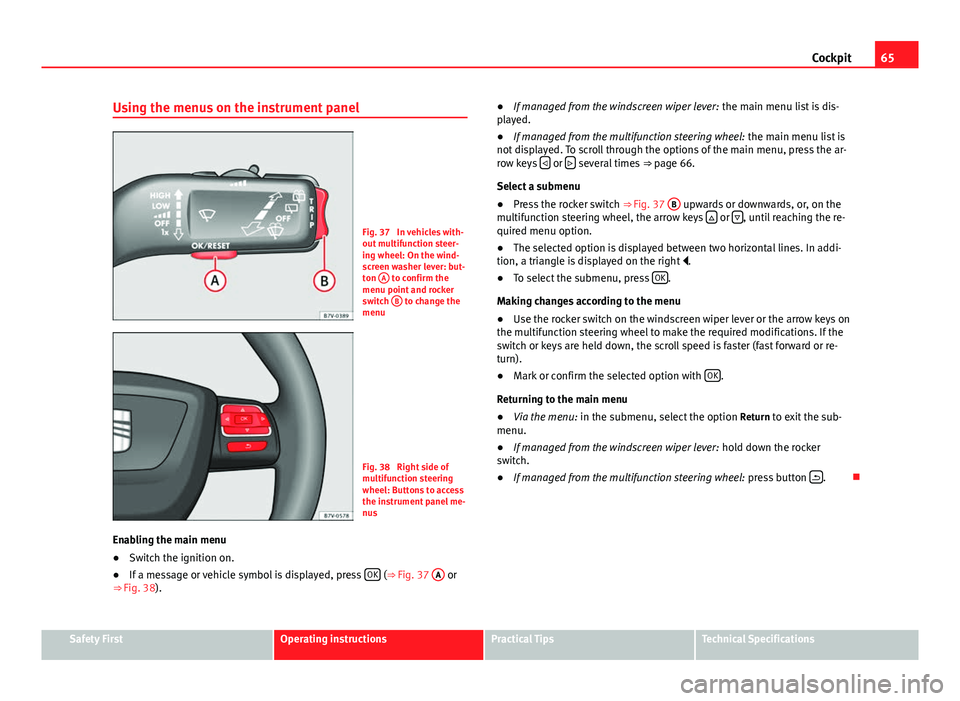
Fig. 37 In vehicles with-
out multifunction steer-
ing wheel: On the wind-
screen washer lever: but-
ton A
to confirm the
menu point and rocker
switch B
to change the
menu
Fig. 38 Right side of
multifunction steering
wheel: Buttons to access
the instrument panel me-
nus
Enabling the main menu
● Switch the ignition on.
● If a message or vehicle symbol is displayed, press OK
(⇒
Fig. 37 A or
⇒ Fig. 38). ●
If managed from the windscreen wiper lever: the main menu list is dis-
played.
● If managed from the multifunction steering wheel: the main menu list is
not displayed. To scroll through the options of the main menu, press the ar-
row keys
or several times
⇒ page 66.
Select a submenu
● Press the rocker switch ⇒ Fig. 37 B
upwards or downwards, or, on the
multifunction steering wheel, the arrow keys or , until reaching the re-
quired menu option.
● The selected option is displayed between two horizontal lines. In addi-
tion, a triangle is displayed on the right .
● To select the submenu, press OK
.
Making changes according to the menu
● Use the rocker switch on the windscreen wiper lever or the arrow keys on
the multifunction steering wheel to make the required modifications. If the
switch or keys are held down, the scroll speed is faster (fast forward or re-
turn).
● Mark or confirm the selected option with OK
.
Returning to the main menu
● Via the menu: in the submenu, select the option Return to exit the sub-
menu.
● If managed from the windscreen wiper lever: hold down the rocker
switch.
● If managed from the multifunction steering wheel: press button
.
Safety FirstOperating instructionsPractical TipsTechnical Specifications
Page 69 of 381
67
Cockpit
MenueffectAverage fuel con-
sumptionWhen the ignition is switched on, the average con-
sumption (in l/100 km or in mpg) is displayed after
the vehicle has moved approximately 100 metres
(328 feet). Otherwise horizontal lines are displayed.
The value shown is updated approximately every 5
seconds.
Operating rangeApproximate distance in km (or miles) that can still
be travelled with the fuel remaining in the tank, as-
suming the same style of driving is maintained. This
is calculated using the current fuel consumption.
Distance coveredDistance travelled, after ignition is switched on, in
km (or miles).
Average speedAfter the ignition is switched on, the average speed
will be shown after a distance of approximately 100
metres (328 feet) has been travelled. Otherwise hori-
zontal lines are displayed. The value shown is upda-
ted approximately every 5 seconds.
Digital display of
speedCurrent speed displayed digitally.
Oil temperature digi-
tal displayUpdated engine oil temperature digital display
Speed warning at ---
km/h (mph)If the stored speed is exceeded (between 30 -
250 km/h, or 18 - 155 mph), an audible warning is
given together with a visual warning.
Changing between display modes
● In vehicles without multifunction steering wheel: press the lever.
● Vehicles with a multifunction steering wheel: press
or .
Storing a speed for the speed warning
● Select the display Speed warning at --- km/h.
● Press OK
to store the current speed and switch off the warning. ●
In addition, set the required speed by pressing the rocker switch on the
windscreen wiper lever or buttons
or on the multifunction steering
wheel for 5 seconds. Next, press OK again or wait a few seconds. The
speed is stored and the warning activated.
● To switch off , press OK
. The stored speed is deleted.
Manually erasing memory 1 or 2
● Select the memory to be erased.
● Press and hold OK
for approximately two seconds.
Personalising the displays
It is possible to select which of the displays in the multifunction display you
wish to see on the instrument panel in the settings menu. The units of
measurement can also be modified ⇒ page 67.
Configuration Menu
Configuration Menueffect
Multifunction
display dataConfiguration of the multifunction display data that you
wish to see on the instrument panel display ⇒ page 66.
CompassChanging the magnetic region and calibration of the com-
pass. To calibrate the compass, please follow the instruc-
tions given on the instrument panel display.
ConvenienceChanging vehicle convenience functions ⇒ page 68.Lights & visi-
bilityConfiguration of vehicle lighting ⇒ page 69.
TimeChanging the hours and minutes of the instrument panel
clock and the navigation system. The time can be set here
and the choice can be made between the 24 hour and 12
hour display. The S in the upper part of the display indi-
cates that the clock is set to summer time.
Safety FirstOperating instructionsPractical TipsTechnical Specifications
Page 87 of 381
85
Opening and closing
WARNING (Continued)
● Ensure the rear lid is locked after closing, otherwise, it may open un-
expectedly while driving. A closed rear lid should be flush with the corre-
sponding parts of the bodywork.
● Always keep the rear lid closed while driving to avoid toxic gases en-
tering the vehicle interior.
● Do not open the rear lid when there is a load carrier installed. Like-
wise, the rear lid cannot be opened when a load is attached to it, for ex-
ample bicycles. An open rear lid could close itself if there is an additional
weight on it. If necessary, press down on the rear lid and remove the
load.
● Close and lock both the rear lid and all the other doors when you are
not using the vehicle. Ensure that nobody remains inside the vehicle.
● Never allow children to play inside or around the vehicle without su-
pervision, especially if the rear lid is open. Children could enter the lug-
gage compartment, close the rear lid and become trapped. Depending on
the time of the year, temperatures inside a locked and closed vehicle can
be extremely high or extremely low resulting in serious injuries and ill-
ness or even death, particularly for young children.
● Never leave children or disabled people alone in the vehicle. If the ve-
hicle key or the central locking button is used, they may be locked in the
vehicle.
CAUTION
Before opening the rear lid, ensure that there is sufficient free space to
open and close it, for example if you are towing a trailer or in a garage. Warning lamp
lights upPossible causeSolution
The rear lid is open or not
correctly shut.
Stop driving immediately!
Open the rear lid and close it
again.
Several warning and control lamps should light up for a few seconds when
the ignition is switched on, signalling that the function is being verified.
They will switch off after a few seconds.
A warning lamp appears on the instrument panel if the rear lid is open or
not properly closed.
Depending on the vehicle equipment, a symbol may be displayed on the
dash panel screen instead of the warning lamp. The indication is also visi-
ble when the ignition is switched off. The indication disappears around 15
seconds after the vehicle has been locked.
WARNING
If the rear lid is not correctly closed, it could open unexpectedly when
driving and cause serious injuries.
● Always stop immediately and close the rear lid.
● Ensure that the rear lid has been locked into place by the element on
the lock carrier when you close it.
Safety FirstOperating instructionsPractical TipsTechnical Specifications
Page 99 of 381
97
Lights and visibility
WARNING
If the warning lamps and messages are ignored, the vehicle may stall in
traffic, or may cause accidents and severe injuries.
● Never ignore the warning lamps or text messages.
● Stop the vehicle safely as soon as possible.
● Park the vehicle at a suitable distance away from the traffic ensuring
that the exhaust system is not in contact with inflammable material, for
example, dry grass, fuel, oil, etc.
● A faulty vehicle represents a risk of accident for the driver and for oth-
er road users. If necessary, switch on the hazard warning lamps and put
out the warning triangle to advise other drivers.
CAUTION
Failure to heed the control lamps and text messages when they appear may
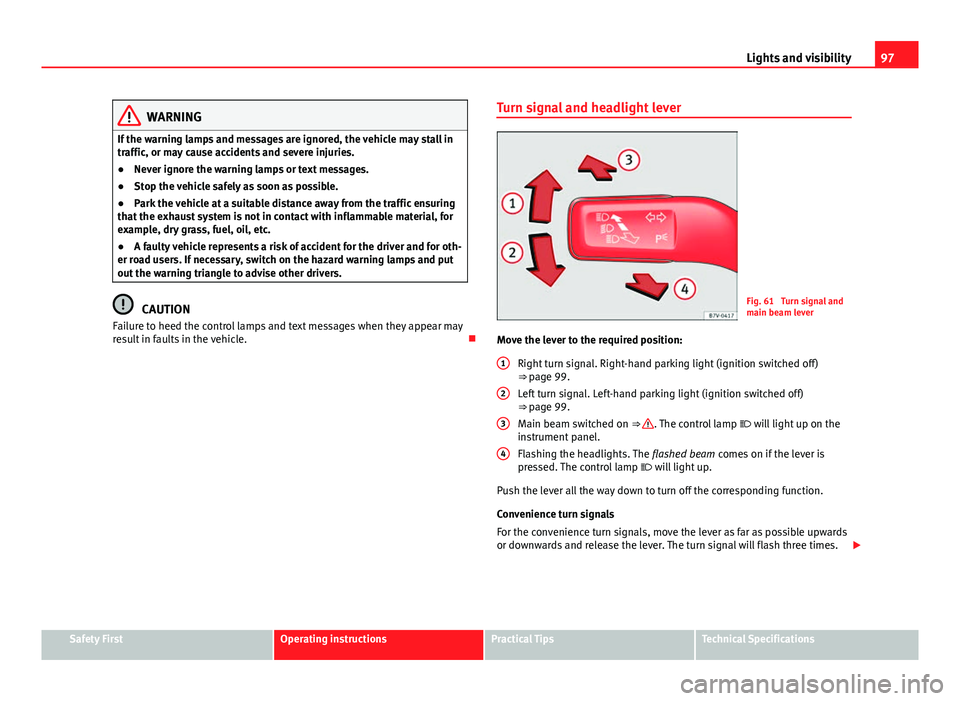
result in faults in the vehicle. Turn signal and headlight leverFig. 61 Turn signal and
main beam lever
Move the lever to the required position: Right turn signal. Right-hand parking light (ignition switched off)
⇒ page 99.
Left turn signal. Left-hand parking light (ignition switched off)
⇒ page 99.
Main beam switched on ⇒
. The control lamp will light up on the
instrument panel.
Flashing the headlights. The flashed beam comes on if the lever is
pressed. The control lamp will light up.
Push the lever all the way down to turn off the corresponding function.
Convenience turn signals
For the convenience turn signals, move the lever as far as possible upwards
or downwards and release the lever. The turn signal will flash three times.
1
2
3
4
Safety FirstOperating instructionsPractical TipsTechnical Specifications
Page 100 of 381
98Lights and visibility
The control turn signals are switched on and off from the menu Lights & Visi-
bility on the instrument panel display ⇒ page 62. This function can be dis-
connected at a specialised workshop for those vehicles which do not have
the menu Lights & Visibility .
WARNING
Incorrect use of the headlights may cause accidents and serious injury,
as the main beam may distract or dazzle other drivers.
Note
● The turn signal only works when the ignition is switched on. The hazard
warning lights also work when the ignition is switched off ⇒ page 316.
● If a turn signal on the vehicle or trailer is faulty, the warning lamp flash-
es twice as fast as usual.
● The main beam headlights can only be switched on if the dipped beam
headlights are already on.
Turning lights on and off
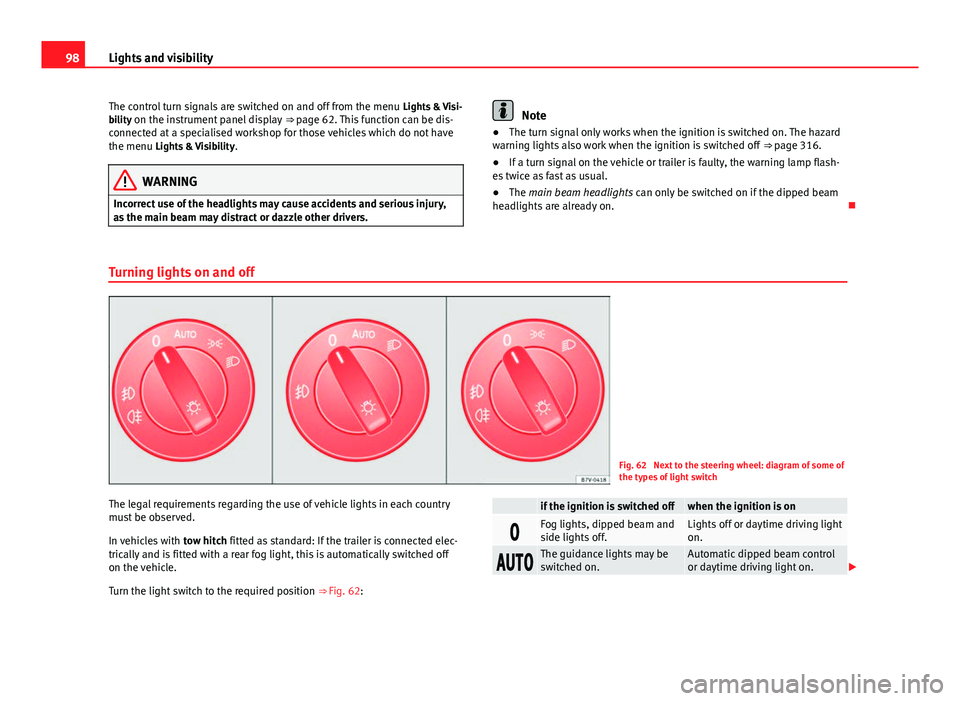
Fig. 62 Next to the steering wheel: diagram of some of
the types of light switch
The legal requirements regarding the use of vehicle lights in each country
must be observed.
In vehicles with tow hitch fitted as standard: If the trailer is connected elec-
trically and is fitted with a rear fog light, this is automatically switched off
on the vehicle.
Turn the light switch to the required position ⇒ Fig. 62:
if the ignition is switched offwhen the ignition is on
Fog lights, dipped beam and
side lights off.Lights off or daytime driving light
on.
The guidance lights may be
switched on.Automatic dipped beam control
or daytime driving light on.