lights Seat Alhambra 2014 Owner's Guide
[x] Cancel search | Manufacturer: SEAT, Model Year: 2014, Model line: Alhambra, Model: Seat Alhambra 2014Pages: 381, PDF Size: 5.75 MB
Page 113 of 381

111
Lights and visibility
WARNING
Never mix an unsuitable antifreeze or other similar additives with the
windscreen washer water. A greasy layer may be formed on the wind-
screen which will impair visibility.
● Use clean water with a window cleaner recommended by SEAT.
● If necessary, add a suitable antifreeze to the water in the reservoir.
CAUTION
● Do not mix cleaning products recommended by SEAT with other prod-
ucts. This could lead to flocculation and may block the windscreen washer
jets.
● When topping up service fluids, make absolutely certain that you fill the
fluids into the correct reservoirs. Using the wrong fluids could cause serious
malfunctions and engine damage!
Rear vision mirror
Introduction
Additional information and warnings:
● Personal convenience settings in the SEAT information system
⇒ page 62
● Seat memory
⇒ page 118
● Changing gear
⇒ page 176
● Braking, stopping and parking
⇒ page 185
WARNING
The automatic anti-dazzle rear vision mirror contains an electrolytic fluid
which may leak if the mirror is broken. This could cause irritation to the
skin, eyes and respiratory organs.
● The electrolytic fluid may cause irritation to the skin, eyes and respi-
ratory organs, particularly in individuals suffering from asthma or other
illnesses. Make sure that adequate quantities of fresh air enter and leave
the vehicle if it is not possible to open all the doors and windows.
● If the electrolytic fluid comes into contact with eyes or skin, wash the
area for at least 15 minutes with plenty of water, and seek medical ad-
vice.
● If the electrolytic fluid comes into contact with shoes or clothing,
wash the area for at least 15 minutes with plenty of water. Wash shoes
and clothing before wearing them again.
● If the electrolytic fluid is swallowed, wash your mouth with plenty of
water for at least 15 minutes. Do not try to provoke vomiting unless rec-
ommended by a Doctor. Seek medical advice immediately.
CAUTION
In the event that an automatic anti-dazzle rear vision mirror breaks, an elec-
trolyte fluid may leak. This liquid attacks plastic surfaces. Therefore, it
should be cleaned as fast as possible with a damp sponge or similar.
Safety FirstOperating instructionsPractical TipsTechnical Specifications
Page 114 of 381

112Lights and visibility
Rear vision mirror
Fig. 72 Manual anti-daz-
zle function for rear vi-
sion mirror
Fig. 73 Automatic anti-
dazzle function for rear
vision mirror
The driver should always adjust the rear vision mirror to permit adequate
visibility through the rear window. Manual anti-dazzle function for interior rear vision mirror
●
Basic position: point the lever at the bottom of the mirror forwards.
● Pull the lever to the back to select the anti-dazzle function ⇒ Fig. 72.
Automatic anti-dazzle function for interior mirror
Legend for the Fig. 73:
control lamp
Control
Light incidence sensor
This function can be activated and deactivated by pressing the rear vision
mirror switch ⇒ Fig. 73 2
. When it is activated, the warning lamp lights up
1.
When the ignition is on, the sensor 3
automatically moves the rear vision
mirror to the anti-dazzle position depending upon the incidence of the light
from behind.
The automatic anti-dazzle function is deactivated when reverse gear is en-
gaged or the interior or reading lights are on.
Note
If the incidence of the light on the sensor is obstructed or prevented, e.g. by
the sun blinds, the rear vision mirror with automatic anti-dazzle function will
not operate correctly.
1
23
Page 115 of 381
113
Lights and visibility
Exterior mirrors
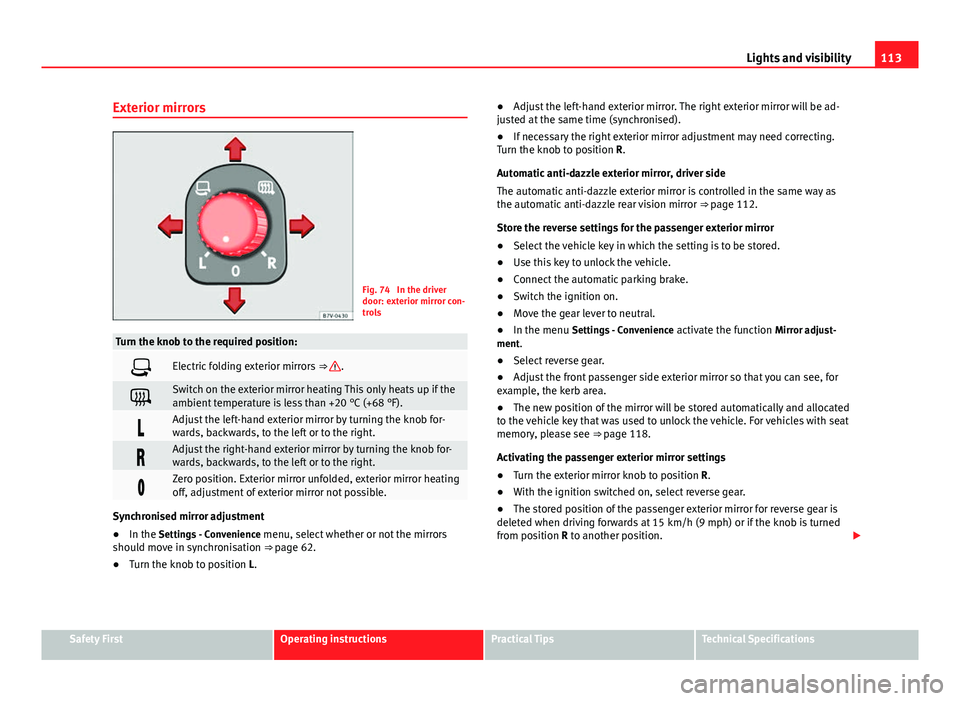
Fig. 74 In the driver
door: exterior mirror con-
trols
Turn the knob to the required position:
Electric folding exterior mirrors ⇒ .
Switch on the exterior mirror heating This only heats up if the
ambient temperature is less than +20 °C (+68 °F).
Adjust the left-hand exterior mirror by turning the knob for-
wards, backwards, to the left or to the right.
Adjust the right-hand exterior mirror by turning the knob for-
wards, backwards, to the left or to the right.
Zero position. Exterior mirror unfolded, exterior mirror heating
off, adjustment of exterior mirror not possible.
Synchronised mirror adjustment
●In the Settings - Convenience menu, select whether or not the mirrors
should move in synchronisation ⇒ page 62.
● Turn the knob to position L. ●
Adjust the left-hand exterior mirror. The right exterior mirror will be ad-
justed at the same time (synchronised).
● If necessary the right exterior mirror adjustment may need correcting.
Turn the knob to position R.
Automatic anti-dazzle exterior mirror, driver side
The automatic anti-dazzle exterior mirror is controlled in the same way as
the automatic anti-dazzle rear vision mirror ⇒ page 112.
Store the reverse settings for the passenger exterior mirror
● Select the vehicle key in which the setting is to be stored.
● Use this key to unlock the vehicle.
● Connect the automatic parking brake.
● Switch the ignition on.
● Move the gear lever to neutral.
● In the menu Settings - Convenience activate the function Mirror adjust-
ment.
● Select reverse gear.
● Adjust the front passenger side exterior mirror so that you can see, for
example, the kerb area.
● The new position of the mirror will be stored automatically and allocated
to the vehicle key that was used to unlock the vehicle. For vehicles with seat
memory, please see ⇒ page 118.
Activating the passenger exterior mirror settings
● Turn the exterior mirror knob to position R.
● With the ignition switched on, select reverse gear.
● The stored position of the passenger exterior mirror for reverse gear is
deleted when driving forwards at 15 km/h (9 mph) or if the knob is turned
from position R to another position.
Safety FirstOperating instructionsPractical TipsTechnical Specifications
Page 116 of 381

114Lights and visibility
WARNING
Fold and unfold the exterior mirror, taking care to avoid injuries.
● Only fold or unfold the exterior mirror when there is no-one in the way
of the mirror.
● When moving the mirror, take care not to trap fingers between the
mirror and the mirror bracket.
WARNING
Failure to correctly estimate the distance of the vehicle behind could lead
to serious accident.
● Rear-view convex or aspheric mirrors increase the field of vision, how-
ever objects appear smaller and further away in the mirrors.
● The use of these mirrors to estimate the distance to the next vehicle
when changing lane is imprecise and could result in serious accident.
● If possible, use the rear vision mirror to estimate distances to vehi-
cles behind you or in other circumstances.
● Make sure that the rear visibility is adequate.
CAUTION
● Before entering a car wash, always ensure that the exterior mirrors are
correctly folded in.
● Electrically-folding exterior mirrors should not be folded and unfolded
mechanically as this may damage the electrical operation.
For the sake of the environment
The exterior mirror heating should be switched off when it is no longer nee-
ded. Otherwise, it is an unnecessary fuel waste.
Note
● The exterior mirror heating initially heats up with a high power, after two
minutes the heat will depend upon the ambient temperature.
● In the event of faults, the electric exterior mirrors can be adjusted man-
ually by pressing the edge of the mirror surface.
Page 121 of 381
119
Seats and storage
effectAction ⇒ Fig. 79, ⇒ Fig. 80To switch system on:Press button . Seat heating is switched on fully.Adjusting the heating
output:Keep pressing button until the required intensi-
ty is set.
To switch system off:Keep pressing button until all of the lights are
switched off ⇒ Fig. 79, ⇒ Fig. 80.
WARNING
People whose pain and temperature threshold has been affected by some
kind of medicine, paraplegia or chronic illness (e.g. diabetes) may sus-
tain burns to the back, buttocks and legs from use of the seat heating
that may lead to a long healing process or that may never completely
heal. Seek medical advice if you have doubts regarding your health.
● People with a limit pain and temperature threshold must never use
seat heating.
CAUTION
● To avoid damaging the heating elements of the seat heating, please do
not kneel on the seat or apply sharp pressure at a single point to the seat
cushion and backrest.
● Liquids, sharp objects and insulating materials on the seat could dam-
age the seat heating.
● In the event of smells, switch off the seat heating immediately and have
the unit inspected by a specialised workshop.
For the sake of the environment
The seat heating should remain on only when needed. Otherwise, it is an
unnecessary fuel waste. Seat with position memory*
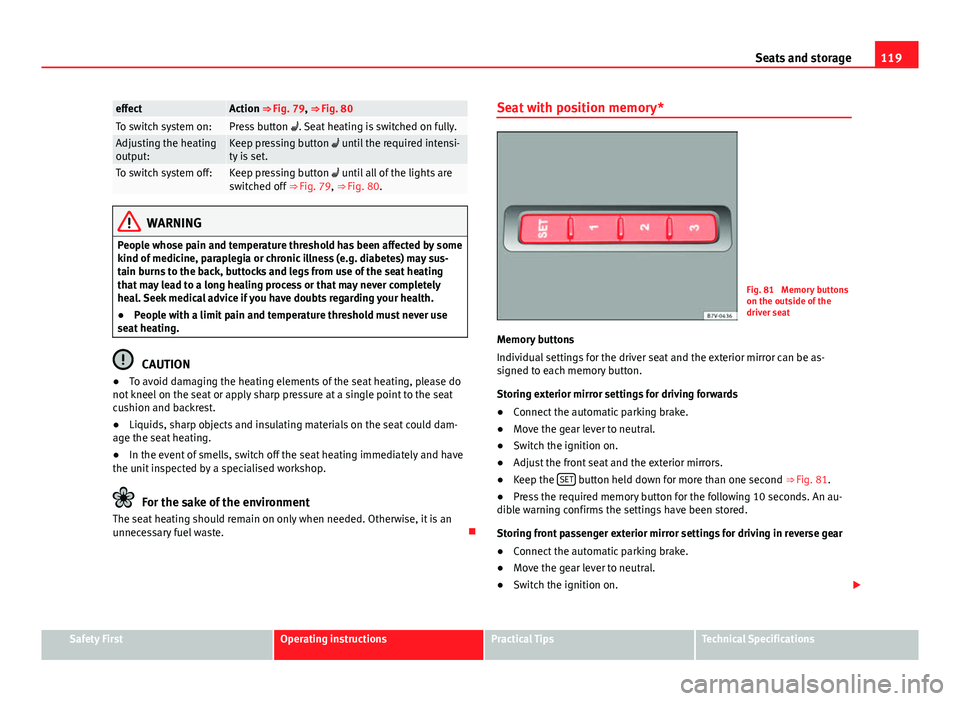
Fig. 81 Memory buttons
on the outside of the
driver seat
Memory buttons
Individual settings for the driver seat and the exterior mirror can be as-
signed to each memory button.
Storing exterior mirror settings for driving forwards
● Connect the automatic parking brake.
● Move the gear lever to neutral.
● Switch the ignition on.
● Adjust the front seat and the exterior mirrors.
● Keep the SET
button held down for more than one second
⇒ Fig. 81.
● Press the required memory button for the following 10 seconds. An au-
dible warning confirms the settings have been stored.
Storing front passenger exterior mirror settings for driving in reverse gear
● Connect the automatic parking brake.
● Move the gear lever to neutral.
● Switch the ignition on.
Safety FirstOperating instructionsPractical TipsTechnical Specifications
Page 161 of 381
159
Air conditioning
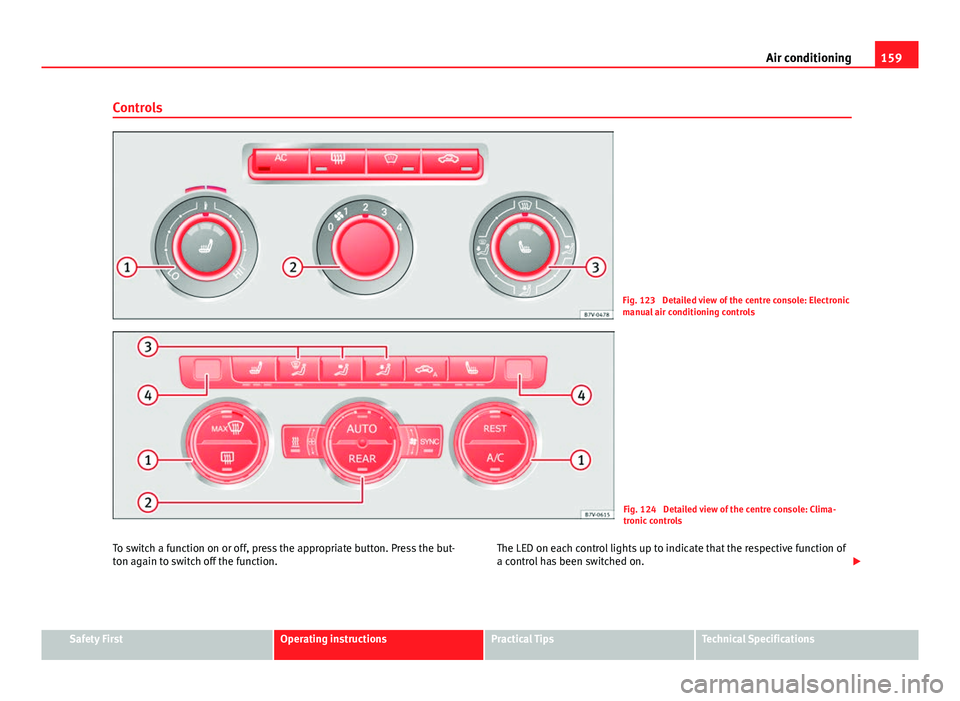
Controls
Fig. 123 Detailed view of the centre console: Electronic
manual air conditioning controls
Fig. 124 Detailed view of the centre console: Clima-
tronic controls
To switch a function on or off, press the appropriate button. Press the but-
ton again to switch off the function. The LED on each control lights up to indicate that the respective function of
a control has been switched on.
Safety FirstOperating instructionsPractical TipsTechnical Specifications
Page 163 of 381
161
Air conditioning
Control but-
tonAdditional information. Electronic manual air conditioning
⇒ Fig. 123; Climatronic ⇒ Fig. 124.
Climatronic: Accept the temperature selection for the driver
and front passenger sides: When the SYNC button light is lit,
the temperature settings on the driver side also apply to the
passenger side. Press the button or adjust the temperature
control for the passenger side in order to set a different tem-
perature. No lamp lights up on the button.
Climatronic: Automatic temperature, fan, and air distribution
control. Press the button to switch on the function. The con-
trol lamp lights up on the AUTO
button.
Climatronic: Press the button REAR to adjust the air condi-
tioner for the rear seats from the front seats. A lamp is lit in
the REAR
button if the function is activated. The settings for
the rear seats will be displayed. Press the button again to
switch the function off or do not touch any other button for
around 10 seconds.
Climatronic: Press the button REST to use the heat that the
engine radiates. When the engine is still warm but the igni-
tion switched off, the heat given off by the engine can be
used to keep the vehicle interior warm. The REST
button will
light up when the function is switched on. The function will
switch off after around 30 minutes and if the battery level is
low.
a)
Switch off.
Electronic manual air conditioning : Turn the fan switch to
setting 0.
Climatronic: Press the button OFF
or manually set the fan to
0. When the device is switched off the OFF button will light
up.
a) Depending on the version of the model.
WARNING
Never turn off the air fan for a long time or the air in the vehicle interior
will not be refreshed.
● Stuffy or used air will increase fatigue and reduce driver and passen-
ger concentration possibly resulting in a serious accident.
Note
● Not all Climatronic buttons are operational in REAR mode.
● The REAR
button is locked in defrost mode.
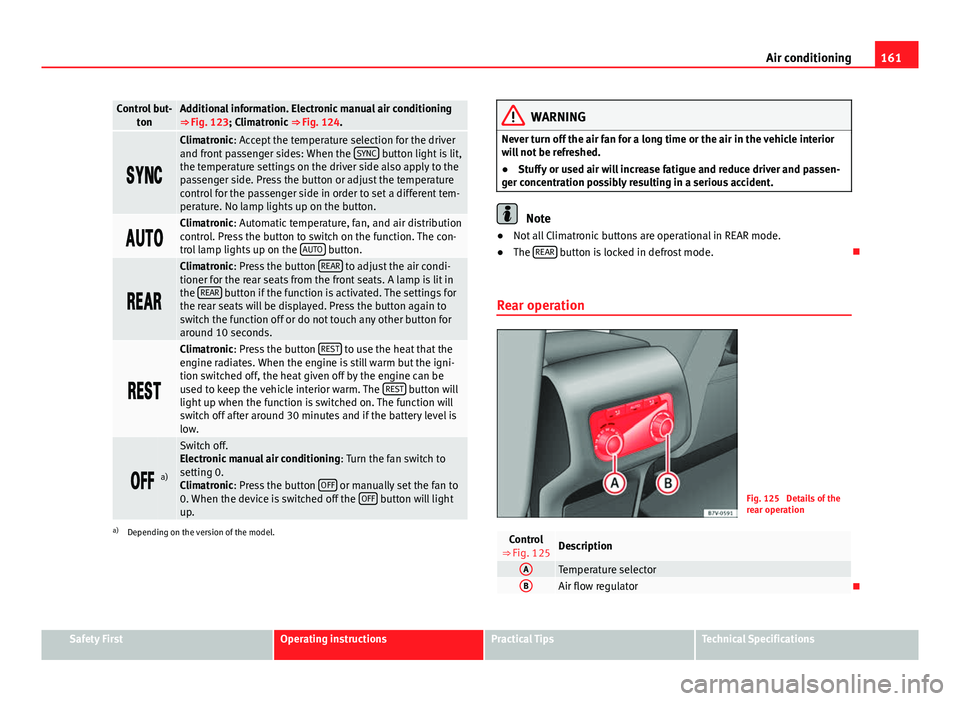
Rear operation
Fig. 125 Details of the
rear operation
Control
⇒ Fig. 125Description
ATemperature selectorBAir flow regulator
Safety FirstOperating instructionsPractical TipsTechnical Specifications
Page 165 of 381
163
Air conditioning
Air vents
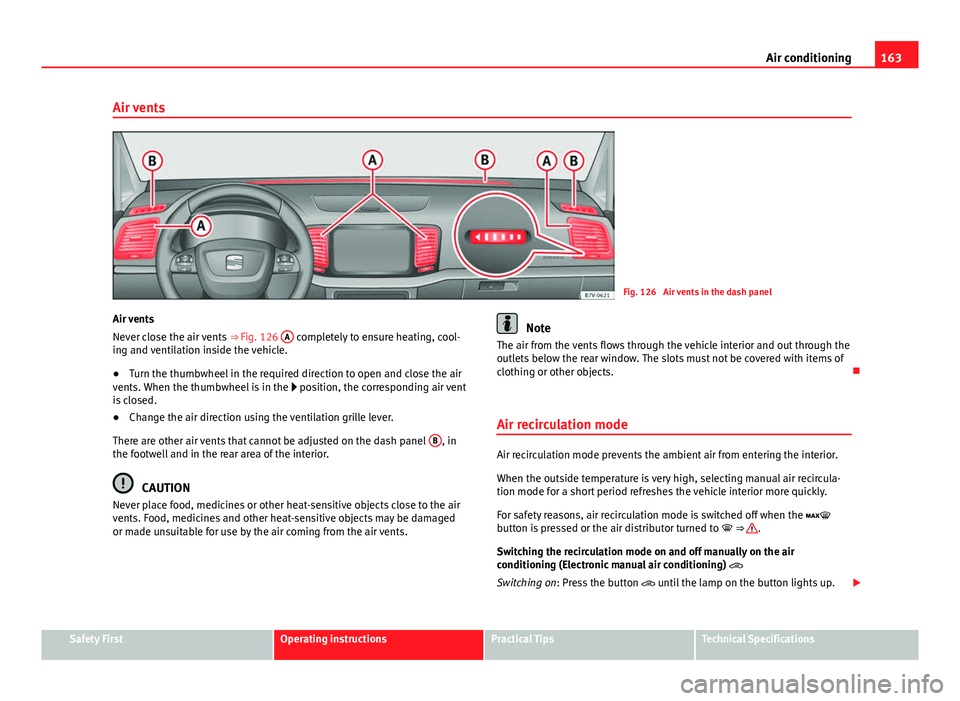
Fig. 126 Air vents in the dash panel
Air vents
Never close the air vents ⇒ Fig. 126 A
completely to ensure heating, cool-
ing and ventilation inside the vehicle.
● Turn the thumbwheel in the required direction to open and close the air
vents. When the thumbwheel is in the position, the corresponding air vent
is closed.
● Change the air direction using the ventilation grille lever.
There are other air vents that cannot be adjusted on the dash panel B
, in
the footwell and in the rear area of the interior.
CAUTION
Never place food, medicines or other heat-sensitive objects close to the air
vents. Food, medicines and other heat-sensitive objects may be damaged
or made unsuitable for use by the air coming from the air vents.
Note
The air from the vents flows through the vehicle interior and out through the
outlets below the rear window. The slots must not be covered with items of
clothing or other objects.
Air recirculation mode
Air recirculation mode prevents the ambient air from entering the interior.
When the outside temperature is very high, selecting manual air recircula-
tion mode for a short period refreshes the vehicle interior more quickly.
For safety reasons, air recirculation mode is switched off when the
button is pressed or the air distributor turned to ⇒
.
Switching the recirculation mode on and off manually on the air
conditioning (Electronic manual air conditioning)
Switching on: Press the button until the lamp on the button lights up.
Safety FirstOperating instructionsPractical TipsTechnical Specifications
Page 166 of 381
164Air conditioning
Switching off: Press the button until the lamp on the button switches off.
Switching the recirculation mode on and off manually on the
Climatronic
Switching on: Press the button until the lamp on the button lights up.
Switching off: Press the button until the lamp on the button switches
off.
Automatic air recirculation mode
Fresh air enters the vehicle interior in position . If the system detects a
high concentration of hazardous substances in the ambient air, air recircu-
lation mode is switched on automatically. When the level of impurities
drops to within a normal range, recirculation mode is switched off.
The system is unable to detect unpleasant smells.
With the following outside temperatures and conditions the air recirculation
does not switch on automatically:
● The cooling system is switched on (the AC
button is lit up) and the out-
side temperature is below +3 °C (+38 °F).
● The cooling system and the windscreen wipers are switched off and the
outside temperature is below +10 °C (+50 °F).
● The cooling system is switched off and the outside temperature is below
+15 °C (+59 °F). The windscreen wiper is switched on.
Switching the automatic air recirculation mode on and off
Switching on: Press the button until the right lamp on the button lights
up.
Switching off: Press the button until all the lamps on the button are
switched off. Switching the automatic air recirculation mode off temporarily
●
Press the button once to temporarily switch to manual air recircula-
tion mode in the event of unpleasant smells from outside. The left indicator
lamp turns on.
● After more than two seconds, press the button again to restart auto-
matic air recirculation. The right indicator lamp turns on.
WARNING
Stuffy or used air will increase fatigue and reduce driver concentration
possibly resulting in a serious accident.
● Never use recirculation mode for long periods as it does not refresh
the air inside the vehicle.
● If the cooling system is switched off and air recirculation mode
switched on, the windows can mist over very quickly, considerably limit-
ing visibility.
● Switch air recirculation mode off when it is not required.
CAUTION
Do not smoke when air recirculation is switched on in vehicles with an air
conditioner. The smoke taken in could lie on the cooling system vaporiser
and on the activated charcoal cartridge of the dust and pollen filter, leading
to a permanently unpleasant smell.
Note
Climatronic: Air recirculation mode switches on to prevent exhaust gas from
entering the vehicle interior when it is in reverse and while the automatic
windscreen wash and wipe is working.
Page 168 of 381
166Air conditioning
Remote control
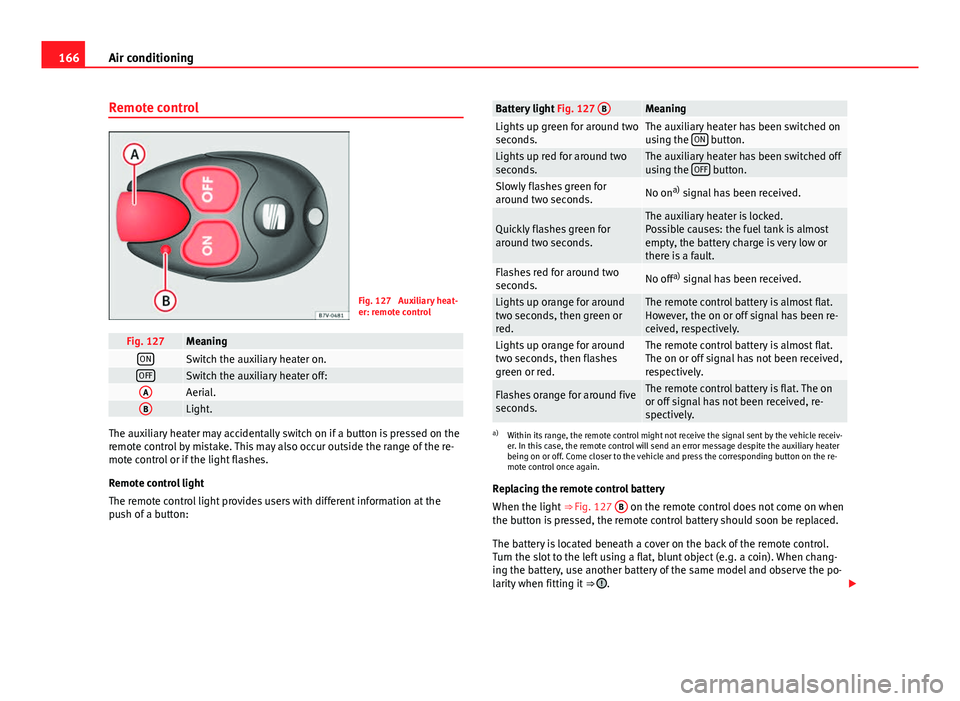
Fig. 127 Auxiliary heat-
er: remote control
Fig. 127MeaningONSwitch the auxiliary heater on.OFFSwitch the auxiliary heater off:AAerial.BLight.
The auxiliary heater may accidentally switch on if a button is pressed on the
remote control by mistake. This may also occur outside the range of the re-
mote control or if the light flashes.
Remote control light
The remote control light provides users with different information at the
push of a button:
Battery light Fig. 127 BMeaningLights up green for around two
seconds.The auxiliary heater has been switched on
using the ON button.Lights up red for around two
seconds.The auxiliary heater has been switched off
using the OFF button.Slowly flashes green for
around two seconds.No ona)
signal has been received.
Quickly flashes green for
around two seconds.The auxiliary heater is locked.
Possible causes: the fuel tank is almost
empty, the battery charge is very low or
there is a fault.
Flashes red for around two
seconds.No off a)
signal has been received.
Lights up orange for around
two seconds, then green or
red.The remote control battery is almost flat.
However, the on or off signal has been re-
ceived, respectively.
Lights up orange for around
two seconds, then flashes
green or red.The remote control battery is almost flat.
The on or off signal has not been received,
respectively.
Flashes orange for around five
seconds.The remote control battery is flat. The on
or off signal has not been received, re-
spectively.
a) Within its range, the remote control might not receive the signal sent by the vehicle receiv-
er. In this case, the remote control will send an error message despite the auxiliary heater
being on or off. Come closer to the vehicle and press the corresponding button on the re-
mote control once again.
Replacing the remote control battery
When the light ⇒ Fig. 127 B
on the remote control does not come on when
the button is pressed, the remote control battery should soon be replaced.
The battery is located beneath a cover on the back of the remote control.
Turn the slot to the left using a flat, blunt object (e.g. a coin). When chang-
ing the battery, use another battery of the same model and observe the po-
larity when fitting it ⇒
.