technical specifications Seat Alhambra 2014 Owner's Guide
[x] Cancel search | Manufacturer: SEAT, Model Year: 2014, Model line: Alhambra, Model: Seat Alhambra 2014Pages: 381, PDF Size: 5.75 MB
Page 65 of 381
63
Cockpit
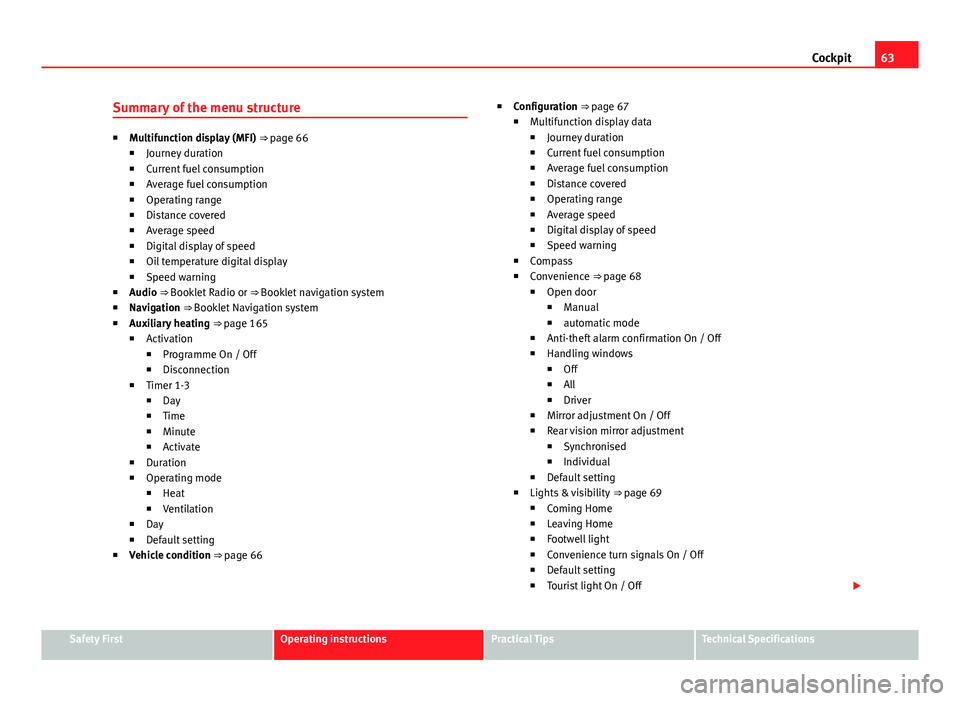
Summary of the menu structure
■ Multifunction display (MFI) ⇒ page 66
■ Journey duration
■ Current fuel consumption
■ Average fuel consumption
■ Operating range
■ Distance covered
■ Average speed
■ Digital display of speed
■ Oil temperature digital display
■ Speed warning
■ Audio ⇒ Booklet Radio or ⇒ Booklet navigation system
■ Navigation ⇒ Booklet Navigation system
■ Auxiliary heating ⇒ page 165
■ Activation
■ Programme On / Off
■ Disconnection
■ Timer 1-3
■ Day
■ Time
■ Minute
■ Activate
■ Duration
■ Operating mode
■ Heat
■ Ventilation
■ Day
■ Default setting
■ Vehicle condition ⇒ page 66 ■
Configuration ⇒ page 67
■ Multifunction display data
■ Journey duration
■ Current fuel consumption
■ Average fuel consumption
■ Distance covered
■ Operating range
■ Average speed
■ Digital display of speed
■ Speed warning
■ Compass
■ Convenience ⇒ page 68
■ Open door
■ Manual
■ automatic mode
■ Anti-theft alarm confirmation On / Off
■ Handling windows
■ Off
■ All
■ Driver
■ Mirror adjustment On / Off
■ Rear vision mirror adjustment
■ Synchronised
■ Individual
■ Default setting
■ Lights & visibility ⇒ page 69
■ Coming Home
■ Leaving Home
■ Footwell light
■ Convenience turn signals On / Off
■ Default setting
■ Tourist light On / Off
Safety FirstOperating instructionsPractical TipsTechnical Specifications
Page 67 of 381
65
Cockpit
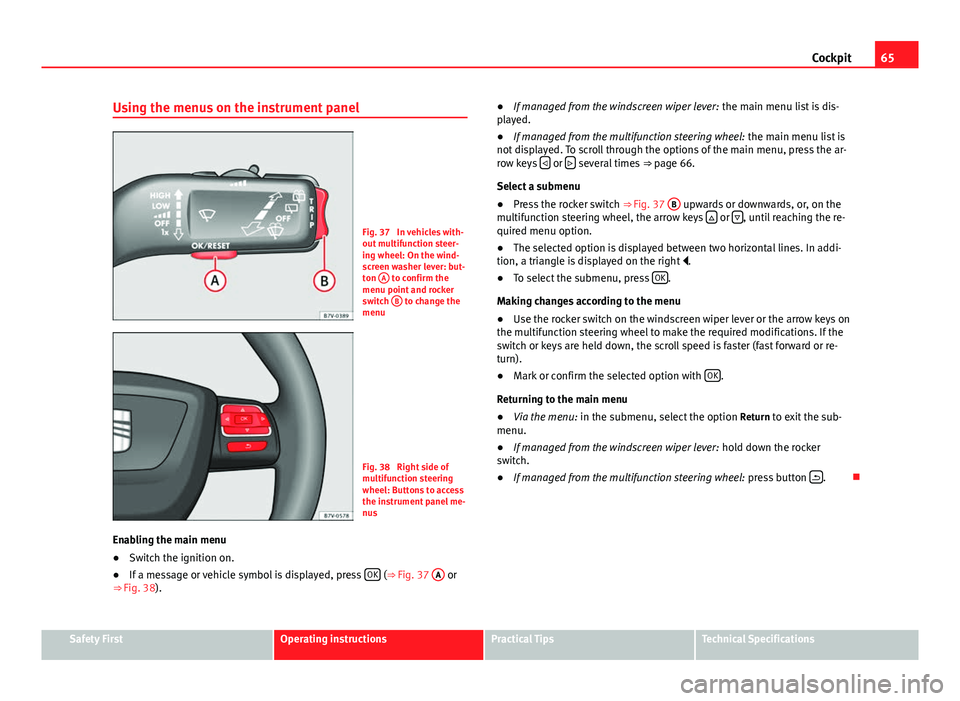
Using the menus on the instrument panel
Fig. 37 In vehicles with-
out multifunction steer-
ing wheel: On the wind-
screen washer lever: but-
ton A
to confirm the
menu point and rocker
switch B
to change the
menu
Fig. 38 Right side of
multifunction steering
wheel: Buttons to access
the instrument panel me-
nus
Enabling the main menu
● Switch the ignition on.
● If a message or vehicle symbol is displayed, press OK
(⇒
Fig. 37 A or
⇒ Fig. 38). ●
If managed from the windscreen wiper lever: the main menu list is dis-
played.
● If managed from the multifunction steering wheel: the main menu list is
not displayed. To scroll through the options of the main menu, press the ar-
row keys
or several times
⇒ page 66.
Select a submenu
● Press the rocker switch ⇒ Fig. 37 B
upwards or downwards, or, on the
multifunction steering wheel, the arrow keys or , until reaching the re-
quired menu option.
● The selected option is displayed between two horizontal lines. In addi-
tion, a triangle is displayed on the right .
● To select the submenu, press OK
.
Making changes according to the menu
● Use the rocker switch on the windscreen wiper lever or the arrow keys on
the multifunction steering wheel to make the required modifications. If the
switch or keys are held down, the scroll speed is faster (fast forward or re-
turn).
● Mark or confirm the selected option with OK
.
Returning to the main menu
● Via the menu: in the submenu, select the option Return to exit the sub-
menu.
● If managed from the windscreen wiper lever: hold down the rocker
switch.
● If managed from the multifunction steering wheel: press button
.
Safety FirstOperating instructionsPractical TipsTechnical Specifications
Page 69 of 381
67
Cockpit
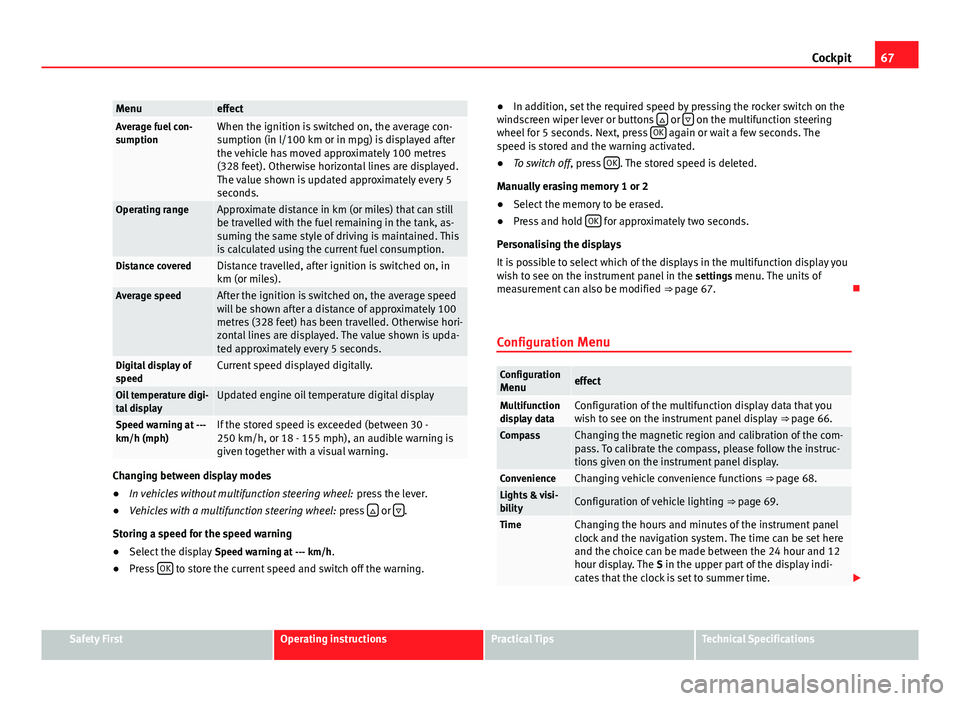
MenueffectAverage fuel con-
sumptionWhen the ignition is switched on, the average con-
sumption (in l/100 km or in mpg) is displayed after
the vehicle has moved approximately 100 metres
(328 feet). Otherwise horizontal lines are displayed.
The value shown is updated approximately every 5
seconds.
Operating rangeApproximate distance in km (or miles) that can still
be travelled with the fuel remaining in the tank, as-
suming the same style of driving is maintained. This
is calculated using the current fuel consumption.
Distance coveredDistance travelled, after ignition is switched on, in
km (or miles).
Average speedAfter the ignition is switched on, the average speed
will be shown after a distance of approximately 100
metres (328 feet) has been travelled. Otherwise hori-
zontal lines are displayed. The value shown is upda-
ted approximately every 5 seconds.
Digital display of
speedCurrent speed displayed digitally.
Oil temperature digi-
tal displayUpdated engine oil temperature digital display
Speed warning at ---
km/h (mph)If the stored speed is exceeded (between 30 -
250 km/h, or 18 - 155 mph), an audible warning is
given together with a visual warning.
Changing between display modes
● In vehicles without multifunction steering wheel: press the lever.
● Vehicles with a multifunction steering wheel: press
or .
Storing a speed for the speed warning
● Select the display Speed warning at --- km/h.
● Press OK
to store the current speed and switch off the warning. ●
In addition, set the required speed by pressing the rocker switch on the
windscreen wiper lever or buttons
or on the multifunction steering
wheel for 5 seconds. Next, press OK again or wait a few seconds. The
speed is stored and the warning activated.
● To switch off , press OK
. The stored speed is deleted.
Manually erasing memory 1 or 2
● Select the memory to be erased.
● Press and hold OK
for approximately two seconds.
Personalising the displays
It is possible to select which of the displays in the multifunction display you
wish to see on the instrument panel in the settings menu. The units of
measurement can also be modified ⇒ page 67.
Configuration Menu
Configuration Menueffect
Multifunction
display dataConfiguration of the multifunction display data that you
wish to see on the instrument panel display ⇒ page 66.
CompassChanging the magnetic region and calibration of the com-
pass. To calibrate the compass, please follow the instruc-
tions given on the instrument panel display.
ConvenienceChanging vehicle convenience functions ⇒ page 68.Lights & visi-
bilityConfiguration of vehicle lighting ⇒ page 69.
TimeChanging the hours and minutes of the instrument panel
clock and the navigation system. The time can be set here
and the choice can be made between the 24 hour and 12
hour display. The S in the upper part of the display indi-
cates that the clock is set to summer time.
Safety FirstOperating instructionsPractical TipsTechnical Specifications
Page 71 of 381
69
Cockpit
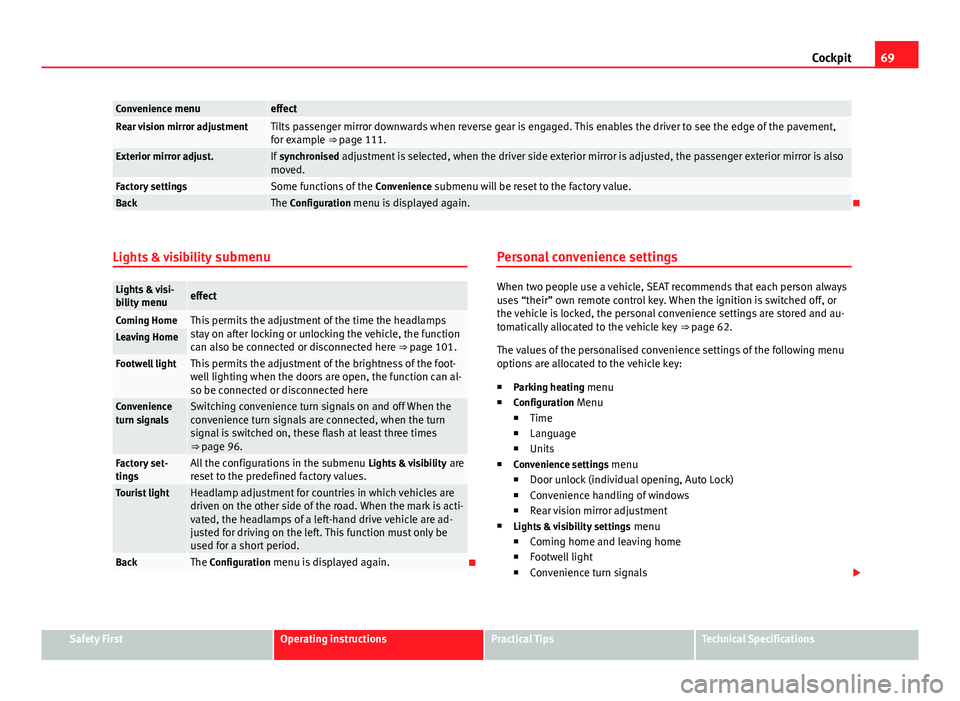
Convenience menueffectRear vision mirror adjustmentTilts passenger mirror downwards when reverse gear is engaged. This enables the driver to see the edge of the pavement,
for example ⇒ page 111.
Exterior mirror adjust.If synchronised adjustment is selected, when the driver side exterior mirror is adjusted, the passenger exterior mirror is also
moved.
Factory settingsSome functions of the Convenience submenu will be reset to the factory value.BackThe Configuration menu is displayed again.
Lights & visibility submenu
Lights & visi-
bility menueffect
Coming HomeThis permits the adjustment of the time the headlamps
stay on after locking or unlocking the vehicle, the function
can also be connected or disconnected here ⇒ page 101.Leaving Home
Footwell lightThis permits the adjustment of the brightness of the foot-
well lighting when the doors are open, the function can al-
so be connected or disconnected here
Convenience
turn signalsSwitching convenience turn signals on and off When the
convenience turn signals are connected, when the turn
signal is switched on, these flash at least three times
⇒ page 96.
Factory set-
tingsAll the configurations in the submenu Lights & visibility are
reset to the predefined factory values.
Tourist lightHeadlamp adjustment for countries in which vehicles are
driven on the other side of the road. When the mark is acti-
vated, the headlamps of a left-hand drive vehicle are ad-
justed for driving on the left. This function must only be
used for a short period.
BackThe Configuration menu is displayed again. Personal convenience settings
When two people use a vehicle, SEAT recommends that each person always
uses “their” own remote control key. When the ignition is switched off, or
the vehicle is locked, the personal convenience settings are stored and au-
tomatically allocated to the vehicle key
⇒ page 62.
The values of the personalised convenience settings of the following menu
options are allocated to the vehicle key: ■ Parking heating menu
■ Configuration Menu
■ Time
■ Language
■ Units
■ Convenience settings menu
■ Door unlock (individual opening, Auto Lock)
■ Convenience handling of windows
■ Rear vision mirror adjustment
■ Lights & visibility settings menu
■ Coming home and leaving home
■ Footwell light
■ Convenience turn signals
Safety FirstOperating instructionsPractical TipsTechnical Specifications
Page 73 of 381
71
Cockpit
Note
Calls made with the and buttons take priority over normal calls. If the or
button is pressed during a normal telephone call, this call will be cut off
and a connection will be made to the information or assistance centre.
Note
Any call made to the information service will be interrupted if the assistance
button is pressed. The connection to the assistance service will then be
made (and vice versa).
Note
Mobile phone coverage must be available to place a call to the information
and assistance services. This service might not be available in some coun-
tries.
Activating and deactivating voice control
Switching on the speech control system
● Press the button on the multi-function steering wheel.
● OR: Press the button in the three button unit in the headliner.
● Wait for the acoustic signal.
● Speak the command.
● Follow the dialogue instructions (extended dialogue).
Ending voice control
● Press the button on the multi-function steering wheel.
● OR: Press the button in the three button unit in the headliner. Interrupting the instructions
●
During the instructions, press the button on the multi-function steer-
ing wheel.
● OR: Press the button in the three button unit in the headliner.
● You will be able to speak a command immediately after.
Safety FirstOperating instructionsPractical TipsTechnical Specifications
Page 75 of 381
73
Opening and closing
Vehicle keys
With the vehicle key ⇒ Fig. 40 or ⇒ Fig. 41 the vehicle may be locked or un-
locked remotely.
The vehicle key includes an emitter and batteries. The receiver is in the inte-
rior of the vehicle. The range of the vehicle key with remote control and new
batteries is several metres around the vehicle.
If it is not possible to open or close the vehicle using the remote control key,
this should be re-synchronised ⇒ page 75 or the battery changed
⇒ page 74.
Different keys belonging to the vehicle may be used.
Folding the key shaft in and out
When the button A
is pressed, the key shaft is released and unfolds.
To fold it press the button A
and fold the key shaft in until it locks in place.
Duplicate keys
To obtain a spare key and other vehicle keys, the vehicle chassis number is
required.
Each new key must contain a microchip and be coded with the data from the
vehicle electronic immobiliser. A vehicle key will not work if it does not con-
tain microchip or the microchip has not been encoded. This is also true for
keys cut for the vehicle.
The vehicle keys or new spare keys can be obtained from a Technical Serv-
ice, a specialised workshop or approved key service qualified to create this
kind of key.
New keys or spare keys must be synchronised before use ⇒ page 75.
CAUTION
All of the vehicle keys contain electronic components. Protect the vehicle
keys from damage, impacts and humidity.
Note
● Only use the key button when you require the corresponding function.
Pushing the button unnecessarily could accidentally unlock the vehicle or
trigger the alarm. It is also possible even when you are outside the radius of
action.
● Key operation can be greatly influenced by overlapping radio signals
around the vehicle working in the same range of frequencies (for example,
radio transmitters, mobile telephones).
● Obstacles between the remote control and the vehicle, bad weather con-
ditions and discharged batteries can considerably reduce the range of the
remote control.
Safety FirstOperating instructionsPractical TipsTechnical Specifications
Page 77 of 381
75
Opening and closing
SEAT recommend having the batteries changed in a specialised workshop.
The battery is located to the rear of the vehicle key, under a cover ⇒ Fig. 44.
When changing the battery, use another battery of the same model and ob-
serve the polarity when fitting it ⇒
.
To change the battery
● Unfold the key shaft ⇒ page 72.
● Remove the cover from the back of the vehicle key ⇒ Fig. 44 in the direc-
tion of the arrow ⇒
.
● Extract the battery from the compartment using a suitable thin object
⇒ Fig. 45.
● Place the new battery in the compartment, pressing in the direction of
the arrow as shown ⇒ Fig. 45 ⇒
.
● Fit the battery compartment cover, pressing in the direction of the arrow
as shown ⇒ Fig. 44 until it clicks into place.
CAUTION
● If the battery is not changed correctly, the vehicle key may be damaged.
● Use of unsuitable batteries may damage the vehicle key. For this reason,
always replace the dead battery with another of the same voltage, size and
specifications.
For the sake of the environment
● Please dispose of your used batteries correctly and with respect for the
environment.
● The vehicle key battery may contain perchlorate. Observe the legal re-
quirements for their disposal. Synchronising the vehicle key
If the button
is pressed frequently outside of the vehicle range, it is pos-
sible that the vehicle can no longer be locked or unlocked using the key. In
this case, the vehicle key must be synchronised once more as follows:
● Unfold the key shaft ⇒ page 73.
● Remove the cover from the driver door handle ⇒ page 318.
● Press the button
on the vehicle key. For this, it must remain with the
vehicle.
● Open the vehicle within one minute using the key shift.
● Turn on the ignition using the vehicle key. The key has been synchron-
ised.
● Replace the driver door handle cover.
Central locking and locking system
Introduction
Central locking functions correctly when all the doors and the rear lid are
correctly shut. If the driver door is open, the vehicle cannot be locked with
the key.
The battery of a vehicle left unlocked during a long period (for instance, in a
private garage) may run down and fail to start the motor.
Additional information and warnings:
● Personal convenience settings in the SEAT information system
⇒ page 62
● Vehicle key set ⇒ page 72
● Sliding doors ⇒ page 81
Safety FirstOperating instructionsPractical TipsTechnical Specifications
Page 79 of 381
77
Opening and closing
Locking and unlocking the vehicle from the outside
Fig. 46 Buttons on the
vehicle key
Fig. 47 Buttons on the
key of vehicles with slid-
ing doors
effectHandling the buttons on the vehicleUnlocking the vehicle.Press button . Keep it pushed for the
convenience opening.
Lock the vehicle.Press button . Keep it pushed for the
convenience locking function.
Unlocking the rear lid.Press button .Open the sliding door.⇒ page 81.
Please note: Depending on the function selected in the central locking sub-
menu Convenience, you may have to push the ⇒
page 62 button twice to
unlock all doors and the rear lid
The vehicle key only locks and unlocks the vehicle if it is within range of the
vehicle and if the batteries have enough power. When locking, the vehicle's
turn signals will blink.
If the driver door is open, the vehicle cannot be locked with the key. If you
unlock the vehicle without opening any doors or the rear lid, it will lock
again automatically after a few seconds. This function prevents the vehicle
from remaining unlocked if the unlocking button is pressed by mistake.
Convenience open/close function
● See "Electric windows: functions" ⇒ page 89.
● See "Panoramic sliding sunroof: operation" ⇒ page 93.
Safety FirstOperating instructionsPractical TipsTechnical Specifications
Page 81 of 381
79
Opening and closing
Driver door control lamp.
When the vehicle is locked:MeaningThe red LED flashes for approximately 2
seconds at short intervals and then more
slowly.The deadlock is switched on.
The red LED flashes for about two sec-
onds then turns off. After 30 seconds, the
LED flashes again.The deadlock is switched off.
The red LED remains lit for about 30 sec-
onds.There is a fault in the locking
system. Contact a specialised
workshop.
WARNING
Careless use of the deadlock can cause serious injury.
● Never leave anybody inside the vehicle if this is locked using the key.
When the deadlock is activated, doors cannot be opened from the inside!
● When the doors are locked, it is difficult to get to passengers in the
vehicle interior in case of an emergency. Passengers could remain trap-
ped inside in case of emergency.
Anti-theft alarm
The anti-theft alarm makes it more difficult to break into the vehicle or steal
it.
The anti-theft alarm is automatically turned on when the vehicle is locked
with the key.
When does the system trigger an alarm?
The anti-theft alarm siren will be triggered for about 30 seconds accompa-
nied by optical warning signals for about five minutes when the vehicle is
locked and the following unauthorised actions are taken: ●
When the door is mechanically unlocked using the vehicle key without
turning the ignition within the following 15 seconds.
● A door is opened.
● The bonnet is opened.
● The rear lid is opened.
● When the ignition is switched on with a non-authorised key.
● When the vehicle battery is disconnected.
● When there is movement inside the vehicle (vehicles with interior moni-
toring).
● When the vehicle is towed (vehicles with anti-tow system)
● When the vehicle is lifted (vehicles with anti-tow system).
● Transporting the vehicle on a ferry or by railroad (vehicles with an anti-
tow system or interior monitoring).
● Unhitch a trailer connected to the anti-theft alarm ⇒ page 237.
How to turn OFF the alarm
Unlock the vehicle with the unlocking button on the key or turn on the igni-
tion with a valid key.
Note
● The alarm will be triggered once more when anybody enters the same
zone of surveillance or any other zone. If, for example, after opening a door,
the rear lid is also opened.
● The anti-theft alarm is not activated when the vehicle is locked from
within using the central locking button
.
● If the driver door is unlocked mechanically with the key, only the driver
door is unlocked, the rest of the doors remain locked. Only when the igni-
tion has been turned on will the other doors be available - but not unlocked
- and the central lock button activated.
● If the vehicle battery is run down or flat then the anti-theft alarm will not
operate correctly.
Safety FirstOperating instructionsPractical TipsTechnical Specifications
Page 83 of 381
81
Opening and closing
Doors Introduction
Additional information and warnings:
● Vehicle key set ⇒ page 72
● Central locking and locking system ⇒ page 75
● Emergency locking and unlocking ⇒ page 318
WARNING
If a door is not correctly closed, it could open unexpectedly when driving
and cause serious injuries.
● Always stop immediately and close the door.
● When closing, ensure that the door has closed correctly. A closed
door should be flush with the corresponding parts of the bodywork.
● Open and close doors only when nobody is in the way of the door.
WARNING
A door held open by its retainer could be blown closed by the wind or
close if the vehicle is on a hill causing injury.
● When opening and closing doors, always use the door handle.
Warning lamp
lights upPossible causeSolution
At least one vehicle door is
open or not correctly shut. Stop driving immediately!
Open the corresponding door
and close it immediately.
Several warning and control lamps should light up for a few seconds when
the ignition is switched on, signalling that the function is being verified.
They will switch off after a few seconds.
If a door is open or incorrectly closed, the warning lamp or on the in-
strument panel will light.
Depending on the vehicle equipment, a symbol may be displayed on the
dash panel screen instead of the warning lamp. The indication is also visi-
ble when the ignition is switched off. The indication disappears around 15
seconds after the vehicle has been locked.
Sliding doors Introduction
Additional information:
● Vehicle key set ⇒ page 72
● Central locking and locking system ⇒ page 75
● Emergency locking and unlocking ⇒ page 318
WARNING
If a sliding door is not correctly closed, it could open unexpectedly when
driving and cause serious injuries.
● Always stop immediately and close the sliding door.
● When closing, ensure that the sliding door has closed correctly. A
closed sliding door should be flush with the corresponding parts of the
bodywork.
● Only open and close sliding doors when no body is in the way of the
door.
Safety FirstOperating instructionsPractical TipsTechnical Specifications