boot Seat Alhambra 2015 User Guide
[x] Cancel search | Manufacturer: SEAT, Model Year: 2015, Model line: Alhambra, Model: Seat Alhambra 2015Pages: 305, PDF Size: 5.46 MB
Page 71 of 305
Opening and closing
In case of difficulty or obstruction, automatic
opening of the rear lid is interrupted.
Electronically opening the rear lid does not
work when a trailer is electrically connected
and hitched to a factory fitted tow hitch
››› page 179 .
The r e
ar lid can be opened manually by ap-
plying more force.
Closing the rear lid
● Press and hold the button on the vehi-
cle key for approximately 1 second.
● OR: press and hold the button on the
centre console for approximately 1 second
››› Fig. 52 .
● OR: press the ›
›› Fig. 53
boot hatch button
(arro
w).
● Press the button on the open rear lid
››› Fig. 55
›
›› .
● Manually push the rear lid down to close it.
The rear lid will move down to the closed po-
sition to close and lock itself automatically
using the power-close feature ››› .
In case of difficulty or obstruction, automatic
closing of the rear lid is interrupted and it will
open slightly.
Check why the rear lid could not close.
Attempt to close it once more. Interrupting the opening and closing process
Rear lid opening and closing can be stopped
by pressing one of the
buttons. Each time
one of the buttons is pressed, the rear lid
moves to its initial position.
Then, it can be opened or closed by hand. To
do this, apply a little more force.
Memorising the opening angle
The rear lid must be at least half open to
memorise an opening angle.
● Stop automatic opening in the opening po-
sition required ››› page 69 .
● Ho l
d down the button ››› Fig. 55
with the
rear lid open for at least three seconds. The
opening angle is memorised.
Memorisation is confirmed by blinking of the
hazard warning lights and an audible warn-
ing.
To fully open the boot hatch again, the open-
ing angle must be memorised once more.
● Release the rear lid and open it to the
memorised height.
● Push the rear lid all the way up. To do this,
apply a little more force.
● Hold down the button ››› Fig. 55
with the
rear lid open for at least three seconds.
● The opening angle is reset to the original
factory setting. WARNING
Unsuitable or careless closing and locking of
the rear lid could cause serious injuries.
● Never allow children to play inside or
around the vehicle without supervision, espe-
cially if the rear lid is open. Children could
enter the luggage compartment, close the
rear lid and become trapped. A locked vehicle
can be subjected to extremely high and low
temperatures, depending on the time of year,
resulting in serious injuries/illness or even
death. WARNING
It is possible that the rear lid does not open
completely or, if it is open, closes alone if a
large amount of snow has built up on it or if a
luggage rack is fitted. In this case, the rear lid
must be supported. CAUTION
● When using a trailer, ensure that there is
sufficient space to open and close the rear
lid.
● Before opening the rear lid, any kind of
equipment carrier should be removed, for ex-
ample a bicycle carrier. CAUTION
In case of repeated short-term use, the sys-
tem is turned off to avoid overheating. » 69
Technical specifications
Advice
Operation
Safety
Page 80 of 305
Operation
them off again at speeds below approximate-
ly 30 km/h (18 mph).
Switching on and off Action
Switch-
ing on:– With the ignition on, turn the lights control
to the position and put the turn signal
and main beam lever in the main beam posi-
tion ››› page 76. When the headlight adjust-
ment (automatic lights also) is activated, the
warning lamp lights up in the dash panel
display
.
Switch-
ing off:– Disconnect the on button.
– OR: turn the lights control to a different po-
sition to
››› page 75.
– OR: place the turn signal and main beam
lever in the headlight flasher or main beam
position ››› page 76. The following conditions can cause the head-
light adjustment to fail to turn off the main
beam or fail to do so in time:
●
On roads with insufficient lighting with very
reflective signs
● If road users are insufficiently lit up, e.g.
pedestrians or cyclists.
● On closed curves, when the traffic in the
opposite direction is partially hidden, on pro-
nounced slopes
● On roads with traffic in the opposite direc-
tion and with a central reservation barrier
where the driver can see through gaps or
over it e.g. lorry drivers. ●
If the camera is damaged or if the power
supply has been cut off
● In the event of fog, snow or heavy rain
● In the event of dust or sand storms
● If the windscreen is damaged by the impact
from a stone in the camera's field of vision
● If the camera's field of vision is misted up,
dirty or covered by a sticker, snow or ice. WARNING
The greater comfort that the headlight ad-
justment provides (automatic also) must not
cause you to take risks. The system is not a
replacement for driver awareness.
● Always monitor the lights yourself and ad-
just them depending on the light, visibility
and traffic conditions.
● The headlight adjustment (automatic also)
may not correctly detect all situations and in
certain situations may only provide limited
function.
● If the windscreen is damaged or modifica-
tions are made to the vehicle lighting, this
may harm the functioning of the headlight
adjustment (automatic lights also), for exam-
ple, if additional headlight are fitted. Note
Main beam and flashed headlights can be
turned on and off manually at any time with
the turn signal and main beam lever
››› page 76. “Coming home” and “Leaving home”
function (guidance lights)
The “Coming home” function should be
switched on manually. However the “Leav-
ing home” function is automatically control-
led by a photo sensor.
Coming home: necessary operations
To switch sys-
tem on:
– Switch off the ignition.
– Briefly flash the headlights
for ap-
proximately one second ››› page 76.
The “Coming home” lighting comes on
when the driver door is opened. The
delay in switching off the headlights is
counted from when the last door or
boot hatch is closed.
To switch sys-
tem off:
– Automatically at the end of the delay
period.
– Automatically, if 30 seconds after
coming on, a vehicle door or the boot
hatch remains open.
– When the light switch is turned to po-
sition
.
– When the ignition is switched on.
Leaving home: necessary operations
To switch sys-
tem on:– Unlock the vehicle when the light
switch is in position and the pho-
to sensor detects darkness.78
Page 101 of 305
Transport and practical equipment
Transporting a load Secure all objects in the vehicle
● Distribute the load throughout the vehicle,
on the roof and in a trailer as uniformly as
possible.
● Transport heavy objects as far forward as
possible in the luggage compartment and
lock the seat backs in the vertical position.
● Secure luggage in the luggage compart-
ment with suitable straps on the fastening
rings ››› page 100
.
● Chec k
the headlight adjustment
››› page 74
.
● Use the suitable tyre pressure according to
the load being transported. Read the tire in-
flation information label ›››
page 231.
● For vehicles with a tire pressure indicator,
change the vehicle load status ›››
page 177. CAUTION
Objects on the shelf could chafe against the
wires of the heating element in the heated
rear window and cause damage. Note
Please note the information about loading a
trailer ››› page 179 and the roof carrier sys-
t em ›
›› page 110. Driving with the rear lid open
Driving with the rear lid open creates an addi-
tional risk. Secure all objects and secure the
rear lid correctly and take all measures possi-
ble to reduce toxic gases from entering the
vehicle.
WARNING
Driving with the rear lid unlocked or open
could cause serious injuries.
● Always drive with the rear lid closed.
● Secure all objects in the vehicle. Loose
items could fall out of the vehicle and injure
other road users or damage other vehicles.
● Drive particularly carefully and think
ahead.
● Avoid sudden manoeuvres and braking giv-
en that this could cause an uncontrolled
movement of the open rear lid.
● When transporting objects that protrude
out of the luggage compartment, indicate
them suitably. Observe legal requirements.
● If objects must project out of the luggage
compartment, the rear lid must never be used
to “secure” or “attach” objects.
● If a baggage rack is fitted on the rear lid, it
should be removed before travelling with the
rear lid open. WARNING
Toxic gases may enter the vehicle interior
when the rear lid is open. This could cause
loss of consciousness, carbon monoxide poi-
soning, serious injury and accidents.
● To avoid toxic gases entering the vehicle al-
ways drive with the rear lid closed.
● In exceptional circumstances, if you must
drive with the rear lid open, observe the fol-
lowing to reduce the entry of toxic gases in-
side the vehicle:
– Close all windows and the sliding sun-
roof.
– Turn off the air recirculation for the heat-
ing and air conditioner.
– Open all of the air outlets in the dash
panel.
– Turn the heating fan and heater to the
highest level. CAUTION
An open boot hatch changes the length and
height of the vehicle. Driving a loaded vehicle
For the best handling when driving a loaded
vehicle, note the following:
● Secure all objects ›››
page 99 .
● Ac
celerate gently and carefully. »
99
Technical specifications
Advice
Operation
Safety
Page 102 of 305
Operation
● Avoid sudden braking and manoeuvres.
● Brake early.
● If necessary, read the instructions for driv-
ing with a trailer ››› page 179.
● If necessary, read the instructions for driv-
ing with a roof carrier system ››› page 110. WARNING
A sliding load could considerably affect the
stability and safety of the vehicle resulting in
an accident with serious consequences.
● Secure loads correctly so they do not move.
● When transporting heavy objects, use suit-
able ropes or straps.
● Lock the seat backs in vertical position. Loading luggage compartment
Introduction Always transport heavy loads in the luggage
compartment and place the seat backs in a
vertical position. Always use the fastening
rings with suitable rope or straps. Never over-
load the vehicle. Both the carrying capacity
as well as the distribution of the load in the
vehicle have effects on the driving behaviour
and braking ability
››› . WARNING
When the vehicle is not in use or being
watched, always lock the doors and the rear
lid to reduce the risk of serious injury or
death.
● Do not leave children unwatched, especial-
ly when the boot is open. Children could
climb into the luggage compartment, close
the rear lid from inside and be unable to es-
cape themselves. This could lead to serious
injury or death.
● Never allow children to play in or around
the vehicle.
● Never transport people in the luggage com-
partment. WARNING
Unsecured or incorrectly secured objects can
cause serious injury in case of a sudden ma-
noeuvring or breaking or in case of an acci-
dent. This is especially true when objects are
struck by a detonating airbag and fired
through the vehicle interior. To reduce the
risks, please note the following:
● Secure all objects in the vehicle. Always
place equipment and heavy objects in the
boot.
● Always secure objects with suitable ropes
or straps so that they cannot be pushed in-
side the cabin and move around the areas
around the front or side airbags in the event
of sudden braking or an accident. ●
While driving, always keep object compart-
ments closed.
● Do not place hard, heavy or sharp objects
inside the vehicle interior, in open storage
compartments, the rear shelf or on the dash
panel.
● Remove hard, heavy and sharp objects from
clothes and pockets inside the vehicle and
store securely. WARNING
The transport of heavy object changes vehi-
cle handling and increases braking distance.
Heavy loads that have not been stored or se-
cured correctly could cause loss of control
and result in serious injury.
● Vehicle handling changes when transport-
ing heavy objects due to a change in the cen-
tre of gravity.
● Distribute the load as uniformly and as low
down on the vehicle as possible.
● Store heavy objects in the luggage com-
partment as far from the rear axle as possi-
ble. CAUTION
● Hard objects on the rear shelf could chafe
the wires of the heating element and antenna
of the rear window and cause damage.
● The side window antenna could be dam-
aged due to chafing from objects. 100
Page 105 of 305
Transport and practical equipment
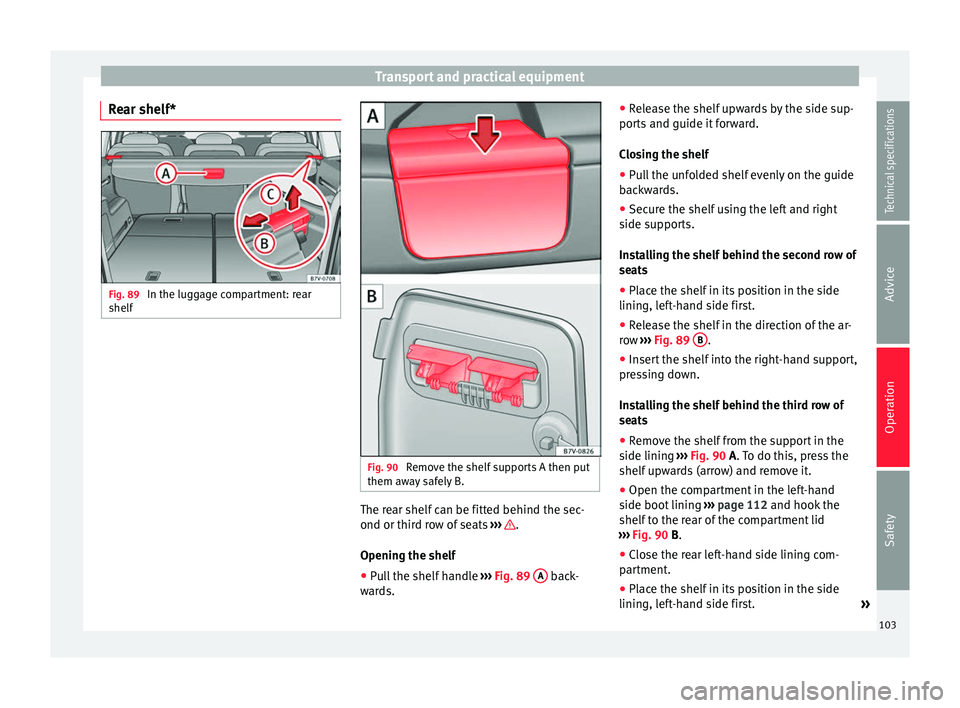
Rear shelf* Fig. 89
In the luggage compartment: rear
shelf Fig. 90
Remove the shelf supports A then put
them away safely B. The rear shelf can be fitted behind the sec-
ond or third row of seats
››› .
Opening the shelf
● Pull the shelf handle ›››
Fig. 89 A back-
wards. ●
Release the shelf upwards by the side sup-
ports and guide it forward.
Closing the shelf
● Pull the unfolded shelf evenly on the guide
backwards.
● Secure the shelf using the left and right
side supports.
Installing the shelf behind the second row of
seats
● Place the shelf in its position in the side
lining, left-hand side first.
● Release the shelf in the direction of the ar-
row ››› Fig. 89 B .
● Insert the shelf into the right-hand support,
pressing down.
Installing the shelf behind the third row of
seats
● Remove the shelf from the support in the
side lining ››› Fig. 90
A. To do this, press the
shelf upwards (arrow) and remove it.
● Open the compartment in the left-hand
side boot lining ››› page 112 and hook the
shelf to the rear of the compartment lid
››› Fig. 90 B
.
● Close the rear left-hand side lining com-
partment.
● Place the shelf in its position in the side
lining, left-hand side first. »
103
Technical specifications
Advice
Operation
Safety
Page 106 of 305
Operation
● Lift the shelf off in direction of the arrow
››› Fig. 89 B .
● Insert the shelf into the right-hand support,
pressing down.
Removing the shelf
● Release the shelf in the direction of the ar-
row ››› Fig. 89 B and lift it in the direction of
the arrow C .
● Remove the shelf from the right-hand side
support.
● In addition, when removing the shelf be-
hind the third row of seats: cover the side lin-
ing supports with their covers.
● Only with 5 places: support the released
shelf by placing it on the front section of the
boot floor ››› page 112 . WARNING
If the shelf is placed on one of the rear seats,
this could cause serious injury in case of sud-
den braking or an accident.
● Whenever it the third row seats are occu-
pied, the shelf should be put behind this row. WARNING
Unsecured or incorrectly secured objects or
animals on the rear shelf could cause serious
injuries in case of a sudden manoeuvre or
braking or even an accident. ●
Do not leave hard, heavy or sharp objects
(loose or in bags) on the rear shelf.
● Never transport animals on the rear shelf. Net partition*
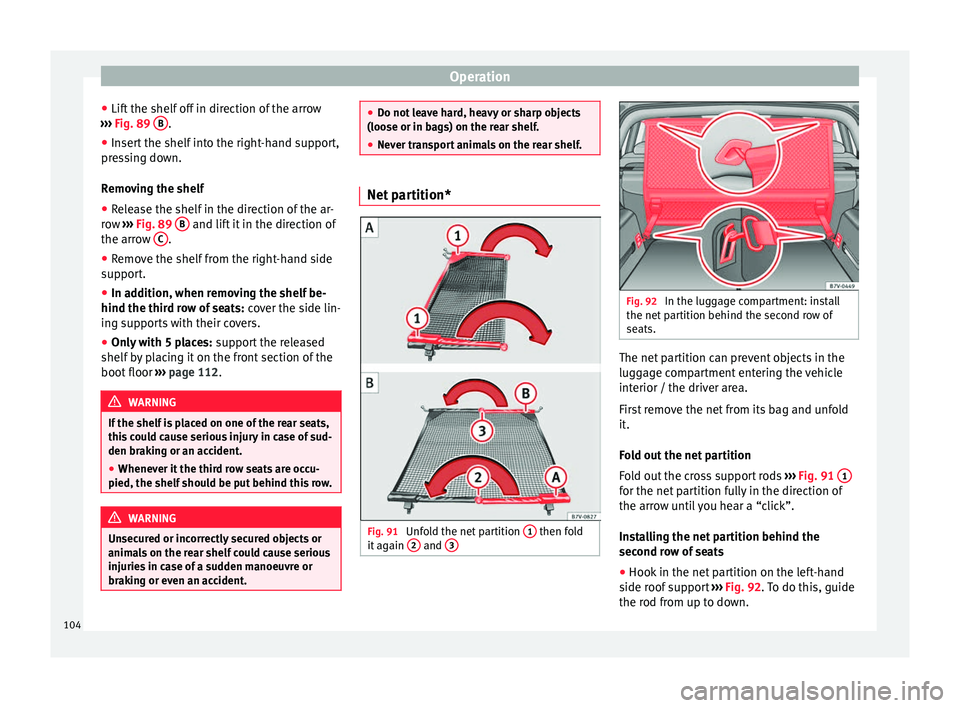
Fig. 91
Unfold the net partition 1 then fold
it again 2 and
3 Fig. 92
In the luggage compartment: install
the net partition behind the second row of
seats. The net partition can prevent objects in the
luggage compartment entering the vehicle
interior / the driver area.
First remove the net from its bag and unfold
it.
Fold out the net partition
Fold out the cross support rods
››› Fig. 91 1 for the net partition fully in the direction of
the arrow until you hear a “click”.
Installing the net partition behind the
second row of seats
●
Hook in the net partition on the left-hand
side roof support ››› Fig. 92 . To do this, guide
the r od fr
om up to down.
104
Page 107 of 305
Transport and practical equipment
● Hook in the net partition on the rear right-
hand side roof support by pressing on the
rod.
● Secure the net partition hooks into the
straps in the front of the boot ››› Fig. 92 then
tight en the belts.
In
stalling the net partition behind the front
seats
● Hook in the net partition on the front left-
hand side roof support ››› Fig. 92. To do this,
guide the rod fr
om up to down.
● Hook in the net partition on the rear right-
hand side roof support by pressing on the
rod.
● Secure the hooks of the net partition to the
attachment rings in the left and right hand
side footwells on the second row of seats
then tighten the straps.
Removing the net partition
● Loosen the net partition straps.
● Release the net partition hooks from the
rings ››› Fig. 92.
● Unhook the net
partition on the right-hand
side roof support ››› Fig. 92 by pressing on
the rod.
● Unhook
the net partition from the left-hand
side roof support. Folding in the net partition
●
Press on the release button ››› Fig. 91 2 and bend the rod
A in the direction of the
arrow with the release button pressed.
● Press on the release button ››› Fig. 91 3 and bend the rod
B in the direction of the
arrow with the release button pressed.
● Store the net partition securely in the vehi-
cle. WARNING
Loose objects in the vehicle interior can be vi-
olently thrown in case of a sudden manoeu-
vre or braking and especially in accidents
causing serious injury.
● Ensure that the rods are correctly locked in
place.
● Even when the net partition is correctly fit-
ted, objects must be secured.
● When driving with the net partition, no pas-
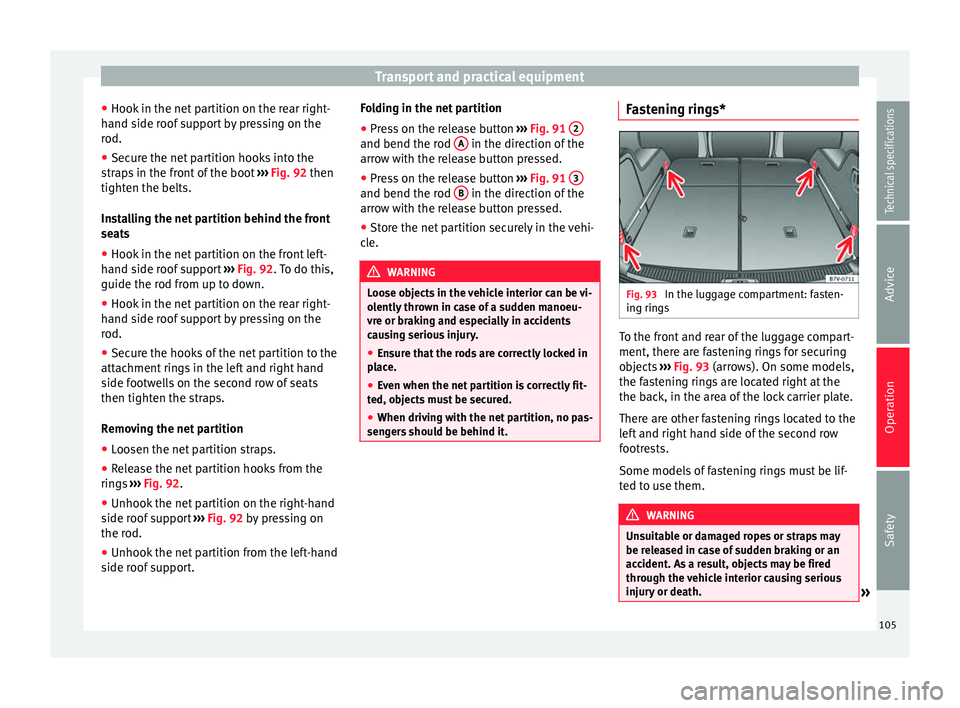
sengers should be behind it. Fastening rings*
Fig. 93
In the luggage compartment: fasten-
ing rings To the front and rear of the luggage compart-
ment, there are fastening rings for securing
objects
››› Fig. 93 (arrows). On some models,
the f a
stening rings are located right at the
the back, in the area of the lock carrier plate.
There are other fastening rings located to the
left and right hand side of the second row
footrests.
Some models of fastening rings must be lif-
ted to use them. WARNING
Unsuitable or damaged ropes or straps may
be released in case of sudden braking or an
accident. As a result, objects may be fired
through the vehicle interior causing serious
injury or death. » 105
Technical specifications
Advice
Operation
Safety
Page 110 of 305
Operation
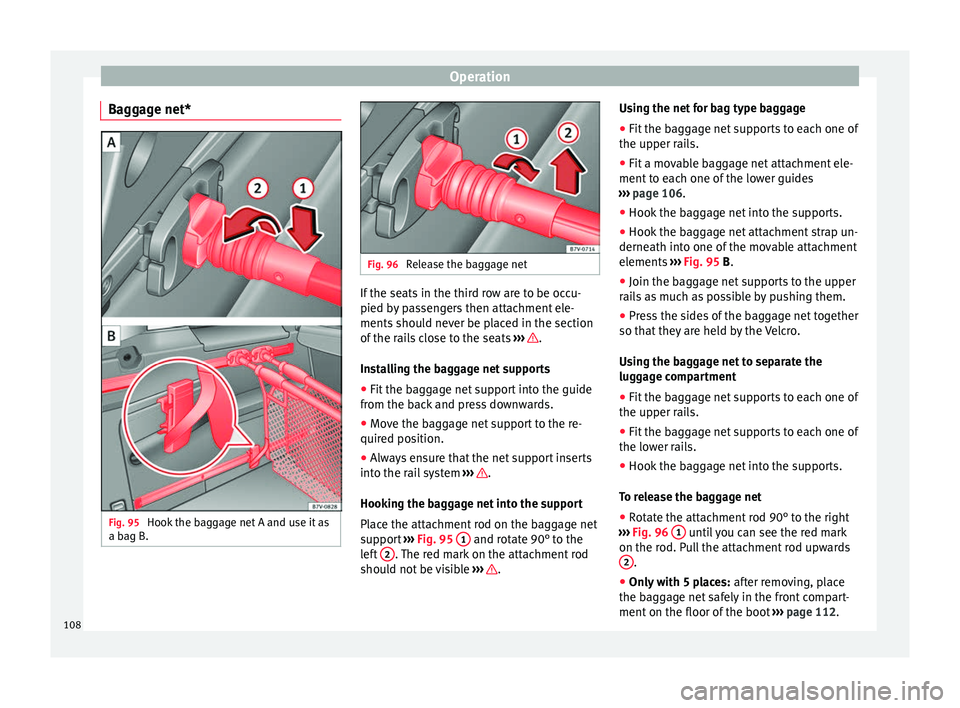
Baggage net* Fig. 95
Hook the baggage net A and use it as
a bag B. Fig. 96
Release the baggage net If the seats in the third row are to be occu-
pied by passengers then attachment ele-
ments should never be placed in the section
of the rails close to the seats
››› .
Installing the baggage net supports
● Fit the baggage net support into the guide
from the back and press downwards.
● Move the baggage net support to the re-
quired position.
● Always ensure that the net support inserts
into the rail system ››› .
Hooking the baggage net into the support
Place the attachment rod on the baggage net
support ››› Fig. 95 1 and rotate 90° to the
left 2 . The red mark on the attachment rod
should not be visible ››› .Using the net for bag type baggage
●
Fit the baggage net supports to each one of
the upper rails.
● Fit a movable baggage net attachment ele-
ment to each one of the lower guides
››› page 106 .
● Hook the b
aggage net into the supports.
● Hook the baggage net attachment strap un-
derneath into one of the movable attachment
elements ››› Fig. 95 B
.
● Join the baggage net supports to the upper
rails as much as possible by pushing them.
● Press the sides of the baggage net together
so that they are held by the Velcro.
Using the baggage net to separate the
luggage compartment
● Fit the baggage net supports to each one of
the upper rails.
● Fit the baggage net supports to each one of
the lower rails.
● Hook the baggage net into the supports.
To release the baggage net
● Rotate the attachment rod 90° to the right
››› Fig. 96 1 until you can see the red mark
on the rod. Pull the attachment rod upwards 2 .
● Only with 5 places: after removing, place
the baggage net safely in the front compart-
ment on the floor of the boot ››› page 112.
108
Page 111 of 305
Transport and practical equipment
Removing the baggage net supports
● Remove the net attachment element from
the rail and pull it out downwards. WARNING
In case of an accident or sudden braking, the
net attachment elements in the parts of the
rails close to the seats of the third row could
injure seat occupants.
● Whenever the seats on the third row are to
be occupied, remove the attachment ele-
ments from the rails or move them all the way
back. WARNING
Baggage net supports that are not secured
correctly can be released from the guide in
case of the sudden braking or accident. As a
result, objects may be fired through the vehi-
cle interior causing serious injury or death.
● Always ensure that the baggage net sup-
ports are correctly inserted into the rails; the
red mark should not be visible.
● Never secure a child seat to the baggage
net supports. CAUTION
● The baggage net supports placed on the
rail system can be damaged when folding
down seats from the third row or putting
them back into position and these can also
damage the seats themselves. Before folding down or repositioning the seats, remove the
baggage net supports from the rail system.
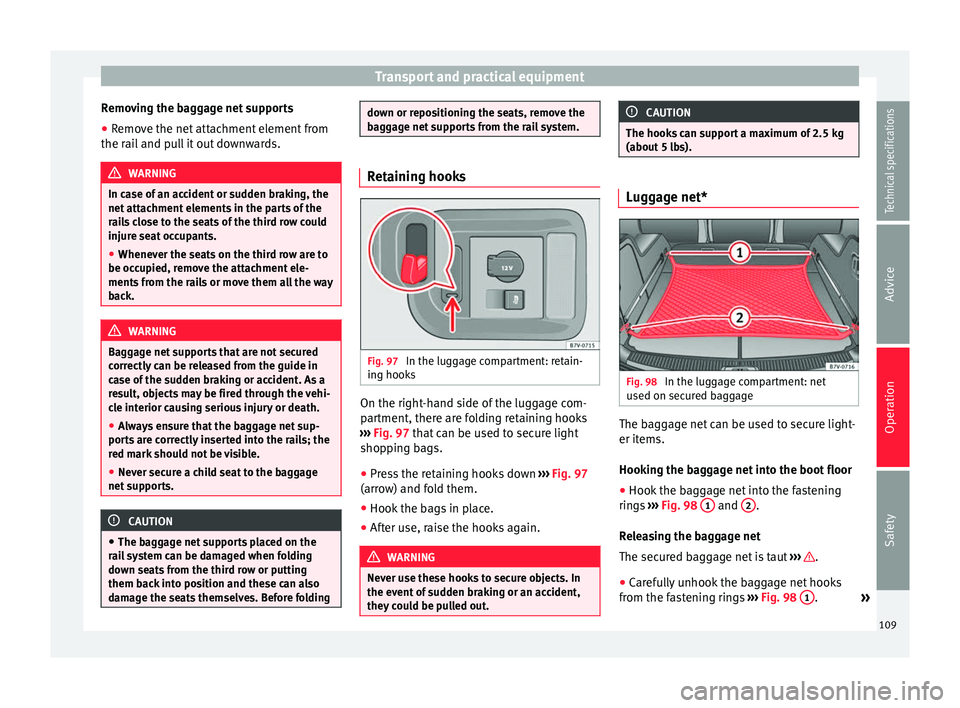
Retaining hooks
Fig. 97
In the luggage compartment: retain-
ing hooks On the right-hand side of the luggage com-
partment, there are folding retaining hooks
››› Fig. 97 that can be used to secure light
shop pin
g bags.
● Press the retaining hooks down ››› Fig. 97
(arrow) and fold them.
● Hook the bags in place.
● After use, raise the hooks again. WARNING
Never use these hooks to secure objects. In
the event of sudden braking or an accident,
they could be pulled out. CAUTION
The hooks can support a maximum of 2.5 kg
(about 5 lbs). Luggage net*
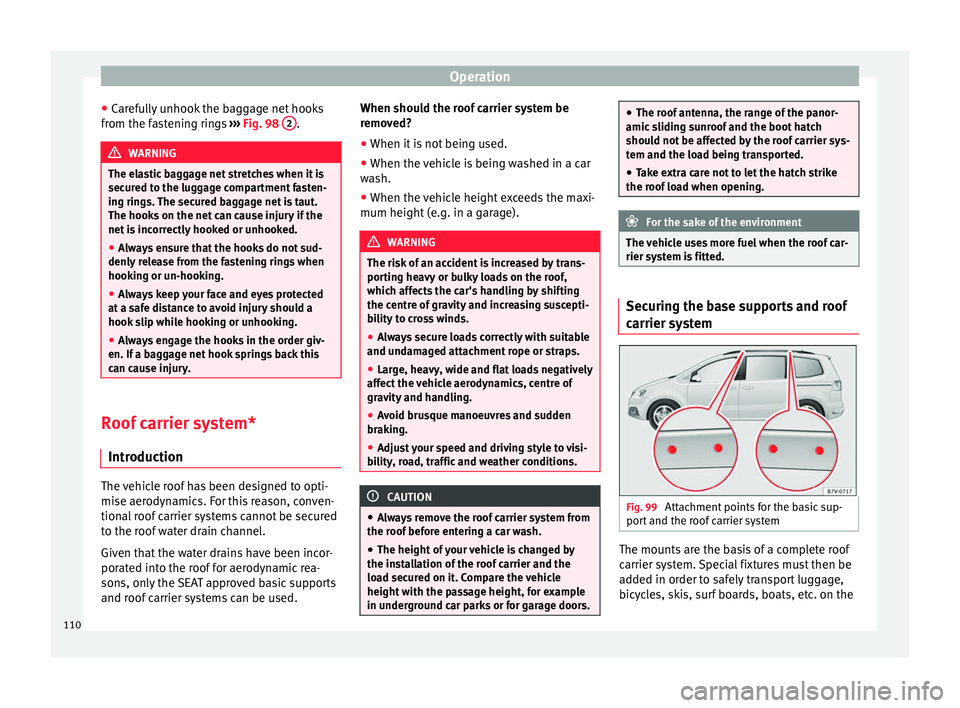
Fig. 98
In the luggage compartment: net
used on secured baggage The baggage net can be used to secure light-
er items.
Hooking the baggage net into the boot floor
● Hook the baggage net into the fastening
rings ››› Fig. 98 1 and
2 .
Releasing the baggage net
The secured baggage net is taut ››› .
● Carefully unhook the baggage net hooks
from the fastening rings ››› Fig. 98 1 .
»
109
Technical specifications
Advice
Operation
Safety
Page 112 of 305
Operation
● Carefully unhook the baggage net hooks
from the fastening rings ››› Fig. 98 2 .
WARNING
The elastic baggage net stretches when it is
secured to the luggage compartment fasten-
ing rings. The secured baggage net is taut.
The hooks on the net can cause injury if the
net is incorrectly hooked or unhooked.
● Always ensure that the hooks do not sud-
denly release from the fastening rings when
hooking or un-hooking.
● Always keep your face and eyes protected
at a safe distance to avoid injury should a
hook slip while hooking or unhooking.
● Always engage the hooks in the order giv-
en. If a baggage net hook springs back this
can cause injury. Roof carrier system*
Introduction The vehicle roof has been designed to opti-
mise aerodynamics. For this reason, conven-
tional roof carrier systems cannot be secured
to the roof water drain channel.
Given that the water drains have been incor-
porated into the roof for aerodynamic rea-
sons, only the SEAT approved basic supports
and roof carrier systems can be used. When should the roof carrier system be
removed?
● When it is not being used.
● When the vehicle is being washed in a car
wash.
● When the vehicle height exceeds the maxi-
mum height (e.g. in a garage). WARNING
The risk of an accident is increased by trans-
porting heavy or bulky loads on the roof,
which affects the car's handling by shifting
the centre of gravity and increasing suscepti-
bility to cross winds.
● Always secure loads correctly with suitable
and undamaged attachment rope or straps.
● Large, heavy, wide and flat loads negatively
affect the vehicle aerodynamics, centre of
gravity and handling.
● Avoid brusque manoeuvres and sudden
braking.
● Adjust your speed and driving style to visi-
bility, road, traffic and weather conditions. CAUTION
● Always remove the roof carrier system from
the roof before entering a car wash.
● The height of your vehicle is changed by
the installation of the roof carrier and the
load secured on it. Compare the vehicle
height with the passage height, for example
in underground car parks or for garage doors. ●
The roof antenna, the range of the panor-
amic sliding sunroof and the boot hatch
should not be affected by the roof carrier sys-
tem and the load being transported.
● Take extra care not to let the hatch strike
the roof load when opening. For the sake of the environment
The vehicle uses more fuel when the roof car-
rier system is fitted. Securing the base supports and roof
carrier system
Fig. 99
Attachment points for the basic sup-
port and the roof carrier system The mounts are the basis of a complete roof
carrier system. Special fixtures must then be
added in order to safely transport luggage,
bicycles, skis, surf boards, boats, etc. on the
110