run flat Seat Alhambra 2015 User Guide
[x] Cancel search | Manufacturer: SEAT, Model Year: 2015, Model line: Alhambra, Model: Seat Alhambra 2015Pages: 305, PDF Size: 5.46 MB
Page 230 of 305
Advice
●
Avoid sparks and electrostatic discharges
when working with cables and electrical devi-
ces.
● Never short the battery terminals.
● Never use a damaged battery. It can ex-
plode. Replace a damaged battery immedi-
ately.
● Replaced damaged or frozen batteries as
soon as possible. A flat battery can also
freeze at temperatures close to 0 °C (+32 °F).
● For vehicles with the battery in the luggage
compartment: Check that the battery gas
ventilation hose is securely attached. CAUTION
● Never disconnect the battery if the ignition
is switched on or if the engine is running.
This could damage the electrical system or
electronic components.
● Do not expose the battery to direct sunlight
over a long period of time, as the intense ul-
traviolet radiation can damage the battery
housing.
● If the car is left standing for long periods,
protect the battery from extreme cold temper-
ature so that it does not “freeze up” and be-
come damaged. Warning lampIt
lights upPossible causeSolution
Faulty generator.
Contact a specialised
workshop. Have the
electrical system
checked.
Disconnect any unneces-
sary electrical devices.
The generator does not
charge the battery while
the vehicle is in motion.
Several warning and control lamps light up
for a few seconds when the ignition is switch-
ed on, signalling that the function is being
verified. They will switch off after a few sec-
onds.
WARNING
If the warning lamps and messages are ignor-
ed, the vehicle may stall in traffic, or may
cause accidents and severe injuries.
● Never ignore the warning lamps or text
messages.
● Stop the vehicle safely as soon as possible. CAUTION
Failure to heed the control lamps and text
messages when they appear may result in
faults in the vehicle. Checking the electrolyte level of the
vehicle battery
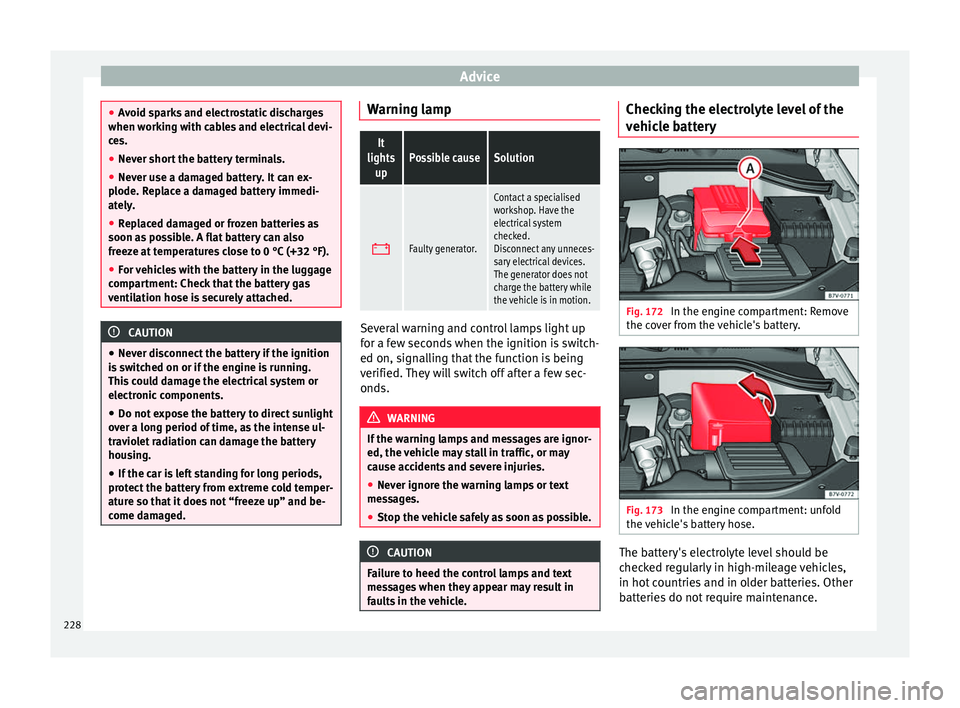
Fig. 172
In the engine compartment: Remove
the cover from the vehicle's battery. Fig. 173
In the engine compartment: unfold
the vehicle's battery hose. The battery's electrolyte level should be
checked regularly in high-mileage vehicles,
in hot countries and in older batteries. Other
batteries do not require maintenance.
228
Page 232 of 305
Advice
● The vehicle must be unlocked before dis-
connecting the battery, otherwise the alarm
will be triggered.
● First disconnect the negative cable and
then the positive ››› .
Connecting the vehicle's battery
● Before reconnecting the battery, switch off
the engine and all electrical devices.
● First reconnect the positive cable and then
the negative ››› .
Different control lamps may light up after
connecting the battery and switching the ig-
nition on. They will be turned off after a short
trip at a speed of between 15-20 km/h
(10-12 mph). If the warning indicators remain
lit, please visit a specialised workshop to
have the vehicle checked.
If the battery has been disconnected for a
long time, it is possible that the next service
date is not displayed or calculated correctly
››› page 40 . Respect the maximum service in-
t er
vals permitted ››› Booklet Maintenance
Programme.
Vehic
les with Keyless Access (››› page 59): if,
after connecting the battery, the ignition can-
not be switched on, lock and unlock the vehi-
cle from outside. Then try to switch on the ig-
nition again. If the ignition does not work,
seek professional assistance. Automatic device disconnection
The intelligent vehicle electrical system auto-
matically implements a range of measures to
prevent the battery from discharging when
high demands are made on it:
● the idling speed is increased so that the al-
ternator provides more electricity.
● where necessary, the power of the most
powerful devices is reduced or even com-
pletely disconnected.
● On starting the engine, the power supply
from the 12-volt power sockets and the ciga-
rette lighter may be interrupted for a short
time.
The on-board management program cannot
always prevent the battery from running flat.
For example, if the ignition is left on for a
long period with the engine off or if the side
lights or parking lights are left on while the
vehicle is stationary.
Why does the battery run flat?
● When stationary for a long time without
starting the engine, particularly if the ignition
is switched on.
● Use of electrical devices with the engine
switched off.
● If the auxiliary heater is running
››› page 128
. WARNING
Incorrectly securing the battery or using the
wrong battery can cause short-circuits, fire
and serious injuries.
● Always use only maintenance free batteries
that do not run flat alone and whose proper-
ties, specifications and size correspond to
the standard battery. The specifications are
indicated on the battery case. WARNING
A highly explosive mixture of gases is re-
leased when the battery is under charge.
● The batteries should be charged in a well-
ventilated room only.
● Never charge a frozen or recently thawed
battery. A flat battery can also freeze at tem-
peratures close to 0 °C (+32 °F).
● Always replace a battery which has frozen.
● Battery cables not correctly connected may
cause a short circuit. Reconnect first the posi-
tive cable and then the negative cable. CAUTION
● Never disconnect the battery if the ignition
is switched on or if the engine is running.
This could damage the electrical system or
electronic components.
● Never plug accessories that supply current,
such as solar panels or a battery charger, to
the 12-volt power sockets or the cigarette 230
Page 236 of 305
Advice
good performance, a better seal, improved
safety and wheel run out. Therefore, worn
rims should always be replaced and must on-
ly be repaired in a specialised workshop.
SEAT recommends visiting a technical service
››› .
Wheel rims with bolted trims
Wheel rims may be fitted with interchangea-
ble trim parts which are attached to the rim
using self-locking bolts. Worn trims should
only be replaced at a specialised workshop.
SEAT recommends visiting a technical service
››› .
WARNING
The use of worn or damaged wheel rims could
make driving more dangerous and result in
serious accidents and damage.
● Only wheel rims which have been approved
for use with your vehicle should be used.
● Inspect wheel rims regularly for damage
and replace as required. WARNING
If the bolted joints of wheel rims with bolted
ring trims are not correctly tightened or loos-
ened, this could result in serious accident.
● Never loosen the bolted joints of wheel
rims with bolted ring trims.
● Any work relating to wheel rims with bolted
rims should be carried out at specialised workshop. SEAT recommends taking your car
in for technical service.
Replacement of wheel rims and new
tyres
New tyres
● When tyres are new, drive with extreme
caution for the first 500 km, as all tyres need
to be run-in . Tyres which have not been run-
in do not
have such good grip ››› or brak-
ing capacity ››› .
● All four wheels must be fitted with radial
tyres of the same type, size (rolling circumfer-
ence) and the same tread pattern.
● The tread depth of new tyres may vary, ac-
cording to the type and make of tyre and the
tread pattern.
Replacing tyres
● Where possible, always replace both
wheels on an axle (both wheels on the front
axle or both wheels on the rear axle) ››› .
● Old tyres should only be replaced by SEAT
approved tyres for the vehicle in question,
and in accordance with the maximum permit-
ted size, diameter, load and speed capacity.
● If replacing tyres, make sure the new ones
have an emergency ride system (Conti-
Seal/Run flat). Otherwise, we recommend
carrying a tyre mobility system. ●
Never use tyres which are larger than SEAT
approved tyres. If the tyres are too big, they
may knock or rub against the chassis or other
components, resulting in damage. WARNING
New tyres do not give maximum grip and will
not have reached their maximum braking ca-
pacity to start with, and therefore need run-
ning in.
● To prevent accidents and major damage,
extreme caution should be taken for the first
600 km. WARNING
There should be adequate space between the
tyres and the vehicle in accordance with the
vehicle design. If this is not the case, the
tyres may rub against parts of the running
gear, chassis or brake lines, leading to faults
in the brake system or to tread detachment,
and the risk of burst tyres.
● The true tyre dimension should not be
greater than the dimensions of tyres manu-
factured and approved by SEAT and should
not rub against parts of the vehicle. Note
● Although tyres may be shown as being the
same size, the true dimensions of different
types of tyre may vary with respect to the
nominal size, or tread patterns may be differ-
ent. 234
Page 241 of 305
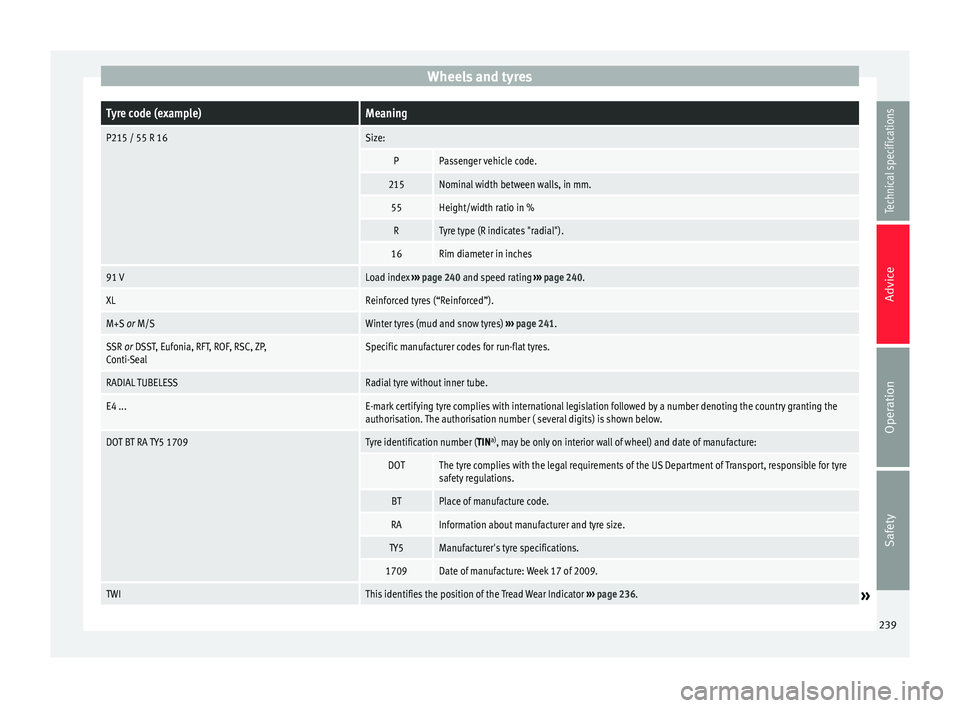
Wheels and tyresTyre code (example)Meaning
P215 / 55 R 16Size:
PPassenger vehicle code.
215Nominal width between walls, in mm.
55Height/width ratio in %
RTyre type (R indicates "radial").
16Rim diameter in inches
91 VLoad index
››› page 240 and speed rating ››› page 240.
XLReinforced tyres (“Reinforced”).
M+S or M/SWinter tyres (mud and snow tyres) ››› page 241.
SSR or DSST, Eufonia, RFT, ROF, RSC, ZP,
Conti-SealSpecific manufacturer codes for run-flat tyres.
RADIAL TUBELESSRadial tyre without inner tube.
E4 ...E-mark certifying tyre complies with international legislation followed by a number denoting the country granting the
authorisation. The authorisation number ( several digits) is shown below.
DOT BT RA TY5 1709Tyre identification number (TIN a)
, may be only on interior wall of wheel) and date of manufacture:
DOTThe tyre complies with the legal requirements of the US Department of Transport, responsible for tyre
safety regulations.
BTPlace of manufacture code.
RAInformation about manufacturer and tyre size.
TY5Manufacturer's tyre specifications.
1709Date of manufacture: Week 17 of 2009.
TWIThis identifies the position of the Tread Wear Indicator ››› page 236.» 239
Technical specifications
Advice
Operation
Safety
Page 254 of 305
Advice
Tyre valve remover
Sticker indicating maximum speed “max.
80 km/h” or “max. 50 mph”
Filler tube with cap
Air compressor
ON/OFF switch
Air bleed screw 1)
Tyre pressure monitoring 1)
Tube for inflating tyres
12 volt connector
Bottle of sealant
Spare insert for valve
The valve insert remover
1 has a gap at the
lower end for a valve insert. The valve insert
can only be screwed or unscrewed in this
way. This also applies to its replacement part 11 .
Seal and inflate a tyre Sealing a tyre
● Unscrew the tyre valve cap.
● Use the enclosed extractor ›››
Fig. 190 1 to unscrew the valve insert. Place it on a
clean surface.1 2
3
4
5
6
7
8
9
10
11 ●
Shake the bottle of sealant ››› Fig. 190 10 well.
●
Screw the inflator tube ››› Fig. 190 3 into
the sealant bottle in a clockwise direction.
The seal on the mouth of the bottle pierces
automatically.
● Remove the lid from the filling tube
››› Fig. 190 3 and insert the open end of the
tube into the tyre valve.
● Keep the bottle mouth facing down and
empty all the contents into the tyre.
● Remo
ve the empty bottle from the valve.
● Screw in the valve insert again with the aid
of the extractor ››› Fig. 190
1 .
Inflating the tyre
● Screw the tyre inflator tube ››› Fig. 190 8 of the air compressor into the tyre valve.
●
Check whether the air bleed screw
››› Fig. 190 6 is tightened.
● Start the engine and leave it running in
neutral.
● Attach the connector ››› Fig. 190 9 to one
of the vehicle's 12 volt sockets ››› page 119.
● Switch on the air compressor with the
ON/OFF switch ››› Fig. 190 5 .
● Keep the air compressor running until it
reaches 2.0 to 2.5 bar (29-36 psi / 200-250 kPa)
››› .
Do not leave it running
f or mor
e than 8 minutes ››› .
● Switch off the compressor.
● If it fails to reach a pressure of between
2.0 and 2.5 bar (29-36 psi / 200-250 kPa),
unscrew the inflator tube from the tyre valve.
● Move the vehicle some 10 metres forwards
or backwards so that the sealant is evenly
distributed in the tyre interior.
● Securely screw the compressor tyre inflator
tube into the tyre valve again and repeat the
inflation process.
● If the indicated pressure can still not be
reached, the tyre is too badly damaged. The
tyre cannot be sealed with the tyre mobility
system. Do not continue driving. You should
obtain professional assistance ››› .
● Disconnect the air compressor and unscrew
the inflator tube from the tyre valve.
● If a pressure between 2.0 and 2.5 bar
(29-36 psi / 200-250 kPa) is reached, then
continue driving at 80 km/h (50 mph) maxi-
mum.
● After 10 minutes , check the pressure again
› ›
› page 253. WARNING
When inflating the tyre, the air compressor
and the inflator tube may become hot. 1)
An inflator tube may also be included.
252
Page 257 of 305
Emergencies
Starting
7. Start the engine of the vehicle with the boosting battery and let it run at idling
speed.
8. Start the engine of the vehicle with the flat battery and wait 2 or 3 minutes until the
engine is “running”.
Removing the jump leads
9. Before you remove the jump leads, switch off the dipped beam headlights (if they
are switched on).
10. Turn on the heater blower and heated rear
w indo
w in the vehicle with the flat battery.
This helps minimise voltage peaks which
are generated when the leads are discon-
nected.
11.When the engine is running, disconnect the leads in reverse order to the details
given above.
Connect the battery clamps so they have
good metal-to-metal contact with the battery
terminals.
If the engine fails to start, switch off the start-
er after about 10 seconds and try again after
about 1 minute. WARNING
● Please note the safety warnings referring to
working in the engine compartment
››› page 214.
● The b att
ery providing assistance must have
the same voltage as the flat battery (12V) and
approximately the same capacity (see imprint
on battery). Failure to comply could result in
an explosion.
● Never use jump leads when one of the bat-
teries is frozen. Danger of explosion! Even af-
ter the battery has thawed, battery acid could
leak and cause chemical burns. If a battery
freezes, it should be replaced.
● Keep sparks, flames and lighted cigarettes
away from batteries, danger of explosion.
Failure to comply could result in an explo-
sion.
● Observe the instructions provided by the
manufacturer of the jump leads.
● Do not connect the negative cable from the
other vehicle directly to the negative terminal
of the flat battery. The gas emitted from the
battery could be ignited by sparks. Danger of
explosion.
● Do not attach the negative cable from the
other vehicle to parts of the fuel system or to
the brake line.
● The non-insulated parts of the battery
clamps must not be allowed to touch. The
jump lead attached to the positive battery
terminal must not touch metal parts of the ve-
hicle, this can cause a short circuit. ●
Position the leads in such a way that they
cannot come into contact with any moving
parts in the engine compartment.
● Do not lean on the batteries. This could re-
sult in chemical burns. Note
The vehicles must not touch each other, oth-
erwise electricity could flow as soon as the
positive terminals are connected. Towing and tow starting
Introduction When towing, always respect legal require-
ments.
For technical reasons, it is not possible to
tow a vehicle if the battery is flat.
If the vehicle comes with the Keyless Access
system, towing is only allowed with the igni-
tion on!
The vehicle battery drains if the vehicle is
towed with the engine switched off and the
ignition connected. Depending on the battery
charge status, the drop in voltage may be so
large, even after just a few minutes, that no
electrical device in the vehicle may work e.g.
the hazard warning lights. In vehicles with
»
255
Technical specifications
Advice
Operation
Safety
Page 298 of 305
Index
Electronic locking . . . . . . . . . . . . . . . . . . . . . . . . 68
Electronic opening . . . . . . . . . . . . . . . . . . . . . . . 68
Emergency locking and unlocking . . . . . . . . . . 261
Opening . . . . . . . . . . . . . . . . . . . . . . . . . . . . . . . 67
See "Rear lid" . . . . . . . . . . . . . . . . . . . . . . . . . . . 66
Unlocking . . . . . . . . . . . . . . . . . . . . . . . . . . . . . . 67
Warning lamp . . . . . . . . . . . . . . . . . . . . . . . . . . . 67
Rear seats . . . . . . . . . . . . . . . . . . . . . . . . . . . . . . . 101
Rear shelf . . . . . . . . . . . . . . . . . . . . . . . . . . . . . . . 103
Rear vision mirror . . . . . . . . . . . . . . . . . . . . . . . . . . 85
Rear vision mirrors . . . . . . . . . . . . . . . . . . . . . . . . . 85
Recommended gear . . . . . . . . . . . . . . . . . . . . . . . 147
Recycling . . . . . . . . . . . . . . . . . . . . . . . . . . . . . . . . 206
Reflective vest . . . . . . . . . . . . . . . . . . . . . . . . . . . 242
Reflective vests . . . . . . . . . . . . . . . . . . . . . . . . . . . 242
Refuelling Mistakes . . . . . . . . . . . . . . . . . . . . . . . . . . . . . . 207
Remote control Auxiliary heater . . . . . . . . . . . . . . . . . . . . . . . . . 129
See "Keys" . . . . . . . . . . . . . . . . . . . . . . . . . . . . . . 54
Removing ice . . . . . . . . . . . . . . . . . . . . . . . . . . . . 198
Removing snow . . . . . . . . . . . . . . . . . . . . . . . . . . 198
Removing wax deposits . . . . . . . . . . . . . . . . . . . . 197
Repairs . . . . . . . . . . . . . . . . . . . . . . . . . . . . 189, 190 Airbag system . . . . . . . . . . . . . . . . . . . . . . . . . . 191
Labels . . . . . . . . . . . . . . . . . . . . . . . . . . . . . . . . 205
Lifting platform . . . . . . . . . . . . . . . . . . . . . . . . . 194
Plates . . . . . . . . . . . . . . . . . . . . . . . . . . . . . . . . 205
Replacement of parts . . . . . . . . . . . . . . . . . . . . . . 189
Reprogramming control units . . . . . . . . . . . . . . . 192
Reservoir capacity Windscreen washer water reservoir . . . . . . . . 227
Retaining hooks . . . . . . . . . . . . . . . . . . . . . . . . . . 109
Retro-fitting Two-way radios . . . . . . . . . . . . . . . . . . . . . . . . . 191
Vehicle telephone . . . . . . . . . . . . . . . . . . . . . . . 191
Rev counter . . . . . . . . . . . . . . . . . . . . . . . . . . . . . . . 40 Reversing camera . . . . . . . . . . . . . . . . . . . . . . . . . 166
Rocker switches
Tiptronic . . . . . . . . . . . . . . . . . . . . . . . . . . . . . . 146
Rollback anti-trap function Electric sliding doors . . . . . . . . . . . . . . . . . . . . . 65
Roof carrier system . . . . . . . . . . . . . . . . . . . . . . . . 110
Rubber seals . . . . . . . . . . . . . . . . . . . . . . . . . . . . . 199
Run-flat tyres Codes . . . . . . . . . . . . . . . . . . . . . . . . . . . . . . . . 239
Running-in Brake pads . . . . . . . . . . . . . . . . . . . . . . . . . . . . 141
First trips . . . . . . . . . . . . . . . . . . . . . . . . . . . . . . 148
Running-in brake pads Please also see "Brakes" . . . . . . . . . . . . . . . . . 141
Running in Engine . . . . . . . . . . . . . . . . . . . . . . . . . . . . . . . . 148
Tyres . . . . . . . . . . . . . . . . . . . . . . . . . . . . . . . . . 234
Wheels and tyres . . . . . . . . . . . . . . . . . . . . . . . 234
S SAFE . . . . . . . . . . . . . . . . . . . . . . . . . . . . . . . 61, 137
Safe driving . . . . . . . . . . . . . . . . . . . . . . . . . . . . . . . 5
Safety . . . . . . . . . . . . . . . . . . . . . . . . . . . . . . . . . . . . 5
Safety equipment . . . . . . . . . . . . . . . . . . . . . . . . . . . 6
Sale of vehicle In other countries / continents . . . . . . . . . . . . 205
Salt water . . . . . . . . . . . . . . . . . . . . . . . . . . . . . . . 153
Scrapping . . . . . . . . . . . . . . . . . . . . . . . . . . . . . . . 206
Seat belt position . . . . . . . . . . . . . . . . . . . . . . . . . . 15
Seat belt protection . . . . . . . . . . . . . . . . . . . . . . . . 12
Seat belts . . . . . . . . . . . . . . . . . . . . . . . . . . . . . . . . 10 Automatic belt retainer . . . . . . . . . . . . . . . . . . . 17
Belt height adjustments . . . . . . . . . . . . . . . . . . 16
Belt tensioner . . . . . . . . . . . . . . . . . . . . . . . . . . . 17
Belt tension limiter . . . . . . . . . . . . . . . . . . . . . . . 17
Fastening . . . . . . . . . . . . . . . . . . . . . . . . . . . . . . 14
Seat belt position . . . . . . . . . . . . . . . . . . . . . . . . 15 Seat belt status display . . . . . . . . . . . . . . . . . . . 11
Twisted belt . . . . . . . . . . . . . . . . . . . . . . . . . . . . . 13
Unfastened . . . . . . . . . . . . . . . . . . . . . . . . . . . . . 13
Unfastening . . . . . . . . . . . . . . . . . . . . . . . . . . . . 14
Use . . . . . . . . . . . . . . . . . . . . . . . . . . . . . . . . . . . 13
Warning lamp . . . . . . . . . . . . . . . . . . . . . . . . . . . 11
With two buckles . . . . . . . . . . . . . . . . . . . . . . . . 16
Seat belt warning lamp . . . . . . . . . . . . . . . . . . . . . 11
Seat belt with two buckles Fastening . . . . . . . . . . . . . . . . . . . . . . . . . . . . . . 16
Twisting . . . . . . . . . . . . . . . . . . . . . . . . . . . . . . . . 16
Unfastening . . . . . . . . . . . . . . . . . . . . . . . . . . . . 16
Seat functions . . . . . . . . . . . . . . . . . . . . . . . . . . . . 93 Convenient entry function for the third row ofseats . . . . . . . . . . . . . . . . . . . . . . . . . . . . . . . . 95
Folding the seat backrest of the front passen- ger seat . . . . . . . . . . . . . . . . . . . . . . . . . . . . . . 96
Seat heating . . . . . . . . . . . . . . . . . . . . . . . . . . . . . . 93
SEAT information system . . . . . . . . . . . . . . . . . . . . 47
Seats . . . . . . . . . . . . . . . . . . . . . . . . . . . . . . . . . . . 6, 8 Adjusting the head restraints . . . . . . . . . . . . . . 90
Adjusting the steering wheel position . . . . . . . . 7
Convenient entry function for the third row ofseats . . . . . . . . . . . . . . . . . . . . . . . . . . . . . . . . 95
Correct position . . . . . . . . . . . . . . . . . . . . . . . . . . 6
Electric front seat . . . . . . . . . . . . . . . . . . . . . . . . 88
Fitting the head restraints . . . . . . . . . . . . . . . . . 91
Folding the seat backrest of the front passen- ger seat . . . . . . . . . . . . . . . . . . . . . . . . . . . . . . 96
Heated seats . . . . . . . . . . . . . . . . . . . . . . . . . . . . 93
manual adjustment . . . . . . . . . . . . . . . . . . . . . . 88
Number of seats . . . . . . . . . . . . . . . . . . . . . . . . . . 8
Rear seats . . . . . . . . . . . . . . . . . . . . . . . . . . . . . . 89
Removing the head restraints . . . . . . . . . . . . . . 91
Seat with position memory . . . . . . . . . . . . . . . . 94
Seat upholstery Alcantara . . . . . . . . . . . . . . . . . . . . . . . . . . . . . . 201
cleaning Alcantara . . . . . . . . . . . . . . . . . . . . . . 201
296
Page 302 of 305
Index
Washing by hand . . . . . . . . . . . . . . . . . . . . . . . 195
Washing the vehicle . . . . . . . . . . . . . . . . . . . . . 195
Windows . . . . . . . . . . . . . . . . . . . . . . . . . . . . . . 197
Wooden trim . . . . . . . . . . . . . . . . . . . . . . . . . . . 204
Vehicle chassis number . . . . . . . . . . . . . . . . . . . . 274
Vehicle code . . . . . . . . . . . . . . . . . . . . . . . . . . . . . 274 Vehicle data label . . . . . . . . . . . . . . . . . . . . . . . 274
Vehicle key Synchronising . . . . . . . . . . . . . . . . . . . . . . . . . . . 57
Vehicle key set See "Keys" . . . . . . . . . . . . . . . . . . . . . . . . . . . . . . 54
Vehicle maintenance electrically adjustable seats . . . . . . . . . . . . . . 201
heated seats . . . . . . . . . . . . . . . . . . . . . . . . . . . 201
natural leather . . . . . . . . . . . . . . . . . . . . . . . . . 203
non-electrically adjustable seats . . . . . . . . . . 202
seats with airbag components . . . . . . . . . . . . 201
seats without airbag components . . . . . . . . . . 202
synthetic leather . . . . . . . . . . . . . . . . . . . . . . . . 203
trim fabrics . . . . . . . . . . . . . . . . . . . . . . . . . . . . 201
unheated seats . . . . . . . . . . . . . . . . . . . . . . . . . 202
Vehicle specifications . . . . . . . . . . . . . . . . . . . . . 274
Vehicle telephone . . . . . . . . . . . . . . . . . . . . . . . . 191
Vehicle tool kit . . . . . . . . . . . . . . . . . . . . . . . . . . . 244 Components . . . . . . . . . . . . . . . . . . . . . . . . . . . 245
Location . . . . . . . . . . . . . . . . . . . . . . . . . . . . . . 244
Vehicle's battery Charging . . . . . . . . . . . . . . . . . . . . . . . . . . . . . . 229
Connecting . . . . . . . . . . . . . . . . . . . . . . . . . . . . 229
Disconnecting . . . . . . . . . . . . . . . . . . . . . . . . . . 229
Replacing . . . . . . . . . . . . . . . . . . . . . . . . . . . . . 229
Running flat . . . . . . . . . . . . . . . . . . . . . . . . . . . 230
Vibrations Steering . . . . . . . . . . . . . . . . . . . . . . . . . . . . . . . 237
Voice control . . . . . . . . . . . . . . . . . . . . . . . . . . . . . . 54 W
Warning lamp AdBlue . . . . . . . . . . . . . . . . . . . . . . . . . . . . . . . . 212
Alternator . . . . . . . . . . . . . . . . . . . . . . . . . . . . . 228
Brake system . . . . . . . . . . . . . . . . . . . . . . . . . . 138
Changing gear . . . . . . . . . . . . . . . . . . . . . . . . . 143
Coolant . . . . . . . . . . . . . . . . . . . . . . . . . . . . . . . 222
Cruise control system (CCS) . . . . . . . . . . . . . . . 170
Doors . . . . . . . . . . . . . . . . . . . . . . . . . . . . . . . . . . 64
Engine oil pressure . . . . . . . . . . . . . . . . . . . . . . 218
Pressing the brake . . . . . . . . . . . . . . . . . . . . . . 138
Rear lid . . . . . . . . . . . . . . . . . . . . . . . . . . . . . . . . 67
Seat belts . . . . . . . . . . . . . . . . . . . . . . . . . . . . . . 11
Vehicle battery . . . . . . . . . . . . . . . . . . . . . . . . . 228
Warning triangle . . . . . . . . . . . . . . . . . . . . . . . . . . 242
Washing . . . . . . . . . . . . . . . . . . . . . . . . . . . . . . . . 195 by hand . . . . . . . . . . . . . . . . . . . . . . . . . . . . . . . 195
Washing the vehicle . . . . . . . . . . . . . . . . . . . . . . . 195 Sensors . . . . . . . . . . . . . . . . . . . . . . . . . . 160, 163
Special features . . . . . . . . . . . . . . . . . . . . . . . . 196
things to note . . . . . . . . . . . . . . . . . . . . . . . . . . . 61
with high pressure cleaning equipment . . . . . 197
Water box . . . . . . . . . . . . . . . . . . . . . . . . . . . . . . . 200
Wear indicators . . . . . . . . . . . . . . . . . . . . . . . . . . 237
Wear of tyres . . . . . . . . . . . . . . . . . . . . . . . . . . . . . 237
Weights . . . . . . . . . . . . . . . . . . . . . . . . . . . . . . . . . 275
Wheel bolts . . . . . . . . . . . . . . . . . . . . . 246, 247, 276 Caps . . . . . . . . . . . . . . . . . . . . . . . . . . . . . . . . . . 247
Tightening torque . . . . . . . . . . . . . . . . . . . . . . . 248
Wheel load capacity . . . . . . . . . . . . . . . . . . . . . . . 239
Wheel rims . . . . . . . . . . . . . . . . . . . . . . . . . . . . . . 233 Beadlock . . . . . . . . . . . . . . . . . . . . . . . . . . . . . . 233
Bolted trims . . . . . . . . . . . . . . . . . . . . . . . . . . . 234
See "Wheels and tyres" . . . . . . . . . . . . . . . . . . 231
Wheels . . . . . . . . . . . . . . . . . . . . . . . . . . . . . . . . . 276 Wheels and tyres . . . . . . . . . . . . . . . . . . . . . . . . . 231
Avoiding damage . . . . . . . . . . . . . . . . . . . . . . . 232
Changing a wheel . . . . . . . . . . . . . . . . . . . . . . . 246
Code . . . . . . . . . . . . . . . . . . . . . . . . . . . . . . . . . 238
Damaged tyres . . . . . . . . . . . . . . . . . . . . . . . . . 237
Errors in wheel alignment . . . . . . . . . . . . . . . . 237
Foreign bodies in the tyres . . . . . . . . . . . . . . . 237
Interchanging tyres . . . . . . . . . . . . . . . . . . . . . 232
New tyres . . . . . . . . . . . . . . . . . . . . . . . . . . . . . 234
Older tyres . . . . . . . . . . . . . . . . . . . . . . . . . . . . . 233
Replacing tyres . . . . . . . . . . . . . . . . . . . . . . . . . 234
Run-flat tyre codes . . . . . . . . . . . . . . . . . . . . . . 239
Run-out . . . . . . . . . . . . . . . . . . . . . . . . . . . . . . . 237
Serial number . . . . . . . . . . . . . . . . . . . . . . . . . . 239
Snow chains . . . . . . . . . . . . . . . . . . . . . . . . . . . 242
Speed rating . . . . . . . . . . . . . . . . . . . . . . 239, 240
Storing tyres . . . . . . . . . . . . . . . . . . . . . . . . . . . 233
Technical data . . . . . . . . . . . . . . . . . . . . . . . . . . 238
Tread depth . . . . . . . . . . . . . . . . . . . . . . . . . . . . 236
Tyre code . . . . . . . . . . . . . . . . . . . . . . . . . . . . . . 238
Tyre identification number (TIN) . . . . . . . . . . . 239
Tyre load rating . . . . . . . . . . . . . . . . . . . . . . . . . 240
Tyre pressures . . . . . . . . . . . . . . . . . . . . . . . . . . 235
Tyre pressure sensor . . . . . . . . . . . . . . . . . . . . 236
Tyres with directional tread pattern . . . . 232, 240
Valve caps . . . . . . . . . . . . . . . . . . . . . . . . . . . . . 236
Wear indicators . . . . . . . . . . . . . . . . . . . . . . . . . 237
Wear of tyres . . . . . . . . . . . . . . . . . . . . . . . . . . . 237
Wheel balance . . . . . . . . . . . . . . . . . . . . . . . . . 237
Wheel rims . . . . . . . . . . . . . . . . . . . . . . . . . . . . 233
Winter tyres . . . . . . . . . . . . . . . . . . . . . . . . . . . . 241
Wheel trims . . . . . . . . . . . . . . . . . . . . . . . . . . . . . . 246 Full hub caps . . . . . . . . . . . . . . . . . . . . . . . . . . . 247
Wheel bolts caps . . . . . . . . . . . . . . . . . . . . . . . 247
Windows See "Electric windows" . . . . . . . . . . . . . . . . . . . 70
Window wiper . . . . . . . . . . . . . . . . . . . . . . . . . . . . . 81
300