instrument panel Seat Alhambra 2015 Owner's Guide
[x] Cancel search | Manufacturer: SEAT, Model Year: 2015, Model line: Alhambra, Model: Seat Alhambra 2015Pages: 305, PDF Size: 5.46 MB
Page 176 of 305
Operation
Sign Assist* Introduction Sign Assist can help the driver with informa-
tion on speed limits or if overtaking is pro-
hibited at that moment. The traffic signs and
additional information detected by the sys-
tem is represented in the dash panel display
and in the visual presentation of the naviga-
tion system map.
Applicable countries:
Sign Assist is accepted in the following coun-
tries:
Andorra, Belgium, Denmark, Germany, Fin-
land, France, Ireland, Italy, Liechtenstein,
Luxembourg, Monaco, Netherlands, Norway,
Austria, Poland, Portugal, San Marino, Swe-
den, Switzerland, Spain, Czech Republic, Uni-
ted Kingdom, Vatican City.
WARNING
The traffic signs and instructions shown by
Sign Assist may differ from the current traffic
situation.
● The signs and highway code rules always
take precedence over the instructions and
display of Sign Assist.
● Adjust your speed and driving style to visi-
bility, road, traffic and weather conditions. ●
The system cannot always detect or cor-
rectly show all the traffic signs. WARNING
The traffic sign detection is not a replacement
for driver awareness.
● Adverse conditions of visibility, darkness,
snow, rain and fog can cause the system not
to show the traffic signs or to show them er-
roneously. CAUTION
● If old mapping data is used in the naviga-
tion system, this may cause the traffic signs
to be shown incorrectly.
● In the route points mode (navigation by
route points) of the navigation system, Sign
Assist is only partly available. Indication on display
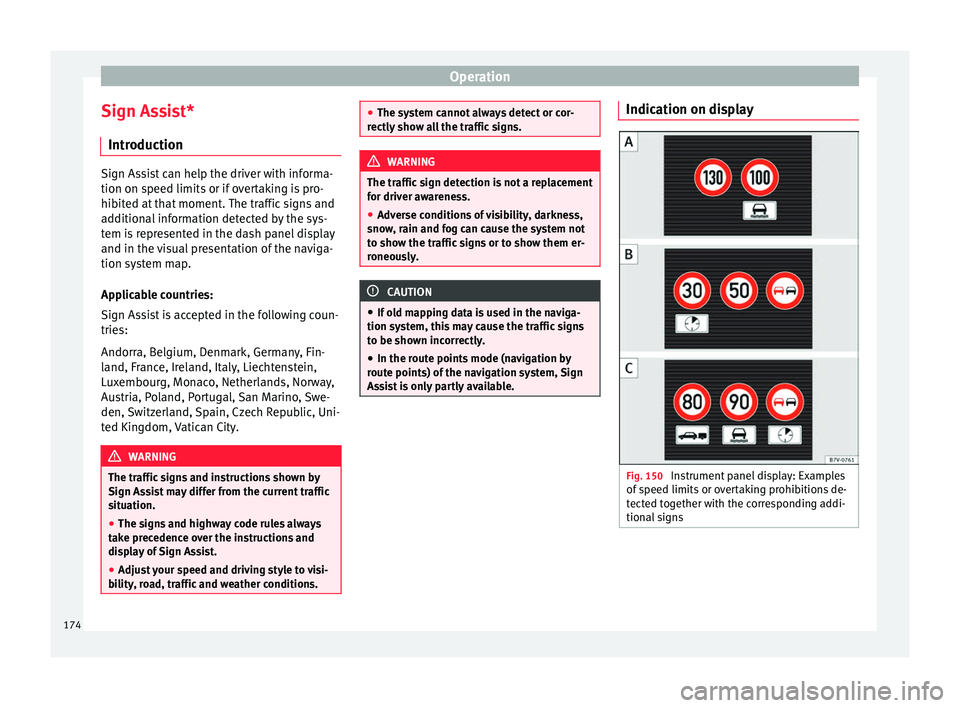
Fig. 150
Instrument panel display: Examples
of speed limits or overtaking prohibitions de-
tected together with the corresponding addi-
tional signs 174
Page 177 of 305
Driver assistance systemsDisplay text of
Sign Assist on
the instrument
panelCause and solution
Error: Sign AssistSystem fault.
Have the system checked by a
specialised workshop.
Sign Assist: Clean the
windscreen!The windscreen is dirty in the
area of the camera.
Clean the windscreen.
Sign Assist: only
partly available at the
moment.No data is being transmitted
from the navigator.
Connect the navigator and in-
sert the navigation data medi-
um.
ALTERNATIVELY: Sign Assist is
not supported in the country in
which you are driving at this
time. WARNING
If the warning lamps and messages are ignor-
ed, the vehicle may stall in traffic, or may
cause accidents and severe injuries.
● Never ignore the warning lamps or text
messages.
● Stop the vehicle safely as soon as possible. CAUTION
Failure to heed the control lamps and text
messages when they appear may result in ve-
hicle faults. Operation mode
Sign Assist does not work in all countries.
This must be taken into account when travel-
ling abroad.
Display of traffic signs
Speed limits or overtaking prohibitions to-
gether with the corresponding additional
signs are shown on the instrument panel dis-
play
››› Fig. 150. Depending on the naviga-
tion sy s
tem installed in the vehicle, traffic
signs will be shown as above and also in the
navigation system's map display.
When Sign Assist is connected, the vehicle
records the traffic signs with a camera in the
base of the interior rear vision mirror. After
checking and evaluating the information
from the camera, the navigation system and
the current vehicle data, up to three valid
traffic signs are displayed in conjunction with
the corresponding additional signs. The traf-
fic sign that is currently valid for the driver is
shown first, in the left side of the screen. A
traffic sign of only limited validity,
e.g. 90 km/h
(56 mph) is shown second, to-
gether with the additional sign “if the road is
wet”. If the vehicle's rain sensor detects rain
during travel, the traffic sign valid at this mo-
ment will move to the first position along the
additional sign “if the road is wet”.
The permanent display on the instrument
panel screen is shown as you pass the real traffic signs. The signs for entering and leav-
ing towns activate the display of the usual
speed limits for that country on roads in
populated areas and national highways, even
if the speed is not limited by an actual traffic
sign.
The end of a prohibition or limitation is not
displayed. If you exceed the speed limits
shown, a warning will not appear. The system
does not detect areas with little traffic. The
current legal provisions apply.
Connection and disconnection
● Connect or disconnect the assist system in
the Settings menu in the SEAT information
system ››› page 47.
● OR: press the button for the driver assist
sy s
tems on the main beam lever.
Trailer
Connect or disconnect the secondary display
for speed limits and overtaking bans that ap-
ply to trailers (trailer mode) in the Settings
menu in the SEAT information system
››› page 47.
175
Technical specifications
Advice
Operation
Safety
Page 178 of 305
Operation
Tiredness detection
(recommendation to take a
break) Introduction WARNING
Do not let the extra convenience afforded by
the tiredness detection function tempt you
into taking any risks when driving. When
making long trips, conveniently long breaks
must be taken.
● The driver is responsible for determining
their capacity to drive.
● Never drive when tired.
● The system does not always detect the
tiredness of the driver. Please read the infor-
mation provided in the section ››› page 176,
Limited operation.
● In some s it
uations the system may incor-
rectly interpret an intended manoeuvre as a
sign of tiredness of the driver.
● In the event of the an episode called “mi-
crosleep” at the wheel, a strong warning is
not in place!
● Observe the indications on the display of
the instrument panel and act in accordance
with them. Note
● The tiredness detection function has only
been designed for driving on motorways and
wide roads.
● If there is a fault in the system, refer to a
Specialised workshop to have the system in-
spected. Function and operation
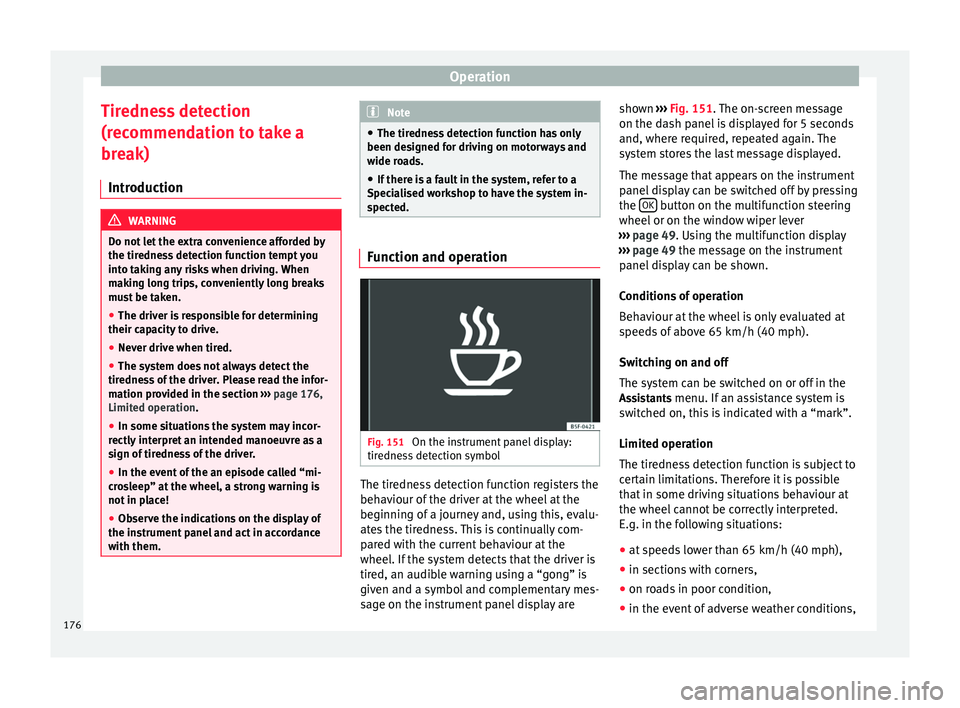
Fig. 151
On the instrument panel display:
tiredness detection symbol The tiredness detection function registers the
behaviour of the driver at the wheel at the
beginning of a journey and, using this, evalu-
ates the tiredness. This is continually com-
pared with the current behaviour at the
wheel. If the system detects that the driver is
tired, an audible warning using a “gong” is
given and a symbol and complementary mes-
sage on the instrument panel display areshown
››› Fig. 151 . The on-screen message
on the d a
sh panel is displayed for 5 seconds
and, where required, repeated again. The
system stores the last message displayed.
The message that appears on the instrument
panel display can be switched off by pressing
the OK button on the multifunction steering
wheel or on the window wiper lever
››› page 49 . Using the multifunction display
› ›
› page 49 the message on the instrument
panel
display can be shown.
Conditions of operation
Behaviour at the wheel is only evaluated at
speeds of above 65 km/h (40 mph).
Switching on and off
The system can be switched on or off in the
Assistants menu. If an assistance system is switched on, this is indicated with a “mark”.
Limited operation
The tiredness detection function is subject to
certain limitations. Therefore it is possible
that in some driving situations behaviour at
the wheel cannot be correctly interpreted.
E.g. in the following situations:
● at speeds lower than 65 km/h (40 mph),
● in sections with corners,
● on roads in poor condition,
● in the event of adverse weather conditions,
176
Page 180 of 305
Operation
Elements of the tyre monitoring
indicatorTyre monitoring indicator with button.
See ››› page 179.
Control lamp on the instrument panel.
SET button on the centre console.
Monitoring the tread of all tyres using ABS sensors
(indirect measurement).
Adjustable medium and full-load tyre pressures.
Button to update the system when the tyre pressure is
changed. Control lamp
Lights
up or
flashesPossible causeSolution
The tyre pressure
of a wheel has
dropped consider-
ably in relation to
the pressure set
by the driver
››› page 179.
Stop the vehicle!
Reduce your speed im-
mediately! Stop the ve-
hicle safely as soon as
possible. Avoid sud-
den manoeuvres and
braking!
Check all tyres and
pressures. Replace any
damaged tyres.
Lights
up or
flashesPossible causeSolution
System malfunc-
tion.
Consult a specialised
workshop if the tyre
pressure is correct and
the lamp remains lit af-
ter switching the igni-
tion off and back on
again. Have the sys-
tem checked there.
Several warning and control lamps light up
for a few seconds when the ignition is switch-
ed on, signalling that the function is being
verified. They will switch off after a few sec-
onds.
WARNING
Observe the safety warnings ››› in Control
and warning lamps on page 47. WARNING
When the tyres are inflated at different pres-
sures or at a pressure that is too low then a
tyre may be damaged resulting in a loss of
control of the vehicle and a serious or fatal
accident.
● If the warning lamp lights up, stop im-
mediately and check the tyres.
● If the tyres are inflated at different pres-
sures or if a tyre pressure is too low, this will
increase tyre wear, negatively affecting vehi- cle stability and increasing braking distan-
ces.
●
If tyres are inflated at different pressures or
a tyre pressure is too low, a tyre may be dam-
aged and burst resulting in a loss of control
of the vehicle.
● The driver is responsible for ensuring that
all of the vehicle tyres are correctly inflated
to the right pressure. The recommended tyre
pressure is indicated on the label ››› Fig. 175.
● The ty r
e monitoring system can only oper-
ate correctly if all of the tyres are inflated to
the correct pressure when cold.
● Driving with tyres at the wrong pressure
can damage them and result in an accident.
Ensure that the tyre pressures of all the tyres
correspond to the vehicle load.
● Before starting a journey, always inflate
tyres to the correct pressure.
● If tyre pressure is too low then the tyre is
subject to greater forces and it may be heated
to such an extent that the tread can rupture
and the tyre will burst.
● With an overloaded vehicle at high speed,
the tyres can overheat and burst resulting in
a loss of vehicle control.
● Tyre pressures which are too high or too
low reduce the useful life of the tyre, affect-
ing vehicle performance.
● If a tyre has not been “punctured” and does
not have to be changed immediately, drive to
the nearest specialised workshop at a moder-
ate speed and have the tyre checked and in-
flated to the correct pressure. 178
Page 181 of 305
Towing bracket device
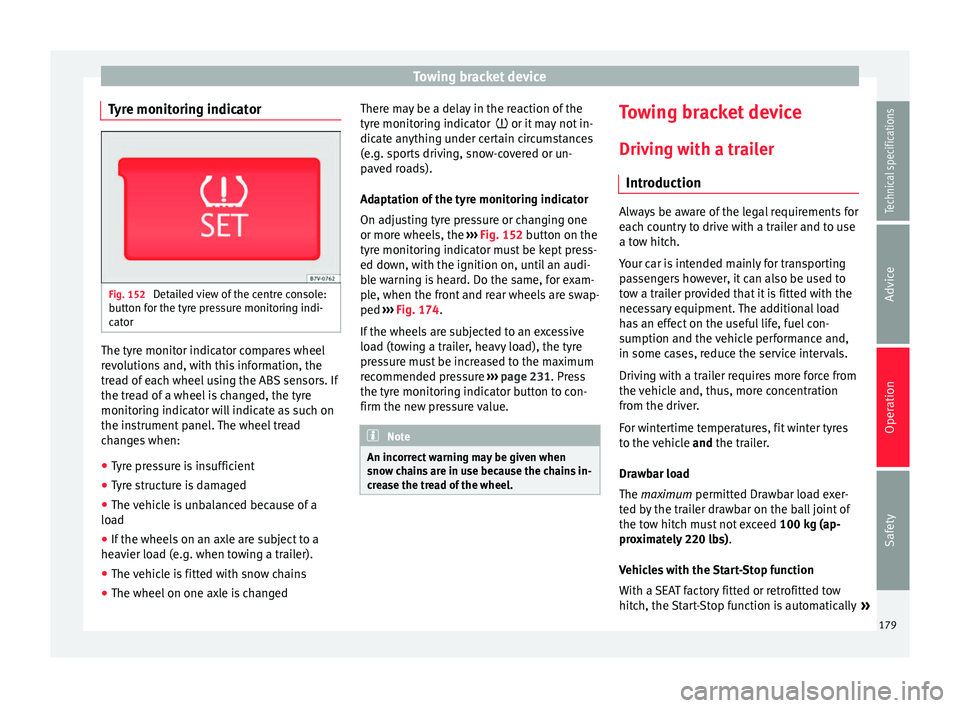
Tyre monitoring indicator Fig. 152
Detailed view of the centre console:
button for the tyre pressure monitoring indi-
cator The tyre monitor indicator compares wheel
revolutions and, with this information, the
tread of each wheel using the ABS sensors. If
the tread of a wheel is changed, the tyre
monitoring indicator will indicate as such on
the instrument panel. The wheel tread
changes when:
● Tyre pressure is insufficient
● Tyre structure is damaged
● The vehicle is unbalanced because of a
load
● If the wheels on an axle are subject to a
heavier load (e.g. when towing a trailer).
● The vehicle is fitted with snow chains
● The wheel on one axle is changed There may be a delay in the reaction of the
tyre monitoring indicator
or it may not in-
dic
ate anything under certain circumstances
(e.g. sports driving, snow-covered or un-
paved roads).
Adaptation of the tyre monitoring indicator
On adjusting tyre pressure or changing one
or more wheels, the ››› Fig. 152
button on the
tyre monitoring indicator must be kept press-
ed down, with the ignition on, until an audi-
ble warning is heard. Do the same, for exam-
ple, when the front and rear wheels are swap-
ped ››› Fig. 174
.
If the wheels are subjected to an excessive
load (towing a trailer, heavy load), the tyre
pressure must be increased to the maximum
recommended pressure ››› page 231. Press
the tyre monitoring indicator button to con-
firm the new pressure value. Note
An incorrect warning may be given when
snow chains are in use because the chains in-
crease the tread of the wheel. Towing bracket device
Driving with a trailer Introduction Always be aware of the legal requirements for
each country to drive with a trailer and to use
a tow hitch.
Your car is intended mainly for transporting
passengers however, it can also be used to
tow a trailer provided that it is fitted with the
necessary equipment. The additional load
has an effect on the useful life, fuel con-
sumption and the vehicle performance and,
in some cases, reduce the service intervals.
Driving with a trailer requires more force from
the vehicle and, thus, more concentration
from the driver.
For wintertime temperatures, fit winter tyres
to the vehicle
and
the trailer.
Dr a
wbar load
The
maximum permitted Drawbar load exer-
ted by the trailer drawbar on the ball joint of
the tow hitch must not exceed 100 kg (ap-
proximately 220 lbs).
Vehicles with the Start-Stop function
With a SEAT factory fitted or retrofitted tow
hitch, the Start-Stop function is automatically »
179
Technical specifications
Advice
Operation
Safety
Page 194 of 305
Advice
Check first with a specialised workshop that
understands the technical possibilities of in-
stallation if you wish to use a two-way radio
with a transmitting power of over 10 watts.
SEAT recommends taking your car in for tech-
nical service.
All legal requirements, together with the in-
structions for the use of two-way radios must
be observed. WARNING
If the two-way radio is not securely fastened
in position, it could be sent flying around the
vehicle in the event of sharp braking, sudden
manoeuvres or accident, causing injury.
● While driving, two-way radios must be se-
curely fastened in position, outside the radi-
us of action of the airbags, or safely stowed
away. WARNING
When using a two-way radio without a con-
nection to an exterior aerial, the maximum
permitted levels of electromagnetic radiation
may be exceeded. This is also the case if the
aerial has not been correctly installed.
● You should only use a two-way radio inside
the vehicle if it has first been correctly con-
nected to an exterior aerial. Information stored by the control
units
Your vehicle is fitted at the factory with a ser-
ies of electronic control units responsible for
the engine and gearbox management. In ad-
dition, the control units supervise the per-
formance of the exhaust gas system and the
airbag systems.
Therefore, while the vehicle is being driven,
these electronic control units are continuous-
ly analysing the vehicle data. In the event of
faults or deviations from the theoretical val-
ues, only this data is stored. Normally, the
warning lamps on the instrument panel light
up in the event of faults.
This data can only be read and analysed us-
ing special equipment.
The storing of the data allows specialised
workshops to detect and repair faults. Stored
data may include:
● Data relating to the engine or the gearbox
● Speed
● Direction of travel
● Braking force
● Detection of seat belt
The vehicle control units never record conver-
sations held by passengers in the vehicle.
In vehicles equipped with an emergency call
function via the mobile phone or other appli- ances connected in the vehicle, it is possible
to send the vehicle position. If the control
unit records an accident with airbag activa-
tion, the system may automatically send a
signal. This will depend on the network oper-
ator. Normally, transmission is only possible
in areas with good coverage.
Event Data Recorder
The vehicle is
not
fitted with an event data re-
c or
der.
An event data recorder temporarily stores the
vehicle information. Therefore, in the event of
an accident, it is possible to obtain detailed
information about how the accident occur-
red. For example, in vehicles with airbag sys-
tems, data relating to speed of impact, seat
belt status, seat positions and airbag activa-
tion times may be stored. The volume of data
depends on the manufacturer.
Event data recorders can only be mounted
with authorisation from the vehicle owner
and, in some countries, they are governed by
local legislation.
Reprogramming control units
On the whole, all the data required for the
component management is stored in the con-
trol units. The programming of certain con-
venience functions, such as the turn signals,
individual door opening and instructions on
the display can be modified using special
192
Page 206 of 305
Advice
Cleaning storage compartments,
drinks holders and ashtray Cleaning storage compartments and drinks
holders
Some storage compartments and drinks
holders have a removable rubber mat.
● Use a clean, damp, lint-free cloth to clean
parts.
● If this does not provide satisfactory results,
we recommend using a special solvent-free
plastic cleaning product.
Cleaning the ashtray
● Extract the ashtray and empty it.
● Clean the ashtray with a dishcloth.
Use a toothpick or similar to remove ash from
the area where cigarettes are stubbed out.
Care and cleaning of plastic parts,
wooden trim and the instrument
panel ●
Use a clean, damp, lint-free cloth to clean
parts.
● Clean plastic parts (inside and outside the
vehicle) and the dash panel with a special
solvent-free product for the care and clean-
in g of
plastic, approved by SEAT ››› .●
Wash wooden trims
w
ith a mi
ld soap and
water solution. WARNING
Solvents cause the surfaces of the airbag
modules to become porous. If an airbag is ac-
cidentally triggered, the detachment of plas-
tic parts could cause serious injury.
● Never clean the dash panel and the surfa-
ces of the airbag modules with cleaners con-
taining solvents. Cleaning seat belts
If the seat belt is very dirty, the belt retractor
may not work correctly thus preventing the
seat belt from operating correctly.
The seat belts should never be removed from
the vehicle for cleaning.
● Use a soft brush to remove the worst dirt
››› .
● Pull the seat belt right out and leave it out.
● Clean dirty seat belts with a gentle soap
and w at
er solution.
● Wait until they are completely dry.
● Only allow the seat belt to retract when it is
completely dry. WARNING
Check the condition of all the seat belts at
regular intervals. If the webbing or other
parts of the belt are damaged, the vehicle
should be taken to a specialised workshop
immediately and the belts should be re-
placed. It is extremely dangerous to drive us-
ing damaged seat belts and could result in
serious injury or loss of life.
● Seat belts and their components must nev-
er be cleaned with chemical products, nor
should they be allowed to come into contact
with corrosive liquids, solvents or sharp ob-
jects. This could affect the strength of the
seat belt webbing.
● Seat belts should be completely dry before
retracting. Damp could damage the belt re-
tractor so that it is does not operate correct-
ly.
● Do not allow liquids or foreign bodies to en-
ter the buckle fastenings. This could damage
the buckles and seat belts.
● Never attempt to repair, modify or remove a
seat belt yourself.
● Always have damaged seatbelts replaced
immediately by seat belts approved for the
vehicle in question by SEAT. Seat belts which
have been worn in an accident and stretched
must be replaced by a specialised workshop.
Renewal may be necessary even if there is no
apparent damage. The belt anchorage should
also be checked. 204
Page 210 of 305
Advice
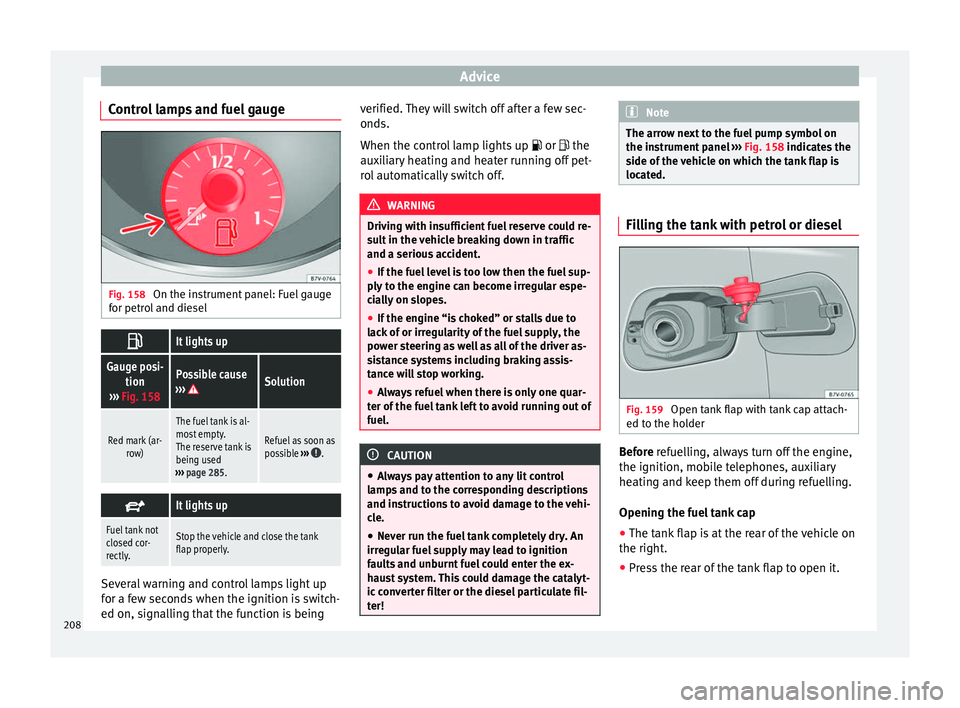
Control lamps and fuel gauge Fig. 158
On the instrument panel: Fuel gauge
for petrol and diesel It lights up
Gauge posi-
tion
››› Fig. 158Possible cause
››› Solution
Red mark (ar- row)
The fuel tank is al-most empty.
The reserve tank is
being used
››› page 285.
Refuel as soon as
possible ››› .
It lights up
Fuel tank not
closed cor-
rectly.Stop the vehicle and close the tank
flap properly.
Several warning and control lamps light up
for a few seconds when the ignition is switch-
ed on, signalling that the function is being verified. They will switch off after a few sec-
onds.
When the control lamp lights up
or
the
auxiliary heating and heater running off pet-
rol automatically switch off. WARNING
Driving with insufficient fuel reserve could re-
sult in the vehicle breaking down in traffic
and a serious accident.
● If the fuel level is too low then the fuel sup-
ply to the engine can become irregular espe-
cially on slopes.
● If the engine “is choked” or stalls due to
lack of or irregularity of the fuel supply, the
power steering as well as all of the driver as-
sistance systems including braking assis-
tance will stop working.
● Always refuel when there is only one quar-
ter of the fuel tank left to avoid running out of
fuel. CAUTION
● Always pay attention to any lit control
lamps and to the corresponding descriptions
and instructions to avoid damage to the vehi-
cle.
● Never run the fuel tank completely dry. An
irregular fuel supply may lead to ignition
faults and unburnt fuel could enter the ex-
haust system. This could damage the catalyt-
ic converter filter or the diesel particulate fil-
ter! Note
The arrow next to the fuel pump symbol on
the instrument panel ››› Fig. 158 indicates the
s ide of
the vehicle on which the tank flap is
located. Filling the tank with petrol or diesel
Fig. 159
Open tank flap with tank cap attach-
ed to the holder Before
refuelling, always turn off the engine,
the ignition, mo b
ile telephones, auxiliary
heating and keep them off during refuelling.
Opening the fuel tank cap
● The tank flap is at the rear of the vehicle on
the right.
● Press the rear of the tank flap to open it.
208
Page 224 of 305
Advice
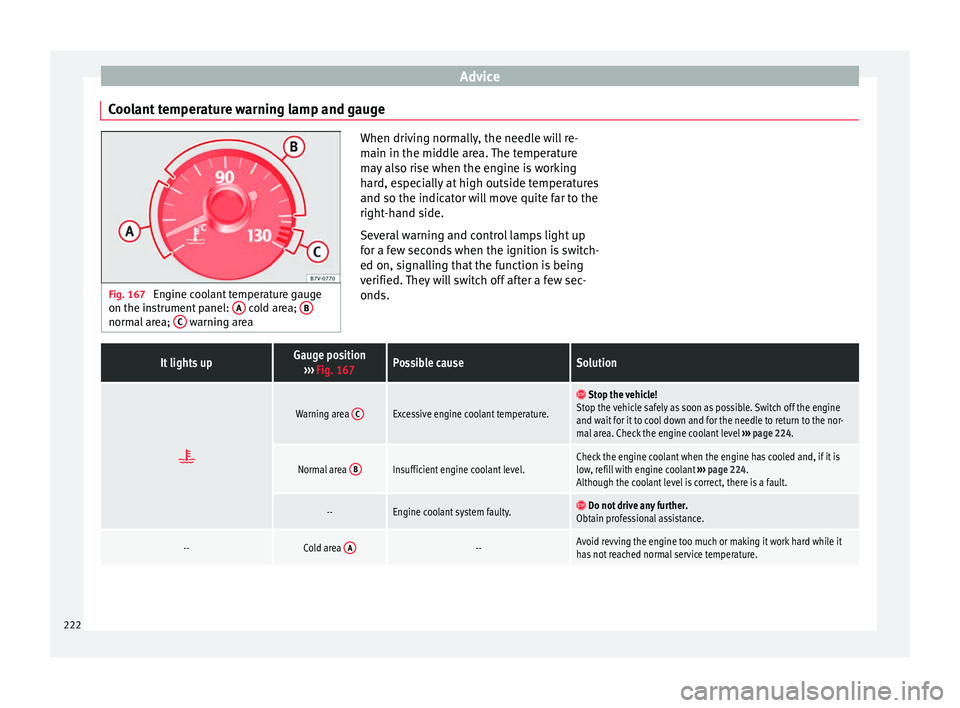
Coolant temperature warning lamp and gauge Fig. 167
Engine coolant temperature gauge
on the instrument panel: A cold area;
B normal area;
C warning area When driving normally, the needle will re-
main in the middle area. The temperature
may also rise when the engine is working
hard, especially at high outside temperatures
and so the indicator will move quite far to the
right-hand side.
Several warning and control lamps light up
for a few seconds when the ignition is switch-
ed on, signalling that the function is being
verified. They will switch off after a few sec-
onds.It lights upGauge position
››› Fig. 167Possible causeSolution
Warning area
CExcessive engine coolant temperature.
Stop the vehicle!
Stop the vehicle safely as soon as possible. Switch off the engine
and wait for it to cool down and for the needle to return to the nor-
mal area. Check the engine coolant level ››› page 224.
Normal area BInsufficient engine coolant level.Check the engine coolant when the engine has cooled and, if it is
low, refill with engine coolant
››› page 224.
Although the coolant level is correct, there is a fault.
--Engine coolant system faulty. Do not drive any further.
Obtain professional assistance.
--Cold area A--Avoid revving the engine too much or making it work hard while it
has not reached normal service temperature.222
Page 243 of 305
Wheels and tyres
max. 240 km/h (149 mph)
max. 270 km/h (168 mph)
max. 300 km/h (186 mph)
Some manufacturers use the letters “ZR” for
tyres with a maximum authorised speed
above 240 km/h (149 mph).
Winter service
Winter tyres* In winter conditions winter tyres will consid-
erably improve the vehicle's handling. The
design of summer tyres (width, rubber com-
pound, tread pattern) gives less grip on ice
and snow. Winter tyres also improve the vehi-
cle braking performance, reducing the brak-
ing distance in winter weather. SEAT recom-
mend that winter tyres be fitted to the vehicle
at temperatures below +7 °C (+45 °F).
The performance of winter tyres is much re-
duced if the
tyre tread is worn below 4 mm
(1/16 inc h).
The age of the tyre is another
factor affecting performance, regardless of
the depth of the tyre tread.
Please observe the following when using
winter tyres:
● Observe legal requirements in each coun-
try. Z
W
Y ●
Winter tyres must be fitted on all four
wheels.
● Only use winter tyres in wintery weather
conditions.
● Only use winter tyres of the size authorised
for the vehicle.
● Only use radial winter tyres of the same
type, size (rolling circumference) and tread
pattern.
● Adjust speeds to within the limits indicated
(code letter on tyre) ››› .
Speed limit
A code letter indicating the speed limit is
stamped on all winter tyres ››› page 240.
In some vehicles, it is possible to set a speed
warning in the MFA (multifunction display)
menu on the instrument panel ››› page 47.
If you use V-rated tyres the speed limits and
ty r
e pressure will be determined by engine
size. Please ask your technical service centre
for further information on the maximum per-
mitted speed and the required pressures for
the tyres.
All-wheel drive*
Thanks to its all-wheel drive, your car will
have plenty of traction in winter conditions,
even with the standard tyres. Nevertheless,
SEAT still recommend that winter tyres or all-
season tyres should be fitted on all fourwheels when winter road conditions are ex-
pected, mainly because this will give a better
braking response
.
Please observe all instructions and warnings
when using
snow chains ››› page 242. WARNING
Although winter tyres help to make driving
safer in the winter, you should not take un-
necessary risks.
● Adjust your speed and driving style to visi-
bility, road, traffic and weather conditions.
● Never exceed the maximum permitted
speed or loads specified for the type of winter
tyre fitted on your vehicle. For the sake of the environment
When winter is over, change back to summer
tyres. In temperatures above +7 °C (+45 °F),
performance will be improved if summer tyres
are used. Fuel consumption, wear and noises
while driving will all be reduced. Note
● If the vehicle is fitted with a tyre control
system, this should be “reprogrammed”
whenever a tyre is changed ››› page 179.
● Please ask at a technical service centre for
information about the permitted sizes for
winter tyres. 241
Technical specifications
Advice
Operation
Safety