instrument panel Seat Alhambra 2015 User Guide
[x] Cancel search | Manufacturer: SEAT, Model Year: 2015, Model line: Alhambra, Model: Seat Alhambra 2015Pages: 305, PDF Size: 5.46 MB
Page 51 of 305
Cockpit
Using the menus on the instrument
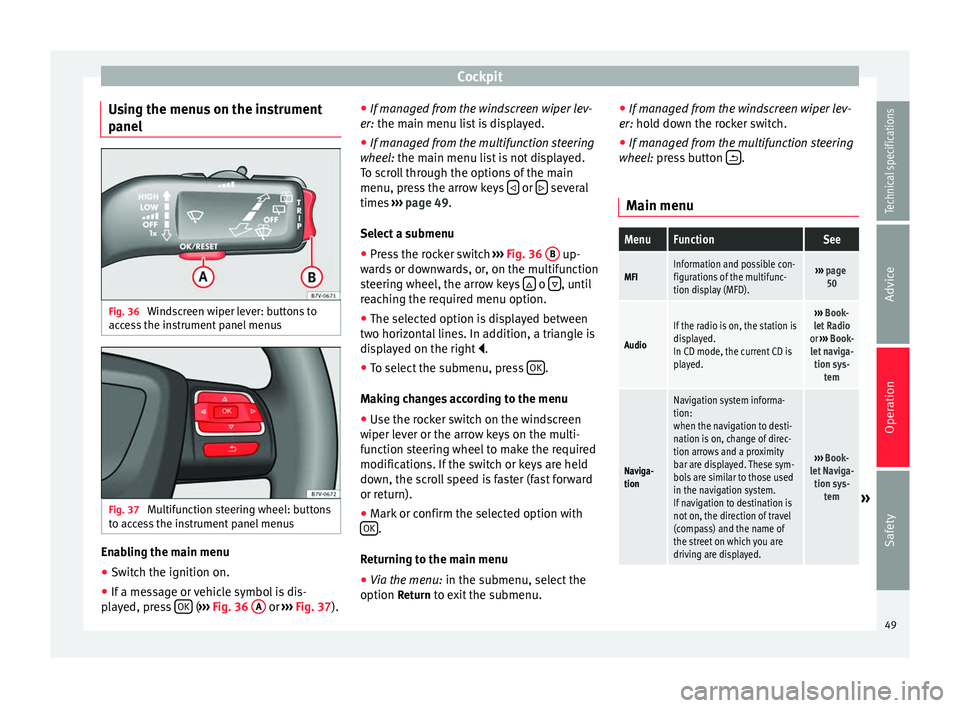
panel Fig. 36
Windscreen wiper lever: buttons to
access the instrument panel menus Fig. 37
Multifunction steering wheel: buttons
to access the instrument panel menus Enabling the main menu
● Switch the ignition on.
● If a message or vehicle symbol is dis-
played, press OK (
››› Fig. 36 A or
››› Fig. 37 ).●
If mana ge d from the windscreen wiper lev-
er: the main menu list is displayed.
● If manage
d from the multifunction steering
wheel: the main menu list is not displayed.
To s
croll through the options of the main
menu, press the arrow keys or
several
times ››› page 49 .
Sel ect
a submenu
● Press the rocker switch ››› Fig. 36
B up-
wards or downwards, or, on the multifunction
steering wheel, the arrow keys o
, until
reaching the required menu option.
● The selected option is displayed between
two horizontal lines. In addition, a triangle is
displayed on the right .
● To select the submenu, press OK .
Making changes according to the menu ● Use the rocker switch on the windscreen
wiper lever or the arrow keys on the multi-
function steering wheel to make the required
modifications. If the switch or keys are held
down, the scroll speed is faster (fast forward
or return).
● Mark or confirm the selected option with
OK .
Returning to the main menu
● Via the menu: in the submenu, select the
option Return to exit the submenu. ●
If managed from the windscreen wiper lev-
er: hold down the rocker switch.
● If mana ge
d from the multifunction steering
wheel: press button .
Main menu
MenuFunctionSee
MFIInformation and possible con-
figurations of the multifunc-
tion display (MFD).››› page
50
Audio
If the radio is on, the station is
displayed.
In CD mode, the current CD is
played.››› Book-
let Radio
or ››› Book-
let naviga- tion sys- tem
Naviga-
tion
Navigation system informa-
tion:
when the navigation to desti-
nation is on, change of direc-
tion arrows and a proximity
bar are displayed. These sym-
bols are similar to those used
in the navigation system.
If navigation to destination is
not on, the direction of travel
(compass) and the name of
the street on which you are
driving are displayed.
››› Book-
let Naviga- tion sys- tem
» 49
Technical specifications
Advice
Operation
Safety
Page 52 of 305
OperationMenuFunctionSee
Tele-
phoneMobile telephone pre-installa-
tion set up information and
options
›››
Book-
let Radio
or ››› Book-
let Naviga- tion sys- tem
Parking
heating
Information and configura-
tions of the parking heating:
switching the parking heating
on or off. Select the operating
mode and duration.
››› page
128
Vehicle
condition
Current warning or informa-
tion texts.
This option only appears
when one of the following
texts is available. The number
of available messages is dis-
played. Example 1/1 or 2/2.
››› page 40
Configu-
ration
Different setting options, for
example, the Convenience,
Lighting & Visibility menus,
and the time, speed warning
with winter tyres, language,
units of measurement, or “Dis-
play off”.
››› page
51 MFI
(multifunction display) menu The multifunction display (MFI) has two auto-
matic memories:
1 - Partial memory and 2 -
T ot
al memory . The selected memory will be shown in the upper right-hand corner of the
display.
With the ignition switched on, and memory 1 or
2 displayed, briefly press
OK to change from
one memory to another.
1
Trip
memory
(for a
single
jour-
ney).
The memory stores the values for the
journey and the consumption from the
moment the ignition is switched on until
it is switched off again.
If the journey is broken for more than 2
hours, the memory is automatically
erased. If the journey is continued in less
than 2 hours after the ignition is switch-
ed off, the new data is added to the data
already stored in the memory.
2
Total
memory
(for all
jour-
neys).
The memory records the values for a spe-
cific number of partial trips, up to a total
of 19 hours and 59 minutes or 99 hours
and 59 minutes, or 1999.9 km (or miles)
for 9999 km (or miles), depending on the
model of instrument panel. On reaching
either of these limits, the memory is au-
tomatically erased and starts to count
from 0 again. Possible displays
MenuFunction
Journey dura-
tionThis indicates the hours (h) and mi-
nutes (min) since the ignition was
switched on.
MenuFunction
Current fuel
consumption
The current fuel consumption while
driving is displayed in l/100 km (or
miles per gallon, mpg); when the en-
gine is running but the vehicle is not
moving, in l/h (or gallons per hour).
Average fuel
consumption
When the ignition is switched on, the
average consumption (in l/100 km or in mpg) is displayed after the vehicle
has moved approximately 100 metres
(328 feet). Otherwise horizontal lines
are displayed. The value shown is up-
dated approximately every 5 seconds.
Operating
range
Approximate distance in km (or miles)
that can still be travelled with the fuel
remaining in the tank, assuming the
same style of driving is maintained.
This is calculated using the current fuel
consumption.
Distance cov-
eredDistance travelled, after ignition is
switched on, in km (or miles).
Average speed
After the ignition is switched on, the
average speed will be shown after a
distance of approximately 100 metres
(328 feet) has been travelled. Other-
wise horizontal lines are displayed. The
value shown is updated approximately
every 5 seconds.
Digital display
of speedCurrent speed displayed digitally.
Oil tempera-
ture digital
displayUpdated engine oil temperature digital
display 50
Page 53 of 305
CockpitMenuFunction
Speed warn-
ing at --- km/hIf the stored speed is exceeded (be-
tween 30 - 250 km/h, or 18 -
155 mph), an audible warning is given
together with a visual warning. Changing between display modes
● In vehicles without multifunction steering
wheel: press the lever.
● Vehicle
s with a multifunction steering
wheel:
press or
.
Storing a speed for the speed warning
● Select the display Speed warning at --- km/h
.
● Press OK to store the current speed and
switch off the warning.
● In addition, set the required speed by
pressing the rocker switch on the windscreen
wiper lever or buttons or
on the multi-
function steering wheel for 5 seconds. Next,
press OK again or wait a few seconds. The
speed is stored and the warning activated.
● To switch off , press OK . The stored speed is
deleted.
Manually erasing memory 1 or 2
● Select the memory to be erased.
● Press and hold OK for approximately 2 sec-
onds. Personalising the displays
It is possible to select which of the displays
in the multifunction display you wish to see
on the instrument panel in the
settings
menu. The units of measurement can also be
modified ››› page 51 .
C onfigur
ation Menu
Configu-
ration
MenuFunction
Multi-
function
display
dataConfiguration of the multifunction display
data that you wish to see on the instrument
panel display ››› page 50.
Compass
Changing the magnetic region and calibra-
tion of the compass. To calibrate the com-
pass, please follow the instructions given
on the instrument panel display.
Conven-
ienceChanging vehicle convenience functions
››› page 52.
Lights &
visibilityConfiguration of vehicle lighting
››› page 52.
Time
Changing the hours and minutes of the in-
strument panel clock and the navigation
system. The time can be set here and the
choice can be made between the 24-hour
and 12-hour display. The S in the upper
part of the display indicates that the clock
is set to summer time.
Configu-
ration
MenuFunction
Winter
tyres
Changing the visual and audible speed
warnings. This function should only be
used when the vehicle is fitted with winter
tyres, which are not designed for travel at
high speeds.
LanguageChanging the language of the display texts
and the navigation system.
UnitsChanging the units of measurement for the
temperature, consumption and distance.
Second
speedSwitching second speed display on and off.
Auto-HoldSelect if the Auto-Hold function should be
on permanently.
ServiceCheck the service notifications or reset the
service intervals to zero.
Factory
settingsSome functions of the Configuration menu
will be reset to the factory value.
BackThe main menu is displayed again. 51
Technical specifications
Advice
Operation
Safety
Page 66 of 305
Operation
Warning lampIt
lights upPossible causeSolution
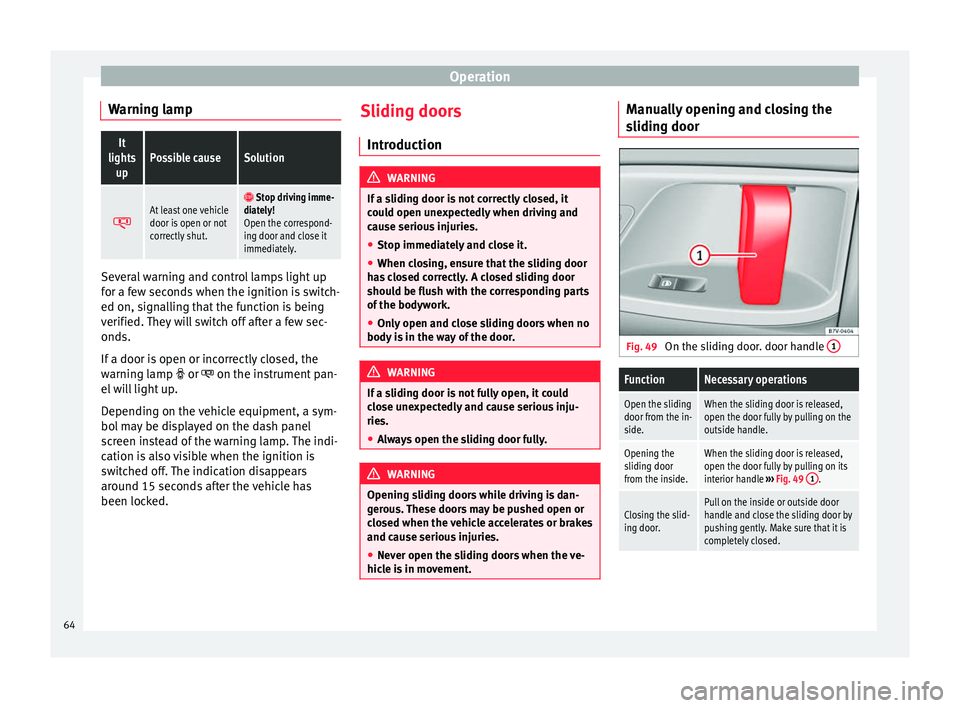
At least one vehicle
door is open or not
correctly shut. Stop driving imme-
diately!
Open the correspond-
ing door and close it
immediately. Several warning and control lamps light up
for a few seconds when the ignition is switch-
ed on, signalling that the function is being
verified. They will switch off after a few sec-
onds.
If a door is open or incorrectly closed, the
warning lamp
or on the instrument pan-
el will light up.
Depending on the vehicle equipment, a sym-
bol may be displayed on the dash panel
screen instead of the warning lamp. The indi-
cation is also visible when the ignition is
switched off. The indication disappears
around 15 seconds after the vehicle has
been locked. Sliding doors
Introduction WARNING
If a sliding door is not correctly closed, it
could open unexpectedly when driving and
cause serious injuries.
● Stop immediately and close it.
● When closing, ensure that the sliding door
has closed correctly. A closed sliding door
should be flush with the corresponding parts
of the bodywork.
● Only open and close sliding doors when no
body is in the way of the door. WARNING
If a sliding door is not fully open, it could
close unexpectedly and cause serious inju-
ries.
● Always open the sliding door fully. WARNING
Opening sliding doors while driving is dan-
gerous. These doors may be pushed open or
closed when the vehicle accelerates or brakes
and cause serious injuries.
● Never open the sliding doors when the ve-
hicle is in movement. Manually opening and closing the
sliding door
Fig. 49
On the sliding door. door handle 1
FunctionNecessary operations
Open the sliding
door from the in-
side.When the sliding door is released,
open the door fully by pulling on the
outside handle.
Opening the
sliding door
from the inside.When the sliding door is released,
open the door fully by pulling on its
interior handle
››› Fig. 49 1
.
Closing the slid-
ing door.Pull on the inside or outside door
handle and close the sliding door by
pushing gently. Make sure that it is
completely closed.64
Page 78 of 305
Operation
● Switching on the front fog lights : Turn
the sw it
ch to position or pull out to the
first stop.
● Switching on the rear fog light : turn the
light sw
itch to position or pull out to
the maximum.
● To switch off the fog lights, press the light
switch or turn it to position
.
Audible warnings to advise the driver that
the lights have not been switched off
If the key is not in the ignition and the driver
door is open, an audible warning signal is
heard in the following cases: this is a remind-
er to turn off the lights.
● When the parking light is on ››› page 76.
● When the light switch is in position .WARNING
The side lights or daytime driving lights are
not bright enough to illuminate the road
ahead and to ensure that other road users are
able to see you.
● Always use your dipped beam head lights if
it is raining or if visibility is poor. Turn signal and main beam lever
Fig. 61
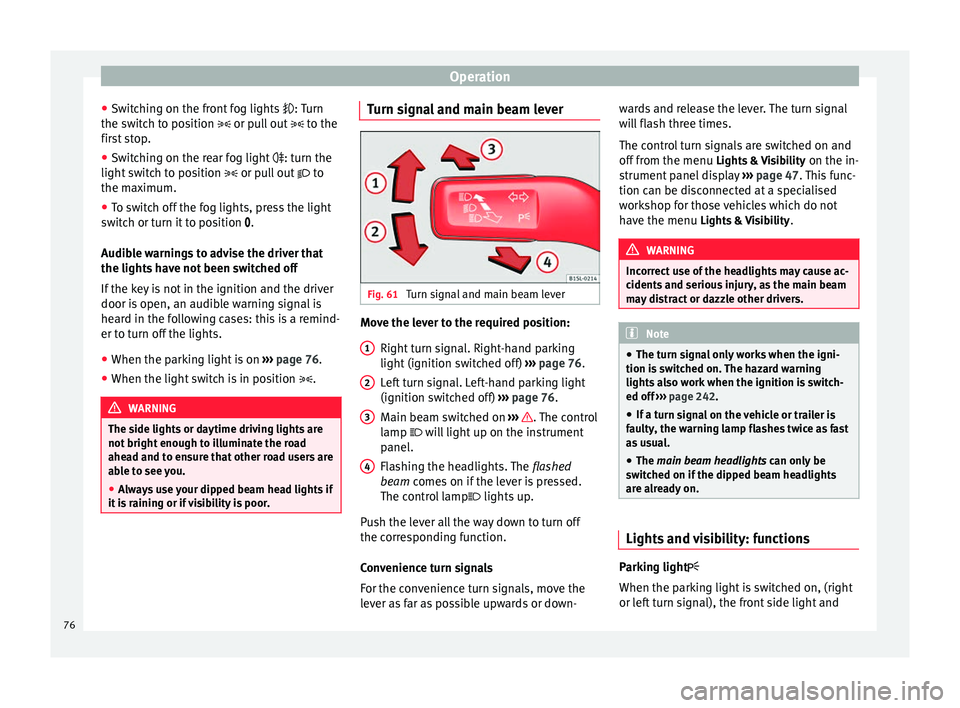
Turn signal and main beam lever Move the lever to the required position:
Right turn signal. Right-hand parking
light (ignition switched off) ››› page 76.
Left turn signal. Left-hand parking light
(ignition switched off) ››› page 76.
Main beam switched on ››› . The control
lamp will light up on the instrument
panel.
Flashing the headlights. The flashed
beam comes on if the lever is pressed.
The c ontr
ol lamp lights up.
Push the lever all the way down to turn off
the corresponding function.
Convenience turn signals
For the convenience turn signals, move the
lever as far as possible upwards or down- 1 2
3
4 wards and release the lever. The turn signal
will flash three times.
The control turn signals are switched on and
off from the menu
Lights & Visibility on the in-
strument panel display ››› page 47. This func-
tion can be disconnected at a specialised
workshop for those vehicles which do not
have the menu Lights & Visibility
. WARNING
Incorrect use of the headlights may cause ac-
cidents and serious injury, as the main beam
may distract or dazzle other drivers. Note
● The turn signal only works when the igni-
tion is switched on. The hazard warning
lights also work when the ignition is switch-
ed off ››› page 242.
● If a t
urn signal on the vehicle or trailer is
faulty, the warning lamp flashes twice as fast
as usual.
● The main beam headlights can only be
sw
itched on if the dipped beam headlights
are already on. Lights and visibility: functions
Parking light
When the parking light is switched on, (right
or left turn signal), the front side light and
76
Page 79 of 305
Lights and visibility
the rear light on the corresponding side of
the vehicle stay lit. The parking lights will on-
ly work with the ignition off.
Daytime driving light
The daytime light reduces the risk of acci-
dents by increasing the visibility of the vehi-
cle. These are independent lights which are
built into the headlights and which come on
each time the ignition is turned on if the light
switch is in position or 0
.
When the light
switch is in position , a
photo sensor automatically turns the instru-
ment and switch lighting on and off.
Automatic dipped beam control
The automatic dipped beam control is merely
intended as an aid and is not able to recog-
nise all driving situations.
When the light switch is in position , the
vehicle lights and the instrument panel and
switch lighting switch on and off automatical-
ly in the following situations ››› :
Automatic switching
onAutomatic switching
off or switch to day-
time running lighting
The photo sensor detects
darkness, for example,
when driving through a
tunnel.When adequate lighting is
detected.
Automatic switching
onAutomatic switching
off or switch to day-
time running lighting
The rain sensor detects
rain and activates the
windscreen wipers.When the windscreen wip-
er has been inactive for a
few minutes. Adaptive headlights (AFS)
The adaptive headlights only operate when
the dipped beam is on and at speeds of over
10 km/h (6 mph). On bends, the adaptive
headlights automatically improve lighting on
the road ahead.
The adaptive headlights can be switched on
and off from the infotainment system.
Static turning lights
When turning slowly to change direction or
going round a tight bend, the static cornering
lights automatically come on. The static cor-
nering lights only work at speeds of less than
40 km/h (25 mph).
The static cornering lights may be incorpora-
ted into the fog lights or the front headlights,
depending upon the equipment.
WARNING
If the road is not well lit and other road users
cannot see the vehicle well enough or at all,
accidents may occur. ●
The automatic dipped beam control ( )
only switches on the dipped beam when
there are no changes in brightness, and not,
for example when it is foggy.
● Never drive with daytime lights if the road
is not well lit due to weather or lighting con-
ditions. Daytime lights do not provide
enough light to illuminate the road properly
or be seen by other road users.
● The rear lights do not come on with the
daytime driving light. A vehicle which does
not have the rear lights on may not be visible
to other drivers in the darkness, if it is rain-
ing or in conditions of poor visibility. Headlight adjustment
Headlight adjustment (Light Assist)
The headlight adjustment automatically con-
nects and disconnects these lights depend-
ing on the environmental and traffic condi-
tions and on the speed, within the limitations
of the system
››› . This is monitored by a
sensor located on the inside of the wind-
screen, above the interior rear vision mirror.
The automatic headlight adjustment auto-
matically switches on the lights depending
on the vehicles travelling in front and in the
opposite direction, and on other environmen-
tal and traffic conditions from an approxi-
mate speed of 60 km/h (37 mph) and turns »
77
Technical specifications
Advice
Operation
Safety
Page 81 of 305
Lights and visibilityLeaving home: necessary operations
To switch sys-
tem off:
– Automatically, at the end of the delay
period.
– When the vehicle is locked.
– When the light switch is turned to po-
sition
.
– When the ignition is switched on. Lighting around the exterior mirrors
The lighting around the exterior mirrors illu-
minates the door area on entering and leav-
ing the vehicles. It comes on when the vehi-
cle is unlocked, when the vehicle door is
opened and when the “Coming home” or
“Leaving home” function is switched on. If
the equipment includes the light sensor, the
lighting around the exterior mirrors only
comes when it is dark.
Note
● The time taken for the headlights to go off
can be changed in the Lights & Visibility menu
and the f u
nction can be switched on or off
››› page 47.
● When the “Comin
g home” function is on, if
the vehicle door is opened there is no audible
warning signal to advise that the light is still
on. Adhesive strips for headlights or
adjusting headlights
In those countries where vehicles drive on
the other side of the road to the home coun-
try, the asymmetric dipped beam may dazzle
drivers of oncoming vehicles. Therefore,
when driving abroad, adhesive strips should
be attached to the headlights or the head-
lights should be adjusted accordingly.
The direction of the headlights can be adjus-
ted from the instrument panel, in the
Tourist
light submenu of the Configuration menu
››› page 51
.
F or tho
se vehicles in which it is not possible
to adjust the headlights from the menu, ad-
hesive strips are used to cover certain parts
of the headlamp cover or the headlights may
be adjusted at a specialised workshop. For
further information, please refer to a special-
ised workshop. SEAT recommends visiting a
technical service. Note
Use of the Tourist light option and the adhe-
sives on the headlights is only allowed if they
are to be used for a short period of time. To
modify the direction of the headlights perma-
nently, please take the vehicle to a special-
ised workshop. SEAT recommends visiting a
technical service centre. Headlight range control, instrument
and switch lighting
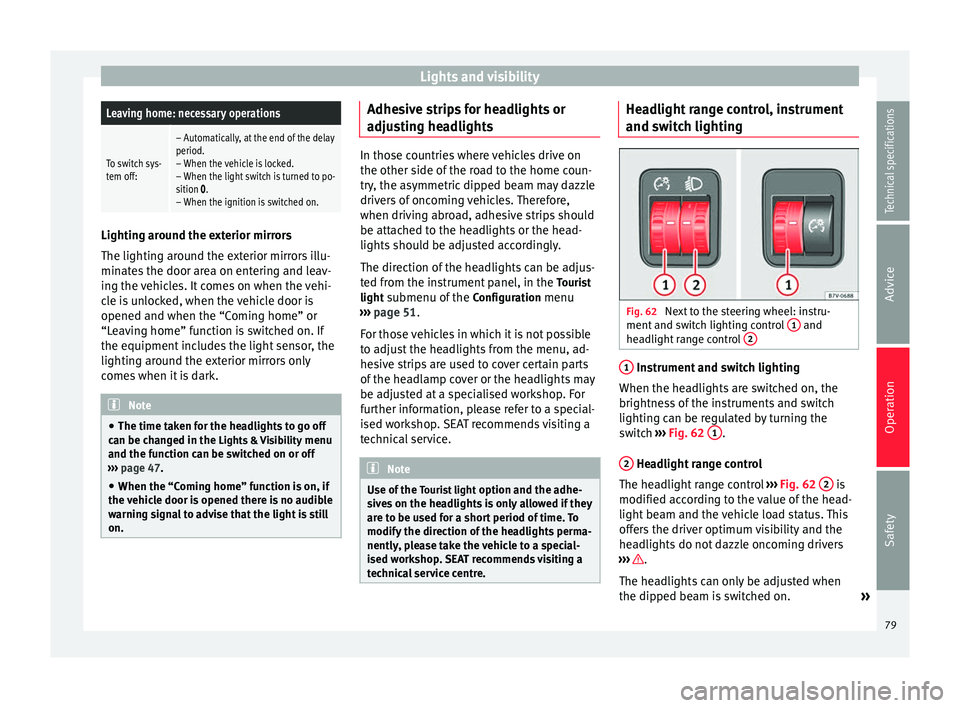
Fig. 62
Next to the steering wheel: instru-
ment and switch lighting control 1 and
headlight range control 2 1
Instrument and switch lighting
When the headlights are switched on, the
brightness of the instruments and switch
lighting can be regulated by turning the
switch ››› Fig. 62 1 .
2 Headlight range control
The headlight range control ››› Fig. 62 2 is
modified according to the value of the head-
light beam and the vehicle load status. This
offers the driver optimum visibility and the
headlights do not dazzle oncoming drivers
››› .
The headlights can only be adjusted when
the dipped beam is switched on. »
79
Technical specifications
Advice
Operation
Safety
Page 115 of 305
Transport and practical equipment
Storage compartment on the roof
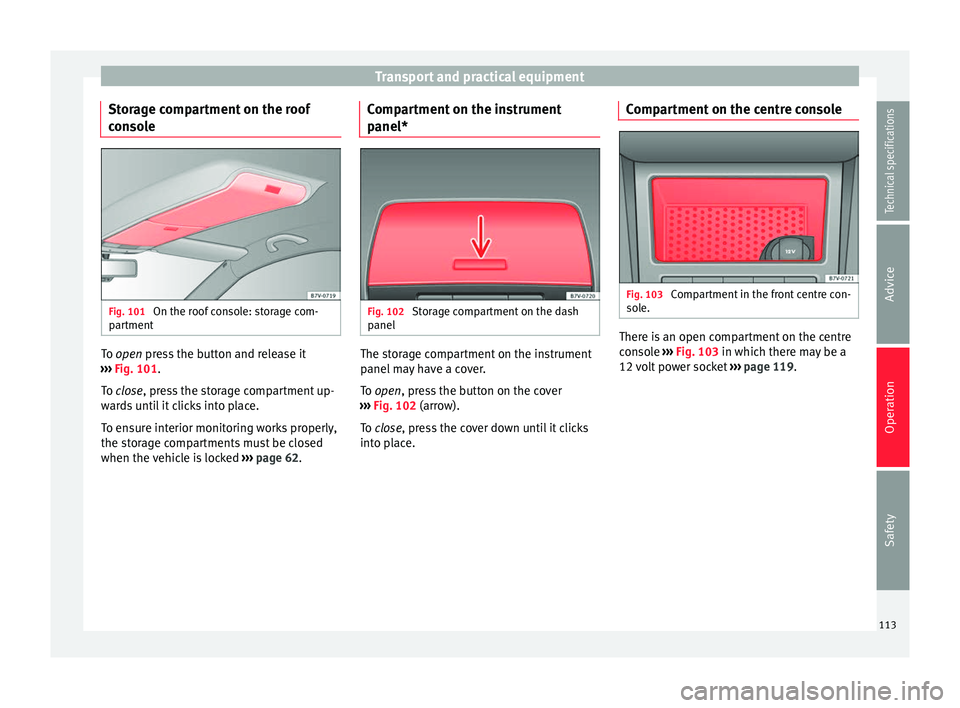
console Fig. 101
On the roof console: storage com-
partment To
open
press the button and release it
›
›› Fig. 101.
To
close, press the storage compartment up-
wards until it clicks into place.
To ensure interior monitoring works properly,
the storage compartments must be closed
when the vehicle is locked ››› page 62. Compartment on the instrument
panel*
Fig. 102
Storage compartment on the dash
panel The storage compartment on the instrument
panel may have a cover.
To
open
, press the button on the cover
›
›› Fig. 102 (arrow).
To
close, press the cover down until it clicks
into place. Compartment on the centre console Fig. 103
Compartment in the front centre con-
sole. There is an open compartment on the centre
console
››› Fig. 103 in which there may be a
12 v
olt power socket ››› page 119.
113
Technical specifications
Advice
Operation
Safety
Page 124 of 305
Operation
Air conditioning
Air conditioner Introduction Viewing Climatronic information
The factory-fitted radio or navigation system
screen briefly displays information relating to
Climatronic.
The units of temperature measurement is dis-
played on the factory-installed radio or navi-
gation system and, depending on the vehicle
equipment, can be set using the
Configura-
tion menu on the instrument panel. WARNING
Reduced visibility through the windows in-
creases the risk of serious accidents.
● Ensure that all windows are free of ice and
snow and that they are not fogged up pre-
venting a clear view of everything outside.
● The maximum heat output required to de-
frost windows quickly is only available when
the engine has reached its normal running
temperature. Only drive when you have good
visibility. ●
Always ensure that you use the air condi-
tioner and heated rear window to maintain
good visibility.
● Never leave the air recirculation on for a
long period of time. If the cooling system is
switched off and air recirculation mode
switched on, the windows can mist over very
quickly, considerably limiting visibility.
● Switch air recirculation mode off when it is
not required. WARNING
Stuffy or used air will increase fatigue and re-
duce driver concentration possibly resulting
in a serious accident.
● Never leave the fresh air fan turned off or
use the air recirculation for long periods of
time; the air in the vehicle interior will not be
refreshed. CAUTION
● Switch the air conditioner off if you think it
may be broken. This will avoid additional
damage. Have the air conditioner checked by
a specialised workshop.
● Repairs to the air conditioner require spe-
cialist knowledge and special tools. SEAT rec-
ommends taking your car in for technical
service. ●
Do not smoke when air recirculation is
switched on in vehicles with an air condition-
er. The smoke taken in could lie on the cool-
ing system vaporiser and on the activated
charcoal cartridge of the dust and pollen fil-
ter, leading to a permanently unpleasant
smell. Note
● When the cooling system is turned off, air
coming from the outside will not be dried. To
avoid fogging up the windows, SEAT recom-
mends leaving the cooler (compressor) on. To
do this, press the A/C button. The button
lamp should light up.
● If the humidity and temperature outside the
vehicle are high, condensation can drip off
the evaporator in the cooling system and
form a pool underneath the vehicle, this is
completely normal and there is no need to
suspect a leak.
● Keep the air intake slots in front of the
windscreen free of snow, ice and leaves to en-
sure heating and cooling are not impaired,
and to prevent the windows from misting
over. 122
Page 128 of 305
Operation
the navigation system is carried out in the
menu on the instrument panel ››› page 51.
The cooling system does not switch on
If the air conditioning system cannot be
switched on, this may be caused by the fol-
lowing:
● The engine is not running.
● The fan is switched off.
● The air conditioning fuse is blown. ●
The outside temperature is lower than ap-
proximately +3 °C (+38 °F).
● The air conditioner compressor has been
temporarily switched off because the engine
coolant temperature is too high.
● Another fault in the vehicle. Have the air
conditioner checked by a specialised work-
shop.
Things to note
If the humidity and temperature outside the
vehicle are high, condensation
can drip off the vaporiser in the cooling system and form
a pool underneath the vehicle. This is normal
and does not indicate a leak! Note
After starting the engine, any residual humid-
ity in the air conditioner could mist over the
windscreen. Switch on the defrost function as
soon as possible to clear the windscreen of
condensation. Air vents
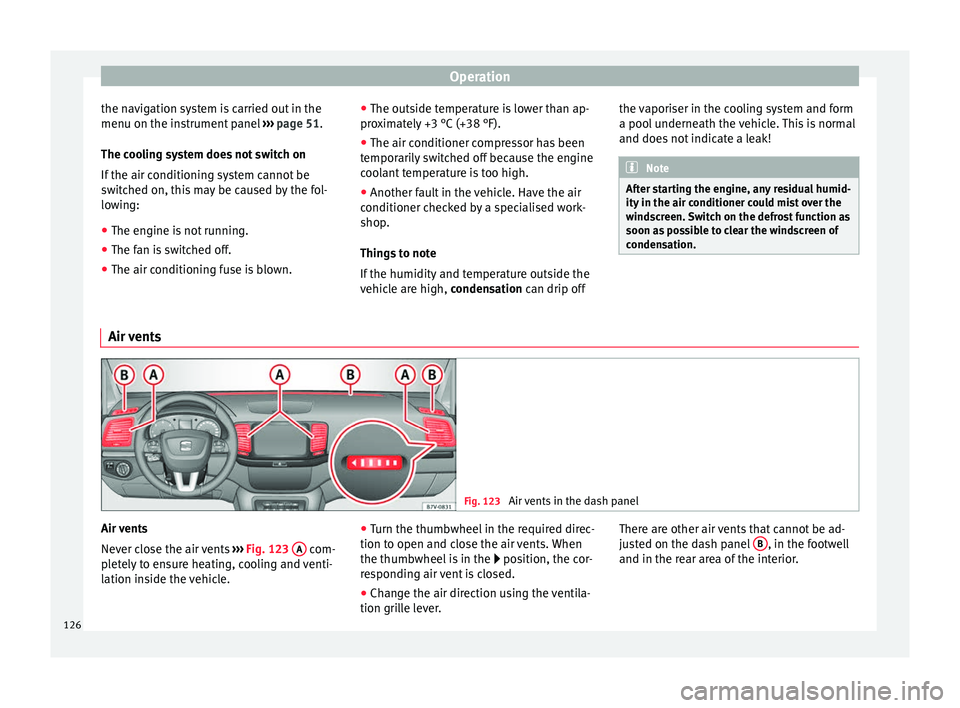
Fig. 123
Air vents in the dash panel Air vents
Never close the air vents
››› Fig. 123 A com-
pletely to ensure heating, cooling and venti-
lation inside the vehicle. ●
Turn the thumbwheel in the required direc-
tion to open and close the air vents. When
the thumbwheel is in the position, the cor-
r e
sponding air vent is closed.
● Change the air direction using the ventila-
tion grille lever. There are other air vents that cannot be ad-
justed on the dash panel
B , in the footwell
and in the rear area of the interior.
126