tow Seat Alhambra 2015 Owner's Guide
[x] Cancel search | Manufacturer: SEAT, Model Year: 2015, Model line: Alhambra, Model: Seat Alhambra 2015Pages: 305, PDF Size: 5.46 MB
Page 184 of 305
Operation
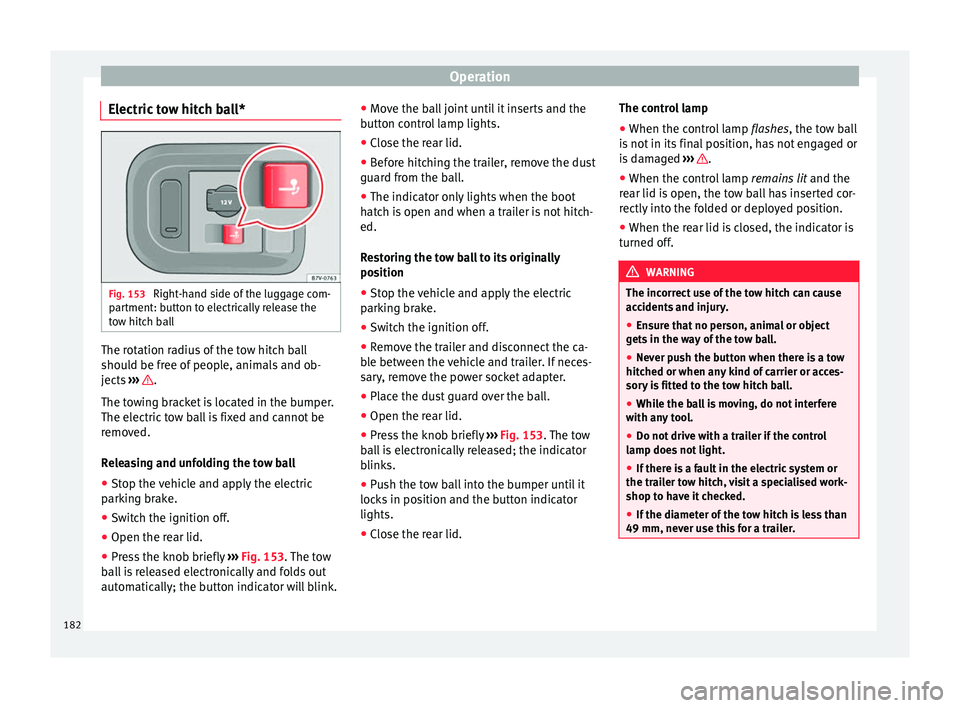
Electric tow hitch ball* Fig. 153
Right-hand side of the luggage com-
partment: button to electrically release the
tow hitch ball The rotation radius of the tow hitch ball
should be free of people, animals and ob-
jects
››› .
The towing bracket is located in the bumper.
The electric tow ball is fixed and cannot be
removed.
Releasing and unfolding the tow ball
● Stop the vehicle and apply the electric
parking brake.
● Switch the ignition off.
● Open the rear lid.
● Press the knob briefly ››› Fig. 153 . The tow
b al
l is released electronically and folds out
automatically; the button indicator will blink. ●
Move the ball joint until it inserts and the
button control lamp lights.
● Close the rear lid.
● Before hitching the trailer, remove the dust
guard from the ball.
● The indicator only lights when the boot
hatch is open and when a trailer is not hitch-
ed.
Restoring the tow ball to its originally
position
● Stop the vehicle and apply the electric
parking brake.
● Switch the ignition off.
● Remove the trailer and disconnect the ca-
ble between the vehicle and trailer. If neces-
sary, remove the power socket adapter.
● Place the dust guard over the ball.
● Open the rear lid.
● Press the knob briefly ››› Fig. 153
. The tow
ball is electronically released; the indicator
blinks.
● Push the tow ball into the bumper until it
locks in position and the button indicator
lights.
● Close the rear lid. The control lamp
●
When the control lamp flashes, the tow ball
is
not in its final position, has not engaged or
is damaged ››› .
● When the control lamp remains lit and the
rear lid is open, the tow ball has inserted cor-
rectly into the folded or deployed position.
● When the rear lid is closed, the indicator is
turned off. WARNING
The incorrect use of the tow hitch can cause
accidents and injury.
● Ensure that no person, animal or object
gets in the way of the tow ball.
● Never push the button when there is a tow
hitched or when any kind of carrier or acces-
sory is fitted to the tow hitch ball.
● While the ball is moving, do not interfere
with any tool.
● Do not drive with a trailer if the control
lamp does not light.
● If there is a fault in the electric system or
the trailer tow hitch, visit a specialised work-
shop to have it checked.
● If the diameter of the tow hitch is less than
49 mm, never use this for a trailer. 182
Page 185 of 305
Towing bracket device
CAUTION
● If anything is attached to the tow hitch ball,
do not, under any circumstances press the
button.
● Never direct a high-pressure or steam
cleaning system directly at the tow hitch ball
or trailer power socket. This could cause
damage to seals or remove lubricating
grease. Note
In extremely low temperatures, it is possible
that the tow hitch is not released. In this
case, place the vehicle in a warmer location
(e.g. a garage). Installing a bicycle carrier to the tow
hitch
The maximum load permitted for a bicycle
carrier on the tow hitch ball is
75 kg, with a
m ax
imum distance of 30 cm from the sup-
port. The distance between supports is the
distance between the bicycle carrier centre of
gravity (with the bicycles) and the centre of
point of the tow hitch ball. WARNING
The incorrect use of the tow hitch with a bicy-
cle carrier installed can cause accidents and
injury. ●
Never exceed the load and distances be-
tween supports indicated.
● Never fit the bicycle carrier to the tow hitch
ball neck, underneath the tow hitch given
that the bicycle carrier may be incorrectly fit-
ted due to the shape of the tow hitch and the
model of bicycle carrier.
● Always read and take the manufacturer as-
sembly instructions into account. CAUTION
Exceeding the maximum load and distance
between supports indicated can cause con-
siderable damage to the vehicle.
● Never exceed the specifications. Hitching and connecting the trailer
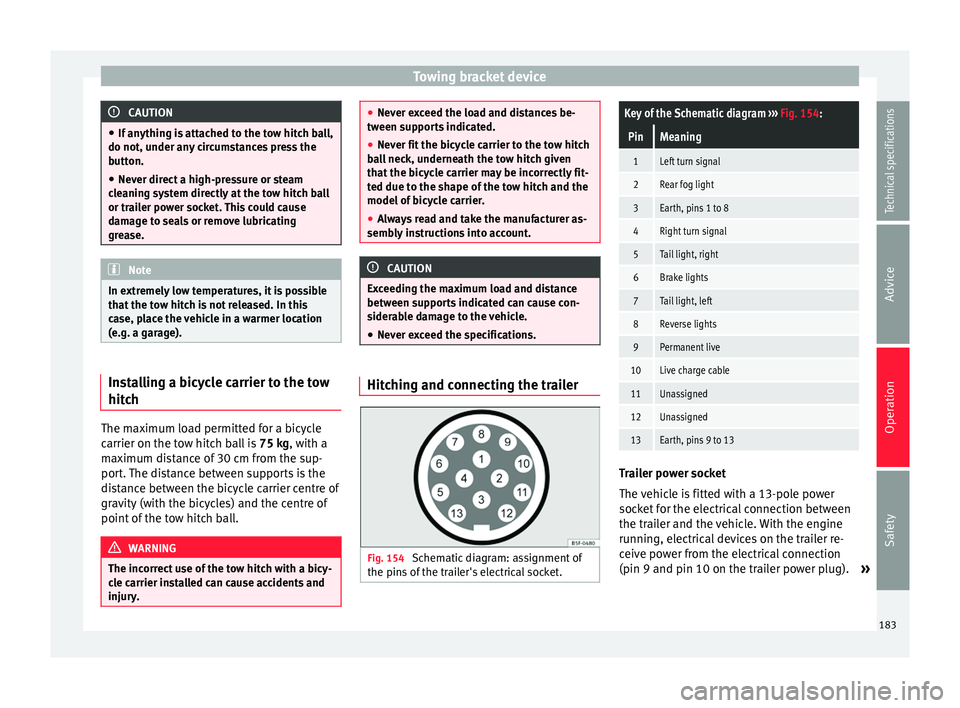
Fig. 154
Schematic diagram: assignment of
the pins of the trailer's electrical socket.
Key of the Schematic diagram ››› Fig. 154:
PinMeaning
1Left turn signal
2Rear fog light
3Earth, pins 1 to 8
4Right turn signal
5Tail light, right
6Brake lights
7Tail light, left
8Reverse lights
9Permanent live
10Live charge cable
11Unassigned
12Unassigned
13Earth, pins 9 to 13 Trailer power socket
The vehicle is fitted with a 13-pole power
socket for the electrical connection between
the trailer and the vehicle. With the engine
running, electrical devices on the trailer re-
ceive power from the electrical connection
(pin 9 and pin 10 on the trailer power plug).
»
183
Technical specifications
Advice
Operation
Safety
Page 186 of 305
Operation
If the system detects that a trailer has been
connected electrically, the electrical equip-
ment on the trailer will receive voltage
through this connection (pins 9 and 10). Pin
9 has a permanent live. This powers, for ex-
ample, the trailer's interior lighting. Electrical
devices such as a fridge in a caravan only re-
c eiv
e electrical power if the engine is running
(through pin 10).
The earth wires, pin 3 and pin 13, should not
be connected to each other to avoid over-
loading the electrical system.
If the trailer has a 7-contact connector , you
will need to use an adapter cable. In this case
the function corresponding to pin 10 will not
be available.
Trailer cable
Always secure the trailer cable to the towing
vehicle correctly. Leave a little bit of slack in
the cable for turning. However, ensure that
the cable does not rub off the ground while
driving.
Trailer rear lights
Check the trailer rear lights to ensure they
work correctly and remain legal. Ensure that
the trailer does not use more than the maxi-
mum power ›››
page 181. Tr
ailer connected to the anti-theft alarm:
● When a vehicle comes from the factory fit-
ted with an anti-theft alarm and tow hitch.
● When the trailer is connected to the vehicle
using the socket.
● When the vehicle and trailer electrical sys-
tems work correctly and are not damaged.
● When the vehicle is locked using the vehi-
cle key and the anti-theft alarm is turned on.
When the vehicle is locked, the alarm is trig-
gered when the electrical connection be-
tween the vehicle and the trailer is removed.
Always turn off the anti-theft alarm system
before connecting or disconnecting a trailer.
Otherwise, the tilt sensor may erroneously
activate the alarm.
Trailer with rear LED lights
For technical reasons, trailers fitted with rear
LED lights cannot be connected to the anti-
theft alarm system.
When the vehicle is locked, the alarm does
not trigger if the electrical connection with
the trailer is cut if it has rear light with light-
emitting diodes. WARNING
Erroneous or unsuitable connection of elec-
tric cables may supply energy to the trailer
causing an anomaly in the vehicle electronics that could result in an accident with serious
consequences.
●
All work on the electrical system must be
carried out only by a specialised workshop.
● Never connect the trailer's electric system
to the electrical connections of the rear lights
or any other power sources. CAUTION
Do not leave the trailer connected to the vehi-
cle when parked; places on its support wheel
or its supports. For example, when changing
the load or a puncture, the vehicle will be
pushed up or down. The force acting on the
tow hitch and the trailer could damage the
vehicle or the trailer. Note
● In the event of a fault in the vehicle or trail-
er electrical system or in the event of prob-
lems with the anti-theft alarm system, have
the system checked by a specialised work-
shop.
● If the trailer accessories use energy from
the power socket when the engine is stop-
ped, the battery will be discharged.
● For technical reasons, trailers fitted with
rear LED lights cannot be connected to the
anti-theft alarm system.
● If the vehicle battery is running low, the
electrical connection with the trailer is auto-
matically cut. 184
Page 187 of 305
Towing bracket device
●
With the engine running, the electrical
equipment on the trailer will be supplied with
power. Loading the trailer
Trailer weight / drawbar load
The trailer weight is the load that the vehicle
can pull
››› . The drawbar load is the vertical
weight of the tow hitch on the tow hitch ball
››› page 188.
The figur e
s for trailer weights and drawbar
load weights given on the data plate of the
tow hitch are for values of this model only.
The correct figures for your specific vehicle,
which may be lower than these figures for the
t o
w hitch, are given in the vehicle documen-
tation. The instructions in the official vehicle
documents take precedence.
For the sake of road safety, SEAT recom-
mends using the maximum allowed drawbar
load
. The handling of the combined vehicle
and trailer will be poor if the drawbar load is
too low.
The drawbar load increases the weight on the
rear axle, reducing the vehicle carrying ca-
pacity.
Gross combination weight
This figure refers to the combined weight of
the loaded vehicle and loaded trailer. Loading the trailer
The combined vehicle and trailer must be
balanced. Use the maximum drawbar load
authorised and do not overload the front or
the rear of the trailer:
●
Distribute loads in the trailer so that heavy
objects are as near to the axle as possible or
above it.
● Correctly secure the trailer load.
Tyre pressure
Inflate the trailer tyres according to the man-
ufacturer's instructions.
Inflate the towing vehicles tyres to the maxi-
mum ››› page 231. WARNING
Exceeding the maximum authorised axle
load, drawbar load or the gross combination
weight of the towing vehicle and trailer could
cause a serious accident with severe conse-
quences.
● Never exceed the specifications.
● With the actual load on the front and rear
axles, the maximum axle load should never
be exceeded. The weight on the front and rear
should never exceed the gross vehicle
weight. WARNING
If the load moves, the stability and safety of
the vehicle and trailer combination will be se-
riously affected and this could result in a seri-
ous accident.
● Always correctly load the trailer.
● Always secure loads correctly with suitable
and undamaged attachment rope or straps. Driving with a trailer
Adjusting the headlights
When towing a trailer, the front of the vehicle
may rise and so the dipped beam headlights
may blind other drivers. Use the headlight
range control to lower the cone of light. If you
do not have headlight range control, have
the headlights adjusted by a specialised
workshop. Vehicles with high-intensity dis-
charge lamps adapt automatically and do not
require adjustment.
Details of driving with a trailer
● If the trailer has an overrun brake, apply
the brakes gently at first and then, firmly.
This will prevent the jerking that can be
caused by the trailer wheels locking.
● As of the combined vehicle and trailer
mass, braking distances will be greater.
● Select a low gear before driving down a
steep hill to use the engine braking effect to »
185
Technical specifications
Advice
Operation
Safety
Page 188 of 305
Operation
slow down the vehicle. Otherwise, the brak-
ing system could overheat and fail.
● The vehicle centre of gravity and handling
change because of the trailer load and be-
cause of the increased combined mass of the
vehicle and trailer.
● If the towing vehicle is empty and the trail-
er loaded then the load distribution is incor-
rect. If you must travel in these conditions,
drive carefully and reduce your speed accord-
ingly.
Hill starts with a trailer
Depending on the hill and the gross com-
bined weight, it is possible that the com-
bined vehicle and trailer move backwards
slightly when starting.
For a hill start with a trailer, proceed as fol-
lows:
● Press and hold the brake pedal.
● Press the button once to turn off the
electric parking brake ››› page 137.
● Press and hold the button to hold the
vehicle and trailer combination using the
parking brake.
● With a manual gearbox: press the clutch
pedal to the floor.
● Engage first gear or the gear range D
››› page 143, Changing gear .
● Rel
ease the brake pedal. ●
Move off slowly. To do this, gently release
the clutch pedal (for manual gearbox).
● Release the button only when the en-
gine provides sufficient power to move the
vehicle and trailer combination. WARNING
Jerking the trailer in an unsuitable manner
could cause loss of vehicle control with the
subsequent serious consequences.
● Driving with a trailer and transporting
heavy or a large objects will change the vehi-
cle handling and braking distances.
● Anticipate traffic and be extremely cau-
tious. Brake early.
● Adjust your speed and driving style to visi-
bility, road, traffic and weather conditions.
Reduce your speed, especially on steep hills.
● Accelerate gently and carefully. Avoid brus-
que manoeuvres and sudden braking.
● Always take the following precautions seri-
ously. Reduce your speed immediately if you
observe the trailer rocking from side to side.
● Never try to stop the “snaking” by increas-
ing speed.
● Always take the speed limits for vehicles
with and without trailers in each country into
account. Stabilising the vehicle and trailer
combination
Stabilisation of the vehicle and trailer combi-
nation is an extension of the electronic sta-
bility control (ESC) and helps, with the assis-
tance of the trajectory control, to reduce trail-
er “snaking”.
Stabilisation of the vehicle and trailer combi-
nation is active when the ESC
indicator on
the d a
sh panel remains lit for about two sec-
onds more than the ABS indicator.
Requirements for stabilising the
vehicle/trailer combination
● An original tow hitch is fitted by the manu-
facturer or a compatible model is retrofitted.
● The ECS is switched on. The warning lamp
on the dash panel is not lit.
● The trailer is connected to the vehicle using
the power socket.
● It travels faster than 60 km/h (37 mph).
● The maximum drawbar load is used.
● The trailer must have a fixed drawbar.
● Trailers with brakes must be equipped with
a mechanical inertia brake. WARNING
Do not let the extra safety afforded by the
stabilisation system tempt you into taking
any risks when driving. 186
Page 189 of 305
Towing bracket device
●
Adjust your speed and driving style to visi-
bility, road, traffic and weather conditions.
● If the road surface is slippery, take care
when accelerating.
● When a system is operating, lift your foot
off the accelerator. WARNING
It is possible that the combination stabilisa-
tion system does not correctly recognised all
driving situations.
● It is possible that the stabilisation system
does not detect snaking of a light trailer and
thus does not intervene.
● When driving on slippery ground, the trail-
er could jack-knife despite the stabilisation
sy
stem.
● Trailers with a high centre of gravity may
even tip over before they start to rock side-
ways.
● If a trailer is not used and the trailer power
socket is connected (e.g. installation of a bi-
cycle carrier with lights), repeated automatic
braking may occur in extreme driving condi-
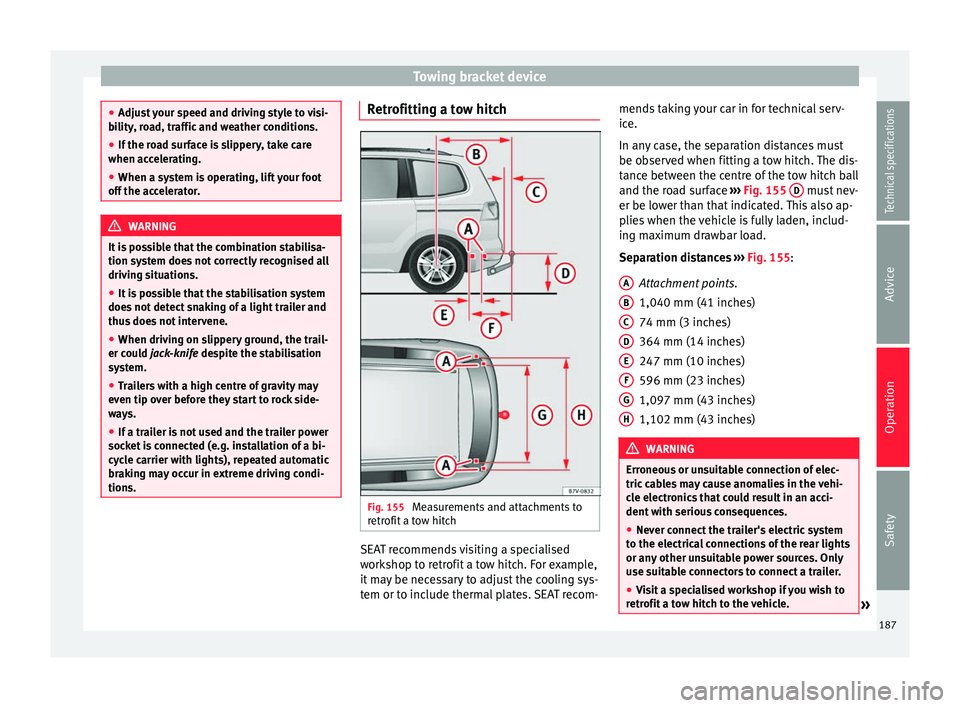
tions. Retrofitting a tow hitch
Fig. 155
Measurements and attachments to
retrofit a tow hitch SEAT recommends visiting a specialised
workshop to retrofit a tow hitch. For example,
it may be necessary to adjust the cooling sys-
tem or to include thermal plates. SEAT recom-mends taking your car in for technical serv-
ice.
In any case, the separation distances must
be observed when fitting a tow hitch. The dis-
tance between the centre of the tow hitch ball
and the road surface
››› Fig. 155 D must nev-
er be lower than that indicated. This also ap-
plies when the vehicle is fully laden, includ-
ing maximum drawbar load.
Separation distances
›
›› Fig. 155
:
Attachment points.
1,040 mm (41 inches)
74 mm (3 inches)
364 mm (14 inches)
247 mm (10 inches)
596 mm (23 inches)
1,097 mm (43 inches)
1,102 mm (43 inches) WARNING
Erroneous or unsuitable connection of elec-
tric cables may cause anomalies in the vehi-
cle electronics that could result in an acci-
dent with serious consequences.
● Never connect the trailer's electric system
to the electrical connections of the rear lights
or any other unsuitable power sources. Only
use suitable connectors to connect a trailer.
● Visit a specialised workshop if you wish to
retrofit a tow hitch to the vehicle. » A
B
C
D
E
F
G
H
187
Technical specifications
Advice
Operation
Safety
Page 190 of 305
Operation
WARNING
If the tow hitch is badly fitted or unsuitable,
the trailer may separate from the vehicle
while driving. This could result in a serious
accident. Note
Use only tow hitches approved by SEAT for
the vehicle. Maximum gross trailer weight
The instructions in the official vehicle docu-
ments take precedence. All the technical data
provided in this documentation is applicable
to the basic model. The vehicle data label in
the Maintenance Programme or the vehicle
documentation shows which engine is instal-
led in your vehicle.
The figures may be different depending
whether additional equipment is fitted, for
different models and for special vehicles.
WARNING
Exceeding the maximum trailer weight indica-
ted could cause a serious accident.
● Never exceed the indicated trailer weight. CAUTION
Exceeding the maximum trailer weight indica-
ted could cause damage to the vehicle. ● Never exceed the indicated trailer weight. Gross combined vehicle weight rating
The instructions in the official vehicle docu-
ments take precedence. All the technical data
provided in this documentation is applicable
to the basic model. The vehicle data label in
the Maintenance Programme or the vehicle
documentation shows which engine is instal-
led in your vehicle.
The figures may be different depending
whether additional equipment is fitted, for
different models and for special vehicles.
The maximum combined weights listed are
only applicable for altitudes up to 1000 m
above sea level. The weight of the car and
trailer must be reduced by about 10% for ev-
ery further 1000 m (or part thereof).
WARNING
Exceeding the maximum weight indicated
could cause a serious accident.
● Never exceed the gross combined weight
rating. CAUTION
Exceeding the maximum gross combined
weight rating indicated could cause damage
to the vehicle. ● Never exceed the gross combined weight
rating. 188
Page 194 of 305
Advice
Check first with a specialised workshop that
understands the technical possibilities of in-
stallation if you wish to use a two-way radio
with a transmitting power of over 10 watts.
SEAT recommends taking your car in for tech-
nical service.
All legal requirements, together with the in-
structions for the use of two-way radios must
be observed. WARNING
If the two-way radio is not securely fastened
in position, it could be sent flying around the
vehicle in the event of sharp braking, sudden
manoeuvres or accident, causing injury.
● While driving, two-way radios must be se-
curely fastened in position, outside the radi-
us of action of the airbags, or safely stowed
away. WARNING
When using a two-way radio without a con-
nection to an exterior aerial, the maximum
permitted levels of electromagnetic radiation
may be exceeded. This is also the case if the
aerial has not been correctly installed.
● You should only use a two-way radio inside
the vehicle if it has first been correctly con-
nected to an exterior aerial. Information stored by the control
units
Your vehicle is fitted at the factory with a ser-
ies of electronic control units responsible for
the engine and gearbox management. In ad-
dition, the control units supervise the per-
formance of the exhaust gas system and the
airbag systems.
Therefore, while the vehicle is being driven,
these electronic control units are continuous-
ly analysing the vehicle data. In the event of
faults or deviations from the theoretical val-
ues, only this data is stored. Normally, the
warning lamps on the instrument panel light
up in the event of faults.
This data can only be read and analysed us-
ing special equipment.
The storing of the data allows specialised
workshops to detect and repair faults. Stored
data may include:
● Data relating to the engine or the gearbox
● Speed
● Direction of travel
● Braking force
● Detection of seat belt
The vehicle control units never record conver-
sations held by passengers in the vehicle.
In vehicles equipped with an emergency call
function via the mobile phone or other appli- ances connected in the vehicle, it is possible
to send the vehicle position. If the control
unit records an accident with airbag activa-
tion, the system may automatically send a
signal. This will depend on the network oper-
ator. Normally, transmission is only possible
in areas with good coverage.
Event Data Recorder
The vehicle is
not
fitted with an event data re-
c or
der.
An event data recorder temporarily stores the
vehicle information. Therefore, in the event of
an accident, it is possible to obtain detailed
information about how the accident occur-
red. For example, in vehicles with airbag sys-
tems, data relating to speed of impact, seat
belt status, seat positions and airbag activa-
tion times may be stored. The volume of data
depends on the manufacturer.
Event data recorders can only be mounted
with authorisation from the vehicle owner
and, in some countries, they are governed by
local legislation.
Reprogramming control units
On the whole, all the data required for the
component management is stored in the con-
trol units. The programming of certain con-
venience functions, such as the turn signals,
individual door opening and instructions on
the display can be modified using special
192
Page 195 of 305
Care and maintenance
equipment at the workshop. If this is the
case, the information and descriptions given
in the Instruction Manual will not match the
original functions. Therefore, SEAT recom-
mends that any modifications be recorded in
the section “Other workshop notes” in the
Maintenance Programme.
The technical service centre must have a re-
cord of any modification to the programming.
Reading the vehicle fault memory
There is a diagnostics connector in the vehi-
cle interior for reading the vehicle fault mem-
ory. The fault memory documents errors and
deviations from the theoretical values of the
electronic control units.
The diagnostics connector is in the driver
side footwell area, next to the lever for open-
ing the bonnet, below a cover.
The fault memory should only be read and re-
set by a specialised workshop.
Using a mobile telephone in a vehicle
without connection to an exterior
aerial Mobile telephones transmit and receive radio
waves, both when in use and when on stand-
by. Scientific studies state that radio waves
exceeding certain values may be harmful to
the human body. International committees and authorities have established limits and
directives in order to ensure electromagnetic
radiation from mobile phones remains within
certain limits that do not endanger health.
Nevertheless, there is no conclusive scientif-
ic evidence that wireless telephones are to-
tally safe.
Therefore, some experts recommend that use
of mobile phone be kept to a minimum until
the results of current research are published.
When a mobile phone not connected to an
exterior aerial is used inside the vehicle, the
electromagnetic radiation may be greater
than if the mobile phone were connected to a
built-in aerial or to another exterior aerial.
If the vehicle is fitted with a suitable hands-
free device, it will comply with the legislation
in many countries which only permits the use
of mobile phones inside vehicles using a
hands-free device.
The hands-free system mounted at the facto-
ry has been designed for use with conven-
tional mobile phones and phones with Blue-
tooth technology. Mobile phones should be
placed on a suitable phone cradle. In addi-
tion, the cradle should always be correctly fit-
ted into the base plate. This ensures that the
mobile phone is securely attached to the
dash panel, it is always within reach of the
driver and is connected to the vehicle exterior
aerial.
If the mobile phone is connected to an aerial
incorporated into the vehicle or an exterior
aerial connected to the vehicle, it will help re-
duce the electromagnetic radiation transmit-
ted and the risk to human health. It will also
improve the quality of the connection.
If the phone is used inside the vehicle with-
out the hands-free system, it will not be se-
curely fastened and will not be connected to
the exterior aerial of the vehicle telephone.
Nor will the telephone charge if it is not on
the support. In addition, some calls may
break off and the quality of the connection
will be affected.
Mobile phones should only be used inside
the vehicle if they are connected to a hands-
free system with an exterior aerial.
WARNING
If the mobile phone is not securely fastened
in position, it could be sent flying around the
vehicle in the event of sharp braking, sudden
manoeuvres or accident, causing injury.
● While driving, mobile phones must be se-
curely fastened in position, outside the radi-
us of action of the airbags, or safely stowed
away. WARNING
When using a mobile phone without a con-
nection to an exterior aerial, the maximum
permitted levels of electromagnetic radiation » 193Technical specifications
Advice
Operation
Safety
Page 222 of 305
AdviceFig. 165Operations required depending on
the engine oil level:
Area
C
It is
essential to add oil (approximately 1 li-
tre or quarter of a gallon). Ensure that the
level is around the centre of the zone B
after adding oil.Adding oil after checking the level
Only add engine oil in small quantities and in
steps:
● Unscrew the cap from engine oil filler neck
on the cylinder head ›››
Fig. 166 . If you are
not s
ure where the cap is, request help from
a specialist.
● Only refill using engine oil expressly ap-
proved by SEAT and in small quantities (not
more than 0.5 l or 1/2 a quarter of a gallon at
a time) ›››
page 218
.
● To avoid adding too much oil, each time
you add a quantity, wait until the oil has flow-
ed into the crankcase so that it can be meas-
ured with the dipstick.
● Check the oil level before adding any more
oil. Do not top up with too much engine oil
››› .
● When the oil level is at least in the
››› Fig. 165 B zone, insert the dipstick into
the tube fully to avoid engine oil escaping
when the engine is running.
● After topping up the oil, ensure that the
cap is screwed on to the filler neck correctly. WARNING
Oil could catch fire if it comes into contact
with hot engine components. This could lead
to a fire, explosion and severe injuries.
● Always ensure that after topping of oil, the
engine oil filler cap is correctly tightened.
This will avoid engine oil spilling onto hot en-
gine parts when the engine is running. CAUTION
● If the engine oil level is above the area
››› Fig. 165 A do not start the engine. Seek
specialist assistance. Otherwise catalytic
converter and engine damage may occur.
● When refilling or changing service liquids,
ensure that you put the liquids into the right
tank. Making a mistake when refilling could
cause serious malfunctions and damage the
engine! For the sake of the environment
The oil level must never be above area
››› Fig. 165 A . Otherwise oil can be drawn in
through the crankcase breather and escape
into the atmosphere via the exhaust system. Engine oil consumption
The consumption of engine oil can be differ-
ent from one engine to another and can vary
during the useful life of the engine.Depending on driving style and the condi-
tions of use, the consumption of engine oil
can reach 1 litre every 2000 km (one quarter
of a gallon every 1200 miles); for new vehi-
cles, this could be higher for the first
5,000 km. For this reason the engine oil level
must be checked at regular intervals, prefera-
bly when filling the tank and before a jour-
ney.
When the engine is working hard, for in-
stance, during long motorway journeys in
summer, when towing a trailer or climbing
high mountain passes, the oil level should
preferably be kept within area
››› Fig. 165 A .
Changing the engine oil The engine oil must be changed regularly ac-
cording to the specifications of the Mainte-
nance Programme.
Due to the problems linked with disposing of
used oil and the need for suitable tools and
special knowledge, always visit a specialised
workshop to have the engine oil and filter
changed. SEAT recommends taking your car
in for technical service.
Detailed information on the service intervals
is shown in the Maintenance Programme.
220