lock Seat Alhambra 2015 Repair Manual
[x] Cancel search | Manufacturer: SEAT, Model Year: 2015, Model line: Alhambra, Model: Seat Alhambra 2015Pages: 305, PDF Size: 5.46 MB
Page 131 of 305
Air conditioning
burn any fuel remaining in the auxiliary heat-
er. The exhaust gases are also extracted from
the system.
Remote control Fig. 124
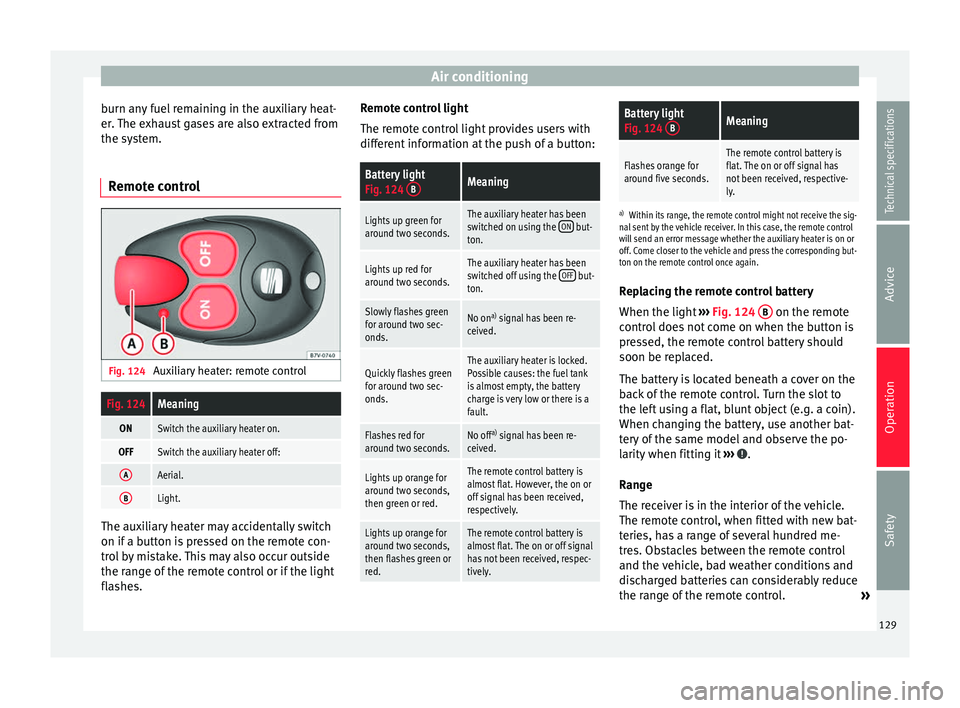
Auxiliary heater: remote controlFig. 124Meaning
ONSwitch the auxiliary heater on.
OFFSwitch the auxiliary heater off:
AAerial.
BLight. The auxiliary heater may accidentally switch
on if a button is pressed on the remote con-
trol by mistake. This may also occur outside
the range of the remote control or if the light
flashes. Remote control light
The remote control light provides users with
different information at the push of a button:
Battery light
Fig. 124
BMeaning
Lights up green for
around two seconds.The auxiliary heater has been
switched on using the ON but-
ton.
Lights up red for
around two seconds.The auxiliary heater has been
switched off using the OFF but-
ton.
Slowly flashes green
for around two sec-
onds.No on a)
signal has been re-
ceived.
Quickly flashes green
for around two sec-
onds.The auxiliary heater is locked.
Possible causes: the fuel tank
is almost empty, the battery
charge is very low or there is a
fault.
Flashes red for
around two seconds.No off a)
signal has been re-
ceived.
Lights up orange for
around two seconds,
then green or red.The remote control battery is
almost flat. However, the on or
off signal has been received,
respectively.
Lights up orange for
around two seconds,
then flashes green or
red.The remote control battery is
almost flat. The on or off signal
has not been received, respec-
tively.
Battery light
Fig. 124 BMeaning
Flashes orange for
around five seconds.The remote control battery is
flat. The on or off signal has
not been received, respective-
ly.
a)
Within its range, the remote control might not receive the sig-
nal sent by the vehicle receiver. In this case, the remote control
will send an error message whether the auxiliary heater is on or
off. Come closer to the vehicle and press the corresponding but-
ton on the remote control once again.
Replacing the remote control battery
When the light ›››
Fig. 124 B on the remote
control does not come on when the button is
pressed, the remote control battery should
soon be replaced.
The battery is located beneath a cover on the
back of the remote control. Turn the slot to
the left using a flat, blunt object (e.g. a coin).
When changing the battery, use another bat-
tery of the same model and observe the po-
larity when fitting it ››› .
Range
The receiver is in the interior of the vehicle.
The remote control, when fitted with new bat-
teries, has a range of several hundred me-
tres. Obstacles between the remote control
and the vehicle, bad weather conditions and
discharged batteries can considerably reduce
the range of the remote control. »
129
Technical specifications
Advice
Operation
Safety
Page 134 of 305
Operation
lock and it will not be possible to turn the
steering wheel.
Control and warning lampsIt lights
upPossible causeSolution
(red)Power steering
faulty.
The steering system
should be checked by
a specialised work-
shop as soon as pos-
sible.
(yellow)
Power steering
operation re-
duced.
The steering system
should be checked by
a specialised work-
shop as soon as pos-
sible.
If, after restarting the
engine and driving for
a short distance, the
yellow warning lamp
no longer comes on, it
will
not be necessary
to take the vehicle to
a specialised work-
shop.
The vehicle bat-
tery was discon-
nected and has
been reconnec-
ted.Drive for a short dis-
tance at 15-20 km/h
(9-12 mph).
FlashesPossible causeSolution
(red)
Fault in the steer-
ing column elec-
tronic lock. Do not drive on!
Seek professional ad-
vice.
(yellow)
Steering column
deviation.Gently turn the steer-
ing wheel to and fro.
Steering wheel
not unlocked or
locked.
Remove the key from
the ignition and then
switch the ignition
back on. Check the
messages displayed
on the instrument
panel at the same
time.
Do not drive on, if
the
steering column re-
mains locked after the
ignition has been
switched on. Seek
specialist assistance. Several warning and control lamps light up
for a few seconds when the ignition is switch-
ed on, signalling that the function is being
verified. They will switch off after a few sec-
onds.
WARNING
Observe the safety warnings ››› in Control
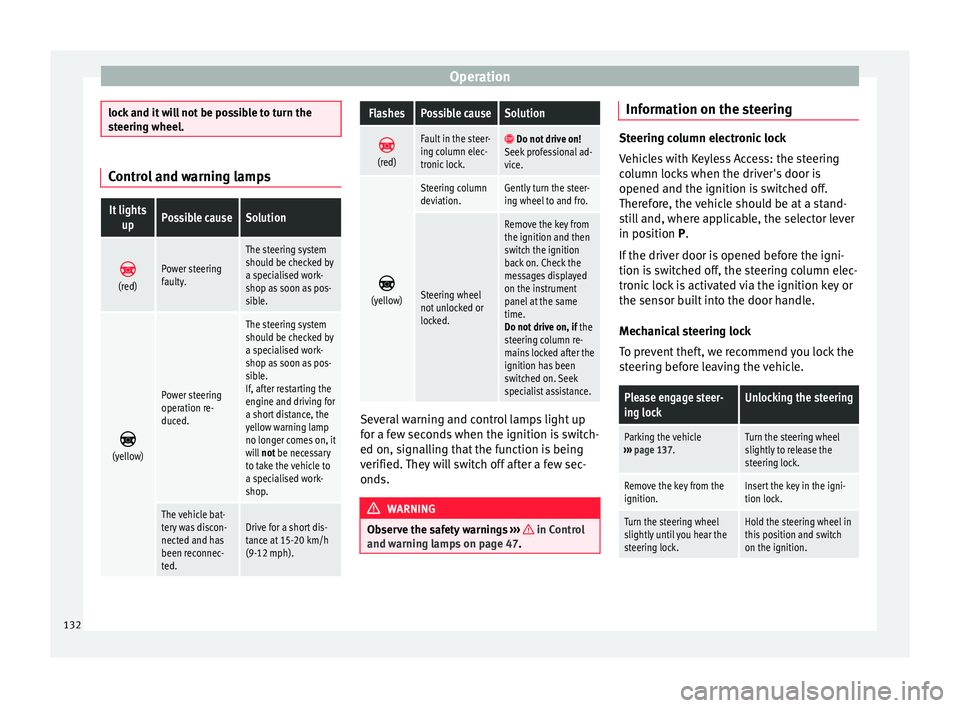
and warning lamps on page 47. Information on the steering
Steering column electronic lock
Vehicles with Keyless Access: the steering
column locks when the driver's door is
opened and the ignition is switched off.
Therefore, the vehicle should be at a stand-
still and, where applicable, the selector lever
in position P
.
If
the driver door is opened before the igni-
tion is switched off, the steering column elec-
tronic lock is activated via the ignition key or
the sensor built into the door handle.
Mechanical steering lock
To prevent theft, we recommend you lock the
steering before leaving the vehicle.
Please engage steer-
ing lockUnlocking the steering
Parking the vehicle
››› page 137.Turn the steering wheel
slightly to release the
steering lock.
Remove the key from the
ignition.Insert the key in the igni-
tion lock.
Turn the steering wheel
slightly until you hear the
steering lock.Hold the steering wheel in
this position and switch
on the ignition. 132
Page 136 of 305
Operation
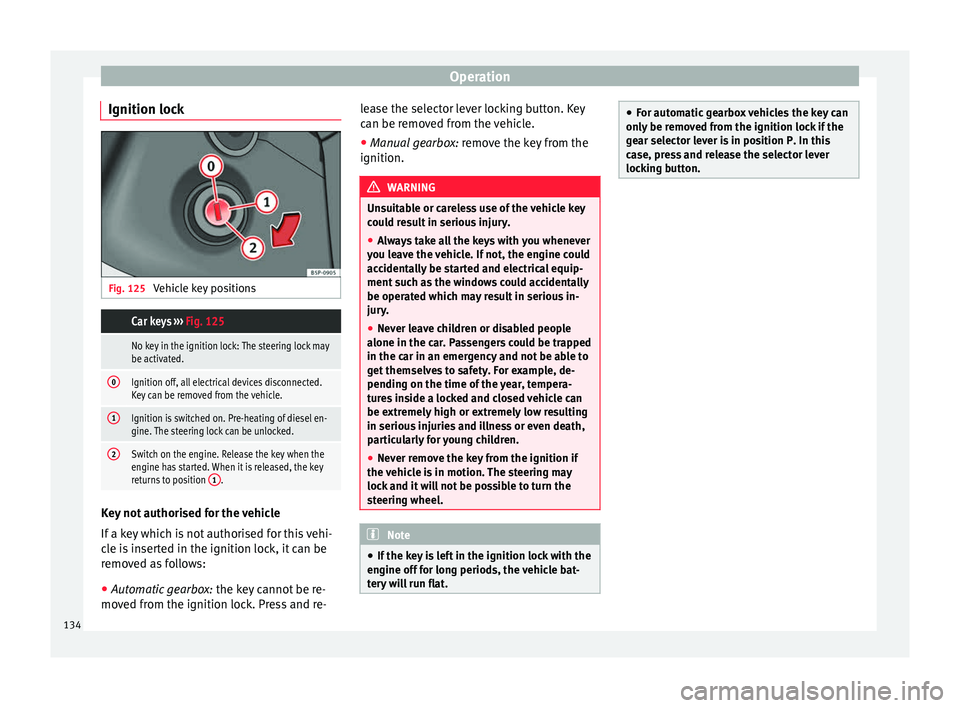
Ignition lock Fig. 125
Vehicle key positions Car keys ››› Fig. 125
No key in the ignition lock: The steering lock may
be activated.
0Ignition off, all electrical devices disconnected.
Key can be removed from the vehicle.
1Ignition is switched on. Pre-heating of diesel en-
gine. The steering lock can be unlocked.
2Switch on the engine. Release the key when the
engine has started. When it is released, the key
returns to position 1
.Key not authorised for the vehicle
If a key which is not authorised for this vehi-
cle is inserted in the ignition lock, it can be
removed as follows:
●
Automatic gearbox: the key cannot be re-
moved from the ignition lock. Press and re- lease the selector lever locking button. Key
can be removed from the vehicle.
●
Manual gearbox: remove the key from the
ignition. WARNING
Unsuitable or careless use of the vehicle key
could result in serious injury.
● Always take all the keys with you whenever
you leave the vehicle. If not, the engine could
accidentally be started and electrical equip-
ment such as the windows could accidentally
be operated which may result in serious in-
jury.
● Never leave children or disabled people
alone in the car. Passengers could be trapped
in the car in an emergency and not be able to
get themselves to safety. For example, de-
pending on the time of the year, tempera-
tures inside a locked and closed vehicle can
be extremely high or extremely low resulting
in serious injuries and illness or even death,
particularly for young children.
● Never remove the key from the ignition if
the vehicle is in motion. The steering may
lock and it will not be possible to turn the
steering wheel. Note
● If the key is left in the ignition lock with the
engine off for long periods, the vehicle bat-
tery will run flat. ●
For automatic gearbox vehicles the key can
only be removed from the ignition lock if the
gear selector lever is in position P. In this
case, press and release the selector lever
locking button. 134
Page 137 of 305
Driving
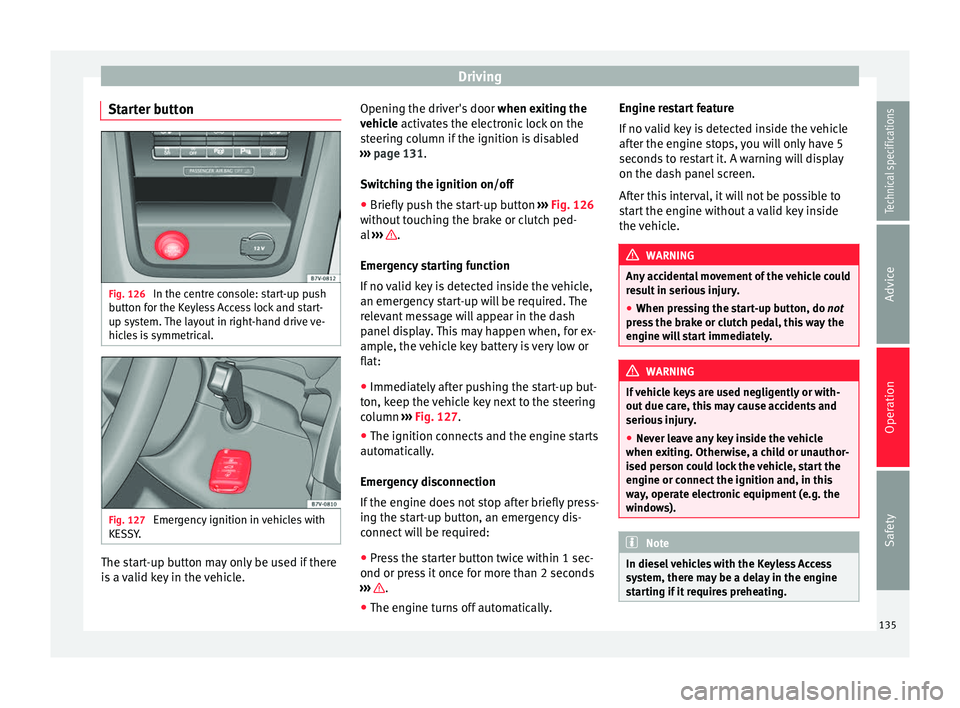
Starter button Fig. 126
In the centre console: start-up push
button for the Keyless Access lock and start-
up system. The layout in right-hand drive ve-
hicles is symmetrical. Fig. 127
Emergency ignition in vehicles with
KESSY. The start-up button may only be used if there
is a valid key in the vehicle. Opening the driver's door
when exiting the
vehicle activates the electronic lock on the
s t
eering column if the ignition is disabled
››› page 131.
Swit
ching the ignition on/off
● Briefly push the start-up button ››› Fig. 126
without touching the brake or clutch ped-
al ››› .
Emergency starting function
If no valid key is detected inside the vehicle,
an emergency start-up will be required. The
relevant message will appear in the dash
panel display. This may happen when, for ex-
ample, the vehicle key battery is very low or
flat:
● Immediately after pushing the start-up but-
ton, keep the vehicle key next to the steering
column ››› Fig. 127 .
● The ignition c onnects
and the engine starts
automatically.
Emergency disconnection
If the engine does not stop after briefly press-
ing the start-up button, an emergency dis-
connect will be required:
● Press the starter button twice within 1 sec-
ond or press it once for more than 2 seconds
››› .
● The engine turns off automatically. Engine restart feature
If no valid key is detected inside the vehicle
after the engine stops, you will only have 5
seconds to restart it. A warning will display
on the dash panel screen.
After this interval, it will not be possible to
start the engine without a valid key inside
the vehicle.
WARNING
Any accidental movement of the vehicle could
result in serious injury.
● When pressing the start-up button, do not
pr e
ss the brake or clutch pedal, this way the
engine will start immediately. WARNING
If vehicle keys are used negligently or with-
out due care, this may cause accidents and
serious injury.
● Never leave any key inside the vehicle
when exiting. Otherwise, a child or unauthor-
ised person could lock the vehicle, start the
engine or connect the ignition and, in this
way, operate electronic equipment (e.g. the
windows). Note
In diesel vehicles with the Keyless Access
system, there may be a delay in the engine
starting if it requires preheating. 135
Technical specifications
Advice
Operation
Safety
Page 138 of 305
Operation
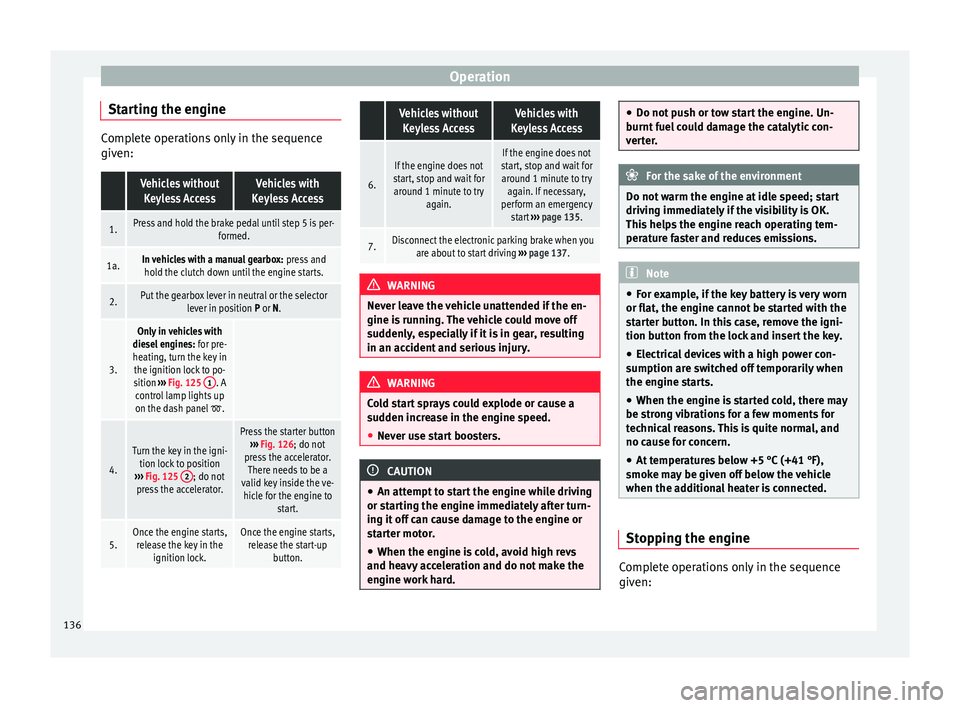
Starting the engine Complete operations only in the sequence
given: Vehicles without
Keyless AccessVehicles with
Keyless Access
1.Press and hold the brake pedal until step 5 is per- formed.
1a.In vehicles with a manual gearbox: press and
hold the clutch down until the engine starts.
2.Put the gearbox lever in neutral or the selector lever in position P or N.
3.
Only in vehicles with
diesel engines: for pre-
heating, turn the key in the ignition lock to po-
sition ››› Fig. 125 1
. A
control lamp lights up
on the dash panel
.
4.
Turn the key in the igni- tion lock to position
››› Fig. 125 2
; do not
press the accelerator.
Press the starter button ››› Fig. 126; do not
press the accelerator. There needs to be a
valid key inside the ve- hicle for the engine to start.
5.Once the engine starts,release the key in the ignition lock.Once the engine starts,release the start-up button.
Vehicles without
Keyless AccessVehicles with
Keyless Access
6.
If the engine does not
start, stop and wait for around 1 minute to try again.If the engine does not
start, stop and wait for around 1 minute to try again. If necessary,
perform an emergency start ››› page 135.
7.Disconnect the electronic parking brake when you
are about to start driving ››› page 137. WARNING
Never leave the vehicle unattended if the en-
gine is running. The vehicle could move off
suddenly, especially if it is in gear, resulting
in an accident and serious injury. WARNING
Cold start sprays could explode or cause a
sudden increase in the engine speed.
● Never use start boosters. CAUTION
● An attempt to start the engine while driving
or starting the engine immediately after turn-
ing it off can cause damage to the engine or
starter motor.
● When the engine is cold, avoid high revs
and heavy acceleration and do not make the
engine work hard. ●
Do not push or tow start the engine. Un-
burnt fuel could damage the catalytic con-
verter. For the sake of the environment
Do not warm the engine at idle speed; start
driving immediately if the visibility is OK.
This helps the engine reach operating tem-
perature faster and reduces emissions. Note
● For example, if the key battery is very worn
or flat, the engine cannot be started with the
starter button. In this case, remove the igni-
tion button from the lock and insert the key.
● Electrical devices with a high power con-
sumption are switched off temporarily when
the engine starts.
● When the engine is started cold, there may
be strong vibrations for a few moments for
technical reasons. This is quite normal, and
no cause for concern.
● At temperatures below +5 °C (+41 °F),
smoke may be given off below the vehicle
when the additional heater is connected. Stopping the engine
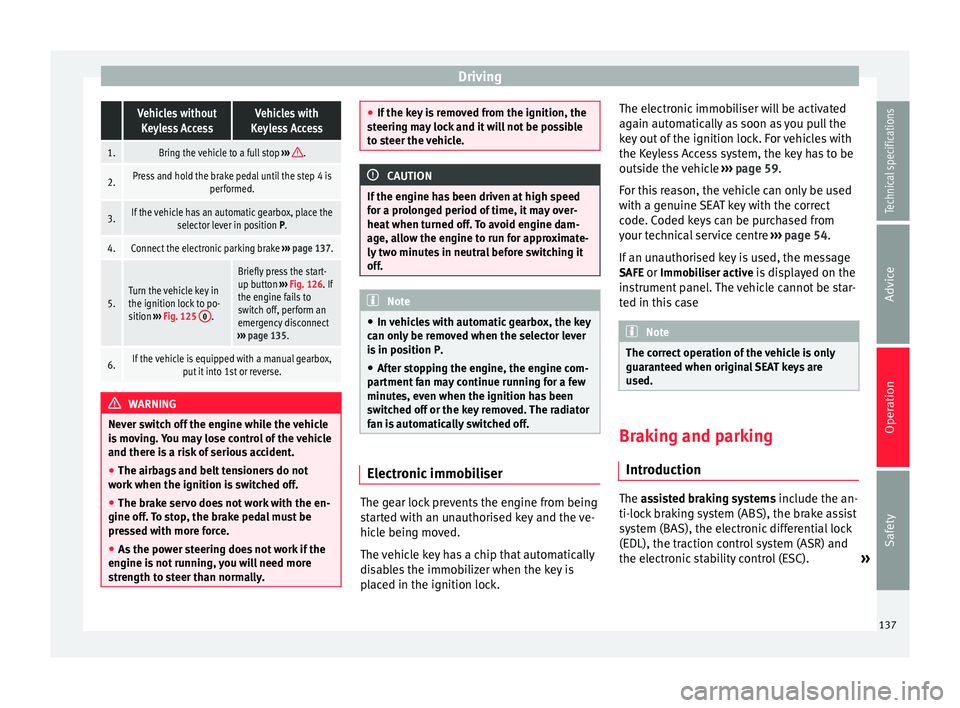
Complete operations only in the sequence
given:
136
Page 139 of 305
Driving Vehicles without
Keyless AccessVehicles with
Keyless Access
1.Bring the vehicle to a full stop ››› .
2.Press and hold the brake pedal until the step 4 is
performed.
3.If the vehicle has an automatic gearbox, place theselector lever in position P.
4.Connect the electronic parking brake ››› page 137.
5.Turn the vehicle key in
the ignition lock to po-
sition ››› Fig. 125 0
.
Briefly press the start-
up button
››› Fig. 126. If
the engine fails to
switch off, perform an
emergency disconnect
››› page 135.
6.If the vehicle is equipped with a manual gearbox,
put it into 1st or reverse. WARNING
Never switch off the engine while the vehicle
is moving. You may lose control of the vehicle
and there is a risk of serious accident.
● The airbags and belt tensioners do not
work when the ignition is switched off.
● The brake servo does not work with the en-
gine off. To stop, the brake pedal must be
pressed with more force.
● As the power steering does not work if the
engine is not running, you will need more
strength to steer than normally. ●
If the key is removed from the ignition, the
steering may lock and it will not be possible
to steer the vehicle. CAUTION
If the engine has been driven at high speed
for a prolonged period of time, it may over-
heat when turned off. To avoid engine dam-
age, allow the engine to run for approximate-
ly two minutes in neutral before switching it
off. Note
● In vehicles with automatic gearbox, the key
can only be removed when the selector lever
is in position P.
● After stopping the engine, the engine com-
partment fan may continue running for a few
minutes, even when the ignition has been
switched off or the key removed. The radiator
fan is automatically switched off. Electronic immobiliser
The gear lock prevents the engine from being
started with an unauthorised key and the ve-
hicle being moved.
The vehicle key has a chip that automatically
disables the immobilizer when the key is
placed in the ignition lock.The electronic immobiliser will be activated
again automatically as soon as you pull the
key out of the ignition lock. For vehicles with
the Keyless Access system, the key has to be
outside the vehicle
››› page 59.
For this reason, the vehicle can only be used
with a genuine SEAT key with the correct
code. Coded keys can be purchased from
your technical service centre ››› page 54.
If an unauthorised key is used, the message SAFE or Immobiliser active is displayed on the
instrument panel. The vehicle cannot be star-
ted in this case Note
The correct operation of the vehicle is only
guaranteed when original SEAT keys are
used. Braking and parking
Introduction The
assisted braking systems
include the an-
ti-loc
k braking system (ABS), the brake assist
system (BAS), the electronic differential lock
(EDL), the traction control system (ASR) and
the electronic stability control (ESC). »
137
Technical specifications
Advice
Operation
Safety
Page 140 of 305
Operation
WARNING
Driving with worn brake pads or a faulty
brake system may lead to serious accident.
● If lights, alone or accompanied by a
warning message on the instrument panel
display, please go immediately to a special-
ised workshop to check the brake pads and to
replace them if they are worn. WARNING
Careless parking can cause serious injury.
● Never remove the key from the ignition if
the vehicle is in motion. The steering lock
may engage and lock the steering wheel mak-
ing the vehicle impossible to control.
● Always park your vehicle so that no part of
the exhaust system can come in contact with
flammable materials (such as wood, leaves,
dried grass, spilled fuel, etc.).
● Always apply the electronic parking brake
when you leave your vehicle and when you
park.
● Never leave children or disabled people
alone in the vehicle. They could release the
electronic parking brake, activate the selec-
tor lever or gear stick and start the vehicle
moving. This could result in a serious acci-
dent.
● Always take all the keys with you whenever
you leave the vehicle. The engine could acci-
dentally be started and electrical equipment
such as the windows could accidentally be
operated resulting in serious injury. ●
Never leave children or disabled people
alone in the car. They could be trapped in the
car in an emergency and will not be able to
get themselves to safety. For example, de-
pending on the time of the year, tempera-
tures inside a locked and closed vehicle can
be extremely high or extremely low resulting
in serious injuries and illness or even death,
particularly for young children. CAUTION
● Special care should be taken when parking
in areas with high kerbs or fixed barriers. Ob-
jects protruding from the ground may dam-
age the bumper or other parts of the vehicle
during manoeuvres. To avoid damage, stop
before the wheels touch the barrier or kerb.
● Special attention is required when driving
through entrances, over ramps, kerbs or oth-
er objects. The vehicle underbody, bumpers,
mudguards and running gear, and the engine
and exhaust system could be damaged as
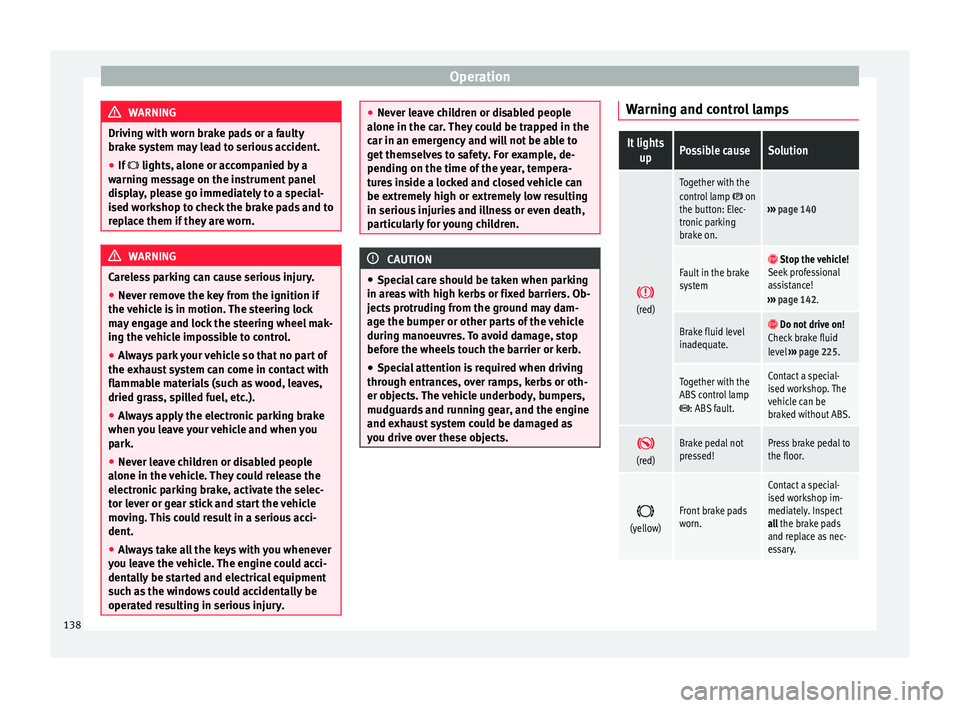
you drive over these objects. Warning and control lampsIt lights
upPossible causeSolution
(red)
Together with the
control lamp on
the button: Elec-
tronic parking
brake on.››› page 140
Fault in the brake
system Stop the vehicle!
Seek professional
assistance!
››› page 142.
Brake fluid level
inadequate. Do not drive on!
Check brake fluid
level ››› page 225.
Together with the
ABS control lamp
: ABS fault.
Contact a special-
ised workshop. The
vehicle can be
braked without ABS.
(red)Brake pedal not
pressed!Press brake pedal to
the floor.
(yellow)Front brake pads
worn.
Contact a special-
ised workshop im-
mediately. Inspect
all the brake pads
and replace as nec-
essary.
138
Page 141 of 305
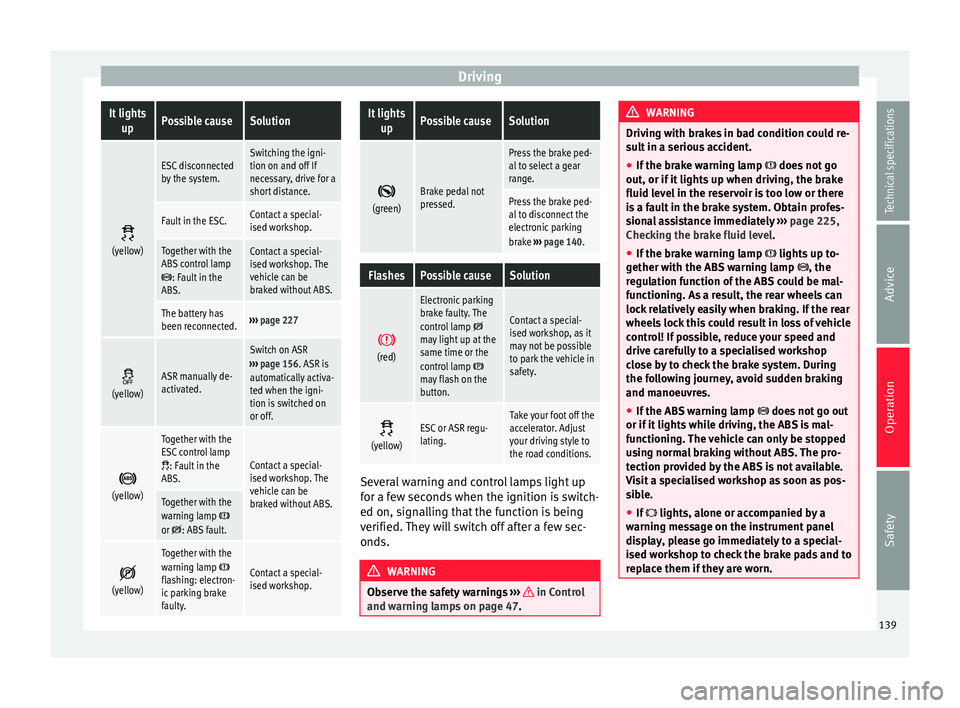
DrivingIt lights
upPossible causeSolution
(yellow)
ESC disconnected
by the system.Switching the igni-
tion on and off If
necessary, drive for a
short distance.
Fault in the ESC.Contact a special-
ised workshop.
Together with the
ABS control lamp
: Fault in the
ABS.
Contact a special-
ised workshop. The
vehicle can be
braked without ABS.
The battery has
been reconnected.››› page 227
(yellow)ASR manually de-
activated.
Switch on ASR
››› page 156. ASR is
automatically activa-
ted when the igni-
tion is switched on
or off.
(yellow)
Together with the
ESC control lamp
: Fault in the
ABS.Contact a special-
ised workshop. The
vehicle can be
braked without ABS.
Together with the
warning lamp or : ABS fault.
(yellow)
Together with the
warning lamp flashing: electron-
ic parking brake
faulty.Contact a special-
ised workshop.
It lights
upPossible causeSolution
(green)Brake pedal not
pressed.
Press the brake ped-
al to select a gear
range.
Press the brake ped-
al to disconnect the
electronic parking
brake
››› page 140.
FlashesPossible causeSolution
(red)
Electronic parking
brake faulty. The
control lamp
may light up at the
same time or the
control lamp
may flash on the
button.
Contact a special-
ised workshop, as it
may not be possible
to park the vehicle in
safety.
(yellow)ESC or ASR regu-
lating.Take your foot off the
accelerator. Adjust
your driving style to
the road conditions.
Several warning and control lamps light up
for a few seconds when the ignition is switch-
ed on, signalling that the function is being
verified. They will switch off after a few sec-
onds.
WARNING
Observe the safety warnings ››› in Control
and warning lamps on page 47. WARNING
Driving with brakes in bad condition could re-
sult in a serious accident.
● If the brake warning lamp does not go
out, or if it lights up when driving, the brake
fluid level in the reservoir is too low or there
is a fault in the brake system. Obtain profes-
sional assistance immediately ››› page 225,
Checking the brake fluid level.
● If the brake warning lamp lights up to-
gether with the ABS warning lamp , the
regulation function of the ABS could be mal-
functioning. As a result, the rear wheels can
lock relatively easily when braking. If the rear
wheels lock this could result in loss of vehicle
control! If possible, reduce your speed and
drive carefully to a specialised workshop
close by to check the brake system. During
the following journey, avoid sudden braking
and manoeuvres.
● If the ABS warning lamp does not go out
or if it lights while driving, the ABS is mal-
functioning. The vehicle can only be stopped
using normal braking without ABS. The pro-
tection provided by the ABS is not available.
Visit a specialised workshop as soon as pos-
sible.
● If lights, alone or accompanied by a
warning message on the instrument panel
display, please go immediately to a special-
ised workshop to check the brake pads and to
replace them if they are worn. 139
Technical specifications
Advice
Operation
Safety
Page 143 of 305
Driving
● Press and hold the brake pedal until the ve-
hicle comes to a standstill.
● Connect the electronic parking brake
››› page 140 .
● For an aut
omatic gearbox, move the selec-
tor lever to position P.
● Sw
itch off the engine and release the brake
pedal.
● Remove the key from the ignition.
● If necessary, turn the steering wheel slight-
ly to lock the steering.
● With a manual gearbox, engage 1st gear on
flat ground and slopes, or even reverse gear
on hills, and release the clutch pedal.
● Ensure that all passengers leave the vehi-
cle, especially children.
● When leaving the vehicle, take all keys with
you.
● Lock the vehicle.
Additional information for steep slopes and
hills
Before switching off the engine, rotate the
steering wheel so that if the vehicle should
move, it will be held by the kerb.
● On slopes, turn the front wheels so that
they are against the edge of the kerb.
● Uphill, turn the wheels towards the centre
of the road. WARNING
The components of the exhaust system reach
very high temperatures. This could cause a
fire and considerable damage.
● Always park your vehicle so that no part of
the exhaust system can come in contact with
flammable materials (such as wood,
leaves,dried grass, or spilled fuel). CAUTION
● Special care should be taken when parking
in areas with high kerbs or fixed barriers. Ob-
jects protruding from the ground may dam-
age the bumper or other parts of the vehicle
during manoeuvres. To avoid damage, stop
before the wheels touch the barrier or kerb.
● Special attention is required when driving
through entrances, over ramps, kerbs or oth-
er objects. The vehicle underbody, bumpers,
mudguards and running gear, and the engine
and exhaust system could be damaged as
you drive over these objects. Information about the brakes
For the first 200 to 300 km, new brake pads
have not yet reached their maximum braking
capacity, and need to be “run in” first
››› .
The slightly reduced braking effect can be
compensated for by increasing pressure on
the brake pedal. While running in, the full
br ak
ing distance or emergency braking dis- tance is larger
then when the brake pads
have been run in. While running in, avoid full
power braking or situations requiring braking
performance. For example, in heavy traffic.
The
rate of wear of the brake pads depends
to a great extent on the conditions in which
the vehicle is used and the way the vehicle is
driven. If the vehicle is used frequently in city
traffic or for short trips or driven sport style,
visit a specialised workshop regularly, more
frequently than advised in the Maintenance
Programme, to have the brake pads checked.
If you drive with wet brakes, for example, af-
ter crossing areas of water, in heavy rainfall
or even after washing the car, the effect of
the brakes is lessened as the brake discs are
wet or even frozen (in winter). At higher
speed, “dry” the brakes as quickly as possi-
ble by braking gently several times. Only do
this without endangering vehicles behind
you or any other road users ››› .
A layer of salt on the discs and brake pads
w i
ll reduce the effectiveness of the brakes
and increase braking distance. If you drive for
a prolonged period on salted roads without
braking then brake carefully several times to
eliminate the layer of salt on the brakes ››› .
If the vehicle remains parked for considera-
ble lengths of time, is used little, or if the
brakes are not used, there may be corrosion
on the brake discs and a build up of dirt on
the brake pads. If the brakes are not used »
141
Technical specifications
Advice
Operation
Safety
Page 145 of 305
Driving
reduce the strain on the brake system. Other-
wise, the brakes may overheat and fail. Only
use the brakes to reduce speed or to stop.
Note
When checking the front brake pads, take the
time to also check the rear brake pads. The
thickness of the brake pads should be
checked visually and regularly, by looking
through the openings in the wheel rims or
from underneath the vehicle. If necessary, re-
move the wheels to check them thoroughly.
SEAT recommends taking your car in for tech-
nical service. Changing gear
Introduction When reverse gear is engaged and the
ignition is switched on the following takes
place:
● Reverse lights light up.
● When reversing, the air conditioner auto-
matically changes to air recirculation mode.
● The rear window heater switches on when
the windscreen wiper is activated.
● Also, the parking sensor system, the opti-
cal parking sensor and the camera for the re-
verse assist system are connected. WARNING
Rapid acceleration can cause loss of traction
and skidding, especially on slippery ground.
This could cause loss of control of the vehicle
resulting in an accident and considerable
damage.
● Only use the kick-down function or rapid
acceleration if visibility, weather, road and
traffic conditions so permit. WARNING
Do not allow the brakes to “rub” for a pro-
longed period of time, or brake frequently or
for long periods of time. Continuous braking
heats up the brakes. This could significantly
reduce braking power, increase braking dis-
tance or even result in the total failure of the
brake system. Warning and control lampsIt lights
upPossible causeSolution
(red)Brake pedal not
pressed!Press brake pedal to
the floor.
(green)Brake pedal not
pressed.
To select a range of
gears, press the
brake pedal.
Please also see "Elec-
tronic parking brake"
››› page 137.
FlashesPossible causeSolution
(green)
The selector lever
locking button
has not engaged.
The vehicle does
not start to move.Engage the selector
lever lock
››› page 145. Several warning and control lamps light up
for a few seconds when the ignition is switch-
ed on, signalling that the function is being
verified. They will switch off after a few sec-
onds.
WARNING
Observe the safety warnings ››› in Control
and warning lamps on page 47. Manual gearbox: Engaging gears
Fig. 129
Gear shift pattern of a 6-speed man-
ual gearbox » 143
Technical specifications
Advice
Operation
Safety